Variables, Types,
Assignments, Input, and
Output
EECS 280
Chuck Severance / Jim Eng
Variables
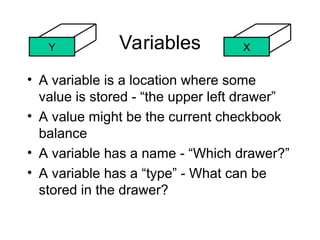
• A variable is a location where some
value is stored - “the upper left drawer”
• A value might be the current checkbook
balance
• A variable has a name - “Which drawer?”
• A variable has a “type” - What can be
stored in the drawer?
X
Y
Rules for Variable Names
• Variable names start with a letter or an
underscore and consist of numbers, letters,
or underscores
• Good names: x1 i abc123
• Bad names: x+1 52pickup t&e
• C++ is case sensitive
– X1 and x1 are different variables
• Variable names can be any length
Variable Types
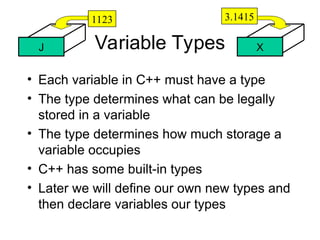
• Each variable in C++ must have a type
• The type determines what can be legally
stored in a variable
• The type determines how much storage a
variable occupies
• C++ has some built-in types
• Later we will define our own new types and
then declare variables our types
X
J
1123 3.1415
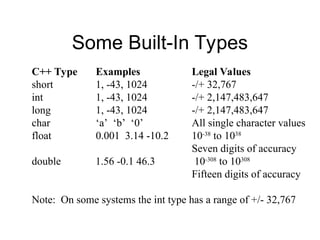
Some Built-In Types
C++ Type Examples Legal Values
short 1, -43, 1024 -/+ 32,767
int 1, -43, 1024 -/+ 2,147,483,647
long 1, -43, 1024 -/+ 2,147,483,647
char ‘a’ ‘b’ ‘0’ All single character values
float 0.001 3.14 -10.2 10-38
to 1038
Seven digits of accuracy
double 1.56 -0.1 46.3 10-308
to 10308
Fifteen digits of accuracy
Note: On some systems the int type has a range of +/- 32,767
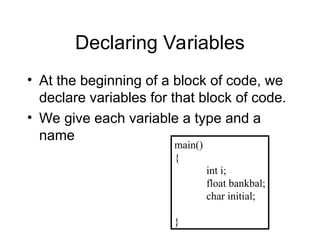
Declaring Variables
• At the beginning of a block of code, we
declare variables for that block of code.
• We give each variable a type and a
name
main()
{
int i;
float bankbal;
char initial;
}
Assignment Statements
• Set a variable to a value
• A variable can only hold one value
• The next assignment
replaces the variable
contents
X
3.1415
X = 3.1415
100.0
X = 100.0
3.1415
X
This is not Algebra
• In Algebra “x=5” means “For the
purposes of this problem, x is 5”
• In programming, “x=5” means:
X=5
“Go find the memory location called
x, blast whatever is in it, and set it to
5. And I mean NOW!”
178829
X
5
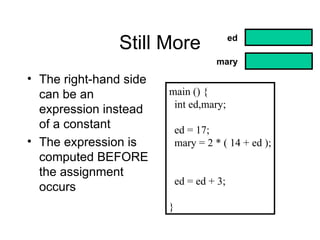
Still More
main () {
int ed,mary;
ed = 17;
mary = 2 * ( 14 + ed );
ed = ed + 3;
}
• The right-hand side
can be an
expression instead
of a constant
• The expression is
computed BEFORE
the assignment
occurs
ed
mary
In the Beginning...
• What values are in
variables right at the
beginning of the
program?
main () {
int ed,mary;
ed = mary;
}
??????
ed
In the Beginning...
• What values are in
variables right at the
beginning of the
program?
• Garbage, bad stuff,
smelly leftovers
• Behavior is officially
“undefined”
• Don’t assume zero
main () {
int ed,mary;
ed = mary;
}
??????
ed
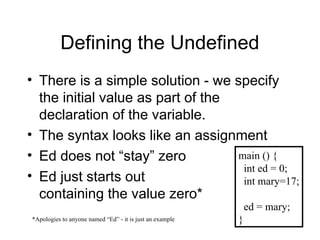
Defining the Undefined
• There is a simple solution - we specify
the initial value as part of the
declaration of the variable.
• The syntax looks like an assignment
• Ed does not “stay” zero
• Ed just starts out
containing the value zero*
main () {
int ed = 0;
int mary=17;
ed = mary;
}
*Apologies to anyone named “Ed” - it is just an example
A Program
main () {
float celsius;
float faren;
celsius = 33.2;
faren = ( (celsius * 9 ) / 5) + 32.0;
}
celsius
faren
Language Assignment Syntax
APL X 20
Pascal X := 20
COBOL MOVE 20 TO X
BASIC LET X = 20
FORTRAN X = 20
C and C++ X = 20
The History of Assignment
• There is disagreement among computer
languages as to how to represent this
act of moving data into a variable
Running A Program
main () {
float celsius;
float faren;
celsius = 33.2;
faren = ( (celsius * 9 ) / 5) + 32.0;
}
Output:
% g++ samp1.c
% a.out
%
Run the G++ Compiler
Run the compiled program
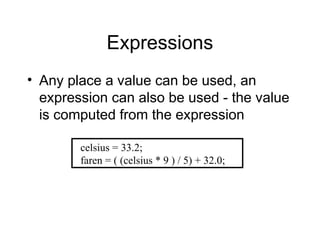
Expressions
• Any place a value can be used, an
expression can also be used - the value
is computed from the expression
celsius = 33.2;
faren = ( (celsius * 9 ) / 5) + 32.0;
Operators
C/C++ Operator Operation
+ - Addition Subtraction
* / Multiplication Division
% Remainder (Integer division)
Expression Value Notes
3 + 4 7
5 - 1 + 2 6 5 - 1 is done first (left to right)
5 * 2 + 4 14 All multiplication and division is
done before add and subtract
5 * ( 2 + 4 ) 30 Parenthesis rule!
32 % 6 2 The remainder of 32/6 is 2
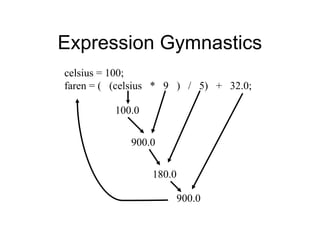
Expression Gymnastics
celsius = 100;
faren = ( (celsius * 9 ) / 5) + 32.0;
900.0
100.0
180.0
900.0
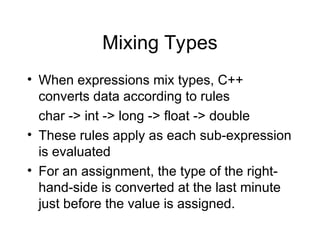
Mixing Types
• When expressions mix types, C++
converts data according to rules
char -> int -> long -> float -> double
• These rules apply as each sub-expression
is evaluated
• For an assignment, the type of the right-
hand-side is converted at the last minute
just before the value is assigned.
Type Gymnastics
celsius = 100;
faren = ( (celsius * 9 ) / 5) + 32.0;
900.0
100.0
180.0
900.0
Input and Output
• Programs must interact with something
– Keyboard, screen, joystick, speaker,
temperature sensor, keypad (like on a cell
phone)
• When a program takes data from
something we call it “input”
• When a program sends its data to
something, we call it “output”
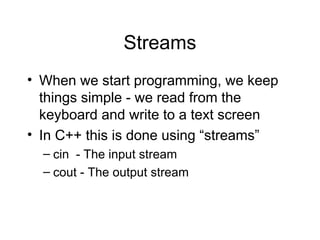
Streams
• When we start programming, we keep
things simple - we read from the
keyboard and write to a text screen
• In C++ this is done using “streams”
– cin - The input stream
– cout - The output stream
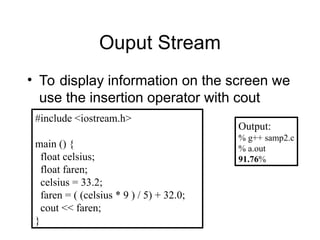
Ouput Stream
• To display information on the screen we
use the insertion operator with cout
#include <iostream.h>
main () {
float celsius;
float faren;
celsius = 33.2;
faren = ( (celsius * 9 ) / 5) + 32.0;
cout << faren;
}
Output:
% g++ samp2.c
% a.out
91.76%
Your Responsibility
Computers are getting so fast and so capable
that it will not be long until computers will do
what you want them to do instead of what you
tell them to do.
Gerard P. Weeg (paraphrased ca. 1963)
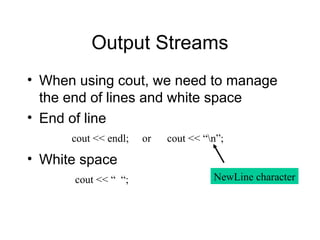
Output Streams
• When using cout, we need to manage
the end of lines and white space
• End of line
• White space
cout << endl; or cout << “n”;
cout << “ “; NewLine character
#include <iostream.h>
main () {
float celsius;
float faren;
celsius = 33.2;
faren = ( (celsius * 9 ) / 5) + 32.0;
cout << faren;
}
Output:
% g++ samp2.c
% a.out
91.76%
#include <iostream.h>
main () {
float celsius;
float faren;
celsius = 33.2;
faren = ( (celsius * 9 ) / 5) + 32.0;
cout << faren;
cout << endl; // Add A NewLine
}
Output:
% g++ samp3.c
% a.out
91.76
%
We Said We Got
We Wanted
We Needed to Say
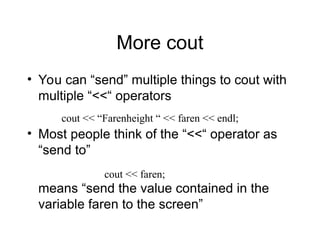
More cout
• You can “send” multiple things to cout with
multiple “<<“ operators
• Most people think of the “<<“ operator as
“send to”
means “send the value contained in the
variable faren to the screen”
cout << “Farenheight “ << faren << endl;
cout << faren;
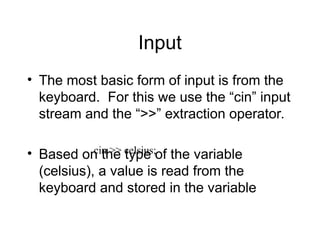
Input
• The most basic form of input is from the
keyboard. For this we use the “cin” input
stream and the “>>” extraction operator.
• Based on the type of the variable
(celsius), a value is read from the
keyboard and stored in the variable
cin >> celsius;
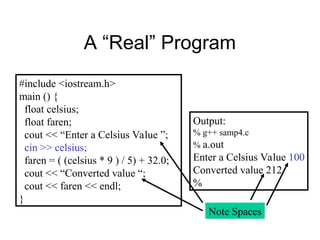
A “Real” Program
#include <iostream.h>
main () {
float celsius;
float faren;
cout << “Enter a Celsius Value ”;
cin >> celsius;
faren = ( (celsius * 9 ) / 5) + 32.0;
cout << “Converted value “;
cout << faren << endl;
}
Output:
% g++ samp4.c
% a.out
Enter a Celsius Value 100
Converted value 212
%
Note Spaces
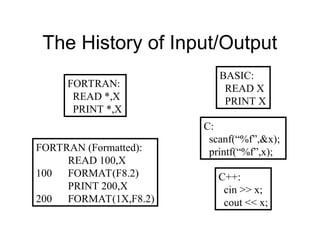
The History of Input/Output
FORTRAN:
READ *,X
PRINT *,X
BASIC:
READ X
PRINT X
C:
scanf(“%f”,&x);
printf(“%f”,x);
C++:
cin >> x;
cout << x;
FORTRAN (Formatted):
READ 100,X
100 FORMAT(F8.2)
PRINT 200,X
200 FORMAT(1X,F8.2)
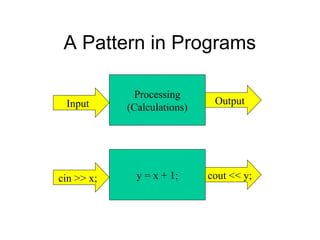
A Pattern in Programs
Processing
(Calculations)
Input Output
y = x + 1;
cin >> x; cout << y;
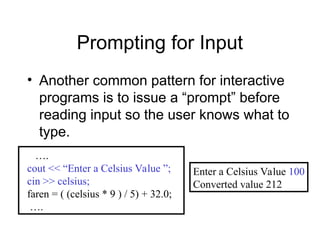
Prompting for Input
• Another common pattern for interactive
programs is to issue a “prompt” before
reading input so the user knows what to
type.
….
cout << “Enter a Celsius Value ”;
cin >> celsius;
faren = ( (celsius * 9 ) / 5) + 32.0;
….
Enter a Celsius Value 100
Converted value 212

chap2_Variables_In_Proraming_Introduction.ppt

  • 1.
    Variables, Types, Assignments, Input,and Output EECS 280 Chuck Severance / Jim Eng
  • 2.
    Variables • A variableis a location where some value is stored - “the upper left drawer” • A value might be the current checkbook balance • A variable has a name - “Which drawer?” • A variable has a “type” - What can be stored in the drawer? X Y
  • 3.
    Rules for VariableNames • Variable names start with a letter or an underscore and consist of numbers, letters, or underscores • Good names: x1 i abc123 • Bad names: x+1 52pickup t&e • C++ is case sensitive – X1 and x1 are different variables • Variable names can be any length
  • 4.
    Variable Types • Eachvariable in C++ must have a type • The type determines what can be legally stored in a variable • The type determines how much storage a variable occupies • C++ has some built-in types • Later we will define our own new types and then declare variables our types X J 1123 3.1415
  • 5.
    Some Built-In Types C++Type Examples Legal Values short 1, -43, 1024 -/+ 32,767 int 1, -43, 1024 -/+ 2,147,483,647 long 1, -43, 1024 -/+ 2,147,483,647 char ‘a’ ‘b’ ‘0’ All single character values float 0.001 3.14 -10.2 10-38 to 1038 Seven digits of accuracy double 1.56 -0.1 46.3 10-308 to 10308 Fifteen digits of accuracy Note: On some systems the int type has a range of +/- 32,767
  • 6.
    Declaring Variables • Atthe beginning of a block of code, we declare variables for that block of code. • We give each variable a type and a name main() { int i; float bankbal; char initial; }
  • 7.
    Assignment Statements • Seta variable to a value • A variable can only hold one value • The next assignment replaces the variable contents X 3.1415 X = 3.1415 100.0 X = 100.0 3.1415 X
  • 8.
    This is notAlgebra • In Algebra “x=5” means “For the purposes of this problem, x is 5” • In programming, “x=5” means: X=5 “Go find the memory location called x, blast whatever is in it, and set it to 5. And I mean NOW!” 178829 X 5
  • 9.
    Still More main (){ int ed,mary; ed = 17; mary = 2 * ( 14 + ed ); ed = ed + 3; } • The right-hand side can be an expression instead of a constant • The expression is computed BEFORE the assignment occurs ed mary
  • 10.
    In the Beginning... •What values are in variables right at the beginning of the program? main () { int ed,mary; ed = mary; } ?????? ed
  • 11.
    In the Beginning... •What values are in variables right at the beginning of the program? • Garbage, bad stuff, smelly leftovers • Behavior is officially “undefined” • Don’t assume zero main () { int ed,mary; ed = mary; } ?????? ed
  • 12.
    Defining the Undefined •There is a simple solution - we specify the initial value as part of the declaration of the variable. • The syntax looks like an assignment • Ed does not “stay” zero • Ed just starts out containing the value zero* main () { int ed = 0; int mary=17; ed = mary; } *Apologies to anyone named “Ed” - it is just an example
  • 13.
    A Program main (){ float celsius; float faren; celsius = 33.2; faren = ( (celsius * 9 ) / 5) + 32.0; } celsius faren
  • 14.
    Language Assignment Syntax APLX 20 Pascal X := 20 COBOL MOVE 20 TO X BASIC LET X = 20 FORTRAN X = 20 C and C++ X = 20 The History of Assignment • There is disagreement among computer languages as to how to represent this act of moving data into a variable
  • 15.
    Running A Program main() { float celsius; float faren; celsius = 33.2; faren = ( (celsius * 9 ) / 5) + 32.0; } Output: % g++ samp1.c % a.out % Run the G++ Compiler Run the compiled program
  • 16.
    Expressions • Any placea value can be used, an expression can also be used - the value is computed from the expression celsius = 33.2; faren = ( (celsius * 9 ) / 5) + 32.0;
  • 17.
    Operators C/C++ Operator Operation +- Addition Subtraction * / Multiplication Division % Remainder (Integer division) Expression Value Notes 3 + 4 7 5 - 1 + 2 6 5 - 1 is done first (left to right) 5 * 2 + 4 14 All multiplication and division is done before add and subtract 5 * ( 2 + 4 ) 30 Parenthesis rule! 32 % 6 2 The remainder of 32/6 is 2
  • 18.
    Expression Gymnastics celsius =100; faren = ( (celsius * 9 ) / 5) + 32.0; 900.0 100.0 180.0 900.0
  • 19.
    Mixing Types • Whenexpressions mix types, C++ converts data according to rules char -> int -> long -> float -> double • These rules apply as each sub-expression is evaluated • For an assignment, the type of the right- hand-side is converted at the last minute just before the value is assigned.
  • 20.
    Type Gymnastics celsius =100; faren = ( (celsius * 9 ) / 5) + 32.0; 900.0 100.0 180.0 900.0
  • 21.
    Input and Output •Programs must interact with something – Keyboard, screen, joystick, speaker, temperature sensor, keypad (like on a cell phone) • When a program takes data from something we call it “input” • When a program sends its data to something, we call it “output”
  • 22.
    Streams • When westart programming, we keep things simple - we read from the keyboard and write to a text screen • In C++ this is done using “streams” – cin - The input stream – cout - The output stream
  • 23.
    Ouput Stream • Todisplay information on the screen we use the insertion operator with cout #include <iostream.h> main () { float celsius; float faren; celsius = 33.2; faren = ( (celsius * 9 ) / 5) + 32.0; cout << faren; } Output: % g++ samp2.c % a.out 91.76%
  • 24.
    Your Responsibility Computers aregetting so fast and so capable that it will not be long until computers will do what you want them to do instead of what you tell them to do. Gerard P. Weeg (paraphrased ca. 1963)
  • 25.
    Output Streams • Whenusing cout, we need to manage the end of lines and white space • End of line • White space cout << endl; or cout << “n”; cout << “ “; NewLine character
  • 26.
    #include <iostream.h> main (){ float celsius; float faren; celsius = 33.2; faren = ( (celsius * 9 ) / 5) + 32.0; cout << faren; } Output: % g++ samp2.c % a.out 91.76% #include <iostream.h> main () { float celsius; float faren; celsius = 33.2; faren = ( (celsius * 9 ) / 5) + 32.0; cout << faren; cout << endl; // Add A NewLine } Output: % g++ samp3.c % a.out 91.76 % We Said We Got We Wanted We Needed to Say
  • 27.
    More cout • Youcan “send” multiple things to cout with multiple “<<“ operators • Most people think of the “<<“ operator as “send to” means “send the value contained in the variable faren to the screen” cout << “Farenheight “ << faren << endl; cout << faren;
  • 28.
    Input • The mostbasic form of input is from the keyboard. For this we use the “cin” input stream and the “>>” extraction operator. • Based on the type of the variable (celsius), a value is read from the keyboard and stored in the variable cin >> celsius;
  • 29.
    A “Real” Program #include<iostream.h> main () { float celsius; float faren; cout << “Enter a Celsius Value ”; cin >> celsius; faren = ( (celsius * 9 ) / 5) + 32.0; cout << “Converted value “; cout << faren << endl; } Output: % g++ samp4.c % a.out Enter a Celsius Value 100 Converted value 212 % Note Spaces
  • 30.
    The History ofInput/Output FORTRAN: READ *,X PRINT *,X BASIC: READ X PRINT X C: scanf(“%f”,&x); printf(“%f”,x); C++: cin >> x; cout << x; FORTRAN (Formatted): READ 100,X 100 FORMAT(F8.2) PRINT 200,X 200 FORMAT(1X,F8.2)
  • 31.
    A Pattern inPrograms Processing (Calculations) Input Output y = x + 1; cin >> x; cout << y;
  • 32.
    Prompting for Input •Another common pattern for interactive programs is to issue a “prompt” before reading input so the user knows what to type. …. cout << “Enter a Celsius Value ”; cin >> celsius; faren = ( (celsius * 9 ) / 5) + 32.0; …. Enter a Celsius Value 100 Converted value 212

Editor's Notes

  • #8 Algebra is about stating what is true, computer programming is about giving orders. Think about barking out orders orders to move stuff around.
  • #17 When in doubt - use parenthesis.
  • #21 If a Celsius value is converted to Farenheight and no one sees it, was it ever really converted?
  • #24 Gerard was wrong and is still wrong.
  • #28 In some ways, this is like an assignment statement - the value in the vartiable is overwritten.