C basics : 
First c program : 
#include<stdio.h> 
main() 
{ 
printf(“hello world..”); 
} 
green part is for including header file, the definition of the used statements will contained by them. 
blue part is for the main function any program should contain main function . 
red part is for the body of the main funtion here we will write the program for serial execution. 
The c-program name will be closed with *.c extension. 
Any program may contain more than one header file. More than one function. But it have to 
contain the main function because execution starts from there. Execution is sequential. 
C character set: 
A to Z in uppercase, a to z in lowercase, digits 0 to 9 and the specila characters like ! # % & * ( ) - 
+ { } [ ]  | “ : ; < > , . ? @ $ ~ blank_space etc. are used. In C we use b n r v t for special 
conditions such as back space, newline, carriage return etc. These are called escape sequence. 
IDENIFIER & KEYWORD: 
Identifiers are the name which we give to the variables, functions etc. Name may contain any 
character except blank space in-between. It may start capital, small letter and undersore but not any 
number and any other special character. Name should not clash with any keyword or statement. 
Keyword is some reserved word donoting some predefined meaning. Like auto, char, int, long, 
float, void, for, while, if, case, switch, struct, sizeof, static etc. 
DATA TYPES: 
There are several data types, three main basic data types are int for integer variable (2 byte), float 
for real variable (4 byte), char for character variable(1 byte). 
We use long int for 4 byte integer variale and double for 8 byte double precision real entry. There 
are signed and unsigned int and char data types also. 
There are also user defined data types that we can define using typedef keyword. 
CONSTANT: 
There are four basic types of constant integer constant, floating point constant, character constant
and string constant. 
In integer constant there are decimal, octal, hexadecimal number system, signed and unsigned 
manner. 
For floating point constant we use decimal point or exponent or both. 
For character constant ASCII character set from 0 to 127 are used. Here we use escape sequence to 
denote some special character. We use the ASCII code or the character in single quotetion to asign. 
In order to asign the string constant we use the sequence of character enclosed by double 
quotetion. 
For defining symbolic constant we have to use #define notation, 
example, 
#define pi 3.14 
#define f(x,y) x*x+y*y // defining a function 
The value of symbolic constant can not be change. 
VARIABLE: 
It is a named location in the memory holding some special type od data. If we want to use a 
variable it should be declared first. 
Syntax of declaration: type var_name / var_list ; 
for example: int a; float b,c,d; 
for any variable if we want to get it's address then we have to put “&” before it. For example; for 
the variable “float b;” “&b” gives the address of the variable b. 
Array is the sequence of same kind of variable. To declare an array w have to give data type of the 
array and the name and the size of the array which should be an integer constant. 
For example, int a[100]; 
here “a” denotes the base address of the array a[100]. For individual address we can get them by 
using &a[10], &a[20] etc. 
For declaring a[100], we reserve 100 memory location sequentially starts from a[0], a[1], ..... 
a[99]. 
There are two kind of variable local and global. 
There are mainly four storage class static, extern, register and auto. 
If we use: const int a=5; then the value of “a” will become read only. 
OPERATORS: 
There are five basic arithmetic operators, addition (+), subtraction (-), multiplication (*), division 
(/) and modulo (%) operations. 
There are unary operators like negetion(-), incrementation(++), decrementation(--) not (!). 
There are logical operators like equal to (==), not equal to (!=), less than (<), less than or equal 
(<=), greater than(>), greater than or equal(>=), and (&&), or (||). 
There are asignment operators like =, +=, *=, /=, %=, -= . where a+=b implies a=a+b . 
There are also conditional operators (? :) 
for example; 
(a<b) ? p=2 : p=3 
if a<b holds then p will be 2 otherwise p will be 3. 
There is another operator named comma operator. 
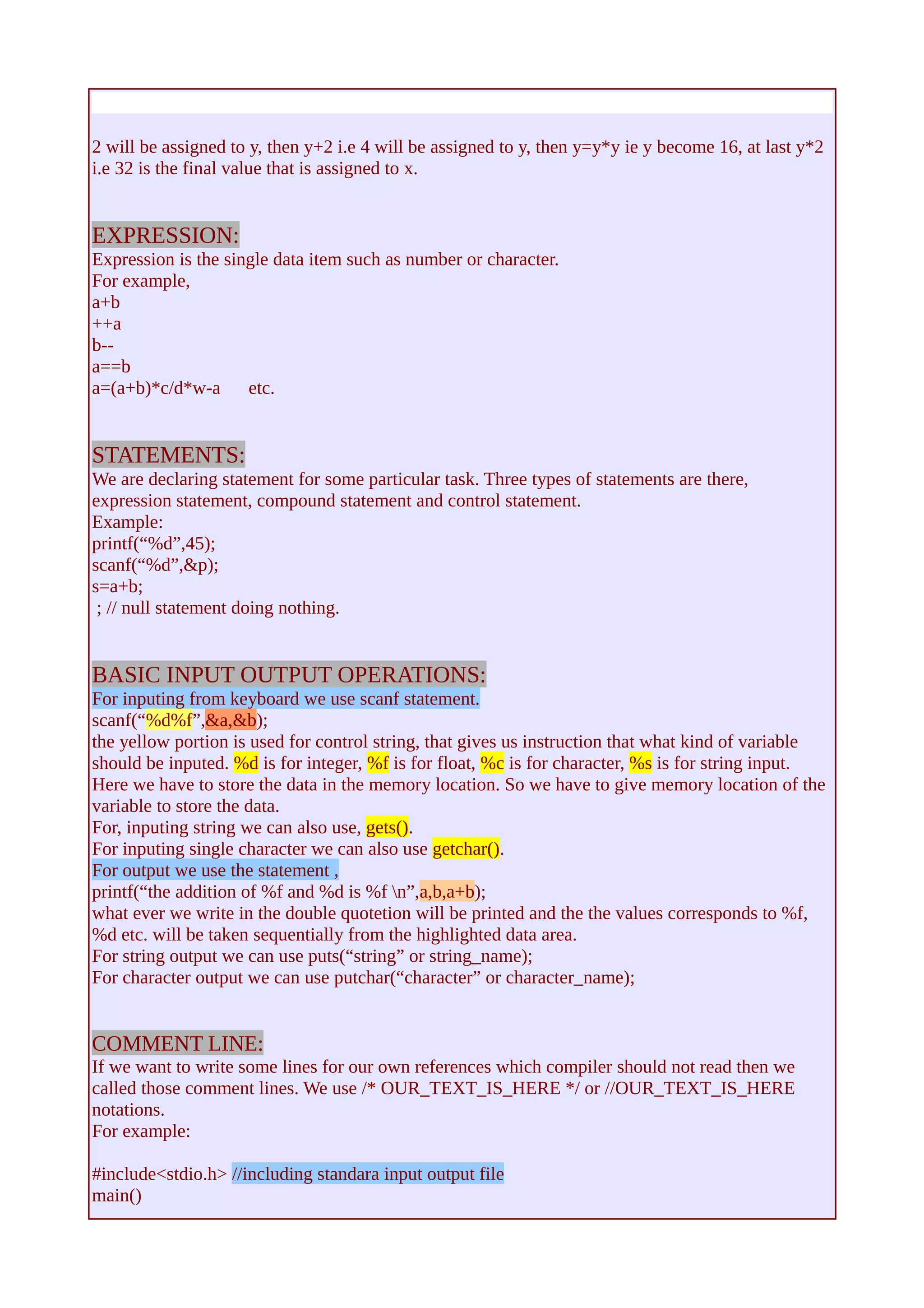
x=(y=2,y=y+2,y=y*y,y*2); 
this gives the value x as 32. It execute from left to right sequntially and the last value is assigned to 
x.
2 will be assigned to y, then y+2 i.e 4 will be assigned to y, then y=y*y ie y become 16, at last y*2 
i.e 32 is the final value that is assigned to x. 
EXPRESSION: 
Expression is the single data item such as number or character. 
For example, 
a+b 
++a 
b-- 
a==b 
a=(a+b)*c/d*w-a etc. 
STATEMENTS: 
We are declaring statement for some particular task. Three types of statements are there, 
expression statement, compound statement and control statement. 
Example: 
printf(“%d”,45); 
scanf(“%d”,&p); 
s=a+b; 
; // null statement doing nothing. 
BASIC INPUT OUTPUT OPERATIONS: 
For inputing from keyboard we use scanf statement. 
scanf(“%d%f”,&a,&b); 
the yellow portion is used for control string, that gives us instruction that what kind of variable 
should be inputed. %d is for integer, %f is for float, %c is for character, %s is for string input. 
Here we have to store the data in the memory location. So we have to give memory location of the 
variable to store the data. 
For, inputing string we can also use, gets(). 
For inputing single character we can also use getchar(). 
For output we use the statement , 
printf(“the addition of %f and %d is %f n”,a,b,a+b); 
what ever we write in the double quotetion will be printed and the the values corresponds to %f, 
%d etc. will be taken sequentially from the highlighted data area. 
For string output we can use puts(“string” or string_name); 
For character output we can use putchar(“character” or character_name); 
COMMENT LINE: 
If we want to write some lines for our own references which compiler should not read then we 
called those comment lines. We use /* OUR_TEXT_IS_HERE */ or //OUR_TEXT_IS_HERE 
notations. 
For example: 
#include<stdio.h> //including standara input output file 
main()
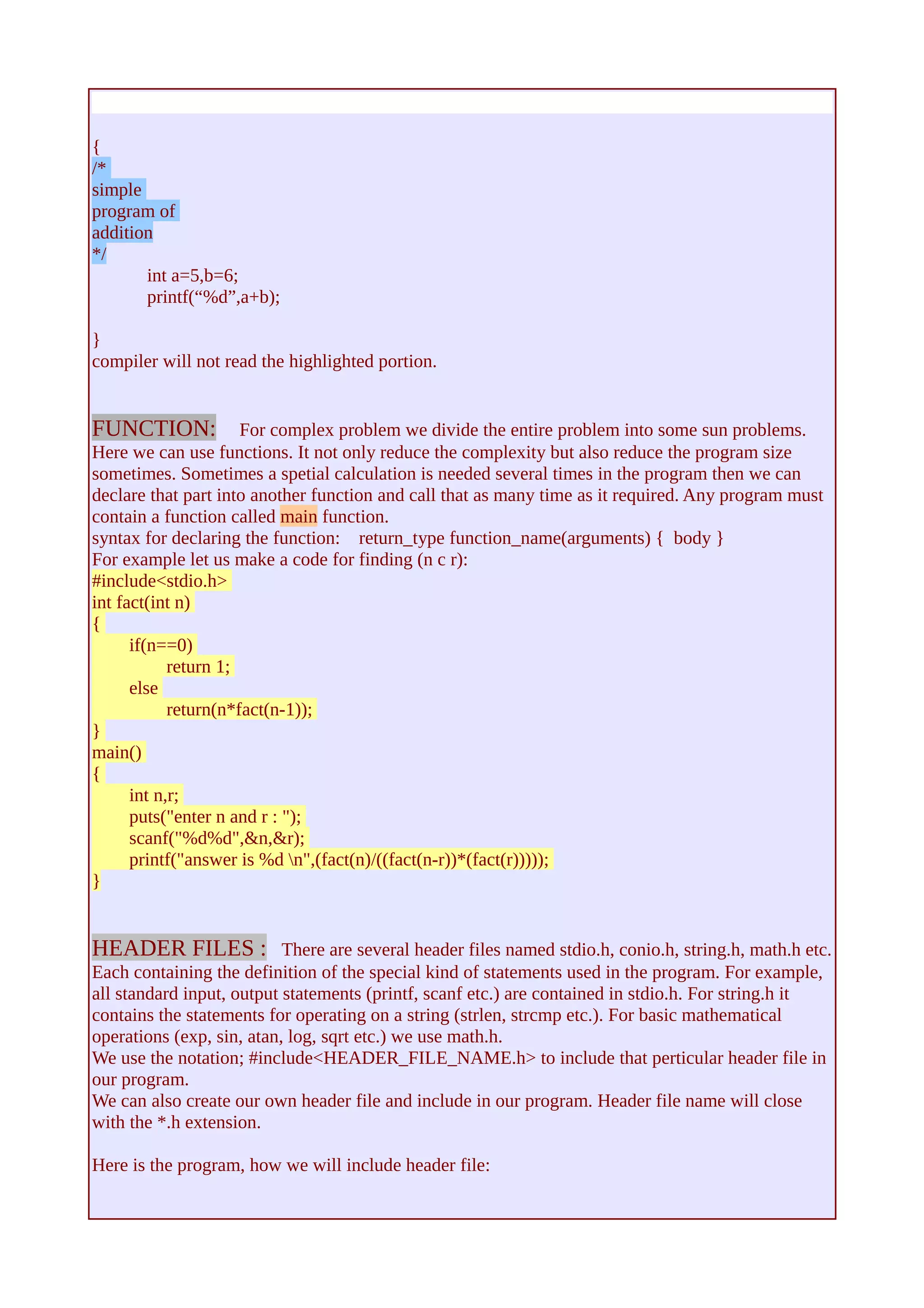
{ /* 
simple 
program of 
addition 
*/ 
int a=5,b=6; 
printf(“%d”,a+b); 
} compiler will not read the highlighted portion. 
FUNCTION: For complex problem we divide the entire problem into some sun problems. 
Here we can use functions. It not only reduce the complexity but also reduce the program size 
sometimes. Sometimes a spetial calculation is needed several times in the program then we can 
declare that part into another function and call that as many time as it required. Any program must 
contain a function called main function. 
syntax for declaring the function: return_type function_name(arguments) { body } 
For example let us make a code for finding (n c r): 
#include<stdio.h> 
int fact(int n) 
{ 
if(n==0) 
return 1; 
else 
return(n*fact(n-1)); 
} 
main() 
{ 
int n,r; 
puts("enter n and r : "); 
scanf("%d%d",&n,&r); 
printf("answer is %d n",(fact(n)/((fact(n-r))*(fact(r))))); 
} 
HEADER FILES : There are several header files named stdio.h, conio.h, string.h, math.h etc. 
Each containing the definition of the special kind of statements used in the program. For example, 
all standard input, output statements (printf, scanf etc.) are contained in stdio.h. For string.h it 
contains the statements for operating on a string (strlen, strcmp etc.). For basic mathematical 
operations (exp, sin, atan, log, sqrt etc.) we use math.h. 
We use the notation; #include<HEADER_FILE_NAME.h> to include that perticular header file in 
our program. 
We can also create our own header file and include in our program. Header file name will close 
with the *.h extension. 
Here is the program, how we will include header file:
// we save this header file with name head.h 
#include<stdio.h> 
#include<stdlib.h> 
#include<math.h> 
typedef struct comp{ 
float a; 
float b; 
}; 
struct comp add (struct comp p,struct comp q) 
{ 
struct comp r; 
r.a=p.a+q.a; 
r.b=p.b+q.b; 
return r; 
} 
struct comp mul (struct comp p,struct comp q) 
{ 
struct comp r; 
r.a=p.a*q.a-p.b*q.b; 
r.b=p.a*q.b+p.b*q.a; 
return r; 
} 
struct comp conj (struct comp p) 
{ 
struct comp r; 
r.a=p.a; 
r.b=-p.b; 
return r; 
} 
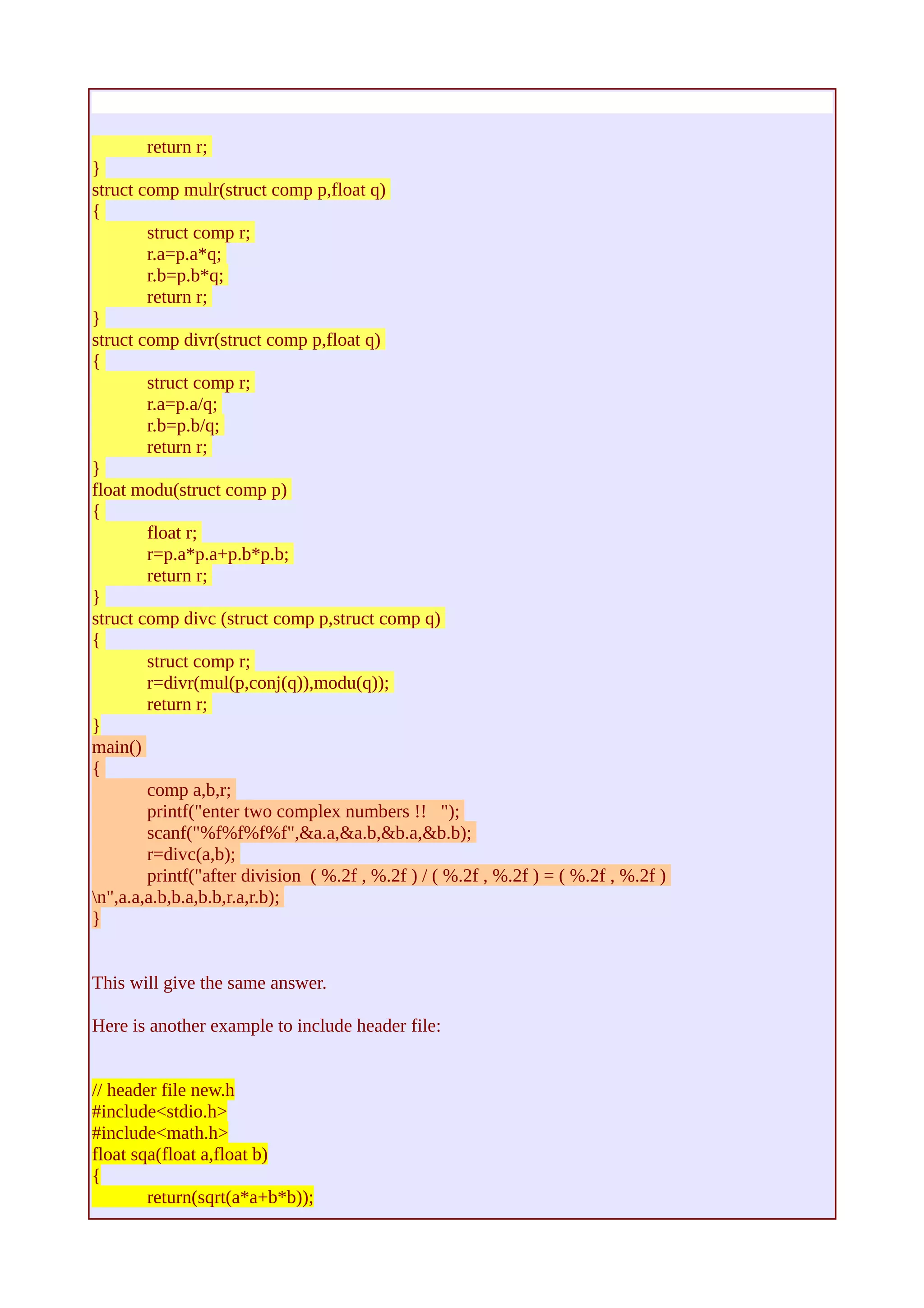
struct comp mulr(struct comp p,float q) 
{ 
struct comp r; 
r.a=p.a*q; 
r.b=p.b*q; 
return r; 
} 
struct comp divr(struct comp p,float q) 
{ 
struct comp r; 
r.a=p.a/q; 
r.b=p.b/q; 
return r; 
} 
float modu(struct comp p) 
{ 
float r; 
r=p.a*p.a+p.b*p.b; 
return r; 
} 
struct comp divc (struct comp p,struct comp q)
{ 
struct comp r; 
r=divr(mul(p,conj(q)),modu(q)); 
return r; 
} 
//on the same directory where header file exists give the program name say comp.c 
#include"head.h" 
main() 
{ 
comp a,b,r; 
printf("enter two complex numbers !! "); 
scanf("%f%f%f%f",&a.a,&a.b,&b.a,&b.b); 
r=divc(a,b); 
printf("after division ( %.2f , %.2f ) / ( %.2f , %.2f ) = ( %.2f , %.2f ) 
n",a.a,a.b,b.a,b.b,r.a,r.b); 
} 
If we run the program comp.c it will run. So here in the header file we create our own definitions. 
We can join the above program in one program as; 
#include<stdio.h> 
#include<stdlib.h> 
#include<math.h> 
typedef struct comp{ 
float a; 
float b; 
}; 
struct comp add (struct comp p,struct comp q) 
{ 
struct comp r; 
r.a=p.a+q.a; 
r.b=p.b+q.b; 
return r; 
} 
struct comp mul (struct comp p,struct comp q) 
{ 
struct comp r; 
r.a=p.a*q.a-p.b*q.b; 
r.b=p.a*q.b+p.b*q.a; 
return r; 
} 
struct comp conj (struct comp p) 
{ 
struct comp r; 
r.a=p.a; 
r.b=-p.b;
return r; 
} 
struct comp mulr(struct comp p,float q) 
{ 
struct comp r; 
r.a=p.a*q; 
r.b=p.b*q; 
return r; 
} 
struct comp divr(struct comp p,float q) 
{ 
struct comp r; 
r.a=p.a/q; 
r.b=p.b/q; 
return r; 
} 
float modu(struct comp p) 
{ 
float r; 
r=p.a*p.a+p.b*p.b; 
return r; 
} 
struct comp divc (struct comp p,struct comp q) 
{ 
struct comp r; 
r=divr(mul(p,conj(q)),modu(q)); 
return r; 
} 
main() 
{ 
comp a,b,r; 
printf("enter two complex numbers !! "); 
scanf("%f%f%f%f",&a.a,&a.b,&b.a,&b.b); 
r=divc(a,b); 
printf("after division ( %.2f , %.2f ) / ( %.2f , %.2f ) = ( %.2f , %.2f ) 
n",a.a,a.b,b.a,b.b,r.a,r.b); 
} 
This will give the same answer. 
Here is another example to include header file: 
// header file new.h 
#include<stdio.h> 
#include<math.h> 
float sqa(float a,float b) 
{ 
return(sqrt(a*a+b*b));
} 
float sqs(float a,float b) 
{ 
return(sqrt(a*a-b*b)); 
} 
main() 
{ 
int a,b; 
printf("give a and b"); 
scanf("%d%d",&a,&b); 
printf("%f %f ",sqa(a,b),sqs(a,b)); 
} 
// c-file new.c 
#include "new.h" 
This will run the code in the header file. 
STRING: 
String is array of character followed by a null symbol. 
For using some inbuilt string operations we use the header file <string.h> 
Some of those inbuilt statements are: 
strcmp(a,b): compare strings a and b (lexiographically), give <0 if a<b, give 0 if a=b, give >0 if 
a>b. 
strcat(a,b): concatenate two string a and b, join b with a. 
strcpy(a,b): copy string b to string a. 
etc. 
We can also implement these without out using those inbuilt functions. 
POINTER: 
Pointer is a variable that store the reference or address of a variable of a specific data type. 
To declare a pointer variable pointing to a integer variable a we will declare them as, 
int a,*p; 
p=&a; 
i.e, p is containing the address of a. 
The pointer is declared as <data_type> *<pointer_name>; 
here the pointer can only store the reference of the data of the declared data type of the pointer. 
To store the reference of a pointer we use pointer to pointer, like below: 
int **p1,*p2,a; 
p2=&a; 
p1=&p2; 
and so on. 
Pointer is very useful to passing reference rather than the value to the function. As it denote the 
reference of the variable then change of the value at that reference does change the value actually. 
In first example, *p denote the value of the variable stored at the location p. So in the second 
example the value of a will be, **p1 or *p2.
SOME C-PROGRAMS: 
output : 
* 
*** 
***** 
******* 
********* 
* 
* 
code: 
#include<stdio.h> 
main() 
{ 
int i,n,j,k; 
for(j=0;j<=6;j++) 
{ 
for(i=1;i<10;i++) 
{ 
if((j>=5&&i==5)||((j<5)&&(i>=5-j)&&(i<=5+j))) 
printf("*"); 
else printf(" "); 
} 
printf("n"); 
} 
}
output : 
* * * 
*** *** *** 
***** ***** ***** 
******* ******* ******* 
********* ********* ********* 
* * * 
* * * 
code: 
#include<stdio.h> 
main() 
{ 
int i,n,j,k,p; 
puts("how many tree?? "); 
scanf("%d",&p); 
for(j=0;j<=6;j++) 
{ 
for(i=1;i<=10*p;i++) 
{ 
if((j>=5&&(i==5||i%10==5))||((j<5)&&(i%10>=5-j)&&(i%10<=5+j))) 
printf("*"); 
else printf(" "); 
} 
printf("n"); 
} 
}
output : 
* 
*** 
***** 
******* 
********* 
* 
* 
* 
*** 
***** 
******* 
********* 
* 
* 
* 
*** 
***** 
******* 
********* 
* 
* 
code : 
#include<stdio.h> 
main() 
{ 
int i,n,j,k,p; 
puts("how many tree? "); 
scanf("%d",&n); 
for(p=0;p<n;p++) 
{ 
for(j=0;j<=6;j++) 
{ 
for(i=1;i<10;i++) 
{ 
if((j>=5&&i==5)||((j<5)&&(i>=5-j)&&(i<=5+j))) 
printf("*"); 
else printf(" "); 
} 
printf("n"); 
} 
printf("nn"); 
} 
}
output : 
multiplication of two polynomials. 
code : 
#include<stdio.h> 
main() 
{ 
int a[100],b[100],c[100],m,n,i,j; 
printf("the degrees of 1st and 2nd polynomial "); 
scanf("%d%d",&m,&n); 
printf("enter the co-eff. of 1st plo. (asend.) "); 
for(i=0;i<=m;i++) 
{ 
scanf("%d",&a[i]); 
} 
printf("enter the co-eff. of 2nd pol. (asend.) "); 
for(i=0;i<=n;i++) 
{ 
scanf("%d",&b[i]); 
} 
for(i=0;i<=m+n;i++) 
{ 
c[i]=0; 
} 
for(i=0;i<=n;i++) 
for(j=0;j<=m;j++) 
{ 
c[i+j]=c[i+j]+b[i]*a[j]; 
} 
printf("ans..n"); 
for(i=0;i<=m+n;i++) 
{ 
printf("%d ",c[i]); 
} 
}
output : 
multiplication of two polynomials co-efficients are 3Χ3 matrices. 
code : 
#include<stdio.h> 
void mul(int a[][10],int b[][10],int c[][10],int n) 
{ 
int i,j,k; 
for(i=0;i<n;i++) 
for(j=0;j<n;j++) 
{ 
c[i][j]=0; 
} 
for(i=0;i<n;i++) 
{ 
for(j=0;j<n;j++) 
{ 
for(k=0;k<n;k++) 
{ 
c[i][j]=c[i][j]+a[i][k]*b[k][j]; 
} 
} 
} 
} 
void add(int a[][10],int b[][10],int n) 
{ 
int i,j; 
for(i=0;i<n;i++) 
for(j=0;j<n;j++) 
a[i][j]=a[i][j]+b[i][j]; 
} 
main() 
{ 
int a[10][10][10],b[10][10][10],c[10][10][10],d[10][10],m,n,i,j,p=3,x,y; 
printf("the degrees of 1st and 2nd polynomial "); 
scanf("%d%d",&m,&n); 
printf("enter the co-eff. of 1st plo. (asend.) "); 
for(i=0;i<=m;i++) 
{ 
for(x=0;x<p;x++) 
for(y=0;y<p;y++) 
scanf("%d",&a[i][x][y]); 
} 
printf("enter the co-eff. of 2nd pol. (asend.) "); 
for(i=0;i<=n;i++) 
{ 
for(x=0;x<p;x++) 
for(y=0;y<p;y++) 
scanf("%d",&b[i][x][y]); 
}
/*for(i=0;i<=m+n;i++) 
{ 
c[i]=0; 
}*/ 
for(i=0;i<=n;i++) 
for(j=0;j<=m;j++) 
{ 
mul(b[i],a[j],d,p); 
add(c[i+j],d,p); 
} 
printf("ans..n"); 
for(i=0;i<=m+n;i++) 
{ 
for(x=0;x<p;x++) 
{ 
for(y=0;y<p;y++) 
{ 
printf("%3d ",c[i][x][y]); 
} 
printf("n"); 
} 
printf("nn"); 
} 
}
output : 
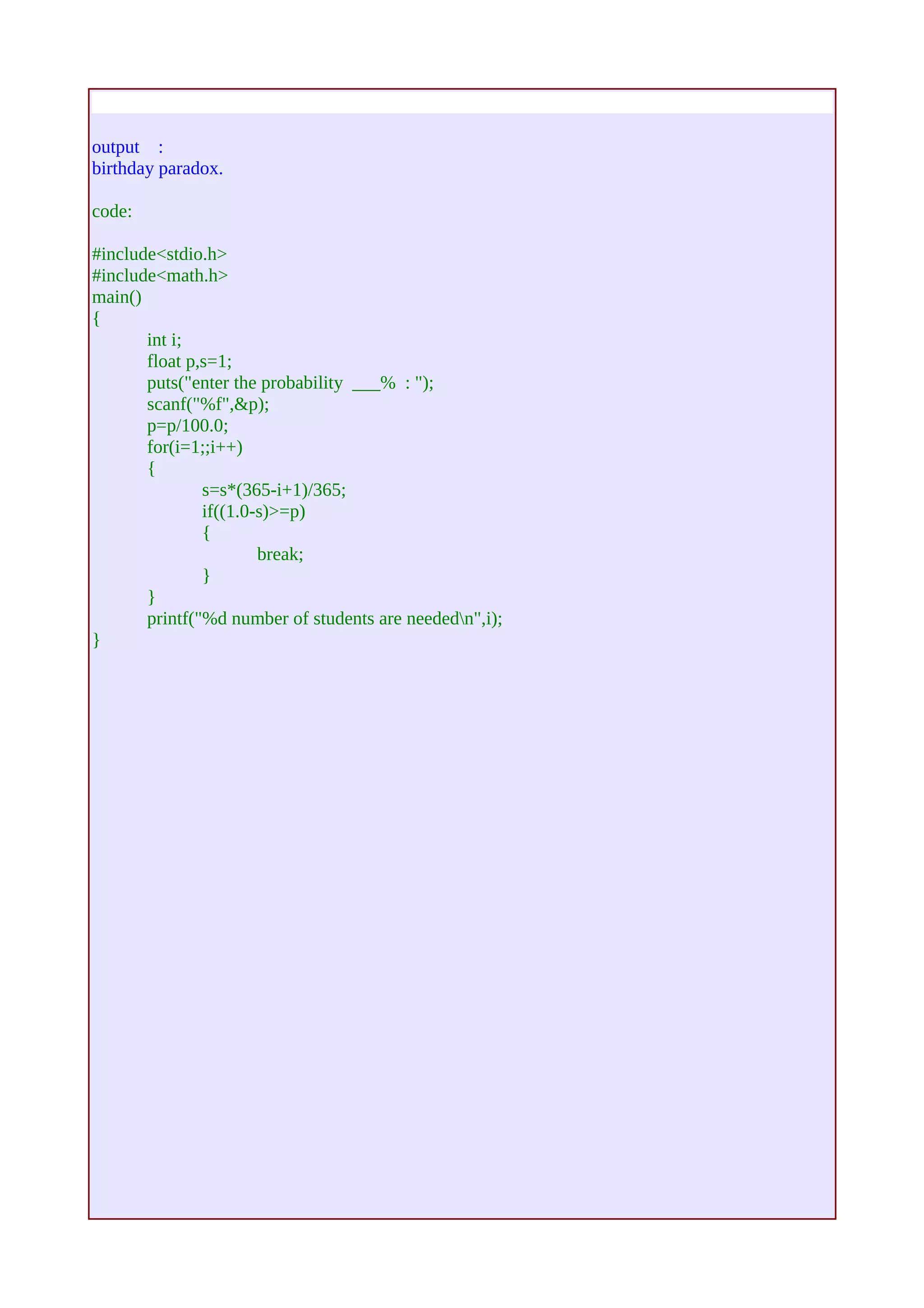
birthday paradox. 
code: 
#include<stdio.h> 
#include<math.h> 
main() 
{ 
int i; 
float p,s=1; 
puts("enter the probability ___% : "); 
scanf("%f",&p); 
p=p/100.0; 
for(i=1;;i++) 
{ 
s=s*(365-i+1)/365; 
if((1.0-s)>=p) 
{ 
break; 
} 
} 
printf("%d number of students are neededn",i); 
}
Unwanted output using sleep try the following program: 
#include<stdio.h> 
main() 
{ 
int i; 
for(i=0;i<=5000;i++) 
{ 
printf("%d ",i); 
}s 
leep(2); 
printf("%c %c %c %c",66,67,68,69); 
} 
This is because of the output buffer used by compiler.
New way to calculating, nCr is to break n into two parts (say m & n) and send them into the 
following van() function. 
#include<stdio.h> 
int fact(int n) 
{ 
if(n==0) 
return 1; 
else 
return (n*fact(n-1)); 
} 
int ncr(int n, int r) 
{ 
if(n>=r) 
return (fact(n)/(fact(n-r)*fact(r))); 
else 
return 0; 
} 
int van(int n,int m,int r) 
{ 
int i,p=0; 
for(i=0;i<=r;i++) 
p=p+ncr(n,i)*ncr(m,r-i); 
return p; 
} 
main() 
{ 
int n,m,r; 
puts("enter m, n, r : "); 
scanf("%d%d%d",&m,&n,&r); 
printf("the values are %d and %d n",ncr(m+n,r),van(n,m,r)); 
} 
we can use this method to calculate nCr for large n.
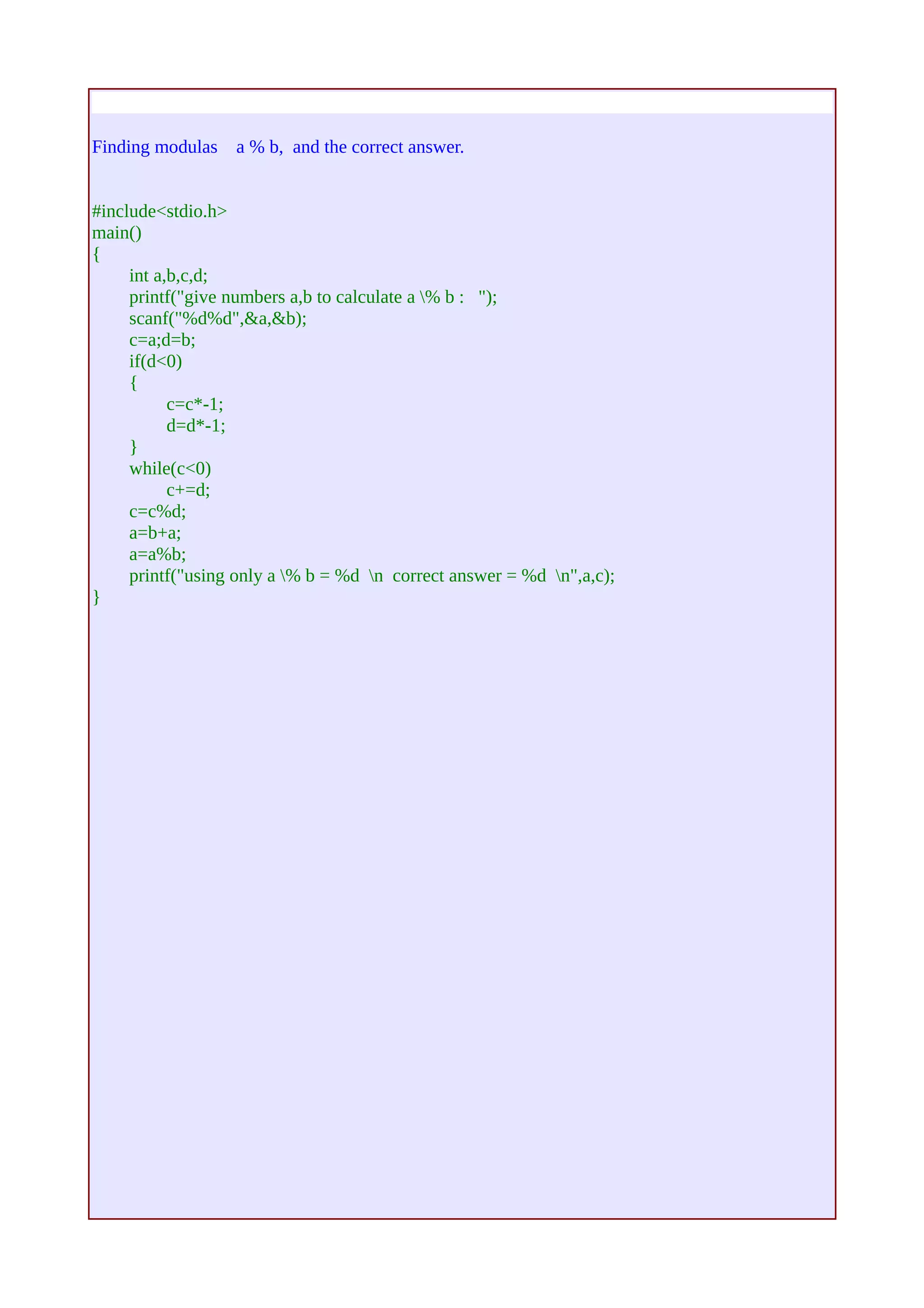
Finding modulas a % b, and the correct answer. 
#include<stdio.h> 
main() 
{ 
int a,b,c,d; 
printf("give numbers a,b to calculate a % b : "); 
scanf("%d%d",&a,&b); 
c=a;d=b; 
if(d<0) 
{ 
c=c*-1; 
d=d*-1; 
} 
while(c<0) 
c+=d; 
c=c%d; 
a=b+a; 
a=a%b; 
printf("using only a % b = %d n correct answer = %d n",a,c); 
}

Tut1

  • 1.
    C basics : First c program : #include<stdio.h> main() { printf(“hello world..”); } green part is for including header file, the definition of the used statements will contained by them. blue part is for the main function any program should contain main function . red part is for the body of the main funtion here we will write the program for serial execution. The c-program name will be closed with *.c extension. Any program may contain more than one header file. More than one function. But it have to contain the main function because execution starts from there. Execution is sequential. C character set: A to Z in uppercase, a to z in lowercase, digits 0 to 9 and the specila characters like ! # % & * ( ) - + { } [ ] | “ : ; < > , . ? @ $ ~ blank_space etc. are used. In C we use b n r v t for special conditions such as back space, newline, carriage return etc. These are called escape sequence. IDENIFIER & KEYWORD: Identifiers are the name which we give to the variables, functions etc. Name may contain any character except blank space in-between. It may start capital, small letter and undersore but not any number and any other special character. Name should not clash with any keyword or statement. Keyword is some reserved word donoting some predefined meaning. Like auto, char, int, long, float, void, for, while, if, case, switch, struct, sizeof, static etc. DATA TYPES: There are several data types, three main basic data types are int for integer variable (2 byte), float for real variable (4 byte), char for character variable(1 byte). We use long int for 4 byte integer variale and double for 8 byte double precision real entry. There are signed and unsigned int and char data types also. There are also user defined data types that we can define using typedef keyword. CONSTANT: There are four basic types of constant integer constant, floating point constant, character constant
  • 2.
    and string constant. In integer constant there are decimal, octal, hexadecimal number system, signed and unsigned manner. For floating point constant we use decimal point or exponent or both. For character constant ASCII character set from 0 to 127 are used. Here we use escape sequence to denote some special character. We use the ASCII code or the character in single quotetion to asign. In order to asign the string constant we use the sequence of character enclosed by double quotetion. For defining symbolic constant we have to use #define notation, example, #define pi 3.14 #define f(x,y) x*x+y*y // defining a function The value of symbolic constant can not be change. VARIABLE: It is a named location in the memory holding some special type od data. If we want to use a variable it should be declared first. Syntax of declaration: type var_name / var_list ; for example: int a; float b,c,d; for any variable if we want to get it's address then we have to put “&” before it. For example; for the variable “float b;” “&b” gives the address of the variable b. Array is the sequence of same kind of variable. To declare an array w have to give data type of the array and the name and the size of the array which should be an integer constant. For example, int a[100]; here “a” denotes the base address of the array a[100]. For individual address we can get them by using &a[10], &a[20] etc. For declaring a[100], we reserve 100 memory location sequentially starts from a[0], a[1], ..... a[99]. There are two kind of variable local and global. There are mainly four storage class static, extern, register and auto. If we use: const int a=5; then the value of “a” will become read only. OPERATORS: There are five basic arithmetic operators, addition (+), subtraction (-), multiplication (*), division (/) and modulo (%) operations. There are unary operators like negetion(-), incrementation(++), decrementation(--) not (!). There are logical operators like equal to (==), not equal to (!=), less than (<), less than or equal (<=), greater than(>), greater than or equal(>=), and (&&), or (||). There are asignment operators like =, +=, *=, /=, %=, -= . where a+=b implies a=a+b . There are also conditional operators (? :) for example; (a<b) ? p=2 : p=3 if a<b holds then p will be 2 otherwise p will be 3. There is another operator named comma operator. x=(y=2,y=y+2,y=y*y,y*2); this gives the value x as 32. It execute from left to right sequntially and the last value is assigned to x.
  • 3.
    2 will beassigned to y, then y+2 i.e 4 will be assigned to y, then y=y*y ie y become 16, at last y*2 i.e 32 is the final value that is assigned to x. EXPRESSION: Expression is the single data item such as number or character. For example, a+b ++a b-- a==b a=(a+b)*c/d*w-a etc. STATEMENTS: We are declaring statement for some particular task. Three types of statements are there, expression statement, compound statement and control statement. Example: printf(“%d”,45); scanf(“%d”,&p); s=a+b; ; // null statement doing nothing. BASIC INPUT OUTPUT OPERATIONS: For inputing from keyboard we use scanf statement. scanf(“%d%f”,&a,&b); the yellow portion is used for control string, that gives us instruction that what kind of variable should be inputed. %d is for integer, %f is for float, %c is for character, %s is for string input. Here we have to store the data in the memory location. So we have to give memory location of the variable to store the data. For, inputing string we can also use, gets(). For inputing single character we can also use getchar(). For output we use the statement , printf(“the addition of %f and %d is %f n”,a,b,a+b); what ever we write in the double quotetion will be printed and the the values corresponds to %f, %d etc. will be taken sequentially from the highlighted data area. For string output we can use puts(“string” or string_name); For character output we can use putchar(“character” or character_name); COMMENT LINE: If we want to write some lines for our own references which compiler should not read then we called those comment lines. We use /* OUR_TEXT_IS_HERE */ or //OUR_TEXT_IS_HERE notations. For example: #include<stdio.h> //including standara input output file main()
  • 4.
    { /* simple program of addition */ int a=5,b=6; printf(“%d”,a+b); } compiler will not read the highlighted portion. FUNCTION: For complex problem we divide the entire problem into some sun problems. Here we can use functions. It not only reduce the complexity but also reduce the program size sometimes. Sometimes a spetial calculation is needed several times in the program then we can declare that part into another function and call that as many time as it required. Any program must contain a function called main function. syntax for declaring the function: return_type function_name(arguments) { body } For example let us make a code for finding (n c r): #include<stdio.h> int fact(int n) { if(n==0) return 1; else return(n*fact(n-1)); } main() { int n,r; puts("enter n and r : "); scanf("%d%d",&n,&r); printf("answer is %d n",(fact(n)/((fact(n-r))*(fact(r))))); } HEADER FILES : There are several header files named stdio.h, conio.h, string.h, math.h etc. Each containing the definition of the special kind of statements used in the program. For example, all standard input, output statements (printf, scanf etc.) are contained in stdio.h. For string.h it contains the statements for operating on a string (strlen, strcmp etc.). For basic mathematical operations (exp, sin, atan, log, sqrt etc.) we use math.h. We use the notation; #include<HEADER_FILE_NAME.h> to include that perticular header file in our program. We can also create our own header file and include in our program. Header file name will close with the *.h extension. Here is the program, how we will include header file:
  • 5.
    // we savethis header file with name head.h #include<stdio.h> #include<stdlib.h> #include<math.h> typedef struct comp{ float a; float b; }; struct comp add (struct comp p,struct comp q) { struct comp r; r.a=p.a+q.a; r.b=p.b+q.b; return r; } struct comp mul (struct comp p,struct comp q) { struct comp r; r.a=p.a*q.a-p.b*q.b; r.b=p.a*q.b+p.b*q.a; return r; } struct comp conj (struct comp p) { struct comp r; r.a=p.a; r.b=-p.b; return r; } struct comp mulr(struct comp p,float q) { struct comp r; r.a=p.a*q; r.b=p.b*q; return r; } struct comp divr(struct comp p,float q) { struct comp r; r.a=p.a/q; r.b=p.b/q; return r; } float modu(struct comp p) { float r; r=p.a*p.a+p.b*p.b; return r; } struct comp divc (struct comp p,struct comp q)
  • 6.
    { struct compr; r=divr(mul(p,conj(q)),modu(q)); return r; } //on the same directory where header file exists give the program name say comp.c #include"head.h" main() { comp a,b,r; printf("enter two complex numbers !! "); scanf("%f%f%f%f",&a.a,&a.b,&b.a,&b.b); r=divc(a,b); printf("after division ( %.2f , %.2f ) / ( %.2f , %.2f ) = ( %.2f , %.2f ) n",a.a,a.b,b.a,b.b,r.a,r.b); } If we run the program comp.c it will run. So here in the header file we create our own definitions. We can join the above program in one program as; #include<stdio.h> #include<stdlib.h> #include<math.h> typedef struct comp{ float a; float b; }; struct comp add (struct comp p,struct comp q) { struct comp r; r.a=p.a+q.a; r.b=p.b+q.b; return r; } struct comp mul (struct comp p,struct comp q) { struct comp r; r.a=p.a*q.a-p.b*q.b; r.b=p.a*q.b+p.b*q.a; return r; } struct comp conj (struct comp p) { struct comp r; r.a=p.a; r.b=-p.b;
  • 7.
    return r; } struct comp mulr(struct comp p,float q) { struct comp r; r.a=p.a*q; r.b=p.b*q; return r; } struct comp divr(struct comp p,float q) { struct comp r; r.a=p.a/q; r.b=p.b/q; return r; } float modu(struct comp p) { float r; r=p.a*p.a+p.b*p.b; return r; } struct comp divc (struct comp p,struct comp q) { struct comp r; r=divr(mul(p,conj(q)),modu(q)); return r; } main() { comp a,b,r; printf("enter two complex numbers !! "); scanf("%f%f%f%f",&a.a,&a.b,&b.a,&b.b); r=divc(a,b); printf("after division ( %.2f , %.2f ) / ( %.2f , %.2f ) = ( %.2f , %.2f ) n",a.a,a.b,b.a,b.b,r.a,r.b); } This will give the same answer. Here is another example to include header file: // header file new.h #include<stdio.h> #include<math.h> float sqa(float a,float b) { return(sqrt(a*a+b*b));
  • 8.
    } float sqs(floata,float b) { return(sqrt(a*a-b*b)); } main() { int a,b; printf("give a and b"); scanf("%d%d",&a,&b); printf("%f %f ",sqa(a,b),sqs(a,b)); } // c-file new.c #include "new.h" This will run the code in the header file. STRING: String is array of character followed by a null symbol. For using some inbuilt string operations we use the header file <string.h> Some of those inbuilt statements are: strcmp(a,b): compare strings a and b (lexiographically), give <0 if a<b, give 0 if a=b, give >0 if a>b. strcat(a,b): concatenate two string a and b, join b with a. strcpy(a,b): copy string b to string a. etc. We can also implement these without out using those inbuilt functions. POINTER: Pointer is a variable that store the reference or address of a variable of a specific data type. To declare a pointer variable pointing to a integer variable a we will declare them as, int a,*p; p=&a; i.e, p is containing the address of a. The pointer is declared as <data_type> *<pointer_name>; here the pointer can only store the reference of the data of the declared data type of the pointer. To store the reference of a pointer we use pointer to pointer, like below: int **p1,*p2,a; p2=&a; p1=&p2; and so on. Pointer is very useful to passing reference rather than the value to the function. As it denote the reference of the variable then change of the value at that reference does change the value actually. In first example, *p denote the value of the variable stored at the location p. So in the second example the value of a will be, **p1 or *p2.
  • 9.
    SOME C-PROGRAMS: output: * *** ***** ******* ********* * * code: #include<stdio.h> main() { int i,n,j,k; for(j=0;j<=6;j++) { for(i=1;i<10;i++) { if((j>=5&&i==5)||((j<5)&&(i>=5-j)&&(i<=5+j))) printf("*"); else printf(" "); } printf("n"); } }
  • 10.
    output : ** * *** *** *** ***** ***** ***** ******* ******* ******* ********* ********* ********* * * * * * * code: #include<stdio.h> main() { int i,n,j,k,p; puts("how many tree?? "); scanf("%d",&p); for(j=0;j<=6;j++) { for(i=1;i<=10*p;i++) { if((j>=5&&(i==5||i%10==5))||((j<5)&&(i%10>=5-j)&&(i%10<=5+j))) printf("*"); else printf(" "); } printf("n"); } }
  • 11.
    output : * *** ***** ******* ********* * * * *** ***** ******* ********* * * * *** ***** ******* ********* * * code : #include<stdio.h> main() { int i,n,j,k,p; puts("how many tree? "); scanf("%d",&n); for(p=0;p<n;p++) { for(j=0;j<=6;j++) { for(i=1;i<10;i++) { if((j>=5&&i==5)||((j<5)&&(i>=5-j)&&(i<=5+j))) printf("*"); else printf(" "); } printf("n"); } printf("nn"); } }
  • 12.
    output : multiplicationof two polynomials. code : #include<stdio.h> main() { int a[100],b[100],c[100],m,n,i,j; printf("the degrees of 1st and 2nd polynomial "); scanf("%d%d",&m,&n); printf("enter the co-eff. of 1st plo. (asend.) "); for(i=0;i<=m;i++) { scanf("%d",&a[i]); } printf("enter the co-eff. of 2nd pol. (asend.) "); for(i=0;i<=n;i++) { scanf("%d",&b[i]); } for(i=0;i<=m+n;i++) { c[i]=0; } for(i=0;i<=n;i++) for(j=0;j<=m;j++) { c[i+j]=c[i+j]+b[i]*a[j]; } printf("ans..n"); for(i=0;i<=m+n;i++) { printf("%d ",c[i]); } }
  • 13.
    output : multiplicationof two polynomials co-efficients are 3Χ3 matrices. code : #include<stdio.h> void mul(int a[][10],int b[][10],int c[][10],int n) { int i,j,k; for(i=0;i<n;i++) for(j=0;j<n;j++) { c[i][j]=0; } for(i=0;i<n;i++) { for(j=0;j<n;j++) { for(k=0;k<n;k++) { c[i][j]=c[i][j]+a[i][k]*b[k][j]; } } } } void add(int a[][10],int b[][10],int n) { int i,j; for(i=0;i<n;i++) for(j=0;j<n;j++) a[i][j]=a[i][j]+b[i][j]; } main() { int a[10][10][10],b[10][10][10],c[10][10][10],d[10][10],m,n,i,j,p=3,x,y; printf("the degrees of 1st and 2nd polynomial "); scanf("%d%d",&m,&n); printf("enter the co-eff. of 1st plo. (asend.) "); for(i=0;i<=m;i++) { for(x=0;x<p;x++) for(y=0;y<p;y++) scanf("%d",&a[i][x][y]); } printf("enter the co-eff. of 2nd pol. (asend.) "); for(i=0;i<=n;i++) { for(x=0;x<p;x++) for(y=0;y<p;y++) scanf("%d",&b[i][x][y]); }
  • 14.
    /*for(i=0;i<=m+n;i++) { c[i]=0; }*/ for(i=0;i<=n;i++) for(j=0;j<=m;j++) { mul(b[i],a[j],d,p); add(c[i+j],d,p); } printf("ans..n"); for(i=0;i<=m+n;i++) { for(x=0;x<p;x++) { for(y=0;y<p;y++) { printf("%3d ",c[i][x][y]); } printf("n"); } printf("nn"); } }
  • 15.
    output : birthdayparadox. code: #include<stdio.h> #include<math.h> main() { int i; float p,s=1; puts("enter the probability ___% : "); scanf("%f",&p); p=p/100.0; for(i=1;;i++) { s=s*(365-i+1)/365; if((1.0-s)>=p) { break; } } printf("%d number of students are neededn",i); }
  • 16.
    Unwanted output usingsleep try the following program: #include<stdio.h> main() { int i; for(i=0;i<=5000;i++) { printf("%d ",i); }s leep(2); printf("%c %c %c %c",66,67,68,69); } This is because of the output buffer used by compiler.
  • 17.
    New way tocalculating, nCr is to break n into two parts (say m & n) and send them into the following van() function. #include<stdio.h> int fact(int n) { if(n==0) return 1; else return (n*fact(n-1)); } int ncr(int n, int r) { if(n>=r) return (fact(n)/(fact(n-r)*fact(r))); else return 0; } int van(int n,int m,int r) { int i,p=0; for(i=0;i<=r;i++) p=p+ncr(n,i)*ncr(m,r-i); return p; } main() { int n,m,r; puts("enter m, n, r : "); scanf("%d%d%d",&m,&n,&r); printf("the values are %d and %d n",ncr(m+n,r),van(n,m,r)); } we can use this method to calculate nCr for large n.
  • 18.
    Finding modulas a% b, and the correct answer. #include<stdio.h> main() { int a,b,c,d; printf("give numbers a,b to calculate a % b : "); scanf("%d%d",&a,&b); c=a;d=b; if(d<0) { c=c*-1; d=d*-1; } while(c<0) c+=d; c=c%d; a=b+a; a=a%b; printf("using only a % b = %d n correct answer = %d n",a,c); }