Monitoring your App in
Kubernetes with Prometheus
Jeff Hoffer, Developer Experience
github.com/eudaimos
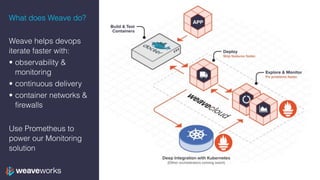
What does Weave do?
Weave helps devops
iterate faster with:
• observability &
monitoring
• continuous delivery
• container networks &
firewalls
Use Prometheus to
power our Monitoring
solution
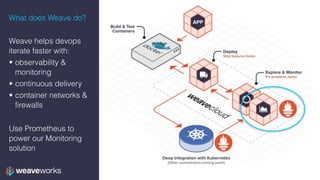
What does Weave do?
Weave helps devops
iterate faster with:
• observability &
monitoring
• continuous delivery
• container networks &
firewalls
Use Prometheus to
power our Monitoring
solution
Agenda
1. Prometheus concepts: data model & metrics types
2. Prometheus architecture & pull model
3. Why Prometheus & Kubernetes are a good fit
4. What is Cortex?
5. Kubernetes recap
6. Training on real app
7. What’s next?
Prometheus
Borg —> Kubernetes
Borgmon —> Prometheus
Initially developed at Soundcloud
Data Model
• Prometheus is a labelled time-series database
• Labels are key-value pairs
• A time-series is [(timestamp, value), …]
• lists of timestamp, value tuples
• values are just floats – PromQL lets you make sense of them
• So the data type of Prometheus is
• {key1=A, key2=B} —> [(t0, v0), (t1, v1), …]
• …
Data Model
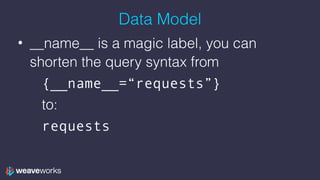
• __name__ is a magic label, you can
shorten the query syntax from
{__name__=“requests”}
to:
requests
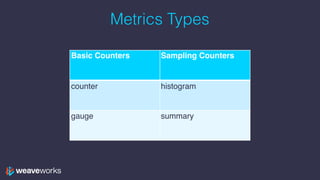
Metrics Types
Basic Counters Sampling Counters
counter histogram
gauge summary
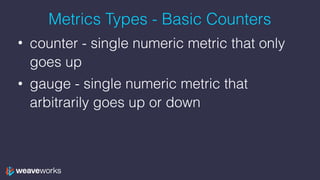
Metrics Types - Basic Counters
• counter - single numeric metric that only
goes up
• gauge - single numeric metric that
arbitrarily goes up or down
Metric Types - Sampling Counters
• histogram - samples observations and
counts them in configurable buckets
• summary - samples observations and
counts them
Data Model
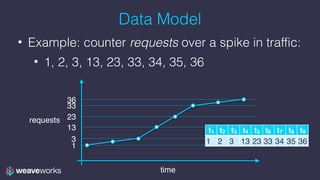
• Example: counter requests over a spike in traffic:
• 1, 2, 3, 13, 23, 33, 34, 35, 36
time
requests
1
3
13
23
33
36
t1 t2 t3 t4 t5 t6 t7 t8 t9
1 2 3 13 23 33 34 35 36
Data Model
• What Prom is storing
• {__name__=“requests”} —>
[(t1, 1), (t2, 2), (t3, 3), (t4, 13), 

(t5, 23), (t6, 33), (t7, 34), (t8, 35), 

(t9, 36), (t10, 37)]
or
t1 t2 t3 t4 t5 t6 t7 t8 t9
1 2 3 13 23 33 34 35 36
Data model & PromQL
• the [P] (period) syntax after a label turns
an instant type into a vector type
• for each value, turn the value into a vector
of all the values before and including that
value for the last period P
• Example P: 5s, 1m, 2h…
Data model & PromQL
• Recall our time-series requests


• What is requests[3s]? Vector query:
t1 t2 t3 t4 t5 t6 t7 t8 t9
1 2 3 13 23 33 34 35 36
t1-3 t2-4 t3-5 t4-6 t5-7 t6-8 t7-9
1
2
3
Data model & PromQL
• Recall our time-series requests


• What is requests[3s]? Vector query:
t1 t2 t3 t4 t5 t6 t7 t8 t9
1 2 3 13 23 33 34 35 36
t1-3 t2-4 t3-5 t4-6 t5-7 t6-8 t7-9
1 2
2 3
3 13
Data model & PromQL
• Recall our time-series requests


• What is requests[3s]? Vector query:
t1 t2 t3 t4 t5 t6 t7 t8 t9
1 2 3 13 23 33 34 35 36
t1-3 t2-4 t3-5 t4-6 t5-7 t6-8 t7-9
1 2 3
2 3 13
3 13 23
Data model & PromQL
• Recall our time-series requests


• What is requests[3s]? Vector query:
t1 t2 t3 t4 t5 t6 t7 t8 t9
1 2 3 13 23 33 34 35 36
t1-3 t2-4 t3-5 t4-6 t5-7 t6-8 t7-9
1 2 3 13 23 33 34
2 3 13 23 33 34 35
3 13 23 33 34 35 36
Data model & PromQL
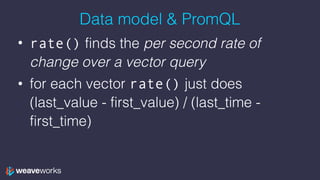
• rate() finds the per second rate of
change over a vector query
• for each vector rate() just does
(last_value - first_value) / (last_time -
first_time)
Data model & PromQL
• rate(requests[3s])
• [
t1-3 t2-4 t3-5 t4-6 t5-7 t6-8 t7-9
1 2 3 13 23 33 34
2 3 13 23 33 34 35
3 13 23 33 34 35 36
(last_value - first_value) / (last_time - first_time)
Data model & PromQL
• rate(requests[3s])
• [3-1
t1-3 t2-4 t3-5 t4-6 t5-7 t6-8 t7-9
1 2 3 13 23 33 34
2 3 13 23 33 34 35
3 13 23 33 34 35 36
(last_value - first_value) / (last_time - first_time)
Data model & PromQL
• rate(requests[3s])
• [2
t1-3 t2-4 t3-5 t4-6 t5-7 t6-8 t7-9
1 2 3 13 23 33 34
2 3 13 23 33 34 35
3 13 23 33 34 35 36
(last_value - first_value) / (last_time - first_time)
Data model & PromQL
• rate(requests[3s])
• [2/(3-1)
t1-3 t2-4 t3-5 t4-6 t5-7 t6-8 t7-9
1 2 3 13 23 33 34
2 3 13 23 33 34 35
3 13 23 33 34 35 36
(last_value - first_value) / (last_time - first_time)
Data model & PromQL
• rate(requests[3s])
• [2/2
t1-3 t2-4 t3-5 t4-6 t5-7 t6-8 t7-9
1 2 3 13 23 33 34
2 3 13 23 33 34 35
3 13 23 33 34 35 36
(last_value - first_value) / (last_time - first_time)
Data model & PromQL
• rate(requests[3s])
• [1,
t1-3 t2-4 t3-5 t4-6 t5-7 t6-8 t7-9
1 2 3 13 23 33 34
2 3 13 23 33 34 35
3 13 23 33 34 35 36
(last_value - first_value) / (last_time - first_time)
Data model & PromQL
• rate(requests[3s])
• [1, 13-2
t1-3 t2-4 t3-5 t4-6 t5-7 t6-8 t7-9
1 2 3 13 23 33 34
2 3 13 23 33 34 35
3 13 23 33 34 35 36
(last_value - first_value) / (last_time - first_time)
Data model & PromQL
• rate(requests[3s])
• [1, 11
t1-3 t2-4 t3-5 t4-6 t5-7 t6-8 t7-9
1 2 3 13 23 33 34
2 3 13 23 33 34 35
3 13 23 33 34 35 36
(last_value - first_value) / (last_time - first_time)
Data model & PromQL
• rate(requests[3s])
• [1, 11/(4-2)
t1-3 t2-4 t3-5 t4-6 t5-7 t6-8 t7-9
1 2 3 13 23 33 34
2 3 13 23 33 34 35
3 13 23 33 34 35 36
(last_value - first_value) / (last_time - first_time)
Data model & PromQL
• rate(requests[3s])
• [1, 11/2
t1-3 t2-4 t3-5 t4-6 t5-7 t6-8 t7-9
1 2 3 13 23 33 34
2 3 13 23 33 34 35
3 13 23 33 34 35 36
(last_value - first_value) / (last_time - first_time)
Data model & PromQL
• rate(requests[3s])
• [1, 5.5
t1-3 t2-4 t3-5 t4-6 t5-7 t6-8 t7-9
1 2 3 13 23 33 34
2 3 13 23 33 34 35
3 13 23 33 34 35 36
(last_value - first_value) / (last_time - first_time)
Data model & PromQL
• rate(requests[3s])
• [1, 5.5, 23-3
t1-3 t2-4 t3-5 t4-6 t5-7 t6-8 t7-9
1 2 3 13 23 33 34
2 3 13 23 33 34 35
3 13 23 33 34 35 36
(last_value - first_value) / (last_time - first_time)
Data model & PromQL
• rate(requests[3s])
• [1, 5.5, 20
t1-3 t2-4 t3-5 t4-6 t5-7 t6-8 t7-9
1 2 3 13 23 33 34
2 3 13 23 33 34 35
3 13 23 33 34 35 36
(last_value - first_value) / (last_time - first_time)
Data model & PromQL
• rate(requests[3s])
• [1, 5.5, 20/2
t1-3 t2-4 t3-5 t4-6 t5-7 t6-8 t7-9
1 2 3 13 23 33 34
2 3 13 23 33 34 35
3 13 23 33 34 35 36
(last_value - first_value) / (last_time - first_time)
Data model & PromQL
• rate(requests[3s])
• [1, 5.5, 10
t1-3 t2-4 t3-5 t4-6 t5-7 t6-8 t7-9
1 2 3 13 23 33 34
2 3 13 23 33 34 35
3 13 23 33 34 35 36
(last_value - first_value) / (last_time - first_time)
Data model & PromQL
• rate(requests[3s])
• [1, 5.5, 10, 10
t1-3 t2-4 t3-5 t4-6 t5-7 t6-8 t7-9
1 2 3 13 23 33 34
2 3 13 23 33 34 35
3 13 23 33 34 35 36
(last_value - first_value) / (last_time - first_time)
Data model & PromQL
• rate(requests[3s])
• [1, 5.5, 10, 10, 5.5,
t1-3 t2-4 t3-5 t4-6 t5-7 t6-8 t7-9
1 2 3 13 23 33 34
2 3 13 23 33 34 35
3 13 23 33 34 35 36
(last_value - first_value) / (last_time - first_time)
Data model & PromQL
• rate(requests[3s])
• [1, 5.5, 10, 10, 5.5, 1
t1-3 t2-4 t3-5 t4-6 t5-7 t6-8 t7-9
1 2 3 13 23 33 34
2 3 13 23 33 34 35
3 13 23 33 34 35 36
(last_value - first_value) / (last_time - first_time)
Data model & PromQL
• rate(requests[3s])
• [1, 5.5, 10, 10, 5.5, 1, 1]
t1-3 t2-4 t3-5 t4-6 t5-7 t6-8 t7-9
1 2 3 13 23 33 34
2 3 13 23 33 34 35
3 13 23 33 34 35 36
(last_value - first_value) / (last_time - first_time)
time
requests
1
3
13
23
33
36
t1 t2 t3 t4 t5 t6 t7 t8 t9
1 2 3 13 23 33 34 35 36
t1-3 t2-4 t3-5 t4-6 t5-7 t6-8 t7-9
1 2 3 13 23 33 34
2 3 13 23 33 34 35
3 13 23 33 34 35 36
requests[3s]
time
rate(requests[3s])
1
5
10
t3 t4 t5 t6 t7 t8 t9
1 5.5 10 10 5.5 1 1
Now we can understand irate (“instantaneous rate”)
• irate(requests[3s])
• [
t1-3 t2-4 t3-5 t4-6 t5-7 t6-8 t7-9
1 2 3 13 23 33 34
2 3 13 23 33 34 35
3 13 23 33 34 35 36
(last_value - 2nd_last_value) / (last_time - 2nd_last_time)
Now we can understand irate (“instantaneous rate”)
• irate(requests[3s])
• [1, 10, 10, 10, 1, 1, 1]
t1-3 t2-4 t3-5 t4-6 t5-7 t6-8 t7-9
1 2 3 13 23 33 34
2 3 13 23 33 34 35
3 13 23 33 34 35 36
(last_value - 2nd_last_value) / (last_time - 2nd_last_time)
it’s “spikier”
Labels
• Recall that requests is just shorthand for
{__name__=“requests”}
• We can have more labels:
{__name__=“requests”, job=“frontend”}
• Shortens to requests{job=“frontend”}
• And so we could query
rate(requests{job=“frontend”}[1m])
Label Operators
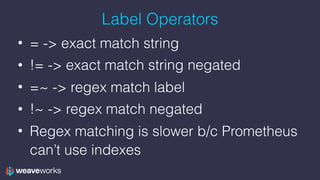
• = -> exact match string
• != -> exact match string negated
• =~ -> regex match label
• !~ -> regex match negated
• Regex matching is slower b/c Prometheus
can’t use indexes
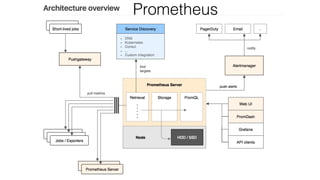
Architecture
Prometheus
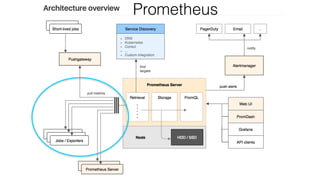
Architecture
Prometheus
Jobs & Instances
• Instance = individually scraped process
• Job = collection of instances of same type
– configured in scrape_config
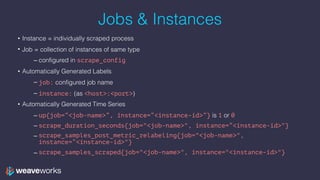
Jobs & Instances
• Instance = individually scraped process
• Job = collection of instances of same type
– configured in scrape_config
• Automatically Generated Labels
– job: configured job name
– instance: (as <host>:<port>)
Jobs & Instances
• Instance = individually scraped process
• Job = collection of instances of same type
– configured in scrape_config
• Automatically Generated Labels
– job: configured job name
– instance: (as <host>:<port>)
• Automatically Generated Time Series
– up{job=“<job-name>”, instance=“<instance-id>”} is 1 or 0
– scrape_duration_seconds{job="<job-name>", instance=“<instance-id>"}
– scrape_samples_post_metric_relabeling{job="<job-name>",
instance=“<instance-id>"}
– scrape_samples_scraped{job="<job-name>", instance="<instance-id>"}
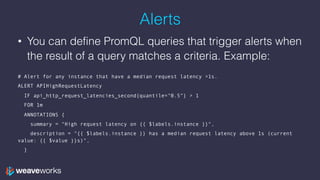
Alerts
• You can define PromQL queries that trigger alerts when
the result of a query matches a criteria. Example:


# Alert for any instance that have a median request latency >1s.
ALERT APIHighRequestLatency
IF api_http_request_latencies_second{quantile="0.5"} > 1
FOR 1m
ANNOTATIONS {
summary = "High request latency on {{ $labels.instance }}",
description = "{{ $labels.instance }} has a median request latency above 1s (current
value: {{ $value }}s)",
}
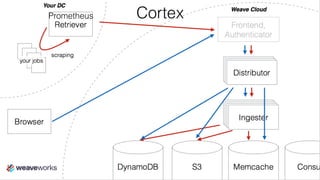
Cortex
• Distributed, multi-tenant version of
Prometheus
• Prometheus architecture is single-server
• We wanted to build something scalable
CortexPrometheus
Cortex
• We run it for you
• Long term storage for your metrics
• We open sourced it
• https://github.com/weaveworks/cortex
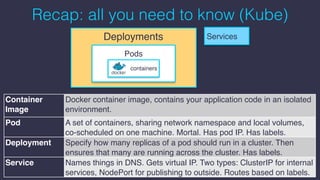
Recap: all you need to know (Kube)
Pods
containers
ServicesDeployments
Container
Image
Docker container image, contains your application code in an isolated
environment.
Pod A set of containers, sharing network namespace and local volumes,
co-scheduled on one machine. Mortal. Has pod IP. Has labels.
Deployment Specify how many replicas of a pod should run in a cluster. Then
ensures that many are running across the cluster. Has labels.
Service Names things in DNS. Gets virtual IP. Two types: ClusterIP for internal
services, NodePort for publishing to outside. Routes based on labels.
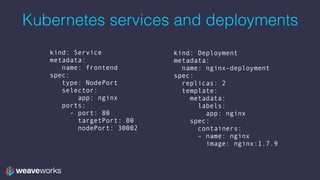
kind: Deployment
metadata:
name: nginx-deployment
spec:
replicas: 2
template:
metadata:
labels:
app: nginx
spec:
containers:
- name: nginx
image: nginx:1.7.9
kind: Service
metadata:
name: frontend
spec:
type: NodePort
selector:
app: nginx
ports:
- port: 80
targetPort: 80
nodePort: 30002
Kubernetes services and deployments
Why Kubernetes <3 Prometheus
• Prom discovers what to scrape by asking Kube
• Prom’s pull model matches Kube dynamic
scheduling
• Allows Prom to identify thing it’s pulling from
• Prom label/value pairs mirror Kube labels
• Pods were made for exporters
Training!
Join the Weave user group!
meetup.com/pro/Weave/

weave.works/help
Other topics
• Kubernetes 101
• Continuous delivery: hooking up my CI/CD
pipeline to Kubernetes
• Network policy for security
We have talks on all these topics in the Weave
user group!
Thanks! Questions?
We are hiring!
DX in San Francisco
Engineers in London & SF
weave.works/weave-company/hiring

Monitoring your Application in Kubernetes with Prometheus

  • 1.
    Monitoring your Appin Kubernetes with Prometheus Jeff Hoffer, Developer Experience github.com/eudaimos
  • 2.
    What does Weavedo? Weave helps devops iterate faster with: • observability & monitoring • continuous delivery • container networks & firewalls Use Prometheus to power our Monitoring solution
  • 3.
    What does Weavedo? Weave helps devops iterate faster with: • observability & monitoring • continuous delivery • container networks & firewalls Use Prometheus to power our Monitoring solution
  • 4.
    Agenda 1. Prometheus concepts:data model & metrics types 2. Prometheus architecture & pull model 3. Why Prometheus & Kubernetes are a good fit 4. What is Cortex? 5. Kubernetes recap 6. Training on real app 7. What’s next?
  • 5.
    Prometheus Borg —> Kubernetes Borgmon—> Prometheus Initially developed at Soundcloud
  • 6.
    Data Model • Prometheusis a labelled time-series database • Labels are key-value pairs • A time-series is [(timestamp, value), …] • lists of timestamp, value tuples • values are just floats – PromQL lets you make sense of them • So the data type of Prometheus is • {key1=A, key2=B} —> [(t0, v0), (t1, v1), …] • …
  • 7.
    Data Model • __name__is a magic label, you can shorten the query syntax from {__name__=“requests”} to: requests
  • 8.
    Metrics Types Basic CountersSampling Counters counter histogram gauge summary
  • 9.
    Metrics Types -Basic Counters • counter - single numeric metric that only goes up • gauge - single numeric metric that arbitrarily goes up or down
  • 10.
    Metric Types -Sampling Counters • histogram - samples observations and counts them in configurable buckets • summary - samples observations and counts them
  • 11.
    Data Model • Example:counter requests over a spike in traffic: • 1, 2, 3, 13, 23, 33, 34, 35, 36 time requests 1 3 13 23 33 36 t1 t2 t3 t4 t5 t6 t7 t8 t9 1 2 3 13 23 33 34 35 36
  • 12.
    Data Model • WhatProm is storing • {__name__=“requests”} —> [(t1, 1), (t2, 2), (t3, 3), (t4, 13), 
 (t5, 23), (t6, 33), (t7, 34), (t8, 35), 
 (t9, 36), (t10, 37)] or t1 t2 t3 t4 t5 t6 t7 t8 t9 1 2 3 13 23 33 34 35 36
  • 13.
    Data model &PromQL • the [P] (period) syntax after a label turns an instant type into a vector type • for each value, turn the value into a vector of all the values before and including that value for the last period P • Example P: 5s, 1m, 2h…
  • 14.
    Data model &PromQL • Recall our time-series requests 
 • What is requests[3s]? Vector query: t1 t2 t3 t4 t5 t6 t7 t8 t9 1 2 3 13 23 33 34 35 36 t1-3 t2-4 t3-5 t4-6 t5-7 t6-8 t7-9 1 2 3
  • 15.
    Data model &PromQL • Recall our time-series requests 
 • What is requests[3s]? Vector query: t1 t2 t3 t4 t5 t6 t7 t8 t9 1 2 3 13 23 33 34 35 36 t1-3 t2-4 t3-5 t4-6 t5-7 t6-8 t7-9 1 2 2 3 3 13
  • 16.
    Data model &PromQL • Recall our time-series requests 
 • What is requests[3s]? Vector query: t1 t2 t3 t4 t5 t6 t7 t8 t9 1 2 3 13 23 33 34 35 36 t1-3 t2-4 t3-5 t4-6 t5-7 t6-8 t7-9 1 2 3 2 3 13 3 13 23
  • 17.
    Data model &PromQL • Recall our time-series requests 
 • What is requests[3s]? Vector query: t1 t2 t3 t4 t5 t6 t7 t8 t9 1 2 3 13 23 33 34 35 36 t1-3 t2-4 t3-5 t4-6 t5-7 t6-8 t7-9 1 2 3 13 23 33 34 2 3 13 23 33 34 35 3 13 23 33 34 35 36
  • 18.
    Data model &PromQL • rate() finds the per second rate of change over a vector query • for each vector rate() just does (last_value - first_value) / (last_time - first_time)
  • 19.
    Data model &PromQL • rate(requests[3s]) • [ t1-3 t2-4 t3-5 t4-6 t5-7 t6-8 t7-9 1 2 3 13 23 33 34 2 3 13 23 33 34 35 3 13 23 33 34 35 36 (last_value - first_value) / (last_time - first_time)
  • 20.
    Data model &PromQL • rate(requests[3s]) • [3-1 t1-3 t2-4 t3-5 t4-6 t5-7 t6-8 t7-9 1 2 3 13 23 33 34 2 3 13 23 33 34 35 3 13 23 33 34 35 36 (last_value - first_value) / (last_time - first_time)
  • 21.
    Data model &PromQL • rate(requests[3s]) • [2 t1-3 t2-4 t3-5 t4-6 t5-7 t6-8 t7-9 1 2 3 13 23 33 34 2 3 13 23 33 34 35 3 13 23 33 34 35 36 (last_value - first_value) / (last_time - first_time)
  • 22.
    Data model &PromQL • rate(requests[3s]) • [2/(3-1) t1-3 t2-4 t3-5 t4-6 t5-7 t6-8 t7-9 1 2 3 13 23 33 34 2 3 13 23 33 34 35 3 13 23 33 34 35 36 (last_value - first_value) / (last_time - first_time)
  • 23.
    Data model &PromQL • rate(requests[3s]) • [2/2 t1-3 t2-4 t3-5 t4-6 t5-7 t6-8 t7-9 1 2 3 13 23 33 34 2 3 13 23 33 34 35 3 13 23 33 34 35 36 (last_value - first_value) / (last_time - first_time)
  • 24.
    Data model &PromQL • rate(requests[3s]) • [1, t1-3 t2-4 t3-5 t4-6 t5-7 t6-8 t7-9 1 2 3 13 23 33 34 2 3 13 23 33 34 35 3 13 23 33 34 35 36 (last_value - first_value) / (last_time - first_time)
  • 25.
    Data model &PromQL • rate(requests[3s]) • [1, 13-2 t1-3 t2-4 t3-5 t4-6 t5-7 t6-8 t7-9 1 2 3 13 23 33 34 2 3 13 23 33 34 35 3 13 23 33 34 35 36 (last_value - first_value) / (last_time - first_time)
  • 26.
    Data model &PromQL • rate(requests[3s]) • [1, 11 t1-3 t2-4 t3-5 t4-6 t5-7 t6-8 t7-9 1 2 3 13 23 33 34 2 3 13 23 33 34 35 3 13 23 33 34 35 36 (last_value - first_value) / (last_time - first_time)
  • 27.
    Data model &PromQL • rate(requests[3s]) • [1, 11/(4-2) t1-3 t2-4 t3-5 t4-6 t5-7 t6-8 t7-9 1 2 3 13 23 33 34 2 3 13 23 33 34 35 3 13 23 33 34 35 36 (last_value - first_value) / (last_time - first_time)
  • 28.
    Data model &PromQL • rate(requests[3s]) • [1, 11/2 t1-3 t2-4 t3-5 t4-6 t5-7 t6-8 t7-9 1 2 3 13 23 33 34 2 3 13 23 33 34 35 3 13 23 33 34 35 36 (last_value - first_value) / (last_time - first_time)
  • 29.
    Data model &PromQL • rate(requests[3s]) • [1, 5.5 t1-3 t2-4 t3-5 t4-6 t5-7 t6-8 t7-9 1 2 3 13 23 33 34 2 3 13 23 33 34 35 3 13 23 33 34 35 36 (last_value - first_value) / (last_time - first_time)
  • 30.
    Data model &PromQL • rate(requests[3s]) • [1, 5.5, 23-3 t1-3 t2-4 t3-5 t4-6 t5-7 t6-8 t7-9 1 2 3 13 23 33 34 2 3 13 23 33 34 35 3 13 23 33 34 35 36 (last_value - first_value) / (last_time - first_time)
  • 31.
    Data model &PromQL • rate(requests[3s]) • [1, 5.5, 20 t1-3 t2-4 t3-5 t4-6 t5-7 t6-8 t7-9 1 2 3 13 23 33 34 2 3 13 23 33 34 35 3 13 23 33 34 35 36 (last_value - first_value) / (last_time - first_time)
  • 32.
    Data model &PromQL • rate(requests[3s]) • [1, 5.5, 20/2 t1-3 t2-4 t3-5 t4-6 t5-7 t6-8 t7-9 1 2 3 13 23 33 34 2 3 13 23 33 34 35 3 13 23 33 34 35 36 (last_value - first_value) / (last_time - first_time)
  • 33.
    Data model &PromQL • rate(requests[3s]) • [1, 5.5, 10 t1-3 t2-4 t3-5 t4-6 t5-7 t6-8 t7-9 1 2 3 13 23 33 34 2 3 13 23 33 34 35 3 13 23 33 34 35 36 (last_value - first_value) / (last_time - first_time)
  • 34.
    Data model &PromQL • rate(requests[3s]) • [1, 5.5, 10, 10 t1-3 t2-4 t3-5 t4-6 t5-7 t6-8 t7-9 1 2 3 13 23 33 34 2 3 13 23 33 34 35 3 13 23 33 34 35 36 (last_value - first_value) / (last_time - first_time)
  • 35.
    Data model &PromQL • rate(requests[3s]) • [1, 5.5, 10, 10, 5.5, t1-3 t2-4 t3-5 t4-6 t5-7 t6-8 t7-9 1 2 3 13 23 33 34 2 3 13 23 33 34 35 3 13 23 33 34 35 36 (last_value - first_value) / (last_time - first_time)
  • 36.
    Data model &PromQL • rate(requests[3s]) • [1, 5.5, 10, 10, 5.5, 1 t1-3 t2-4 t3-5 t4-6 t5-7 t6-8 t7-9 1 2 3 13 23 33 34 2 3 13 23 33 34 35 3 13 23 33 34 35 36 (last_value - first_value) / (last_time - first_time)
  • 37.
    Data model &PromQL • rate(requests[3s]) • [1, 5.5, 10, 10, 5.5, 1, 1] t1-3 t2-4 t3-5 t4-6 t5-7 t6-8 t7-9 1 2 3 13 23 33 34 2 3 13 23 33 34 35 3 13 23 33 34 35 36 (last_value - first_value) / (last_time - first_time)
  • 38.
    time requests 1 3 13 23 33 36 t1 t2 t3t4 t5 t6 t7 t8 t9 1 2 3 13 23 33 34 35 36 t1-3 t2-4 t3-5 t4-6 t5-7 t6-8 t7-9 1 2 3 13 23 33 34 2 3 13 23 33 34 35 3 13 23 33 34 35 36 requests[3s] time rate(requests[3s]) 1 5 10 t3 t4 t5 t6 t7 t8 t9 1 5.5 10 10 5.5 1 1
  • 39.
    Now we canunderstand irate (“instantaneous rate”) • irate(requests[3s]) • [ t1-3 t2-4 t3-5 t4-6 t5-7 t6-8 t7-9 1 2 3 13 23 33 34 2 3 13 23 33 34 35 3 13 23 33 34 35 36 (last_value - 2nd_last_value) / (last_time - 2nd_last_time)
  • 40.
    Now we canunderstand irate (“instantaneous rate”) • irate(requests[3s]) • [1, 10, 10, 10, 1, 1, 1] t1-3 t2-4 t3-5 t4-6 t5-7 t6-8 t7-9 1 2 3 13 23 33 34 2 3 13 23 33 34 35 3 13 23 33 34 35 36 (last_value - 2nd_last_value) / (last_time - 2nd_last_time) it’s “spikier”
  • 41.
    Labels • Recall thatrequests is just shorthand for {__name__=“requests”} • We can have more labels: {__name__=“requests”, job=“frontend”} • Shortens to requests{job=“frontend”} • And so we could query rate(requests{job=“frontend”}[1m])
  • 42.
    Label Operators • =-> exact match string • != -> exact match string negated • =~ -> regex match label • !~ -> regex match negated • Regex matching is slower b/c Prometheus can’t use indexes
  • 43.
  • 44.
  • 45.
    Jobs & Instances •Instance = individually scraped process • Job = collection of instances of same type – configured in scrape_config
  • 46.
    Jobs & Instances •Instance = individually scraped process • Job = collection of instances of same type – configured in scrape_config • Automatically Generated Labels – job: configured job name – instance: (as <host>:<port>)
  • 47.
    Jobs & Instances •Instance = individually scraped process • Job = collection of instances of same type – configured in scrape_config • Automatically Generated Labels – job: configured job name – instance: (as <host>:<port>) • Automatically Generated Time Series – up{job=“<job-name>”, instance=“<instance-id>”} is 1 or 0 – scrape_duration_seconds{job="<job-name>", instance=“<instance-id>"} – scrape_samples_post_metric_relabeling{job="<job-name>", instance=“<instance-id>"} – scrape_samples_scraped{job="<job-name>", instance="<instance-id>"}
  • 48.
    Alerts • You candefine PromQL queries that trigger alerts when the result of a query matches a criteria. Example: 
 # Alert for any instance that have a median request latency >1s. ALERT APIHighRequestLatency IF api_http_request_latencies_second{quantile="0.5"} > 1 FOR 1m ANNOTATIONS { summary = "High request latency on {{ $labels.instance }}", description = "{{ $labels.instance }} has a median request latency above 1s (current value: {{ $value }}s)", }
  • 49.
    Cortex • Distributed, multi-tenantversion of Prometheus • Prometheus architecture is single-server • We wanted to build something scalable
  • 50.
  • 51.
    Cortex • We runit for you • Long term storage for your metrics • We open sourced it • https://github.com/weaveworks/cortex
  • 52.
    Recap: all youneed to know (Kube) Pods containers ServicesDeployments Container Image Docker container image, contains your application code in an isolated environment. Pod A set of containers, sharing network namespace and local volumes, co-scheduled on one machine. Mortal. Has pod IP. Has labels. Deployment Specify how many replicas of a pod should run in a cluster. Then ensures that many are running across the cluster. Has labels. Service Names things in DNS. Gets virtual IP. Two types: ClusterIP for internal services, NodePort for publishing to outside. Routes based on labels.
  • 53.
    kind: Deployment metadata: name: nginx-deployment spec: replicas:2 template: metadata: labels: app: nginx spec: containers: - name: nginx image: nginx:1.7.9 kind: Service metadata: name: frontend spec: type: NodePort selector: app: nginx ports: - port: 80 targetPort: 80 nodePort: 30002 Kubernetes services and deployments
  • 54.
    Why Kubernetes <3Prometheus • Prom discovers what to scrape by asking Kube • Prom’s pull model matches Kube dynamic scheduling • Allows Prom to identify thing it’s pulling from • Prom label/value pairs mirror Kube labels • Pods were made for exporters
  • 55.
  • 56.
    Join the Weaveuser group! meetup.com/pro/Weave/
 weave.works/help
  • 57.
    Other topics • Kubernetes101 • Continuous delivery: hooking up my CI/CD pipeline to Kubernetes • Network policy for security We have talks on all these topics in the Weave user group!
  • 58.
    Thanks! Questions? We arehiring! DX in San Francisco Engineers in London & SF weave.works/weave-company/hiring