Outline      Installation   Basic Classes   Generating Graphs   Analyzing Graphs   Save/Load   Plotting (Matplotlib)


                                            NetworkX Tutorial

                                                   Evan Rosen


                                               October 6, 2011


Evan Rosen
NetworkX Tutorial
Outline      Installation   Basic Classes   Generating Graphs   Analyzing Graphs   Save/Load   Plotting (Matplotlib)


          1 Installation

          2 Basic Classes

          3 Generating Graphs

          4 Analyzing Graphs

          5 Save/Load

          6 Plotting (Matplotlib)


Evan Rosen
NetworkX Tutorial
Outline      Installation   Basic Classes   Generating Graphs   Analyzing Graphs   Save/Load   Plotting (Matplotlib)


Local Installation


                install manually from
                http://pypi.python.org/pypi/networkx
                or use built-in python package manager, easy install
                $ easy install networkx
                or use macports
                $ sudo port install py27-networkx
                use pip (replacement for easy install)
                $ sudo pip install networkx
                or use debian package manager
                $ sudo apt-get install python-networkx


Evan Rosen
NetworkX Tutorial
Outline      Installation   Basic Classes   Generating Graphs   Analyzing Graphs   Save/Load   Plotting (Matplotlib)


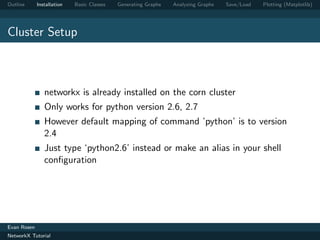
Cluster Setup


                networkx is already installed on the corn cluster
                Only works for python version 2.6, 2.7
                However default mapping of command ’python’ is to version
                2.4
                Just type ‘python2.6’ instead or make an alias in your shell
                configuration


Evan Rosen
NetworkX Tutorial
Outline      Installation   Basic Classes   Generating Graphs   Analyzing Graphs   Save/Load   Plotting (Matplotlib)


Basic Example


          >>> import networkx as nx
          >>> G = nx . Graph ()
          >>> G . add_node ( " spam " )
          >>> G . add_edge (1 ,2)
          >>> print ( G . nodes () )
          [1 , 2 , ’ spam ’]
          >>> print ( G . edges () )
          [(1 , 2) ]


Evan Rosen
NetworkX Tutorial
Outline      Installation   Basic Classes   Generating Graphs   Analyzing Graphs   Save/Load   Plotting (Matplotlib)


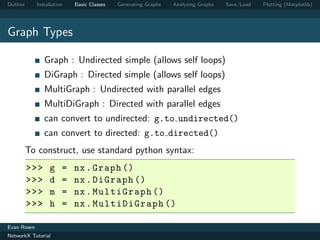
Graph Types

                Graph : Undirected simple (allows self loops)
                DiGraph : Directed simple (allows self loops)
                MultiGraph : Undirected with parallel edges
                MultiDiGraph : Directed with parallel edges
                can convert to undirected: g.to undirected()
                can convert to directed: g.to directed()
          To construct, use standard python syntax:
          >>>      g    =   nx . Graph ()
          >>>      d    =   nx . DiGraph ()
          >>>      m    =   nx . MultiGraph ()
          >>>      h    =   nx . MultiDiGraph ()

Evan Rosen
NetworkX Tutorial
Outline      Installation   Basic Classes   Generating Graphs   Analyzing Graphs   Save/Load   Plotting (Matplotlib)


Adding Nodes

                add nodes from() takes any iterable collection and any
                object

          >>> g = nx . Graph ()
          >>> g . add_node ( ’a ’)
          >>> g . add_nodes_from ( [ ‘ b ’ ,‘c ’ ,‘d ’ ])
          >>> g . add_nodes_from ( ’ xyz ’)
          >>> h = nx . path_graph (5)
          >>> g . add_nodes_from ( h )
          >>> g . nodes ()
          [0 ,1 , ‘ c ’ ,‘b ’ ,4 , ‘ d ’ ,2 ,3 ,5 , ‘ x ’ ,‘y ’ ,‘z ’]


Evan Rosen
NetworkX Tutorial
Outline      Installation   Basic Classes   Generating Graphs   Analyzing Graphs   Save/Load   Plotting (Matplotlib)


Adding Edges


                Adding an edge between nodes that don’t exist will
                automatically add those nodes
                add nodes from() takes any iterable collection and any type
                (anything that has a iter () method)

          >>> g = nx . Graph ( [( ‘ a ’ ,‘b ’) ,( ‘ b ’ ,‘c ’) ,( ‘ c ’
             ,‘a ’) ] )
          >>> g . add_edge ( ’a ’ , ’d ’)
          >>> g . add_edges_from ([( ‘ d ’ , ‘c ’) , ( ‘ d ’ , ‘b ’)
             ])


Evan Rosen
NetworkX Tutorial
Outline      Installation     Basic Classes   Generating Graphs   Analyzing Graphs   Save/Load   Plotting (Matplotlib)


Adding Node and Edge attributes
                Every node and edge is associated with a dictionary from
                attribute keys to values
                Type indifferent, just needs to be hashable
                            i.e. can’t use list, must use tuple
                            >>> G = nx . Graph ()
                            >>> G . add_node ([1 ,2])
                            Traceback ( most recent call last ) :
                            File " < stdin > " , line 1 , in < module >
                            File " / usr / lib / pymodules / python2 .7/
                               networkx / classes / graph . py " , line 377 ,
                               in add_node
                                if n not in self . adj :
                            TypeError : unhashable type : ’ list ’

                No consistency among attribute dicts enforced by NetworkX
Evan Rosen
NetworkX Tutorial
Outline      Installation   Basic Classes   Generating Graphs   Analyzing Graphs   Save/Load   Plotting (Matplotlib)


Node attributes


                Can add node attributes as optional arguments along with
                most add methods

          >>> g = nx . Graph ()
          >>> g . add_node (1 , name = ‘ Obrian ’)
          >>> g . add_nodes_from ([2] , name = ‘ Quintana ’ ])
          >>> g [1][ ‘ name ’]
          ‘ Obrian ’


Evan Rosen
NetworkX Tutorial
Outline      Installation   Basic Classes   Generating Graphs   Analyzing Graphs   Save/Load   Plotting (Matplotlib)


Edge attributes

                Can add edge attributes as optional arguments along with
                most add methods

          >>> g . add_edge (1 , 2 , w =4.7 )
          >>> g . add_edges_from ([(3 ,4) ,(4 ,5) ] , w =3.0)
          >>> g . add_edges_from ([(1 ,2 ,{ ‘ val ’ :2.0}) ])
          # adds third value in tuple as ‘ weight ’ attr
          >>> g . ad d _w ei g h t e d _ e d g e s _ f r o m ([(6 ,7 ,3.0) ])
          >>> g . get_edge_data (3 ,4)
          { ‘ w ’ : 3.0}
          >>> g . add_edge (5 ,6)
          >>> g [5][6]
          {}

Evan Rosen
NetworkX Tutorial
Outline      Installation   Basic Classes   Generating Graphs   Analyzing Graphs   Save/Load   Plotting (Matplotlib)


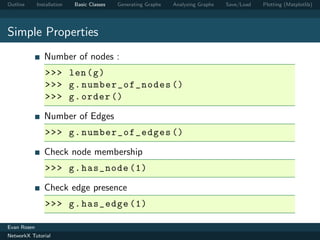
Simple Properties
                Number of nodes :
                >>> len ( g )
                >>> g . number_of_nodes ()
                >>> g . order ()

                Number of Edges
                >>> g . number_of_edges ()

                Check node membership
                >>> g . has_node (1)

                Check edge presence
                >>> g . has_edge (1)

Evan Rosen
NetworkX Tutorial
Outline      Installation   Basic Classes   Generating Graphs   Analyzing Graphs   Save/Load   Plotting (Matplotlib)


Neighbors
                Iterating over edges
                can be useful for efficiency
          >>> G = nx . Graph ()
          >>> G . add_path ([0 ,1 ,2 ,3])
          >>> [ e for e in G . edges_iter () ]
          [(0 , 1) , (1 , 2) , (2 , 3) ]
          >>> [( n , nbrs ) for n , nbrs in G . adjacency_iter
              () ]
          [(0 , {1: {}}) , (1 , {0: {} , 2: {}}) , (2 , {1:
              {} , 3: {}}) , (3 , {2: {}}) ]
          >>> G [1][2][ ’ new_attr ’] = 5
          >>> G [1][2][ ’ new_attr ’]
          5

Evan Rosen
NetworkX Tutorial
Outline      Installation   Basic Classes   Generating Graphs   Analyzing Graphs   Save/Load   Plotting (Matplotlib)


Degrees


            >>> G . degree (0)
          1
          >>> G . degree ([0 ,1])
          {0: 1 , 1: 2}
          >>> G . degree ()
          {1: 1 , 2: 2 , 3: 2 , 4: 1}
          >>> G . degree () . values () # useful for degree
              dist
          [1 , 2 , 2 , 1]


Evan Rosen
NetworkX Tutorial
Outline      Installation   Basic Classes   Generating Graphs   Analyzing Graphs   Save/Load   Plotting (Matplotlib)


Simple Graph Generators
                located in networkx.generators.classic module
                Complete Graph
                nx . complete_graph (5)

                Chain
                nx . path_graph (5)

                Bipartite
                nx . c om p l e te _ b i p a r t i t e _ g r a p h ( n1 , n2 )

                Arbitrary Dimensional Lattice (nodes are tuples of ints)
                nx . grid_graph ([10 ,10 ,10 ,10]) # 4D , 100^4
                     nodes

Evan Rosen
NetworkX Tutorial
Outline      Installation   Basic Classes   Generating Graphs   Analyzing Graphs   Save/Load   Plotting (Matplotlib)


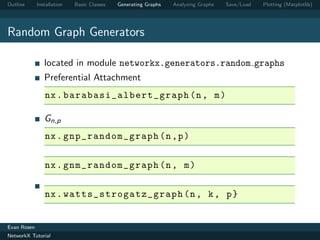
Random Graph Generators

                located in module networkx.generators.random graphs
                Preferential Attachment
                nx . ba raba si_ a l b e r t _ g r a p h (n , m )

                Gn,p
                nx . gnp_random_graph (n , p )


                nx . gnm_random_graph (n , m )


                nx . watts_str o g a t z _ g r a p h (n , k , p }


Evan Rosen
NetworkX Tutorial
Outline      Installation   Basic Classes   Generating Graphs   Analyzing Graphs   Save/Load   Plotting (Matplotlib)


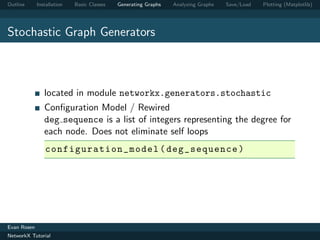
Stochastic Graph Generators


                located in module networkx.generators.stochastic
                Configuration Model / Rewired
                deg sequence is a list of integers representing the degree for
                each node. Does not eliminate self loops
                c onfiguratio n _ mo d e l ( deg_sequence )


Evan Rosen
NetworkX Tutorial
Outline      Installation   Basic Classes   Generating Graphs   Analyzing Graphs   Save/Load   Plotting (Matplotlib)


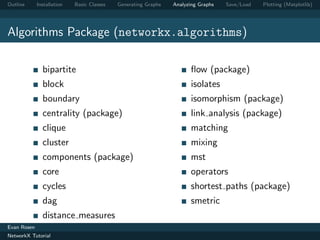
Algorithms Package (networkx.algorithms)

               bipartite                                              flow (package)
               block                                                  isolates
               boundary                                               isomorphism (package)
               centrality (package)                                   link analysis (package)
               clique                                                 matching
               cluster                                                mixing
               components (package)                                   mst
               core                                                   operators
               cycles                                                 shortest paths (package)
               dag                                                    smetric
               distance measures
Evan Rosen
NetworkX Tutorial
Outline      Installation   Basic Classes   Generating Graphs   Analyzing Graphs   Save/Load   Plotting (Matplotlib)


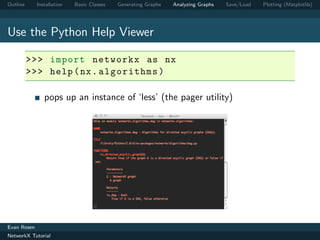
Use the Python Help Viewer

          >>> import networkx as nx
          >>> help ( nx . algorithms )

                pops up an instance of ‘less’ (the pager utility)


Evan Rosen
NetworkX Tutorial
Outline      Installation   Basic Classes   Generating Graphs   Analyzing Graphs   Save/Load   Plotting (Matplotlib)


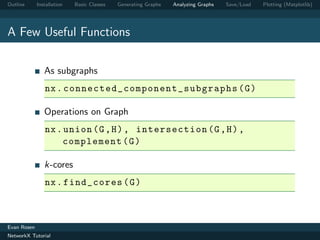
A Few Useful Functions

                As subgraphs
                nx . c o n n e c t e d _ c o m p o n e n t _ s u b g r a p h s ( G )

                Operations on Graph
                nx . union (G , H ) , intersection (G , H ) ,
                     complement ( G )

                k-cores
                nx . find_cores ( G )


Evan Rosen
NetworkX Tutorial
Outline      Installation   Basic Classes   Generating Graphs   Analyzing Graphs   Save/Load   Plotting (Matplotlib)


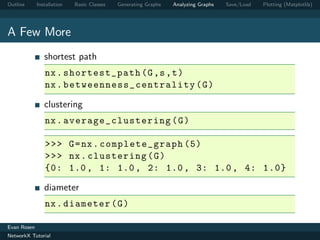
A Few More
                shortest path
                nx . shortest_path (G ,s , t )
                nx . b et we en ne s s _ c e n t r a l i t y ( G )

                clustering
                nx . average_c lu st er in g ( G )

                >>> G = nx . complete_graph (5)
                >>> nx . clustering ( G )
                {0: 1.0 , 1: 1.0 , 2: 1.0 , 3: 1.0 , 4: 1.0}

                diameter
                nx . diameter ( G )

Evan Rosen
NetworkX Tutorial
Outline      Installation   Basic Classes   Generating Graphs   Analyzing Graphs   Save/Load   Plotting (Matplotlib)


Edge List Text File

          nx . read_edgelist ( ‘ elist ’ , comment = ‘# ’ ,
               delimiter = ‘ t ’)
          nx . write_edgelist (G , path )
          >>> G . edges ()
          [( u ‘1 ’ , u ‘3 ’) , (u ‘1 ’ , u ‘2 ’) , (u ‘3 ’ , u ‘2 ’) ]
          >>> G . add_edge (u ‘1 ’ ,u ‘3 ’)
          >>> nx . save_edgelist (G , ’ elist_new ’ , data =
               False )


      # edge list file                                          # new edge list file
      1       2                                                 1       2
      3       2                                                 3       2
                                                                3       1

Evan Rosen
NetworkX Tutorial
Outline      Installation   Basic Classes   Generating Graphs   Analyzing Graphs   Save/Load   Plotting (Matplotlib)


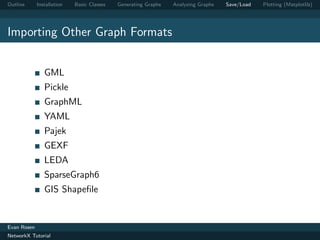
Importing Other Graph Formats


                GML
                Pickle
                GraphML
                YAML
                Pajek
                GEXF
                LEDA
                SparseGraph6
                GIS Shapefile


Evan Rosen
NetworkX Tutorial
Outline      Installation     Basic Classes   Generating Graphs   Analyzing Graphs   Save/Load   Plotting (Matplotlib)


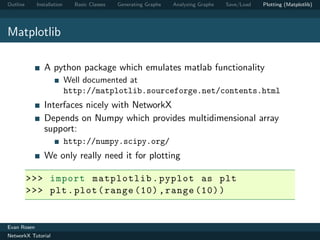
Matplotlib

                A python package which emulates matlab functionality
                            Well documented at
                            http://matplotlib.sourceforge.net/contents.html
                Interfaces nicely with NetworkX
                Depends on Numpy which provides multidimensional array
                support:
                            http://numpy.scipy.org/
                We only really need it for plotting

          >>> import matplotlib . pyplot as plt
          >>> plt . plot ( range (10) , range (10) )


Evan Rosen
NetworkX Tutorial
Outline      Installation     Basic Classes   Generating Graphs   Analyzing Graphs   Save/Load   Plotting (Matplotlib)


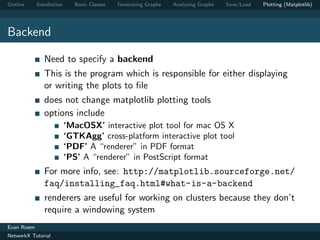
Backend

                Need to specify a backend
                This is the program which is responsible for either displaying
                or writing the plots to file
                does not change matplotlib plotting tools
                options include
                            ‘MacOSX’ interactive plot tool for mac OS X
                            ‘GTKAgg’ cross-platform interactive plot tool
                            ‘PDF’ A “renderer” in PDF format
                            ‘PS’ A “renderer” in PostScript format
                For more info, see: http://matplotlib.sourceforge.net/
                faq/installing_faq.html#what-is-a-backend
                renderers are useful for working on clusters because they don’t
                require a windowing system
Evan Rosen
NetworkX Tutorial
Outline      Installation   Basic Classes   Generating Graphs   Analyzing Graphs   Save/Load   Plotting (Matplotlib)


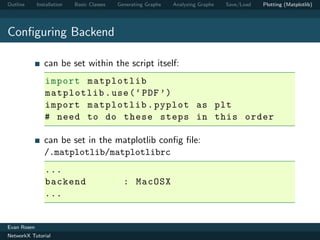
Configuring Backend

                can be set within the script itself:
                import matplotlib
                matplotlib . use ( ‘ PDF ’)
                import matplotlib . pyplot as plt
                # need to do these steps in this order

                can be set in the matplotlib config file:
                /.matplotlib/matplotlibrc
                ...
                backend                       : MacOSX
                ...


Evan Rosen
NetworkX Tutorial
Outline      Installation   Basic Classes   Generating Graphs        Analyzing Graphs   Save/Load   Plotting (Matplotlib)


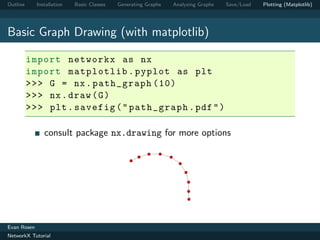
Basic Graph Drawing (with matplotlib)

          import networkx as nx
          import matplotlib . pyplot as plt
          >>> G = nx . path_graph (10)
          >>> nx . draw ( G )
          >>> plt . savefig ( " path_graph . pdf " )

                consult package nx.drawing for more options
                                                         7   6
                                                     8           5
                                                 9
                                                                       4


                                                                           3


                                                                               2


                                                                               1

                                                                               0


Evan Rosen
NetworkX Tutorial
Outline      Installation   Basic Classes   Generating Graphs   Analyzing Graphs   Save/Load   Plotting (Matplotlib)


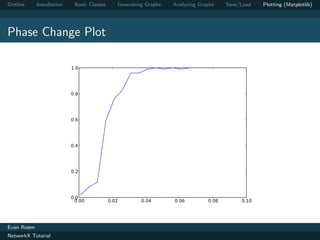
Basic Data Plotting

          def get_phase_curve ( n ) :
              ps = np . arange (0.001 ,0.1 ,0.005)
              cs = []
              for p in ps :
                  G = nx . gnp_random_graph (n , p )
                  c = nx . c o n n e c t e d _ c o m p o n e n t _ s u b g r a p h s
                      ( G ) [0]. order ()
                  cs . append ( float ( c ) /100)
              return cs

           plt . plot ( ps , get_phase_curve (100) )
           plt . savefig ( ‘ phase . pdf ’)


Evan Rosen
NetworkX Tutorial
Outline      Installation    Basic Classes      Generating Graphs   Analyzing Graphs    Save/Load   Plotting (Matplotlib)


Phase Change Plot

                            1.0


                            0.8


                            0.6


                            0.4


                            0.2


                            0.0
                             0.00            0.02        0.04       0.06         0.08        0.10


Evan Rosen
NetworkX Tutorial
Outline      Installation   Basic Classes    Generating Graphs           Analyzing Graphs   Save/Load   Plotting (Matplotlib)


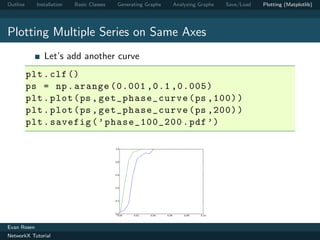
Plotting Multiple Series on Same Axes
                Let’s add another curve
          plt . clf ()
          ps = np . arange (0.001 ,0.1 ,0.005)
          plt . plot ( ps , get_phase_curve ( ps ,100) )
          plt . plot ( ps , get_phase_curve ( ps ,200) )
          plt . savefig ( ’ phase_100_200 . pdf ’)

                                            1.0


                                            0.8


                                            0.6


                                            0.4


                                            0.2


                                            0.0
                                             0.00   0.02   0.04   0.06       0.08   0.10


Evan Rosen
NetworkX Tutorial
Outline      Installation     Basic Classes   Generating Graphs   Analyzing Graphs   Save/Load   Plotting (Matplotlib)


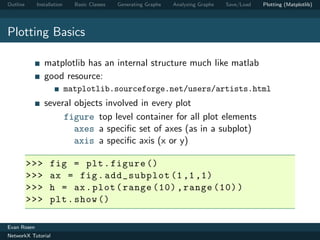
Plotting Basics

                matplotlib has an internal structure much like matlab
                good resource:
                            matplotlib.sourceforge.net/users/artists.html
                several objects involved in every plot
                     figure top level container for all plot elements
                        axes a specific set of axes (as in a subplot)
                        axis a specific axis (x or y)

          >>>      fig = plt . figure ()
          >>>      ax = fig . add_subplot (1 ,1 ,1)
          >>>      h = ax . plot ( range (10) , range (10) )
          >>>      plt . show ()

Evan Rosen
NetworkX Tutorial
Outline      Installation   Basic Classes   Generating Graphs     Analyzing Graphs      Save/Load   Plotting (Matplotlib)


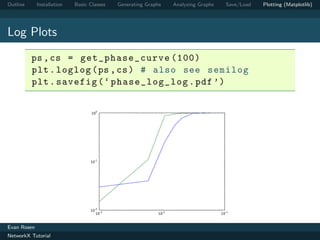
Log Plots
          ps , cs = get_phase_curve (100)
          plt . loglog ( ps , cs ) # also see semilog
          plt . savefig ( ‘ phase_log_log . pdf ’)


                                   100


                                  10-1


                                  10-2 -3
                                     10                    10-2                      10-1

Evan Rosen
NetworkX Tutorial
Outline      Installation   Basic Classes   Generating Graphs   Analyzing Graphs   Save/Load   Plotting (Matplotlib)


Legends


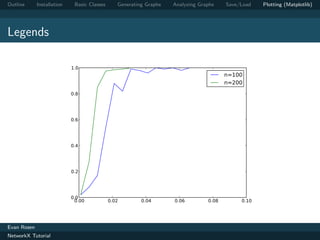
                each call to plt.plot returns a handle object for the series
                of type matplotlib.lines.Line2D
                to add a legend, call use method
                plt.legend([handles],[labels])
                can control placement with keyword argument
                loc=[1,. . .,10] (uppper left, lower left, ...)

          h_100 = plt . plot ( ps , get_phase_curve (100) )
          h_200 = plt . plot ( ps , get_phase_curve (200) )
          plt . legend ([ h_100 , h_200 ] ,[ ‘ n =100 ’ ,‘n =200 ’ ])


Evan Rosen
NetworkX Tutorial
Outline      Installation    Basic Classes      Generating Graphs   Analyzing Graphs    Save/Load   Plotting (Matplotlib)


Legends

                            1.0
                                                                                        n=100
                                                                                        n=200
                            0.8


                            0.6


                            0.4


                            0.2


                            0.0
                             0.00            0.02        0.04       0.06         0.08        0.10


Evan Rosen
NetworkX Tutorial
Outline      Installation   Basic Classes   Generating Graphs   Analyzing Graphs   Save/Load   Plotting (Matplotlib)


Legends
                Can use Latex:
                plt . legend ([ h_100 , h_200 ] ,[ ’ $$ n =100 $$ ’ , ’
                    $$ n =200 $$ ’ ])


Evan Rosen
NetworkX Tutorial
Outline      Installation   Basic Classes   Generating Graphs   Analyzing Graphs   Save/Load   Plotting (Matplotlib)


Resources
                NetworkX Docs
                http://networkx.lanl.gov/tutorial/index.html
                NetworkX Tutorial
                http://networkx.lanl.gov/contents.html
                Matplotlib Docs
                http://matplotlib.sourceforge.net/contents.html
                Matplotlib Tutorial
                http://matplotlib.sourceforge.net/users/pyplot_
                tutorial.html
                Numpy Docs
                http://numpy.scipy.org/
                MacPorts
                http://macports.org
Evan Rosen
NetworkX Tutorial

Nx tutorial basics

  • 1.
    Outline Installation Basic Classes Generating Graphs Analyzing Graphs Save/Load Plotting (Matplotlib) NetworkX Tutorial Evan Rosen October 6, 2011 Evan Rosen NetworkX Tutorial
  • 2.
    Outline Installation Basic Classes Generating Graphs Analyzing Graphs Save/Load Plotting (Matplotlib) 1 Installation 2 Basic Classes 3 Generating Graphs 4 Analyzing Graphs 5 Save/Load 6 Plotting (Matplotlib) Evan Rosen NetworkX Tutorial
  • 3.
    Outline Installation Basic Classes Generating Graphs Analyzing Graphs Save/Load Plotting (Matplotlib) Local Installation install manually from http://pypi.python.org/pypi/networkx or use built-in python package manager, easy install $ easy install networkx or use macports $ sudo port install py27-networkx use pip (replacement for easy install) $ sudo pip install networkx or use debian package manager $ sudo apt-get install python-networkx Evan Rosen NetworkX Tutorial
  • 4.
    Outline Installation Basic Classes Generating Graphs Analyzing Graphs Save/Load Plotting (Matplotlib) Cluster Setup networkx is already installed on the corn cluster Only works for python version 2.6, 2.7 However default mapping of command ’python’ is to version 2.4 Just type ‘python2.6’ instead or make an alias in your shell configuration Evan Rosen NetworkX Tutorial
  • 5.
    Outline Installation Basic Classes Generating Graphs Analyzing Graphs Save/Load Plotting (Matplotlib) Basic Example >>> import networkx as nx >>> G = nx . Graph () >>> G . add_node ( " spam " ) >>> G . add_edge (1 ,2) >>> print ( G . nodes () ) [1 , 2 , ’ spam ’] >>> print ( G . edges () ) [(1 , 2) ] Evan Rosen NetworkX Tutorial
  • 6.
    Outline Installation Basic Classes Generating Graphs Analyzing Graphs Save/Load Plotting (Matplotlib) Graph Types Graph : Undirected simple (allows self loops) DiGraph : Directed simple (allows self loops) MultiGraph : Undirected with parallel edges MultiDiGraph : Directed with parallel edges can convert to undirected: g.to undirected() can convert to directed: g.to directed() To construct, use standard python syntax: >>> g = nx . Graph () >>> d = nx . DiGraph () >>> m = nx . MultiGraph () >>> h = nx . MultiDiGraph () Evan Rosen NetworkX Tutorial
  • 7.
    Outline Installation Basic Classes Generating Graphs Analyzing Graphs Save/Load Plotting (Matplotlib) Adding Nodes add nodes from() takes any iterable collection and any object >>> g = nx . Graph () >>> g . add_node ( ’a ’) >>> g . add_nodes_from ( [ ‘ b ’ ,‘c ’ ,‘d ’ ]) >>> g . add_nodes_from ( ’ xyz ’) >>> h = nx . path_graph (5) >>> g . add_nodes_from ( h ) >>> g . nodes () [0 ,1 , ‘ c ’ ,‘b ’ ,4 , ‘ d ’ ,2 ,3 ,5 , ‘ x ’ ,‘y ’ ,‘z ’] Evan Rosen NetworkX Tutorial
  • 8.
    Outline Installation Basic Classes Generating Graphs Analyzing Graphs Save/Load Plotting (Matplotlib) Adding Edges Adding an edge between nodes that don’t exist will automatically add those nodes add nodes from() takes any iterable collection and any type (anything that has a iter () method) >>> g = nx . Graph ( [( ‘ a ’ ,‘b ’) ,( ‘ b ’ ,‘c ’) ,( ‘ c ’ ,‘a ’) ] ) >>> g . add_edge ( ’a ’ , ’d ’) >>> g . add_edges_from ([( ‘ d ’ , ‘c ’) , ( ‘ d ’ , ‘b ’) ]) Evan Rosen NetworkX Tutorial
  • 9.
    Outline Installation Basic Classes Generating Graphs Analyzing Graphs Save/Load Plotting (Matplotlib) Adding Node and Edge attributes Every node and edge is associated with a dictionary from attribute keys to values Type indifferent, just needs to be hashable i.e. can’t use list, must use tuple >>> G = nx . Graph () >>> G . add_node ([1 ,2]) Traceback ( most recent call last ) : File " < stdin > " , line 1 , in < module > File " / usr / lib / pymodules / python2 .7/ networkx / classes / graph . py " , line 377 , in add_node if n not in self . adj : TypeError : unhashable type : ’ list ’ No consistency among attribute dicts enforced by NetworkX Evan Rosen NetworkX Tutorial
  • 10.
    Outline Installation Basic Classes Generating Graphs Analyzing Graphs Save/Load Plotting (Matplotlib) Node attributes Can add node attributes as optional arguments along with most add methods >>> g = nx . Graph () >>> g . add_node (1 , name = ‘ Obrian ’) >>> g . add_nodes_from ([2] , name = ‘ Quintana ’ ]) >>> g [1][ ‘ name ’] ‘ Obrian ’ Evan Rosen NetworkX Tutorial
  • 11.
    Outline Installation Basic Classes Generating Graphs Analyzing Graphs Save/Load Plotting (Matplotlib) Edge attributes Can add edge attributes as optional arguments along with most add methods >>> g . add_edge (1 , 2 , w =4.7 ) >>> g . add_edges_from ([(3 ,4) ,(4 ,5) ] , w =3.0) >>> g . add_edges_from ([(1 ,2 ,{ ‘ val ’ :2.0}) ]) # adds third value in tuple as ‘ weight ’ attr >>> g . ad d _w ei g h t e d _ e d g e s _ f r o m ([(6 ,7 ,3.0) ]) >>> g . get_edge_data (3 ,4) { ‘ w ’ : 3.0} >>> g . add_edge (5 ,6) >>> g [5][6] {} Evan Rosen NetworkX Tutorial
  • 12.
    Outline Installation Basic Classes Generating Graphs Analyzing Graphs Save/Load Plotting (Matplotlib) Simple Properties Number of nodes : >>> len ( g ) >>> g . number_of_nodes () >>> g . order () Number of Edges >>> g . number_of_edges () Check node membership >>> g . has_node (1) Check edge presence >>> g . has_edge (1) Evan Rosen NetworkX Tutorial
  • 13.
    Outline Installation Basic Classes Generating Graphs Analyzing Graphs Save/Load Plotting (Matplotlib) Neighbors Iterating over edges can be useful for efficiency >>> G = nx . Graph () >>> G . add_path ([0 ,1 ,2 ,3]) >>> [ e for e in G . edges_iter () ] [(0 , 1) , (1 , 2) , (2 , 3) ] >>> [( n , nbrs ) for n , nbrs in G . adjacency_iter () ] [(0 , {1: {}}) , (1 , {0: {} , 2: {}}) , (2 , {1: {} , 3: {}}) , (3 , {2: {}}) ] >>> G [1][2][ ’ new_attr ’] = 5 >>> G [1][2][ ’ new_attr ’] 5 Evan Rosen NetworkX Tutorial
  • 14.
    Outline Installation Basic Classes Generating Graphs Analyzing Graphs Save/Load Plotting (Matplotlib) Degrees >>> G . degree (0) 1 >>> G . degree ([0 ,1]) {0: 1 , 1: 2} >>> G . degree () {1: 1 , 2: 2 , 3: 2 , 4: 1} >>> G . degree () . values () # useful for degree dist [1 , 2 , 2 , 1] Evan Rosen NetworkX Tutorial
  • 15.
    Outline Installation Basic Classes Generating Graphs Analyzing Graphs Save/Load Plotting (Matplotlib) Simple Graph Generators located in networkx.generators.classic module Complete Graph nx . complete_graph (5) Chain nx . path_graph (5) Bipartite nx . c om p l e te _ b i p a r t i t e _ g r a p h ( n1 , n2 ) Arbitrary Dimensional Lattice (nodes are tuples of ints) nx . grid_graph ([10 ,10 ,10 ,10]) # 4D , 100^4 nodes Evan Rosen NetworkX Tutorial
  • 16.
    Outline Installation Basic Classes Generating Graphs Analyzing Graphs Save/Load Plotting (Matplotlib) Random Graph Generators located in module networkx.generators.random graphs Preferential Attachment nx . ba raba si_ a l b e r t _ g r a p h (n , m ) Gn,p nx . gnp_random_graph (n , p ) nx . gnm_random_graph (n , m ) nx . watts_str o g a t z _ g r a p h (n , k , p } Evan Rosen NetworkX Tutorial
  • 17.
    Outline Installation Basic Classes Generating Graphs Analyzing Graphs Save/Load Plotting (Matplotlib) Stochastic Graph Generators located in module networkx.generators.stochastic Configuration Model / Rewired deg sequence is a list of integers representing the degree for each node. Does not eliminate self loops c onfiguratio n _ mo d e l ( deg_sequence ) Evan Rosen NetworkX Tutorial
  • 18.
    Outline Installation Basic Classes Generating Graphs Analyzing Graphs Save/Load Plotting (Matplotlib) Algorithms Package (networkx.algorithms) bipartite flow (package) block isolates boundary isomorphism (package) centrality (package) link analysis (package) clique matching cluster mixing components (package) mst core operators cycles shortest paths (package) dag smetric distance measures Evan Rosen NetworkX Tutorial
  • 19.
    Outline Installation Basic Classes Generating Graphs Analyzing Graphs Save/Load Plotting (Matplotlib) Use the Python Help Viewer >>> import networkx as nx >>> help ( nx . algorithms ) pops up an instance of ‘less’ (the pager utility) Evan Rosen NetworkX Tutorial
  • 20.
    Outline Installation Basic Classes Generating Graphs Analyzing Graphs Save/Load Plotting (Matplotlib) A Few Useful Functions As subgraphs nx . c o n n e c t e d _ c o m p o n e n t _ s u b g r a p h s ( G ) Operations on Graph nx . union (G , H ) , intersection (G , H ) , complement ( G ) k-cores nx . find_cores ( G ) Evan Rosen NetworkX Tutorial
  • 21.
    Outline Installation Basic Classes Generating Graphs Analyzing Graphs Save/Load Plotting (Matplotlib) A Few More shortest path nx . shortest_path (G ,s , t ) nx . b et we en ne s s _ c e n t r a l i t y ( G ) clustering nx . average_c lu st er in g ( G ) >>> G = nx . complete_graph (5) >>> nx . clustering ( G ) {0: 1.0 , 1: 1.0 , 2: 1.0 , 3: 1.0 , 4: 1.0} diameter nx . diameter ( G ) Evan Rosen NetworkX Tutorial
  • 22.
    Outline Installation Basic Classes Generating Graphs Analyzing Graphs Save/Load Plotting (Matplotlib) Edge List Text File nx . read_edgelist ( ‘ elist ’ , comment = ‘# ’ , delimiter = ‘ t ’) nx . write_edgelist (G , path ) >>> G . edges () [( u ‘1 ’ , u ‘3 ’) , (u ‘1 ’ , u ‘2 ’) , (u ‘3 ’ , u ‘2 ’) ] >>> G . add_edge (u ‘1 ’ ,u ‘3 ’) >>> nx . save_edgelist (G , ’ elist_new ’ , data = False ) # edge list file # new edge list file 1 2 1 2 3 2 3 2 3 1 Evan Rosen NetworkX Tutorial
  • 23.
    Outline Installation Basic Classes Generating Graphs Analyzing Graphs Save/Load Plotting (Matplotlib) Importing Other Graph Formats GML Pickle GraphML YAML Pajek GEXF LEDA SparseGraph6 GIS Shapefile Evan Rosen NetworkX Tutorial
  • 24.
    Outline Installation Basic Classes Generating Graphs Analyzing Graphs Save/Load Plotting (Matplotlib) Matplotlib A python package which emulates matlab functionality Well documented at http://matplotlib.sourceforge.net/contents.html Interfaces nicely with NetworkX Depends on Numpy which provides multidimensional array support: http://numpy.scipy.org/ We only really need it for plotting >>> import matplotlib . pyplot as plt >>> plt . plot ( range (10) , range (10) ) Evan Rosen NetworkX Tutorial
  • 25.
    Outline Installation Basic Classes Generating Graphs Analyzing Graphs Save/Load Plotting (Matplotlib) Backend Need to specify a backend This is the program which is responsible for either displaying or writing the plots to file does not change matplotlib plotting tools options include ‘MacOSX’ interactive plot tool for mac OS X ‘GTKAgg’ cross-platform interactive plot tool ‘PDF’ A “renderer” in PDF format ‘PS’ A “renderer” in PostScript format For more info, see: http://matplotlib.sourceforge.net/ faq/installing_faq.html#what-is-a-backend renderers are useful for working on clusters because they don’t require a windowing system Evan Rosen NetworkX Tutorial
  • 26.
    Outline Installation Basic Classes Generating Graphs Analyzing Graphs Save/Load Plotting (Matplotlib) Configuring Backend can be set within the script itself: import matplotlib matplotlib . use ( ‘ PDF ’) import matplotlib . pyplot as plt # need to do these steps in this order can be set in the matplotlib config file: /.matplotlib/matplotlibrc ... backend : MacOSX ... Evan Rosen NetworkX Tutorial
  • 27.
    Outline Installation Basic Classes Generating Graphs Analyzing Graphs Save/Load Plotting (Matplotlib) Basic Graph Drawing (with matplotlib) import networkx as nx import matplotlib . pyplot as plt >>> G = nx . path_graph (10) >>> nx . draw ( G ) >>> plt . savefig ( " path_graph . pdf " ) consult package nx.drawing for more options 7 6 8 5 9 4 3 2 1 0 Evan Rosen NetworkX Tutorial
  • 28.
    Outline Installation Basic Classes Generating Graphs Analyzing Graphs Save/Load Plotting (Matplotlib) Basic Data Plotting def get_phase_curve ( n ) : ps = np . arange (0.001 ,0.1 ,0.005) cs = [] for p in ps : G = nx . gnp_random_graph (n , p ) c = nx . c o n n e c t e d _ c o m p o n e n t _ s u b g r a p h s ( G ) [0]. order () cs . append ( float ( c ) /100) return cs plt . plot ( ps , get_phase_curve (100) ) plt . savefig ( ‘ phase . pdf ’) Evan Rosen NetworkX Tutorial
  • 29.
    Outline Installation Basic Classes Generating Graphs Analyzing Graphs Save/Load Plotting (Matplotlib) Phase Change Plot 1.0 0.8 0.6 0.4 0.2 0.0 0.00 0.02 0.04 0.06 0.08 0.10 Evan Rosen NetworkX Tutorial
  • 30.
    Outline Installation Basic Classes Generating Graphs Analyzing Graphs Save/Load Plotting (Matplotlib) Plotting Multiple Series on Same Axes Let’s add another curve plt . clf () ps = np . arange (0.001 ,0.1 ,0.005) plt . plot ( ps , get_phase_curve ( ps ,100) ) plt . plot ( ps , get_phase_curve ( ps ,200) ) plt . savefig ( ’ phase_100_200 . pdf ’) 1.0 0.8 0.6 0.4 0.2 0.0 0.00 0.02 0.04 0.06 0.08 0.10 Evan Rosen NetworkX Tutorial
  • 31.
    Outline Installation Basic Classes Generating Graphs Analyzing Graphs Save/Load Plotting (Matplotlib) Plotting Basics matplotlib has an internal structure much like matlab good resource: matplotlib.sourceforge.net/users/artists.html several objects involved in every plot figure top level container for all plot elements axes a specific set of axes (as in a subplot) axis a specific axis (x or y) >>> fig = plt . figure () >>> ax = fig . add_subplot (1 ,1 ,1) >>> h = ax . plot ( range (10) , range (10) ) >>> plt . show () Evan Rosen NetworkX Tutorial
  • 32.
    Outline Installation Basic Classes Generating Graphs Analyzing Graphs Save/Load Plotting (Matplotlib) Log Plots ps , cs = get_phase_curve (100) plt . loglog ( ps , cs ) # also see semilog plt . savefig ( ‘ phase_log_log . pdf ’) 100 10-1 10-2 -3 10 10-2 10-1 Evan Rosen NetworkX Tutorial
  • 33.
    Outline Installation Basic Classes Generating Graphs Analyzing Graphs Save/Load Plotting (Matplotlib) Legends each call to plt.plot returns a handle object for the series of type matplotlib.lines.Line2D to add a legend, call use method plt.legend([handles],[labels]) can control placement with keyword argument loc=[1,. . .,10] (uppper left, lower left, ...) h_100 = plt . plot ( ps , get_phase_curve (100) ) h_200 = plt . plot ( ps , get_phase_curve (200) ) plt . legend ([ h_100 , h_200 ] ,[ ‘ n =100 ’ ,‘n =200 ’ ]) Evan Rosen NetworkX Tutorial
  • 34.
    Outline Installation Basic Classes Generating Graphs Analyzing Graphs Save/Load Plotting (Matplotlib) Legends 1.0 n=100 n=200 0.8 0.6 0.4 0.2 0.0 0.00 0.02 0.04 0.06 0.08 0.10 Evan Rosen NetworkX Tutorial
  • 35.
    Outline Installation Basic Classes Generating Graphs Analyzing Graphs Save/Load Plotting (Matplotlib) Legends Can use Latex: plt . legend ([ h_100 , h_200 ] ,[ ’ $$ n =100 $$ ’ , ’ $$ n =200 $$ ’ ]) Evan Rosen NetworkX Tutorial
  • 36.
    Outline Installation Basic Classes Generating Graphs Analyzing Graphs Save/Load Plotting (Matplotlib) Resources NetworkX Docs http://networkx.lanl.gov/tutorial/index.html NetworkX Tutorial http://networkx.lanl.gov/contents.html Matplotlib Docs http://matplotlib.sourceforge.net/contents.html Matplotlib Tutorial http://matplotlib.sourceforge.net/users/pyplot_ tutorial.html Numpy Docs http://numpy.scipy.org/ MacPorts http://macports.org Evan Rosen NetworkX Tutorial