Monitoring with Prometheus
at Scale
Adam Hamsik
adam.hamsik@lablabs.io
Labyrinth Labs
Rock-solid infrastructure and DevOps
● Building rock-solid and secure foundations for all your digital operations. Our
mission is to let you focus on your business without ever needing to worry
about technical issues again.
● Making you ready for growing traffic, safe against new security vulnerabilities
and data-loss.
2
TL;DR
● We will start with common monitoring issues and problems.
● Deploying Prometheus is easy and running a single instance can be sufficient
for most deployments.
● We will have a quick look at AlertManager
● We will talk about scalability limits of prometheus instance, when and how to
use sharding.
● What is Trickster and why you should use it too
● How Thanos/Cortex can help you when all hope is lost.
3
Common Monitoring Problems
● Monitoring tools are limited both technically and conceptually
● Most of existing tools don’t really scale with current infrastructure needs.
● Limited visibility
○ Generally we want to monitor and gather as much information as we can.
○ Even if we don’t need it right away usually it will be useful in a future(I promise)
● No common application monitoring interface. There are different
protocols/standards
○ Openmetrics
○ SNMP
4
Common Monitoring Problems
5
Prometheus Monitoring System
The Prometheus monitoring system and time series database is CNCF graduated
project.
● Originally developed by exGooglers for SoundCloud as their internal monitoring
system
● Inspired by Google’s Borgmon monitoring system
● Open Source under the Apache License
● Written as monolithic application in Go
6
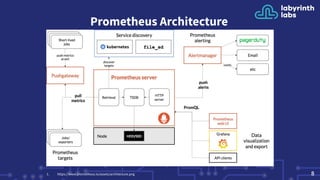
Prometheus Server Overview
● Multi-dimensional data model with time series data identified by metric
name and key/value(labels) pairs
● PromQL, a flexible query language to leverage this dimensionality
● No reliance on distributed storage; single server nodes are autonomous
● Targets are discovered via service discovery or static configuration
● Pushing time series is supported via an intermediary gateway
● Monitor Services not Machines/Servers
7
Prometheus Architecture
81. https://www.prometheus.io/assets/architecture.png
Company Prometheus
Usage
● We deployed first prometheus servers
● Add some services
● Setup trickster as a Grafana Cache
● Add more services/servers
● Continuous adding of CPU/Memory to Prometheus instance
● Setup simple federation/sharding if single instance is too big
● Use Thanos
9
First Prometheus Deployment
● Deploying your first Prometheus server is very easy. Fetch prometheus
binary + config.
● There is a no concept of a Prometheus Cluster
● Generally Prometheus can scale very well with CPU/Memory
○ Providing more cpu/memory allows prometheus to monitor more
metrics
○ It’s hard to run large pod in a kubernetes cluster if it’s as big as a
worker node.
● If job is too big for a single server you can use federation/sharding
(remote reads) for simple scaling
10
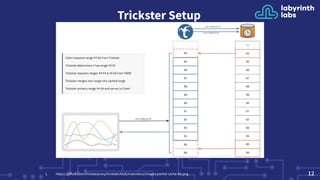
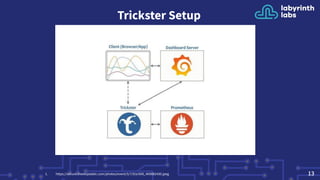
Trickster Setup
● Loading complicated/big dashboard on Grafana can overload your
prometheus server
○ Use trickster to cache PromQL results for future reuse
○ Queries on metrics with high cardinality can use a lot of memory on
you prometheus instance[1].
○ Use limits to make sure user will not overload your server
query.max-concurrency/query.max-samples
● Delta Proxy caching - inspects the time range of a client query to
determine what data points are already cached
111. https://www.robustperception.io/limiting-promql-resource-usage
Trickster Setup
121. https://github.com/tricksterproxy/trickster/blob/main/docs/images/partial-cache-hit.png
Trickster Setup
131. https://secure.meetupstatic.com/photos/event/5/7/9/e/600_469882430.jpeg
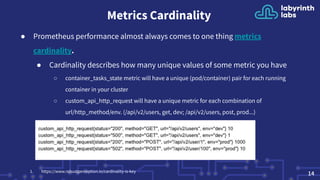
Metrics Cardinality
● Prometheus performance almost always comes to one thing metrics
cardinality.
● Cardinality describes how many unique values of some metric you have
○ container_tasks_state metric will have a unique (pod/container) pair for each running
container in your cluster
○ custom_api_http_request will have a unique metric for each combination of
url/http_method/env. (/api/v2/users, get, dev; /api/v2/users, post, prod...)
141. https://www.robustperception.io/cardinality-is-key
Bad Metrics Cardinality
151. https://www.robustperception.io/cardinality-is-key
● See example below where we throw away bad fluentd metrics and dropped number of
scrapped metrics by ½
● If you are using fluentd look for fluentd_tail_file_inode, fluentd_tail_file_position
○ In our use case we saw cardinality 1220 from 2 metrics above per node !
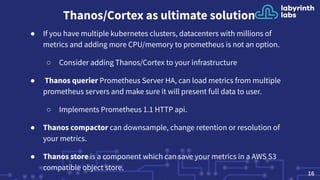
Thanos/Cortex as ultimate solution
● If you have multiple kubernetes clusters, datacenters with millions of
metrics and adding more CPU/memory to prometheus is not an option.
○ Consider adding Thanos/Cortex to your infrastructure
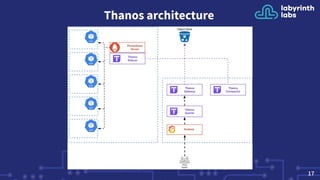
● Thanos querier Prometheus Server HA, can load metrics from multiple
prometheus servers and make sure it will present full data to user.
○ Implements Prometheus 1.1 HTTP api.
● Thanos compactor can downsample, change retention or resolution of
your metrics.
● Thanos store is a component which can save your metrics in a AWS S3
compatible object store.
16
Thanos architecture
17
Thanos SideCar
18
● It implements Thanos’ Store API on top of Prometheus’ remote-read API. This allows
Queriers to treat Prometheus servers as yet another source of time series data without
directly talking to its APIs.
● Optionally, the sidecar uploads TSDB blocks to an object storage bucket as Prometheus
produces them every 2 hours. This allows Prometheus servers to be run with relatively
low retention while their historic data is made durable and queryable via object storage.
● Optionally Thanos sidecar is able to watch Prometheus rules and configuration,
decompress and substitute environment variables if needed and ping Prometheus to
reload them.
Thanos Query
19
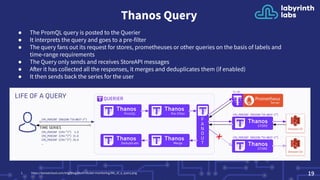
● The PromQL query is posted to the Querier
● It interprets the query and goes to a pre-filter
● The query fans out its request for stores, prometheuses or other queries on the basis of labels and
time-range requirements
● The Query only sends and receives StoreAPI messages
● After it has collected all the responses, it merges and deduplicates them (if enabled)
● It then sends back the series for the user
1. https://banzaicloud.com/img/blog/multi-cluster-monitoring/life_of_a_query.png
Questions ?
20
Thank You.
We are hiring, remote working DevOps/Kubernetes
engineers.
adam.hamsik@lablabs.io
www.lablabs.io
21

Monitoring with prometheus at scale

  • 1.
    Monitoring with Prometheus atScale Adam Hamsik adam.hamsik@lablabs.io
  • 2.
    Labyrinth Labs Rock-solid infrastructureand DevOps ● Building rock-solid and secure foundations for all your digital operations. Our mission is to let you focus on your business without ever needing to worry about technical issues again. ● Making you ready for growing traffic, safe against new security vulnerabilities and data-loss. 2
  • 3.
    TL;DR ● We willstart with common monitoring issues and problems. ● Deploying Prometheus is easy and running a single instance can be sufficient for most deployments. ● We will have a quick look at AlertManager ● We will talk about scalability limits of prometheus instance, when and how to use sharding. ● What is Trickster and why you should use it too ● How Thanos/Cortex can help you when all hope is lost. 3
  • 4.
    Common Monitoring Problems ●Monitoring tools are limited both technically and conceptually ● Most of existing tools don’t really scale with current infrastructure needs. ● Limited visibility ○ Generally we want to monitor and gather as much information as we can. ○ Even if we don’t need it right away usually it will be useful in a future(I promise) ● No common application monitoring interface. There are different protocols/standards ○ Openmetrics ○ SNMP 4
  • 5.
  • 6.
    Prometheus Monitoring System ThePrometheus monitoring system and time series database is CNCF graduated project. ● Originally developed by exGooglers for SoundCloud as their internal monitoring system ● Inspired by Google’s Borgmon monitoring system ● Open Source under the Apache License ● Written as monolithic application in Go 6
  • 7.
    Prometheus Server Overview ●Multi-dimensional data model with time series data identified by metric name and key/value(labels) pairs ● PromQL, a flexible query language to leverage this dimensionality ● No reliance on distributed storage; single server nodes are autonomous ● Targets are discovered via service discovery or static configuration ● Pushing time series is supported via an intermediary gateway ● Monitor Services not Machines/Servers 7
  • 8.
  • 9.
    Company Prometheus Usage ● Wedeployed first prometheus servers ● Add some services ● Setup trickster as a Grafana Cache ● Add more services/servers ● Continuous adding of CPU/Memory to Prometheus instance ● Setup simple federation/sharding if single instance is too big ● Use Thanos 9
  • 10.
    First Prometheus Deployment ●Deploying your first Prometheus server is very easy. Fetch prometheus binary + config. ● There is a no concept of a Prometheus Cluster ● Generally Prometheus can scale very well with CPU/Memory ○ Providing more cpu/memory allows prometheus to monitor more metrics ○ It’s hard to run large pod in a kubernetes cluster if it’s as big as a worker node. ● If job is too big for a single server you can use federation/sharding (remote reads) for simple scaling 10
  • 11.
    Trickster Setup ● Loadingcomplicated/big dashboard on Grafana can overload your prometheus server ○ Use trickster to cache PromQL results for future reuse ○ Queries on metrics with high cardinality can use a lot of memory on you prometheus instance[1]. ○ Use limits to make sure user will not overload your server query.max-concurrency/query.max-samples ● Delta Proxy caching - inspects the time range of a client query to determine what data points are already cached 111. https://www.robustperception.io/limiting-promql-resource-usage
  • 12.
  • 13.
  • 14.
    Metrics Cardinality ● Prometheusperformance almost always comes to one thing metrics cardinality. ● Cardinality describes how many unique values of some metric you have ○ container_tasks_state metric will have a unique (pod/container) pair for each running container in your cluster ○ custom_api_http_request will have a unique metric for each combination of url/http_method/env. (/api/v2/users, get, dev; /api/v2/users, post, prod...) 141. https://www.robustperception.io/cardinality-is-key
  • 15.
    Bad Metrics Cardinality 151.https://www.robustperception.io/cardinality-is-key ● See example below where we throw away bad fluentd metrics and dropped number of scrapped metrics by ½ ● If you are using fluentd look for fluentd_tail_file_inode, fluentd_tail_file_position ○ In our use case we saw cardinality 1220 from 2 metrics above per node !
  • 16.
    Thanos/Cortex as ultimatesolution ● If you have multiple kubernetes clusters, datacenters with millions of metrics and adding more CPU/memory to prometheus is not an option. ○ Consider adding Thanos/Cortex to your infrastructure ● Thanos querier Prometheus Server HA, can load metrics from multiple prometheus servers and make sure it will present full data to user. ○ Implements Prometheus 1.1 HTTP api. ● Thanos compactor can downsample, change retention or resolution of your metrics. ● Thanos store is a component which can save your metrics in a AWS S3 compatible object store. 16
  • 17.
  • 18.
    Thanos SideCar 18 ● Itimplements Thanos’ Store API on top of Prometheus’ remote-read API. This allows Queriers to treat Prometheus servers as yet another source of time series data without directly talking to its APIs. ● Optionally, the sidecar uploads TSDB blocks to an object storage bucket as Prometheus produces them every 2 hours. This allows Prometheus servers to be run with relatively low retention while their historic data is made durable and queryable via object storage. ● Optionally Thanos sidecar is able to watch Prometheus rules and configuration, decompress and substitute environment variables if needed and ping Prometheus to reload them.
  • 19.
    Thanos Query 19 ● ThePromQL query is posted to the Querier ● It interprets the query and goes to a pre-filter ● The query fans out its request for stores, prometheuses or other queries on the basis of labels and time-range requirements ● The Query only sends and receives StoreAPI messages ● After it has collected all the responses, it merges and deduplicates them (if enabled) ● It then sends back the series for the user 1. https://banzaicloud.com/img/blog/multi-cluster-monitoring/life_of_a_query.png
  • 20.
  • 21.
    Thank You. We arehiring, remote working DevOps/Kubernetes engineers. adam.hamsik@lablabs.io www.lablabs.io 21