Monitoring error logs at
Databricks
Josh Rosen
April 12, 2017
1
2
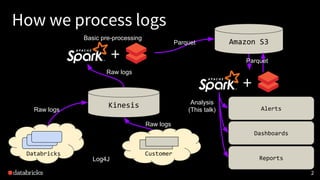
How we process logs
Amazon S3
Kinesis Analysis
(This talk) Alerts
Reports
Dashboards
Raw logs
Raw logs
+
Raw logs
Basic pre-processing
Parquet
+
Parquet
CustomerDatabricks
service
service
Log4J
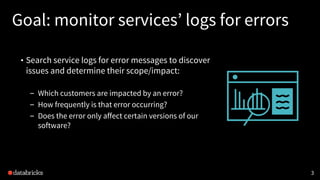
Goal: monitor services’ logs for errors
• Search service logs for error messages to discover
issues and determine their scope/impact:
– Which customers are impacted by an error?
– How frequently is that error occurring?
– Does the error only affect certain versions of our
software?
3
Challenges
• Data structure: our logs have less structure than our
metrics
• Data volume: we ingest over 10 terabytes of logs per day
• Signal vs. noise: alerting system isn’t very useful if has
frequent false alarms for benign/known errors.
4
Solution: normalize, deduplicate & filter
• Normalize: replace constants in logs (numbers, IP
addresses, customer names) with placeholders.
• Deduplicate: Store (count, version,
set(customers), example) instead of raw logs.
• Filter: Use patterns to (conditionally) ignore known
errors or to surface only new errors (errors that
appeared for the first time).
5
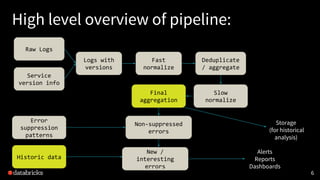
High level overview of pipeline:
6
Raw Logs
Logs with
versions
Service
version info
Fast
normalize
Deduplicate
/ aggregate
Slow
normalize
Final
aggregation
Error
suppression
patterns
Historic data
New /
interesting
errors
Alerts
Reports
Dashboards
Storage
(for historical
analysis)
Non-suppressed
errors
7
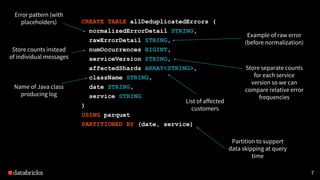
CREATE TABLE allDeduplicatedErrors (
normalizedErrorDetail STRING,
rawErrorDetail STRING,
numOccurrences BIGINT,
serviceVersion STRING,
affectedShards ARRAY<STRING>,
className STRING,
date STRING,
service STRING
)
USING parquet
PARTITIONED BY (date, service)
Store counts instead
of individual messages
Partition to support
data skipping at query
time
Store separate counts
for each service
version so we can
compare relative error
frequencies
Error pattern (with
placeholders)
Example of raw error
(before normalization)
Name of Java class
producing log
List of affected
customers
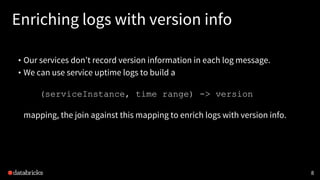
Enriching logs with version info
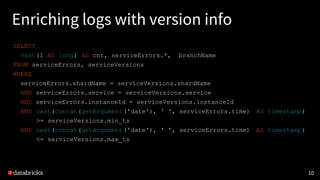
• Our services don’t record version information in each log message.
• We can use service uptime logs to build a
(serviceInstance, time range) -> version
mapping, the join against this mapping to enrich logs with version info.
8
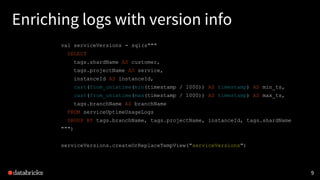
Enriching logs with version info
val serviceVersions = sql(s"""
SELECT
tags.shardName AS customer,
tags.projectName AS service,
instanceId AS instanceId,
cast(from_unixtime(min(timestamp / 1000)) AS timestamp) AS min_ts,
cast(from_unixtime(max(timestamp / 1000)) AS timestamp) AS max_ts,
tags.branchName AS branchName
FROM serviceUptimeUsageLogs
GROUP BY tags.branchName, tags.projectName, instanceId, tags.shardName
""")
serviceVersions.createOrReplaceTempView("serviceVersions")
9
Enriching logs with version info
SELECT
cast(1 AS long) AS cnt, serviceErrors.*, branchName
FROM serviceErrors, serviceVersions
WHERE
serviceErrors.shardName = serviceVersions.shardName
AND serviceErrors.service = serviceVersions.service
AND serviceErrors.instanceId = serviceVersions.instanceId
AND cast(concat(getArgument('date'), ' ', serviceErrors.time) AS timestamp)
>= serviceVersions.min_ts
AND cast(concat(getArgument('date'), ' ', serviceErrors.time) AS timestamp)
<= serviceVersions.max_ts
10
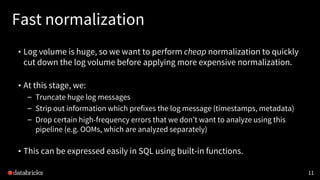
Fast normalization
• Log volume is huge, so we want to perform cheap normalization to quickly
cut down the log volume before applying more expensive normalization.
• At this stage, we:
– Truncate huge log messages
– Strip out information which prefixes the log message (timestamps, metadata)
– Drop certain high-frequency errors that we don’t want to analyze using this
pipeline (e.g. OOMs, which are analyzed separately)
• This can be expressed easily in SQL using built-in functions.
11
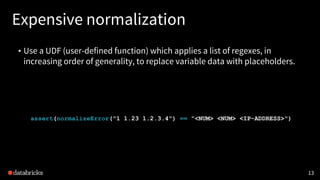
Expensive normalization
• Use a UDF (user-defined function) which applies a list of regexes, in
increasing order of generality, to replace variable data with placeholders.
12
val regexes = Seq(
"https://[^ ]+" -> "https://<URL>",
"http://[^ ]+" -> "http://<URL>",
"[((root|tenant|op|parent)=[^ ]+ ?){1,5}]" -> "<RPC-TRACING-INFO>",
[...]
"(?<![a-zA-Z])[0-9]+.[0-9]+" -> "<NUM>", // floating point numbers
"(?<![a-zA-Z])[0-9]+" -> "<NUM>"
)
Expensive normalization
• Use a UDF (user-defined function) which applies a list of regexes, in
increasing order of generality, to replace variable data with placeholders.
13
assert(normalizeError("1 1.23 1.2.3.4") == "<NUM> <NUM> <IP-ADDRESS>")
Example: raw log
14
(workerEnvId=default-worker-env)[tenant=0 root=ElasticJobRun-68af12a6e31cd8e7
parent=InstanceManager-3db732f5476993f5 op=InstanceManager-3db732f5476993f6]:
Exception while trying to launch new instance (req =
NewInstanceRequest(r3.2xlarge,worker,branch-2.39-304-9912f549,shard-fooCorp,Pend
ingInstance{attributes=AwsInstanceAttributes(instance_type_id: "r3.2xlarge"
memory_mb: 62464
num_cores: 8
[...]
com.databricks.backend.aws.util.InstanceSetupTimeoutException: Timeout after
1200 seconds while setting up instance i-00cf6d76e44d64ed7: Instance is not
running.
at [..stacktrace..]
Example: variables to normalize
15
(workerEnvId=default-worker-env) [tenant=0 root=ElasticJobRun-68af12a6e31cd8e7
parent=InstanceManager-3db732f5476993f5 op=InstanceManager-3db732f5476993f6] :
Exception while trying to launch new instance (req =
NewInstanceRequest( r3.2xlarge,worker,branch-2.39-304-9912f549 ,shard-fooCorp,Pend
ingInstance{attributes=AwsInstanceAttributes(instance_type_id: "r3.2xlarge"
memory_mb: 62464
num_cores: 8
[...]
com.databricks.backend.aws.util.InstanceSetupTimeoutException: Timeout after
1200 seconds while setting up instance i-00cf6d76e44d64ed7 : Instance is not
running.
at [..stacktrace..]
Example: normalized log
16
(workerEnvId=default-worker-env) <RPC-TRACING-INFO> : Exception while trying to
launch new instance (req =
NewInstanceRequest( <INSTANCE-TYPE-ID> ,worker,<BRANCH-NAME>,<SHARD-NAME>,PendingIn
stance{attributes=AwsInstanceAttributes(instance_type_id: " <INSTANCE-TYPE-ID> "
memory_mb: <NUM>
num_cores: <NUM>
[...]
com.databricks.backend.aws.util.InstanceSetupTimeoutException: Timeout after
<NUM>
seconds while setting up instance <AWS-INSTANCE-ID> : Instance is not running.
at [..stacktrace..]
17
18
Signal vs. noise in log monitoring
• Even though we’ve deduplicated our errors, many of the same error
categories occur day-to-day.
• We don’t want to have to wade through lots of errors that we already know
about in order to find new errors.
• Once we’ve fixed a bug which causes an error it would be useful to
suppress that error in log messages from known buggy versions.
19
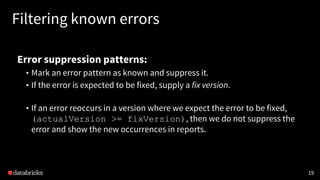
Filtering known errors
Error suppression patterns:
• Mark an error pattern as known and suppress it.
• If the error is expected to be fixed, supply a fix version.
• If an error reoccurs in a version where we expect the error to be fixed,
(actualVersion >= fixVersion), then we do not suppress the
error and show the new occurrences in reports.
20
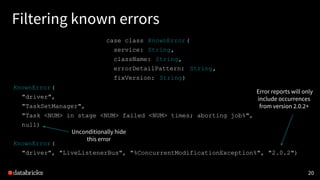
Filtering known errors
case class KnownError(
service: String,
className: String,
errorDetailPattern: String,
fixVersion: String)
KnownError(
"driver",
"TaskSetManager",
"Task <NUM> in stage <NUM> failed <NUM> times; aborting job%",
null)
KnownError(
"driver", "LiveListenerBus", "%ConcurrentModificationException%", "2.0.2")
Error reports will only
include occurrences
from version 2.0.2+
Unconditionally hide
this error
21
Filtering known errors
SELECT
[...]
FROM allDeduplicatedErrors [...]
WHERE
NOT EXISTS (
SELECT *
FROM knownErrors
WHERE
knownErrors.service = allDeduplicatedErrors.service
AND knownErrors.className = allDeduplicatedErrors.className
AND allDeduplicatedErrors.normalizedErrorDetail LIKE knownErrors.errorDetailPattern
AND (fixVersion IS NULL OR
isHigherVersionThan(fixVersion, allDeduplicatedErrors.serviceVersion))
)
GROUP BY [...]
22
End result:
• High-signal dashboards and reports of only “new” errors.
– Reports have surfaced several rarely-occurring but important errors
– Example: alerted on unexpected failure mode in third-party library
• Normalized and aggregated error logs enable fast analysis / investigation.
• Fast processing pipeline means we can quickly re-process historical raw
logs in case we want to normalize or aggregate by different criteria.
15% Discount Code: Databricks
Thank you
joshrosen@databricks.com
@jshrsn
24

Monitoring Error Logs at Databricks

  • 1.
    Monitoring error logsat Databricks Josh Rosen April 12, 2017 1
  • 2.
    2 How we processlogs Amazon S3 Kinesis Analysis (This talk) Alerts Reports Dashboards Raw logs Raw logs + Raw logs Basic pre-processing Parquet + Parquet CustomerDatabricks service service Log4J
  • 3.
    Goal: monitor services’logs for errors • Search service logs for error messages to discover issues and determine their scope/impact: – Which customers are impacted by an error? – How frequently is that error occurring? – Does the error only affect certain versions of our software? 3
  • 4.
    Challenges • Data structure:our logs have less structure than our metrics • Data volume: we ingest over 10 terabytes of logs per day • Signal vs. noise: alerting system isn’t very useful if has frequent false alarms for benign/known errors. 4
  • 5.
    Solution: normalize, deduplicate& filter • Normalize: replace constants in logs (numbers, IP addresses, customer names) with placeholders. • Deduplicate: Store (count, version, set(customers), example) instead of raw logs. • Filter: Use patterns to (conditionally) ignore known errors or to surface only new errors (errors that appeared for the first time). 5
  • 6.
    High level overviewof pipeline: 6 Raw Logs Logs with versions Service version info Fast normalize Deduplicate / aggregate Slow normalize Final aggregation Error suppression patterns Historic data New / interesting errors Alerts Reports Dashboards Storage (for historical analysis) Non-suppressed errors
  • 7.
    7 CREATE TABLE allDeduplicatedErrors( normalizedErrorDetail STRING, rawErrorDetail STRING, numOccurrences BIGINT, serviceVersion STRING, affectedShards ARRAY<STRING>, className STRING, date STRING, service STRING ) USING parquet PARTITIONED BY (date, service) Store counts instead of individual messages Partition to support data skipping at query time Store separate counts for each service version so we can compare relative error frequencies Error pattern (with placeholders) Example of raw error (before normalization) Name of Java class producing log List of affected customers
  • 8.
    Enriching logs withversion info • Our services don’t record version information in each log message. • We can use service uptime logs to build a (serviceInstance, time range) -> version mapping, the join against this mapping to enrich logs with version info. 8
  • 9.
    Enriching logs withversion info val serviceVersions = sql(s""" SELECT tags.shardName AS customer, tags.projectName AS service, instanceId AS instanceId, cast(from_unixtime(min(timestamp / 1000)) AS timestamp) AS min_ts, cast(from_unixtime(max(timestamp / 1000)) AS timestamp) AS max_ts, tags.branchName AS branchName FROM serviceUptimeUsageLogs GROUP BY tags.branchName, tags.projectName, instanceId, tags.shardName """) serviceVersions.createOrReplaceTempView("serviceVersions") 9
  • 10.
    Enriching logs withversion info SELECT cast(1 AS long) AS cnt, serviceErrors.*, branchName FROM serviceErrors, serviceVersions WHERE serviceErrors.shardName = serviceVersions.shardName AND serviceErrors.service = serviceVersions.service AND serviceErrors.instanceId = serviceVersions.instanceId AND cast(concat(getArgument('date'), ' ', serviceErrors.time) AS timestamp) >= serviceVersions.min_ts AND cast(concat(getArgument('date'), ' ', serviceErrors.time) AS timestamp) <= serviceVersions.max_ts 10
  • 11.
    Fast normalization • Logvolume is huge, so we want to perform cheap normalization to quickly cut down the log volume before applying more expensive normalization. • At this stage, we: – Truncate huge log messages – Strip out information which prefixes the log message (timestamps, metadata) – Drop certain high-frequency errors that we don’t want to analyze using this pipeline (e.g. OOMs, which are analyzed separately) • This can be expressed easily in SQL using built-in functions. 11
  • 12.
    Expensive normalization • Usea UDF (user-defined function) which applies a list of regexes, in increasing order of generality, to replace variable data with placeholders. 12 val regexes = Seq( "https://[^ ]+" -> "https://<URL>", "http://[^ ]+" -> "http://<URL>", "[((root|tenant|op|parent)=[^ ]+ ?){1,5}]" -> "<RPC-TRACING-INFO>", [...] "(?<![a-zA-Z])[0-9]+.[0-9]+" -> "<NUM>", // floating point numbers "(?<![a-zA-Z])[0-9]+" -> "<NUM>" )
  • 13.
    Expensive normalization • Usea UDF (user-defined function) which applies a list of regexes, in increasing order of generality, to replace variable data with placeholders. 13 assert(normalizeError("1 1.23 1.2.3.4") == "<NUM> <NUM> <IP-ADDRESS>")
  • 14.
    Example: raw log 14 (workerEnvId=default-worker-env)[tenant=0root=ElasticJobRun-68af12a6e31cd8e7 parent=InstanceManager-3db732f5476993f5 op=InstanceManager-3db732f5476993f6]: Exception while trying to launch new instance (req = NewInstanceRequest(r3.2xlarge,worker,branch-2.39-304-9912f549,shard-fooCorp,Pend ingInstance{attributes=AwsInstanceAttributes(instance_type_id: "r3.2xlarge" memory_mb: 62464 num_cores: 8 [...] com.databricks.backend.aws.util.InstanceSetupTimeoutException: Timeout after 1200 seconds while setting up instance i-00cf6d76e44d64ed7: Instance is not running. at [..stacktrace..]
  • 15.
    Example: variables tonormalize 15 (workerEnvId=default-worker-env) [tenant=0 root=ElasticJobRun-68af12a6e31cd8e7 parent=InstanceManager-3db732f5476993f5 op=InstanceManager-3db732f5476993f6] : Exception while trying to launch new instance (req = NewInstanceRequest( r3.2xlarge,worker,branch-2.39-304-9912f549 ,shard-fooCorp,Pend ingInstance{attributes=AwsInstanceAttributes(instance_type_id: "r3.2xlarge" memory_mb: 62464 num_cores: 8 [...] com.databricks.backend.aws.util.InstanceSetupTimeoutException: Timeout after 1200 seconds while setting up instance i-00cf6d76e44d64ed7 : Instance is not running. at [..stacktrace..]
  • 16.
    Example: normalized log 16 (workerEnvId=default-worker-env)<RPC-TRACING-INFO> : Exception while trying to launch new instance (req = NewInstanceRequest( <INSTANCE-TYPE-ID> ,worker,<BRANCH-NAME>,<SHARD-NAME>,PendingIn stance{attributes=AwsInstanceAttributes(instance_type_id: " <INSTANCE-TYPE-ID> " memory_mb: <NUM> num_cores: <NUM> [...] com.databricks.backend.aws.util.InstanceSetupTimeoutException: Timeout after <NUM> seconds while setting up instance <AWS-INSTANCE-ID> : Instance is not running. at [..stacktrace..]
  • 17.
  • 18.
    18 Signal vs. noisein log monitoring • Even though we’ve deduplicated our errors, many of the same error categories occur day-to-day. • We don’t want to have to wade through lots of errors that we already know about in order to find new errors. • Once we’ve fixed a bug which causes an error it would be useful to suppress that error in log messages from known buggy versions.
  • 19.
    19 Filtering known errors Errorsuppression patterns: • Mark an error pattern as known and suppress it. • If the error is expected to be fixed, supply a fix version. • If an error reoccurs in a version where we expect the error to be fixed, (actualVersion >= fixVersion), then we do not suppress the error and show the new occurrences in reports.
  • 20.
    20 Filtering known errors caseclass KnownError( service: String, className: String, errorDetailPattern: String, fixVersion: String) KnownError( "driver", "TaskSetManager", "Task <NUM> in stage <NUM> failed <NUM> times; aborting job%", null) KnownError( "driver", "LiveListenerBus", "%ConcurrentModificationException%", "2.0.2") Error reports will only include occurrences from version 2.0.2+ Unconditionally hide this error
  • 21.
    21 Filtering known errors SELECT [...] FROMallDeduplicatedErrors [...] WHERE NOT EXISTS ( SELECT * FROM knownErrors WHERE knownErrors.service = allDeduplicatedErrors.service AND knownErrors.className = allDeduplicatedErrors.className AND allDeduplicatedErrors.normalizedErrorDetail LIKE knownErrors.errorDetailPattern AND (fixVersion IS NULL OR isHigherVersionThan(fixVersion, allDeduplicatedErrors.serviceVersion)) ) GROUP BY [...]
  • 22.
    22 End result: • High-signaldashboards and reports of only “new” errors. – Reports have surfaced several rarely-occurring but important errors – Example: alerted on unexpected failure mode in third-party library • Normalized and aggregated error logs enable fast analysis / investigation. • Fast processing pipeline means we can quickly re-process historical raw logs in case we want to normalize or aggregate by different criteria.
  • 23.
  • 24.