RediSearch Aggregations
Super fast data processing pipeline!
RediSearch 101
● High Performance Search Index
● Redis Module
● Written From Scratch in C
● Supports multiple index types
● Open Source / Commercial
○ Commercial is scalable and distributed
○ Several commercial customers
○ Largest cluster: 200 shards, ~2B documents, 8TB RAM
What Can RediSearch Do?
● Full-Text, Numeric, Geo and Tag indexes
● Real-time indexing and updates
● Distributed search on Billions of documents
● Complex query language
● Auto-Complete
● Highlighting
So, Aggregations...
“Data aggregation is the compiling of information from databases with intent
to prepare combined datasets for data processing.”
(Whatever you say, Wikipedia)
● Take a Search Query
● Process the results to produce some insights from them by:
○ Grouping
○ Reducing groups
○ Applying Transformations
○ Sorting
● Transform plain search results into statistical insights
Aggregate Request vs Search Request
● Search request just fetches the top N most relevant results
● Processing is minimal if any
● Focus is on filtering and ranking
● Aggregate requests use the same query language
● But add a pipeline of processing steps
● Emphasis on processing and transforming
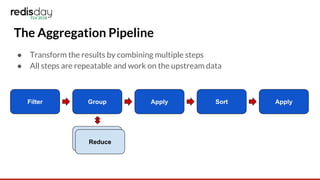
The Aggregation Pipeline
● Transform the results by combining multiple steps
● All steps are repeatable and work on the upstream data
Filter Group
Reduce
Apply Sort Apply
Reduce
What The API Looks Like
FT.AGGREGATE {index} {query}
[LOAD {len} {property} ...]
[GROUPBY {len} {property} ...
[REDUCE {func} {len} {arg} … [AS {alias}] ]
[SORTBY {len}{property} [ASC|DESC] …[MAX {n}]
[APPLY {expr} AS {alias}]
[LIMIT {offset} {num} ]
Aggregate Filters
● Determine what results we process
● Same query syntax as normal RediSearch queries
● Can be used to create complex selections
@country:{Israel | Italy}
@age:[25 52]
@profession:”1337 h4x0r”
-@languages:{perl | php}
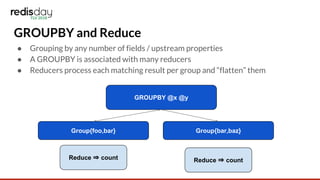
GROUPBY and Reduce
● Grouping by any number of fields / upstream properties
● A GROUPBY is associated with many reducers
● Reducers process each matching result per group and “flatten” them
GROUPBY @x @y
Reduce ⇒ count
Group{foo,bar} Group{bar,baz}
Reduce ⇒ count
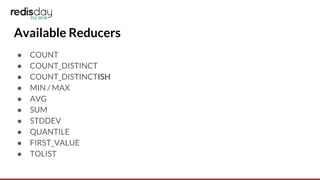
Available Reducers
● COUNT
● COUNT_DISTINCT
● COUNT_DISTINCTISH
● MIN / MAX
● AVG
● SUM
● STDDEV
● QUANTILE
● FIRST_VALUE
● TOLIST
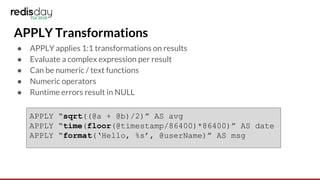
APPLY Transformations
● APPLY applies 1:1 transformations on results
● Evaluate a complex expression per result
● Can be numeric / text functions
● Numeric operators
● Runtime errors result in NULL
APPLY “sqrt((@a + @b)/2)” AS avg
APPLY “time(floor(@timestamp/86400)*86400)” AS date
APPLY “format(‘Hello, %s’, @userName)” AS msg
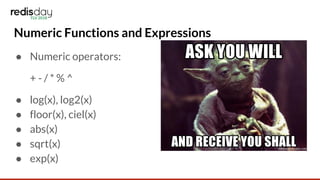
Numeric Functions and Expressions
● Numeric operators:
+ - / * % ^
● log(x), log2(x)
● floor(x), ciel(x)
● abs(x)
● sqrt(x)
● exp(x)
String Functions and Expressions
● lower(s)
● upper(s)
● substr(s, offset, len)
● format(fmt, …)
● time(unix_timestamp, [fmt])
● parsetime(str, [fmt])
SORTBY
● Sort by one or more properties
● Each can be ASC/DESC
● MAX limits to top-N results
● Using MinMaxHeap
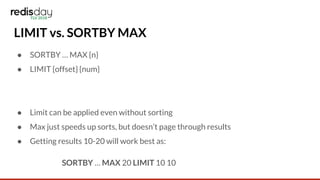
LIMIT vs. SORTBY MAX
● SORTBY … MAX {n}
● LIMIT {offset} {num}
● Limit can be applied even without sorting
● Max just speeds up sorts, but doesn’t page through results
● Getting results 10-20 will work best as:
SORTBY … MAX 20 LIMIT 10 10
Aggregations In Practice
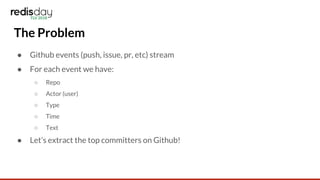
The Problem
● Github events (push, issue, pr, etc) stream
● For each event we have:
○ Repo
○ Actor (user)
○ Type
○ Time
○ Text
● Let’s extract the top committers on Github!
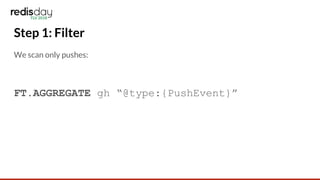
Step 1: Filter
We scan only pushes:
FT.AGGREGATE gh “@type:{PushEvent}”
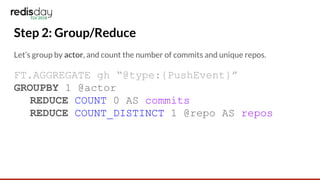
Step 2: Group/Reduce
Let’s group by actor, and count the number of commits and unique repos.
FT.AGGREGATE gh “@type:{PushEvent}”
GROUPBY 1 @actor
REDUCE COUNT 0 AS commits
REDUCE COUNT_DISTINCT 1 @repo AS repos
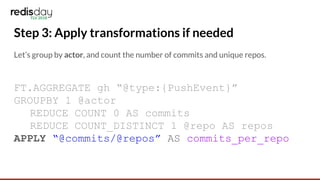
Step 3: Apply transformations if needed
Let’s group by actor, and count the number of commits and unique repos.
FT.AGGREGATE gh “@type:{PushEvent}”
GROUPBY 1 @actor
REDUCE COUNT 0 AS commits
REDUCE COUNT_DISTINCT 1 @repo AS repos
APPLY “@commits/@repos” AS commits_per_repo
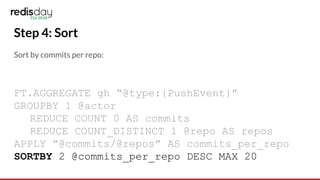
Step 4: Sort
Sort by commits per repo:
FT.AGGREGATE gh “@type:{PushEvent}”
GROUPBY 1 @actor
REDUCE COUNT 0 AS commits
REDUCE COUNT_DISTINCT 1 @repo AS repos
APPLY “@commits/@repos” AS commits_per_repo
SORTBY 2 @commits_per_repo DESC MAX 20
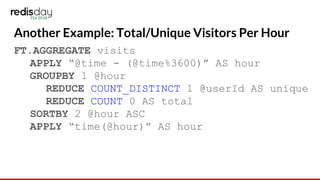
Another Example: Total/Unique Visitors Per Hour
FT.AGGREGATE visits
APPLY “@time - (@time%3600)” AS hour
GROUPBY 1 @hour
REDUCE COUNT_DISTINCT 1 @userId AS unique
REDUCE COUNT 0 AS total
SORTBY 2 @hour ASC
APPLY “time(@hour)” AS hour
(Near) Future Challenges
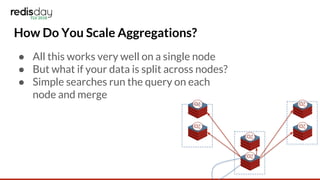
How Do You Scale Aggregations?
● All this works very well on a single node
● But what if your data is split across nodes?
● Simple searches run the query on each
node and merge
How Do You Scale Aggregations?
● That cannot always be done for aggregations
○ How would you merge AVG?
○ How would you merge COUNT_DISTINCT?
Simple Approach - Filter Push-Down
● We push the filtering stage and the properties we want to all nodes
● We merge all results into one stream
● Perform aggregations on it as if it was a single node’s results
● Pros: simple
● Cons: ALL matching records must be transferred over the network
Nicer Approach - Complex Push-Down
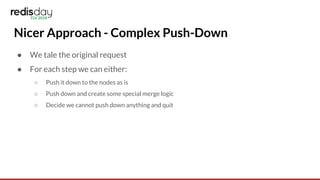
● We tale the original request
● For each step we can either:
○ Push it down to the nodes as is
○ Push down and create some special merge logic
○ Decide we cannot push down anything and quit
Nicer Approach - Complex Push-Down
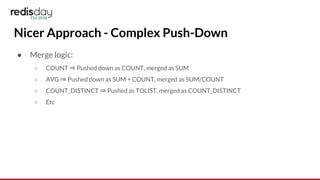
● Merge logic:
○ COUNT ⇒ Pushed down as COUNT, merged as SUM
○ AVG ⇒ Pushed down as SUM + COUNT, merged as SUM/COUNT
○ COUNT_DISTINCT ⇒ Pushed as TOLIST, merged as COUNT_DISTINCT
○ Etc
Thank You!

Redis Day TLV 2018 - RediSearch Aggregations

  • 1.
    RediSearch Aggregations Super fastdata processing pipeline!
  • 2.
    RediSearch 101 ● HighPerformance Search Index ● Redis Module ● Written From Scratch in C ● Supports multiple index types ● Open Source / Commercial ○ Commercial is scalable and distributed ○ Several commercial customers ○ Largest cluster: 200 shards, ~2B documents, 8TB RAM
  • 3.
    What Can RediSearchDo? ● Full-Text, Numeric, Geo and Tag indexes ● Real-time indexing and updates ● Distributed search on Billions of documents ● Complex query language ● Auto-Complete ● Highlighting
  • 4.
    So, Aggregations... “Data aggregationis the compiling of information from databases with intent to prepare combined datasets for data processing.” (Whatever you say, Wikipedia) ● Take a Search Query ● Process the results to produce some insights from them by: ○ Grouping ○ Reducing groups ○ Applying Transformations ○ Sorting ● Transform plain search results into statistical insights
  • 5.
    Aggregate Request vsSearch Request ● Search request just fetches the top N most relevant results ● Processing is minimal if any ● Focus is on filtering and ranking ● Aggregate requests use the same query language ● But add a pipeline of processing steps ● Emphasis on processing and transforming
  • 6.
    The Aggregation Pipeline ●Transform the results by combining multiple steps ● All steps are repeatable and work on the upstream data Filter Group Reduce Apply Sort Apply Reduce
  • 7.
    What The APILooks Like FT.AGGREGATE {index} {query} [LOAD {len} {property} ...] [GROUPBY {len} {property} ... [REDUCE {func} {len} {arg} … [AS {alias}] ] [SORTBY {len}{property} [ASC|DESC] …[MAX {n}] [APPLY {expr} AS {alias}] [LIMIT {offset} {num} ]
  • 8.
    Aggregate Filters ● Determinewhat results we process ● Same query syntax as normal RediSearch queries ● Can be used to create complex selections @country:{Israel | Italy} @age:[25 52] @profession:”1337 h4x0r” -@languages:{perl | php}
  • 9.
    GROUPBY and Reduce ●Grouping by any number of fields / upstream properties ● A GROUPBY is associated with many reducers ● Reducers process each matching result per group and “flatten” them GROUPBY @x @y Reduce ⇒ count Group{foo,bar} Group{bar,baz} Reduce ⇒ count
  • 10.
    Available Reducers ● COUNT ●COUNT_DISTINCT ● COUNT_DISTINCTISH ● MIN / MAX ● AVG ● SUM ● STDDEV ● QUANTILE ● FIRST_VALUE ● TOLIST
  • 11.
    APPLY Transformations ● APPLYapplies 1:1 transformations on results ● Evaluate a complex expression per result ● Can be numeric / text functions ● Numeric operators ● Runtime errors result in NULL APPLY “sqrt((@a + @b)/2)” AS avg APPLY “time(floor(@timestamp/86400)*86400)” AS date APPLY “format(‘Hello, %s’, @userName)” AS msg
  • 12.
    Numeric Functions andExpressions ● Numeric operators: + - / * % ^ ● log(x), log2(x) ● floor(x), ciel(x) ● abs(x) ● sqrt(x) ● exp(x)
  • 13.
    String Functions andExpressions ● lower(s) ● upper(s) ● substr(s, offset, len) ● format(fmt, …) ● time(unix_timestamp, [fmt]) ● parsetime(str, [fmt])
  • 14.
    SORTBY ● Sort byone or more properties ● Each can be ASC/DESC ● MAX limits to top-N results ● Using MinMaxHeap
  • 15.
    LIMIT vs. SORTBYMAX ● SORTBY … MAX {n} ● LIMIT {offset} {num} ● Limit can be applied even without sorting ● Max just speeds up sorts, but doesn’t page through results ● Getting results 10-20 will work best as: SORTBY … MAX 20 LIMIT 10 10
  • 16.
  • 17.
    The Problem ● Githubevents (push, issue, pr, etc) stream ● For each event we have: ○ Repo ○ Actor (user) ○ Type ○ Time ○ Text ● Let’s extract the top committers on Github!
  • 18.
    Step 1: Filter Wescan only pushes: FT.AGGREGATE gh “@type:{PushEvent}”
  • 19.
    Step 2: Group/Reduce Let’sgroup by actor, and count the number of commits and unique repos. FT.AGGREGATE gh “@type:{PushEvent}” GROUPBY 1 @actor REDUCE COUNT 0 AS commits REDUCE COUNT_DISTINCT 1 @repo AS repos
  • 20.
    Step 3: Applytransformations if needed Let’s group by actor, and count the number of commits and unique repos. FT.AGGREGATE gh “@type:{PushEvent}” GROUPBY 1 @actor REDUCE COUNT 0 AS commits REDUCE COUNT_DISTINCT 1 @repo AS repos APPLY “@commits/@repos” AS commits_per_repo
  • 21.
    Step 4: Sort Sortby commits per repo: FT.AGGREGATE gh “@type:{PushEvent}” GROUPBY 1 @actor REDUCE COUNT 0 AS commits REDUCE COUNT_DISTINCT 1 @repo AS repos APPLY “@commits/@repos” AS commits_per_repo SORTBY 2 @commits_per_repo DESC MAX 20
  • 22.
    Another Example: Total/UniqueVisitors Per Hour FT.AGGREGATE visits APPLY “@time - (@time%3600)” AS hour GROUPBY 1 @hour REDUCE COUNT_DISTINCT 1 @userId AS unique REDUCE COUNT 0 AS total SORTBY 2 @hour ASC APPLY “time(@hour)” AS hour
  • 23.
  • 24.
    How Do YouScale Aggregations? ● All this works very well on a single node ● But what if your data is split across nodes? ● Simple searches run the query on each node and merge
  • 25.
    How Do YouScale Aggregations? ● That cannot always be done for aggregations ○ How would you merge AVG? ○ How would you merge COUNT_DISTINCT?
  • 26.
    Simple Approach -Filter Push-Down ● We push the filtering stage and the properties we want to all nodes ● We merge all results into one stream ● Perform aggregations on it as if it was a single node’s results ● Pros: simple ● Cons: ALL matching records must be transferred over the network
  • 27.
    Nicer Approach -Complex Push-Down ● We tale the original request ● For each step we can either: ○ Push it down to the nodes as is ○ Push down and create some special merge logic ○ Decide we cannot push down anything and quit
  • 28.
    Nicer Approach -Complex Push-Down ● Merge logic: ○ COUNT ⇒ Pushed down as COUNT, merged as SUM ○ AVG ⇒ Pushed down as SUM + COUNT, merged as SUM/COUNT ○ COUNT_DISTINCT ⇒ Pushed as TOLIST, merged as COUNT_DISTINCT ○ Etc
  • 29.