Redis
Redis Key-Value Database:
Practical Introduction
SoftUni Team
Technical Trainers
Software University
http://softuni.bg
Table of Contents
1. What is Redis?
2. Installing and Running Redis
3. Redis Commands
 String Commands
 Working with Keys
 Working with Hashes
 Working with Lists
 Working with Sets
 Working with Sorted Sets
2
Redis
Ultra-Fast Data Structure Server
4
 Redis is:
 Ultra-fast in-memory key-value data store
 Powerful data structure server
 Open-source software: http://redis.io
 Redis stores data structures:
 Strings, lists, hashes, sets, sorted sets
 Publish / subscribe messaging
What is Redis?
 Redis is really fast
 Non-blocking I/O, single threaded
 100,000+ read / writes per second
 Redis is not a database
 It complements your existing data storage layer
 E.g. StackOverflow uses Redis for data caching
 For small labs Redis may replace entirely the database
 Trade performance for durability  data is persisted immediately
Redis: Features
 To install Redis on Linux / Mac OS X:
 Download from http://redis.io/download
 Install it and run it
 To install Redis on Windows:
 Download https://github.com/MSOpenTech/redis
 Compile the solution in the msvs folder and build it with VS
 The easier way: use the Windows package manager Chocolatey
 http://chocolatey.org
Installing Redis
choco install redis
7
 On Linux / Mac OS X start / stop the Redis service
 The default Redis port is 6379 (the service name is redis_6379)
 On Windows start / stop the "redis" service
 Use the console-based (CLI) client or just connect with Telnet:
Running Redis
sudo service redis_6379 start sudo service redis_6379 stop
sc start redis sc stop redis
redis-cli telnet localhost 6379
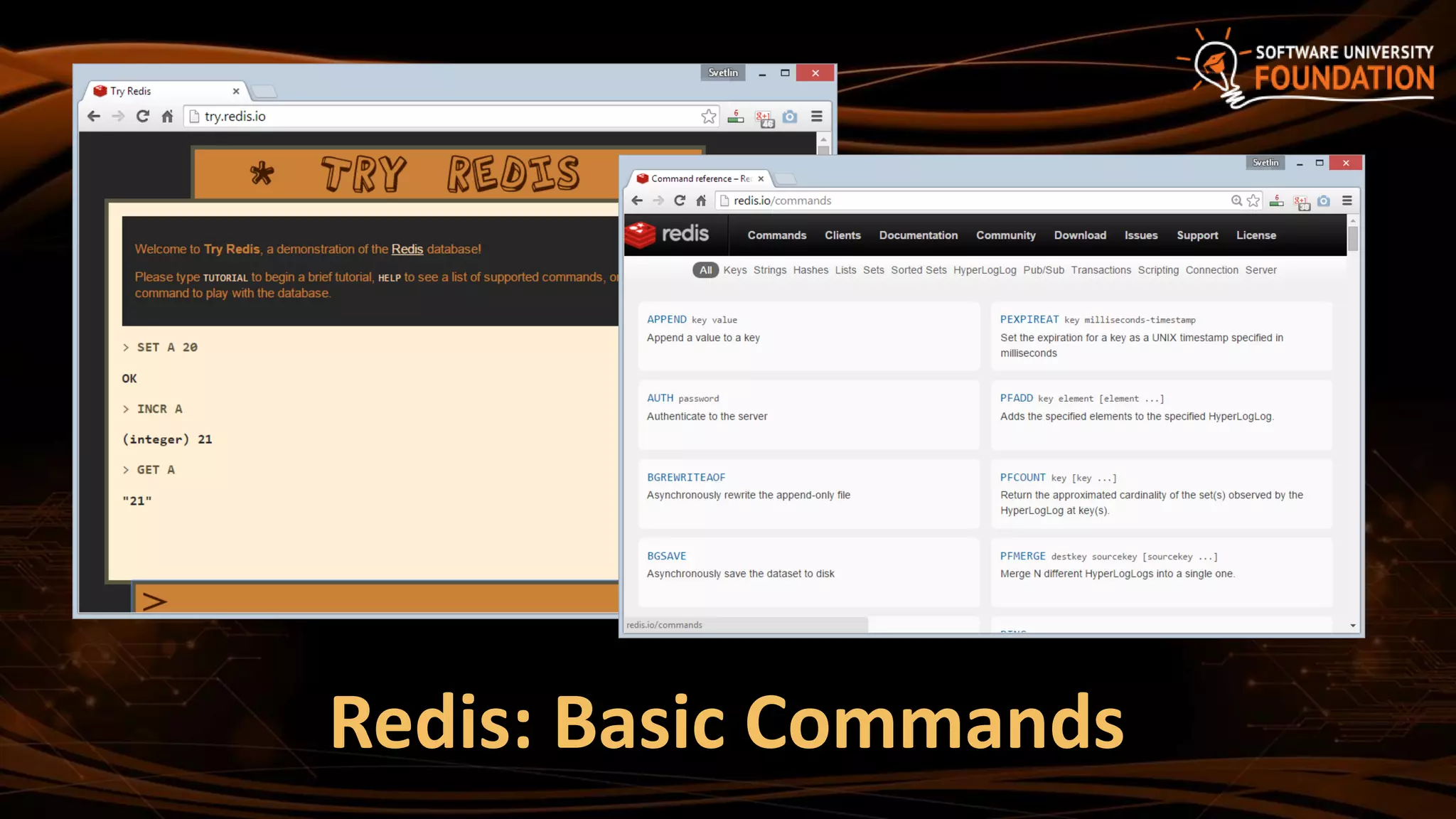
Redis: Basic Commands
9
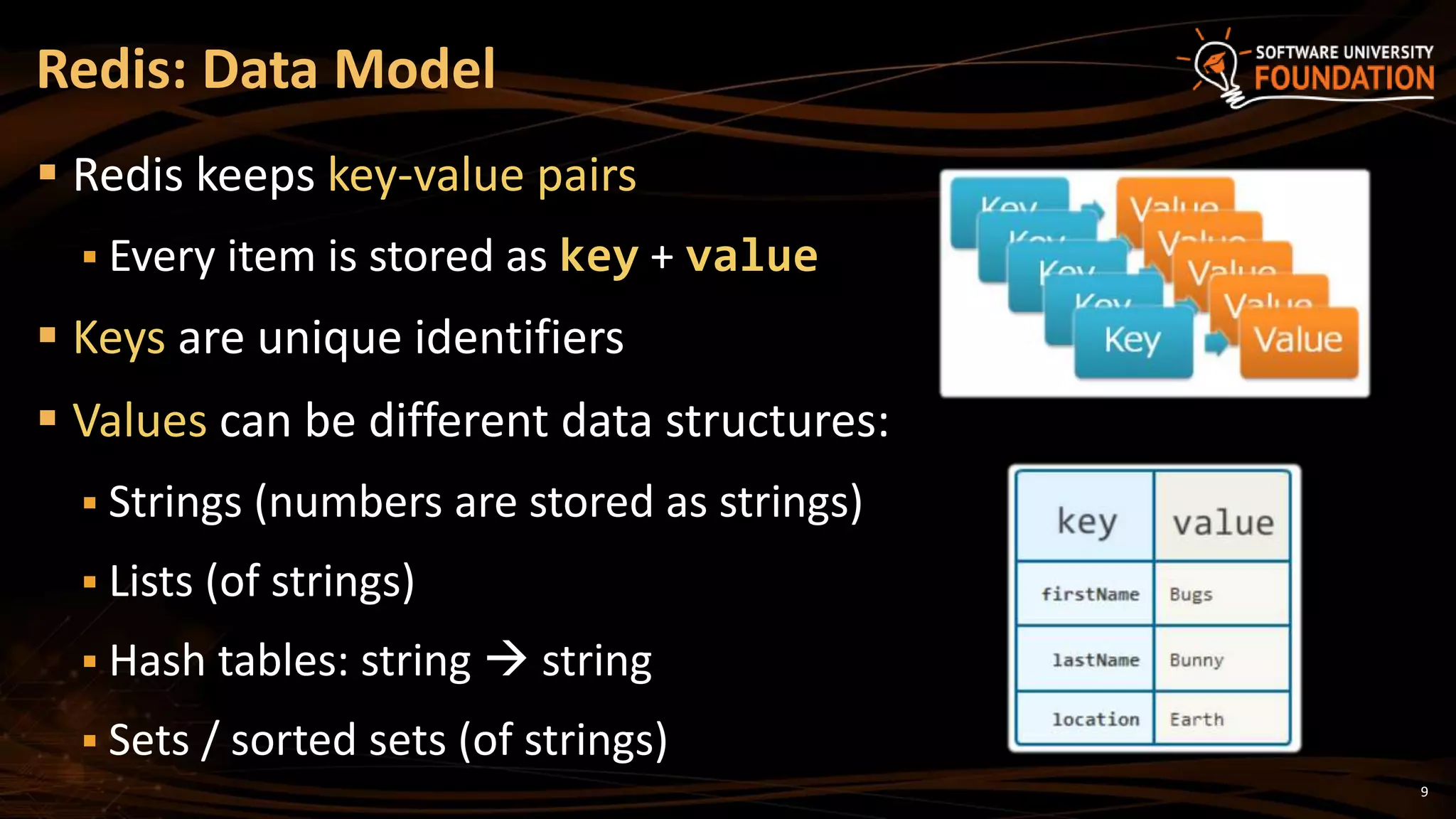
 Redis keeps key-value pairs
 Every item is stored as key + value
 Keys are unique identifiers
 Values can be different data structures:
 Strings (numbers are stored as strings)
 Lists (of strings)
 Hash tables: string  string
 Sets / sorted sets (of strings)
Redis: Data Model
10
 Redis works as interpreter of commands:
Redis: Commands
SET name "Nakov"
OK
GET name
"Nakov"
DEL name
(integer) 1
GET name
(nil)
 Play with the command-line client
redis-cli
 Or play with Redis online at
http://try.redis.io
11
String Commands
 SET [key] [value]
 Assigns a string value in a key
 GET [key] / MGET [keys]
 Returns the value by key / keys
 INCR [key] / DECR [key]
 Increments / decrements a key
 STRLEN [key]
 Returns the length of a string
SET name "hi"
OK
GET name
"hi"
SET name abc
OK
GET "name"
"abc"
GET Name
(nil)
SET a 1234
OK
INCR a
(integer) 1235
GET a
"12345"
MGET a name
1) "1235"
2) "asdda"
STRLEN a
(integer) 4
12
Working with Keys
 EXISTS [key]
 Checks whether a key exists
 TYPE [key]
 Returns the type of a key
 DEL [key]
 Deletes a key
 EXPIRE [key] [t]
 Deletes a key after t seconds
SET count 5
OK
TYPE count
string
EXISTS count
(integer) 1
DEL count
(integer) 1
EXISTS count
(integer) 0
SET a 1234
OK
GET a
"1234"
EXPIRE a 5
(integer) 1
EXISTS a
(integer) 1
EXISTS a
(integer) 0
13
Working with Hashes (Hash Tables)
 HSET [key] [field] [value]
 Assigns a value for given field
 HKEYS [key]
 Returns the fields (keys) is in a hash
 HGET [key] [field]
 Returns a value by fields from a hash
 HDEL [key] [field]
 Deletes a fields from a hash
HSET user name "peter"
(integer) 1
HSET user age 23
(integer) 1
HKEYS user
1) "name"
2) "age"
HGET user age
"23"
HDEL user age
(integer) 1
14
Working with Lists
 RPUSH / LPUSH [list] [value]
 Appends / prepend an value to a list
 LINDEX [list] [index]
 Returns a value given index in a list
 LLEN [list]
 Returns the length of a list
 LRANGE [list] [start] [count]
 Returns a sub-list (range of values)
RPUSH names "peter"
(integer) 1
LPUSH names Nakov
(integer) 1
LINDEX names 0
"Nakov"
LLEN names
(integer) 2
LRANGE names 0 100
1) "Nakov"
2) "peter"
15
Working with Sets
 SADD [set] [value]
 Appends a value to a set
 SMEMBERS [set]
 Returns the values from a set
 SREM [set] [value]
 Deletes a value form a set
 SCARD [set]
 Returns the stack size (items count)
SADD users "peter"
(integer) 1
SADD users "peter"
(integer) 0
SADD users maria
(integer) 1
SMEMBERS users
1) "peter"
2) "maria"
SREM users maria
(integer) 1
16
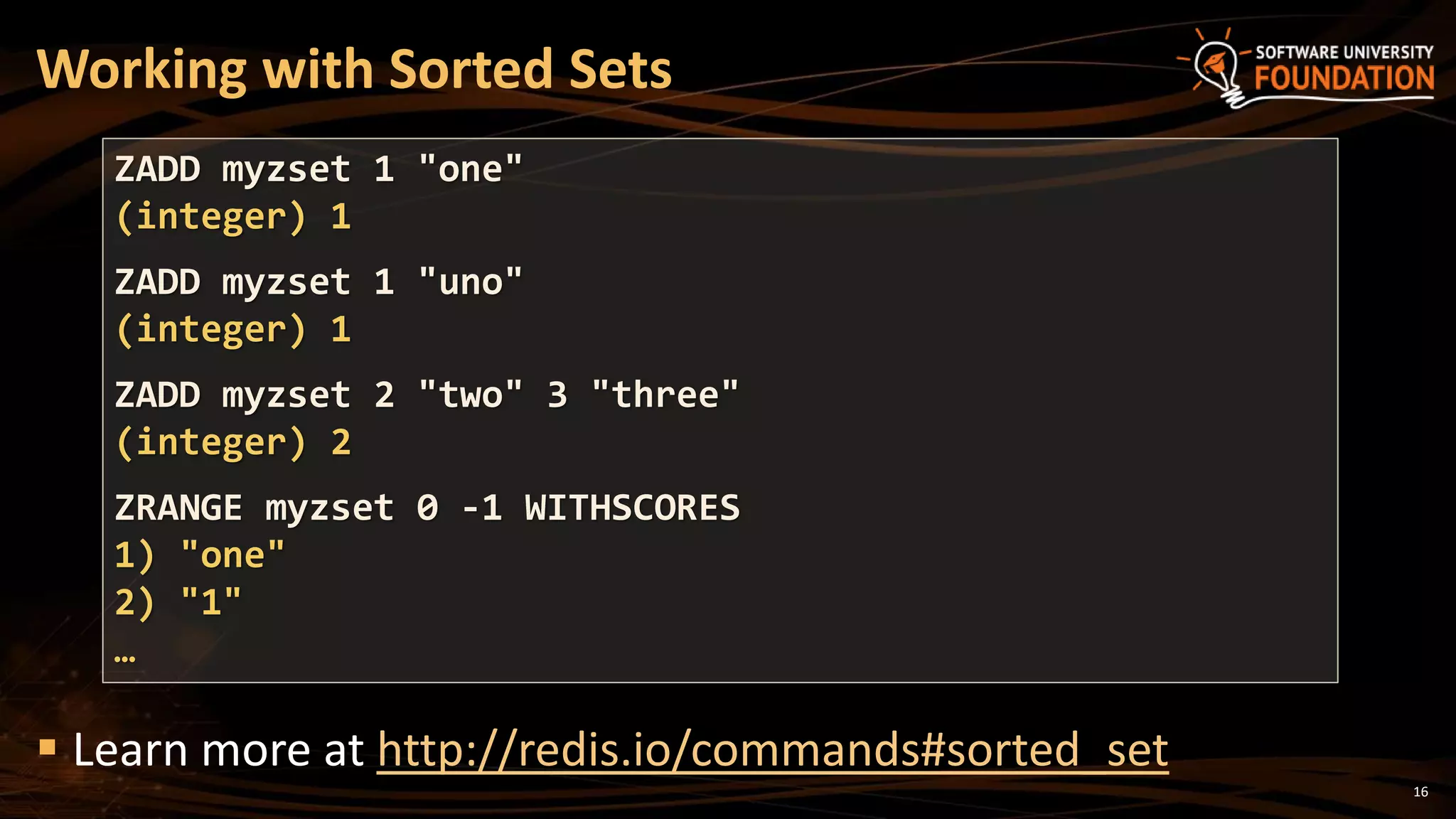
Working with Sorted Sets
 Learn more at http://redis.io/commands#sorted_set
ZADD myzset 1 "one"
(integer) 1
ZADD myzset 1 "uno"
(integer) 1
ZADD myzset 2 "two" 3 "three"
(integer) 2
ZRANGE myzset 0 -1 WITHSCORES
1) "one"
2) "1"
…
17
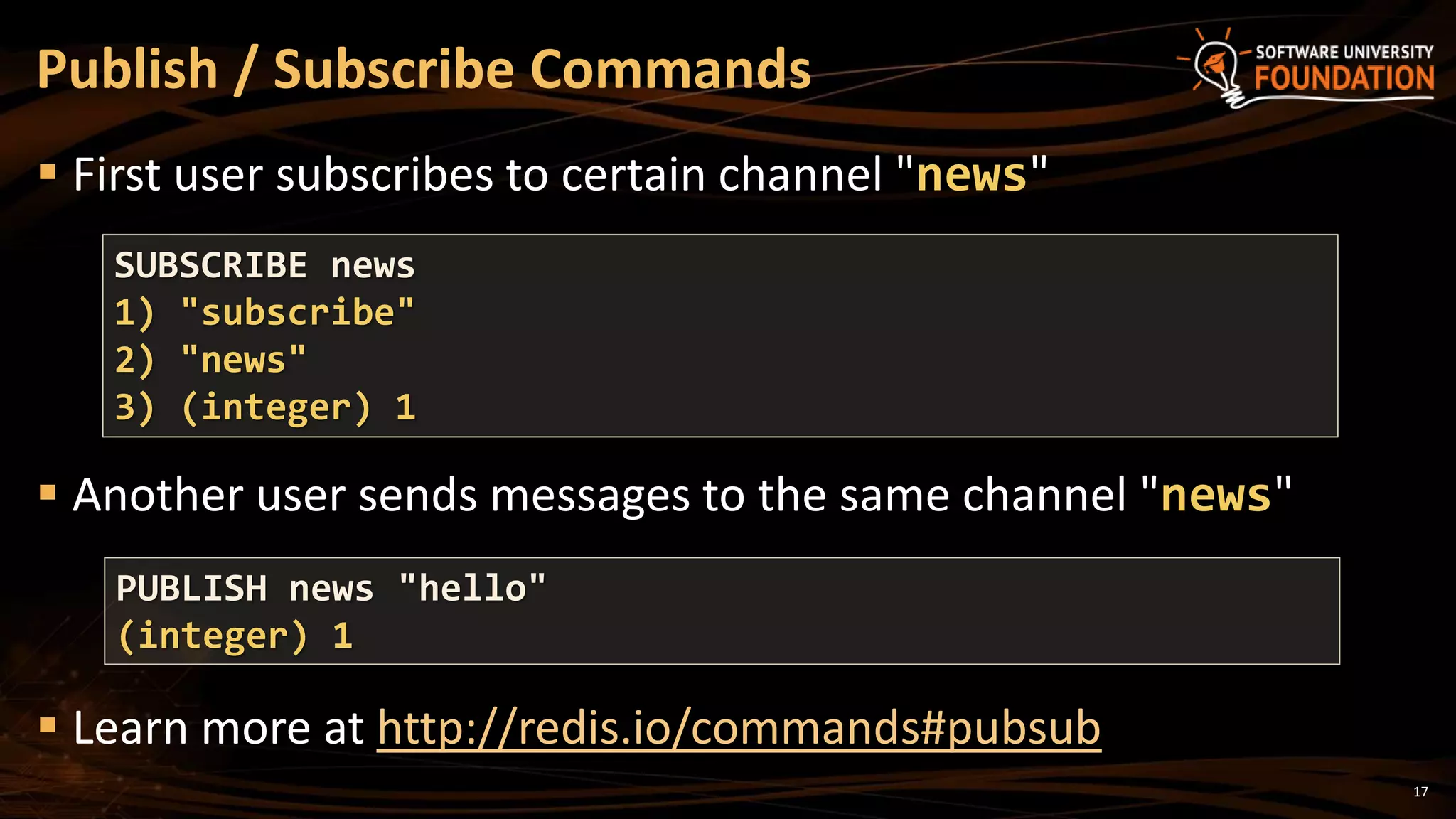
 First user subscribes to certain channel "news"
 Another user sends messages to the same channel "news"
 Learn more at http://redis.io/commands#pubsub
Publish / Subscribe Commands
SUBSCRIBE news
1) "subscribe"
2) "news"
3) (integer) 1
PUBLISH news "hello"
(integer) 1
18
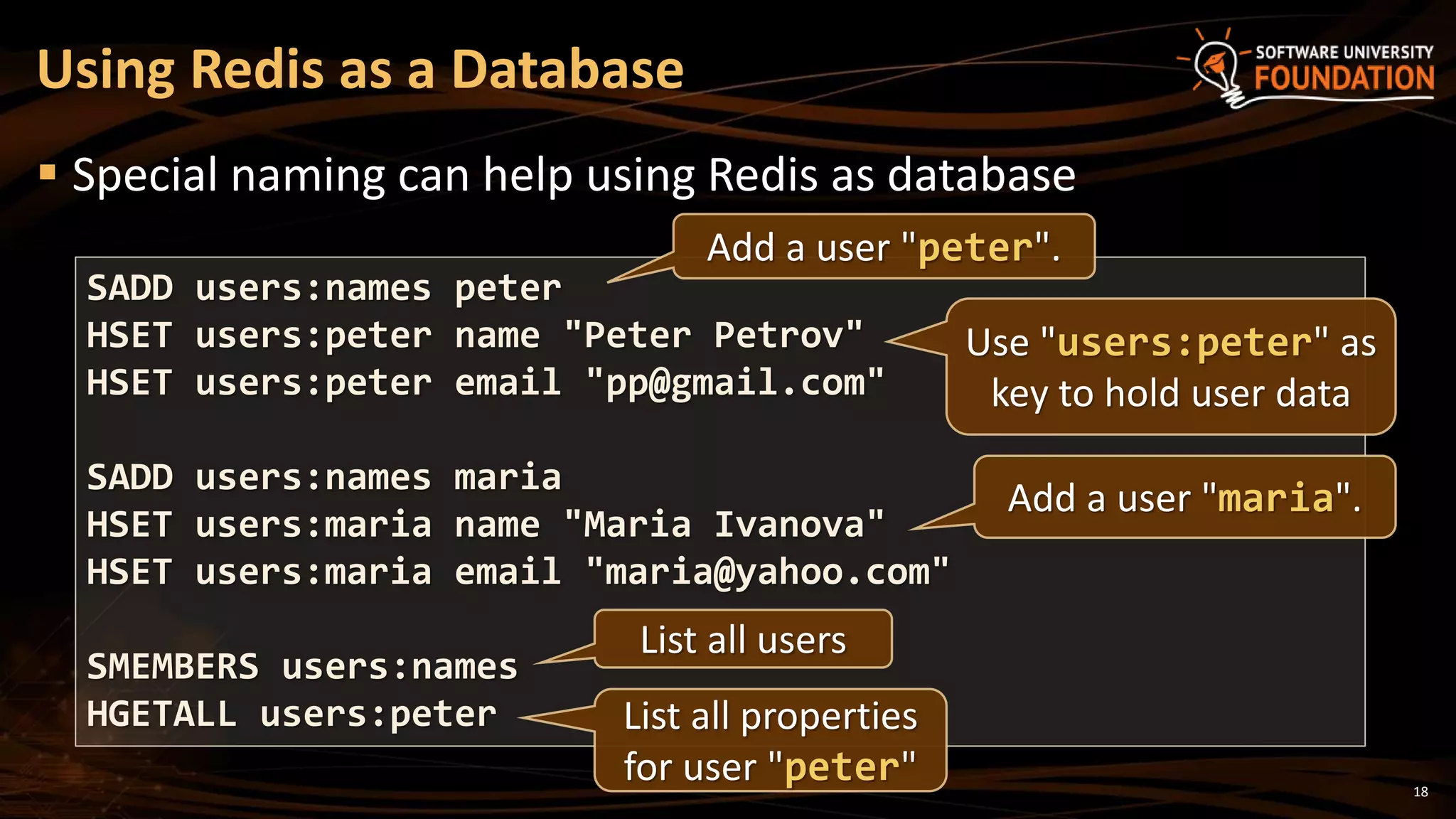
 Special naming can help using Redis as database
Using Redis as a Database
SADD users:names peter
HSET users:peter name "Peter Petrov"
HSET users:peter email "pp@gmail.com"
SADD users:names maria
HSET users:maria name "Maria Ivanova"
HSET users:maria email "maria@yahoo.com"
SMEMBERS users:names
HGETALL users:peter
Add a user "peter".
Add a user "maria".
Use "users:peter" as
key to hold user data
List all users
List all properties
for user "peter"
19
1. Redis is ultra-fast in-memory data store
 Not a database, used along with databases
2. Supports strings, numbers, lists, hashes,
sets, sorted sets, publish / subscribe
messaging
3. Used for caching / simple apps
Summary
?
https://softuni.bg/courses/databases
Redis
License
 This course (slides, examples, demos, videos, homework, etc.)
is licensed under the "Creative Commons Attribution-
NonCommercial-ShareAlike 4.0 International" license
21
 Attribution: this work may contain portions from
 "Databases" course by Telerik Academy under CC-BY-NC-SA license
Free Trainings @ Software University
 Software University Foundation – softuni.org
 Software University – High-Quality Education,
Profession and Job for Software Developers
 softuni.bg
 Software University @ Facebook
 facebook.com/SoftwareUniversity
 Software University @ YouTube
 youtube.com/SoftwareUniversity
 Software University Forums – forum.softuni.bg

Redis

  • 1.
    Redis Redis Key-Value Database: PracticalIntroduction SoftUni Team Technical Trainers Software University http://softuni.bg
  • 2.
    Table of Contents 1.What is Redis? 2. Installing and Running Redis 3. Redis Commands  String Commands  Working with Keys  Working with Hashes  Working with Lists  Working with Sets  Working with Sorted Sets 2
  • 3.
  • 4.
    4  Redis is: Ultra-fast in-memory key-value data store  Powerful data structure server  Open-source software: http://redis.io  Redis stores data structures:  Strings, lists, hashes, sets, sorted sets  Publish / subscribe messaging What is Redis?
  • 5.
     Redis isreally fast  Non-blocking I/O, single threaded  100,000+ read / writes per second  Redis is not a database  It complements your existing data storage layer  E.g. StackOverflow uses Redis for data caching  For small labs Redis may replace entirely the database  Trade performance for durability  data is persisted immediately Redis: Features
  • 6.
     To installRedis on Linux / Mac OS X:  Download from http://redis.io/download  Install it and run it  To install Redis on Windows:  Download https://github.com/MSOpenTech/redis  Compile the solution in the msvs folder and build it with VS  The easier way: use the Windows package manager Chocolatey  http://chocolatey.org Installing Redis choco install redis
  • 7.
    7  On Linux/ Mac OS X start / stop the Redis service  The default Redis port is 6379 (the service name is redis_6379)  On Windows start / stop the "redis" service  Use the console-based (CLI) client or just connect with Telnet: Running Redis sudo service redis_6379 start sudo service redis_6379 stop sc start redis sc stop redis redis-cli telnet localhost 6379
  • 8.
  • 9.
    9  Redis keepskey-value pairs  Every item is stored as key + value  Keys are unique identifiers  Values can be different data structures:  Strings (numbers are stored as strings)  Lists (of strings)  Hash tables: string  string  Sets / sorted sets (of strings) Redis: Data Model
  • 10.
    10  Redis worksas interpreter of commands: Redis: Commands SET name "Nakov" OK GET name "Nakov" DEL name (integer) 1 GET name (nil)  Play with the command-line client redis-cli  Or play with Redis online at http://try.redis.io
  • 11.
    11 String Commands  SET[key] [value]  Assigns a string value in a key  GET [key] / MGET [keys]  Returns the value by key / keys  INCR [key] / DECR [key]  Increments / decrements a key  STRLEN [key]  Returns the length of a string SET name "hi" OK GET name "hi" SET name abc OK GET "name" "abc" GET Name (nil) SET a 1234 OK INCR a (integer) 1235 GET a "12345" MGET a name 1) "1235" 2) "asdda" STRLEN a (integer) 4
  • 12.
    12 Working with Keys EXISTS [key]  Checks whether a key exists  TYPE [key]  Returns the type of a key  DEL [key]  Deletes a key  EXPIRE [key] [t]  Deletes a key after t seconds SET count 5 OK TYPE count string EXISTS count (integer) 1 DEL count (integer) 1 EXISTS count (integer) 0 SET a 1234 OK GET a "1234" EXPIRE a 5 (integer) 1 EXISTS a (integer) 1 EXISTS a (integer) 0
  • 13.
    13 Working with Hashes(Hash Tables)  HSET [key] [field] [value]  Assigns a value for given field  HKEYS [key]  Returns the fields (keys) is in a hash  HGET [key] [field]  Returns a value by fields from a hash  HDEL [key] [field]  Deletes a fields from a hash HSET user name "peter" (integer) 1 HSET user age 23 (integer) 1 HKEYS user 1) "name" 2) "age" HGET user age "23" HDEL user age (integer) 1
  • 14.
    14 Working with Lists RPUSH / LPUSH [list] [value]  Appends / prepend an value to a list  LINDEX [list] [index]  Returns a value given index in a list  LLEN [list]  Returns the length of a list  LRANGE [list] [start] [count]  Returns a sub-list (range of values) RPUSH names "peter" (integer) 1 LPUSH names Nakov (integer) 1 LINDEX names 0 "Nakov" LLEN names (integer) 2 LRANGE names 0 100 1) "Nakov" 2) "peter"
  • 15.
    15 Working with Sets SADD [set] [value]  Appends a value to a set  SMEMBERS [set]  Returns the values from a set  SREM [set] [value]  Deletes a value form a set  SCARD [set]  Returns the stack size (items count) SADD users "peter" (integer) 1 SADD users "peter" (integer) 0 SADD users maria (integer) 1 SMEMBERS users 1) "peter" 2) "maria" SREM users maria (integer) 1
  • 16.
    16 Working with SortedSets  Learn more at http://redis.io/commands#sorted_set ZADD myzset 1 "one" (integer) 1 ZADD myzset 1 "uno" (integer) 1 ZADD myzset 2 "two" 3 "three" (integer) 2 ZRANGE myzset 0 -1 WITHSCORES 1) "one" 2) "1" …
  • 17.
    17  First usersubscribes to certain channel "news"  Another user sends messages to the same channel "news"  Learn more at http://redis.io/commands#pubsub Publish / Subscribe Commands SUBSCRIBE news 1) "subscribe" 2) "news" 3) (integer) 1 PUBLISH news "hello" (integer) 1
  • 18.
    18  Special namingcan help using Redis as database Using Redis as a Database SADD users:names peter HSET users:peter name "Peter Petrov" HSET users:peter email "pp@gmail.com" SADD users:names maria HSET users:maria name "Maria Ivanova" HSET users:maria email "maria@yahoo.com" SMEMBERS users:names HGETALL users:peter Add a user "peter". Add a user "maria". Use "users:peter" as key to hold user data List all users List all properties for user "peter"
  • 19.
    19 1. Redis isultra-fast in-memory data store  Not a database, used along with databases 2. Supports strings, numbers, lists, hashes, sets, sorted sets, publish / subscribe messaging 3. Used for caching / simple apps Summary
  • 20.
  • 21.
    License  This course(slides, examples, demos, videos, homework, etc.) is licensed under the "Creative Commons Attribution- NonCommercial-ShareAlike 4.0 International" license 21  Attribution: this work may contain portions from  "Databases" course by Telerik Academy under CC-BY-NC-SA license
  • 22.
    Free Trainings @Software University  Software University Foundation – softuni.org  Software University – High-Quality Education, Profession and Job for Software Developers  softuni.bg  Software University @ Facebook  facebook.com/SoftwareUniversity  Software University @ YouTube  youtube.com/SoftwareUniversity  Software University Forums – forum.softuni.bg