Zahid Mian
Part of the Brown-bag Series
 Schema-less
 Document DB (don't thinkWord Document)
 Document is a JSON object
 Supports Indexes
 Scalable
 Doesn't Support "traditional" Joins
 Doesn't SupportTransactions (not ACID-compliant)
 Version 3.0.5 (in this doc)
 http://docs.mongodb.org/manual/
 https://www.mongodb.org/downloads
 Dictionaries and Arrays
 {}
 {"fruits": ["apple", "pear", "peach"]}
 {name: "Adam Smith"}
 {numbers: [7,2,3,8]}
 {name: "Adam Smith", hobbies: [hobby: "Econ",
hobby:"Tennis"]}
 Formal Representation: http://json.org/
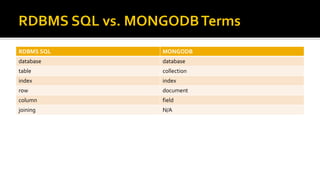
RDBMS SQL MONGODB
database database
table collection
index index
row document
column field
joining N/A
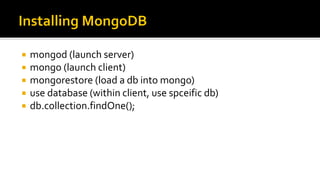
 mongod (launch server)
 mongo (launch client)
 mongorestore (load a db into mongo)
 use database (within client, use spceific db)
 db.collection.findOne();
 Download/extract mongodb files
 Either update Path to include bin folder or navigate to bin folder …
 Create folder for data …
 > md data -> md datadb (remember where you created this folder)
 > mongod --dbpath c:datadb (default path onWindows)
▪ Now the mongodb server will be running (unless there is a problem)
 From another command shell launch client: > mongo
▪ Now the mongodb shell will be running
▪ Try the following commands:
▪ show databases
▪ db
▪ show collections
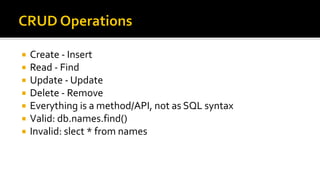
 Create - Insert
 Read - Find
 Update - Update
 Delete - Remove
 Everything is a method/API, not as SQL syntax
 Valid: db.names.find()
 Invalid: slect * from names
 javascript interpreter
 > for (i=0;i<3;i++) print("hello");
 > help
 > help keys
 auto complete with tab
 > z = {"a":1}
 > z.a
 > z["a"]
 > x={a:1}; y="a"; x[y]++; print(x.a); // output is 2
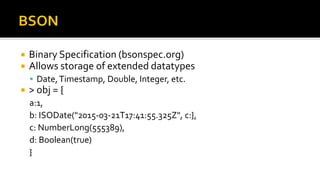
 Binary Specification (bsonspec.org)
 Allows storage of extended datatypes
 Date,Timestamp, Double, Integer, etc.
 > obj = {
a:1,
b: ISODate("2015-03-21T17:41:55.325Z", c:},
c: NumberLong(555389),
d: Boolean(true)
}
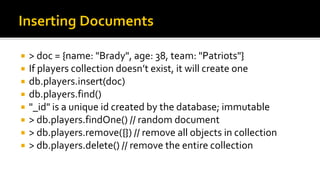
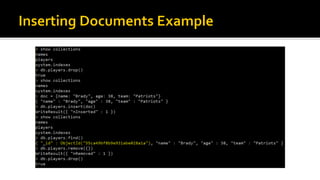
 > doc = {name: "Brady", age: 38, team: "Patriots"}
 If players collection doesn’t exist, it will create one
 db.players.insert(doc)
 db.players.find()
 "_id" is a unique id created by the database; immutable
 > db.players.findOne() // random document
 > db.players.remove({}) // remove all objects in collection
 > db.players.delete() // remove the entire collection
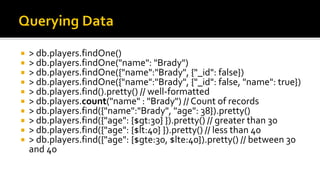
 > db.players.findOne()
 > db.players.findOne("name": "Brady")
 > db.players.findOne({"name":"Brady", {"_id": false})
 > db.players.findOne({"name":"Brady", {"_id": false, "name": true})
 > db.players.find().pretty() // well-formatted
 > db.players.count("name" : "Brady") // Count of records
 > db.players.find({"name":"Brady", "age": 38}).pretty()
 > db.players.find({"age": {$gt:30} }).pretty() // greater than 30
 > db.players.find({"age": {$lt:40} }).pretty() // less than 40
 > db.players.find({"age": {$gte:30, $lte:40}).pretty() // between 30
and 40
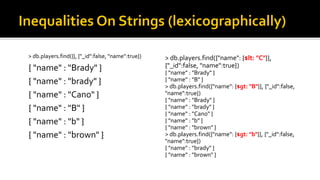
> db.players.find({"name": {$lt: "C"}},
{"_id":false, "name":true})
{ "name" : "Brady" }
{ "name" : "B" }
> db.players.find({"name": {$gt: "B"}}, {"_id":false,
"name":true})
{ "name" : "Brady" }
{ "name" : "brady" }
{ "name" : "Cano" }
{ "name" : "b" }
{ "name" : "brown" }
> db.players.find({"name": {$gt: "b"}}, {"_id":false,
"name":true})
{ "name" : "brady" }
{ "name" : "brown" }
> db.players.find({}, {"_id":false, "name":true})
{ "name" : "Brady" }
{ "name" : "brady" }
{ "name" : "Cano" }
{ "name" : "B" }
{ "name" : "b" }
{ "name" : "brown" }
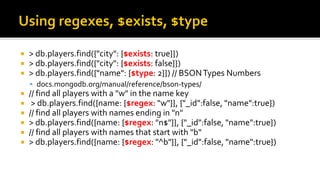
 > db.players.find({"city": {$exists: true}})
 > db.players.find({"city": {$exists: false}})
 > db.players.find({"name": {$type: 2}}) // BSONTypes Numbers
 docs.mongodb.org/manual/reference/bson-types/
 // find all players with a "w" in the name key
 > db.players.find({name: {$regex: "w"}}, {"_id":false, "name":true})
 // find all players with names ending in "n"
 > db.players.find({name: {$regex: "n$"}}, {"_id":false, "name":true})
 // find all players with names that start with "b"
 > db.players.find({name: {$regex: "^b"}}, {"_id":false, "name":true})
 // find players that have age of 38 OR have a city
 > db.players.find({$or: [{"age":38}, {"city": {$exists:true}}]})
 // find players that have age 38 AND name equals "Brady"
 > db.players.find({$and [{age:38}, {name:"Brady"}]})
 // same as … a bit more efficient
 > db.players.find({age:38, name:"Brady"})
 //What about this?Think about javascript behavior!!
 > db.players.find({age:38, age:40})
 > db.accounts.find()
 {"name" : "Adam", "favs" : [ "ice cream", "pretzels", "chips" ] }
 {"name" : "Mike", "favs" : [ "beer", "chips" ] }
 {"name" : "Sam", "favs" : "chips" }
 > db.accounts.find({favs:"chips"})
 > db.accounts.find({favs:"chips", name: {$gte : "M"}})
 > db.accounts.find({favs: {$all:["chips", "pretzels"]}})
 > db.accounts.find({favs: {$any: ["beer", "pretzels"]}})
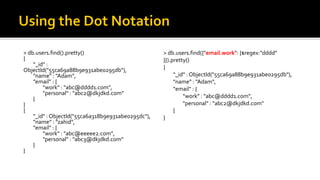
> db.users.find().pretty()
{
"_id" :
ObjectId("55ca69a88b9e931abe0295db"),
"name" : "Adam",
"email" : {
"work" : "abc@dddd1.com",
"personal" : "abc2@dkjdkd.com"
}
}
{
"_id" : ObjectId("55ca6a318b9e931abe0295dc"),
"name" : "zahid",
"email" : {
"work" : "abc@eeeee2.com",
"personal" : "abc3@dkjdkd.com"
}
}
> db.users.find({"email.work": {$regex:"dddd"
}}).pretty()
{
"_id" : ObjectId("55ca69a88b9e931abe0295db"),
"name" : "Adam",
"email" : {
"work" : "abc@dddd1.com",
"personal" : "abc2@dkjdkd.com"
}
}
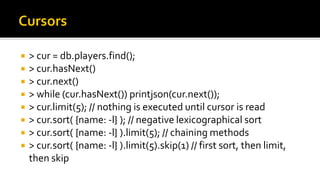
 > cur = db.players.find();
 > cur.hasNext()
 > cur.next()
 > while (cur.hasNext()) printjson(cur.next());
 > cur.limit(5); // nothing is executed until cursor is read
 > cur.sort( {name: -l} ); // negative lexicographical sort
 > cur.sort( {name: -l} ).limit(5); // chaining methods
 > cur.sort( {name: -l} ).limit(5).skip(1) // first sort, then limit,
then skip
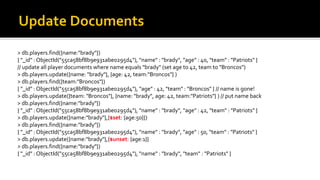
> db.players.find({name:"brady"})
{ "_id" : ObjectId("55ca58bf8b9e931abe0295d4"), "name" : "brady", "age" : 40, "team" : "Patriots" }
// update all player documents where name equals "brady" (set age to 42, team to "Broncos")
> db.players.update({name: "brady"}, {age: 42, team:"Broncos"} )
> db.players.find({team:"Broncos"})
{ "_id" : ObjectId("55ca58bf8b9e931abe0295d4"), "age" : 42, "team" : "Broncos" } // name is gone!
> db.players.update({team: "Broncos"}, {name: "brady", age: 42, team:"Patriots"} ) // put name back
> db.players.find({name:"brady"})
{ "_id" : ObjectId("55ca58bf8b9e931abe0295d4"), "name" : "brady", "age" : 42, "team" : "Patriots" }
> db.players.update({name:"brady"},{$set: {age:50}})
> db.players.find({name:"brady"})
{ "_id" : ObjectId("55ca58bf8b9e931abe0295d4"), "name" : "brady", "age" : 50, "team" : "Patriots" }
> db.players.update({name:"brady"},{$unset: {age:1}}
> db.players.find({name:"brady"})
{ "_id" : ObjectId("55ca58bf8b9e931abe0295d4"), "name" : "brady", "team" : "Patriots" }
> db.arrays.insert( {_id: 0, a: [1,2,3,4]})
> db.arrays.find()
{ "_id" : 0, "a" : [ 1, 2, 3, 4 ] }
> db.arrays.update({_id:0}, {$set: {"a.2": 5}})
> db.arrays.find()
{ "_id" : 0, "a" : [ 1, 2, 5, 4 ] }
> db.arrays.update({_id:0}, {$push: {a: 6}})
> db.arrays.find()
{ "_id" : 0, "a" : [ 1, 2, 5, 4, 6 ] }
> db.arrays.update({_id:0}, {$pop: {a: 1}})
> db.arrays.find()
{ "_id" : 0, "a" : [ 1, 2, 5, 4 ] }
> db.arrays.update({_id:0}, {$pop: {a: -1}})
> db.arrays.find()
{ "_id" : 0, "a" : [ 2, 5, 4 ] }
> db.arrays.update({_id:0}, {$pushAll: {a:
[7,8,9]}})
> db.arrays.find()
{ "_id" : 0, "a" : [ 2, 5, 4, 7, 8, 9 ] }
> db.arrays.update({_id:0}, {$pull: {a: 5}})
> db.arrays.find()
{ "_id" : 0, "a" : [ 2, 4, 7, 8, 9 ] }
> db.arrays.update({_id:0}, {$pullAll: {a:
[8,9]}})
> db.arrays.find()
{ "_id" : 0, "a" : [ 2, 4, 7 ] }
> db.arrays.update({_id:0}, {$addToSet: {a:
3}})
> db.arrays.find()
{ "_id" : 0, "a" : [ 2, 4, 7, 3 ] }
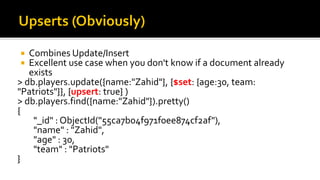
 Combines Update/Insert
 Excellent use case when you don't know if a document already
exists
> db.players.update({name:"Zahid"}, {$set: {age:30, team:
"Patriots"}}, {upsert: true} )
> db.players.find({name:"Zahid"}).pretty()
{
"_id" : ObjectId("55ca7b04f971f0ee874cf2af"),
"name" : "Zahid",
"age" : 30,
"team" : "Patriots"
}
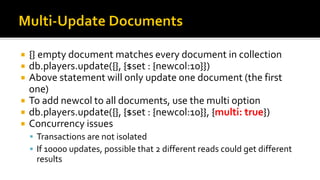
 {} empty document matches every document in collection
 db.players.update({}, {$set : {newcol:10}})
 Above statement will only update one document (the first
one)
 To add newcol to all documents, use the multi option
 db.players.update({}, {$set : {newcol:10}}, {multi: true})
 Concurrency issues
 Transactions are not isolated
 If 10000 updates, possible that 2 different reads could get different
results
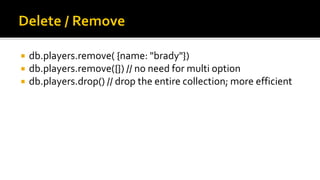
 db.players.remove( {name: "brady"})
 db.players.remove({}) // no need for multi option
 db.players.drop() // drop the entire collection; more efficient
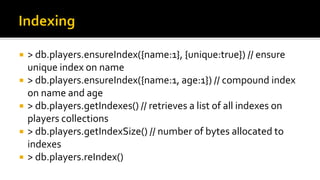
 > db.players.ensureIndex({name:1}, {unique:true}) // ensure
unique index on name
 > db.players.ensureIndex({name:1, age:1}) // compound index
on name and age
 > db.players.getIndexes() // retrieves a list of all indexes on
players collections
 > db.players.getIndexSize() // number of bytes allocated to
indexes
 > db.players.reIndex()
 count
 distinct
 group
> db.records.group( {
key: { a: 1 },
cond: { a: { $lt: 3 } },
reduce: function(cur, result) {
result.count += cur.count },
initial: { count: 0 }
} )
> db.grades.findOne()
{
"_id" : ObjectId("50906d7fa3c412bb040eb577"),
"student_id" : 0,
"type" : "exam",
"score" : 54.6535436362647
}
// sql: selectTop 1 student_id _id, avg(score) average from grades group by student_id order by avg(score) desc
> db.grades.aggregate(
{'$group':{'_id':'$student_id', 'average':{$avg:'$score'}}},
{'$sort':{'average':-1}},
{'$limit':1})
// select student_id _id, min(score) min from grades where score >= 65 group by student_id order by min(score)
> db.grades.aggregate([
{ $match : { score : {$gte : 65 } } },
{ '$group': {'_id':'$student_id', 'min': { $min:'$score'} } },
{ '$sort': { 'min': 1 } } ] );
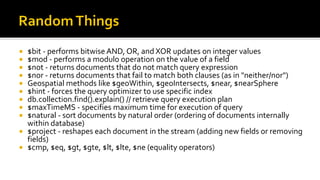
 $bit - performs bitwise AND, OR, and XOR updates on integer values
 $mod - performs a modulo operation on the value of a field
 $not - returns documents that do not match query expression
 $nor - returns documents that fail to match both clauses (as in "neither/nor")
 Geospatial methods like $geoWithin, $geoIntersects, $near, $nearSphere
 $hint - forces the query optimizer to use specific index
 db.collection.find().explain() // retrieve query execution plan
 $maxTimeMS - specifies maximum time for execution of query
 $natural - sort documents by natural order (ordering of documents internally
within database)
 $project - reshapes each document in the stream (adding new fields or removing
fields)
 $cmp, $eq, $gt, $gte, $lt, $lte, $ne (equality operators)
MongoD Essentials

MongoD Essentials

  • 1.
    Zahid Mian Part ofthe Brown-bag Series
  • 2.
     Schema-less  DocumentDB (don't thinkWord Document)  Document is a JSON object  Supports Indexes  Scalable  Doesn't Support "traditional" Joins  Doesn't SupportTransactions (not ACID-compliant)  Version 3.0.5 (in this doc)  http://docs.mongodb.org/manual/  https://www.mongodb.org/downloads
  • 3.
     Dictionaries andArrays  {}  {"fruits": ["apple", "pear", "peach"]}  {name: "Adam Smith"}  {numbers: [7,2,3,8]}  {name: "Adam Smith", hobbies: [hobby: "Econ", hobby:"Tennis"]}  Formal Representation: http://json.org/
  • 4.
    RDBMS SQL MONGODB databasedatabase table collection index index row document column field joining N/A
  • 5.
     mongod (launchserver)  mongo (launch client)  mongorestore (load a db into mongo)  use database (within client, use spceific db)  db.collection.findOne();
  • 6.
     Download/extract mongodbfiles  Either update Path to include bin folder or navigate to bin folder …  Create folder for data …  > md data -> md datadb (remember where you created this folder)  > mongod --dbpath c:datadb (default path onWindows) ▪ Now the mongodb server will be running (unless there is a problem)  From another command shell launch client: > mongo ▪ Now the mongodb shell will be running ▪ Try the following commands: ▪ show databases ▪ db ▪ show collections
  • 7.
     Create -Insert  Read - Find  Update - Update  Delete - Remove  Everything is a method/API, not as SQL syntax  Valid: db.names.find()  Invalid: slect * from names
  • 8.
     javascript interpreter > for (i=0;i<3;i++) print("hello");  > help  > help keys  auto complete with tab  > z = {"a":1}  > z.a  > z["a"]  > x={a:1}; y="a"; x[y]++; print(x.a); // output is 2
  • 9.
     Binary Specification(bsonspec.org)  Allows storage of extended datatypes  Date,Timestamp, Double, Integer, etc.  > obj = { a:1, b: ISODate("2015-03-21T17:41:55.325Z", c:}, c: NumberLong(555389), d: Boolean(true) }
  • 10.
     > doc= {name: "Brady", age: 38, team: "Patriots"}  If players collection doesn’t exist, it will create one  db.players.insert(doc)  db.players.find()  "_id" is a unique id created by the database; immutable  > db.players.findOne() // random document  > db.players.remove({}) // remove all objects in collection  > db.players.delete() // remove the entire collection
  • 12.
     > db.players.findOne() > db.players.findOne("name": "Brady")  > db.players.findOne({"name":"Brady", {"_id": false})  > db.players.findOne({"name":"Brady", {"_id": false, "name": true})  > db.players.find().pretty() // well-formatted  > db.players.count("name" : "Brady") // Count of records  > db.players.find({"name":"Brady", "age": 38}).pretty()  > db.players.find({"age": {$gt:30} }).pretty() // greater than 30  > db.players.find({"age": {$lt:40} }).pretty() // less than 40  > db.players.find({"age": {$gte:30, $lte:40}).pretty() // between 30 and 40
  • 13.
    > db.players.find({"name": {$lt:"C"}}, {"_id":false, "name":true}) { "name" : "Brady" } { "name" : "B" } > db.players.find({"name": {$gt: "B"}}, {"_id":false, "name":true}) { "name" : "Brady" } { "name" : "brady" } { "name" : "Cano" } { "name" : "b" } { "name" : "brown" } > db.players.find({"name": {$gt: "b"}}, {"_id":false, "name":true}) { "name" : "brady" } { "name" : "brown" } > db.players.find({}, {"_id":false, "name":true}) { "name" : "Brady" } { "name" : "brady" } { "name" : "Cano" } { "name" : "B" } { "name" : "b" } { "name" : "brown" }
  • 14.
     > db.players.find({"city":{$exists: true}})  > db.players.find({"city": {$exists: false}})  > db.players.find({"name": {$type: 2}}) // BSONTypes Numbers  docs.mongodb.org/manual/reference/bson-types/  // find all players with a "w" in the name key  > db.players.find({name: {$regex: "w"}}, {"_id":false, "name":true})  // find all players with names ending in "n"  > db.players.find({name: {$regex: "n$"}}, {"_id":false, "name":true})  // find all players with names that start with "b"  > db.players.find({name: {$regex: "^b"}}, {"_id":false, "name":true})
  • 15.
     // findplayers that have age of 38 OR have a city  > db.players.find({$or: [{"age":38}, {"city": {$exists:true}}]})  // find players that have age 38 AND name equals "Brady"  > db.players.find({$and [{age:38}, {name:"Brady"}]})  // same as … a bit more efficient  > db.players.find({age:38, name:"Brady"})  //What about this?Think about javascript behavior!!  > db.players.find({age:38, age:40})
  • 16.
     > db.accounts.find() {"name" : "Adam", "favs" : [ "ice cream", "pretzels", "chips" ] }  {"name" : "Mike", "favs" : [ "beer", "chips" ] }  {"name" : "Sam", "favs" : "chips" }  > db.accounts.find({favs:"chips"})  > db.accounts.find({favs:"chips", name: {$gte : "M"}})  > db.accounts.find({favs: {$all:["chips", "pretzels"]}})  > db.accounts.find({favs: {$any: ["beer", "pretzels"]}})
  • 17.
    > db.users.find().pretty() { "_id" : ObjectId("55ca69a88b9e931abe0295db"), "name": "Adam", "email" : { "work" : "abc@dddd1.com", "personal" : "abc2@dkjdkd.com" } } { "_id" : ObjectId("55ca6a318b9e931abe0295dc"), "name" : "zahid", "email" : { "work" : "abc@eeeee2.com", "personal" : "abc3@dkjdkd.com" } } > db.users.find({"email.work": {$regex:"dddd" }}).pretty() { "_id" : ObjectId("55ca69a88b9e931abe0295db"), "name" : "Adam", "email" : { "work" : "abc@dddd1.com", "personal" : "abc2@dkjdkd.com" } }
  • 18.
     > cur= db.players.find();  > cur.hasNext()  > cur.next()  > while (cur.hasNext()) printjson(cur.next());  > cur.limit(5); // nothing is executed until cursor is read  > cur.sort( {name: -l} ); // negative lexicographical sort  > cur.sort( {name: -l} ).limit(5); // chaining methods  > cur.sort( {name: -l} ).limit(5).skip(1) // first sort, then limit, then skip
  • 19.
    > db.players.find({name:"brady"}) { "_id": ObjectId("55ca58bf8b9e931abe0295d4"), "name" : "brady", "age" : 40, "team" : "Patriots" } // update all player documents where name equals "brady" (set age to 42, team to "Broncos") > db.players.update({name: "brady"}, {age: 42, team:"Broncos"} ) > db.players.find({team:"Broncos"}) { "_id" : ObjectId("55ca58bf8b9e931abe0295d4"), "age" : 42, "team" : "Broncos" } // name is gone! > db.players.update({team: "Broncos"}, {name: "brady", age: 42, team:"Patriots"} ) // put name back > db.players.find({name:"brady"}) { "_id" : ObjectId("55ca58bf8b9e931abe0295d4"), "name" : "brady", "age" : 42, "team" : "Patriots" } > db.players.update({name:"brady"},{$set: {age:50}}) > db.players.find({name:"brady"}) { "_id" : ObjectId("55ca58bf8b9e931abe0295d4"), "name" : "brady", "age" : 50, "team" : "Patriots" } > db.players.update({name:"brady"},{$unset: {age:1}} > db.players.find({name:"brady"}) { "_id" : ObjectId("55ca58bf8b9e931abe0295d4"), "name" : "brady", "team" : "Patriots" }
  • 20.
    > db.arrays.insert( {_id:0, a: [1,2,3,4]}) > db.arrays.find() { "_id" : 0, "a" : [ 1, 2, 3, 4 ] } > db.arrays.update({_id:0}, {$set: {"a.2": 5}}) > db.arrays.find() { "_id" : 0, "a" : [ 1, 2, 5, 4 ] } > db.arrays.update({_id:0}, {$push: {a: 6}}) > db.arrays.find() { "_id" : 0, "a" : [ 1, 2, 5, 4, 6 ] } > db.arrays.update({_id:0}, {$pop: {a: 1}}) > db.arrays.find() { "_id" : 0, "a" : [ 1, 2, 5, 4 ] } > db.arrays.update({_id:0}, {$pop: {a: -1}}) > db.arrays.find() { "_id" : 0, "a" : [ 2, 5, 4 ] } > db.arrays.update({_id:0}, {$pushAll: {a: [7,8,9]}}) > db.arrays.find() { "_id" : 0, "a" : [ 2, 5, 4, 7, 8, 9 ] } > db.arrays.update({_id:0}, {$pull: {a: 5}}) > db.arrays.update({_id:0}, {$pull: {a: 5}}) > db.arrays.find() { "_id" : 0, "a" : [ 2, 4, 7, 8, 9 ] } > db.arrays.update({_id:0}, {$pullAll: {a: [8,9]}}) > db.arrays.find() { "_id" : 0, "a" : [ 2, 4, 7 ] } > db.arrays.update({_id:0}, {$addToSet: {a: 3}}) > db.arrays.find() { "_id" : 0, "a" : [ 2, 4, 7, 3 ] }
  • 21.
     Combines Update/Insert Excellent use case when you don't know if a document already exists > db.players.update({name:"Zahid"}, {$set: {age:30, team: "Patriots"}}, {upsert: true} ) > db.players.find({name:"Zahid"}).pretty() { "_id" : ObjectId("55ca7b04f971f0ee874cf2af"), "name" : "Zahid", "age" : 30, "team" : "Patriots" }
  • 22.
     {} emptydocument matches every document in collection  db.players.update({}, {$set : {newcol:10}})  Above statement will only update one document (the first one)  To add newcol to all documents, use the multi option  db.players.update({}, {$set : {newcol:10}}, {multi: true})  Concurrency issues  Transactions are not isolated  If 10000 updates, possible that 2 different reads could get different results
  • 23.
     db.players.remove( {name:"brady"})  db.players.remove({}) // no need for multi option  db.players.drop() // drop the entire collection; more efficient
  • 24.
     > db.players.ensureIndex({name:1},{unique:true}) // ensure unique index on name  > db.players.ensureIndex({name:1, age:1}) // compound index on name and age  > db.players.getIndexes() // retrieves a list of all indexes on players collections  > db.players.getIndexSize() // number of bytes allocated to indexes  > db.players.reIndex()
  • 25.
     count  distinct group > db.records.group( { key: { a: 1 }, cond: { a: { $lt: 3 } }, reduce: function(cur, result) { result.count += cur.count }, initial: { count: 0 } } )
  • 27.
    > db.grades.findOne() { "_id" :ObjectId("50906d7fa3c412bb040eb577"), "student_id" : 0, "type" : "exam", "score" : 54.6535436362647 } // sql: selectTop 1 student_id _id, avg(score) average from grades group by student_id order by avg(score) desc > db.grades.aggregate( {'$group':{'_id':'$student_id', 'average':{$avg:'$score'}}}, {'$sort':{'average':-1}}, {'$limit':1}) // select student_id _id, min(score) min from grades where score >= 65 group by student_id order by min(score) > db.grades.aggregate([ { $match : { score : {$gte : 65 } } }, { '$group': {'_id':'$student_id', 'min': { $min:'$score'} } }, { '$sort': { 'min': 1 } } ] );
  • 28.
     $bit -performs bitwise AND, OR, and XOR updates on integer values  $mod - performs a modulo operation on the value of a field  $not - returns documents that do not match query expression  $nor - returns documents that fail to match both clauses (as in "neither/nor")  Geospatial methods like $geoWithin, $geoIntersects, $near, $nearSphere  $hint - forces the query optimizer to use specific index  db.collection.find().explain() // retrieve query execution plan  $maxTimeMS - specifies maximum time for execution of query  $natural - sort documents by natural order (ordering of documents internally within database)  $project - reshapes each document in the stream (adding new fields or removing fields)  $cmp, $eq, $gt, $gte, $lt, $lte, $ne (equality operators)