

Modern Application
Foundations: Underscore
and Twitter Bootstrap
Howard M. Lewis Ship
TWD Consulting
hlship@gmail.com
@hlship
                       © 2012 Howard M. Lewis Ship
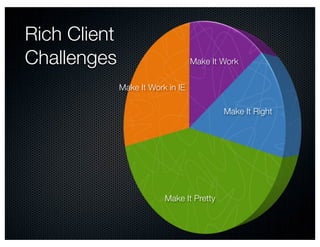
Rich Client
Challenges                         Make It Work


              Make It Work in IE

                                           Make It Right


                          Make It Pretty
Underscore
  Make it work, right
Bootstrap
  Make it pretty
Bootstrap.js + jQuery
  Make it interact right
  Make it work right under IE
_
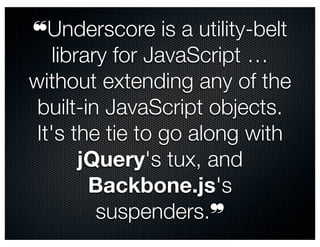
❝Underscore is a utility-belt
    library for JavaScript …
without extending any of the
 built-in JavaScript objects.
 It's the tie to go along with
        jQuery's tux, and
         Backbone.js's
          suspenders.❞
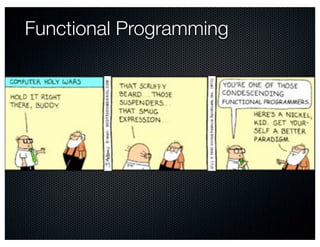
Functional Programming
Is JavaScript a Functional Language?


                    © 2008 Hans Splinter – http://www.flickr.com/photos/67196253@N00/2941655917/
underscore.js 1.3.1

 Great documentation
 34 Kb / < 4 Kb
 60+ built-in functions
 Uses native support where available
 Extensible
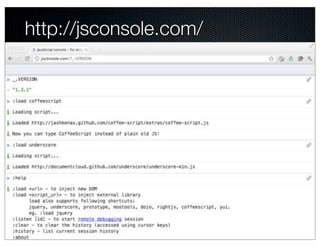
http://jsconsole.com/
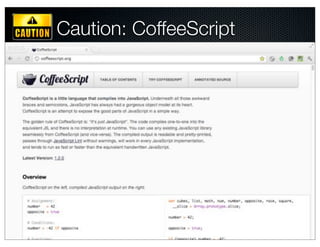
Caution: CoffeeScript
 CoffeeScript
 ➠ ❝… a little language that compiles into JavaScript❞
 Concise and readable
 Optional parenthesis
 Implicit returns
 Concise function definitions
 Great fit with Underscore!
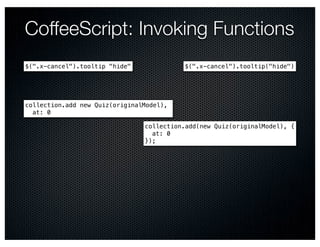
CoffeeScript: Invoking Functions
$(".x-cancel").tooltip "hide"             $(".x-cancel").tooltip("hide")


collection.add new Quiz(originalModel),
  at: 0

                                collection.add(new Quiz(originalModel), {
                                  at: 0
                                });
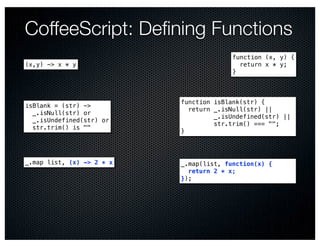
CoffeeScript: Defining Functions
                                         function (x, y) {
(x,y) -> x * y                             return x * y;
                                         }


                           function isBlank(str) {
isBlank = (str) ->
                             return _.isNull(str) ||
  _.isNull(str) or
                                    _.isUndefined(str) ||
  _.isUndefined(str) or
                                    str.trim() === "";
  str.trim() is ""
                           }


_.map list, (x) -> 2 * x   _.map(list, function(x) {
                             return 2 * x;
                           });
Simple Object / Value
Utilities
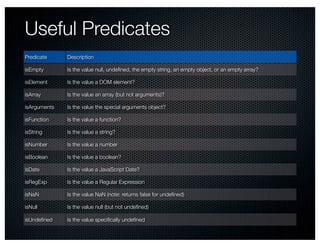
Useful Predicates
Predicate     Description

isEmpty       Is the value null, undefined, the empty string, an empty object, or an empty array?

isElement     Is the value a DOM element?

isArray       Is the value an array (but not arguments)?

isArguments   Is the value the special arguments object?

isFunction    Is the value a function?

isString      Is the value a string?

isNumber      Is the value a number

isBoolean     Is the value a boolean?

isDate        Is the value a JavaScript Date?

isRegExp      Is the value a Regular Expression

isNaN         Is the value NaN (note: returns false for undefined)

isNull        Is the value null (but not undefined)

isUndefined    Is the value specifically undefined
_.isEmpty
 _.isEmpty   null ➠ true
 _.isEmpty   undefined ➠ true
 _.isEmpty   [] ➠ true
 _.isEmpty   "" ➠ true
 _.isEmpty   {} ➠ true
 _.isEmpty   [1] ➠ false

 _.isEmpty name:null ➠ false

 me = name:"Howard"
 delete me.name
 _.isEmpty me ➠ true
_.keys, _.values, _.has
 me =
   firstName: "Howard"
   lastName: "Lewis Ship"

 _.keys me ➠ ["firstName", "lastName"]

 _.values me ➠ ["Howard", "Lewis Ship"]
                  Just keys for this object, not inherited
                  Not sorted


 _.has me, "firstName" ➠ true
 _.has me, "middleName" ➠ false
_.functions


_.functions me ➠ []

_.functions _ ➠ ["after", "all", "any",
"bind", "bindAll", "chain", …
                                   Sorted
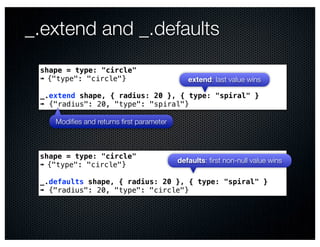
_.extend and _.defaults
 shape = type: "circle"
 ➠ {"type": "circle"}                       extend: last value wins

 _.extend shape, { radius: 20 }, { type: "spiral" }
 ➠ {"radius": 20, "type": "spiral"}

    Modifies and returns first parameter


 shape = type: "circle"
                                         defaults: first non-null value wins
 ➠ {"type": "circle"}

 _.defaults shape, { radius: 20 }, { type: "spiral" }
 ➠ {"radius": 20, "type": "circle"}
Collection Functions
_.each(list, iterator, [context])
                            this set to context before invoking iterator


_.each ["alpha", "bravo", "charlie"],
  (value, index) ->
    console.log "#{value} is at #{index}"
alpha is at 0
bravo is at 1             More CoffeeScript goodness
charlie is at 2
➠ undefined

Alias: _.forEach
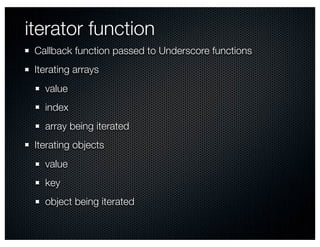
iterator function
 Callback function passed to Underscore functions
 Iterating arrays
   value
   index
   array being iterated
 Iterating objects
   value
   key
   object being iterated
context and this
 this is a side-effect of method invocation:

 anObject.aMethod() ➠     var fn = anObject["aMethod"];
                          fn.call(anObject)

                              Sets this for new stack frame


 DOM and JQuery manipulate this
 ➠ Usually the DOM element that triggered event
 this not relevant to HOFs
   Functions, parameters, local scope
 Optional context parameter on many _ functions
_.each(object, iterator, [context])


_.each me, (value, key) ->
  console.log "Value for #{key} is #{value}"
Value for firstName is Howard
Value for lastName is Lewis Ship
➠ undefined
_.each(list) and undefined

sparse = []
sparse[10] = "ten"
sparse[20] = "twenty"

_.each sparse, (value, index) ->
    console.log "#{value} is at #{index}"
"ten is at 10"
"twenty is at 20"
➠ undefined
_.map(list, iterator, [context])
 _.map [1, 2, 3], (value) -> 2 * value
 ➠[2, 4, 6]

 _.map [1, 2, 3, 40, 500],
   (value, index) -> value * index
 ➠[0, 2, 6, 120, 2000]

 _.map me,(value, key) ->
    "Value for #{key} is #{value}"
 ➠ ["Value for firstName is Howard",
     "Value for lastName is Lewis Ship"]


Alias: _.collect
_.reduce(list, iterator, memo, [context])
                                       aka "accumulator"


_.reduce ["Howard", "Lewis Ship", "TWD Consulting"],
  (memo, name) -> memo + name.length
  0
➠ 30

"HowardLewis ShipTWD Consulting".length
➠ 30
                                      A side effect!
_.reduce me,
  (memo, value, key) -> memo[value] = key ; return memo
  {}
➠ {"Howard": "firstName", "Lewis Ship": "lastName"}


 Aliases: _.inject, _.foldl
_.find(list, iterator, [context])
_.find [1, 2, 3, 4, 5, 6],
  (x) -> x % 2 is 0
➠ 2

hand = [
  { value:3,   suit:   "hearts" }
  { value:2,   suit:   "spades" }
  { value:7,   suit:   "spades" }
  { value:8,   suit:   "diamonds" }
]
➠ …

_.find hand, (card) -> 8 + card.value is 15
➠ {"suit": "spades", "value": 7}

_.find hand, (card) -> 27 + card.value is 31
➠ undefined


Alias: _.detect
                                      © 2009 scribbletaylor – http://www.flickr.com/photos/64958688@N00/3604756480/
_.all(list, iterator, [context])


_.all hand, (card) -> card.value >= 2
➠ true

_.all hand, (card) -> card.suit is "hearts"
➠ false


Alias: _.every
_.any(list, [iterator], [context])


 _.any hand, (card) -> card.suit is "clubs"
 ➠ false

 _.any hand, (card) -> card.suit is "diamonds"
 ➠ true

 _.any []        Default iterator is _.identity
 ➠ false

 _.any [false]
 ➠ false

 _.any [true]
 ➠ true
Alias: _.every
_.filter(list, iterator, [context])


_.filter hand, (card) -> card.suit is "spades"
➠ [{"suit": "spades", "value": 2},
   {"suit": "spades", "value": 7}]

_.reject hand, (card) -> card.suit is "spades"
➠ [{"suit": "hearts", "value": 3},
   {"suit": "diamonds", "value": 8}]


  Alias: _.select
_.groupBy(list, iterator)

   _.groupBy hand, (card) -> card.suit
   ➠ {"diamonds": [{"suit": "diamonds", "value": 8}],
      "hearts": [{"suit": "hearts", "value": 3}],
      "spades": [{"suit": "spades", "value": 2},
                 {"suit": "spades", "value": 7}]}

   _.groupBy hand, (card) -> card.value
   ➠ {"2": [{"suit": "spades", "value": 2}],
      "3": [{"suit": "hearts", "value": 3}],
      "7": [{"suit": "spades", "value": 7}],
      "8": [{"suit": "diamonds", "value": 8}]}

   _.groupBy hand, "suit"
   ➠ {"diamonds": [{"suit": "diamonds", "value": 8}],
      "hearts": [{"suit": "hearts", "value": 3}],
      "spades": [{"suit": "spades", "value": 2},
                 {"suit": "spades", "value": 7}]}
_.sortBy(list, iterator, [context])

_.sortBy hand, (card) ->
  suitIndex = _.indexOf ["clubs", "diamonds", "hearts", "spades"],
    card.suit
  100 * suitIndex + card.value
➠ [{"suit": "diamonds", "value": 8},
   {"suit": "hearts", "value": 3},
   {"suit": "spades", "value": 2},
   {"suit": "spades", "value": 7}]

_.sortBy hand, "propertyName"
Object propertyName has no method 'call'

_.sortBy ["fred", "wilma", "barney"], _.identity
➠ ["barney", "fred", "wilma"]
                                         (x) -> x
_.max(list, [iterator], [context])

   _.max [-1, 2, 3]
   ➠ 3

   _.max []
   ➠ -Infinity

   _.max hand, (card) -> card.value
   ➠ {"suit": "diamonds", "value": 8}
_.min(list, [iterator], [context])
   _.min [-1, 2, 3]
   ➠ -1

   _.min []
   ➠ Infinity

   _.min hand, (card) -> card.value
   ➠ {"suit": "spades", "value": 2}

   _.min ["fred", "wilma", "barney"]
   ➠ NaN
_.include(list, value)

     _.include [1, 2, 3], 2
     ➠ true

     _.include [1, 2, 3], 99
     ➠ false

     _.include [1, 2, 3], "2"
     ➠ false
                     Uses === comparison


Alias: _.contains
_.pluck(list, propertyName)

_.pluck hand, "value"
➠ [3, 2, 7, 8]

_.pluck hand, "suit"
➠ ["hearts", "spades", "spades", "diamonds"]

_.pluck hand, "score"
➠ [undefined, undefined, undefined, undefined]
_.shuffle(list)

  _.shuffle hand
  ➠ [{"suit": "spades", "value": 2},
     {"suit": "diamonds", "value": 8},
     {"suit": "hearts", "value": 3},
     {"suit": "spades", "value": 7}]

  _.shuffle null
  ➠ []
Object Oriented Style and
Chaining
_ is a function
                                   Every function on _ is also on
Returns a wrapper object                  wrapper object

    _(hand).pluck "value"
    ➠ [3, 2, 7, 8]
                           Wrapped object passed as first parameter

    _(hand).size()
    ➠ 4
Chaining Can Be Ugly

 _.map(_.first(_.sortBy(hand,cardSortValue).reverse(), 2),
       (card) -> "#{card.value} of #{card.suit}")
 ➠ ["8 of diamonds", "7 of spades"]


1.Sort the hand using the cardSortValue function
2.Reverse the result
3.Take the first two cards
4.Convert each card to a string
_.chain(object) and _.value(object)


 _.chain(hand)
   .sortBy(cardSortValue)
   .reverse()
   .first(2)                  Each step returns a new wrapped object
   .map((card) -> "#{card.value} of #{card.suit}")
   .value()
 ➠ ["8 of diamonds", "7 of spades"]
Flow of Transformations


© 2008 Manu Gómez – http://www.flickr.com/photos/manugomi/2884678938/
_.tap(object, interceptor)

  _.chain(hand)
    .sortBy(cardSortValue)
    .tap(console.log)
    .reverse()
    .first(2)
    .map((card) -> "#{card.value} of #{card.suit}")
    .value()
  [{"suit": "diamonds", "value": 8},
   {"suit": "spades", "value": 7},
   {"suit": "hearts", "value": 3},
   {"suit": "spades", "value": 2}]
  ➠ ["8 of diamonds", "7 of spades"]
Array prototype methods

                        Extra methods on wrapper not on _


           _.([1, 2]).concat "three"
           ➠ [1, 2, "three"]
 concat                   shift
 join                     slice
 pop                      sort
 push                     splice
 reverse                  unshift
Array Functions
Name                                Description                                                    Aliases

first(array)                         Return first element in array, as single value                  head


first(array, n)                      Return first elements of array as list                          head


initial(array, [n])                 Return everything but last n (default = 1) elements of array


last(array)                         Return last element in array, as single value


last(array, n)                      Return last n (default = 1) elements of array


rest(array, [n])                    Return array from index n (default = 1) on                     tail


indexOf(array, value, [isSorted])   Index of value inside array, or -1


lastIndexOf(array, value)           Last index of value inside array, or -1


                                    Returns copy with all falsey (null, false, 0, undefined, NaN)
compact(array)
                                    removed


flatten(array, [shallow])            Collapses nested arrays down to a single array
Set Operations

    _.without [5, 4, 3, 2, 1], 4, 2
    ➠ [5, 3, 1]

    _.difference [5, 4, 4, 3, 3, 2, 2, 1],
      [1, 2],
      [4, 10, 22]
    ➠ [5, 3, 3]

    _.union [3, 2, 1, 3, 4, 5], [101, 1], [3, 4], [500]
    ➠ [3, 2, 1, 4, 5, 101, 500]

    _.intersection [5, 4, 4, 3, 3, 2, 2, 1],
      [1, 2, 3, 4, 5],
      [4, 10, 22, 3]
    ➠ [4, 3]
_.uniq(array, [isSorted], [iterator])


   _.uniq [1, 30, 50, 40, 30, 1]
   ➠ [1, 30, 50, 40]

   _.uniq [1, 30, 50, 40, 30, 1], false, (x) -> "#{x}".length
   ➠ [1, 30]
_.range([start], stop, [step])
     _.range 5
     ➠ [0, 1, 2, 3, 4]

     _.range 3, 5
     ➠ [3, 4]

     _.range 1, 20, 3
     ➠ [1, 4, 7, 10, 13, 16, 19]

     _.range 1, 20, -3
     ➠ []

     _.range 20, 1, -4
     ➠ [20, 16, 12, 8, 4]
_.zip(*arrays)

_.zip(["a", "b", "c"],
      [1, 2, 3],
      ["alpha", "bravo", "charlie", "delta"])
➠ [["a", 1, "alpha"],
   ["b", 2, "bravo"],
   ["c", 3, "charlie"],
   [undefined, undefined, "delta"]]
Higher Order Underscore
_.bind(fn, context, [*args])

greet = (greeting) -> "#{greeting}: #{this.name}"

greet("Hello, unbound this")
➠ "Hello, unbound this: "

bgreet = _.bind greet, { name: "Howard" }

bgreet "Hello"
➠ "Hello: Howard"

fgreet = _.bind greet, { name: "Mr. Lewis Ship" }, "Salutations"

fgreet()
➠ "Salutations: Mr. Lewis Ship"
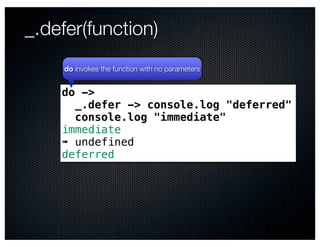
_.defer(function)
     do invokes the function with no parameters


    do ->
      _.defer -> console.log "deferred"
      console.log "immediate"
    immediate
    ➠ undefined
    deferred
_.delay(fn, wait, [*arguments])


       log = _.bind console.log, console
       do ->
         _.delay log, 1000, "delayed"
         log "immediate"
       immediate
       ➠ undefined
       delayed

           About 1 second later
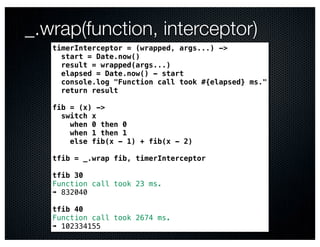
_.wrap(function, interceptor)
   timerInterceptor = (wrapped, args...) ->
     start = Date.now()
     result = wrapped(args...)
     elapsed = Date.now() - start
     console.log "Function call took #{elapsed} ms."
     return result

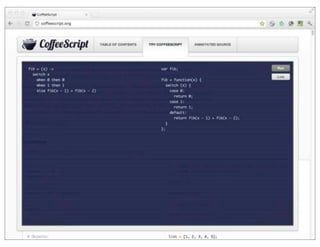
   fib = (x) ->
     switch x
       when 0 then 0
       when 1 then 1
       else fib(x - 1) + fib(x - 2)

   tfib = _.wrap fib, timerInterceptor

   tfib 30
   Function call took 23 ms.
   ➠ 832040

   tfib 40
   Function call took 2674 ms.
   ➠ 102334155
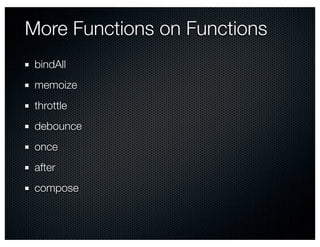
More Functions on Functions
 bindAll
 memoize
 throttle
 debounce
 once
 after
 compose
Underscore Utilities
Name                          Description


identity(value)               Returns its argument, a default iterator


times(n, iterator)            Invoke its iterator n times, passing the index to it


uniqueId([prefix])             Creates a unique id, good for labelling DOM elements


escape(string)                Converts & < > " ' / in string to HTML entities (&amp; &lt; … )


template(string, [context])   Converts the string into a template function, using a <% … %> syntax


mixin(object)                 Adds new functions to _ and to the OOP wrapper, for use with _.chain()
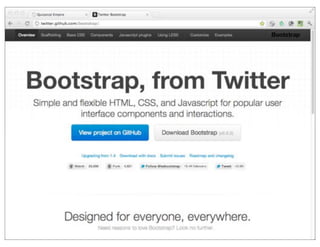
Twitter Bootstrap
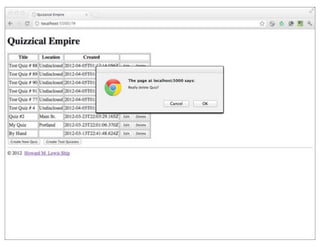
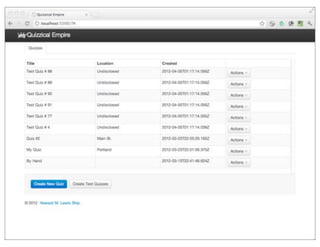
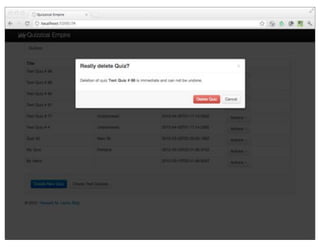
Quizzical Empire
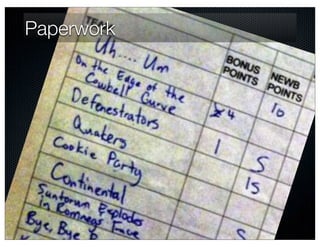
Paperwork
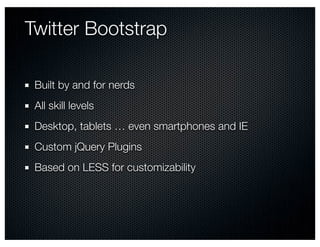
Twitter Bootstrap	

 Built by and for nerds
 All skill levels
 Desktop, tablets … even smartphones and IE
 Custom jQuery Plugins
 Based on LESS for customizability
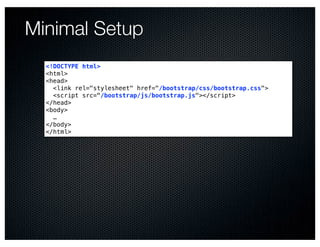
Minimal Setup
  <!DOCTYPE html>
  <html>
  <head>
    <link rel="stylesheet" href="/bootstrap/css/bootstrap.css">
    <script src="/bootstrap/js/bootstrap.js"></script>
  </head>
  <body>
    …
  </body>
  </html>
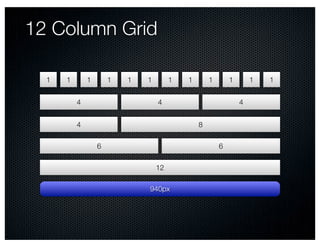
12 Column Grid

  1   1       1       1   1   1        1   1       1       1       1   1


          4                       4                            4


          4                                    8

                  6                                    6

                                  12

                              940px
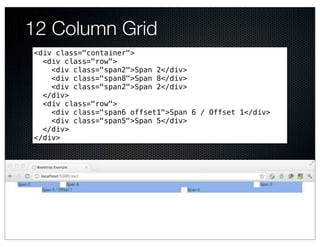
12 Column Grid
<div class="container">
  <div class="row">
    <div class="span2">Span 2</div>
    <div class="span8">Span 8</div>
    <div class="span2">Span 2</div>
  </div>
  <div class="row">
    <div class="span6 offset1">Span 6 / Offset 1</div>
    <div class="span5">Span 5</div>
  </div>
</div>
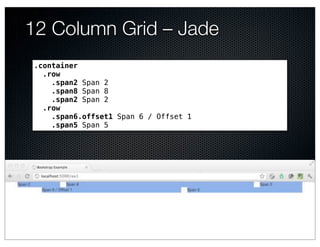
12 Column Grid – Jade
.container
  .row
    .span2 Span 2
    .span8 Span 8
    .span2 Span 2
  .row
    .span6.offset1 Span 6 / Offset 1
    .span5 Span 5
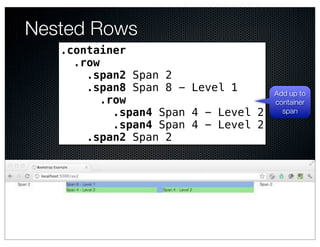
Nested Rows
   .container
     .row
       .span2 Span 2
       .span8 Span 8 - Level 1        Add up to
          .row                        container
            .span4 Span 4 - Level 2     span

            .span4 Span 4 - Level 2
       .span2 Span 2
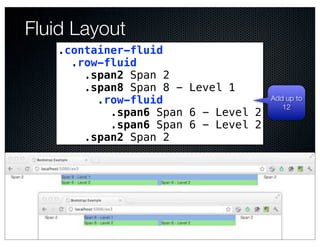
Fluid Layout
   .container-fluid
     .row-fluid
       .span2 Span 2
       .span8 Span 8 - Level 1
         .row-fluid                  Add up to
                                        12
           .span6 Span 6 - Level 2
           .span6 Span 6 - Level 2
       .span2 Span 2
General Bootstrap Approach


 Basic, semantic, markup
 Reasonable default look
 Simple CSS classes: "row", "span3", "offset1"
 Additiive: more CSS classes to tune
Tables
         .container
           table.span12
             caption Bare Table
             thead:tr
               th.span8 Column A
               th Column B
               th.span2 Column C
             tbody
               each row in [1, 2, 3, 4]
                 tr
                    each cell in ["A", "B", "C"]
                      td Cell #{row}-#{cell}
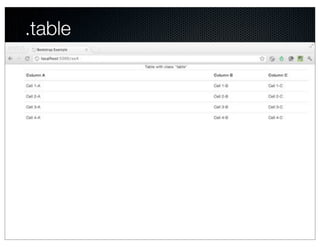
.table
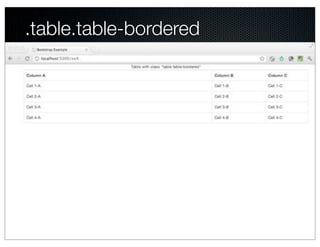
.table.table-bordered
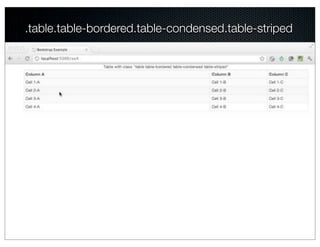
.table.table-bordered.table-condensed.table-striped
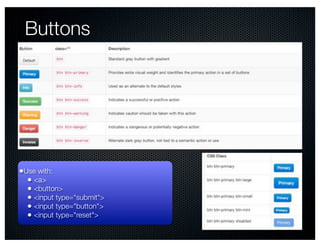
Buttons


•Use with:
  • <a>
  • <button>
  • <input type="submit">
  • <input type="button">
  • <input type="reset">
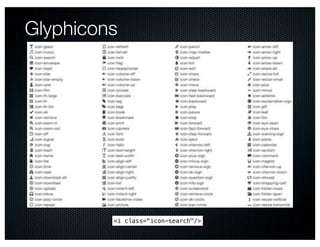
Glyphicons


         <i class="icon-search"/>
Bootstrap Components
.container

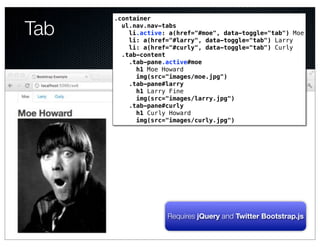
Tab     ul.nav.nav-tabs
          li.active: a(href="#moe", data-toggle="tab") Moe
          li: a(href="#larry", data-toggle="tab") Larry
          li: a(href="#curly", data-toggle="tab") Curly
        .tab-content
          .tab-pane.active#moe
            h1 Moe Howard
            img(src="images/moe.jpg")
          .tab-pane#larry
            h1 Larry Fine
            img(src="images/larry.jpg")
          .tab-pane#curly
            h1 Curly Howard
            img(src="images/curly.jpg")
                 Text


                    Requires jQuery and Twitter Bootstrap.js
Dynamic Tabs
   ex7.jade
   .container
     ul.nav.nav-tabs
     .tab-content
   != js("ex7")


   ex7.coffee
   jQuery ($) ->
     tabs = $("ul.nav.nav-tabs")
     tabContent = $(".tab-content")

     _.each ["Moe Howard", "Larry Fine", "Curly Howard"],
       (name) ->
       …

     tabs.find("li:first").addClass "active"
     tabContent.find(".tab-pane:first").addClass "active in"
Dynamic Tabs
   _.each ["Moe Howard", "Larry Fine", "Curly Howard"],
     (name) ->
       firstName = name.split(' ')[0]
       uid = _.uniqueId "tab"

       tab = $("""
         <li>
            <a href="##{uid}" data-toggle="tab">
              #{firstName}
            </a>
         </li>
       """)
       content = $("""
         <div class="tab-pane fade" id="#{uid}">
            <h1>#{name}</h1>
            <img src="images/#{firstName.toLowerCase()}.jpg">
         </div>
       """)

       content.appendTo tabContent
       tab.appendTo tabs
Modal Dialogs
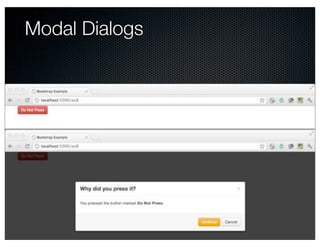
Modal Dialogs
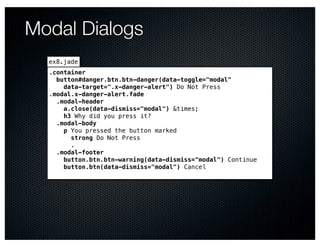
  ex8.jade
  .container
    button#danger.btn.btn-danger(data-toggle="modal"
      data-target=".x-danger-alert") Do Not Press
  .modal.x-danger-alert.fade
    .modal-header
      a.close(data-dismiss="modal") &times;
      h3 Why did you press it?
    .modal-body
      p You pressed the button marked
        strong Do Not Press
        .
    .modal-footer
      button.btn.btn-warning(data-dismiss="modal") Continue
      button.btn(data-dismiss="modal") Cancel
Alerts
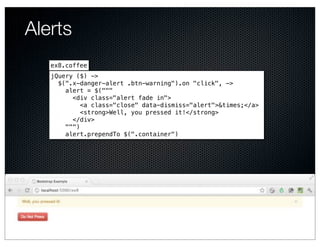
   ex8.coffee
   jQuery ($) ->
     $(".x-danger-alert .btn-warning").on "click", ->
       alert = $("""
         <div class="alert fade in">
            <a class="close" data-dismiss="alert">&times;</a>
            <strong>Well, you pressed it!</strong>
         </div>
       """)
       alert.prependTo $(".container")
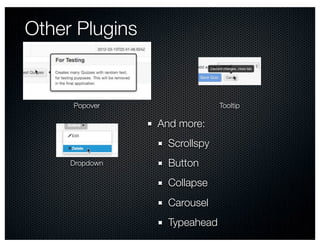
Other Plugins


     Popover                  Tooltip

                And more:
                  Scrollspy
     Dropdown     Button
                  Collapse
                  Carousel
                  Typeahead
Wrap Up
Underscore

  Effective, functional JavaScript

Bootstrap

  Sharp L&F out of the box

  Very customizable

Bootstrap JS

  Lots of UI pizzaz, effortlessly

CoffeeScript

  Concise, readable JavaScript
http://howardlewisship.com
Q&A

Modern Application Foundations: Underscore and Twitter Bootstrap

  • 1.
    Modern Application Foundations: Underscore andTwitter Bootstrap Howard M. Lewis Ship TWD Consulting hlship@gmail.com @hlship © 2012 Howard M. Lewis Ship
  • 2.
    Rich Client Challenges Make It Work Make It Work in IE Make It Right Make It Pretty
  • 3.
    Underscore Makeit work, right Bootstrap Make it pretty Bootstrap.js + jQuery Make it interact right Make it work right under IE
  • 4.
  • 5.
    ❝Underscore is autility-belt library for JavaScript … without extending any of the built-in JavaScript objects. It's the tie to go along with jQuery's tux, and Backbone.js's suspenders.❞
  • 6.
  • 7.
    Is JavaScript aFunctional Language? © 2008 Hans Splinter – http://www.flickr.com/photos/67196253@N00/2941655917/
  • 8.
    underscore.js 1.3.1 Greatdocumentation 34 Kb / < 4 Kb 60+ built-in functions Uses native support where available Extensible
  • 9.
  • 10.
  • 11.
    Caution: CoffeeScript CoffeeScript ➠ ❝… a little language that compiles into JavaScript❞ Concise and readable Optional parenthesis Implicit returns Concise function definitions Great fit with Underscore!
  • 12.
    CoffeeScript: Invoking Functions $(".x-cancel").tooltip"hide" $(".x-cancel").tooltip("hide") collection.add new Quiz(originalModel), at: 0 collection.add(new Quiz(originalModel), { at: 0 });
  • 13.
    CoffeeScript: Defining Functions function (x, y) { (x,y) -> x * y return x * y; } function isBlank(str) { isBlank = (str) -> return _.isNull(str) || _.isNull(str) or _.isUndefined(str) || _.isUndefined(str) or str.trim() === ""; str.trim() is "" } _.map list, (x) -> 2 * x _.map(list, function(x) { return 2 * x; });
  • 15.
    Simple Object /Value Utilities
  • 16.
    Useful Predicates Predicate Description isEmpty Is the value null, undefined, the empty string, an empty object, or an empty array? isElement Is the value a DOM element? isArray Is the value an array (but not arguments)? isArguments Is the value the special arguments object? isFunction Is the value a function? isString Is the value a string? isNumber Is the value a number isBoolean Is the value a boolean? isDate Is the value a JavaScript Date? isRegExp Is the value a Regular Expression isNaN Is the value NaN (note: returns false for undefined) isNull Is the value null (but not undefined) isUndefined Is the value specifically undefined
  • 17.
    _.isEmpty _.isEmpty null ➠ true _.isEmpty undefined ➠ true _.isEmpty [] ➠ true _.isEmpty "" ➠ true _.isEmpty {} ➠ true _.isEmpty [1] ➠ false _.isEmpty name:null ➠ false me = name:"Howard" delete me.name _.isEmpty me ➠ true
  • 18.
    _.keys, _.values, _.has me = firstName: "Howard" lastName: "Lewis Ship" _.keys me ➠ ["firstName", "lastName"] _.values me ➠ ["Howard", "Lewis Ship"] Just keys for this object, not inherited Not sorted _.has me, "firstName" ➠ true _.has me, "middleName" ➠ false
  • 19.
    _.functions _.functions me ➠[] _.functions _ ➠ ["after", "all", "any", "bind", "bindAll", "chain", … Sorted
  • 20.
    _.extend and _.defaults shape = type: "circle" ➠ {"type": "circle"} extend: last value wins _.extend shape, { radius: 20 }, { type: "spiral" } ➠ {"radius": 20, "type": "spiral"} Modifies and returns first parameter shape = type: "circle" defaults: first non-null value wins ➠ {"type": "circle"} _.defaults shape, { radius: 20 }, { type: "spiral" } ➠ {"radius": 20, "type": "circle"}
  • 21.
  • 22.
    _.each(list, iterator, [context]) this set to context before invoking iterator _.each ["alpha", "bravo", "charlie"], (value, index) -> console.log "#{value} is at #{index}" alpha is at 0 bravo is at 1 More CoffeeScript goodness charlie is at 2 ➠ undefined Alias: _.forEach
  • 23.
    iterator function Callbackfunction passed to Underscore functions Iterating arrays value index array being iterated Iterating objects value key object being iterated
  • 24.
    context and this this is a side-effect of method invocation: anObject.aMethod() ➠ var fn = anObject["aMethod"]; fn.call(anObject) Sets this for new stack frame DOM and JQuery manipulate this ➠ Usually the DOM element that triggered event this not relevant to HOFs Functions, parameters, local scope Optional context parameter on many _ functions
  • 25.
    _.each(object, iterator, [context]) _.eachme, (value, key) -> console.log "Value for #{key} is #{value}" Value for firstName is Howard Value for lastName is Lewis Ship ➠ undefined
  • 26.
    _.each(list) and undefined sparse= [] sparse[10] = "ten" sparse[20] = "twenty" _.each sparse, (value, index) -> console.log "#{value} is at #{index}" "ten is at 10" "twenty is at 20" ➠ undefined
  • 27.
    _.map(list, iterator, [context]) _.map [1, 2, 3], (value) -> 2 * value ➠[2, 4, 6] _.map [1, 2, 3, 40, 500], (value, index) -> value * index ➠[0, 2, 6, 120, 2000] _.map me,(value, key) -> "Value for #{key} is #{value}" ➠ ["Value for firstName is Howard", "Value for lastName is Lewis Ship"] Alias: _.collect
  • 28.
    _.reduce(list, iterator, memo,[context]) aka "accumulator" _.reduce ["Howard", "Lewis Ship", "TWD Consulting"], (memo, name) -> memo + name.length 0 ➠ 30 "HowardLewis ShipTWD Consulting".length ➠ 30 A side effect! _.reduce me, (memo, value, key) -> memo[value] = key ; return memo {} ➠ {"Howard": "firstName", "Lewis Ship": "lastName"} Aliases: _.inject, _.foldl
  • 29.
    _.find(list, iterator, [context]) _.find[1, 2, 3, 4, 5, 6], (x) -> x % 2 is 0 ➠ 2 hand = [ { value:3, suit: "hearts" } { value:2, suit: "spades" } { value:7, suit: "spades" } { value:8, suit: "diamonds" } ] ➠ … _.find hand, (card) -> 8 + card.value is 15 ➠ {"suit": "spades", "value": 7} _.find hand, (card) -> 27 + card.value is 31 ➠ undefined Alias: _.detect © 2009 scribbletaylor – http://www.flickr.com/photos/64958688@N00/3604756480/
  • 30.
    _.all(list, iterator, [context]) _.allhand, (card) -> card.value >= 2 ➠ true _.all hand, (card) -> card.suit is "hearts" ➠ false Alias: _.every
  • 31.
    _.any(list, [iterator], [context]) _.any hand, (card) -> card.suit is "clubs" ➠ false _.any hand, (card) -> card.suit is "diamonds" ➠ true _.any [] Default iterator is _.identity ➠ false _.any [false] ➠ false _.any [true] ➠ true Alias: _.every
  • 32.
    _.filter(list, iterator, [context]) _.filterhand, (card) -> card.suit is "spades" ➠ [{"suit": "spades", "value": 2}, {"suit": "spades", "value": 7}] _.reject hand, (card) -> card.suit is "spades" ➠ [{"suit": "hearts", "value": 3}, {"suit": "diamonds", "value": 8}] Alias: _.select
  • 33.
    _.groupBy(list, iterator) _.groupBy hand, (card) -> card.suit ➠ {"diamonds": [{"suit": "diamonds", "value": 8}], "hearts": [{"suit": "hearts", "value": 3}], "spades": [{"suit": "spades", "value": 2}, {"suit": "spades", "value": 7}]} _.groupBy hand, (card) -> card.value ➠ {"2": [{"suit": "spades", "value": 2}], "3": [{"suit": "hearts", "value": 3}], "7": [{"suit": "spades", "value": 7}], "8": [{"suit": "diamonds", "value": 8}]} _.groupBy hand, "suit" ➠ {"diamonds": [{"suit": "diamonds", "value": 8}], "hearts": [{"suit": "hearts", "value": 3}], "spades": [{"suit": "spades", "value": 2}, {"suit": "spades", "value": 7}]}
  • 34.
    _.sortBy(list, iterator, [context]) _.sortByhand, (card) ->   suitIndex = _.indexOf ["clubs", "diamonds", "hearts", "spades"],     card.suit   100 * suitIndex + card.value ➠ [{"suit": "diamonds", "value": 8}, {"suit": "hearts", "value": 3}, {"suit": "spades", "value": 2}, {"suit": "spades", "value": 7}] _.sortBy hand, "propertyName" Object propertyName has no method 'call' _.sortBy ["fred", "wilma", "barney"], _.identity ➠ ["barney", "fred", "wilma"] (x) -> x
  • 35.
    _.max(list, [iterator], [context]) _.max [-1, 2, 3] ➠ 3 _.max [] ➠ -Infinity _.max hand, (card) -> card.value ➠ {"suit": "diamonds", "value": 8}
  • 36.
    _.min(list, [iterator], [context]) _.min [-1, 2, 3] ➠ -1 _.min [] ➠ Infinity _.min hand, (card) -> card.value ➠ {"suit": "spades", "value": 2} _.min ["fred", "wilma", "barney"] ➠ NaN
  • 37.
    _.include(list, value) _.include [1, 2, 3], 2 ➠ true _.include [1, 2, 3], 99 ➠ false _.include [1, 2, 3], "2" ➠ false Uses === comparison Alias: _.contains
  • 38.
    _.pluck(list, propertyName) _.pluck hand,"value" ➠ [3, 2, 7, 8] _.pluck hand, "suit" ➠ ["hearts", "spades", "spades", "diamonds"] _.pluck hand, "score" ➠ [undefined, undefined, undefined, undefined]
  • 39.
    _.shuffle(list) _.shufflehand ➠ [{"suit": "spades", "value": 2}, {"suit": "diamonds", "value": 8}, {"suit": "hearts", "value": 3}, {"suit": "spades", "value": 7}] _.shuffle null ➠ []
  • 40.
  • 41.
    _ is afunction Every function on _ is also on Returns a wrapper object wrapper object _(hand).pluck "value" ➠ [3, 2, 7, 8] Wrapped object passed as first parameter _(hand).size() ➠ 4
  • 42.
    Chaining Can BeUgly _.map(_.first(_.sortBy(hand,cardSortValue).reverse(), 2),       (card) -> "#{card.value} of #{card.suit}") ➠ ["8 of diamonds", "7 of spades"] 1.Sort the hand using the cardSortValue function 2.Reverse the result 3.Take the first two cards 4.Convert each card to a string
  • 43.
    _.chain(object) and _.value(object) _.chain(hand) .sortBy(cardSortValue) .reverse() .first(2) Each step returns a new wrapped object .map((card) -> "#{card.value} of #{card.suit}") .value() ➠ ["8 of diamonds", "7 of spades"]
  • 44.
    Flow of Transformations ©2008 Manu Gómez – http://www.flickr.com/photos/manugomi/2884678938/
  • 45.
    _.tap(object, interceptor) _.chain(hand) .sortBy(cardSortValue) .tap(console.log) .reverse() .first(2) .map((card) -> "#{card.value} of #{card.suit}") .value() [{"suit": "diamonds", "value": 8}, {"suit": "spades", "value": 7}, {"suit": "hearts", "value": 3}, {"suit": "spades", "value": 2}] ➠ ["8 of diamonds", "7 of spades"]
  • 46.
    Array prototype methods Extra methods on wrapper not on _ _.([1, 2]).concat "three" ➠ [1, 2, "three"] concat shift join slice pop sort push splice reverse unshift
  • 47.
  • 48.
    Name Description Aliases first(array) Return first element in array, as single value head first(array, n) Return first elements of array as list head initial(array, [n]) Return everything but last n (default = 1) elements of array last(array) Return last element in array, as single value last(array, n) Return last n (default = 1) elements of array rest(array, [n]) Return array from index n (default = 1) on tail indexOf(array, value, [isSorted]) Index of value inside array, or -1 lastIndexOf(array, value) Last index of value inside array, or -1 Returns copy with all falsey (null, false, 0, undefined, NaN) compact(array) removed flatten(array, [shallow]) Collapses nested arrays down to a single array
  • 49.
    Set Operations _.without [5, 4, 3, 2, 1], 4, 2 ➠ [5, 3, 1] _.difference [5, 4, 4, 3, 3, 2, 2, 1], [1, 2], [4, 10, 22] ➠ [5, 3, 3] _.union [3, 2, 1, 3, 4, 5], [101, 1], [3, 4], [500] ➠ [3, 2, 1, 4, 5, 101, 500] _.intersection [5, 4, 4, 3, 3, 2, 2, 1],   [1, 2, 3, 4, 5],   [4, 10, 22, 3] ➠ [4, 3]
  • 50.
    _.uniq(array, [isSorted], [iterator]) _.uniq [1, 30, 50, 40, 30, 1] ➠ [1, 30, 50, 40] _.uniq [1, 30, 50, 40, 30, 1], false, (x) -> "#{x}".length ➠ [1, 30]
  • 51.
    _.range([start], stop, [step]) _.range 5 ➠ [0, 1, 2, 3, 4] _.range 3, 5 ➠ [3, 4] _.range 1, 20, 3 ➠ [1, 4, 7, 10, 13, 16, 19] _.range 1, 20, -3 ➠ [] _.range 20, 1, -4 ➠ [20, 16, 12, 8, 4]
  • 52.
    _.zip(*arrays) _.zip(["a", "b", "c"], [1, 2, 3], ["alpha", "bravo", "charlie", "delta"]) ➠ [["a", 1, "alpha"], ["b", 2, "bravo"], ["c", 3, "charlie"], [undefined, undefined, "delta"]]
  • 53.
  • 54.
    _.bind(fn, context, [*args]) greet= (greeting) -> "#{greeting}: #{this.name}" greet("Hello, unbound this") ➠ "Hello, unbound this: " bgreet = _.bind greet, { name: "Howard" } bgreet "Hello" ➠ "Hello: Howard" fgreet = _.bind greet, { name: "Mr. Lewis Ship" }, "Salutations" fgreet() ➠ "Salutations: Mr. Lewis Ship"
  • 55.
    _.defer(function) do invokes the function with no parameters do -> _.defer -> console.log "deferred" console.log "immediate" immediate ➠ undefined deferred
  • 56.
    _.delay(fn, wait, [*arguments]) log = _.bind console.log, console do -> _.delay log, 1000, "delayed" log "immediate" immediate ➠ undefined delayed About 1 second later
  • 57.
    _.wrap(function, interceptor) timerInterceptor = (wrapped, args...) -> start = Date.now() result = wrapped(args...) elapsed = Date.now() - start console.log "Function call took #{elapsed} ms." return result fib = (x) -> switch x when 0 then 0 when 1 then 1 else fib(x - 1) + fib(x - 2) tfib = _.wrap fib, timerInterceptor tfib 30 Function call took 23 ms. ➠ 832040 tfib 40 Function call took 2674 ms. ➠ 102334155
  • 58.
    More Functions onFunctions bindAll memoize throttle debounce once after compose
  • 59.
    Underscore Utilities Name Description identity(value) Returns its argument, a default iterator times(n, iterator) Invoke its iterator n times, passing the index to it uniqueId([prefix]) Creates a unique id, good for labelling DOM elements escape(string) Converts & < > " ' / in string to HTML entities (&amp; &lt; … ) template(string, [context]) Converts the string into a template function, using a <% … %> syntax mixin(object) Adds new functions to _ and to the OOP wrapper, for use with _.chain()
  • 60.
  • 61.
  • 62.
  • 67.
    Twitter Bootstrap Builtby and for nerds All skill levels Desktop, tablets … even smartphones and IE Custom jQuery Plugins Based on LESS for customizability
  • 68.
    Minimal Setup <!DOCTYPE html> <html> <head> <link rel="stylesheet" href="/bootstrap/css/bootstrap.css"> <script src="/bootstrap/js/bootstrap.js"></script> </head> <body> … </body> </html>
  • 69.
    12 Column Grid 1 1 1 1 1 1 1 1 1 1 1 1 4 4 4 4 8 6 6 12 940px
  • 70.
    12 Column Grid <divclass="container"> <div class="row"> <div class="span2">Span 2</div> <div class="span8">Span 8</div> <div class="span2">Span 2</div> </div> <div class="row"> <div class="span6 offset1">Span 6 / Offset 1</div> <div class="span5">Span 5</div> </div> </div>
  • 71.
    12 Column Grid– Jade .container .row .span2 Span 2 .span8 Span 8 .span2 Span 2 .row .span6.offset1 Span 6 / Offset 1 .span5 Span 5
  • 72.
    Nested Rows .container .row .span2 Span 2 .span8 Span 8 - Level 1 Add up to .row container .span4 Span 4 - Level 2 span .span4 Span 4 - Level 2 .span2 Span 2
  • 73.
    Fluid Layout .container-fluid .row-fluid .span2 Span 2 .span8 Span 8 - Level 1 .row-fluid Add up to 12 .span6 Span 6 - Level 2 .span6 Span 6 - Level 2 .span2 Span 2
  • 74.
    General Bootstrap Approach Basic, semantic, markup Reasonable default look Simple CSS classes: "row", "span3", "offset1" Additiive: more CSS classes to tune
  • 75.
    Tables .container table.span12 caption Bare Table thead:tr th.span8 Column A th Column B th.span2 Column C tbody each row in [1, 2, 3, 4] tr each cell in ["A", "B", "C"] td Cell #{row}-#{cell}
  • 76.
  • 77.
  • 78.
  • 79.
    Buttons •Use with: • <a> • <button> • <input type="submit"> • <input type="button"> • <input type="reset">
  • 80.
    Glyphicons <i class="icon-search"/>
  • 81.
  • 82.
    .container Tab ul.nav.nav-tabs li.active: a(href="#moe", data-toggle="tab") Moe li: a(href="#larry", data-toggle="tab") Larry li: a(href="#curly", data-toggle="tab") Curly .tab-content .tab-pane.active#moe h1 Moe Howard img(src="images/moe.jpg") .tab-pane#larry h1 Larry Fine img(src="images/larry.jpg") .tab-pane#curly h1 Curly Howard img(src="images/curly.jpg") Text Requires jQuery and Twitter Bootstrap.js
  • 83.
    Dynamic Tabs ex7.jade .container ul.nav.nav-tabs .tab-content != js("ex7") ex7.coffee jQuery ($) -> tabs = $("ul.nav.nav-tabs") tabContent = $(".tab-content") _.each ["Moe Howard", "Larry Fine", "Curly Howard"], (name) -> … tabs.find("li:first").addClass "active" tabContent.find(".tab-pane:first").addClass "active in"
  • 84.
    Dynamic Tabs _.each ["Moe Howard", "Larry Fine", "Curly Howard"], (name) -> firstName = name.split(' ')[0] uid = _.uniqueId "tab" tab = $(""" <li> <a href="##{uid}" data-toggle="tab"> #{firstName} </a> </li> """) content = $(""" <div class="tab-pane fade" id="#{uid}"> <h1>#{name}</h1> <img src="images/#{firstName.toLowerCase()}.jpg"> </div> """) content.appendTo tabContent tab.appendTo tabs
  • 85.
  • 86.
    Modal Dialogs ex8.jade .container button#danger.btn.btn-danger(data-toggle="modal" data-target=".x-danger-alert") Do Not Press .modal.x-danger-alert.fade .modal-header a.close(data-dismiss="modal") &times; h3 Why did you press it? .modal-body p You pressed the button marked strong Do Not Press . .modal-footer button.btn.btn-warning(data-dismiss="modal") Continue button.btn(data-dismiss="modal") Cancel
  • 87.
    Alerts ex8.coffee jQuery ($) -> $(".x-danger-alert .btn-warning").on "click", -> alert = $(""" <div class="alert fade in"> <a class="close" data-dismiss="alert">&times;</a> <strong>Well, you pressed it!</strong> </div> """) alert.prependTo $(".container")
  • 88.
    Other Plugins Popover Tooltip And more: Scrollspy Dropdown Button Collapse Carousel Typeahead
  • 89.
  • 90.
    Underscore Effective,functional JavaScript Bootstrap Sharp L&F out of the box Very customizable Bootstrap JS Lots of UI pizzaz, effortlessly CoffeeScript Concise, readable JavaScript
  • 91.
  • 92.