Strongly Typed Languages and Flexible
Schemas
2
Agenda
Strongly Typed Languages
Flexible Schema Databases
Change Management
Strategies
Tradeoffs
Strongly Typed Languages
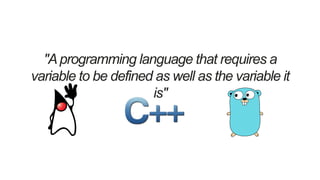
"Aprogramming language that requires a
variable to be defined as well as the variable it
is"
Flexible Schema Databases
6
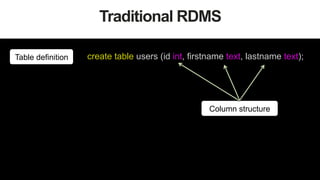
Traditional RDMS
create table users (id int, firstname text, lastname text);Table definition
Column structure
7
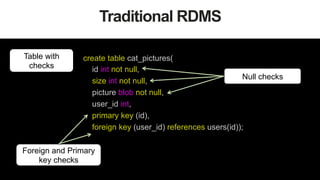
Traditional RDMS
Table with
checks
create table cat_pictures(
id int not null,
size int not null,
picture blob not null,
user_id int,
primary key (id),
foreign key (user_id) references users(id));
Null checks
Foreign and Primary
key checks
8
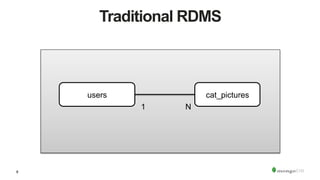
Traditional RDMS
users cat_pictures
1 N
9
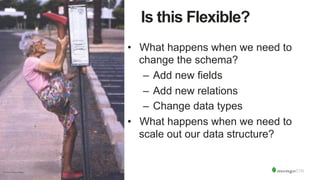
Is this Flexible?
•  What happens when we need to
change the schema?
–  Add new fields
–  Add new relations
–  Change data types
•  What happens when we need to
scale out our data structure?
10
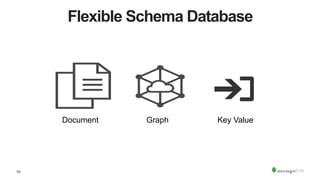
Flexible Schema Database
Document Graph Key Value
11
Flexible Schema
•  No mandatory schema definition
•  No structure restrictions
•  No schema validation process
12
We start from code
public class CatPicture {	
	
	int size;	
	byte[] blob;	
		
}
public class User {	
	
	int id;	
	String firstname;	
	String lastname;	
		
	CatPicture[] cat_pictures;	
		
}
13
Document Structure
{
_id: 1234,
firstname: 'Juan',
lastname: 'Olivo',
cat_pictures: [ {
size: 10,
picture: BinData("0x133334299399299432"),
}
]
}
Rich Data Types
Embedded
Documents
14
Flexible Schema Databases
•  Challenges
– Different Versions of Documents
– Different Structures of Documents
– Different Value Types for Fields in
Documents
15
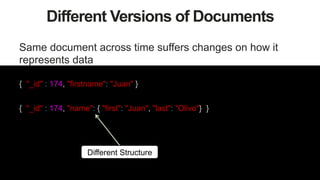
Different Versions of Documents
Same document across time suffers changes on how it
represents data
{ "_id" : 174, "firstname": "Juan" }
{ "_id" : 174, "firstname": "Juan", "lastname": "Olivo" }
First Version
Second Version
{ "_id" : 174, "firstname": "Juan", "lastname": "Olivo" , "cat_pictures":
[{"size": 10, picture: BinData("0x133334299399299432")}]
}
Third Version
16
Different Versions of Documents
Same document across time suffers changes on how it
represents data
{ "_id" : 174, "firstname": "Juan" }
{ "_id" : 174, "name": { "first": "Juan", "last": "Olivo"} }
Different Structure
17
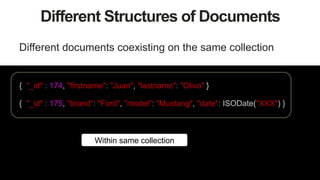
Different Structures of Documents
Different documents coexisting on the same collection
{ "_id" : 175, "brand": "Ford", "model": "Mustang", "date": ISODate("XXX") }
{ "_id" : 174, "firstname": "Juan", "lastname": "Olivo" }
Within same collection
18
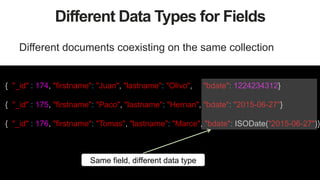
Different Data Types for Fields
Different documents coexisting on the same collection
{ "_id" : 174, "firstname": "Juan", "lastname": "Olivo", "bdate": 1224234312}
{ "_id" : 175, "firstname": "Paco", "lastname": "Hernan", "bdate": "2015-06-27"}
{ "_id" : 176, "firstname": "Tomas", "lastname": "Marce", "bdate": ISODate("2015-06-27")}
Same field, different data type
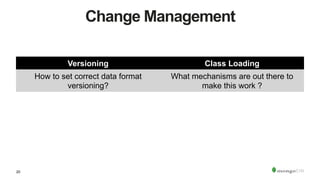
Change Management
20
Change Management
Versioning Class Loading
How to set correct data format
versioning?
What mechanisms are out there to
make this work ?
Strategies
22
Strategies
•  Decoupling Architectures
•  ODM'S
•  Versioning
•  Data Migrations
Decoupled Architectures
24
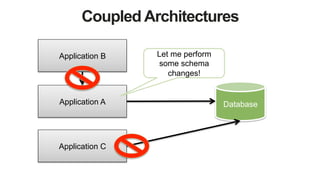
Strongly Coupled
25
Becomes a mess in your hair…
Coupled Architectures
DatabaseApplication A
Application C
Application B Let me perform
some schema
changes!
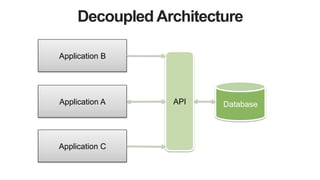
Decoupled Architecture
DatabaseApplication A API
Application C
Application B
28
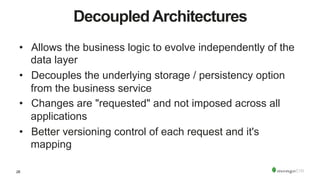
Decoupled Architectures
•  Allows the business logic to evolve independently of the
data layer
•  Decouples the underlying storage / persistency option
from the business service
•  Changes are "requested" and not imposed across all
applications
•  Better versioning control of each request and it's
mapping
ODM's
30
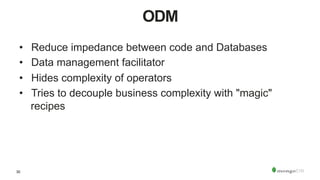
ODM
•  Reduce impedance between code and Databases
•  Data management facilitator
•  Hides complexity of operators
•  Tries to decouple business complexity with "magic"
recipes
31
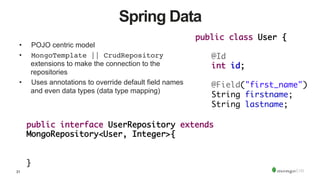
Spring Data
•  POJO centric model
•  MongoTemplate || CrudRepository
extensions to make the connection to the
repositories
•  Uses annotations to override default field names
and even data types (data type mapping)
public interface UserRepository extends
MongoRepository<User, Integer>{	
		
	 		
}	
public class User {	
	
	@Id	
	int id;	
		
	@Field("first_name")	
	String firstname;	
	String lastname;
32
Spring Data Document Structure
{
"_id": 1,
"first_name": "first",
"lastname": "last",
"catpictures": [
{
"size": 10,
"blob": BinData(0, "Kr3AqmvV1R9TJQ==")
},
]
}
33
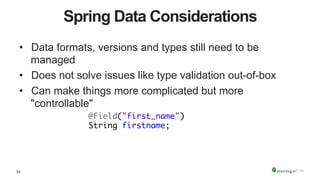
Spring Data Considerations
•  Data formats, versions and types still need to be
managed
•  Does not solve issues like type validation out-of-box
•  Can make things more complicated but more
"controllable"
	@Field("first_name")	
	String firstname;
34
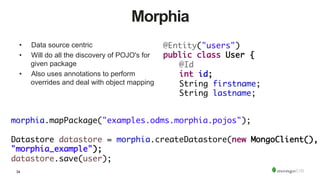
Morphia
•  Data source centric
•  Will do all the discovery of POJO's for
given package
•  Also uses annotations to perform
overrides and deal with object mapping
@Entity("users")	
public class User {	
	@Id	
	int id;	
	String firstname;	
	String lastname;
morphia.mapPackage("examples.odms.morphia.pojos");	
	 		
Datastore datastore = morphia.createDatastore(new MongoClient(),
"morphia_example");	
datastore.save(user);
35
Morphia Document Structure
{
"_id": 1,
"className": "examples.odms.morphia.pojos.User",
"firstname": "first",
"lastname": "last",
"catpictures": [
{
"size": 10,
"blob": BinData(0, "Kr3AqmvV1R9TJQ==")
},
]
}
Class Definition
36
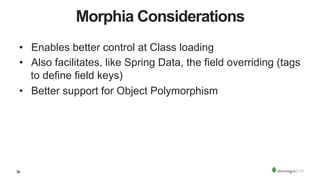
Morphia Considerations
•  Enables better control at Class loading
•  Also facilitates, like Spring Data, the field overriding (tags
to define field keys)
•  Better support for Object Polymorphism
Versioning
38
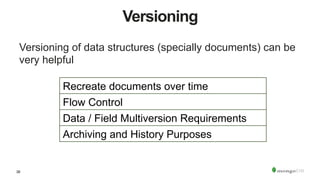
Versioning
Versioning of data structures (specially documents) can be
very helpful
Recreate documents over time
Flow Control
Data / Field Multiversion Requirements
Archiving and History Purposes
39
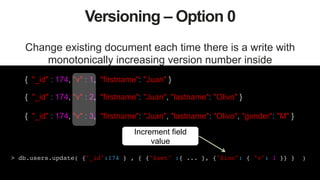
Versioning – Option 0
Change existing document each time there is a write with
monotonically increasing version number inside
{ "_id" : 174, "v" : 1, "firstname": "Juan" }
{ "_id" : 174, "v" : 2, "firstname": "Juan", "lastname": "Olivo" }
{ "_id" : 174, "v" : 3, "firstname": "Juan", "lastname": "Olivo", "gender": "M" }
> db.users.update( {"_id":174 } , { {"$set" :{ ... }, {"$inc": { "v": 1 }} } )!
Increment field
value
40
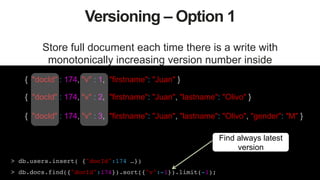
Versioning – Option 1
Store full document each time there is a write with
monotonically increasing version number inside
{ "docId" : 174, "v" : 1, "firstname": "Juan" }
{ "docId" : 174, "v" : 2, "firstname": "Juan", "lastname": "Olivo" }
{ "docId" : 174, "v" : 3, "firstname": "Juan", "lastname": "Olivo", "gender": "M" }
> db.users.insert( {"docId":174 …})!
> db.docs.find({"docId":174}).sort({"v":-1}).limit(-1);!
Find always latest
version
41
Versioning – Option 2
Store all document versions inside a single document.
> db.users.update( {"_id": 174 } , { {"$set" :{ "current": ... }, !
{"$inc": { "current.v": 1 }}, {"$addToSet": {"prev": {... }}} } )!
!
Current value
{ "_id" : 174, "current" : { "v" :3, "attr1": 184, "attr2" : "A-1" },
"prev" : [
{ "v" : 1, "attr1": 165 },
{ "v" : 2, "attr1": 165, "attr2": "A-1" }
]
}
Previous values
42
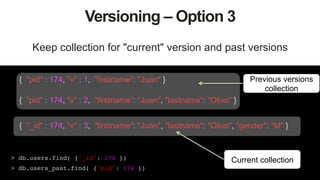
Versioning – Option 3
Keep collection for "current" version and past versions
> db.users.find( {"_id": 174 })!
> db.users_past.find( {"pid": 174 })!
{ "pid" : 174, "v" : 1, "firstname": "Juan" }
{ "pid" : 174, "v" : 2, "firstname": "Juan", "lastname": "Olivo" }
{ "_id" : 174, "v" : 3, "firstname": "Juan", "lastname": "Olivo", "gender": "M" }
Previous versions
collection
Current collection
43
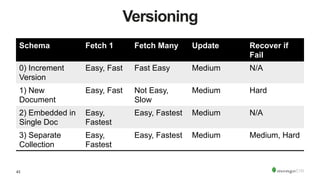
Versioning
Schema Fetch 1 Fetch Many Update Recover if
Fail
0) Increment
Version
Easy, Fast Fast Easy Medium N/A
1) New
Document
Easy, Fast Not Easy,
Slow
Medium Hard
2) Embedded in
Single Doc
Easy,
Fastest
Easy, Fastest Medium N/A
3) Separate
Collection
Easy,
Fastest
Easy, Fastest Medium Medium, Hard
Migrations
45
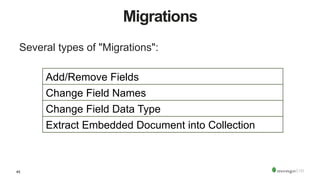
Migrations
Several types of "Migrations":
Add/Remove Fields
Change Field Names
Change Field Data Type
Extract Embedded Document into Collection
46
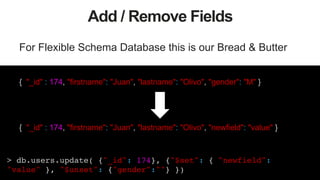
Add / Remove Fields
For Flexible Schema Database this is our Bread & Butter
{ "_id" : 174, "firstname": "Juan", "lastname": "Olivo", "gender": "M" }
{ "_id" : 174, "firstname": "Juan", "lastname": "Olivo", "newfield": "value" }
> db.users.update( {"_id": 174}, {"$set": { "newfield":
"value" }, "$unset": {"gender":""} })!
47
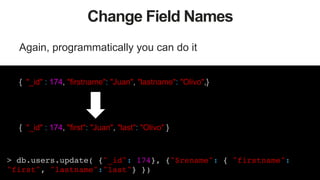
Change Field Names
Again, programmatically you can do it
{ "_id" : 174, "firstname": "Juan", "lastname": "Olivo",}
{ "_id" : 174, "first": "Juan", "last": "Olivo" }
> db.users.update( {"_id": 174}, {"$rename": { "firstname":
"first", "lastname":"last"} })!
48
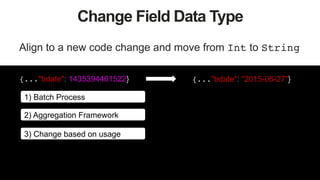
Change Field Data Type
Align to a new code change and move from Int to String!
{..."bdate": 1435394461522} {..."bdate": "2015-06-27"}
1) Batch Process
2) Aggregation Framework
3) Change based on usage
49
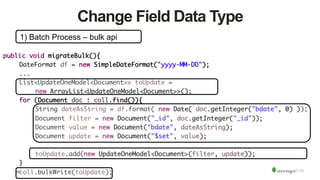
Change Field Data Type
1) Batch Process – bulk api
public void migrateBulk(){	
	DateFormat df = new SimpleDateFormat("yyyy-MM-DD");	
	...	
	List<UpdateOneModel<Document>> toUpdate = 	
	 	new ArrayList<UpdateOneModel<Document>>();	
	for (Document doc : coll.find()){	
	 	String dateAsString = df.format( new Date( doc.getInteger("bdate", 0) ));	
	 	Document filter = new Document("_id", doc.getInteger("_id"));	
	 	Document value = new Document("bdate", dateAsString);	
	 	Document update = new Document("$set", value);	
	 	 		
	 	toUpdate.add(new UpdateOneModel<Document>(filter, update));	
	}	
	coll.bulkWrite(toUpdate);
50
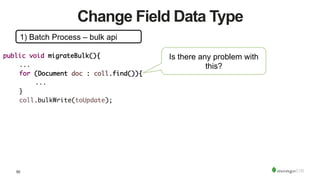
Change Field Data Type
1) Batch Process – bulk api
public void migrateBulk(){	
	...	
	for (Document doc : coll.find()){	
	 	... 	 	 		
	}	
	coll.bulkWrite(toUpdate);	
Is there any problem with
this?
51
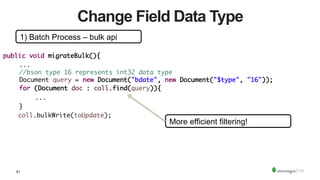
Change Field Data Type
1) Batch Process – bulk api
public void migrateBulk(){	
	...	
	//bson type 16 represents int32 data type	
	Document query = new Document("bdate", new Document("$type", "16"));	
	for (Document doc : coll.find(query)){	
	 	... 	 	 		
	}	
coll.bulkWrite(toUpdate);	
More efficient filtering!
52
Extract Document into Collection
Normalize your schema
{"size": 10, picture: BinData("0x133334299399299432")}
{ "_id" : 174, "firstname": "Juan",
"lastname": "Olivo",}
> db.users.aggregate( [ !
{$unwind: "$cat_pictures"},!
{$project: { "_id":0, "uid":"$_id", "size": "$cat_pictures.size",
"picture": "$cat_pictures.picture"}}, !
{$out:"cats"}])!
{ "_id" : 174, "firstname": "Juan", "lastname": "Olivo" , "cat_pictures":
[{"size": 10, picture: BinData(0, "m/lhLlLmoNiUKQ==")}]
}
{"size": 10, "picture": BinData(0, "m/lhLlLmoNiUKQ==")}
Tradeoffs
54
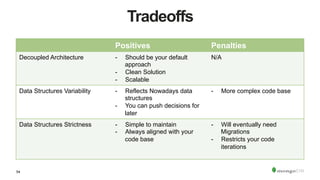
Tradeoffs
Positives Penalties
Decoupled Architecture -  Should be your default
approach
-  Clean Solution
-  Scalable
N/A
Data Structures Variability -  Reflects Nowadays data
structures
-  You can push decisions for
later
-  More complex code base
Data Structures Strictness -  Simple to maintain
-  Always aligned with your
code base
-  Will eventually need
Migrations
-  Restricts your code
iterations
Recap
56
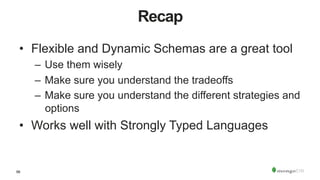
Recap
•  Flexible and Dynamic Schemas are a great tool
–  Use them wisely
–  Make sure you understand the tradeoffs
–  Make sure you understand the different strategies and
options
•  Works well with Strongly Typed Languages
57
Free Education
https://university.mongodb.com/courses/M101J/about
Obrigado!
Norberto Leite
Technical Evangelist
http://www.mongodb.com/norberto
norberto@mongodb.com
@nleite
Strongly Typed Languages and Flexible Schemas

Strongly Typed Languages and Flexible Schemas

  • 1.
    Strongly Typed Languagesand Flexible Schemas
  • 2.
    2 Agenda Strongly Typed Languages FlexibleSchema Databases Change Management Strategies Tradeoffs
  • 3.
  • 4.
    "Aprogramming language thatrequires a variable to be defined as well as the variable it is"
  • 5.
  • 6.
    6 Traditional RDMS create tableusers (id int, firstname text, lastname text);Table definition Column structure
  • 7.
    7 Traditional RDMS Table with checks createtable cat_pictures( id int not null, size int not null, picture blob not null, user_id int, primary key (id), foreign key (user_id) references users(id)); Null checks Foreign and Primary key checks
  • 8.
  • 9.
    9 Is this Flexible? • What happens when we need to change the schema? –  Add new fields –  Add new relations –  Change data types •  What happens when we need to scale out our data structure?
  • 10.
  • 11.
    11 Flexible Schema •  Nomandatory schema definition •  No structure restrictions •  No schema validation process
  • 12.
    12 We start fromcode public class CatPicture { int size; byte[] blob; } public class User { int id; String firstname; String lastname; CatPicture[] cat_pictures; }
  • 13.
    13 Document Structure { _id: 1234, firstname:'Juan', lastname: 'Olivo', cat_pictures: [ { size: 10, picture: BinData("0x133334299399299432"), } ] } Rich Data Types Embedded Documents
  • 14.
    14 Flexible Schema Databases • Challenges – Different Versions of Documents – Different Structures of Documents – Different Value Types for Fields in Documents
  • 15.
    15 Different Versions ofDocuments Same document across time suffers changes on how it represents data { "_id" : 174, "firstname": "Juan" } { "_id" : 174, "firstname": "Juan", "lastname": "Olivo" } First Version Second Version { "_id" : 174, "firstname": "Juan", "lastname": "Olivo" , "cat_pictures": [{"size": 10, picture: BinData("0x133334299399299432")}] } Third Version
  • 16.
    16 Different Versions ofDocuments Same document across time suffers changes on how it represents data { "_id" : 174, "firstname": "Juan" } { "_id" : 174, "name": { "first": "Juan", "last": "Olivo"} } Different Structure
  • 17.
    17 Different Structures ofDocuments Different documents coexisting on the same collection { "_id" : 175, "brand": "Ford", "model": "Mustang", "date": ISODate("XXX") } { "_id" : 174, "firstname": "Juan", "lastname": "Olivo" } Within same collection
  • 18.
    18 Different Data Typesfor Fields Different documents coexisting on the same collection { "_id" : 174, "firstname": "Juan", "lastname": "Olivo", "bdate": 1224234312} { "_id" : 175, "firstname": "Paco", "lastname": "Hernan", "bdate": "2015-06-27"} { "_id" : 176, "firstname": "Tomas", "lastname": "Marce", "bdate": ISODate("2015-06-27")} Same field, different data type
  • 19.
  • 20.
    20 Change Management Versioning ClassLoading How to set correct data format versioning? What mechanisms are out there to make this work ?
  • 21.
  • 22.
    22 Strategies •  Decoupling Architectures • ODM'S •  Versioning •  Data Migrations
  • 23.
  • 24.
  • 25.
    25 Becomes a messin your hair…
  • 26.
    Coupled Architectures DatabaseApplication A ApplicationC Application B Let me perform some schema changes!
  • 27.
    Decoupled Architecture DatabaseApplication AAPI Application C Application B
  • 28.
    28 Decoupled Architectures •  Allowsthe business logic to evolve independently of the data layer •  Decouples the underlying storage / persistency option from the business service •  Changes are "requested" and not imposed across all applications •  Better versioning control of each request and it's mapping
  • 29.
  • 30.
    30 ODM •  Reduce impedancebetween code and Databases •  Data management facilitator •  Hides complexity of operators •  Tries to decouple business complexity with "magic" recipes
  • 31.
    31 Spring Data •  POJOcentric model •  MongoTemplate || CrudRepository extensions to make the connection to the repositories •  Uses annotations to override default field names and even data types (data type mapping) public interface UserRepository extends MongoRepository<User, Integer>{ } public class User { @Id int id; @Field("first_name") String firstname; String lastname;
  • 32.
    32 Spring Data DocumentStructure { "_id": 1, "first_name": "first", "lastname": "last", "catpictures": [ { "size": 10, "blob": BinData(0, "Kr3AqmvV1R9TJQ==") }, ] }
  • 33.
    33 Spring Data Considerations • Data formats, versions and types still need to be managed •  Does not solve issues like type validation out-of-box •  Can make things more complicated but more "controllable" @Field("first_name") String firstname;
  • 34.
    34 Morphia •  Data sourcecentric •  Will do all the discovery of POJO's for given package •  Also uses annotations to perform overrides and deal with object mapping @Entity("users") public class User { @Id int id; String firstname; String lastname; morphia.mapPackage("examples.odms.morphia.pojos"); Datastore datastore = morphia.createDatastore(new MongoClient(), "morphia_example"); datastore.save(user);
  • 35.
    35 Morphia Document Structure { "_id":1, "className": "examples.odms.morphia.pojos.User", "firstname": "first", "lastname": "last", "catpictures": [ { "size": 10, "blob": BinData(0, "Kr3AqmvV1R9TJQ==") }, ] } Class Definition
  • 36.
    36 Morphia Considerations •  Enablesbetter control at Class loading •  Also facilitates, like Spring Data, the field overriding (tags to define field keys) •  Better support for Object Polymorphism
  • 37.
  • 38.
    38 Versioning Versioning of datastructures (specially documents) can be very helpful Recreate documents over time Flow Control Data / Field Multiversion Requirements Archiving and History Purposes
  • 39.
    39 Versioning – Option0 Change existing document each time there is a write with monotonically increasing version number inside { "_id" : 174, "v" : 1, "firstname": "Juan" } { "_id" : 174, "v" : 2, "firstname": "Juan", "lastname": "Olivo" } { "_id" : 174, "v" : 3, "firstname": "Juan", "lastname": "Olivo", "gender": "M" } > db.users.update( {"_id":174 } , { {"$set" :{ ... }, {"$inc": { "v": 1 }} } )! Increment field value
  • 40.
    40 Versioning – Option1 Store full document each time there is a write with monotonically increasing version number inside { "docId" : 174, "v" : 1, "firstname": "Juan" } { "docId" : 174, "v" : 2, "firstname": "Juan", "lastname": "Olivo" } { "docId" : 174, "v" : 3, "firstname": "Juan", "lastname": "Olivo", "gender": "M" } > db.users.insert( {"docId":174 …})! > db.docs.find({"docId":174}).sort({"v":-1}).limit(-1);! Find always latest version
  • 41.
    41 Versioning – Option2 Store all document versions inside a single document. > db.users.update( {"_id": 174 } , { {"$set" :{ "current": ... }, ! {"$inc": { "current.v": 1 }}, {"$addToSet": {"prev": {... }}} } )! ! Current value { "_id" : 174, "current" : { "v" :3, "attr1": 184, "attr2" : "A-1" }, "prev" : [ { "v" : 1, "attr1": 165 }, { "v" : 2, "attr1": 165, "attr2": "A-1" } ] } Previous values
  • 42.
    42 Versioning – Option3 Keep collection for "current" version and past versions > db.users.find( {"_id": 174 })! > db.users_past.find( {"pid": 174 })! { "pid" : 174, "v" : 1, "firstname": "Juan" } { "pid" : 174, "v" : 2, "firstname": "Juan", "lastname": "Olivo" } { "_id" : 174, "v" : 3, "firstname": "Juan", "lastname": "Olivo", "gender": "M" } Previous versions collection Current collection
  • 43.
    43 Versioning Schema Fetch 1Fetch Many Update Recover if Fail 0) Increment Version Easy, Fast Fast Easy Medium N/A 1) New Document Easy, Fast Not Easy, Slow Medium Hard 2) Embedded in Single Doc Easy, Fastest Easy, Fastest Medium N/A 3) Separate Collection Easy, Fastest Easy, Fastest Medium Medium, Hard
  • 44.
  • 45.
    45 Migrations Several types of"Migrations": Add/Remove Fields Change Field Names Change Field Data Type Extract Embedded Document into Collection
  • 46.
    46 Add / RemoveFields For Flexible Schema Database this is our Bread & Butter { "_id" : 174, "firstname": "Juan", "lastname": "Olivo", "gender": "M" } { "_id" : 174, "firstname": "Juan", "lastname": "Olivo", "newfield": "value" } > db.users.update( {"_id": 174}, {"$set": { "newfield": "value" }, "$unset": {"gender":""} })!
  • 47.
    47 Change Field Names Again,programmatically you can do it { "_id" : 174, "firstname": "Juan", "lastname": "Olivo",} { "_id" : 174, "first": "Juan", "last": "Olivo" } > db.users.update( {"_id": 174}, {"$rename": { "firstname": "first", "lastname":"last"} })!
  • 48.
    48 Change Field DataType Align to a new code change and move from Int to String! {..."bdate": 1435394461522} {..."bdate": "2015-06-27"} 1) Batch Process 2) Aggregation Framework 3) Change based on usage
  • 49.
    49 Change Field DataType 1) Batch Process – bulk api public void migrateBulk(){ DateFormat df = new SimpleDateFormat("yyyy-MM-DD"); ... List<UpdateOneModel<Document>> toUpdate = new ArrayList<UpdateOneModel<Document>>(); for (Document doc : coll.find()){ String dateAsString = df.format( new Date( doc.getInteger("bdate", 0) )); Document filter = new Document("_id", doc.getInteger("_id")); Document value = new Document("bdate", dateAsString); Document update = new Document("$set", value); toUpdate.add(new UpdateOneModel<Document>(filter, update)); } coll.bulkWrite(toUpdate);
  • 50.
    50 Change Field DataType 1) Batch Process – bulk api public void migrateBulk(){ ... for (Document doc : coll.find()){ ... } coll.bulkWrite(toUpdate); Is there any problem with this?
  • 51.
    51 Change Field DataType 1) Batch Process – bulk api public void migrateBulk(){ ... //bson type 16 represents int32 data type Document query = new Document("bdate", new Document("$type", "16")); for (Document doc : coll.find(query)){ ... } coll.bulkWrite(toUpdate); More efficient filtering!
  • 52.
    52 Extract Document intoCollection Normalize your schema {"size": 10, picture: BinData("0x133334299399299432")} { "_id" : 174, "firstname": "Juan", "lastname": "Olivo",} > db.users.aggregate( [ ! {$unwind: "$cat_pictures"},! {$project: { "_id":0, "uid":"$_id", "size": "$cat_pictures.size", "picture": "$cat_pictures.picture"}}, ! {$out:"cats"}])! { "_id" : 174, "firstname": "Juan", "lastname": "Olivo" , "cat_pictures": [{"size": 10, picture: BinData(0, "m/lhLlLmoNiUKQ==")}] } {"size": 10, "picture": BinData(0, "m/lhLlLmoNiUKQ==")}
  • 53.
  • 54.
    54 Tradeoffs Positives Penalties Decoupled Architecture-  Should be your default approach -  Clean Solution -  Scalable N/A Data Structures Variability -  Reflects Nowadays data structures -  You can push decisions for later -  More complex code base Data Structures Strictness -  Simple to maintain -  Always aligned with your code base -  Will eventually need Migrations -  Restricts your code iterations
  • 55.
  • 56.
    56 Recap •  Flexible andDynamic Schemas are a great tool –  Use them wisely –  Make sure you understand the tradeoffs –  Make sure you understand the different strategies and options •  Works well with Strongly Typed Languages
  • 57.
  • 58.