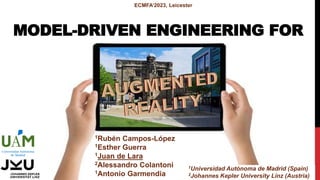
MODEL-DRIVEN ENGINEERING FOR
ECMFA’2023, Leicester
1Rubén Campos-López
1Esther Guerra
1Juan de Lara
2Alessandro Colantoni
1Antonio Garmendia
1Universidad Autónoma de Madrid (Spain)
2Johannes Kepler University Linz (Austria)
AUGMENTED REALITY
2
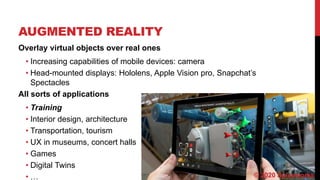
Overlay virtual objects over real ones
• Increasing capabilities of mobile devices: camera
• Head-mounted displays: Hololens, Apple Vision pro, Snapchat’s
Spectacles
All sorts of applications
• Training
• Interior design, architecture
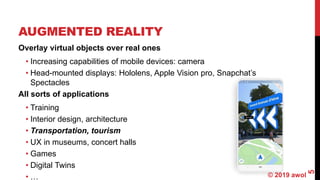
• Transportation, tourism
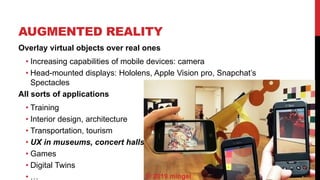
• UX in museums, concert halls
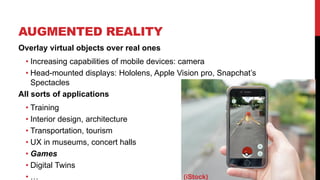
• Games
• Digital Twins
• … © 2020 Spiceworks
AUGMENTED REALITY
3
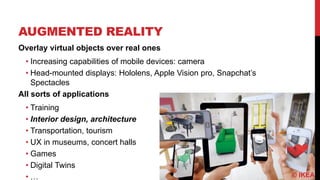
Overlay virtual objects over real ones
• Increasing capabilities of mobile devices: camera
• Head-mounted displays: Hololens, Apple Vision pro, Snapchat’s
Spectacles
All sorts of applications
• Training
• Interior design, architecture
• Transportation, tourism
• UX in museums, concert halls
• Games
• Digital Twins
• … © IKEA
AUGMENTED REALITY
4
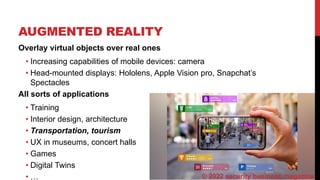
Overlay virtual objects over real ones
• Increasing capabilities of mobile devices: camera
• Head-mounted displays: Hololens, Apple Vision pro, Snapchat’s
Spectacles
All sorts of applications
• Training
• Interior design, architecture
• Transportation, tourism
• UX in museums, concert halls
• Games
• Digital Twins
• … © 2022 security business magazine
AUGMENTED REALITY
5
Overlay virtual objects over real ones
• Increasing capabilities of mobile devices: camera
• Head-mounted displays: Hololens, Apple Vision pro, Snapchat’s
Spectacles
All sorts of applications
• Training
• Interior design, architecture
• Transportation, tourism
• UX in museums, concert halls
• Games
• Digital Twins
• … © 2019 awol
AUGMENTED REALITY
6
Overlay virtual objects over real ones
• Increasing capabilities of mobile devices: camera
• Head-mounted displays: Hololens, Apple Vision pro, Snapchat’s
Spectacles
All sorts of applications
• Training
• Interior design, architecture
• Transportation, tourism
• UX in museums, concert halls
• Games
• Digital Twins
• … © 2019 mingei
AUGMENTED REALITY
7
Overlay virtual objects over real ones
• Increasing capabilities of mobile devices: camera
• Head-mounted displays: Hololens, Apple Vision pro, Snapchat’s
Spectacles
All sorts of applications
• Training
• Interior design, architecture
• Transportation, tourism
• UX in museums, concert halls
• Games
• Digital Twins
• … (iStock)
MOTIVATION
8
Building AR applications is hard!
• Time consuming
• Specialized knowledge
Model-driven engineering to the rescue
• Meta-models to express the different concerns of the AR app
• Model of the domain, AR representation, anchoring, API interaction
Practical!
• ALTER (iOS client): https://alter-ar.github.io/
AGENDA
Approach
Model-based AR specifications
Architecture and Tool Support
Evaluation
• Case studies
• User evaluation
Conclusions and Future work
9
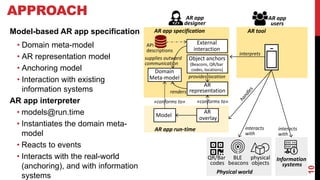
10
APPROACH
Domain
Meta-model
AR
representation
External
interaction
Object anchors
(Beacons, QR/bar
codes, locations)
AR app specification
Model
AR
overlay
interprets
AR app run-time
«conforms to» «conforms to»
interacts
with
API
descriptions
AR app
designer
AR app
users
AR tool
interacts
with
Information
systems
Physical world
QR/Bar
codes
BLE
beacons
physical
objects
provides location
renders
supplies outward
communication
Model-based AR app specification
• Domain meta-model
• AR representation model
• Anchoring model
• Interaction with existing
information systems
AR app interpreter
• models@run.time
• Instantiates the domain meta-
model
• Reacts to events
• Interacts with the real-world
(anchoring), and with information
systems
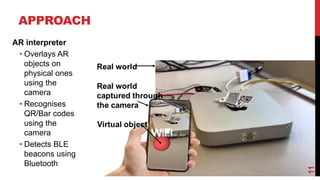
11
APPROACH
AR interpreter
• Overlays AR
objects on
physical ones
using the
camera
• Recognises
QR/Bar codes
using the
camera
• Detects BLE
beacons using
Bluetooth
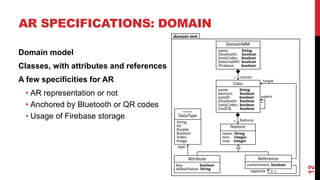
AR SPECIFICATIONS: DOMAIN
12
Domain model
Classes, with attributes and references
A few specificities for AR
• AR representation or not
• Anchored by Bluetooth or QR codes
• Usage of Firebase storage
AR SPECIFICATIONS: AR REPRESENTATION
13
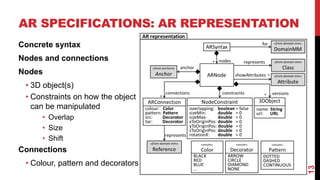
Concrete syntax
Nodes and connections
Nodes
• 3D object(s)
• Constraints on how the object
can be manipulated
• Overlap
• Size
• Shift
Connections
• Colour, pattern and decorators
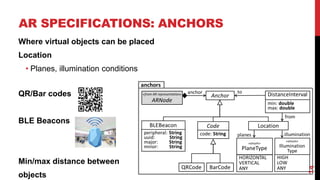
AR SPECIFICATIONS: ANCHORS
14
Where virtual objects can be placed
Location
• Planes, illumination conditions
QR/Bar codes
BLE Beacons
Min/max distance between
objects
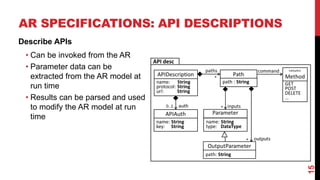
AR SPECIFICATIONS: API DESCRIPTIONS
15
Describe APIs
• Can be invoked from the AR
• Parameter data can be
extracted from the AR model at
run time
• Results can be parsed and used
to modify the AR model at run
time
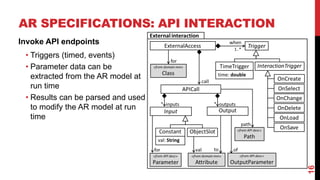
AR SPECIFICATIONS: API INTERACTION
16
Invoke API endpoints
• Triggers (timed, events)
• Parameter data can be
extracted from the AR model at
run time
• Results can be parsed and used
to modify the AR model at run
time
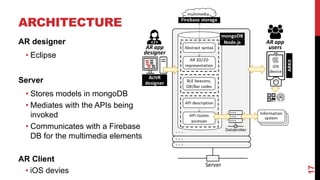
ARCHITECTURE
17
AR designer
• Eclipse
Server
• Stores models in mongoDB
• Mediates with the APIs being
invoked
• Communicates with a Firebase
DB for the multimedia elements
AR Client
• iOS devies
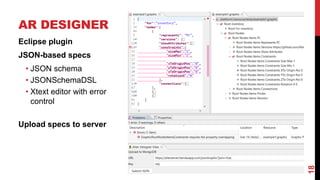
AR DESIGNER
18
Eclipse plugin
JSON-based specs
• JSON schema
• JSONSchemaDSL
• Xtext editor with error
control
Upload specs to server
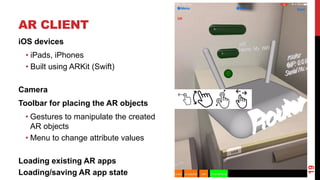
AR CLIENT
19
iOS devices
• iPads, iPhones
• Built using ARKit (Swift)
Camera
Toolbar for placing the AR objects
• Gestures to manipulate the created
AR objects
• Menu to change attribute values
Loading existing AR apps
Loading/saving AR app state
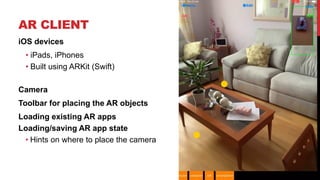
AR CLIENT
20
iOS devices
• iPads, iPhones
• Built using ARKit (Swift)
Camera
Toolbar for placing the AR objects
Loading existing AR apps
Loading/saving AR app state
• Hints on where to place the camera
EVALUATION: CASE STUDIES
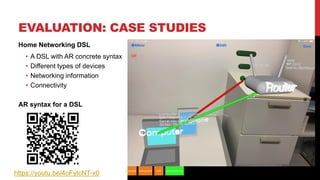
Home Networking DSL
• A DSL with AR concrete syntax
• Different types of devices
• Networking information
• Connectivity
AR syntax for a DSL
21
https://youtu.be/4oFyIcNT-x0
EVALUATION: CASE STUDIES
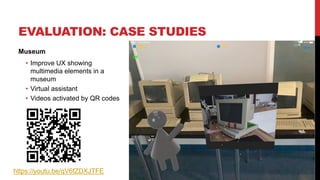
Museum
• Improve UX showing
multimedia elements in a
museum
• Virtual assistant
• Videos activated by QR codes
22
https://youtu.be/qV6fZDXJTFE
EVALUATION: CASE STUDIES
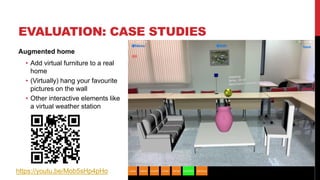
Augmented home
• Add virtual furniture to a real
home
• (Virtually) hang your favourite
pictures on the wall
• Other interactive elements like
a virtual weather station
23
https://youtu.be/Mob5sHp4pHo
EVALUATION: CASE STUDIES
24
EVALUATION:
CASE STUDIES
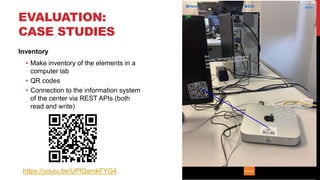
Inventory
• Make inventory of the elements in a
computer lab
• QR codes
• Connection to the information system
of the center via REST APIs (both
read and write)
25
https://youtu.be/UPfQomkFYG4
EVALUATION:
CASE STUDIES
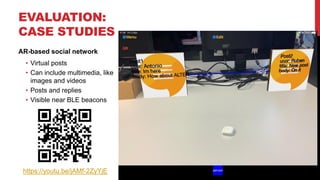
AR-based social network
• Virtual posts
• Can include multimedia, like
images and videos
• Posts and replies
• Visible near BLE beacons
26
https://youtu.be/jAMf-2ZyYjE
CASE STUDY SUMMARY
27
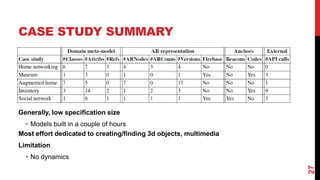
Generally, low specification size
• Models built in a couple of hours
Most effort dedicated to creating/finding 3d objects, multimedia
Limitation
• No dynamics
USER EVALUATION
28
Goal
• Understand perceived usability of ALTER apps
Experiment design
• Perform some tasks with the augmented home
• Fill-in a System Usability Scale (SUS) questionnaire to measure usability
• Demographic questions and open-ended questions
• 11 participants
Results
• SUS score: 79.3% -- Good range [71.4–85.5), close to be Excellent (≥85.5)
• Open questions
• Pros: easy to use, usefulness of the case
• Cons: Placing elements can be tricky, recovering a model
CONCLUSIONS
A model-driven approach to build AR apps
Domain meta-model, decorated with meta-models for
• AR representation
• Anchoring (planes, QR/Bar codes, BLE beacons)
• Interaction with external elements
5 case studies, a user evaluation
29
FUTURE WORK
Physics and dynamics
• A gaming version of ALTER
Collaborative AR apps
Migrate AR designer to the web: low-code
AR platform
User studies from the point of view of the
AR designer
30
THANKS!
Juan.deLara@uam.es
@miso_uam
https://alter-ar.github.io/

Model-driven engineering for AR

  • 1.
    MODEL-DRIVEN ENGINEERING FOR ECMFA’2023,Leicester 1Rubén Campos-López 1Esther Guerra 1Juan de Lara 2Alessandro Colantoni 1Antonio Garmendia 1Universidad Autónoma de Madrid (Spain) 2Johannes Kepler University Linz (Austria)
  • 2.
    AUGMENTED REALITY 2 Overlay virtualobjects over real ones • Increasing capabilities of mobile devices: camera • Head-mounted displays: Hololens, Apple Vision pro, Snapchat’s Spectacles All sorts of applications • Training • Interior design, architecture • Transportation, tourism • UX in museums, concert halls • Games • Digital Twins • … © 2020 Spiceworks
  • 3.
    AUGMENTED REALITY 3 Overlay virtualobjects over real ones • Increasing capabilities of mobile devices: camera • Head-mounted displays: Hololens, Apple Vision pro, Snapchat’s Spectacles All sorts of applications • Training • Interior design, architecture • Transportation, tourism • UX in museums, concert halls • Games • Digital Twins • … © IKEA
  • 4.
    AUGMENTED REALITY 4 Overlay virtualobjects over real ones • Increasing capabilities of mobile devices: camera • Head-mounted displays: Hololens, Apple Vision pro, Snapchat’s Spectacles All sorts of applications • Training • Interior design, architecture • Transportation, tourism • UX in museums, concert halls • Games • Digital Twins • … © 2022 security business magazine
  • 5.
    AUGMENTED REALITY 5 Overlay virtualobjects over real ones • Increasing capabilities of mobile devices: camera • Head-mounted displays: Hololens, Apple Vision pro, Snapchat’s Spectacles All sorts of applications • Training • Interior design, architecture • Transportation, tourism • UX in museums, concert halls • Games • Digital Twins • … © 2019 awol
  • 6.
    AUGMENTED REALITY 6 Overlay virtualobjects over real ones • Increasing capabilities of mobile devices: camera • Head-mounted displays: Hololens, Apple Vision pro, Snapchat’s Spectacles All sorts of applications • Training • Interior design, architecture • Transportation, tourism • UX in museums, concert halls • Games • Digital Twins • … © 2019 mingei
  • 7.
    AUGMENTED REALITY 7 Overlay virtualobjects over real ones • Increasing capabilities of mobile devices: camera • Head-mounted displays: Hololens, Apple Vision pro, Snapchat’s Spectacles All sorts of applications • Training • Interior design, architecture • Transportation, tourism • UX in museums, concert halls • Games • Digital Twins • … (iStock)
  • 8.
    MOTIVATION 8 Building AR applicationsis hard! • Time consuming • Specialized knowledge Model-driven engineering to the rescue • Meta-models to express the different concerns of the AR app • Model of the domain, AR representation, anchoring, API interaction Practical! • ALTER (iOS client): https://alter-ar.github.io/
  • 9.
    AGENDA Approach Model-based AR specifications Architectureand Tool Support Evaluation • Case studies • User evaluation Conclusions and Future work 9
  • 10.
    10 APPROACH Domain Meta-model AR representation External interaction Object anchors (Beacons, QR/bar codes,locations) AR app specification Model AR overlay interprets AR app run-time «conforms to» «conforms to» interacts with API descriptions AR app designer AR app users AR tool interacts with Information systems Physical world QR/Bar codes BLE beacons physical objects provides location renders supplies outward communication Model-based AR app specification • Domain meta-model • AR representation model • Anchoring model • Interaction with existing information systems AR app interpreter • models@run.time • Instantiates the domain meta- model • Reacts to events • Interacts with the real-world (anchoring), and with information systems
  • 11.
    11 APPROACH AR interpreter • OverlaysAR objects on physical ones using the camera • Recognises QR/Bar codes using the camera • Detects BLE beacons using Bluetooth
  • 12.
    AR SPECIFICATIONS: DOMAIN 12 Domainmodel Classes, with attributes and references A few specificities for AR • AR representation or not • Anchored by Bluetooth or QR codes • Usage of Firebase storage
  • 13.
    AR SPECIFICATIONS: ARREPRESENTATION 13 Concrete syntax Nodes and connections Nodes • 3D object(s) • Constraints on how the object can be manipulated • Overlap • Size • Shift Connections • Colour, pattern and decorators
  • 14.
    AR SPECIFICATIONS: ANCHORS 14 Wherevirtual objects can be placed Location • Planes, illumination conditions QR/Bar codes BLE Beacons Min/max distance between objects
  • 15.
    AR SPECIFICATIONS: APIDESCRIPTIONS 15 Describe APIs • Can be invoked from the AR • Parameter data can be extracted from the AR model at run time • Results can be parsed and used to modify the AR model at run time
  • 16.
    AR SPECIFICATIONS: APIINTERACTION 16 Invoke API endpoints • Triggers (timed, events) • Parameter data can be extracted from the AR model at run time • Results can be parsed and used to modify the AR model at run time
  • 17.
    ARCHITECTURE 17 AR designer • Eclipse Server •Stores models in mongoDB • Mediates with the APIs being invoked • Communicates with a Firebase DB for the multimedia elements AR Client • iOS devies
  • 18.
    AR DESIGNER 18 Eclipse plugin JSON-basedspecs • JSON schema • JSONSchemaDSL • Xtext editor with error control Upload specs to server
  • 19.
    AR CLIENT 19 iOS devices •iPads, iPhones • Built using ARKit (Swift) Camera Toolbar for placing the AR objects • Gestures to manipulate the created AR objects • Menu to change attribute values Loading existing AR apps Loading/saving AR app state
  • 20.
    AR CLIENT 20 iOS devices •iPads, iPhones • Built using ARKit (Swift) Camera Toolbar for placing the AR objects Loading existing AR apps Loading/saving AR app state • Hints on where to place the camera
  • 21.
    EVALUATION: CASE STUDIES HomeNetworking DSL • A DSL with AR concrete syntax • Different types of devices • Networking information • Connectivity AR syntax for a DSL 21 https://youtu.be/4oFyIcNT-x0
  • 22.
    EVALUATION: CASE STUDIES Museum •Improve UX showing multimedia elements in a museum • Virtual assistant • Videos activated by QR codes 22 https://youtu.be/qV6fZDXJTFE
  • 23.
    EVALUATION: CASE STUDIES Augmentedhome • Add virtual furniture to a real home • (Virtually) hang your favourite pictures on the wall • Other interactive elements like a virtual weather station 23 https://youtu.be/Mob5sHp4pHo
  • 24.
  • 25.
    EVALUATION: CASE STUDIES Inventory • Makeinventory of the elements in a computer lab • QR codes • Connection to the information system of the center via REST APIs (both read and write) 25 https://youtu.be/UPfQomkFYG4
  • 26.
    EVALUATION: CASE STUDIES AR-based socialnetwork • Virtual posts • Can include multimedia, like images and videos • Posts and replies • Visible near BLE beacons 26 https://youtu.be/jAMf-2ZyYjE
  • 27.
    CASE STUDY SUMMARY 27 Generally,low specification size • Models built in a couple of hours Most effort dedicated to creating/finding 3d objects, multimedia Limitation • No dynamics
  • 28.
    USER EVALUATION 28 Goal • Understandperceived usability of ALTER apps Experiment design • Perform some tasks with the augmented home • Fill-in a System Usability Scale (SUS) questionnaire to measure usability • Demographic questions and open-ended questions • 11 participants Results • SUS score: 79.3% -- Good range [71.4–85.5), close to be Excellent (≥85.5) • Open questions • Pros: easy to use, usefulness of the case • Cons: Placing elements can be tricky, recovering a model
  • 29.
    CONCLUSIONS A model-driven approachto build AR apps Domain meta-model, decorated with meta-models for • AR representation • Anchoring (planes, QR/Bar codes, BLE beacons) • Interaction with external elements 5 case studies, a user evaluation 29
  • 30.
    FUTURE WORK Physics anddynamics • A gaming version of ALTER Collaborative AR apps Migrate AR designer to the web: low-code AR platform User studies from the point of view of the AR designer 30
  • 31.