Exploring.Everyday
Title Text
Understand the Battle of Web vs Apps
What are Progressive Web Apps (PWA)?
Few Statistics on PWA
PWA Components
PWA Libraries
Product Demo
Agenda
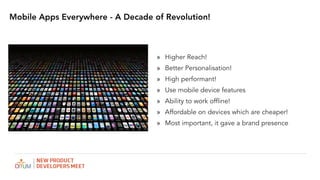
Mobile Apps Everywhere - A Decade of Revolution!
» Higher Reach!
» Better Personalisation!
» High performant!
» Use mobile device features
» Ability to work offline!
» Affordable on devices which are cheaper!
» Most important, it gave a brand presence
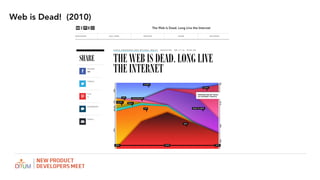
Web is Dead! (2010)
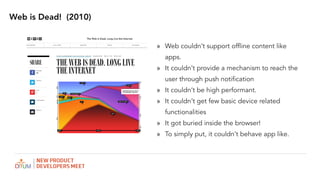
Web is Dead! (2010)
» Web couldn’t support offline content like
apps.
» It couldn’t provide a mechanism to reach the
user through push notification
» It couldn’t be high performant.
» It couldn’t get few basic device related
functionalities
» It got buried inside the browser!
» To simply put, it couldn’t behave app like.
BUT THERE WERE SERIOUS PROBLEM STARTED ARISING
WITH APPS!
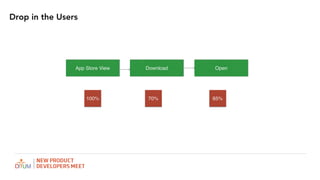
Drop in the Users
App Store View Download Open
100% 70% 65%
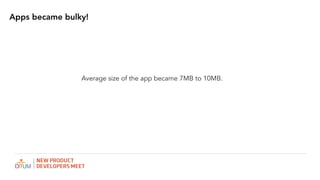
Apps became bulky!
Average size of the app became 7MB to 10MB.
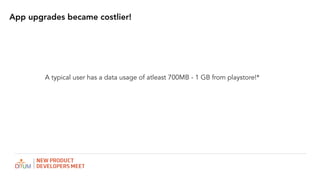
App upgrades became costlier!
A typical user has a data usage of atleast 700MB - 1 GB from playstore!*
Maintenance
When there are multiple platforms, the maintenance became tough!
Implementing offline data
The developer has to take care of handling offline scenarios as the
networks were really flaky!
BIRTH OF PWA
Web isn’t Dead! (2016)
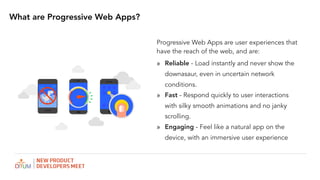
Progressive Web Apps are user experiences that
have the reach of the web, and are:
» Reliable - Load instantly and never show the
downasaur, even in uncertain network
conditions.
» Fast - Respond quickly to user interactions
with silky smooth animations and no janky
scrolling.
» Engaging - Feel like a natural app on the
device, with an immersive user experience
What are Progressive Web Apps?
» Progressive - Work for every user, regardless of
browser choice because they’re built with progressive
enhancement as a core tenet.
» Responsive - Fit any form factor: desktop, mobile,
tablet, or forms yet to emerge
» Connectivity independent - Service workers allow
work offline, or on low quality networks
» App-like - Feel like an app to the user with app-style
interactions and navigation.
» Fresh - Always up-to-date thanks to the service
worker update process.
PWA CHARACTERISTICS
» Safe - Served via HTTPS to prevent snooping and ensure
content hasn’t been tampered with.
» Discoverable - Are identifiable as “applications” thanks to
W3C manifests and service worker registration scope
allowing search engines to find them
» Re-engageable - Make re-engagement easy through
features like push notifications.
» Installable - Allow users to “keep” apps they find most
useful on their home screen without the hassle of an app
store
» Linkable - Easily shared via a URL and do not require
complex installation.
Interesting stats on PWA - Flipkart Lite!
» Users time on site with Flipkart lite vs. previous mobile experience: 3.5 minutes vs
70 seconds..
» 3x more time spent on site
» 40% higher re-engagement rate
» 70% greater conversion rate among those arriving via Add to Homescreen
» 3x lower data usage
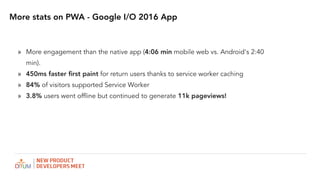
More stats on PWA - Google I/O 2016 App
» More engagement than the native app (4:06 min mobile web vs. Android's 2:40
min).
» 450ms faster first paint for return users thanks to service worker caching
» 84% of visitors supported Service Worker
» 3.8% users went offline but continued to generate 11k pageviews!
HOW IT IS BEEN DONE?
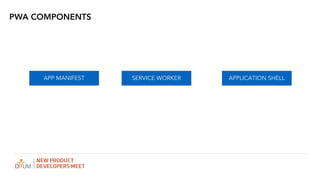
APP MANIFEST
PWA COMPONENTS
SERVICE WORKER APPLICATION SHELL
App Manifest
» Used to create a icon in the home screen
of the phone.
» Contains the url for different sizes of icons
» Contains the background color for the app
» Contains the Name for the app
» Contains the start url for the app
{
"name": "Weather",
"short_name": "Weather",
"icons": [{
"src": "images/icons/icon-128x128.png",
"sizes": "128x128",
"type": "image/png"
},
.
.
.
{
"src": "images/icons/icon-256x256.png",
"sizes": "256x256",
"type": "image/png"
}],
"start_url": "/index.html",
"display": "standalone",
"background_color": "#3E4EB8",
"theme_color": "#2F3BA2"
}
<link rel="manifest" href="/manifest.json">
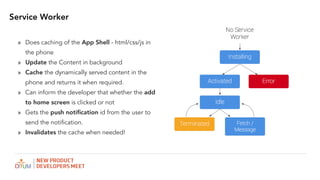
Service Worker
» Does caching of the App Shell - html/css/js in
the phone
» Update the Content in background
» Cache the dynamically served content in the
phone and returns it when required.
» Can inform the developer that whether the add
to home screen is clicked or not
» Gets the push notification id from the user to
send the notification.
» Invalidates the cache when needed!
Service Worker - Cache
// CACHE
self.addEventListener('install', function(e) {
console.log('[ServiceWorker] Install');
e.waitUntil(
caches.open(cacheName).then(function(cache) {
console.log('[ServiceWorker] Caching app shell');
return cache.addAll(filesToCache);
})
);
});
//FETCH
self.addEventListener('fetch', function(e) {
console.log('[ServiceWorker] Fetch', e.request.url);
e.respondWith(
caches.match(e.request).then(function(response) {
return response || fetch(e.request);
})
);
});
//FIRST STEP
if ('serviceWorker' in navigator) {
navigator.serviceWorker
.register('./service-worker.js')
.then(function() { console.log('Service Worker Registered'); });
}
var cacheName = 'weatherPWA-step-6-1';
var filesToCache = [];
Service Worker - Libraries
» sw-precache
» sw-toolbox
» sw-offline-google-analytics
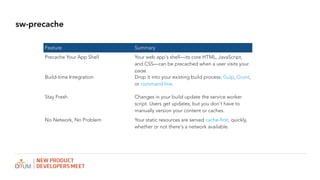
sw-precache
Feature Summary
Precache Your App Shell Your web app's shell—its core HTML, JavaScript,
and CSS—can be precached when a user visits your
page.
Build-time Integration Drop it into your existing build process: Gulp, Grunt,
or command line.
Stay Fresh Changes in your build update the service worker
script. Users get updates, but you don't have to
manually version your content or caches.
No Network, No Problem Your static resources are served cache-first, quickly,
whether or not there's a network available.
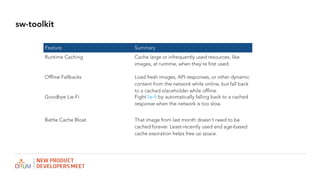
sw-toolkit
Feature Summary
Runtime Caching Cache large or infrequently used resources, like
images, at runtime, when they're first used.
Offline Fallbacks Load fresh images, API responses, or other dynamic
content from the network while online, but fall back
to a cached placeholder while offline.
Goodbye Lie-Fi Fight lie-fi by automatically falling back to a cached
response when the network is too slow.
Battle Cache Bloat That image from last month doesn't need to be
cached forever. Least-recently used and age-based
cache expiration helps free up space.
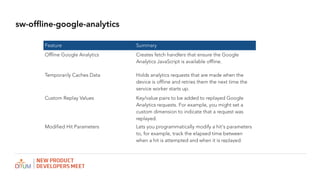
sw-offline-google-analytics
Feature Summary
Offline Google Analytics Creates fetch handlers that ensure the Google
Analytics JavaScript is available offline.
Temporarily Caches Data Holds analytics requests that are made when the
device is offline and retries them the next time the
service worker starts up.
Custom Replay Values Key/value pairs to be added to replayed Google
Analytics requests. For example, you might set a
custom dimension to indicate that a request was
replayed.
Modified Hit Parameters Lets you programmatically modify a hit's parameters
to, for example, track the elapsed time between
when a hit is attempted and when it is replayed.
References
» PWA Developer Site
https://developers.google.com/web/progressive-web-apps/
» Lighthouse Chrome Plugin
To test the PWA score
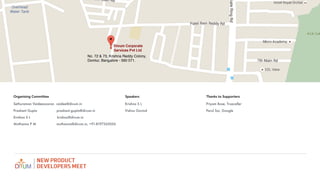
No. 72 & 73, Krishna Reddy Colony,
Domlur, Bangalore - 560 071.
Sethuraman Vaideeswaran vaidee@divum.in
Prashant Gupta prashant.gupta@divum.in
Krishna S L krishna@divum.in
Muthanna P M muthanna@divum.in, +91-8197265056
Organising Committee Speakers Thanks to Supporters

Krishna S L
Vishnu Govind
Priyam Bose, Truecaller

Parul Soi, Google
Thank you

Progressive Web Apps - NPD Meet

  • 1.
  • 2.
    Title Text Understand theBattle of Web vs Apps What are Progressive Web Apps (PWA)? Few Statistics on PWA PWA Components PWA Libraries Product Demo Agenda
  • 3.
    Mobile Apps Everywhere- A Decade of Revolution! » Higher Reach! » Better Personalisation! » High performant! » Use mobile device features » Ability to work offline! » Affordable on devices which are cheaper! » Most important, it gave a brand presence
  • 4.
  • 5.
    Web is Dead!(2010) » Web couldn’t support offline content like apps. » It couldn’t provide a mechanism to reach the user through push notification » It couldn’t be high performant. » It couldn’t get few basic device related functionalities » It got buried inside the browser! » To simply put, it couldn’t behave app like.
  • 6.
    BUT THERE WERESERIOUS PROBLEM STARTED ARISING WITH APPS!
  • 7.
    Drop in theUsers App Store View Download Open 100% 70% 65%
  • 8.
    Apps became bulky! Averagesize of the app became 7MB to 10MB.
  • 9.
    App upgrades becamecostlier! A typical user has a data usage of atleast 700MB - 1 GB from playstore!*
  • 10.
    Maintenance When there aremultiple platforms, the maintenance became tough!
  • 11.
    Implementing offline data Thedeveloper has to take care of handling offline scenarios as the networks were really flaky!
  • 12.
  • 13.
  • 14.
    Progressive Web Appsare user experiences that have the reach of the web, and are: » Reliable - Load instantly and never show the downasaur, even in uncertain network conditions. » Fast - Respond quickly to user interactions with silky smooth animations and no janky scrolling. » Engaging - Feel like a natural app on the device, with an immersive user experience What are Progressive Web Apps?
  • 15.
    » Progressive -Work for every user, regardless of browser choice because they’re built with progressive enhancement as a core tenet. » Responsive - Fit any form factor: desktop, mobile, tablet, or forms yet to emerge » Connectivity independent - Service workers allow work offline, or on low quality networks » App-like - Feel like an app to the user with app-style interactions and navigation. » Fresh - Always up-to-date thanks to the service worker update process. PWA CHARACTERISTICS » Safe - Served via HTTPS to prevent snooping and ensure content hasn’t been tampered with. » Discoverable - Are identifiable as “applications” thanks to W3C manifests and service worker registration scope allowing search engines to find them » Re-engageable - Make re-engagement easy through features like push notifications. » Installable - Allow users to “keep” apps they find most useful on their home screen without the hassle of an app store » Linkable - Easily shared via a URL and do not require complex installation.
  • 16.
    Interesting stats onPWA - Flipkart Lite! » Users time on site with Flipkart lite vs. previous mobile experience: 3.5 minutes vs 70 seconds.. » 3x more time spent on site » 40% higher re-engagement rate » 70% greater conversion rate among those arriving via Add to Homescreen » 3x lower data usage
  • 17.
    More stats onPWA - Google I/O 2016 App » More engagement than the native app (4:06 min mobile web vs. Android's 2:40 min). » 450ms faster first paint for return users thanks to service worker caching » 84% of visitors supported Service Worker » 3.8% users went offline but continued to generate 11k pageviews!
  • 18.
    HOW IT ISBEEN DONE?
  • 19.
    APP MANIFEST PWA COMPONENTS SERVICEWORKER APPLICATION SHELL
  • 20.
    App Manifest » Usedto create a icon in the home screen of the phone. » Contains the url for different sizes of icons » Contains the background color for the app » Contains the Name for the app » Contains the start url for the app { "name": "Weather", "short_name": "Weather", "icons": [{ "src": "images/icons/icon-128x128.png", "sizes": "128x128", "type": "image/png" }, . . . { "src": "images/icons/icon-256x256.png", "sizes": "256x256", "type": "image/png" }], "start_url": "/index.html", "display": "standalone", "background_color": "#3E4EB8", "theme_color": "#2F3BA2" } <link rel="manifest" href="/manifest.json">
  • 21.
    Service Worker » Doescaching of the App Shell - html/css/js in the phone » Update the Content in background » Cache the dynamically served content in the phone and returns it when required. » Can inform the developer that whether the add to home screen is clicked or not » Gets the push notification id from the user to send the notification. » Invalidates the cache when needed!
  • 22.
    Service Worker -Cache // CACHE self.addEventListener('install', function(e) { console.log('[ServiceWorker] Install'); e.waitUntil( caches.open(cacheName).then(function(cache) { console.log('[ServiceWorker] Caching app shell'); return cache.addAll(filesToCache); }) ); }); //FETCH self.addEventListener('fetch', function(e) { console.log('[ServiceWorker] Fetch', e.request.url); e.respondWith( caches.match(e.request).then(function(response) { return response || fetch(e.request); }) ); }); //FIRST STEP if ('serviceWorker' in navigator) { navigator.serviceWorker .register('./service-worker.js') .then(function() { console.log('Service Worker Registered'); }); } var cacheName = 'weatherPWA-step-6-1'; var filesToCache = [];
  • 23.
    Service Worker -Libraries » sw-precache » sw-toolbox » sw-offline-google-analytics
  • 24.
    sw-precache Feature Summary Precache YourApp Shell Your web app's shell—its core HTML, JavaScript, and CSS—can be precached when a user visits your page. Build-time Integration Drop it into your existing build process: Gulp, Grunt, or command line. Stay Fresh Changes in your build update the service worker script. Users get updates, but you don't have to manually version your content or caches. No Network, No Problem Your static resources are served cache-first, quickly, whether or not there's a network available.
  • 25.
    sw-toolkit Feature Summary Runtime CachingCache large or infrequently used resources, like images, at runtime, when they're first used. Offline Fallbacks Load fresh images, API responses, or other dynamic content from the network while online, but fall back to a cached placeholder while offline. Goodbye Lie-Fi Fight lie-fi by automatically falling back to a cached response when the network is too slow. Battle Cache Bloat That image from last month doesn't need to be cached forever. Least-recently used and age-based cache expiration helps free up space.
  • 26.
    sw-offline-google-analytics Feature Summary Offline GoogleAnalytics Creates fetch handlers that ensure the Google Analytics JavaScript is available offline. Temporarily Caches Data Holds analytics requests that are made when the device is offline and retries them the next time the service worker starts up. Custom Replay Values Key/value pairs to be added to replayed Google Analytics requests. For example, you might set a custom dimension to indicate that a request was replayed. Modified Hit Parameters Lets you programmatically modify a hit's parameters to, for example, track the elapsed time between when a hit is attempted and when it is replayed.
  • 27.
    References » PWA DeveloperSite https://developers.google.com/web/progressive-web-apps/ » Lighthouse Chrome Plugin To test the PWA score
  • 28.
    No. 72 &73, Krishna Reddy Colony, Domlur, Bangalore - 560 071. Sethuraman Vaideeswaran vaidee@divum.in Prashant Gupta prashant.gupta@divum.in Krishna S L krishna@divum.in Muthanna P M muthanna@divum.in, +91-8197265056 Organising Committee Speakers Thanks to Supporters
 Krishna S L Vishnu Govind Priyam Bose, Truecaller
 Parul Soi, Google
  • 29.