STANFORD UNIVERSITY • INFORMATION SECURITY OFFICE
Mobile Devices – Using Without Losing
Mark K. Mellis
Associate Information Security Officer
Stanford University Information Security Office
Tech Briefing 30March 2012
STANFORD UNIVERSITY • INFORMATION SECURITY OFFICE
Mobile Devices – Using Without Losing
We all have mobile devices…
§  iPhones, iPads, Droids
§  “There’s an App for that!”
§  What can we do to protect our own
privacy and the University’s data while
enjoying the convenience of mobile
personal computing devices?
STANFORD UNIVERSITY • INFORMATION SECURITY OFFICE
Preview
§  Risks of Mobile Computing
§  Tips
§  What If You Lose Your Phone?
§  Review
§  MDM Walk Through (if we have time)
Mobile Devices – Using Without Losing
STANFORD UNIVERSITY • INFORMATION SECURITY OFFICE
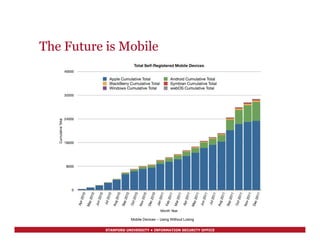
The Future is Mobile
Mobile Devices – Using Without Losing
STANFORD UNIVERSITY • INFORMATION SECURITY OFFICE
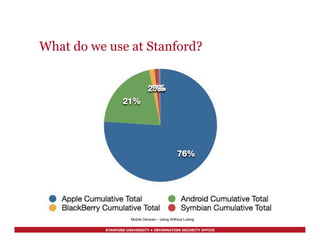
What do we use at Stanford?
Mobile Devices – Using Without Losing
STANFORD UNIVERSITY • INFORMATION SECURITY OFFICE
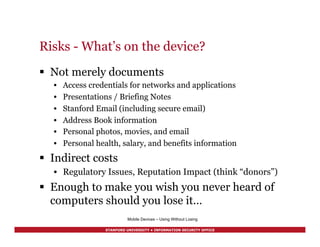
Risks - What’s on the device?
§  Not merely documents
•  Access credentials for networks and applications
•  Presentations / Briefing Notes
•  Stanford Email (including secure email)
•  Address Book information
•  Personal photos, movies, and email
•  Personal health, salary, and benefits information
§  Indirect costs
•  Regulatory Issues, Reputation Impact (think “donors”)
§  Enough to make you wish you never heard of
computers should you lose it…
Mobile Devices – Using Without Losing
STANFORD UNIVERSITY • INFORMATION SECURITY OFFICE
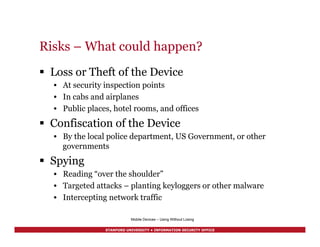
Risks – What could happen?
§  Loss or Theft of the Device
•  At security inspection points
•  In cabs and airplanes
•  Public places, hotel rooms, and offices
§  Confiscation of the Device
•  By the local police department, US Government, or other
governments
§  Spying
•  Reading “over the shoulder”
•  Targeted attacks – planting keyloggers or other malware
•  Intercepting network traffic
Mobile Devices – Using Without Losing
STANFORD UNIVERSITY • INFORMATION SECURITY OFFICE
Stanford’s Policy
§  Mobile devices used to store or access Restricted
Information (per AGM 63) are required to be managed
with an approved mobile device management system
(e.g. Stanford MDM) and profile (e.g. the MDM
Restricted profile).
§  Examples include Health Information, including
Protected Health Information (PHI), Passport and visa
numbers, and export controlled information under U.S.
law.
§  More information about information classification and
handling at:
http://securecomputing.stanford.edu/dataclass_chart.html!
Mobile Devices – Using Without Losing
STANFORD UNIVERSITY • INFORMATION SECURITY OFFICE
Label your device
Mobile Devices – Using Without Losing
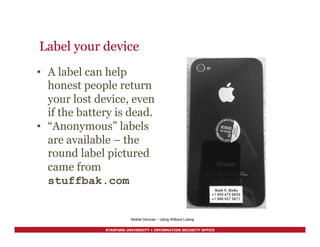
•  A label can help
honest people return
your lost device, even
if the battery is dead.
•  “Anonymous” labels
are available – the
round label pictured
came from
stuffbak.com
STANFORD UNIVERSITY • INFORMATION SECURITY OFFICE
Use a passcode
§  A four digit passcode is plenty unless
you access Restricted Data
§  Don’t use “1-2-3-4” or “6-6-6-6”
§  Set the screen to auto-lock after a
minute or two
§  Set the phone to erase itself if the wrong
passcode is entered too many times –
ten or more is fine
Mobile Devices – Using Without Losing
STANFORD UNIVERSITY • INFORMATION SECURITY OFFICE
A digression on passcodes
§  Daniel Amitay studied* the most-used f0ur
digit PINs used in his app - 204,508 samples
§  Top ten (in order of popularity) were 1234,
0000, 2580 (vertical line), 1111, 5555, 5683
(LOVE), 0852 (vertical line), 2222, 1212, 1998
(birth year?)
§  Of these, 1234, 0000, 1111, 2222, 1212 are
blocked by the MDM passcode policy. Beware
of the others…
!
* http://amitay.us/blog/files/most_common_iphone_passcodes.php!
Mobile Devices – Using Without Losing
STANFORD UNIVERSITY • INFORMATION SECURITY OFFICE
Phones - Keep the software updated
§  Updates are issued frequently – as new
vulnerabilities are exposed, the vendor
patches them.
§  Applies to both the basic device software and
applications – for iOS devices, the operating
system is updated via iTunes or over the air,
and applications are updated via the App
Store.
§  The update story is not so nice for Androids.
Mobile Devices – Using Without Losing
STANFORD UNIVERSITY • INFORMATION SECURITY OFFICE
Don’t “jailbreak” or “root” it
It is popular in some circles to circumvent the security
controls on mobile devices in order to avoid paying for
particular features or to enable capabilities that the
carrier or vendor doesn’t provide. This is called
“jailbreaking” or “rooting.”
§  Jailbreaking removes a layer of protection that helps
keep malware from running on the device
§  Jailbreaking is usually prohibited by mobile phone
company contracts
§  Jailbreaking is contrary to security “best practices”
for those reasons
Mobile Devices – Using Without Losing
STANFORD UNIVERSITY • INFORMATION SECURITY OFFICE
Sign up for "find my iPhone”
§  It’s available free on the iTunes App
Store.
§  Of course you might have an Android
phone – “there’s an app for that.”
Lookout Mobile Security Premium
https://www.mylookout.com for
example.
Mobile Devices – Using Without Losing
STANFORD UNIVERSITY • INFORMATION SECURITY OFFICE
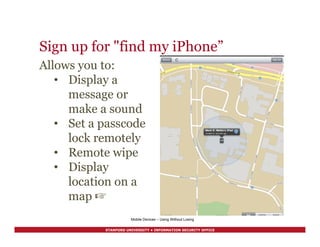
Sign up for "find my iPhone”
Mobile Devices – Using Without Losing
Allows you to:
•  Display a
message or
make a sound
•  Set a passcode
lock remotely
•  Remote wipe
•  Display
location on a
map ☞
STANFORD UNIVERSITY • INFORMATION SECURITY OFFICE
Backups
§  If it’s an iOS device, you can use iTunes or
iCloud to back it up. Other devices have other
backup mechanisms.
§  If you have a good backup of your phone, and
you lose it, you can do a “remote wipe”
without having to worry about losing your
contacts, photos, and other valuable
information. It helps make “doing the right
thing” easier.
Mobile Devices – Using Without Losing
STANFORD UNIVERSITY • INFORMATION SECURITY OFFICE
Encryption
§  If it’s an iOS device running recent software,
merely setting a PIN or passcode will
automatically encrypt the phone.
§  If you have a good backup of your phone, and
you lose it, you can do a “remote wipe”
without having to worry about losing your
contacts, photos, and other valuable
information. It helps make “doing the right
thing” easier.
Mobile Devices – Using Without Losing
STANFORD UNIVERSITY • INFORMATION SECURITY OFFICE
What if you lose it?
§  Next to the pictures of your loved ones, the most
valuable things on your mobile device are probably
your SUnetID and password
§  If your device is lost or stolen, call the Help Desk at 5-
HELP. They will assist in changing your SUnetID’s
password. Doesn’t matter if you are in MDM or not,
works even for Androids and other devices that MDM
doesn’t support yet.
§  If you are enrolled in Stanford MDM, the Help Desk
can lock it, wipe University data, and help you think
through your options for trying to recover the device.
Mobile Devices – Using Without Losing
STANFORD UNIVERSITY • INFORMATION SECURITY OFFICE
Mobile Device Management
§  Stanford has a new service called Mobile Device
Management
§  It will set up your email and calendar, and these
security and privacy “best practices” for you
§  Read about it at
http://mobilemanagement.stanford.edu
Mobile Devices – Using Without Losing
STANFORD UNIVERSITY • INFORMATION SECURITY OFFICE
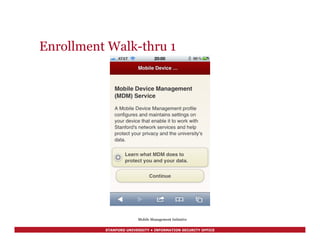
Enrollment Walk-thru 1
Mobile Management Initiative
STANFORD UNIVERSITY • INFORMATION SECURITY OFFICE
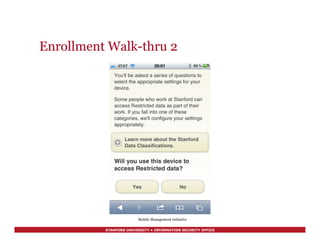
Enrollment Walk-thru 2
Mobile Management Initiative
STANFORD UNIVERSITY • INFORMATION SECURITY OFFICE
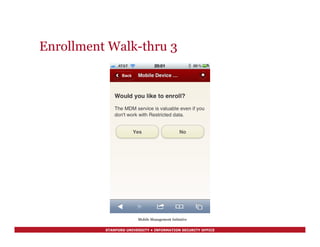
Enrollment Walk-thru 3
Mobile Management Initiative
STANFORD UNIVERSITY • INFORMATION SECURITY OFFICE
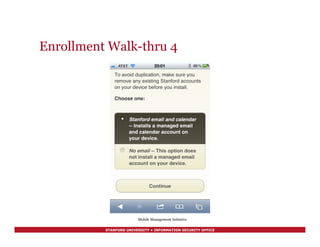
Enrollment Walk-thru 4
Mobile Management Initiative
STANFORD UNIVERSITY • INFORMATION SECURITY OFFICE
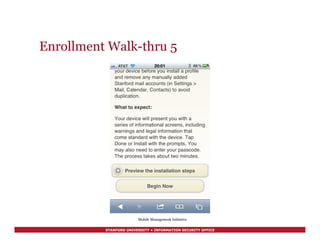
Enrollment Walk-thru 5
Mobile Management Initiative
STANFORD UNIVERSITY • INFORMATION SECURITY OFFICE
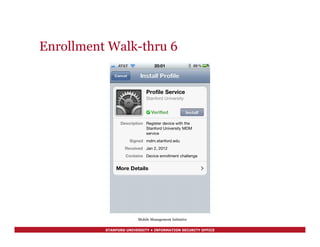
Enrollment Walk-thru 6
Mobile Management Initiative
STANFORD UNIVERSITY • INFORMATION SECURITY OFFICE
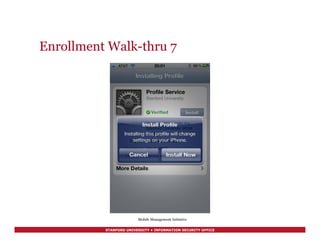
Enrollment Walk-thru 7
Mobile Management Initiative
STANFORD UNIVERSITY • INFORMATION SECURITY OFFICE
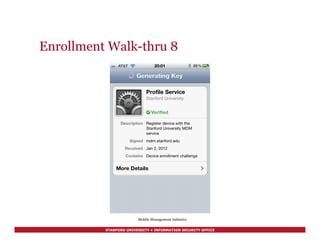
Enrollment Walk-thru 8
Mobile Management Initiative
STANFORD UNIVERSITY • INFORMATION SECURITY OFFICE
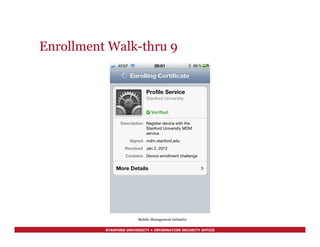
Enrollment Walk-thru 9
Mobile Management Initiative
STANFORD UNIVERSITY • INFORMATION SECURITY OFFICE
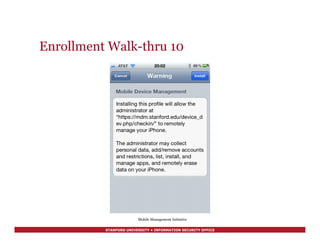
Enrollment Walk-thru 10
Mobile Management Initiative
STANFORD UNIVERSITY • INFORMATION SECURITY OFFICE
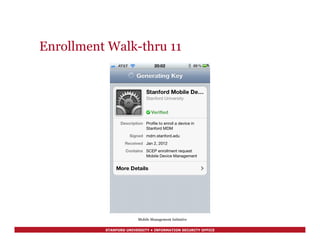
Enrollment Walk-thru 11
Mobile Management Initiative
STANFORD UNIVERSITY • INFORMATION SECURITY OFFICE
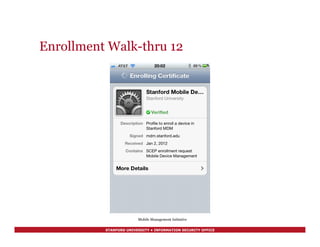
Enrollment Walk-thru 12
Mobile Management Initiative
STANFORD UNIVERSITY • INFORMATION SECURITY OFFICE
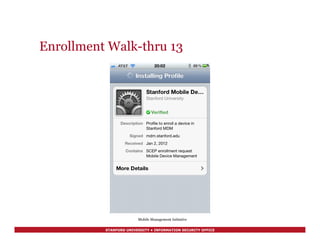
Enrollment Walk-thru 13
Mobile Management Initiative
STANFORD UNIVERSITY • INFORMATION SECURITY OFFICE
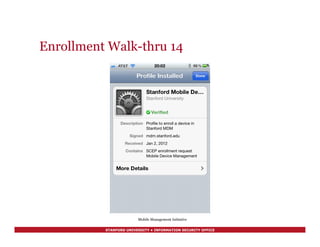
Enrollment Walk-thru 14
Mobile Management Initiative
STANFORD UNIVERSITY • INFORMATION SECURITY OFFICE
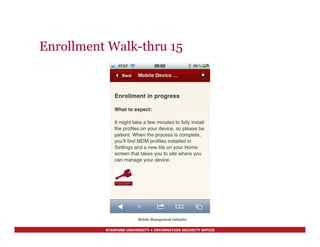
Enrollment Walk-thru 15
Mobile Management Initiative
STANFORD UNIVERSITY • INFORMATION SECURITY OFFICE
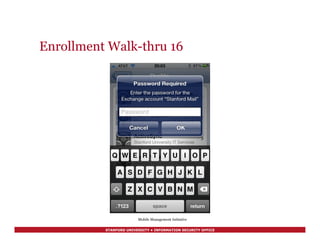
Enrollment Walk-thru 16
Mobile Management Initiative
STANFORD UNIVERSITY • INFORMATION SECURITY OFFICE
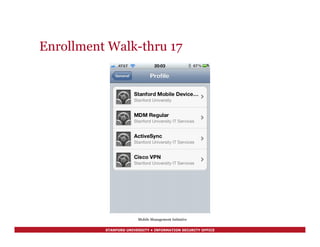
Enrollment Walk-thru 17
Mobile Management Initiative
STANFORD UNIVERSITY • INFORMATION SECURITY OFFICE
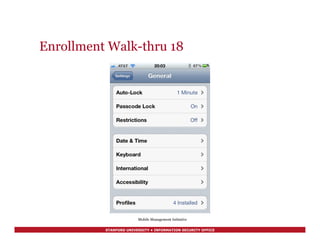
Enrollment Walk-thru 18
Mobile Management Initiative
STANFORD UNIVERSITY • INFORMATION SECURITY OFFICE
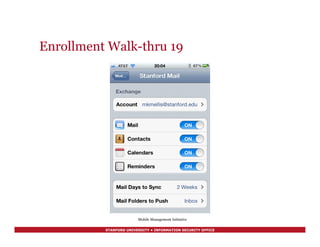
Enrollment Walk-thru 19
Mobile Management Initiative
STANFORD UNIVERSITY • INFORMATION SECURITY OFFICE
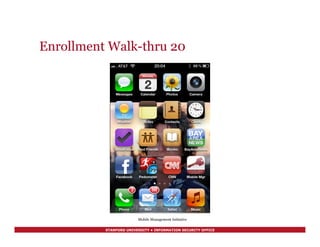
Enrollment Walk-thru 20
Mobile Management Initiative
STANFORD UNIVERSITY • INFORMATION SECURITY OFFICE
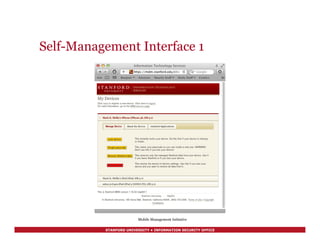
Self-Management Interface 1
Mobile Management Initiative
STANFORD UNIVERSITY • INFORMATION SECURITY OFFICE
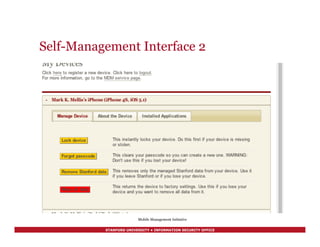
Self-Management Interface 2
Mobile Management Initiative
STANFORD UNIVERSITY • INFORMATION SECURITY OFFICE
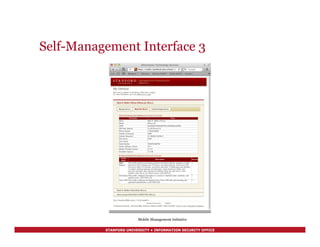
Self-Management Interface 3
Mobile Management Initiative
STANFORD UNIVERSITY • INFORMATION SECURITY OFFICE
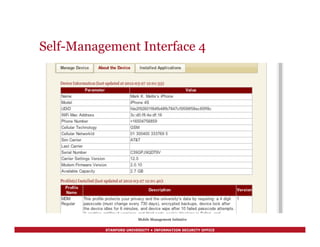
Self-Management Interface 4
Mobile Management Initiative
STANFORD UNIVERSITY • INFORMATION SECURITY OFFICE
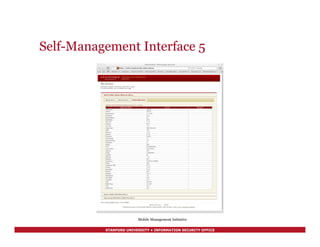
Self-Management Interface 5
Mobile Management Initiative
STANFORD UNIVERSITY • INFORMATION SECURITY OFFICE
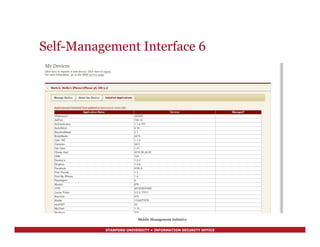
Self-Management Interface 6
Mobile Management Initiative
STANFORD UNIVERSITY • INFORMATION SECURITY OFFICE
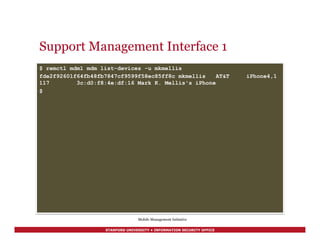
Support Management Interface 1
$ remctl mdm1 mdm list-devices -u mkmellis
fde2f92601f64fb48fb7847cf9599f58ec85ff8c mkmellis AT&T iPhone4,1
117 3c:d0:f8:4e:df:16 Mark K. Mellis's iPhone
$
Mobile Management Initiative
STANFORD UNIVERSITY • INFORMATION SECURITY OFFICE
Support Management Interface 2
$ remctl mdm1 mdm show-device fde2f92601f64fb48fb7847cf9599f58ec85ff8c
Device 1 of 1:
DB id: 3158
UDID: fde2f92601f64fb48fb7847cf9599f58ec85ff8c
Device Name: Mark K. Mellis's iPhone
User Name: mkmellis
Model: iPhone 4S
Last Check-in: 2012-01-02 20:03:09
OS Version: iOS 5.0.1 (9A405)
Cert Expires: 2013-01-01 20:02:18
WiFi Mac Address: 3c:d0:f8:4e:df:16
[continued]
Mobile Management Initiative
STANFORD UNIVERSITY • INFORMATION SECURITY OFFICE
Support Management Interface 3
[continued]
Phone Number: +16504756859
Cellular Technology: GSM
Cellular NetworkId: 01 300400 333769 5
Sim Carrier: AT&T
Last Carrier:
Serial Number: C39GPJ9QDT9V
Carrier Settings Version: 11.0
Modem Firmware Version: 1.0.13
Capacity (GB): 13.58082199096700
Last Updated: 2012-01-02 20:02:42
Profiles Installed:
MDM Regular [v20110815-9]
ActiveSync [v20110815-13]
Cisco VPN [v20110815-15]
$
Mobile Management Initiative
STANFORD UNIVERSITY • INFORMATION SECURITY OFFICE
Support Management Interface 3
$ remctl mdm1 mdm show-apps fde2f92601f64fb48fb7847cf9599f58ec85ff8c
Applications Installed:
AirPort(100.14)
BayAreaNews(1.02)
BodyMedia(2413)
Calc 16C(1.1.0)
[…]
Yelp(5.5.1)
Z-Subsonic(2.8)
$
Mobile Management Initiative
STANFORD UNIVERSITY • INFORMATION SECURITY OFFICE
Here’s what you do…
1.  Review these tips (and more) at
http://securecomputing.stanford.edu/
mobile
2.  Put them into practice today!
3.  Enroll in Mobile Device Management
at https://mdm.stanford.edu/register
Mobile Devices – Using Without Losing
STANFORD UNIVERSITY • INFORMATION SECURITY OFFICE
Questions?
Mark K. Mellis
mkmellis@stanford.edu
http://securecomputing.stanford.edu
Mobile Devices – Using Without Losing

Mobile Devices – Using Without Losing Mark K. Mellis, Associate Information Security Officer

  • 1.
    STANFORD UNIVERSITY •INFORMATION SECURITY OFFICE Mobile Devices – Using Without Losing Mark K. Mellis Associate Information Security Officer Stanford University Information Security Office Tech Briefing 30March 2012
  • 2.
    STANFORD UNIVERSITY •INFORMATION SECURITY OFFICE Mobile Devices – Using Without Losing We all have mobile devices… §  iPhones, iPads, Droids §  “There’s an App for that!” §  What can we do to protect our own privacy and the University’s data while enjoying the convenience of mobile personal computing devices?
  • 3.
    STANFORD UNIVERSITY •INFORMATION SECURITY OFFICE Preview §  Risks of Mobile Computing §  Tips §  What If You Lose Your Phone? §  Review §  MDM Walk Through (if we have time) Mobile Devices – Using Without Losing
  • 4.
    STANFORD UNIVERSITY •INFORMATION SECURITY OFFICE The Future is Mobile Mobile Devices – Using Without Losing
  • 5.
    STANFORD UNIVERSITY •INFORMATION SECURITY OFFICE What do we use at Stanford? Mobile Devices – Using Without Losing
  • 6.
    STANFORD UNIVERSITY •INFORMATION SECURITY OFFICE Risks - What’s on the device? §  Not merely documents •  Access credentials for networks and applications •  Presentations / Briefing Notes •  Stanford Email (including secure email) •  Address Book information •  Personal photos, movies, and email •  Personal health, salary, and benefits information §  Indirect costs •  Regulatory Issues, Reputation Impact (think “donors”) §  Enough to make you wish you never heard of computers should you lose it… Mobile Devices – Using Without Losing
  • 7.
    STANFORD UNIVERSITY •INFORMATION SECURITY OFFICE Risks – What could happen? §  Loss or Theft of the Device •  At security inspection points •  In cabs and airplanes •  Public places, hotel rooms, and offices §  Confiscation of the Device •  By the local police department, US Government, or other governments §  Spying •  Reading “over the shoulder” •  Targeted attacks – planting keyloggers or other malware •  Intercepting network traffic Mobile Devices – Using Without Losing
  • 8.
    STANFORD UNIVERSITY •INFORMATION SECURITY OFFICE Stanford’s Policy §  Mobile devices used to store or access Restricted Information (per AGM 63) are required to be managed with an approved mobile device management system (e.g. Stanford MDM) and profile (e.g. the MDM Restricted profile). §  Examples include Health Information, including Protected Health Information (PHI), Passport and visa numbers, and export controlled information under U.S. law. §  More information about information classification and handling at: http://securecomputing.stanford.edu/dataclass_chart.html! Mobile Devices – Using Without Losing
  • 9.
    STANFORD UNIVERSITY •INFORMATION SECURITY OFFICE Label your device Mobile Devices – Using Without Losing •  A label can help honest people return your lost device, even if the battery is dead. •  “Anonymous” labels are available – the round label pictured came from stuffbak.com
  • 10.
    STANFORD UNIVERSITY •INFORMATION SECURITY OFFICE Use a passcode §  A four digit passcode is plenty unless you access Restricted Data §  Don’t use “1-2-3-4” or “6-6-6-6” §  Set the screen to auto-lock after a minute or two §  Set the phone to erase itself if the wrong passcode is entered too many times – ten or more is fine Mobile Devices – Using Without Losing
  • 11.
    STANFORD UNIVERSITY •INFORMATION SECURITY OFFICE A digression on passcodes §  Daniel Amitay studied* the most-used f0ur digit PINs used in his app - 204,508 samples §  Top ten (in order of popularity) were 1234, 0000, 2580 (vertical line), 1111, 5555, 5683 (LOVE), 0852 (vertical line), 2222, 1212, 1998 (birth year?) §  Of these, 1234, 0000, 1111, 2222, 1212 are blocked by the MDM passcode policy. Beware of the others… ! * http://amitay.us/blog/files/most_common_iphone_passcodes.php! Mobile Devices – Using Without Losing
  • 12.
    STANFORD UNIVERSITY •INFORMATION SECURITY OFFICE Phones - Keep the software updated §  Updates are issued frequently – as new vulnerabilities are exposed, the vendor patches them. §  Applies to both the basic device software and applications – for iOS devices, the operating system is updated via iTunes or over the air, and applications are updated via the App Store. §  The update story is not so nice for Androids. Mobile Devices – Using Without Losing
  • 13.
    STANFORD UNIVERSITY •INFORMATION SECURITY OFFICE Don’t “jailbreak” or “root” it It is popular in some circles to circumvent the security controls on mobile devices in order to avoid paying for particular features or to enable capabilities that the carrier or vendor doesn’t provide. This is called “jailbreaking” or “rooting.” §  Jailbreaking removes a layer of protection that helps keep malware from running on the device §  Jailbreaking is usually prohibited by mobile phone company contracts §  Jailbreaking is contrary to security “best practices” for those reasons Mobile Devices – Using Without Losing
  • 14.
    STANFORD UNIVERSITY •INFORMATION SECURITY OFFICE Sign up for "find my iPhone” §  It’s available free on the iTunes App Store. §  Of course you might have an Android phone – “there’s an app for that.” Lookout Mobile Security Premium https://www.mylookout.com for example. Mobile Devices – Using Without Losing
  • 15.
    STANFORD UNIVERSITY •INFORMATION SECURITY OFFICE Sign up for "find my iPhone” Mobile Devices – Using Without Losing Allows you to: •  Display a message or make a sound •  Set a passcode lock remotely •  Remote wipe •  Display location on a map ☞
  • 16.
    STANFORD UNIVERSITY •INFORMATION SECURITY OFFICE Backups §  If it’s an iOS device, you can use iTunes or iCloud to back it up. Other devices have other backup mechanisms. §  If you have a good backup of your phone, and you lose it, you can do a “remote wipe” without having to worry about losing your contacts, photos, and other valuable information. It helps make “doing the right thing” easier. Mobile Devices – Using Without Losing
  • 17.
    STANFORD UNIVERSITY •INFORMATION SECURITY OFFICE Encryption §  If it’s an iOS device running recent software, merely setting a PIN or passcode will automatically encrypt the phone. §  If you have a good backup of your phone, and you lose it, you can do a “remote wipe” without having to worry about losing your contacts, photos, and other valuable information. It helps make “doing the right thing” easier. Mobile Devices – Using Without Losing
  • 18.
    STANFORD UNIVERSITY •INFORMATION SECURITY OFFICE What if you lose it? §  Next to the pictures of your loved ones, the most valuable things on your mobile device are probably your SUnetID and password §  If your device is lost or stolen, call the Help Desk at 5- HELP. They will assist in changing your SUnetID’s password. Doesn’t matter if you are in MDM or not, works even for Androids and other devices that MDM doesn’t support yet. §  If you are enrolled in Stanford MDM, the Help Desk can lock it, wipe University data, and help you think through your options for trying to recover the device. Mobile Devices – Using Without Losing
  • 19.
    STANFORD UNIVERSITY •INFORMATION SECURITY OFFICE Mobile Device Management §  Stanford has a new service called Mobile Device Management §  It will set up your email and calendar, and these security and privacy “best practices” for you §  Read about it at http://mobilemanagement.stanford.edu Mobile Devices – Using Without Losing
  • 20.
    STANFORD UNIVERSITY •INFORMATION SECURITY OFFICE Enrollment Walk-thru 1 Mobile Management Initiative
  • 21.
    STANFORD UNIVERSITY •INFORMATION SECURITY OFFICE Enrollment Walk-thru 2 Mobile Management Initiative
  • 22.
    STANFORD UNIVERSITY •INFORMATION SECURITY OFFICE Enrollment Walk-thru 3 Mobile Management Initiative
  • 23.
    STANFORD UNIVERSITY •INFORMATION SECURITY OFFICE Enrollment Walk-thru 4 Mobile Management Initiative
  • 24.
    STANFORD UNIVERSITY •INFORMATION SECURITY OFFICE Enrollment Walk-thru 5 Mobile Management Initiative
  • 25.
    STANFORD UNIVERSITY •INFORMATION SECURITY OFFICE Enrollment Walk-thru 6 Mobile Management Initiative
  • 26.
    STANFORD UNIVERSITY •INFORMATION SECURITY OFFICE Enrollment Walk-thru 7 Mobile Management Initiative
  • 27.
    STANFORD UNIVERSITY •INFORMATION SECURITY OFFICE Enrollment Walk-thru 8 Mobile Management Initiative
  • 28.
    STANFORD UNIVERSITY •INFORMATION SECURITY OFFICE Enrollment Walk-thru 9 Mobile Management Initiative
  • 29.
    STANFORD UNIVERSITY •INFORMATION SECURITY OFFICE Enrollment Walk-thru 10 Mobile Management Initiative
  • 30.
    STANFORD UNIVERSITY •INFORMATION SECURITY OFFICE Enrollment Walk-thru 11 Mobile Management Initiative
  • 31.
    STANFORD UNIVERSITY •INFORMATION SECURITY OFFICE Enrollment Walk-thru 12 Mobile Management Initiative
  • 32.
    STANFORD UNIVERSITY •INFORMATION SECURITY OFFICE Enrollment Walk-thru 13 Mobile Management Initiative
  • 33.
    STANFORD UNIVERSITY •INFORMATION SECURITY OFFICE Enrollment Walk-thru 14 Mobile Management Initiative
  • 34.
    STANFORD UNIVERSITY •INFORMATION SECURITY OFFICE Enrollment Walk-thru 15 Mobile Management Initiative
  • 35.
    STANFORD UNIVERSITY •INFORMATION SECURITY OFFICE Enrollment Walk-thru 16 Mobile Management Initiative
  • 36.
    STANFORD UNIVERSITY •INFORMATION SECURITY OFFICE Enrollment Walk-thru 17 Mobile Management Initiative
  • 37.
    STANFORD UNIVERSITY •INFORMATION SECURITY OFFICE Enrollment Walk-thru 18 Mobile Management Initiative
  • 38.
    STANFORD UNIVERSITY •INFORMATION SECURITY OFFICE Enrollment Walk-thru 19 Mobile Management Initiative
  • 39.
    STANFORD UNIVERSITY •INFORMATION SECURITY OFFICE Enrollment Walk-thru 20 Mobile Management Initiative
  • 40.
    STANFORD UNIVERSITY •INFORMATION SECURITY OFFICE Self-Management Interface 1 Mobile Management Initiative
  • 41.
    STANFORD UNIVERSITY •INFORMATION SECURITY OFFICE Self-Management Interface 2 Mobile Management Initiative
  • 42.
    STANFORD UNIVERSITY •INFORMATION SECURITY OFFICE Self-Management Interface 3 Mobile Management Initiative
  • 43.
    STANFORD UNIVERSITY •INFORMATION SECURITY OFFICE Self-Management Interface 4 Mobile Management Initiative
  • 44.
    STANFORD UNIVERSITY •INFORMATION SECURITY OFFICE Self-Management Interface 5 Mobile Management Initiative
  • 45.
    STANFORD UNIVERSITY •INFORMATION SECURITY OFFICE Self-Management Interface 6 Mobile Management Initiative
  • 46.
    STANFORD UNIVERSITY •INFORMATION SECURITY OFFICE Support Management Interface 1 $ remctl mdm1 mdm list-devices -u mkmellis fde2f92601f64fb48fb7847cf9599f58ec85ff8c mkmellis AT&T iPhone4,1 117 3c:d0:f8:4e:df:16 Mark K. Mellis's iPhone $ Mobile Management Initiative
  • 47.
    STANFORD UNIVERSITY •INFORMATION SECURITY OFFICE Support Management Interface 2 $ remctl mdm1 mdm show-device fde2f92601f64fb48fb7847cf9599f58ec85ff8c Device 1 of 1: DB id: 3158 UDID: fde2f92601f64fb48fb7847cf9599f58ec85ff8c Device Name: Mark K. Mellis's iPhone User Name: mkmellis Model: iPhone 4S Last Check-in: 2012-01-02 20:03:09 OS Version: iOS 5.0.1 (9A405) Cert Expires: 2013-01-01 20:02:18 WiFi Mac Address: 3c:d0:f8:4e:df:16 [continued] Mobile Management Initiative
  • 48.
    STANFORD UNIVERSITY •INFORMATION SECURITY OFFICE Support Management Interface 3 [continued] Phone Number: +16504756859 Cellular Technology: GSM Cellular NetworkId: 01 300400 333769 5 Sim Carrier: AT&T Last Carrier: Serial Number: C39GPJ9QDT9V Carrier Settings Version: 11.0 Modem Firmware Version: 1.0.13 Capacity (GB): 13.58082199096700 Last Updated: 2012-01-02 20:02:42 Profiles Installed: MDM Regular [v20110815-9] ActiveSync [v20110815-13] Cisco VPN [v20110815-15] $ Mobile Management Initiative
  • 49.
    STANFORD UNIVERSITY •INFORMATION SECURITY OFFICE Support Management Interface 3 $ remctl mdm1 mdm show-apps fde2f92601f64fb48fb7847cf9599f58ec85ff8c Applications Installed: AirPort(100.14) BayAreaNews(1.02) BodyMedia(2413) Calc 16C(1.1.0) […] Yelp(5.5.1) Z-Subsonic(2.8) $ Mobile Management Initiative
  • 50.
    STANFORD UNIVERSITY •INFORMATION SECURITY OFFICE Here’s what you do… 1.  Review these tips (and more) at http://securecomputing.stanford.edu/ mobile 2.  Put them into practice today! 3.  Enroll in Mobile Device Management at https://mdm.stanford.edu/register Mobile Devices – Using Without Losing
  • 51.
    STANFORD UNIVERSITY •INFORMATION SECURITY OFFICE Questions? Mark K. Mellis mkmellis@stanford.edu http://securecomputing.stanford.edu Mobile Devices – Using Without Losing