Mobile Development &               e Flash Platform
      Mihai Corlan | Developer Evangelist | h p://corlan.org


© 2011 Adobe Systems Incorporated.
About Me

      Developer evangelist (since 2008)
      Flash Builder Engineer 2006-2008
      Web Developer 2000 - 2006
      Blog: h p://corlan.org
      Twi er: h p://twi er.com/mcorlan
      Email: mihai.corlan@adobe.com


© 2011 Adobe Systems Incorporated.
   2
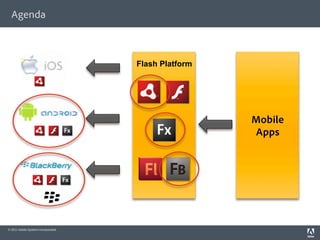
Agenda


                                     Flash Platform


                                                      Mobile
                                                      Apps


© 2011 Adobe Systems Incorporated.
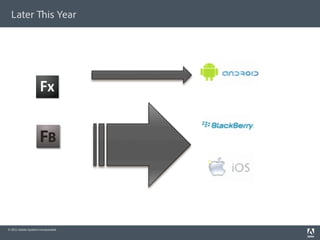
Later                    is Year


© 2011 Adobe Systems Incorporated.
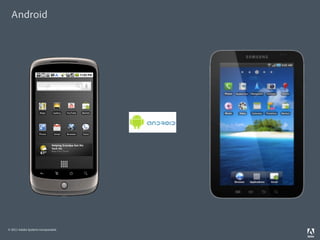
Android


© 2011 Adobe Systems Incorporated.
AIR APIs on Android

      Camera and Microphone access
      Accelerometer
      GPS
      StageWebView
      Multitouch/Gestures
      Screen Orientation / Fullscreen
      Phone/SMS/Email/Browser/Android Market
      Camera (Including Camera Roll Support)
      Session Cache Support – Restore App State
      Hardware Bu ons Support
      Local database (SQLite)

© 2011 Adobe Systems Incorporated.
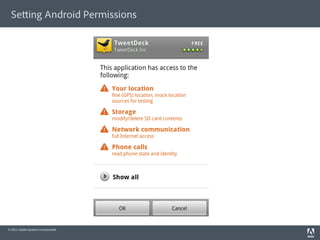
Se ing Android Permissions


© 2011 Adobe Systems Incorporated.
Se ing Android Permissions

   Use Application Descriptor File -> AndroidManifest.xml le


                         <android><manifestAdditions><![CDATA[

                                      <manifest android:installLocation="auto">

                                      <uses-permission android:name="android.permission.INTERNET"/>

                                      <uses-permission android:name="android.permission.WRITE_EXTERNAL_STORAGE"/>

                                      <uses-permission android:name="android.permission.ACCESS_FINE_LOCATION"/>
                                      <uses-permission android:name="android.permission.WAKE_LOCK" />

                                      <uses-permission android:name="android.permission.DISABLE_KEYGUARD"/>

                         </manifest>]]></manifestAdditions>

                         </android>


© 2011 Adobe Systems Incorporated.
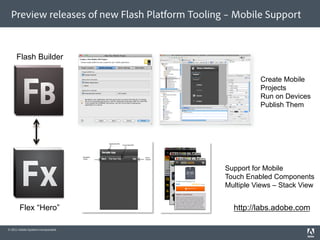
Preview releases of new Flash Platform Tooling – Mobile Support


     Flash Builder

                                                          Create Mobile
                                                          Projects
                                                          Run on Devices
                                                          Publish Them


                                                Support for Mobile
                                                Touch Enabled Components
                                                Multiple Views – Stack View


        Flex “Hero”                               http://labs.adobe.com

© 2011 Adobe Systems Incorporated.
Options for Building Mobile AIR Apps using Burrito

      ActionScript Mobile Project (no MXML)
      Flex Mobile Project:
            Blank – s:Application
            Mobile Project - s:MobileApplication
            Mobile Project – s:TabbedMobileApplication


© 2011 Adobe Systems Incorporated.
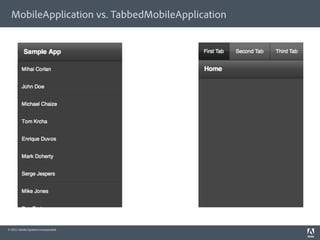
MobileApplication vs. TabbedMobileApplication


© 2011 Adobe Systems Incorporated.
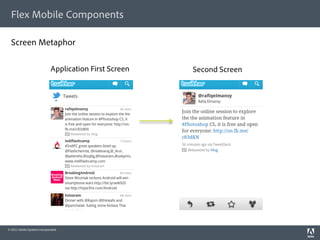
Flex Mobile Components

  Screen Metaphor

                             Application First Screen   Second Screen


© 2011 Adobe Systems Incorporated.
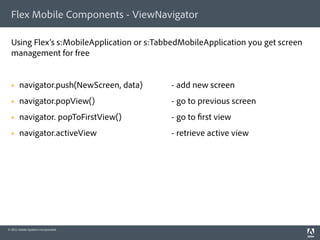
Flex Mobile Components - ViewNavigator

  Using Flex’s s:MobileApplication or s:TabbedMobileApplication you get screen
  management for free


      navigator.push(NewScreen, data)     - add new screen
      navigator.popView()                 - go to previous screen
      navigator. popToFirstView()         - go to rst view
      navigator.activeView                - retrieve active view


© 2011 Adobe Systems Incorporated.
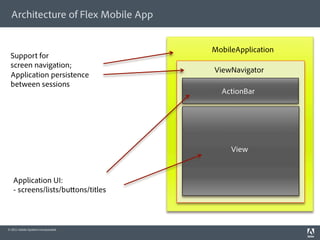
Architecture of Flex Mobile App


                                     MobileApplication
 Support for
 screen navigation;
                                     ViewNavigator
 Application persistence
 between sessions
                                       ActionBar


                                          View


   Application UI:
   - screens/lists/bu ons/titles


© 2011 Adobe Systems Incorporated.
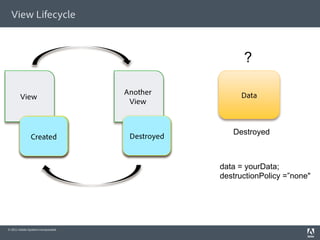
View Lifecycle


                                                        ?

                                     Another           Data
        View
                                      View


                                                     Destroyed
             Destroyed
              Created                 Destroyed
                                       Created


                                                  data = yourData;
                                                  destructionPolicy =”none"


© 2011 Adobe Systems Incorporated.
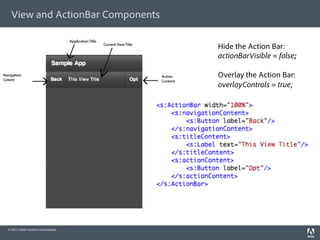
View and ActionBar Components

                                     Hide the Action Bar:
                                     actionBarVisible = false;

                                     Overlay the Action Bar:
                                     overlayControls = true;


© 2011 Adobe Systems Incorporated.
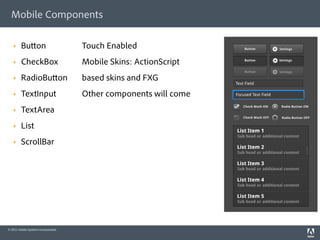
Mobile Components

        Bu on                       Touch Enabled
        CheckBox                    Mobile Skins: ActionScript
        RadioBu on                  based skins and FXG
        TextInput                   Other components will come
        TextArea
        List
        ScrollBar


© 2011 Adobe Systems Incorporated.
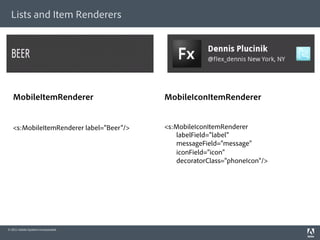
Lists and Item Renderers


   MobileItemRenderer                     MobileIconItemRenderer


   <s:MobileItemRenderer label="Beer"/>   <s:MobileIconItemRenderer
                                             labelField="label"
                                             messageField="message"
                                             iconField="icon"
                                             decoratorClass="phoneIcon"/>


© 2011 Adobe Systems Incorporated.
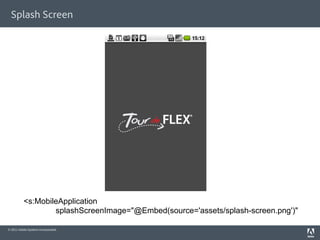
Splash Screen


          <s:MobileApplication
                  splashScreenImage="@Embed(source='assets/splash-screen.png')"

© 2011 Adobe Systems Incorporated.
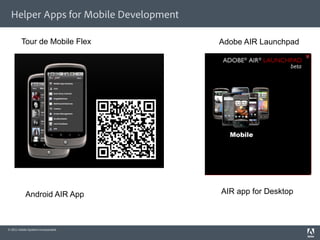
Helper Apps for Mobile Development

         Tour de Mobile Flex           Adobe AIR Launchpad


            Android AIR App            AIR app for Desktop


© 2011 Adobe Systems Incorporated.
Resources

      MP3 Remote Control for Android:
       h p://corlan.org/2010/07/02/creating-multi-screen-apps-for-android-and-desktop-
       using-air/
      Mobile development with Flash Builder Burrito and Hero:
       h p://www.adobe.com/devnet/ ex/articles/mobile_development_hero_burrito.html
      Ge ing Flash Builder “Burrito”:
       h p://labs.adobe.com
      Tour de Mobile Flex:
       h p:// ex.org/tourmobile
      MAX 2010 Sessions Recordings (Channels > MAX 2010):
       h p://tv.adobe.com


© 2011 Adobe Systems Incorporated.
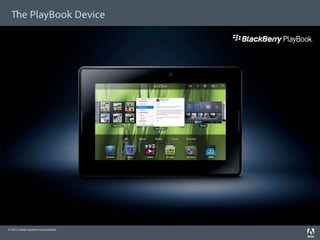
e PlayBook Device


© 2011 Adobe Systems Incorporated.
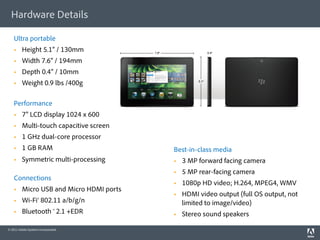
Hardware Details

    Ultra portable
        Height 5.1” / 130mm
        Width 7.6” / 194mm
        Depth 0.4” / 10mm
        Weight 0.9 lbs /400g

    Performance
        7” LCD display 1024 x 600
        Multi-touch capacitive screen
        1 GHz dual-core processor
        1 GB RAM                         Best-in-class media
        Symmetric multi-processing           3 MP forward facing camera
                                              5 MP rear-facing camera
    Connections
                                              1080p HD video; H.264, MPEG4, WMV
        Micro USB and Micro HDMI ports
                                              HDMI video output (full OS output, not
        Wi-Fi® 802.11 a/b/g/n                 limited to image/video)
        Bluetooth ® 2.1 +EDR                 Stereo sound speakers

© 2011 Adobe Systems Incorporated.
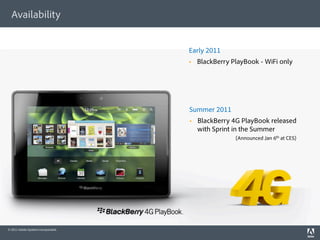
Availability


                                     Early 2011
                                         BlackBerry PlayBook - WiFi only


                                     Summer 2011
                                         BlackBerry 4G PlayBook released
                                          with Sprint in the Summer
                                                      (Announced Jan 6th at CES)


© 2011 Adobe Systems Incorporated.
Developer Have Choices


© 2011 Adobe Systems Incorporated.
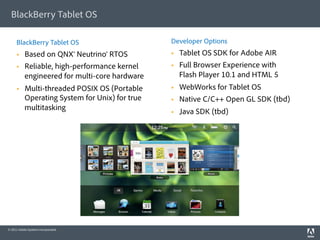
BlackBerry Tablet OS

     BlackBerry Tablet OS                        Developer Options
          Based on QNX® Neutrino® RTOS              Tablet OS SDK for Adobe AIR
          Reliable, high-performance kernel         Full Browser Experience with
           engineered for multi-core hardware         Flash Player 10.1 and HTML 5
          Multi-threaded POSIX OS (Portable         WebWorks for Tablet OS
           Operating System for Unix) for true       Native C/C++ Open GL SDK (tbd)
           multitasking                              Java SDK (tbd)


© 2011 Adobe Systems Incorporated.
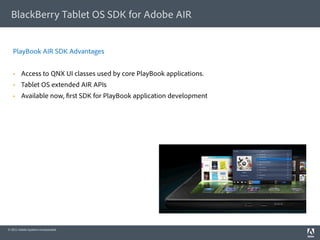
BlackBerry Tablet OS SDK for Adobe AIR


   PlayBook AIR SDK Advantages


        Access to QNX UI classes used by core PlayBook applications.
        Tablet OS extended AIR APIs
        Available now, rst SDK for PlayBook application development


© 2011 Adobe Systems Incorporated.
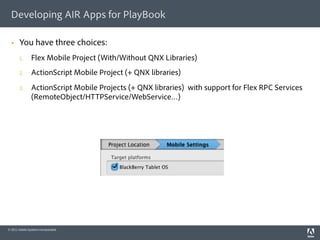
Developing AIR Apps for PlayBook

      You have three choices:
       1.       Flex Mobile Project (With/Without QNX Libraries)
       2.       ActionScript Mobile Project (+ QNX libraries)
       3.       ActionScript Mobile Projects (+ QNX libraries) with support for Flex RPC Services
                (RemoteObject/HTTPService/WebService…)


© 2011 Adobe Systems Incorporated.
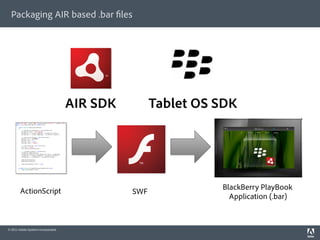
Packaging AIR based .bar les


                                     AIR SDK         Tablet OS SDK


        ActionScript                                           BlackBerry PlayBook
                                               SWF
                                                                 Application (.bar)


© 2011 Adobe Systems Incorporated.
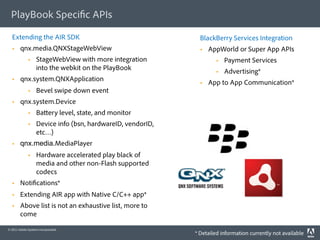
PlayBook Speci c APIs

  Extending the AIR SDK                                        BlackBerry Services Integration
       qnx.media.QNXStageWebView                                  AppWorld or Super App APIs
                  StageWebView with more integration                     Payment Services
                   into the webkit on the PlayBook                        Advertising*
       qnx.system.QNXApplication                                  App to App Communication*
                  Bevel swipe down event
       qnx.system.Device
                  Ba ery level, state, and monitor
                  Device info (bsn, hardwareID, vendorID,
                   etc…)
       qnx.media.MediaPlayer
                  Hardware accelerated play black of
                   media and other non-Flash supported
                   codecs
       Noti cations*
       Extending AIR app with Native C/C++ app*
       Above list is not an exhaustive list, more to
        come

© 2011 Adobe Systems Incorporated.
                                                             * Detailed information currently not available
QNX UI Library: Containers
     //main container
     myMain = new Container();
     myMain.margins = Vector.<Number>([20,20,20,20]);
     myMain. ow = ContainerFlow.HORIZONTAL;
     myMain.debugColor = 0xFFCC00;
     addChild(myMain);

     // create subcontainer on le side of the screen //
     myLe Sub = new Container();
     myLe Sub.size = 50;
     mySub.sizeUnit = SizeUnit.PERCENT;
     mySub.padding = 10;

     // create second subcontainer on le side of the screen //
     mySubRight = new Container();
     mySubRight.size = 50;
     mySubRight.sizeUnit = SizeUnit.PERCENT;
     mySubRight.align = ContainerAlign.MID;

     // create subcontainer as the bo om frame //
     mySubBo om = new Container();
     mySubBo om.size = 12;
     mySubBo om.sizeUnit = SizeUnit.PERCENT;
     mySubBo om.containment = Containment.DOCK_BOTTOM;
                                                  h p://www.blackberry.com/developers/docs/airapi/1.0.0/

© 2011 Adobe Systems Incorporated.
Flex Mobile or QNX UI Library?

      Flex “Hero” Mobile
            Support for screen metaphor
            Limited number of UI components optimized for mobile


      QNX UI Libraries
            More components compared to Flex “Hero” Mobile
            Easier to get the “native” look – these are used by core PlayBook apps
            No built-in support for screen metaphore


© 2011 Adobe Systems Incorporated.
QNX UI Library: UI Controls

       Label / TextInput                                    BackBu on
       Slider / VolumeSlider                                InconBu on / LabelBu on
       ActivityIndicator                                    CheckBox / RadioBu on
       PercentageBar / ProgressBar                          SegmentedControl
       Picker                                               ToggleSwitch
       List / RoundList / SectionList                       AlertDialog / LoginDialog
       TileList / Dropdown / ScrollPane                     PopupList
       MediaPlayer / MediaControl


       BlackBerry Tablet UI component set provides two distinct color themes: light and dark

                                               h p://www.blackberry.com/developers/docs/airapi/1.0.0/

© 2011 Adobe Systems Incorporated.
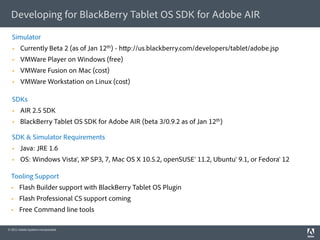
Developing for BlackBerry Tablet OS SDK for Adobe AIR

  Simulator
       Currently Beta 2 (as of Jan 12th) - h p://us.blackberry.com/developers/tablet/adobe.jsp
       VMWare Player on Windows (free)
       VMWare Fusion on Mac (cost)
       VMWare Workstation on Linux (cost)

  SDKs
       AIR 2.5 SDK
       BlackBerry Tablet OS SDK for Adobe AIR (beta 3/0.9.2 as of Jan 12th)

  SDK & Simulator Requirements
       Java: JRE 1.6
       OS: Windows Vista®, XP SP3, 7, Mac OS X 10.5.2, openSUSE® 11.2, Ubuntu® 9.1, or Fedora® 12

  Tooling Support
      Flash Builder support with BlackBerry Tablet OS Plugin
      Flash Professional CS support coming
      Free Command line tools

© 2011 Adobe Systems Incorporated.
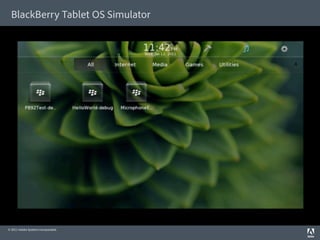
BlackBerry Tablet OS Simulator


© 2011 Adobe Systems Incorporated.
Using the BlackBerry Tablet OS Simulator

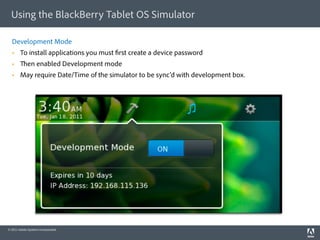
  Development Mode
       To install applications you must rst create a device password
            en enabled Development mode
       May require Date/Time of the simulator to be sync’d with development box.


© 2011 Adobe Systems Incorporated.
Using the BlackBerry Tablet OS Simulator

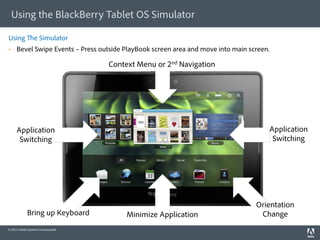
Using             e Simulator
     Bevel Swipe Events – Press outside PlayBook screen area and move into main screen.

                                     Context Menu or 2nd Navigation


     Application                                                                       Application
      Switching                                                                         Switching


                                                                                   Orientation
             Bring up Keyboard            Minimize Application                      Change
© 2011 Adobe Systems Incorporated.
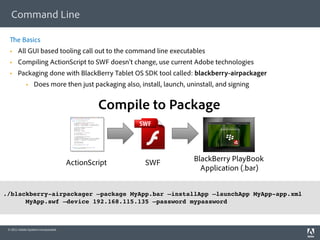
Command Line

       e Basics
      All GUI based tooling call out to the command line executables
      Compiling ActionScript to SWF doesn’t change, use current Adobe technologies
      Packaging done with BlackBerry Tablet OS SDK tool called: blackberry-airpackager
                  Does more then just packaging also, install, launch, uninstall, and signing


                                               Compile to Package


                                      ActionScript       SWF              BlackBerry PlayBook
                                                                            Application (.bar)

!
./blackberry-airpackager –package MyApp.bar –installApp –launchApp MyApp-app.xml
      MyApp.swf –device 192.168.115.135 –password mypassword!
!


 © 2011 Adobe Systems Incorporated.
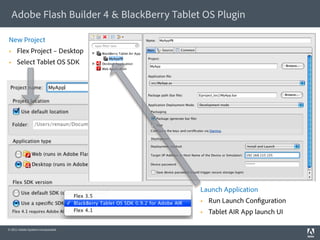
Adobe Flash Builder 4 & BlackBerry Tablet OS Plugin

New Project
     Flex Project – Desktop
     Select Tablet OS SDK


                                           Launch Application
                                               Run Launch Con guration
                                               Tablet AIR App launch UI

© 2011 Adobe Systems Incorporated.
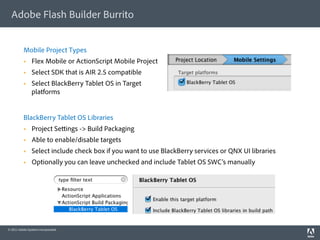
Adobe Flash Builder Burrito


          Mobile Project Types
               Flex Mobile or ActionScript Mobile Project
               Select SDK that is AIR 2.5 compatible
               Select BlackBerry Tablet OS in Target
                platforms


          BlackBerry Tablet OS Libraries
               Project Se ings -> Build Packaging
               Able to enable/disable targets
               Select include check box if you want to use BlackBerry services or QNX UI libraries
               Optionally you can leave unchecked and include Tablet OS SWC’s manually


© 2011 Adobe Systems Incorporated.
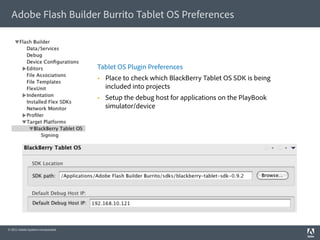
Adobe Flash Builder Burrito Tablet OS Preferences


                                     Tablet OS Plugin Preferences
                                         Place to check which BlackBerry Tablet OS SDK is being
                                          included into projects
                                         Setup the debug host for applications on the PlayBook
                                          simulator/device


© 2011 Adobe Systems Incorporated.
Resources

      Adobe Developer Evangelists blogs
      BlackBerry Developer Center h p://us.blackberry.com/developers/tablet/
      Adobe Developer Center h p://www.adobe.com/devnet/


                                          ank You!
                                        h p://corlan.org
                                     mihai.corlan@adobe.com


© 2011 Adobe Systems Incorporated.
© 2010 Adobe Systems Incorporated. All Rights Reserved. Adobe Con dential.
Native C/C++ OpenGL SDK

  Current Details*
       Leverage existing QNX Momentics SDK                    Allow for Hybrid applications
                  C/C++ Development Environment                      AIR apps leveraging C/C++ libraries for
                  10+ Years Development Tools                         performance intensive routines
       Focus on Game Developers
                  OpenGL 2.0, Networking, Data Storage, etc…


© 2011 Adobe Systems Incorporated.
                                                                         * Detailed information currently not available
WebWorks SDK for Tablet OS

  Features
       Support web technology standards such as
        HTML5, CSS and JavaScript™. e BlackBerry
        platform implementation of the WebKit
        rendering engine is the core of the
        BlackBerry WebWorks platform                     Available Today, Get Started:

       Extend web applications to use the                   h p://us.blackberry.com/developers/tablet/
        BlackBerry WebWorks APIs, which provide               webworks.jsp
        access to device hardware and capabilities                  SDK
        and data such as native dialogs, invoking                   Documentation
        other applications and system information
                                                                    Webcast series (starting in Feb)
       Transform a W3C widget archive le (i.e. zip)
                                                                    Sample Code
        containing web assets (like images, etc.) into
        a BlackBerry WebWorks application package                   Forums and more resources
       Use your favorite development tools or
        tooling in combination with the BlackBerry
        WebWorks SDK to develop, test and deploy
        applications


© 2011 Adobe Systems Incorporated.
Adobe, the Adobe logo, Adobe AIR, the Adobe AIR logo, the Adobe PDF logo, AIR, ColdFusion, ColdFusion Builder, Flash, Flash Builder, the Flash logo, Flex, LiveCycle, and Reader are eithe
                        registered trademarks or trademarks of Adobe Systems Incorporated in the United States and/or other countries. All other trademarks are the property of their respective owners.
                        © 2010 Adobe Systems Incorporated. All rights reserved. Printed in the USA. 9102xxxx 3/10


Adobe, the Adobe logo, Adobe AIR, the Adobe AIR logo, ActionScript, AIR, Flash, Flash Builder, Flash Catalyst, the Flash logo, Flex, and LiveCycle are either registered trademarks or trademarks of Adobe
Systems Incorporated in the United States and/or other countries. Microso and Windows are either registered trademarks or trademarks of Microso Corporation in the United States and/or other
countries. Java is a trademark or registered trademark of Sun Microsystems, Inc. in the United States and other countries. All other trademarks are the property of their respective owners.
Printed in the USA. 91023957 3/10

© 2011 Adobe Systems Incorporated.

Adobe AIR Mobile development for Android and PlayBook

  • 1.
    Mobile Development & e Flash Platform Mihai Corlan | Developer Evangelist | h p://corlan.org © 2011 Adobe Systems Incorporated.
  • 2.
    About Me   Developer evangelist (since 2008)   Flash Builder Engineer 2006-2008   Web Developer 2000 - 2006   Blog: h p://corlan.org   Twi er: h p://twi er.com/mcorlan   Email: mihai.corlan@adobe.com © 2011 Adobe Systems Incorporated. 2
  • 3.
    Agenda Flash Platform Mobile Apps © 2011 Adobe Systems Incorporated.
  • 4.
    Later is Year © 2011 Adobe Systems Incorporated.
  • 5.
    Android © 2011 AdobeSystems Incorporated.
  • 6.
    AIR APIs onAndroid   Camera and Microphone access   Accelerometer   GPS   StageWebView   Multitouch/Gestures   Screen Orientation / Fullscreen   Phone/SMS/Email/Browser/Android Market   Camera (Including Camera Roll Support)   Session Cache Support – Restore App State   Hardware Bu ons Support   Local database (SQLite) © 2011 Adobe Systems Incorporated.
  • 7.
    Se ing AndroidPermissions © 2011 Adobe Systems Incorporated.
  • 8.
    Se ing AndroidPermissions Use Application Descriptor File -> AndroidManifest.xml le <android><manifestAdditions><![CDATA[ <manifest android:installLocation="auto"> <uses-permission android:name="android.permission.INTERNET"/> <uses-permission android:name="android.permission.WRITE_EXTERNAL_STORAGE"/> <uses-permission android:name="android.permission.ACCESS_FINE_LOCATION"/> <uses-permission android:name="android.permission.WAKE_LOCK" /> <uses-permission android:name="android.permission.DISABLE_KEYGUARD"/> </manifest>]]></manifestAdditions> </android> © 2011 Adobe Systems Incorporated.
  • 9.
    Preview releases ofnew Flash Platform Tooling – Mobile Support Flash Builder Create Mobile Projects Run on Devices Publish Them Support for Mobile Touch Enabled Components Multiple Views – Stack View Flex “Hero” http://labs.adobe.com © 2011 Adobe Systems Incorporated.
  • 10.
    Options for BuildingMobile AIR Apps using Burrito   ActionScript Mobile Project (no MXML)   Flex Mobile Project:   Blank – s:Application   Mobile Project - s:MobileApplication   Mobile Project – s:TabbedMobileApplication © 2011 Adobe Systems Incorporated.
  • 11.
    MobileApplication vs. TabbedMobileApplication ©2011 Adobe Systems Incorporated.
  • 12.
    Flex Mobile Components Screen Metaphor Application First Screen Second Screen © 2011 Adobe Systems Incorporated.
  • 13.
    Flex Mobile Components- ViewNavigator Using Flex’s s:MobileApplication or s:TabbedMobileApplication you get screen management for free   navigator.push(NewScreen, data) - add new screen   navigator.popView() - go to previous screen   navigator. popToFirstView() - go to rst view   navigator.activeView - retrieve active view © 2011 Adobe Systems Incorporated.
  • 14.
    Architecture of FlexMobile App MobileApplication Support for screen navigation; ViewNavigator Application persistence between sessions ActionBar View Application UI: - screens/lists/bu ons/titles © 2011 Adobe Systems Incorporated.
  • 15.
    View Lifecycle ? Another Data View View Destroyed Destroyed Created Destroyed Created data = yourData; destructionPolicy =”none" © 2011 Adobe Systems Incorporated.
  • 16.
    View and ActionBarComponents Hide the Action Bar: actionBarVisible = false; Overlay the Action Bar: overlayControls = true; © 2011 Adobe Systems Incorporated.
  • 17.
    Mobile Components   Bu on Touch Enabled   CheckBox Mobile Skins: ActionScript   RadioBu on based skins and FXG   TextInput Other components will come   TextArea   List   ScrollBar © 2011 Adobe Systems Incorporated.
  • 18.
    Lists and ItemRenderers MobileItemRenderer MobileIconItemRenderer <s:MobileItemRenderer label="Beer"/> <s:MobileIconItemRenderer labelField="label" messageField="message" iconField="icon" decoratorClass="phoneIcon"/> © 2011 Adobe Systems Incorporated.
  • 19.
    Splash Screen <s:MobileApplication splashScreenImage="@Embed(source='assets/splash-screen.png')" © 2011 Adobe Systems Incorporated.
  • 20.
    Helper Apps forMobile Development Tour de Mobile Flex Adobe AIR Launchpad Android AIR App AIR app for Desktop © 2011 Adobe Systems Incorporated.
  • 21.
    Resources   MP3 Remote Control for Android: h p://corlan.org/2010/07/02/creating-multi-screen-apps-for-android-and-desktop- using-air/   Mobile development with Flash Builder Burrito and Hero: h p://www.adobe.com/devnet/ ex/articles/mobile_development_hero_burrito.html   Ge ing Flash Builder “Burrito”: h p://labs.adobe.com   Tour de Mobile Flex: h p:// ex.org/tourmobile   MAX 2010 Sessions Recordings (Channels > MAX 2010): h p://tv.adobe.com © 2011 Adobe Systems Incorporated.
  • 22.
    e PlayBook Device ©2011 Adobe Systems Incorporated.
  • 23.
    Hardware Details Ultra portable   Height 5.1” / 130mm   Width 7.6” / 194mm   Depth 0.4” / 10mm   Weight 0.9 lbs /400g Performance   7” LCD display 1024 x 600   Multi-touch capacitive screen   1 GHz dual-core processor   1 GB RAM Best-in-class media   Symmetric multi-processing   3 MP forward facing camera   5 MP rear-facing camera Connections   1080p HD video; H.264, MPEG4, WMV   Micro USB and Micro HDMI ports   HDMI video output (full OS output, not   Wi-Fi® 802.11 a/b/g/n limited to image/video)   Bluetooth ® 2.1 +EDR   Stereo sound speakers © 2011 Adobe Systems Incorporated.
  • 24.
    Availability Early 2011   BlackBerry PlayBook - WiFi only Summer 2011   BlackBerry 4G PlayBook released with Sprint in the Summer (Announced Jan 6th at CES) © 2011 Adobe Systems Incorporated.
  • 25.
    Developer Have Choices ©2011 Adobe Systems Incorporated.
  • 26.
    BlackBerry Tablet OS BlackBerry Tablet OS Developer Options   Based on QNX® Neutrino® RTOS   Tablet OS SDK for Adobe AIR   Reliable, high-performance kernel   Full Browser Experience with engineered for multi-core hardware Flash Player 10.1 and HTML 5   Multi-threaded POSIX OS (Portable   WebWorks for Tablet OS Operating System for Unix) for true   Native C/C++ Open GL SDK (tbd) multitasking   Java SDK (tbd) © 2011 Adobe Systems Incorporated.
  • 27.
    BlackBerry Tablet OSSDK for Adobe AIR PlayBook AIR SDK Advantages   Access to QNX UI classes used by core PlayBook applications.   Tablet OS extended AIR APIs   Available now, rst SDK for PlayBook application development © 2011 Adobe Systems Incorporated.
  • 28.
    Developing AIR Appsfor PlayBook   You have three choices: 1.  Flex Mobile Project (With/Without QNX Libraries) 2.  ActionScript Mobile Project (+ QNX libraries) 3.  ActionScript Mobile Projects (+ QNX libraries) with support for Flex RPC Services (RemoteObject/HTTPService/WebService…) © 2011 Adobe Systems Incorporated.
  • 29.
    Packaging AIR based.bar les AIR SDK Tablet OS SDK ActionScript BlackBerry PlayBook SWF Application (.bar) © 2011 Adobe Systems Incorporated.
  • 30.
    PlayBook Speci cAPIs Extending the AIR SDK BlackBerry Services Integration   qnx.media.QNXStageWebView   AppWorld or Super App APIs   StageWebView with more integration   Payment Services into the webkit on the PlayBook   Advertising*   qnx.system.QNXApplication   App to App Communication*   Bevel swipe down event   qnx.system.Device   Ba ery level, state, and monitor   Device info (bsn, hardwareID, vendorID, etc…)   qnx.media.MediaPlayer   Hardware accelerated play black of media and other non-Flash supported codecs   Noti cations*   Extending AIR app with Native C/C++ app*   Above list is not an exhaustive list, more to come © 2011 Adobe Systems Incorporated. * Detailed information currently not available
  • 31.
    QNX UI Library:Containers //main container myMain = new Container(); myMain.margins = Vector.<Number>([20,20,20,20]); myMain. ow = ContainerFlow.HORIZONTAL; myMain.debugColor = 0xFFCC00; addChild(myMain); // create subcontainer on le side of the screen // myLe Sub = new Container(); myLe Sub.size = 50; mySub.sizeUnit = SizeUnit.PERCENT; mySub.padding = 10; // create second subcontainer on le side of the screen // mySubRight = new Container(); mySubRight.size = 50; mySubRight.sizeUnit = SizeUnit.PERCENT; mySubRight.align = ContainerAlign.MID; // create subcontainer as the bo om frame // mySubBo om = new Container(); mySubBo om.size = 12; mySubBo om.sizeUnit = SizeUnit.PERCENT; mySubBo om.containment = Containment.DOCK_BOTTOM; h p://www.blackberry.com/developers/docs/airapi/1.0.0/ © 2011 Adobe Systems Incorporated.
  • 32.
    Flex Mobile orQNX UI Library?   Flex “Hero” Mobile   Support for screen metaphor   Limited number of UI components optimized for mobile   QNX UI Libraries   More components compared to Flex “Hero” Mobile   Easier to get the “native” look – these are used by core PlayBook apps   No built-in support for screen metaphore © 2011 Adobe Systems Incorporated.
  • 33.
    QNX UI Library:UI Controls   Label / TextInput   BackBu on   Slider / VolumeSlider   InconBu on / LabelBu on   ActivityIndicator   CheckBox / RadioBu on   PercentageBar / ProgressBar   SegmentedControl   Picker   ToggleSwitch   List / RoundList / SectionList   AlertDialog / LoginDialog   TileList / Dropdown / ScrollPane   PopupList   MediaPlayer / MediaControl BlackBerry Tablet UI component set provides two distinct color themes: light and dark h p://www.blackberry.com/developers/docs/airapi/1.0.0/ © 2011 Adobe Systems Incorporated.
  • 34.
    Developing for BlackBerryTablet OS SDK for Adobe AIR Simulator   Currently Beta 2 (as of Jan 12th) - h p://us.blackberry.com/developers/tablet/adobe.jsp   VMWare Player on Windows (free)   VMWare Fusion on Mac (cost)   VMWare Workstation on Linux (cost) SDKs   AIR 2.5 SDK   BlackBerry Tablet OS SDK for Adobe AIR (beta 3/0.9.2 as of Jan 12th) SDK & Simulator Requirements   Java: JRE 1.6   OS: Windows Vista®, XP SP3, 7, Mac OS X 10.5.2, openSUSE® 11.2, Ubuntu® 9.1, or Fedora® 12 Tooling Support   Flash Builder support with BlackBerry Tablet OS Plugin   Flash Professional CS support coming   Free Command line tools © 2011 Adobe Systems Incorporated.
  • 35.
    BlackBerry Tablet OSSimulator © 2011 Adobe Systems Incorporated.
  • 36.
    Using the BlackBerryTablet OS Simulator Development Mode   To install applications you must rst create a device password   en enabled Development mode   May require Date/Time of the simulator to be sync’d with development box. © 2011 Adobe Systems Incorporated.
  • 37.
    Using the BlackBerryTablet OS Simulator Using e Simulator   Bevel Swipe Events – Press outside PlayBook screen area and move into main screen. Context Menu or 2nd Navigation Application Application Switching Switching Orientation Bring up Keyboard Minimize Application Change © 2011 Adobe Systems Incorporated.
  • 38.
    Command Line e Basics   All GUI based tooling call out to the command line executables   Compiling ActionScript to SWF doesn’t change, use current Adobe technologies   Packaging done with BlackBerry Tablet OS SDK tool called: blackberry-airpackager   Does more then just packaging also, install, launch, uninstall, and signing Compile to Package ActionScript SWF BlackBerry PlayBook Application (.bar) ! ./blackberry-airpackager –package MyApp.bar –installApp –launchApp MyApp-app.xml MyApp.swf –device 192.168.115.135 –password mypassword! ! © 2011 Adobe Systems Incorporated.
  • 39.
    Adobe Flash Builder4 & BlackBerry Tablet OS Plugin New Project   Flex Project – Desktop   Select Tablet OS SDK Launch Application   Run Launch Con guration   Tablet AIR App launch UI © 2011 Adobe Systems Incorporated.
  • 40.
    Adobe Flash BuilderBurrito Mobile Project Types   Flex Mobile or ActionScript Mobile Project   Select SDK that is AIR 2.5 compatible   Select BlackBerry Tablet OS in Target platforms BlackBerry Tablet OS Libraries   Project Se ings -> Build Packaging   Able to enable/disable targets   Select include check box if you want to use BlackBerry services or QNX UI libraries   Optionally you can leave unchecked and include Tablet OS SWC’s manually © 2011 Adobe Systems Incorporated.
  • 41.
    Adobe Flash BuilderBurrito Tablet OS Preferences Tablet OS Plugin Preferences   Place to check which BlackBerry Tablet OS SDK is being included into projects   Setup the debug host for applications on the PlayBook simulator/device © 2011 Adobe Systems Incorporated.
  • 42.
    Resources   Adobe Developer Evangelists blogs   BlackBerry Developer Center h p://us.blackberry.com/developers/tablet/   Adobe Developer Center h p://www.adobe.com/devnet/ ank You! h p://corlan.org mihai.corlan@adobe.com © 2011 Adobe Systems Incorporated.
  • 43.
    © 2010 AdobeSystems Incorporated. All Rights Reserved. Adobe Con dential.
  • 44.
    Native C/C++ OpenGLSDK Current Details*   Leverage existing QNX Momentics SDK   Allow for Hybrid applications   C/C++ Development Environment   AIR apps leveraging C/C++ libraries for   10+ Years Development Tools performance intensive routines   Focus on Game Developers   OpenGL 2.0, Networking, Data Storage, etc… © 2011 Adobe Systems Incorporated. * Detailed information currently not available
  • 45.
    WebWorks SDK forTablet OS Features   Support web technology standards such as HTML5, CSS and JavaScript™. e BlackBerry platform implementation of the WebKit rendering engine is the core of the BlackBerry WebWorks platform Available Today, Get Started:   Extend web applications to use the   h p://us.blackberry.com/developers/tablet/ BlackBerry WebWorks APIs, which provide webworks.jsp access to device hardware and capabilities   SDK and data such as native dialogs, invoking   Documentation other applications and system information   Webcast series (starting in Feb)   Transform a W3C widget archive le (i.e. zip)   Sample Code containing web assets (like images, etc.) into a BlackBerry WebWorks application package   Forums and more resources   Use your favorite development tools or tooling in combination with the BlackBerry WebWorks SDK to develop, test and deploy applications © 2011 Adobe Systems Incorporated.
  • 46.
    Adobe, the Adobelogo, Adobe AIR, the Adobe AIR logo, the Adobe PDF logo, AIR, ColdFusion, ColdFusion Builder, Flash, Flash Builder, the Flash logo, Flex, LiveCycle, and Reader are eithe registered trademarks or trademarks of Adobe Systems Incorporated in the United States and/or other countries. All other trademarks are the property of their respective owners. © 2010 Adobe Systems Incorporated. All rights reserved. Printed in the USA. 9102xxxx 3/10 Adobe, the Adobe logo, Adobe AIR, the Adobe AIR logo, ActionScript, AIR, Flash, Flash Builder, Flash Catalyst, the Flash logo, Flex, and LiveCycle are either registered trademarks or trademarks of Adobe Systems Incorporated in the United States and/or other countries. Microso and Windows are either registered trademarks or trademarks of Microso Corporation in the United States and/or other countries. Java is a trademark or registered trademark of Sun Microsystems, Inc. in the United States and other countries. All other trademarks are the property of their respective owners. Printed in the USA. 91023957 3/10 © 2011 Adobe Systems Incorporated.