Getting Started with PhoneGap


Mihai Corlan
Developer Evangelist / Adobe / @mcorlan
Mobile Development


          2
3
Bridging the Gap … PhoneGap


              4
PhoneGap
           ?   Cordova


           5
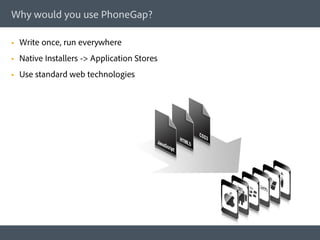
Why would you use PhoneGap?

§    Write once, run everywhere
§    Native Installers -> Application Stores
§    Use standard web technologies
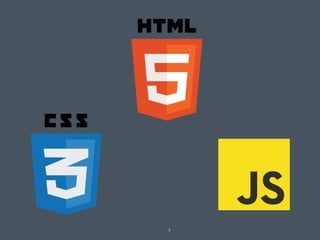
PhoneGap could be your best friend if

§    You want to target multiple mobile platforms
§    You know HTML/JavaScript/CSS
§    You already have a web site/web application. Thus you can reuse parts of this
      (see Wikipedia)
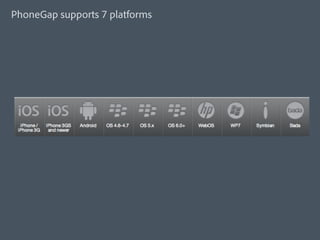
PhoneGap supports 7 platforms
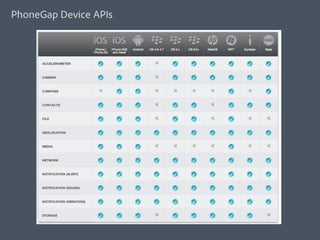
PhoneGap Device APIs
Demo
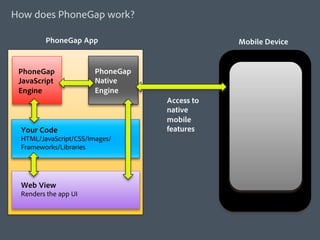
How does PhoneGap work?

        PhoneGap App                          Mobile Device


 PhoneGap              PhoneGap
 JavaScript            Native
 Engine                Engine
                                  Access to
                                  native
                                  mobile
 Your Code                        features
 HTML/JavaScript/CSS/Images/
 Frameworks/Libraries


 Web View
 Renders the app UI
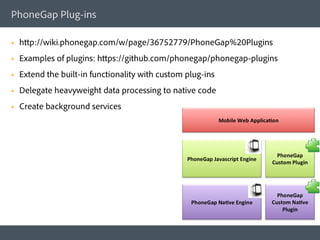
PhoneGap Plug-ins

§    http://wiki.phonegap.com/w/page/36752779/PhoneGap%20Plugins
§    Examples of plugins: https://github.com/phonegap/phonegap-plugins
§    Extend the built-in functionality with custom plug-ins
§    Delegate heavyweight data processing to native code
§    Create background services
Building PhoneGap Apps
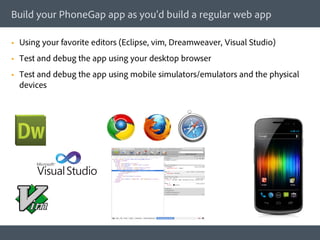
Build your PhoneGap app as you’d build a regular web app

§    Using your favorite editors (Eclipse, vim, Dreamweaver, Visual Studio)
§    Test and debug the app using your desktop browser
§    Test and debug the app using mobile simulators/emulators and the physical
      devices
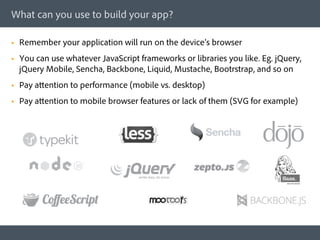
What can you use to build your app?

§    Remember your application will run on the device’s browser
§    You can use whatever JavaScript frameworks or libraries you like. Eg. jQuery,
      jQuery Mobile, Sencha, Backbone, Liquid, Mustache, Bootrstrap, and so on
§    Pay attention to performance (mobile vs. desktop)
§    Pay attention to mobile browser features or lack of them (SVG for example)
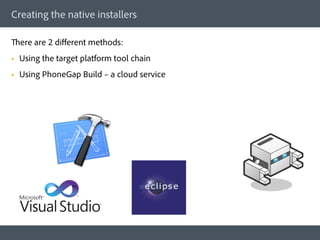
Creating the native installers

There are 2 different methods:
§    Using the target platform tool chain
§    Using PhoneGap Build – a cloud service
Using the platform native tool chain

§    Use the OS and tools each platform recommends:
      §    iOS - http://phonegap.com/start#ios-x4
      §    Android - http://phonegap.com/start#android
      §    BlackBerry - http://phonegap.com/start#blackberry
      §    Windows Phone - http://phonegap.com/start#wp
      §    WebOS: http://phonegap.com/start#webos
      §    Symbian: http://phonegap.com/start#symbian
Using the PhoneGap Build – a Cloud Service

§    http://build.phonegap.com - a cloud service
§    Supports: iOS, Android, BlackBerry, WebOS, Windows Phone 7, and Symbian
§    Supports one plugin (ChildBrowser); but you can hack in support for other
      plugins
§    It is in beta and it is free; it will always be free for Open Source projects
§    You upload your files (index.html, CSS, JS, images)
§    Or you provide a Git / SVN link
§    Support for debugging
Resources

§    Source: github.com/callback
§    Docs: docs.phonegap.com
§    Wiki: wiki.phonegap.com
§    PhoneGap Build: build.phonegap.com
§    Plugins: github.com/phonegap/phonegap-plugins
§    Support: groups.google.com/group/phonegap
§    IRC: irc.freenode.net #phonegap
§    Apps: phonegap.com/apps
§    Bugs: issues.apache.org/jira/browse/CB
PhoneGap Day Europe – Amsterdam September 14th


http://pgday.phonegap.com/eu2012/          100 Euro early bird
Questions & Answers!


 Thank you!

 Mihai Corlan
 @mcorlan
 http://corlan.org
 http://github.com/mcorlan

Getting started with PhoneGap

  • 1.
    Getting Started withPhoneGap Mihai Corlan Developer Evangelist / Adobe / @mcorlan
  • 2.
  • 3.
  • 4.
    Bridging the Gap… PhoneGap 4
  • 5.
    PhoneGap ? Cordova 5
  • 6.
    Why would youuse PhoneGap? §  Write once, run everywhere §  Native Installers -> Application Stores §  Use standard web technologies
  • 7.
    PhoneGap could beyour best friend if §  You want to target multiple mobile platforms §  You know HTML/JavaScript/CSS §  You already have a web site/web application. Thus you can reuse parts of this (see Wikipedia)
  • 8.
  • 9.
  • 10.
  • 11.
    How does PhoneGapwork? PhoneGap App Mobile Device PhoneGap PhoneGap JavaScript Native Engine Engine Access to native mobile Your Code features HTML/JavaScript/CSS/Images/ Frameworks/Libraries Web View Renders the app UI
  • 12.
    PhoneGap Plug-ins §  http://wiki.phonegap.com/w/page/36752779/PhoneGap%20Plugins §  Examples of plugins: https://github.com/phonegap/phonegap-plugins §  Extend the built-in functionality with custom plug-ins §  Delegate heavyweight data processing to native code §  Create background services
  • 13.
  • 14.
    Build your PhoneGapapp as you’d build a regular web app §  Using your favorite editors (Eclipse, vim, Dreamweaver, Visual Studio) §  Test and debug the app using your desktop browser §  Test and debug the app using mobile simulators/emulators and the physical devices
  • 15.
    What can youuse to build your app? §  Remember your application will run on the device’s browser §  You can use whatever JavaScript frameworks or libraries you like. Eg. jQuery, jQuery Mobile, Sencha, Backbone, Liquid, Mustache, Bootrstrap, and so on §  Pay attention to performance (mobile vs. desktop) §  Pay attention to mobile browser features or lack of them (SVG for example)
  • 16.
    Creating the nativeinstallers There are 2 different methods: §  Using the target platform tool chain §  Using PhoneGap Build – a cloud service
  • 17.
    Using the platformnative tool chain §  Use the OS and tools each platform recommends: §  iOS - http://phonegap.com/start#ios-x4 §  Android - http://phonegap.com/start#android §  BlackBerry - http://phonegap.com/start#blackberry §  Windows Phone - http://phonegap.com/start#wp §  WebOS: http://phonegap.com/start#webos §  Symbian: http://phonegap.com/start#symbian
  • 18.
    Using the PhoneGapBuild – a Cloud Service §  http://build.phonegap.com - a cloud service §  Supports: iOS, Android, BlackBerry, WebOS, Windows Phone 7, and Symbian §  Supports one plugin (ChildBrowser); but you can hack in support for other plugins §  It is in beta and it is free; it will always be free for Open Source projects §  You upload your files (index.html, CSS, JS, images) §  Or you provide a Git / SVN link §  Support for debugging
  • 19.
    Resources §  Source: github.com/callback §  Docs: docs.phonegap.com §  Wiki: wiki.phonegap.com §  PhoneGap Build: build.phonegap.com §  Plugins: github.com/phonegap/phonegap-plugins §  Support: groups.google.com/group/phonegap §  IRC: irc.freenode.net #phonegap §  Apps: phonegap.com/apps §  Bugs: issues.apache.org/jira/browse/CB
  • 20.
    PhoneGap Day Europe– Amsterdam September 14th http://pgday.phonegap.com/eu2012/ 100 Euro early bird
  • 21.
    Questions & Answers! Thank you! Mihai Corlan @mcorlan http://corlan.org http://github.com/mcorlan