1
Kony One Studio & Kony Middleware
Version: 0.1
Date: 15 Jul 2013
Author: Kaya Niranjan Kumar Reddy
Application Architect, SME – J2EE, Portals, Mobile / IBM India
2
Kony One Studio
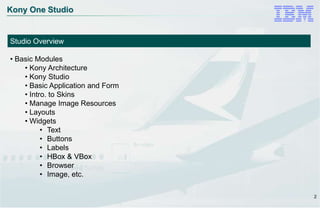
Studio Overview
• Basic Modules
• Kony Architecture
• Kony Studio
• Basic Application and Form
• Intro. to Skins
• Manage Image Resources
• Layouts
• Widgets
• Text
• Buttons
• Labels
• HBox & VBox
• Browser
• Image, etc.
3
Kony One Studio
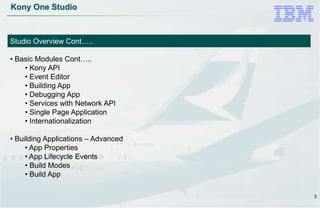
Studio Overview Cont…..
• Basic Modules Cont…..
• Kony API
• Event Editor
• Building App
• Debugging App
• Services with Network API
• Single Page Application
• Internationalization
• Building Applications – Advanced
• App Properties
• App Lifecycle Events
• Build Modes
• Build App
4
Kony One Studio
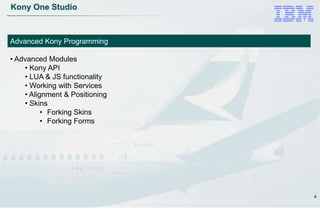
Advanced Kony Programming
• Advanced Modules
• Kony API
• LUA & JS functionality
• Working with Services
• Alignment & Positioning
• Skins
• Forking Skins
• Forking Forms
5
Kony Middleware
Kony Middleware / KMAP Server
• Advanced Modules
• Overview
• Middleware Configuration
• KDCDB (Kony Device Central Database)
• License & Logging Configuration
• Device Detection Logic (DDL)
• Middleware Upgrade
6
Build & Deploy / Publish
Build, Sign, Publish
• Building Application
• Build for Rich / Native platform
• Build for Mobile Web / SPA
• Running on Emulators
• Run & Debug
• Signing Native binaries
• Deploy
• on Native
• on Web
7
Why Kony?
• Single Codebase.
• Multiple Platforms support
• Rapid Application Development
• Industry Recognized & Widely Used
• Continuously Evolving
• Easy to learn (LUA & JS)
8
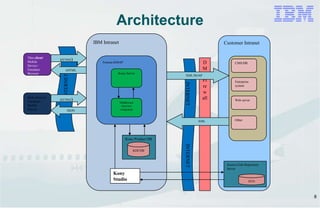
Customer Intranet
D
M
Z
Fi
re
w
all
IBM Intranet
Tomcat-KMAP
Kony Server
Middleware
(Service)
component
Kony Product DB
KDCDB
Rich client on
Emulator /
Mobile
Device
INTERNET
HTTP(S)
JSON
Thin client/
Mobile
Device /
Emulator
Browser
HTTP(S)
xHTML
INTERNETINTERNET
Ff
Dev/Test Env
CMS/DB
Enterprise
system
Web server
Other
XML/SOAP
XML
Kony
Studio
Source Code Repository
Server
SVN
Architecture
9
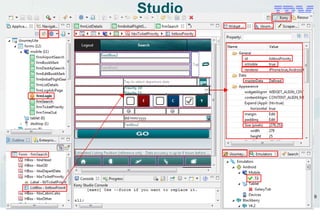
Studio
10
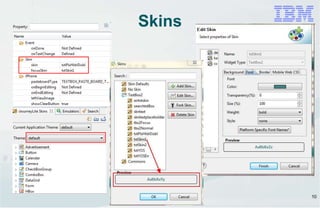
Skins
11
Images
• Images can be used for virtually anything
• Use *.PNG images rather than JPEG/GIF, etc.
• Accurate Image Resolution
• Effects
• Image Repository
• Forked Images (Platform specific)
• Images for Skin
12
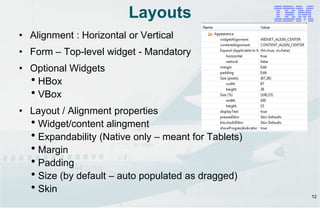
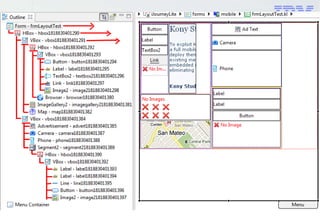
Layouts
• Alignment : Horizontal or Vertical
• Form – Top-level widget - Mandatory
• Optional Widgets
HBox
VBox
• Layout / Alignment properties
Widget/content alingment
Expandability (Native only – meant for Tablets)
Margin
Padding
Size (by default – auto populated as dragged)
Skin
13
14
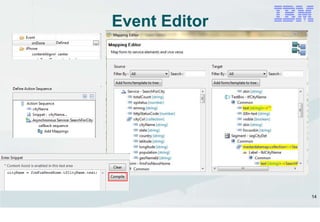
Event Editor
15
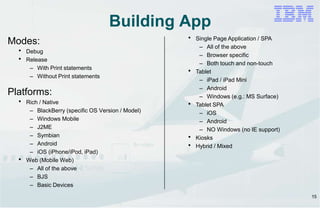
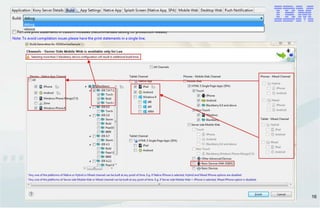
Building App
Modes:
 Debug
 Release
– With Print statements
– Without Print statements
Platforms:
 Rich / Native
– BlackBerry (specific OS Version / Model)
– Windows Mobile
– J2ME
– Symbian
– Android
– iOS (iPhone/iPod, iPad)
 Web (Mobile Web)
– All of the above
– BJS
– Basic Devices
 Single Page Application / SPA
– All of the above
– Browser specific
– Both touch and non-touch
 Tablet
– iPad / iPad Mini
– Android
– Windows (e.g.: MS Surface)
 Tablet SPA
– iOS
– Android
– NO Windows (no IE support)
 Kiosks
 Hybrid / Mixed
16
17
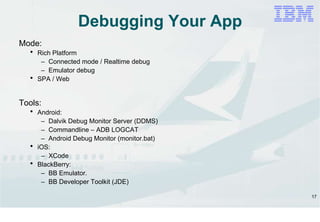
Debugging Your App
Mode:
 Rich Platform
– Connected mode / Realtime debug
– Emulator debug
 SPA / Web
Tools:
 Android:
– Dalvik Debug Monitor Server (DDMS)
– Commandline – ADB LOGCAT
– Android Debug Monitor (monitor.bat)
 iOS:
– XCode
 BlackBerry:
– BB Emulator.
– BB Developer Toolkit (JDE)
18
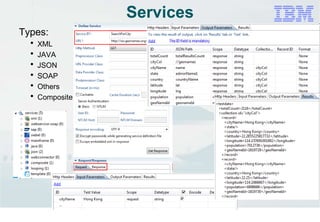
Services
Types:
 XML
 JAVA
 JSON
 SOAP
 Others
 Composite
19
Questions
&
Answers

Kony one studio technical training

  • 1.
    1 Kony One Studio& Kony Middleware Version: 0.1 Date: 15 Jul 2013 Author: Kaya Niranjan Kumar Reddy Application Architect, SME – J2EE, Portals, Mobile / IBM India
  • 2.
    2 Kony One Studio StudioOverview • Basic Modules • Kony Architecture • Kony Studio • Basic Application and Form • Intro. to Skins • Manage Image Resources • Layouts • Widgets • Text • Buttons • Labels • HBox & VBox • Browser • Image, etc.
  • 3.
    3 Kony One Studio StudioOverview Cont….. • Basic Modules Cont….. • Kony API • Event Editor • Building App • Debugging App • Services with Network API • Single Page Application • Internationalization • Building Applications – Advanced • App Properties • App Lifecycle Events • Build Modes • Build App
  • 4.
    4 Kony One Studio AdvancedKony Programming • Advanced Modules • Kony API • LUA & JS functionality • Working with Services • Alignment & Positioning • Skins • Forking Skins • Forking Forms
  • 5.
    5 Kony Middleware Kony Middleware/ KMAP Server • Advanced Modules • Overview • Middleware Configuration • KDCDB (Kony Device Central Database) • License & Logging Configuration • Device Detection Logic (DDL) • Middleware Upgrade
  • 6.
    6 Build & Deploy/ Publish Build, Sign, Publish • Building Application • Build for Rich / Native platform • Build for Mobile Web / SPA • Running on Emulators • Run & Debug • Signing Native binaries • Deploy • on Native • on Web
  • 7.
    7 Why Kony? • SingleCodebase. • Multiple Platforms support • Rapid Application Development • Industry Recognized & Widely Used • Continuously Evolving • Easy to learn (LUA & JS)
  • 8.
    8 Customer Intranet D M Z Fi re w all IBM Intranet Tomcat-KMAP KonyServer Middleware (Service) component Kony Product DB KDCDB Rich client on Emulator / Mobile Device INTERNET HTTP(S) JSON Thin client/ Mobile Device / Emulator Browser HTTP(S) xHTML INTERNETINTERNET Ff Dev/Test Env CMS/DB Enterprise system Web server Other XML/SOAP XML Kony Studio Source Code Repository Server SVN Architecture
  • 9.
  • 10.
  • 11.
    11 Images • Images canbe used for virtually anything • Use *.PNG images rather than JPEG/GIF, etc. • Accurate Image Resolution • Effects • Image Repository • Forked Images (Platform specific) • Images for Skin
  • 12.
    12 Layouts • Alignment :Horizontal or Vertical • Form – Top-level widget - Mandatory • Optional Widgets HBox VBox • Layout / Alignment properties Widget/content alingment Expandability (Native only – meant for Tablets) Margin Padding Size (by default – auto populated as dragged) Skin
  • 13.
  • 14.
  • 15.
    15 Building App Modes:  Debug Release – With Print statements – Without Print statements Platforms:  Rich / Native – BlackBerry (specific OS Version / Model) – Windows Mobile – J2ME – Symbian – Android – iOS (iPhone/iPod, iPad)  Web (Mobile Web) – All of the above – BJS – Basic Devices  Single Page Application / SPA – All of the above – Browser specific – Both touch and non-touch  Tablet – iPad / iPad Mini – Android – Windows (e.g.: MS Surface)  Tablet SPA – iOS – Android – NO Windows (no IE support)  Kiosks  Hybrid / Mixed
  • 16.
  • 17.
    17 Debugging Your App Mode: Rich Platform – Connected mode / Realtime debug – Emulator debug  SPA / Web Tools:  Android: – Dalvik Debug Monitor Server (DDMS) – Commandline – ADB LOGCAT – Android Debug Monitor (monitor.bat)  iOS: – XCode  BlackBerry: – BB Emulator. – BB Developer Toolkit (JDE)
  • 18.
    18 Services Types:  XML  JAVA JSON  SOAP  Others  Composite
  • 19.