Copyright© 2012 Microsoft Corporation
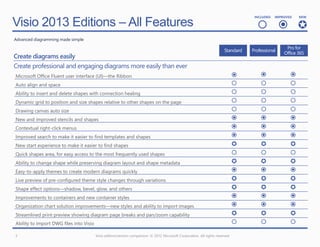
Visio 2013 Editions – All Features
                                                                                                                                   INCLUDED   IMPROVED   NEW


                                                                                                                                      
Advanced diagramming made simple


Create diagrams easily
Create professional and engaging diagrams more easily than ever
Microsoft Office Fluent user interface (UI)—the Ribbon                                                                                             
Auto align and space                                                                                                                               
Ability to insert and delete shapes with connection healing                                                                                        
Dynamic grid to position and size shapes relative to other shapes on the page                                                                      
Drawing canvas auto size                                                                                                                           
New and improved stencils and shapes                                                                                                               
Contextual right-click menus                                                                                                                       
Improved search to make it easier to find templates and shapes                                                                                     
New start experience to make it easier to find shapes                                                                                              
Quick shapes area, for easy access to the most frequently used shapes                                                                              
Ability to change shape while preserving diagram layout and shape metadata                                                                         
Easy-to-apply themes to create modern diagrams quickly                                                                                             
Live preview of pre-configured theme style changes through variations                                                                              
Shape effect options—shadow, bevel, glow, and others                                                                                               
Improvements to containers and new container styles                                                                                                
Organization chart solution improvements—new styles and ability to import images                                                                   
Streamlined print preview showing diagram page breaks and pan/zoom capability                                                                      
Ability to import DWG files into Visio                                                                                                             

3                                        Visio edition/version comparison. © 2012 Microsoft Corporation. All rights reserved
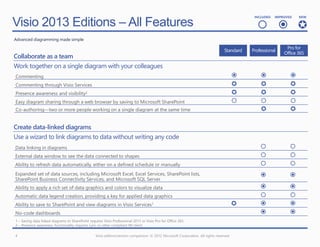
Visio 2013 Editions – All Features
                                                                                                                                            INCLUDED   IMPROVED   NEW


                                                                                                                                               
Advanced diagramming made simple


Collaborate as a team
Work together on a single diagram with your colleagues
Commenting                                                                                                                                                  
Commenting through Visio Services                                                                                                                           
Presence awareness and visibility2                                                                                                                          
Easy diagram sharing through a web browser by saving to Microsoft SharePoint                                                                                
Co-authoring—two or more people working on a single diagram at the same time                                                                                 

Create data-linked diagrams
Use a wizard to link diagrams to data without writing any code
Data linking in diagrams                                                                                                                                     
External data window to see the data connected to shapes                                                                                                     
Ability to refresh data automatically, either on a defined schedule or manually                                                                              
Expanded set of data sources, including Microsoft Excel, Excel Services, SharePoint lists,                                                                   
SharePoint Business Connectivity Services, and Microsoft SQL Server
Ability to apply a rich set of data graphics and colors to visualize data                                                                                    
Automatic data legend creation, providing a key for applied data graphics                                                                                    
Ability to save to SharePoint and view diagrams in Visio Services1                                                                                          
No-code dashboards                                                                                                                                           
1 – Saving data linked diagrams to SharePoint requires Visio Professional 2013 or Visio Pro for Office 365.
2 – Presence awareness functionality requires Lync or other compliant IM client.

4                                                 Visio edition/version comparison. © 2012 Microsoft Corporation. All rights reserved
Visio 2013 Editions – All Features
                                                                                                                           INCLUDED   IMPROVED   NEW


                                                                                                                              
Advanced diagramming made simple


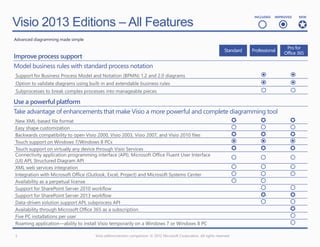
Improve process support
Model business rules with standard process notation
Support for Business Process Model and Notation (BPMN) 1.2 and 2.0 diagrams                                                                 
Option to validate diagrams using built-in and extendable business rules                                                                    
Subprocesses to break complex processes into manageable pieces                                                                              
Use a powerful platform
Take advantage of enhancements that make Visio a more powerful and complete diagramming tool
 New XML-based file format                                                                                                                 
 Easy shape customization                                                                                                                  
 Backwards compatibility to open Visio 2000, Visio 2003, Visio 2007, and Visio 2010 files                                                  
 Touch support on Windows 7/Windows 8 PCs                                                                                                  
 Touch support on virtually any device through Visio Services                                                                              
 Connectivity application programming interface (API), Microsoft Office Fluent User Interface
 (UI) API, Structured Diagram API
                                                                                                                                           
 XML web services integration                                                                                                              
 Integration with Microsoft Office (Outlook, Excel, Project) and Microsoft Systems Center                                                  
 Availability as a perpetual license                                                           
 Support for SharePoint Server 2010 workflow                                                                                                
 Support for SharePoint Server 2013 workflow                                                                                                
 Data-driven solution support API, subprocess API                                                                                           
Availability through Microsoft Office 365 as a subscription                                                                                  
Five PC installations per user                                                                                                               
Roaming application—ability to install Visio temporarily on a Windows 7 or Windows 8 PC                                                      
5                                    Visio edition/version comparison. © 2012 Microsoft Corporation. All rights reserved
Copyright© 2012 Microsoft Corporation
Visio 2013 Editions – New or Improved Features  
                                                                                                                                    IMPROVED   NEW


Advanced diagramming made simple


Create diagrams easily
Create professional and engaging diagrams more easily than ever
New and improved stencils and shapes                                                                                                     
Contextual right-click menus                                                                                                             
Improved search to make it easier to find templates and shapes                                                                           
New start experience to make it easier to find shapes                                                                                    
Ability to change shape while preserving diagram layout and shape metadata                                                               
Easy-to-apply themes to create modern diagrams quickly                                                                                   
Live preview of pre-configured theme style changes through variations                                                                    
Shape effect options—shadow, bevel, glow, and others                                                                                     
Improvements to containers and new container styles                                                                                      
Organization chart solution improvements—new styles and ability to import images                                                         
Streamlined print preview showing diagram page breaks and pan/zoom capability                                                            

Collaborate as a team
Work together on a single diagram with your colleagues
Commenting                                                                                                                               
Commenting through Visio Services                                                                                                        
Presence awareness and visibility                                                                                                        
Co-authoring—two or more people working on a single diagram at the same time                                                              

7                                     Visio edition/version comparison. © 2012 Microsoft Corporation. All rights reserved
Visio 2013 Editions – New or Improved Features  
                                                                                                                                 IMPROVED   NEW


Advanced diagramming made simple


Create data-linked diagrams
Use a wizard to link diagrams to data without writing any code
Expanded set of data sources, including Excel, Excel Services, SharePoint lists, SharePoint
Business Connectivity Services, and SQL Server
                                                                                                                                       
Ability to apply a rich set of data graphics and colors to visualize data                                                              
Ability to save to SharePoint and view diagrams in Visio Services                                                                      
No-code dashboards                                                                                                                     
Improve process support
Model business rules with standard process notation
Support for Business Process Model and Notation (BPMN) 1.2 and 2.0 diagrams                                                            
Option to validate diagrams using built-in and extendable business rules                                                               

Use a powerful platform
Take advantage of enhancements that make Visio a more powerful and complete diagramming tool
 New XML-based file format                                                                                                            
 Backwards compatibility to open Visio 2000, Visio 2003, Visio 2007, and Visio 2010 files                                             
 Touch support on Windows 7/Windows 8 PCs                                                                                             
 Touch support on virtually any device through Visio Services                                                                         
 Support for SharePoint Server 2013 workflow                                                                                           
Availability through Office 365 as a subscription                                                                                       
Five PC installations per user                                                                                                          
Roaming application—ability to install Visio temporarily on a Windows 7 or Windows 8 PC                                                 
8                                      Visio edition/version comparison. © 2012 Microsoft Corporation. All rights reserved
Copyright© 2012 Microsoft Corporation
Visio 2013 Editions – Stencils
                                                                                                                            INCLUDED   IMPROVED   NEW


                                                                                                                               
Advanced diagramming made simple


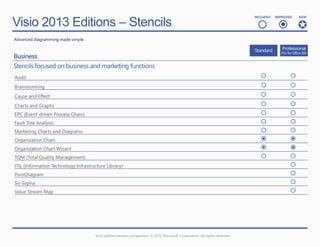
Business
Stencils focused on business and marketing functions
Audit                                                                                                                                        
Brainstorming                                                                                                                                
Cause and Effect                                                                                                                             
Charts and Graphs                                                                                                                            
EPC (Event-driven Process Chain)                                                                                                             
Fault Tree Analysis                                                                                                                          
Marketing Charts and Diagrams                                                                                                                
Organization Chart                                                                                                                           
Organization Chart Wizard                                                                                                                    
TQM (Total Quality Management)                                                                                                               
ITIL (Information Technology Infrastructure Library)                                                                                          
PivotDiagram                                                                                                                                  
Six Sigma                                                                                                                                     
Value Stream Map                                                                                                                              


                                      Visio edition/version comparison. © 2012 Microsoft Corporation. All rights reserved
Visio 2013 Editions – Stencils
                                                                                                                         INCLUDED   IMPROVED   NEW


                                                                                                                            
Advanced diagramming made simple


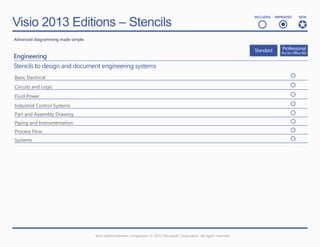
Engineering
Stencils to design and document engineering systems
Basic Electrical                                                                                                                           
Circuits and Logic                                                                                                                         
Fluid Power                                                                                                                                
Industrial Control Systems                                                                                                                 
Part and Assembly Drawing                                                                                                                  
Piping and Instrumentation                                                                                                                 
Process Flow                                                                                                                               
Systems                                                                                                                                    


                                   Visio edition/version comparison. © 2012 Microsoft Corporation. All rights reserved
Visio 2013 Editions – Stencils
                                                                                                                                        INCLUDED   IMPROVED   NEW


                                                                                                                                           
Advanced diagramming made simple


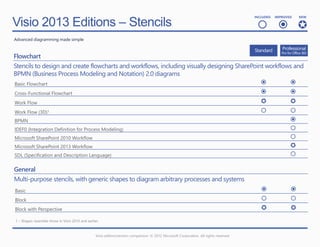
Flowchart
Stencils to design and create flowcharts and workflows, including visually designing SharePoint workflows and
BPMN (Business Process Modeling and Notation) 2.0 diagrams
Basic Flowchart                                                                                        
Cross-Functional Flowchart                                                                             
Work Flow                                                                                              
Work Flow (3D)1                                                                                        
BPMN                                                                                                    
IDEF0 (Integration Definition for Process Modeling)                                                     
Microsoft SharePoint 2010 Workflow                                                                      
Microsoft SharePoint 2013 Workflow                                                                      
SDL (Specification and Description Language)                                                            

General
Multi-purpose stencils, with generic shapes to diagram arbitrary processes and systems
Basic                                                                                                                                                    
Block                                                                                                                                                    
Block with Perspective                                                                                                                                   
1 – Shapes resemble those in Visio 2010 and earlier.


                                                  Visio edition/version comparison. © 2012 Microsoft Corporation. All rights reserved
Visio 2013 Editions – Stencils
                                                                                                                           INCLUDED   IMPROVED   NEW


                                                                                                                              
Advanced diagramming made simple


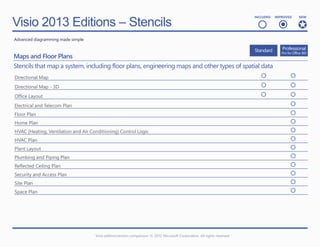
Maps and Floor Plans
Stencils that map a system, including floor plans, engineering maps and other types of spatial data
Directional Map                                                                                                                             
Directional Map - 3D                                                                                                                        
Office Layout                                                                                                                               
Electrical and Telecom Plan                                                                                                                  
Floor Plan                                                                                                                                   
Home Plan                                                                                                                                    
HVAC (Heating, Ventilation and Air Conditioning) Control Logic                                                                               
HVAC Plan                                                                                                                                    
Plant Layout                                                                                                                                 
Plumbing and Piping Plan                                                                                                                     
Reflected Ceiling Plan                                                                                                                       
Security and Access Plan                                                                                                                     
Site Plan                                                                                                                                    
Space Plan                                                                                                                                   


                                     Visio edition/version comparison. © 2012 Microsoft Corporation. All rights reserved
Visio 2013 Editions – Stencils
                                                                                                                                        INCLUDED   IMPROVED   NEW


                                                                                                                                           
Advanced diagramming made simple


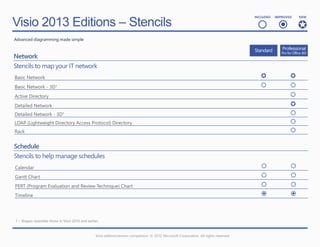
Network
Stencils to map your IT network
Basic Network                                                                                                                                            
Basic Network - 3D1                                                                                                                                      
Active Directory                                                                                                                                          
Detailed Network                                                                                                                                          
Detailed Network - 3D1                                                                                                                                    
LDAP (Lightweight Directory Access Protocol) Directory                                                                                                    
Rack                                                                                                                                                      

Schedule
Stencils to help manage schedules
Calendar                                                                                                                                                 
Gantt Chart                                                                                                                                              
PERT (Program Evaluation and Review Technique) Chart                                                                                                     
Timeline                                                                                                                                                 


1 – Shapes resemble those in Visio 2010 and earlier.


                                                  Visio edition/version comparison. © 2012 Microsoft Corporation. All rights reserved
Visio 2013 Editions – Stencils
                                                                                                                         INCLUDED   IMPROVED   NEW


                                                                                                                            
Advanced diagramming made simple


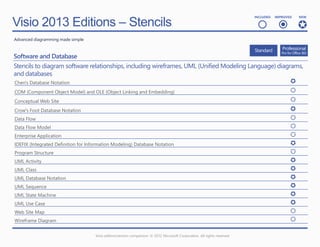
Software and Database
Stencils to diagram software relationships, including wireframes, UML (Unified Modeling Language) diagrams,
and databases
Chen's Database Notation                                                                               
COM (Component Object Model) and OLE (Object Linking and Embedding)                                    
Conceptual Web Site                                                                                    
Crow's Foot Database Notation                                                                          
Data Flow                                                                                              
Data Flow Model                                                                                        
Enterprise Application                                                                                 
IDEFIX (Integrated Definition for Information Modeling) Database Notation                              
Program Structure                                                                                      
UML Activity                                                                                           
UML Class                                                                                              
UML Database Notation                                                                                  
UML Sequence                                                                                           
UML State Machine                                                                                      
UML Use Case                                                                                           
Web Site Map                                                                                           
Wireframe Diagram                                                                                      

                                   Visio edition/version comparison. © 2012 Microsoft Corporation. All rights reserved
Copyright© 2012 Microsoft Corporation
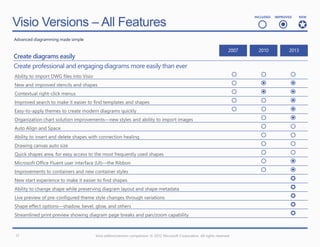
Visio Versions – All Features
                                                                                                                                   INCLUDED   IMPROVED   NEW


                                                                                                                                      
Advanced diagramming made simple


Create diagrams easily
Create professional and engaging diagrams more easily than ever
Ability to import DWG files into Visio                                                                                                             
New and improved stencils and shapes                                                                                                               
Contextual right-click menus                                                                                                                       
Improved search to make it easier to find templates and shapes                                                                                     
Easy-to-apply themes to create modern diagrams quickly                                                                                             
Organization chart solution improvements—new styles and ability to import images                                                                    
Auto Align and Space                                                                                                                                
Ability to insert and delete shapes with connection healing                                                                                         
Drawing canvas auto size                                                                                                                            
Quick shapes area, for easy access to the most frequently used shapes                                                                               
Microsoft Office Fluent user interface (UI)—the Ribbon                                                                                              
Improvements to containers and new container styles                                                                                                 
New start experience to make it easier to find shapes                                                                                                
Ability to change shape while preserving diagram layout and shape metadata                                                                           
Live preview of pre-configured theme style changes through variations                                                                                
Shape effect options—shadow, bevel, glow, and others                                                                                                 
Streamlined print preview showing diagram page breaks and pan/zoom capability                                                                        


17                                       Visio edition/version comparison. © 2012 Microsoft Corporation. All rights reserved
Visio Versions – All Features
                                                                                                                                             INCLUDED   IMPROVED   NEW


                                                                                                                                                
Advanced diagramming made simple


Collaborate as a team
Work together on a single diagram with your colleagues
Commenting                                                                                                                                                   
Easy diagram sharing through a web browser by saving to SharePoint1                                                                                           
Commenting through Visio Services1                                                                                                                             
Co-authoring—two or more people working on a single diagram at the same time2                                                                                  
Presence awareness and visibility3                                                                                                                             

Create data-linked diagrams
Use a wizard to link diagrams to data without writing any code
Data linking in diagrams                                                                                                                                     
Ability to refresh data automatically, either on a defined schedule or manually                                                                               
Automatic data legend creation, providing a key for applied data graphics                                                                                     
No-code dashboards                                                                                                                                            
Expanded set of data sources, including Excel, Excel Services, SharePoint Lists, SharePoint                                                                   
Business Connectivity Services, and SQL Server
Ability to apply a rich set of data graphics and colors to visualize data                                                                                     
Ability to save to SharePoint and view diagrams in Visio Services with data refresh                                                                           
1 – Requires Office 365 or SharePoint Server (licensed separately)
2 – Requires Microsoft SkyDrive, Office 365 or SharePoint Server (licensed separately)
3 – Requires Microsoft Lync 2013 or other compliant instant messaging (IM) client


18                                                 Visio edition/version comparison. © 2012 Microsoft Corporation. All rights reserved
Visio Versions – All Features
                                                                                                                                         INCLUDED   IMPROVED   NEW


                                                                                                                                            
Advanced diagramming made simple


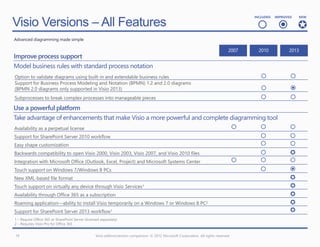
Improve process support
Model business rules with standard process notation
Option to validate diagrams using built-in and extendable business rules                                                                                  
Support for Business Process Modeling and Notation (BPMN) 1.2 and 2.0 diagrams
(BPMN 2.0 diagrams only supported in Visio 2013)                                                                                                          
Subprocesses to break complex processes into manageable pieces                                                                                            
Use a powerful platform
Take advantage of enhancements that make Visio a more powerful and complete diagramming tool
Availability as a perpetual license                                                                                                                      
Support for SharePoint Server 2010 workflow                                                                                                               
Easy shape customization                                                                                                                                  
Backwards compatibility to open Visio 2000, Visio 2003, Visio 2007, and Visio 2010 files                                                                  
Integration with Microsoft Office (Outlook, Excel, Project) and Microsoft Systems Center                                                                 
Touch support on Windows 7/Windows 8 PCs                                                                                                                  
New XML-based file format                                                                                                                                  
Touch support on virtually any device through Visio Services1                                                                                              
Availability through Office 365 as a subscription                                                                                                          
Roaming application—ability to install Visio temporarily on a Windows 7 or Windows 8 PC2                                                                   
Support for SharePoint Server 2013 workflow1                                                                                                               
1 – Require Office 365 or SharePoint Server (licensed separately)
2 – Requires Visio Pro for Office 365


19                                                 Visio edition/version comparison. © 2012 Microsoft Corporation. All rights reserved

Microsoft Viso 2013 - Feature Comparison Chart

  • 1.
  • 2.
  • 3.
    Visio 2013 Editions– All Features INCLUDED IMPROVED NEW    Advanced diagramming made simple Create diagrams easily Create professional and engaging diagrams more easily than ever Microsoft Office Fluent user interface (UI)—the Ribbon    Auto align and space    Ability to insert and delete shapes with connection healing    Dynamic grid to position and size shapes relative to other shapes on the page    Drawing canvas auto size    New and improved stencils and shapes    Contextual right-click menus    Improved search to make it easier to find templates and shapes    New start experience to make it easier to find shapes    Quick shapes area, for easy access to the most frequently used shapes    Ability to change shape while preserving diagram layout and shape metadata    Easy-to-apply themes to create modern diagrams quickly    Live preview of pre-configured theme style changes through variations    Shape effect options—shadow, bevel, glow, and others    Improvements to containers and new container styles    Organization chart solution improvements—new styles and ability to import images    Streamlined print preview showing diagram page breaks and pan/zoom capability    Ability to import DWG files into Visio    3 Visio edition/version comparison. © 2012 Microsoft Corporation. All rights reserved
  • 4.
    Visio 2013 Editions– All Features INCLUDED IMPROVED NEW    Advanced diagramming made simple Collaborate as a team Work together on a single diagram with your colleagues Commenting    Commenting through Visio Services    Presence awareness and visibility2    Easy diagram sharing through a web browser by saving to Microsoft SharePoint    Co-authoring—two or more people working on a single diagram at the same time   Create data-linked diagrams Use a wizard to link diagrams to data without writing any code Data linking in diagrams   External data window to see the data connected to shapes   Ability to refresh data automatically, either on a defined schedule or manually   Expanded set of data sources, including Microsoft Excel, Excel Services, SharePoint lists,   SharePoint Business Connectivity Services, and Microsoft SQL Server Ability to apply a rich set of data graphics and colors to visualize data   Automatic data legend creation, providing a key for applied data graphics   Ability to save to SharePoint and view diagrams in Visio Services1    No-code dashboards   1 – Saving data linked diagrams to SharePoint requires Visio Professional 2013 or Visio Pro for Office 365. 2 – Presence awareness functionality requires Lync or other compliant IM client. 4 Visio edition/version comparison. © 2012 Microsoft Corporation. All rights reserved
  • 5.
    Visio 2013 Editions– All Features INCLUDED IMPROVED NEW    Advanced diagramming made simple Improve process support Model business rules with standard process notation Support for Business Process Model and Notation (BPMN) 1.2 and 2.0 diagrams   Option to validate diagrams using built-in and extendable business rules   Subprocesses to break complex processes into manageable pieces   Use a powerful platform Take advantage of enhancements that make Visio a more powerful and complete diagramming tool New XML-based file format    Easy shape customization    Backwards compatibility to open Visio 2000, Visio 2003, Visio 2007, and Visio 2010 files    Touch support on Windows 7/Windows 8 PCs    Touch support on virtually any device through Visio Services    Connectivity application programming interface (API), Microsoft Office Fluent User Interface (UI) API, Structured Diagram API    XML web services integration    Integration with Microsoft Office (Outlook, Excel, Project) and Microsoft Systems Center    Availability as a perpetual license   Support for SharePoint Server 2010 workflow   Support for SharePoint Server 2013 workflow   Data-driven solution support API, subprocess API   Availability through Microsoft Office 365 as a subscription  Five PC installations per user  Roaming application—ability to install Visio temporarily on a Windows 7 or Windows 8 PC  5 Visio edition/version comparison. © 2012 Microsoft Corporation. All rights reserved
  • 6.
  • 7.
    Visio 2013 Editions– New or Improved Features   IMPROVED NEW Advanced diagramming made simple Create diagrams easily Create professional and engaging diagrams more easily than ever New and improved stencils and shapes    Contextual right-click menus    Improved search to make it easier to find templates and shapes    New start experience to make it easier to find shapes    Ability to change shape while preserving diagram layout and shape metadata    Easy-to-apply themes to create modern diagrams quickly    Live preview of pre-configured theme style changes through variations    Shape effect options—shadow, bevel, glow, and others    Improvements to containers and new container styles    Organization chart solution improvements—new styles and ability to import images    Streamlined print preview showing diagram page breaks and pan/zoom capability    Collaborate as a team Work together on a single diagram with your colleagues Commenting    Commenting through Visio Services    Presence awareness and visibility    Co-authoring—two or more people working on a single diagram at the same time   7 Visio edition/version comparison. © 2012 Microsoft Corporation. All rights reserved
  • 8.
    Visio 2013 Editions– New or Improved Features   IMPROVED NEW Advanced diagramming made simple Create data-linked diagrams Use a wizard to link diagrams to data without writing any code Expanded set of data sources, including Excel, Excel Services, SharePoint lists, SharePoint Business Connectivity Services, and SQL Server   Ability to apply a rich set of data graphics and colors to visualize data   Ability to save to SharePoint and view diagrams in Visio Services   No-code dashboards   Improve process support Model business rules with standard process notation Support for Business Process Model and Notation (BPMN) 1.2 and 2.0 diagrams   Option to validate diagrams using built-in and extendable business rules   Use a powerful platform Take advantage of enhancements that make Visio a more powerful and complete diagramming tool New XML-based file format    Backwards compatibility to open Visio 2000, Visio 2003, Visio 2007, and Visio 2010 files    Touch support on Windows 7/Windows 8 PCs    Touch support on virtually any device through Visio Services    Support for SharePoint Server 2013 workflow   Availability through Office 365 as a subscription  Five PC installations per user  Roaming application—ability to install Visio temporarily on a Windows 7 or Windows 8 PC  8 Visio edition/version comparison. © 2012 Microsoft Corporation. All rights reserved
  • 9.
  • 10.
    Visio 2013 Editions– Stencils INCLUDED IMPROVED NEW    Advanced diagramming made simple Business Stencils focused on business and marketing functions Audit   Brainstorming   Cause and Effect   Charts and Graphs   EPC (Event-driven Process Chain)   Fault Tree Analysis   Marketing Charts and Diagrams   Organization Chart   Organization Chart Wizard   TQM (Total Quality Management)   ITIL (Information Technology Infrastructure Library)  PivotDiagram  Six Sigma  Value Stream Map  Visio edition/version comparison. © 2012 Microsoft Corporation. All rights reserved
  • 11.
    Visio 2013 Editions– Stencils INCLUDED IMPROVED NEW    Advanced diagramming made simple Engineering Stencils to design and document engineering systems Basic Electrical  Circuits and Logic  Fluid Power  Industrial Control Systems  Part and Assembly Drawing  Piping and Instrumentation  Process Flow  Systems  Visio edition/version comparison. © 2012 Microsoft Corporation. All rights reserved
  • 12.
    Visio 2013 Editions– Stencils INCLUDED IMPROVED NEW    Advanced diagramming made simple Flowchart Stencils to design and create flowcharts and workflows, including visually designing SharePoint workflows and BPMN (Business Process Modeling and Notation) 2.0 diagrams Basic Flowchart   Cross-Functional Flowchart   Work Flow   Work Flow (3D)1   BPMN  IDEF0 (Integration Definition for Process Modeling)  Microsoft SharePoint 2010 Workflow  Microsoft SharePoint 2013 Workflow  SDL (Specification and Description Language)  General Multi-purpose stencils, with generic shapes to diagram arbitrary processes and systems Basic   Block   Block with Perspective   1 – Shapes resemble those in Visio 2010 and earlier. Visio edition/version comparison. © 2012 Microsoft Corporation. All rights reserved
  • 13.
    Visio 2013 Editions– Stencils INCLUDED IMPROVED NEW    Advanced diagramming made simple Maps and Floor Plans Stencils that map a system, including floor plans, engineering maps and other types of spatial data Directional Map   Directional Map - 3D   Office Layout   Electrical and Telecom Plan  Floor Plan  Home Plan  HVAC (Heating, Ventilation and Air Conditioning) Control Logic  HVAC Plan  Plant Layout  Plumbing and Piping Plan  Reflected Ceiling Plan  Security and Access Plan  Site Plan  Space Plan  Visio edition/version comparison. © 2012 Microsoft Corporation. All rights reserved
  • 14.
    Visio 2013 Editions– Stencils INCLUDED IMPROVED NEW    Advanced diagramming made simple Network Stencils to map your IT network Basic Network   Basic Network - 3D1   Active Directory  Detailed Network  Detailed Network - 3D1  LDAP (Lightweight Directory Access Protocol) Directory  Rack  Schedule Stencils to help manage schedules Calendar   Gantt Chart   PERT (Program Evaluation and Review Technique) Chart   Timeline   1 – Shapes resemble those in Visio 2010 and earlier. Visio edition/version comparison. © 2012 Microsoft Corporation. All rights reserved
  • 15.
    Visio 2013 Editions– Stencils INCLUDED IMPROVED NEW    Advanced diagramming made simple Software and Database Stencils to diagram software relationships, including wireframes, UML (Unified Modeling Language) diagrams, and databases Chen's Database Notation  COM (Component Object Model) and OLE (Object Linking and Embedding)  Conceptual Web Site  Crow's Foot Database Notation  Data Flow  Data Flow Model  Enterprise Application  IDEFIX (Integrated Definition for Information Modeling) Database Notation  Program Structure  UML Activity  UML Class  UML Database Notation  UML Sequence  UML State Machine  UML Use Case  Web Site Map  Wireframe Diagram  Visio edition/version comparison. © 2012 Microsoft Corporation. All rights reserved
  • 16.
  • 17.
    Visio Versions –All Features INCLUDED IMPROVED NEW    Advanced diagramming made simple Create diagrams easily Create professional and engaging diagrams more easily than ever Ability to import DWG files into Visio    New and improved stencils and shapes    Contextual right-click menus    Improved search to make it easier to find templates and shapes    Easy-to-apply themes to create modern diagrams quickly    Organization chart solution improvements—new styles and ability to import images   Auto Align and Space   Ability to insert and delete shapes with connection healing   Drawing canvas auto size   Quick shapes area, for easy access to the most frequently used shapes   Microsoft Office Fluent user interface (UI)—the Ribbon   Improvements to containers and new container styles   New start experience to make it easier to find shapes  Ability to change shape while preserving diagram layout and shape metadata  Live preview of pre-configured theme style changes through variations  Shape effect options—shadow, bevel, glow, and others  Streamlined print preview showing diagram page breaks and pan/zoom capability  17 Visio edition/version comparison. © 2012 Microsoft Corporation. All rights reserved
  • 18.
    Visio Versions –All Features INCLUDED IMPROVED NEW    Advanced diagramming made simple Collaborate as a team Work together on a single diagram with your colleagues Commenting    Easy diagram sharing through a web browser by saving to SharePoint1   Commenting through Visio Services1  Co-authoring—two or more people working on a single diagram at the same time2  Presence awareness and visibility3  Create data-linked diagrams Use a wizard to link diagrams to data without writing any code Data linking in diagrams    Ability to refresh data automatically, either on a defined schedule or manually   Automatic data legend creation, providing a key for applied data graphics   No-code dashboards   Expanded set of data sources, including Excel, Excel Services, SharePoint Lists, SharePoint   Business Connectivity Services, and SQL Server Ability to apply a rich set of data graphics and colors to visualize data   Ability to save to SharePoint and view diagrams in Visio Services with data refresh   1 – Requires Office 365 or SharePoint Server (licensed separately) 2 – Requires Microsoft SkyDrive, Office 365 or SharePoint Server (licensed separately) 3 – Requires Microsoft Lync 2013 or other compliant instant messaging (IM) client 18 Visio edition/version comparison. © 2012 Microsoft Corporation. All rights reserved
  • 19.
    Visio Versions –All Features INCLUDED IMPROVED NEW    Advanced diagramming made simple Improve process support Model business rules with standard process notation Option to validate diagrams using built-in and extendable business rules   Support for Business Process Modeling and Notation (BPMN) 1.2 and 2.0 diagrams (BPMN 2.0 diagrams only supported in Visio 2013)   Subprocesses to break complex processes into manageable pieces   Use a powerful platform Take advantage of enhancements that make Visio a more powerful and complete diagramming tool Availability as a perpetual license    Support for SharePoint Server 2010 workflow   Easy shape customization   Backwards compatibility to open Visio 2000, Visio 2003, Visio 2007, and Visio 2010 files   Integration with Microsoft Office (Outlook, Excel, Project) and Microsoft Systems Center    Touch support on Windows 7/Windows 8 PCs   New XML-based file format  Touch support on virtually any device through Visio Services1  Availability through Office 365 as a subscription  Roaming application—ability to install Visio temporarily on a Windows 7 or Windows 8 PC2  Support for SharePoint Server 2013 workflow1  1 – Require Office 365 or SharePoint Server (licensed separately) 2 – Requires Visio Pro for Office 365 19 Visio edition/version comparison. © 2012 Microsoft Corporation. All rights reserved