What is SharePoint and what
can it do for organizations?


NGO Connection Day
February 22 & 24, 2011
Email :   Johnny.B@microsoft.com
•   SharePoint 2010 Overview
•   Customer Stories
•   Demo
•   Getting Started
•   CASE STUDY: CNDR’s Disaster Response
    Management System
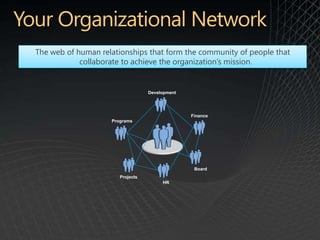
The web of human relationships that form the community of people that
            collaborate to achieve the organization’s mission.


                                  Development


                                                Finance
                    Programs


                                                 Board
                       Projects
                                       HR
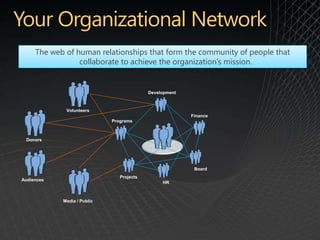
The web of human relationships that form the community of people that
                 collaborate to achieve the organization’s mission.


                                           Development


             Volunteers
                                                         Finance
                             Programs


 Donors


                                                          Board
                                Projects
Audiences
                                                HR


            Media / Public
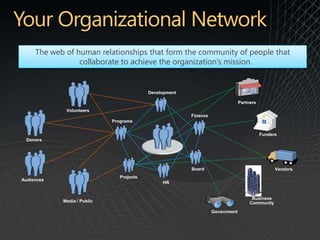
The web of human relationships that form the community of people that
                 collaborate to achieve the organization’s mission.


                                           Development

                                                                                Partners
             Volunteers
                                                         Finance
                             Programs


                                                                                           Funders
 Donors


                                                         Board                                   Vendors
                                Projects
Audiences
                                                HR


                                                                                      Business
            Media / Public                                                           Community
                                                                   Government
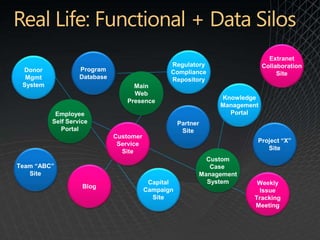
Extranet
                                                Regulatory                  Collaboration
 Donor             Program                      Compliance                       Site
  Mgmt             Database                     Repository
 System                            Main
                                   Web
                                                               Knowledge
                                 Presence
                                                               Management
           Employee                                              Portal
          Self Service                              Partner
             Portal                                  Site
                              Customer
                                                                        Project “X”
                               Service
                                                                           Site
                                Site
                                                            Custom
Team “ABC”                                                   Case
   Site                                                   Management
                                          Capital           System      Weekly
                    Blog
                                         Campaign                        Issue
                                           Site                        Tracking
                                                                       Meeting
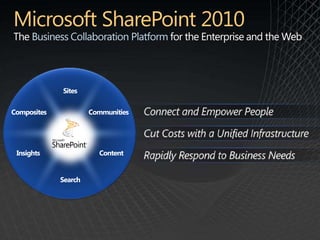
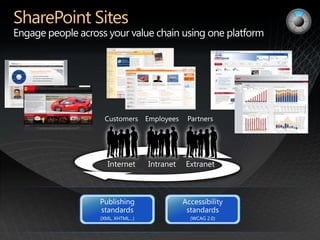
Business Collaboration Platform
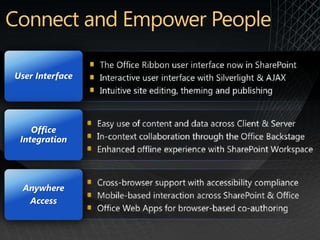
User Interface


    Office
 Integration


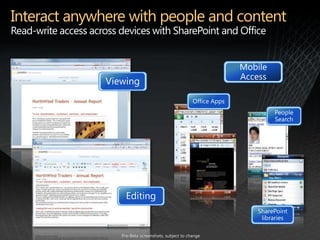
  Anywhere
   Access
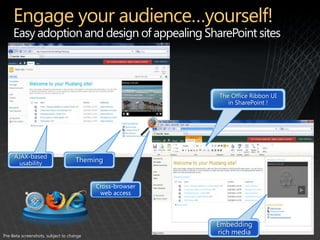
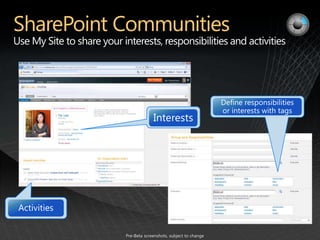
Engage your audience…yourself!
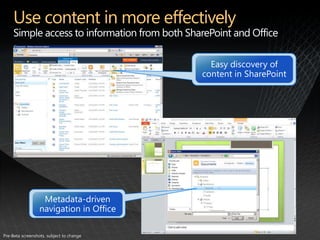
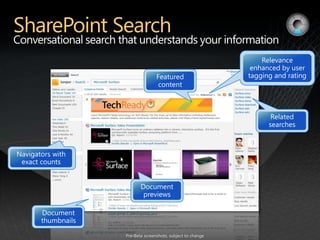
Use content in more effectively
Interact anywhere with people and content
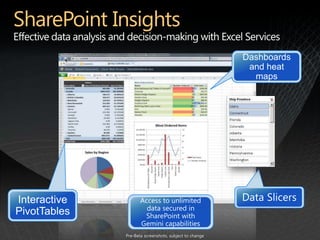
SharePoint Insights
Platform
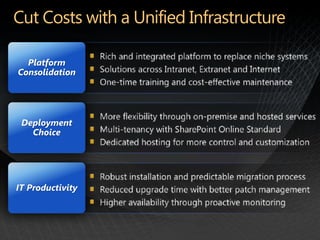
Consolidation


 Deployment
   Choice


IT Productivity
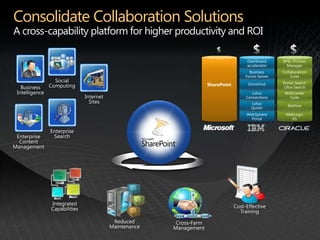
Consolidate Collaboration Solutions
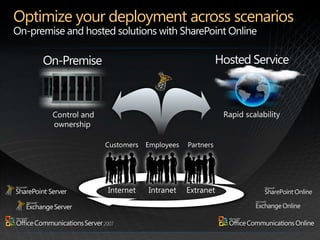
Optimize your deployment across scenarios
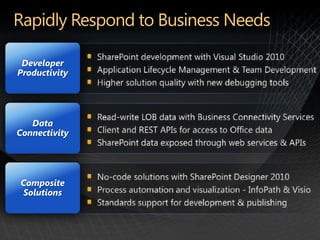
Developer
Productivity


   Data
Connectivity


Composite
Solutions
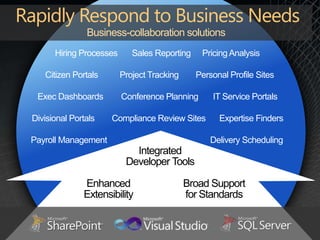
Business-collaboration solutions
      Hiring Processes      Sales Reporting    Pricing Analysis

   Citizen Portals       Project Tracking     Personal Profile Sites

 Exec Dashboards         Conference Planning      IT Service Portals

Divisional Portals   Compliance Review Sites        Expertise Finders

Payroll Management                                Delivery Scheduling
                            Integrated
                          Developer Tools

              Enhanced                      Broad Support
              Extensibility                 for Standards
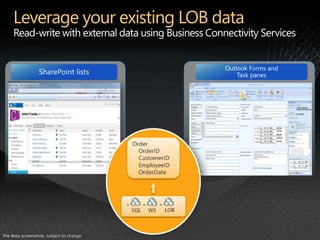
Leverage your existing LOB data
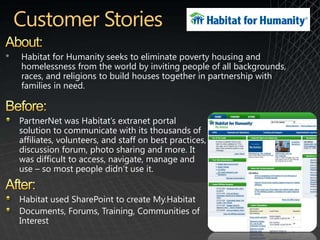
•   Habitat for Humanity seeks to eliminate poverty housing and
    homelessness from the world by inviting people of all backgrounds,
    races, and religions to build houses together in partnership with
    families in need.


    PartnerNet was Habitat’s extranet portal
    solution to communicate with its thousands of
    affiliates, volunteers, and staff on best practices,
    discussion forum, photo sharing and more. It
    was difficult to access, navigate, manage and
    use – so most people didn’t use it.


    Habitat used SharePoint to create My.Habitat
    Documents, Forums, Training, Communities of
    Interest
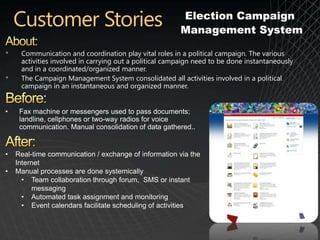
Election Campaign
                                                        Management System

•    Communication and coordination play vital roles in a political campaign. The various
     activities involved in carrying out a political campaign need to be done instantaneously
     and in a coordinated/organized manner.
•    The Campaign Management System consolidated all activities involved in a political
     campaign in an instantaneous and organized manner.


•    Fax machine or messengers used to pass documents;
     landline, cellphones or two-way radios for voice
     communication. Manual consolidation of data gathered..


•   Real-time communication / exchange of information via the
    Internet
•   Manual processes are done systemically
      • Team collaboration through forum, SMS or instant
         messaging
      • Automated task assignment and monitoring
      • Event calendars facilitate scheduling of activities
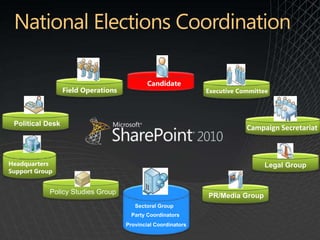
Candidate
                  Field Operations                             Executive Committee


 Political Desk
                                                                           Campaign Secretariat


Headquarters                                                                    Legal Group
Support Group


            Policy Studies Group
                                                               PR/Media Group
                                        Sectoral Group
                                       Party Coordinators
                                     Provincial Coordinators
DEMO
Screenshot Walkthrough

           Boy Bawal
         Sales Director
   Softrigger Interactive Inc.


                      E-Mail: boybawal@softrigger.com
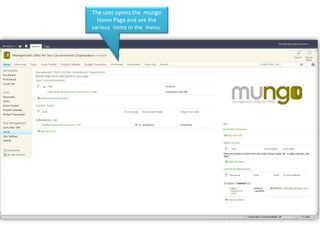
The user opens the mungo
  Home Page and see the
various items in the menu.
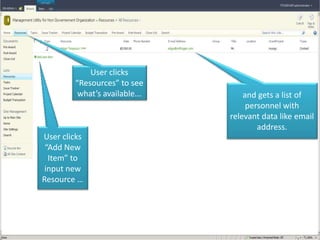
User clicks
        “Resources” to see
         what’s available...       and gets a list of
                                    personnel with
                               relevant data like email
                                       address.
User clicks
 “Add New
  Item” to
 input new
Resource …
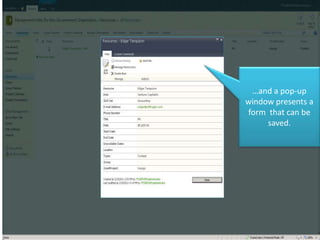
…and a pop-up
window presents a
form that can be
     saved.
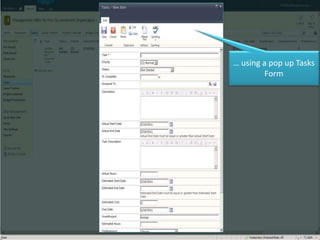
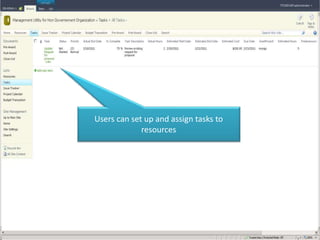
Users can set up and assign tasks to
             resources
… using a pop up Tasks
        Form
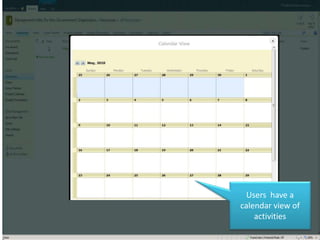
Users have a
calendar view of
    activities
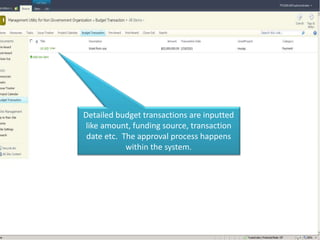
Detailed budget transactions are inputted
like amount, funding source, transaction
 date etc. The approval process happens
            within the system.
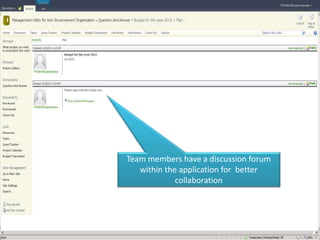
Team members have a discussion forum
   within the application for better
             collaboration
DEMO
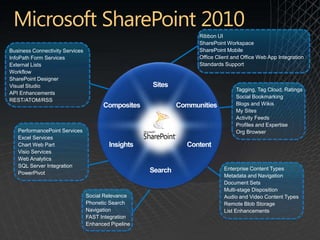
Ribbon UI
                                                     SharePoint Workspace
Business Connectivity Services                       SharePoint Mobile
InfoPath Form Services                               Office Client and Office Web App Integration
External Lists                                       Standards Support
Workflow
SharePoint Designer
Visual Studio
                                                                    Tagging, Tag Cloud, Ratings
API Enhancements
                                                                    Social Bookmarking
REST/ATOM/RSS
                                                                    Blogs and Wikis
                                                                    My Sites
                                                                    Activity Feeds
                                                                    Profiles and Expertise
   PerformancePoint Services                                        Org Browser
   Excel Services
   Chart Web Part
   Visio Services
   Web Analytics
   SQL Server Integration
                                                               Enterprise Content Types
   PowerPivot
                                                               Metadata and Navigation
                                                               Document Sets
                                                               Multi-stage Disposition
                                 Social Relevance              Audio and Video Content Types
                                 Phonetic Search               Remote Blob Storage
                                 Navigation                    List Enhancements
                                 FAST Integration
                                 Enhanced Pipeline
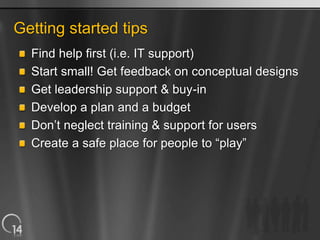
Getting started tips
  Find help first (i.e. IT support)
  Start small! Get feedback on conceptual designs
  Get leadership support & buy-in
  Develop a plan and a budget
  Don’t neglect training & support for users
  Create a safe place for people to “play”
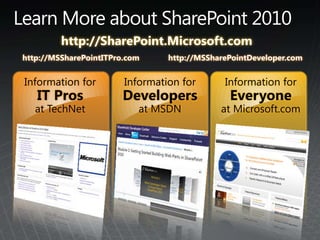
http://SharePoint.Microsoft.com
http://MSSharePointITPro.com     http://MSSharePointDeveloper.com


Information for         Information for       Information for
   IT Pros             Developers              Everyone
   at TechNet              at MSDN           at Microsoft.com
©2009 Microsoft, Microsoft Dynamics, the Office logo, and Your potential. Our passion. are trademarks of the Microsoft group of companies. The information herein is for informational purposes only and
represents the current view of Microsoft Corporation as of the date of this presentation. Because Microsoft must respond to changing market conditions, it should not be interpreted to be a commitment on
the part of Microsoft, and Microsoft cannot guarantee the accuracy of any information provided after the date of this presentation. MICROSOFT MAKES NO WARRANTIES, EXPRESS, IMPLIED OR
STATUTORY, AS TO THE INFORMATION IN THIS PRESENTATION.

Microsoft Sharepoint 2010 by Mr. Johnny Benitez

  • 1.
    What is SharePointand what can it do for organizations? NGO Connection Day February 22 & 24, 2011
  • 2.
    Email : Johnny.B@microsoft.com
  • 3.
    SharePoint 2010 Overview • Customer Stories • Demo • Getting Started • CASE STUDY: CNDR’s Disaster Response Management System
  • 4.
    The web ofhuman relationships that form the community of people that collaborate to achieve the organization’s mission. Development Finance Programs Board Projects HR
  • 5.
    The web ofhuman relationships that form the community of people that collaborate to achieve the organization’s mission. Development Volunteers Finance Programs Donors Board Projects Audiences HR Media / Public
  • 6.
    The web ofhuman relationships that form the community of people that collaborate to achieve the organization’s mission. Development Partners Volunteers Finance Programs Funders Donors Board Vendors Projects Audiences HR Business Media / Public Community Government
  • 7.
    Extranet Regulatory Collaboration Donor Program Compliance Site Mgmt Database Repository System Main Web Knowledge Presence Management Employee Portal Self Service Partner Portal Site Customer Project “X” Service Site Site Custom Team “ABC” Case Site Management Capital System Weekly Blog Campaign Issue Site Tracking Meeting
  • 9.
  • 10.
    User Interface Office Integration Anywhere Access
  • 12.
  • 13.
    Use content inmore effectively
  • 14.
    Interact anywhere withpeople and content
  • 17.
  • 18.
    Platform Consolidation Deployment Choice IT Productivity
  • 19.
  • 20.
    Optimize your deploymentacross scenarios
  • 21.
    Developer Productivity Data Connectivity Composite Solutions
  • 22.
    Business-collaboration solutions Hiring Processes Sales Reporting Pricing Analysis Citizen Portals Project Tracking Personal Profile Sites Exec Dashboards Conference Planning IT Service Portals Divisional Portals Compliance Review Sites Expertise Finders Payroll Management Delivery Scheduling Integrated Developer Tools Enhanced Broad Support Extensibility for Standards
  • 23.
  • 24.
    Habitat for Humanity seeks to eliminate poverty housing and homelessness from the world by inviting people of all backgrounds, races, and religions to build houses together in partnership with families in need. PartnerNet was Habitat’s extranet portal solution to communicate with its thousands of affiliates, volunteers, and staff on best practices, discussion forum, photo sharing and more. It was difficult to access, navigate, manage and use – so most people didn’t use it. Habitat used SharePoint to create My.Habitat Documents, Forums, Training, Communities of Interest
  • 25.
    Election Campaign Management System • Communication and coordination play vital roles in a political campaign. The various activities involved in carrying out a political campaign need to be done instantaneously and in a coordinated/organized manner. • The Campaign Management System consolidated all activities involved in a political campaign in an instantaneous and organized manner. • Fax machine or messengers used to pass documents; landline, cellphones or two-way radios for voice communication. Manual consolidation of data gathered.. • Real-time communication / exchange of information via the Internet • Manual processes are done systemically • Team collaboration through forum, SMS or instant messaging • Automated task assignment and monitoring • Event calendars facilitate scheduling of activities
  • 26.
    Candidate Field Operations Executive Committee Political Desk Campaign Secretariat Headquarters Legal Group Support Group Policy Studies Group PR/Media Group Sectoral Group Party Coordinators Provincial Coordinators
  • 27.
  • 28.
    Screenshot Walkthrough Boy Bawal Sales Director Softrigger Interactive Inc. E-Mail: boybawal@softrigger.com
  • 29.
    The user opensthe mungo Home Page and see the various items in the menu.
  • 30.
    User clicks “Resources” to see what’s available... and gets a list of personnel with relevant data like email address. User clicks “Add New Item” to input new Resource …
  • 31.
    …and a pop-up windowpresents a form that can be saved.
  • 32.
    Users can setup and assign tasks to resources
  • 33.
    … using apop up Tasks Form
  • 34.
    Users have a calendarview of activities
  • 35.
    Detailed budget transactionsare inputted like amount, funding source, transaction date etc. The approval process happens within the system.
  • 36.
    Team members havea discussion forum within the application for better collaboration
  • 37.
  • 38.
    Ribbon UI SharePoint Workspace Business Connectivity Services SharePoint Mobile InfoPath Form Services Office Client and Office Web App Integration External Lists Standards Support Workflow SharePoint Designer Visual Studio Tagging, Tag Cloud, Ratings API Enhancements Social Bookmarking REST/ATOM/RSS Blogs and Wikis My Sites Activity Feeds Profiles and Expertise PerformancePoint Services Org Browser Excel Services Chart Web Part Visio Services Web Analytics SQL Server Integration Enterprise Content Types PowerPivot Metadata and Navigation Document Sets Multi-stage Disposition Social Relevance Audio and Video Content Types Phonetic Search Remote Blob Storage Navigation List Enhancements FAST Integration Enhanced Pipeline
  • 39.
    Getting started tips Find help first (i.e. IT support) Start small! Get feedback on conceptual designs Get leadership support & buy-in Develop a plan and a budget Don’t neglect training & support for users Create a safe place for people to “play”
  • 40.
    http://SharePoint.Microsoft.com http://MSSharePointITPro.com http://MSSharePointDeveloper.com Information for Information for Information for IT Pros Developers Everyone at TechNet at MSDN at Microsoft.com
  • 41.
    ©2009 Microsoft, MicrosoftDynamics, the Office logo, and Your potential. Our passion. are trademarks of the Microsoft group of companies. The information herein is for informational purposes only and represents the current view of Microsoft Corporation as of the date of this presentation. Because Microsoft must respond to changing market conditions, it should not be interpreted to be a commitment on the part of Microsoft, and Microsoft cannot guarantee the accuracy of any information provided after the date of this presentation. MICROSOFT MAKES NO WARRANTIES, EXPRESS, IMPLIED OR STATUTORY, AS TO THE INFORMATION IN THIS PRESENTATION.