3
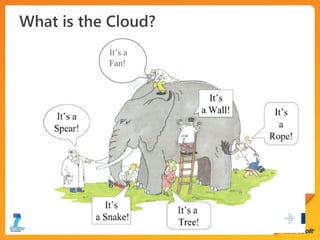
It’s a
Fan!
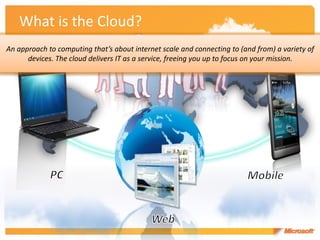
What is the Cloud?
An approach to computing that’s about internet scale and connecting to (and from) a variety of
      devices. The cloud delivers IT as a service, freeing you up to focus on your mission.
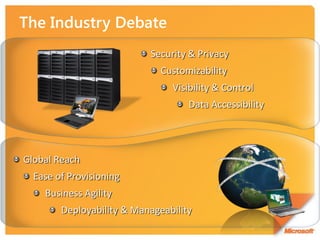
Security & Privacy
                              Customizability
                                Visibility & Control
                                    Data Accessibility


Global Reach
  Ease of Provisioning
    Business Agility
        Deployability & Manageability
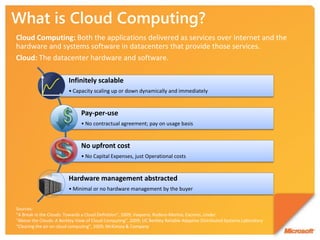
What is Cloud Computing?
Cloud Computing: Both the applications delivered as services over Internet and the
hardware and systems software in datacenters that provide those services.
Cloud: The datacenter hardware and software.

                         Infinitely scalable
                         • Capacity scaling up or down dynamically and immediately


                               Pay-per-use
                               • No contractual agreement; pay on usage basis


                               No upfront cost
                               • No Capital Expenses, just Operational costs


                         Hardware management abstracted
                         • Minimal or no hardware management by the buyer


Sources:
“A Break in the Clouds: Towards a Cloud Definition”, 2009; Vaquero, Rodero-Merino, Caceres, Linder
"Above the Clouds: A Berkley View of Cloud Computing", 2009; UC Berkley Reliable Adaptive Distributed Systems Laboratory
“Clearing the air on cloud computing”, 2009; McKinsey & Company
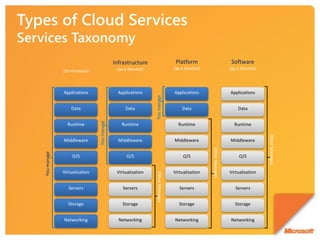
Infrastructure                     Platform                         Software
             (On-Premises)                  (as a Service)                   (as a Service)                   (as a Service)


             Applications                    Applications                    Applications                     Applications


                                                             You manage
                 Data                           Data                             Data                             Data
                              You manage


               Runtime                        Runtime                          Runtime                          Runtime


                                                                                                                               Other Manages
             Middleware                      Middleware                      Middleware                       Middleware


                                                                                              Other Manages
You manage


                  O/S                            O/S                              O/S                              O/S


             Virtualization                 Virtualization                   Virtualization                   Virtualization
                                                             Other Manages


                Servers                        Servers                          Servers                          Servers


               Storage                         Storage                         Storage                          Storage


             Networking                      Networking                      Networking                       Networking
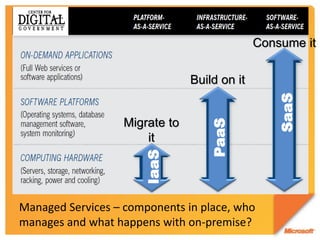
Consume it

                                Build on it


                                                 SaaS
                   Migrate to


                                   PaaS
                       it
                      IaaS


Managed Services – components in place, who
manages and what happens with on-premise?
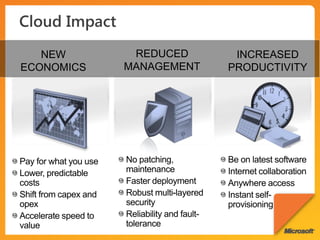
NEW       REDUCED      INCREASED
ECONOMICS   MANAGEMENT   PRODUCTIVITY
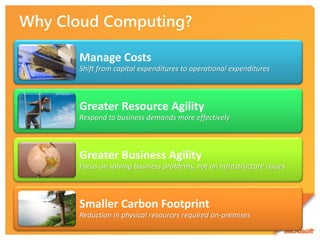
Manage Costs
Shift from capital expenditures to operational expenditures


Greater Resource Agility
Respond to business demands more effectively


Greater Business Agility
Focus on solving business problems, not on infrastructure issues


Smaller Carbon Footprint
Reduction in physical resources required on-premises
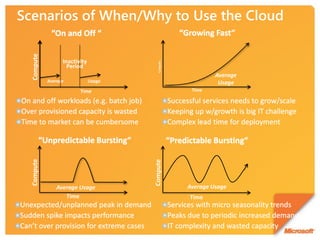
Compute


                Inactivity


                                        Compute
                  Period
                                                           Average
          Average            Usage                          Usage
                       Time                        Time
Compute


                                     Compute


             Average Usage                        Average Usage
                Time                              Time
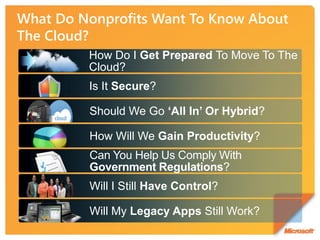
How Do I Get Prepared To Move To The
Cloud?
Is It Secure?

Should We Go ‘All In’ Or Hybrid?

How Will We Gain Productivity?
Can You Help Us Comply With
Government Regulations?
Will I Still Have Control?

Will My Legacy Apps Still Work?
“Don’t run out and do this just because it’s ‘cloud,’
and don’t run out and not do it because it’s ‘cloud.’ If
 the goals and objectives of your organization lead
      you to a cloud solution, then go with it.”

                    Carol Lawson
     CIO California Public Utilities Commission
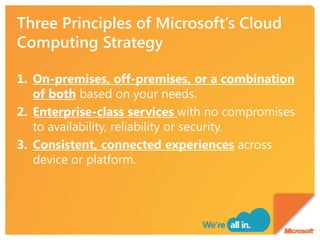
1. On-premises, off-premises, or a combination
   of both based on your needs.
2. Enterprise-class services with no compromises
   to availability, reliability or security.
3. Consistent, connected experiences across
   device or platform.
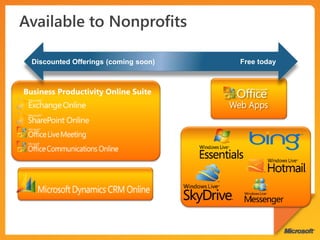
Discounted Offerings (coming soon)     Free today


Business Productivity Online Suite
                                       Web Apps
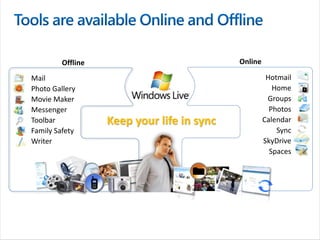
Offline                            Online

Mail                                                  Hotmail
Photo Gallery                                           Home
Movie Maker                                           Groups
Messenger                                              Photos
Toolbar            Keep your life in sync            Calendar
Family Safety                                            Sync
Writer                                               SkyDrive
                                                       Spaces
One of the Red Cross and Red Crescent Movement's oldest
                                  national societies. SRC is the biggest humanitarian
                                  voluntary organization in Sweden, with approximately 500
                                  employees, 250,000 members, and 40,000 volunteers
The Swedish Red Cross

•   Global migration to Microsoft Online Services offering both staff and volunteers interoperable,
    easy-to-use tools for staying in touch with colleagues across Sweden and in foreign countries.

•   SRC reduced travel and hotel costs while enabling collaboration among staff and volunteers in
    different locations. Employees are freed from the confines of the office to be more productive
    while on the road, in meetings, or training volunteers in the field, increasing overall productivity.

•   IT benefits from a simpler way of consuming and managing technology. IT staff now provide tools
    that add value to the services that SRC delivers to the field.

•   … and SRC is saving money that it can now redirect toward its humanitarian efforts.
“Our employees frequently work out       “We did a business case for the
 of the office, yet [our existing] Web     next five years. We estimate
mail client wasn’t popular. There are    that we will achieve a return on
   about 1,200 volunteers who are          our investment in the [cloud]
heavily involved in the organization      project within two years. Over
 who would benefit from a reliable,      the next five years, we estimate
standardized SRC-sanctioned e-mail              that we’ll be saving
  service instead of making do with        approximately 20 percent in
 their own e-mail service providers.”              overall costs.”

           Jim Terneborg,                  Joakim Pettersson-Winter,
      Infrastructure Technician             Chief Technology Officer,
          Swedish Red Cross                    Swedish Red Cross
A unique collaboration of 30+ of the world's leading
                             international humanitarian organizations working
                             together to solve common problems in the
      Net Hope               developing world

THEN
• Inconsistent internal e-mail (employee preferences)
• Local SharePoint deployment for cross-agency resource / information sharing
• Inconsistent remote access to mission-critical e-mail infrastructure

NOW
• Exchange Online now powering @nethope.org e-mail addresses
• Outlook Web Access providing reliable and available communications during
  critical times (post-Haiti earthquake)
• SharePoint Online will ensure more robust cross-agency collaboration
A nonprofit, nonsectarian, nonpartisan, educational
                                   organization, works with educators in response to
                                   requests for resources to strengthen the teaching of
  The Jack Miller Center           America’s founding principles and history.

THEN
• Using a hosted Exchange solution from another vendor – very expensive and servers
  were down often
• No comprehensive collaboration solution and a hodge-podge of web conferencing and
  sharing tools
• Security concerns regarding unauthorized users access to file shares, etc.

NOW
• Exchange Online brought costs down and improved reliability
• SharePoint Online used extensively to support remote users and other constituents
  who should not have access to internal file servers
• LiveMeeting Online used for project status meetings with remote staff and consultants
  … “Love it!”
Supporting children and families who are working toward
                                  achieving or maintaining permanency through transition and
                                                                        therapeutic services.
                    Inspiring girls to be strong, smart, and bold through gender-         Kinship House
                    specific programs and research-based curricula.
   Girls, Inc.
          A social services agency offering programs which support families
                                                  to raise their children well
                                                                                 Rainbow Family Services
THEN
• Antiquated, abandoned systems including FM Pro databases, Excel spreadsheets and mental lists
• Could not run reports reliably or accurately
• Could not effectively manage relationships
• Fragmented data systems – staff needed easy access to their data
• No ability to extend systems to capture new types of data, could not access data remotely, or at
   all in some cases because it was housed on an older workstation

NOW
• Deployed Dynamics CRM Online for Nonprofits with minimal customization and implementation
  in less than 1 month (would have been a 6-8 month project with other systems)
• Benefit from integrated and centralized data, flexible and reliable reporting, remote and
  networked access to data, flexible data structure, work flows automated to increase productivity
  and ensure effective management of relationships
“The system runs seven-by-twenty-four, never
  gets sick, never goes on vacation, and we
              can’t replicate that.”

   -Gordon Peterson, IT Director – City of
               Carlsbad, CA
http://www.adb.org/NGOs/docs/NGOPhilippines.pdf


• Information and communications systems
• Support for networking activities
http://www.microsoft.com/cloud
http://www.microsoft.com/online
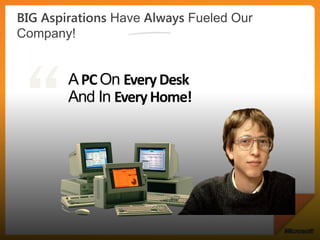
A PC On Every Desk
And In Every Home!
© 2010 Microsoft Corporation. All rights reserved. Microsoft, Windows, Windows Vista and other product names are or may be registered trademarks and/or trademarks in the U.S. and/or other countries.
The information herein is for informational purposes only and represents the current view of Microsoft Corporation as of the date of this presentation. Because Microsoft must respond to changing market
     conditions, it should not be interpreted to be a commitment on the part of Microsoft, and Microsoft cannot guarantee the accuracy of any information provided after the date of this presentation.
                                        MICROSOFT MAKES NO WARRANTIES, EXPRESS, IMPLIED OR STATUTORY, AS TO THE INFORMATION IN THIS PRESENTATION.

Cloud Computing by Dindo Fernando

  • 3.
  • 4.
  • 5.
    What is theCloud? An approach to computing that’s about internet scale and connecting to (and from) a variety of devices. The cloud delivers IT as a service, freeing you up to focus on your mission.
  • 7.
    Security & Privacy Customizability Visibility & Control Data Accessibility Global Reach Ease of Provisioning Business Agility Deployability & Manageability
  • 8.
    What is CloudComputing? Cloud Computing: Both the applications delivered as services over Internet and the hardware and systems software in datacenters that provide those services. Cloud: The datacenter hardware and software. Infinitely scalable • Capacity scaling up or down dynamically and immediately Pay-per-use • No contractual agreement; pay on usage basis No upfront cost • No Capital Expenses, just Operational costs Hardware management abstracted • Minimal or no hardware management by the buyer Sources: “A Break in the Clouds: Towards a Cloud Definition”, 2009; Vaquero, Rodero-Merino, Caceres, Linder "Above the Clouds: A Berkley View of Cloud Computing", 2009; UC Berkley Reliable Adaptive Distributed Systems Laboratory “Clearing the air on cloud computing”, 2009; McKinsey & Company
  • 10.
    Infrastructure Platform Software (On-Premises) (as a Service) (as a Service) (as a Service) Applications Applications Applications Applications You manage Data Data Data Data You manage Runtime Runtime Runtime Runtime Other Manages Middleware Middleware Middleware Middleware Other Manages You manage O/S O/S O/S O/S Virtualization Virtualization Virtualization Virtualization Other Manages Servers Servers Servers Servers Storage Storage Storage Storage Networking Networking Networking Networking
  • 11.
    Consume it Build on it SaaS Migrate to PaaS it IaaS Managed Services – components in place, who manages and what happens with on-premise?
  • 14.
    NEW REDUCED INCREASED ECONOMICS MANAGEMENT PRODUCTIVITY
  • 15.
    Manage Costs Shift fromcapital expenditures to operational expenditures Greater Resource Agility Respond to business demands more effectively Greater Business Agility Focus on solving business problems, not on infrastructure issues Smaller Carbon Footprint Reduction in physical resources required on-premises
  • 18.
    Compute Inactivity Compute Period Average Average Usage Usage Time Time Compute Compute Average Usage Average Usage Time Time
  • 19.
    How Do IGet Prepared To Move To The Cloud? Is It Secure? Should We Go ‘All In’ Or Hybrid? How Will We Gain Productivity? Can You Help Us Comply With Government Regulations? Will I Still Have Control? Will My Legacy Apps Still Work?
  • 20.
    “Don’t run outand do this just because it’s ‘cloud,’ and don’t run out and not do it because it’s ‘cloud.’ If the goals and objectives of your organization lead you to a cloud solution, then go with it.” Carol Lawson CIO California Public Utilities Commission
  • 22.
    1. On-premises, off-premises,or a combination of both based on your needs. 2. Enterprise-class services with no compromises to availability, reliability or security. 3. Consistent, connected experiences across device or platform.
  • 23.
    Discounted Offerings (comingsoon) Free today Business Productivity Online Suite Web Apps
  • 24.
    Offline Online Mail Hotmail Photo Gallery Home Movie Maker Groups Messenger Photos Toolbar Keep your life in sync Calendar Family Safety Sync Writer SkyDrive Spaces
  • 26.
    One of theRed Cross and Red Crescent Movement's oldest national societies. SRC is the biggest humanitarian voluntary organization in Sweden, with approximately 500 employees, 250,000 members, and 40,000 volunteers The Swedish Red Cross • Global migration to Microsoft Online Services offering both staff and volunteers interoperable, easy-to-use tools for staying in touch with colleagues across Sweden and in foreign countries. • SRC reduced travel and hotel costs while enabling collaboration among staff and volunteers in different locations. Employees are freed from the confines of the office to be more productive while on the road, in meetings, or training volunteers in the field, increasing overall productivity. • IT benefits from a simpler way of consuming and managing technology. IT staff now provide tools that add value to the services that SRC delivers to the field. • … and SRC is saving money that it can now redirect toward its humanitarian efforts.
  • 27.
    “Our employees frequentlywork out “We did a business case for the of the office, yet [our existing] Web next five years. We estimate mail client wasn’t popular. There are that we will achieve a return on about 1,200 volunteers who are our investment in the [cloud] heavily involved in the organization project within two years. Over who would benefit from a reliable, the next five years, we estimate standardized SRC-sanctioned e-mail that we’ll be saving service instead of making do with approximately 20 percent in their own e-mail service providers.” overall costs.” Jim Terneborg, Joakim Pettersson-Winter, Infrastructure Technician Chief Technology Officer, Swedish Red Cross Swedish Red Cross
  • 28.
    A unique collaborationof 30+ of the world's leading international humanitarian organizations working together to solve common problems in the Net Hope developing world THEN • Inconsistent internal e-mail (employee preferences) • Local SharePoint deployment for cross-agency resource / information sharing • Inconsistent remote access to mission-critical e-mail infrastructure NOW • Exchange Online now powering @nethope.org e-mail addresses • Outlook Web Access providing reliable and available communications during critical times (post-Haiti earthquake) • SharePoint Online will ensure more robust cross-agency collaboration
  • 29.
    A nonprofit, nonsectarian,nonpartisan, educational organization, works with educators in response to requests for resources to strengthen the teaching of The Jack Miller Center America’s founding principles and history. THEN • Using a hosted Exchange solution from another vendor – very expensive and servers were down often • No comprehensive collaboration solution and a hodge-podge of web conferencing and sharing tools • Security concerns regarding unauthorized users access to file shares, etc. NOW • Exchange Online brought costs down and improved reliability • SharePoint Online used extensively to support remote users and other constituents who should not have access to internal file servers • LiveMeeting Online used for project status meetings with remote staff and consultants … “Love it!”
  • 30.
    Supporting children andfamilies who are working toward achieving or maintaining permanency through transition and therapeutic services. Inspiring girls to be strong, smart, and bold through gender- Kinship House specific programs and research-based curricula. Girls, Inc. A social services agency offering programs which support families to raise their children well Rainbow Family Services THEN • Antiquated, abandoned systems including FM Pro databases, Excel spreadsheets and mental lists • Could not run reports reliably or accurately • Could not effectively manage relationships • Fragmented data systems – staff needed easy access to their data • No ability to extend systems to capture new types of data, could not access data remotely, or at all in some cases because it was housed on an older workstation NOW • Deployed Dynamics CRM Online for Nonprofits with minimal customization and implementation in less than 1 month (would have been a 6-8 month project with other systems) • Benefit from integrated and centralized data, flexible and reliable reporting, remote and networked access to data, flexible data structure, work flows automated to increase productivity and ensure effective management of relationships
  • 31.
    “The system runsseven-by-twenty-four, never gets sick, never goes on vacation, and we can’t replicate that.” -Gordon Peterson, IT Director – City of Carlsbad, CA
  • 32.
    http://www.adb.org/NGOs/docs/NGOPhilippines.pdf • Information andcommunications systems • Support for networking activities
  • 33.
  • 34.
    A PC OnEvery Desk And In Every Home!
  • 36.
    © 2010 MicrosoftCorporation. All rights reserved. Microsoft, Windows, Windows Vista and other product names are or may be registered trademarks and/or trademarks in the U.S. and/or other countries. The information herein is for informational purposes only and represents the current view of Microsoft Corporation as of the date of this presentation. Because Microsoft must respond to changing market conditions, it should not be interpreted to be a commitment on the part of Microsoft, and Microsoft cannot guarantee the accuracy of any information provided after the date of this presentation. MICROSOFT MAKES NO WARRANTIES, EXPRESS, IMPLIED OR STATUTORY, AS TO THE INFORMATION IN THIS PRESENTATION.