Dee Vyas
Learning Innovations
Manchester Metropolitan University
Evernote
‘A tool for all seasons’
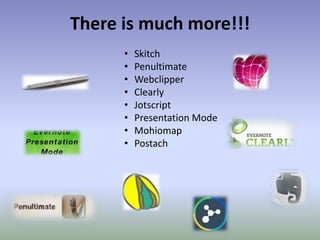
There is much more!!!
• Skitch
• Penultimate
• Webclipper
• Clearly
• Jotscript
• Presentation Mode
• Mohiomap
• Postach
Evernote Presentation Mode
Presentation Mode is the best way to show off your thoughts in a
beautiful and simple way. Collect everything into one or more Evernote
notes and press one button to start presenting
‘How you use technology is dependent upon
you and what you want to do with it.
Technology per se if not used in the right
context is a waste of your time’
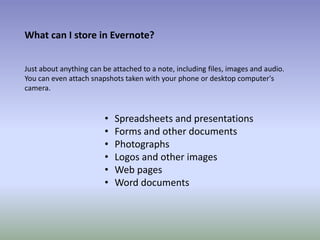
What can I store in Evernote?
Just about anything can be attached to a note, including files, images and audio.
You can even attach snapshots taken with your phone or desktop computer's
camera.
• Spreadsheets and presentations
• Forms and other documents
• Photographs
• Logos and other images
• Web pages
• Word documents
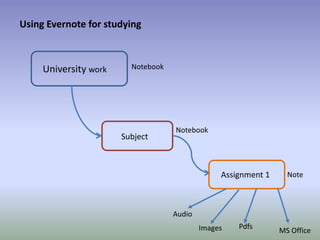
Using Evernote for studying
University work
Subject
Assignment 1
Notebook
Notebook
Note
Images MS Office
Pdfs
Audio
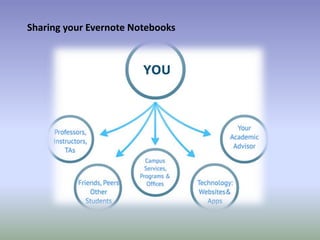
Sharing your Evernote Notebooks
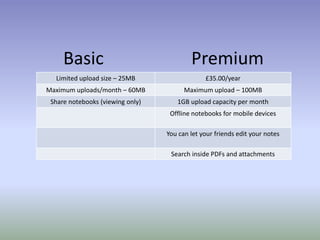
Basic Premium
Limited upload size – 25MB £35.00/year
Maximum uploads/month – 60MB Maximum upload – 100MB
Share notebooks (viewing only) 1GB upload capacity per month
Offline notebooks for mobile devices
You can let your friends edit your notes
Search inside PDFs and attachments
• Makes it easy to easily remember things big and small using computer, phone and
the web.
• It is a great organizational tool
• Keeps all your important information in one place
• Automatically syncs all your notebooks to the cloud and everywhere you have
Evernote installed
• Apps for all kind of smartphones
• Evernote has browser extensions for the major browsers
• Allows users to easily share their notes with others via email, or popular social
media
Why use Evernote?
Resources
https://evernote.com/contact/support/
Thank you for listening

Humanities1

  • 1.
  • 2.
    Evernote ‘A tool forall seasons’
  • 3.
    There is muchmore!!! • Skitch • Penultimate • Webclipper • Clearly • Jotscript • Presentation Mode • Mohiomap • Postach
  • 4.
    Evernote Presentation Mode PresentationMode is the best way to show off your thoughts in a beautiful and simple way. Collect everything into one or more Evernote notes and press one button to start presenting
  • 5.
    ‘How you usetechnology is dependent upon you and what you want to do with it. Technology per se if not used in the right context is a waste of your time’
  • 6.
    What can Istore in Evernote? Just about anything can be attached to a note, including files, images and audio. You can even attach snapshots taken with your phone or desktop computer's camera. • Spreadsheets and presentations • Forms and other documents • Photographs • Logos and other images • Web pages • Word documents
  • 7.
    Using Evernote forstudying University work Subject Assignment 1 Notebook Notebook Note Images MS Office Pdfs Audio
  • 8.
  • 9.
    Basic Premium Limited uploadsize – 25MB £35.00/year Maximum uploads/month – 60MB Maximum upload – 100MB Share notebooks (viewing only) 1GB upload capacity per month Offline notebooks for mobile devices You can let your friends edit your notes Search inside PDFs and attachments
  • 10.
    • Makes iteasy to easily remember things big and small using computer, phone and the web. • It is a great organizational tool • Keeps all your important information in one place • Automatically syncs all your notebooks to the cloud and everywhere you have Evernote installed • Apps for all kind of smartphones • Evernote has browser extensions for the major browsers • Allows users to easily share their notes with others via email, or popular social media Why use Evernote?
  • 11.
  • 12.
    Thank you forlistening