By
Carol J. Laferty
To receive the full benefit of this course, the staff
of the Montgomery County Public Library strongly
recommends attending in person. Individual
assistance with each exercise is provided in class as
well as a Question & Answer session with our
instructors.
 Microsoft Suite 2010 contains:
 ◦ Word – Word Processing
 ◦ Excel - Spreadsheet
 ◦ PowerPoint – Presentation or
   Slideshow
 ◦ Access - Database
 ◦ Publisher – Desktop Publishing
 ◦ Outlook – Email
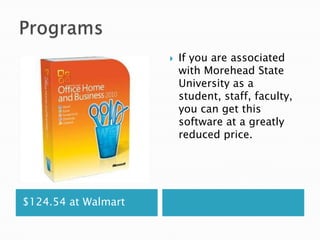
   If you are associated
                         with Morehead State
                         University as a
                         student, staff, faculty,
                         you can get this
                         software at a greatly
                         reduced price.


$124.54 at Walmart
   Word processing – type
    letters, flyers, reports, make tables of
    information.
   The list is endless.
   You can also work with pictures in Word. Let’s
    look at that.
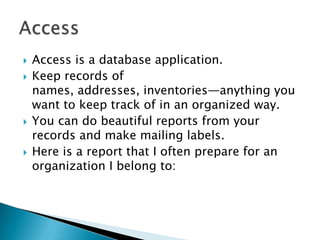
   Excel is a spreadsheet application.
   You work with numbers and formulas.
   Useful for accountant-types, teachers for
    averaging grades, business owners to name a
    few.
   You can also use it for databases and lists.
   Labels for mailing can be printed from it also.
   Access is a database application.
   Keep records of
    names, addresses, inventories—anything you
    want to keep track of in an organized way.
   You can do beautiful reports from your
    records and make mailing labels.
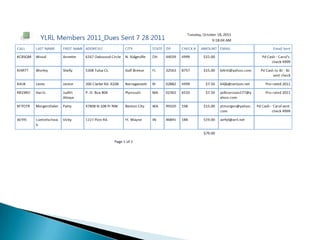
   Here is a report that I often prepare for an
    organization I belong to:
   PowerPoint is a presentation or Slideshow
    application.
   It is highly used in
    business, education, hospitals, sales—
    everywhere.
   It is easy to do and things look very
    professional when presented.
   You can add
    pictures, videos, sounds, Internet links.
   Just about any form of media or
    communication can be added to a slide.
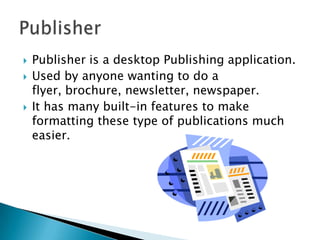
   Publisher is a desktop Publishing application.
   Used by anyone wanting to do a
    flyer, brochure, newsletter, newspaper.
   It has many built-in features to make
    formatting these type of publications much
    easier.
   Outlook is an email application.
   Many people use this application daily for
    their email provider.
   It has many helpful features besides just
    sending/receiving email.
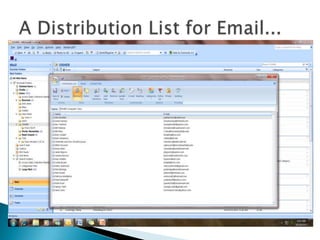
   You can make Address book and distribution
    lists to make mass mailings quite easy.
Microsoft Office Applications

Microsoft Office Applications

  • 1.
  • 2.
    To receive thefull benefit of this course, the staff of the Montgomery County Public Library strongly recommends attending in person. Individual assistance with each exercise is provided in class as well as a Question & Answer session with our instructors.
  • 3.
     Microsoft Suite2010 contains: ◦ Word – Word Processing ◦ Excel - Spreadsheet ◦ PowerPoint – Presentation or Slideshow ◦ Access - Database ◦ Publisher – Desktop Publishing ◦ Outlook – Email
  • 4.
    If you are associated with Morehead State University as a student, staff, faculty, you can get this software at a greatly reduced price. $124.54 at Walmart
  • 5.
    Word processing – type letters, flyers, reports, make tables of information.  The list is endless.  You can also work with pictures in Word. Let’s look at that.
  • 6.
    Excel is a spreadsheet application.  You work with numbers and formulas.  Useful for accountant-types, teachers for averaging grades, business owners to name a few.  You can also use it for databases and lists.  Labels for mailing can be printed from it also.
  • 7.
    Access is a database application.  Keep records of names, addresses, inventories—anything you want to keep track of in an organized way.  You can do beautiful reports from your records and make mailing labels.  Here is a report that I often prepare for an organization I belong to:
  • 9.
    PowerPoint is a presentation or Slideshow application.  It is highly used in business, education, hospitals, sales— everywhere.  It is easy to do and things look very professional when presented.  You can add pictures, videos, sounds, Internet links.  Just about any form of media or communication can be added to a slide.
  • 10.
    Publisher is a desktop Publishing application.  Used by anyone wanting to do a flyer, brochure, newsletter, newspaper.  It has many built-in features to make formatting these type of publications much easier.
  • 11.
    Outlook is an email application.  Many people use this application daily for their email provider.  It has many helpful features besides just sending/receiving email.  You can make Address book and distribution lists to make mass mailings quite easy.