Polycom Solutions For Microsoft® Unified CommunicationsMike StacyMicrosoft Solutions Architect
Polycom & Microsoft RelationshipStrategic PartnerMulti-year development and joint marketing agreement with Microsoft’s UC Product GroupOnly company to currently offer integrated audio and visual communication solutions for Office Communications Server (OCS) 2007Co-development  Interoperability & Integration Three-phase roadmap integrating Polycom visual communication solutions with OCS 2007Leading ODM PartnerCX Family of Phones for Microsoft OCS 2007 VoIP availableFuture plans include “Polycom Differentiated” Phones
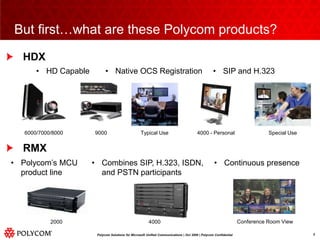
HDXRMXBut first…what are these Polycom products?6000/7000/8000Typical Use4000 - PersonalSpecial Use9000Conference Room View20004000
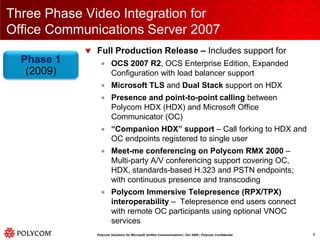
Three Phase Video Integration forOffice Communications Server 2007Full Production Release – Includes support forOCS 2007 R2, OCS Enterprise Edition, Expanded Configuration with load balancer supportMicrosoft TLS and Dual Stack support on HDX Presence and point-to-point calling between Polycom HDX (HDX) and Microsoft Office Communicator (OC)“Companion HDX” support – Call forking to HDX and OC endpoints registered to single userMeet-me conferencing on Polycom RMX 2000 – Multi-party A/V conferencing support covering OC, HDX, standards-based H.323 and PSTN endpoints; with continuous presence and transcodingPolycom Immersive Telepresence (RPX/TPX) interoperability – Telepresence end users connect with remote OC participants using optional VNOC servicesPhase 1(2009)
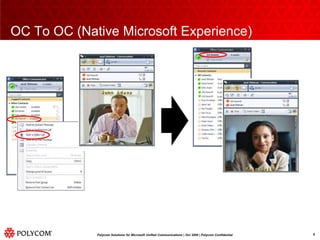
OC To OC (Native Microsoft Experience)
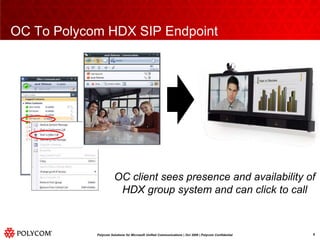
OC To Polycom HDX SIP EndpointOC client sees presence and availability ofHDX group system and can click to call
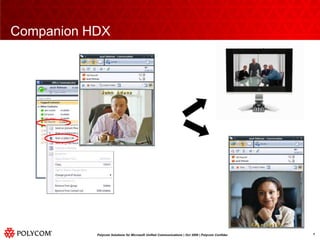
Companion HDX
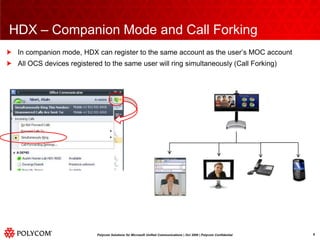
HDX – Companion Mode and Call ForkingIn companion mode, HDX can register to the same account as the user’s MOC accountAll OCS devices registered to the same user will ring simultaneously (Call Forking)
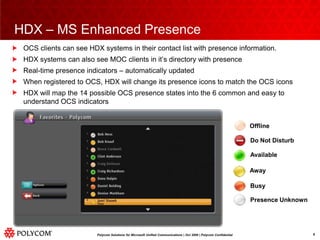
OCS clients can see HDX systems in their contact list with presence information.HDX systems can also see MOC clients in it’s directory with presenceReal-time presence indicators – automatically updatedWhen registered to OCS, HDX will change its presence icons to match the OCS iconsHDX will map the 14 possible OCS presence states into the 6 common and easy to understand OCS indicatorsHDX – MS Enhanced PresenceOfflineDo Not DisturbAvailableAwayBusyPresence Unknown
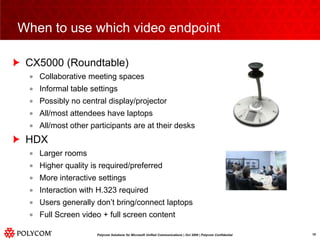
When to use which video endpointCX5000 (Roundtable)Collaborative meeting spacesInformal table settingsPossibly no central display/projectorAll/most attendees have laptopsAll/most other participants are at their desksHDXLarger roomsHigher quality is required/preferredMore interactive settingsInteraction with H.323 requiredUsers generally don’t bring/connect laptopsFull Screen video + full screen content
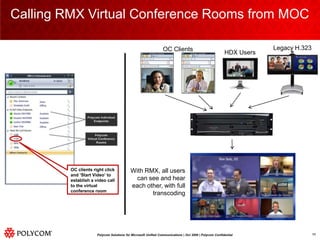
Calling RMX Virtual Conference Rooms from MOCLegacy H.323OC Clients HDX UsersWith RMX, all users can see and hear each other, with full transcodingOC clients right click and ‘Start Video’ to establish a video call to the virtual conference room
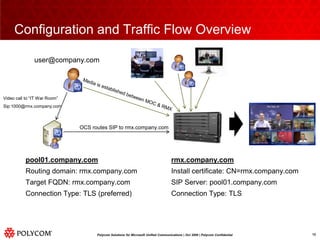
Configuration and Traffic Flow Overviewuser@company.comMedia is established between MOC & RMXVideo call to “IT War Room”Sip:1000@rmx.company.comOCS routes SIP to rmx.company.comrmx.company.comInstall certificate: CN=rmx.company.comSIP Server: pool01.company.comConnection Type: TLSpool01.company.comRouting domain: rmx.company.comTarget FQDN: rmx.company.comConnection Type: TLS (preferred)
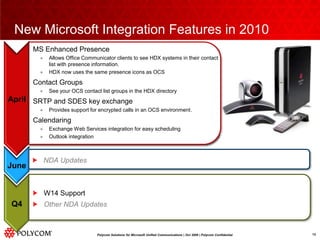
New Microsoft Integration Features in 2010MS Enhanced PresenceAllows Office Communicator clients to see HDX systems in their contact list with presence information.HDX now uses the same presence icons as OCSContact GroupsSee your OCS contact list groups in the HDX directoryMultipoint Group CallingInitiate a multipoint call with a single click from the HDXCalls all participants within a group using the HDX internal MCUSRTP and SDES key exchangeProvides support for encrypted calls in an OCS environment.MS Enhanced PresenceAllows Office Communicator clients to see HDX systems in their contact list with presence information.HDX now uses the same presence icons as OCSContact GroupsSee your OCS contact list groups in the HDX directorySRTP and SDES key exchangeProvides support for encrypted calls in an OCS environment.CalendaringExchange Web Services integration for easy schedulingOutlook integrationAprilAprilJuneNDA UpdatesW14 SupportOther NDA UpdatesQ4
Polycom Conferencing for Outlook (PCO)Mike StacyMicrosoft Solutions Architect
Polycom Conferencing for Outlook (PCO)What is it?It the integration of Polycom video conferencing systems with Outlook, Communicator and Microsoft ExchangeWhat does it do?It allows users to schedule meetings and reserve room systems using OutlookIt adds on screen real-time calendar function for the HDX, making it much easier to join meetingsWhy would you want it?To ease the scheduling of conference and meeting roomsTo provide easy joining of scheduled conferences using the HDX or Office Communicator
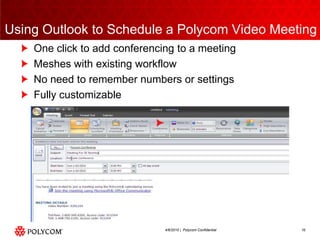
Using Outlook to Schedule a Polycom Video MeetingOne click to add conferencing to a meetingMeshes with existing workflowNo need to remember numbers or settingsFully customizable
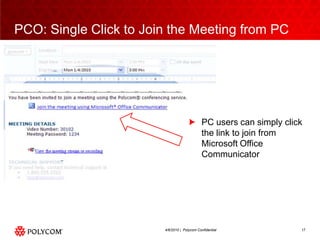
PCO: Single Click to Join the Meeting from PCPC users can simply click the link to join from Microsoft Office Communicator
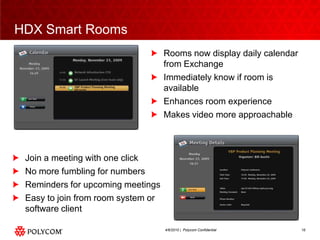
HDX Smart RoomsRooms now display daily calendar from ExchangeImmediately know if room is availableEnhances room experienceMakes video more approachableJoin a meeting with one clickNo more fumbling for numbersReminders for upcoming meetingsEasy to join from room system or software client
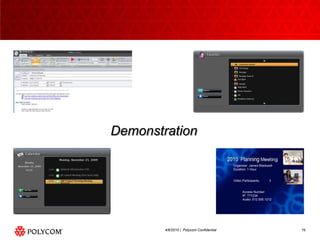
Demonstration
Questions?

Microsoft Integration Polycom W14

  • 1.
    Polycom Solutions ForMicrosoft® Unified CommunicationsMike StacyMicrosoft Solutions Architect
  • 2.
    Polycom & MicrosoftRelationshipStrategic PartnerMulti-year development and joint marketing agreement with Microsoft’s UC Product GroupOnly company to currently offer integrated audio and visual communication solutions for Office Communications Server (OCS) 2007Co-development  Interoperability & Integration Three-phase roadmap integrating Polycom visual communication solutions with OCS 2007Leading ODM PartnerCX Family of Phones for Microsoft OCS 2007 VoIP availableFuture plans include “Polycom Differentiated” Phones
  • 3.
    HDXRMXBut first…what arethese Polycom products?6000/7000/8000Typical Use4000 - PersonalSpecial Use9000Conference Room View20004000
  • 4.
    Three Phase VideoIntegration forOffice Communications Server 2007Full Production Release – Includes support forOCS 2007 R2, OCS Enterprise Edition, Expanded Configuration with load balancer supportMicrosoft TLS and Dual Stack support on HDX Presence and point-to-point calling between Polycom HDX (HDX) and Microsoft Office Communicator (OC)“Companion HDX” support – Call forking to HDX and OC endpoints registered to single userMeet-me conferencing on Polycom RMX 2000 – Multi-party A/V conferencing support covering OC, HDX, standards-based H.323 and PSTN endpoints; with continuous presence and transcodingPolycom Immersive Telepresence (RPX/TPX) interoperability – Telepresence end users connect with remote OC participants using optional VNOC servicesPhase 1(2009)
  • 5.
    OC To OC(Native Microsoft Experience)
  • 6.
    OC To PolycomHDX SIP EndpointOC client sees presence and availability ofHDX group system and can click to call
  • 7.
  • 8.
    HDX – CompanionMode and Call ForkingIn companion mode, HDX can register to the same account as the user’s MOC accountAll OCS devices registered to the same user will ring simultaneously (Call Forking)
  • 9.
    OCS clients cansee HDX systems in their contact list with presence information.HDX systems can also see MOC clients in it’s directory with presenceReal-time presence indicators – automatically updatedWhen registered to OCS, HDX will change its presence icons to match the OCS iconsHDX will map the 14 possible OCS presence states into the 6 common and easy to understand OCS indicatorsHDX – MS Enhanced PresenceOfflineDo Not DisturbAvailableAwayBusyPresence Unknown
  • 10.
    When to usewhich video endpointCX5000 (Roundtable)Collaborative meeting spacesInformal table settingsPossibly no central display/projectorAll/most attendees have laptopsAll/most other participants are at their desksHDXLarger roomsHigher quality is required/preferredMore interactive settingsInteraction with H.323 requiredUsers generally don’t bring/connect laptopsFull Screen video + full screen content
  • 11.
    Calling RMX VirtualConference Rooms from MOCLegacy H.323OC Clients HDX UsersWith RMX, all users can see and hear each other, with full transcodingOC clients right click and ‘Start Video’ to establish a video call to the virtual conference room
  • 12.
    Configuration and TrafficFlow Overviewuser@company.comMedia is established between MOC & RMXVideo call to “IT War Room”Sip:1000@rmx.company.comOCS routes SIP to rmx.company.comrmx.company.comInstall certificate: CN=rmx.company.comSIP Server: pool01.company.comConnection Type: TLSpool01.company.comRouting domain: rmx.company.comTarget FQDN: rmx.company.comConnection Type: TLS (preferred)
  • 13.
    New Microsoft IntegrationFeatures in 2010MS Enhanced PresenceAllows Office Communicator clients to see HDX systems in their contact list with presence information.HDX now uses the same presence icons as OCSContact GroupsSee your OCS contact list groups in the HDX directoryMultipoint Group CallingInitiate a multipoint call with a single click from the HDXCalls all participants within a group using the HDX internal MCUSRTP and SDES key exchangeProvides support for encrypted calls in an OCS environment.MS Enhanced PresenceAllows Office Communicator clients to see HDX systems in their contact list with presence information.HDX now uses the same presence icons as OCSContact GroupsSee your OCS contact list groups in the HDX directorySRTP and SDES key exchangeProvides support for encrypted calls in an OCS environment.CalendaringExchange Web Services integration for easy schedulingOutlook integrationAprilAprilJuneNDA UpdatesW14 SupportOther NDA UpdatesQ4
  • 14.
    Polycom Conferencing forOutlook (PCO)Mike StacyMicrosoft Solutions Architect
  • 15.
    Polycom Conferencing forOutlook (PCO)What is it?It the integration of Polycom video conferencing systems with Outlook, Communicator and Microsoft ExchangeWhat does it do?It allows users to schedule meetings and reserve room systems using OutlookIt adds on screen real-time calendar function for the HDX, making it much easier to join meetingsWhy would you want it?To ease the scheduling of conference and meeting roomsTo provide easy joining of scheduled conferences using the HDX or Office Communicator
  • 16.
    Using Outlook toSchedule a Polycom Video MeetingOne click to add conferencing to a meetingMeshes with existing workflowNo need to remember numbers or settingsFully customizable
  • 17.
    PCO: Single Clickto Join the Meeting from PCPC users can simply click the link to join from Microsoft Office Communicator
  • 18.
    HDX Smart RoomsRoomsnow display daily calendar from ExchangeImmediately know if room is availableEnhances room experienceMakes video more approachableJoin a meeting with one clickNo more fumbling for numbersReminders for upcoming meetingsEasy to join from room system or software client
  • 19.
  • 20.