Ferrari electronic AG – ready for Lync 2010!Johann Deutinger, Chief Technology Officer
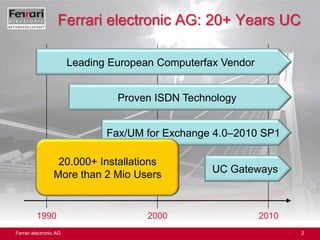
Ferrari electronic AG: 20+ Years UCLeading European Computerfax VendorProven ISDN TechnologyFax/UM for Exchange 4.0–2010 SP120.000+ InstallationsMore than 2 Mio UsersUC Gateways199020002010
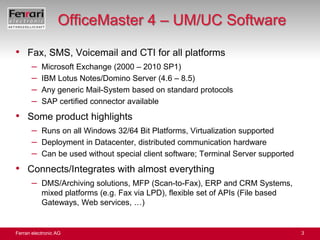
OfficeMaster 4 – UM/UC SoftwareFax, SMS, Voicemail and CTI for all platformsMicrosoft Exchange (2000 – 2010 SP1)IBM Lotus Notes/Domino Server (4.6 – 8.5)Any generic Mail-System based on standard protocolsSAP certified connector availableSome product highlightsRuns on all Windows 32/64 Bit Platforms, Virtualization supportedDeployment in Datacenter, distributed communication hardwareCan be used without special client software; Terminal Server supportedConnects/Integrates with almost everythingDMS/Archiving solutions, MFP (Scan-to-Fax), ERP and CRM Systems, mixed platforms (e.g. Fax via LPD), flexible set of APIs (File based Gateways, Web services, …)
OfficeMaster 4 – UM/UC SoftwareSame Product for all Mail platforms (Exchange/Notes/Generic)License for one instance included, more can be licensed separatelyMain integration platform: Microsoft Exchange ServerSupports Exchange 2000-2010 SP1, SBS 2003, Essential Server 2008Exchange Cluster-enabledNo components installed on Exchange ServerUser configuration stored in AD – without schema extension!Administration integrated into EMC and AD User/Computer MMCAlso supports BPOS via on-premises Fax/SMS Server (based on local AD with DirSync Connector)Easy Deploment within minutesAll objects (e.g. Send/Receive Connector) are created automaticallyDeinstallation removes all these objects completely
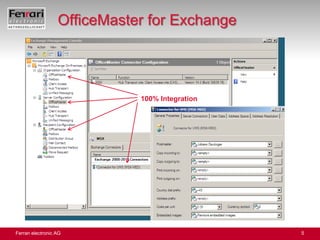
OfficeMaster for Exchange100% Integration
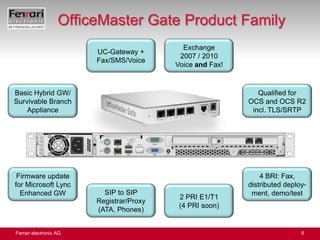
OfficeMaster Gate Product FamilyUC-Gateway +Fax/SMS/VoiceExchange 2007 / 2010Voice and Fax!QualifiedforOCS andOCS R2 incl. TLS/SRTPBasic Hybrid GW/ SurvivableBranch Appliance4 BRI: Fax, distributeddeploy- ment, demo/testFirmware update for Microsoft Lync Enhanced GWSIP to SIP Registrar/Proxy(ATA, Phones)2 PRI E1/T1(4 PRI soon)
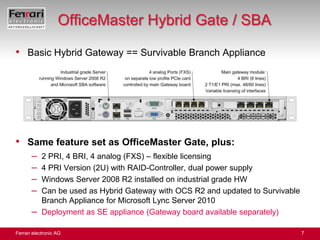
OfficeMaster Hybrid Gate / SBABasic Hybrid Gateway == Survivable Branch ApplianceSame feature set as OfficeMaster Gate, plus:2 PRI, 4 BRI, 4 analog (FXS) – flexible licensing4 PRI Version (2U) with RAID-Controller, dual power supplyWindows Server 2008 R2 installed on industrial grade HWCan be used as Hybrid Gateway with OCS R2 and updated to Survivable Branch Appliance for Microsoft Lync Server 2010 Deployment as SE appliance (Gateway board available separately)
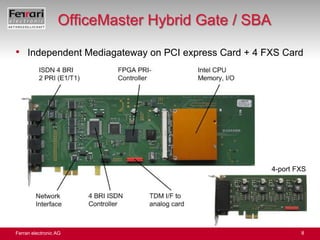
OfficeMaster Hybrid Gate / SBAIndependent Mediagateway on PCI express Card + 4 FXS Card4-port FXS
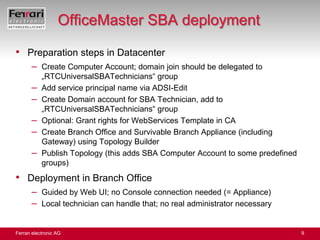
OfficeMaster SBA deploymentPreparation steps in DatacenterCreate Computer Account; domain join should be delegated to „RTCUniversalSBATechnicians“ groupAdd service principal name via ADSI-EditCreate Domain account for SBA Technician, add to „RTCUniversalSBATechnicians“ groupOptional: Grant rights for WebServices Template in CACreate Branch Office and Survivable Branch Appliance (including Gateway) using Topology BuilderPublish Topology (this adds SBA Computer Account to some predefined groups)Deployment in Branch OfficeGuided by Web UI; no Console connection needed (= Appliance)Local technician can handle that; no real administrator necessary
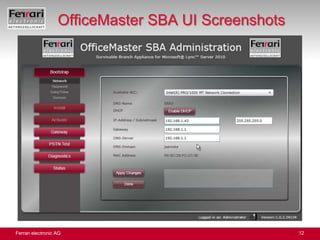
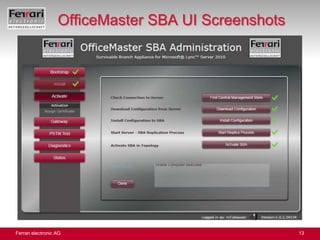
OfficeMaster SBA UISilverlight based Web UI, can be run from any Windows clientBootstrap stepsIP configuration, change Administrator password, set date, time, local time zone, join domainInstall stepsfinalizing SQL, install Lync servicesActivation download/install configuration, start replica process, activate SBA, request/install certificateGateway configuration (basic configuration)Number and type of interfaces usedConfigure Dial-Plan, analog phone numbers
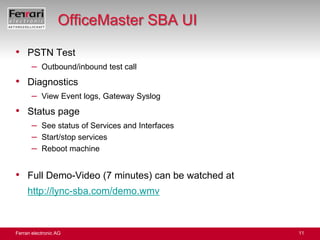
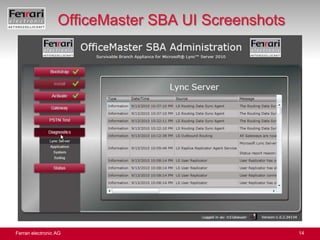
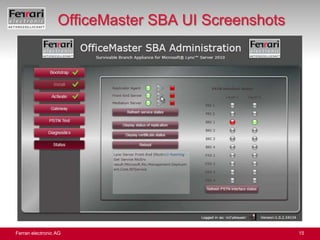
OfficeMaster SBA UIPSTN TestOutbound/inbound test callDiagnosticsView Event logs, Gateway SyslogStatus pageSee status of Services and InterfacesStart/stop servicesReboot machineFull Demo-Video (7 minutes) can be watched athttp://lync-sba.com/demo.wmv
OfficeMaster SBA UI Screenshots
Media Gateways for Lync (EMG)Extended Functions (mandatory)Media Bypass, Hairpin EliminationTLS/SRTP support mandatoryDNS load balancingSIP OPTIONS („Ping“)Failover to Backup Mediation serverSIP REFER-SupportGreatly improved Early Media including multiple early RTPCN Codec mandatoryAnalog-Ports (FXS, FXO) must be availableEverything but DNS-LB also applies to SBA-integrated GW
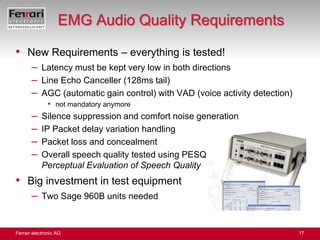
EMG Audio Quality RequirementsNew Requirements – everything is tested!Latency must be kept very low in both directionsLine Echo Canceller (128ms tail)AGC (automatic gain control) with VAD (voice activity detection)not mandatory anymoreSilence suppression and comfort noise generationIP Packet delay variation handlingPacket loss and concealmentOverall speech quality tested using PESQPerceptual Evaluation of Speech QualityBig investment in test equipmentTwo Sage 960B units needed
Distribution channel established inEurope, US/Canada (www.novusllc.com), Asia PacificSupport, training available on-site, remoteOpen Federation (SMTP=SIP)Sales: info@ferrari-electronic.de     Technical questions: deutinger@ferrari-electronic.deThank You!More Information

Session 2: Johann Deutinger (SBA, Lync)

  • 1.
    Ferrari electronic AG– ready for Lync 2010!Johann Deutinger, Chief Technology Officer
  • 2.
    Ferrari electronic AG:20+ Years UCLeading European Computerfax VendorProven ISDN TechnologyFax/UM for Exchange 4.0–2010 SP120.000+ InstallationsMore than 2 Mio UsersUC Gateways199020002010
  • 3.
    OfficeMaster 4 –UM/UC SoftwareFax, SMS, Voicemail and CTI for all platformsMicrosoft Exchange (2000 – 2010 SP1)IBM Lotus Notes/Domino Server (4.6 – 8.5)Any generic Mail-System based on standard protocolsSAP certified connector availableSome product highlightsRuns on all Windows 32/64 Bit Platforms, Virtualization supportedDeployment in Datacenter, distributed communication hardwareCan be used without special client software; Terminal Server supportedConnects/Integrates with almost everythingDMS/Archiving solutions, MFP (Scan-to-Fax), ERP and CRM Systems, mixed platforms (e.g. Fax via LPD), flexible set of APIs (File based Gateways, Web services, …)
  • 4.
    OfficeMaster 4 –UM/UC SoftwareSame Product for all Mail platforms (Exchange/Notes/Generic)License for one instance included, more can be licensed separatelyMain integration platform: Microsoft Exchange ServerSupports Exchange 2000-2010 SP1, SBS 2003, Essential Server 2008Exchange Cluster-enabledNo components installed on Exchange ServerUser configuration stored in AD – without schema extension!Administration integrated into EMC and AD User/Computer MMCAlso supports BPOS via on-premises Fax/SMS Server (based on local AD with DirSync Connector)Easy Deploment within minutesAll objects (e.g. Send/Receive Connector) are created automaticallyDeinstallation removes all these objects completely
  • 5.
  • 6.
    OfficeMaster Gate ProductFamilyUC-Gateway +Fax/SMS/VoiceExchange 2007 / 2010Voice and Fax!QualifiedforOCS andOCS R2 incl. TLS/SRTPBasic Hybrid GW/ SurvivableBranch Appliance4 BRI: Fax, distributeddeploy- ment, demo/testFirmware update for Microsoft Lync Enhanced GWSIP to SIP Registrar/Proxy(ATA, Phones)2 PRI E1/T1(4 PRI soon)
  • 7.
    OfficeMaster Hybrid Gate/ SBABasic Hybrid Gateway == Survivable Branch ApplianceSame feature set as OfficeMaster Gate, plus:2 PRI, 4 BRI, 4 analog (FXS) – flexible licensing4 PRI Version (2U) with RAID-Controller, dual power supplyWindows Server 2008 R2 installed on industrial grade HWCan be used as Hybrid Gateway with OCS R2 and updated to Survivable Branch Appliance for Microsoft Lync Server 2010 Deployment as SE appliance (Gateway board available separately)
  • 8.
    OfficeMaster Hybrid Gate/ SBAIndependent Mediagateway on PCI express Card + 4 FXS Card4-port FXS
  • 9.
    OfficeMaster SBA deploymentPreparationsteps in DatacenterCreate Computer Account; domain join should be delegated to „RTCUniversalSBATechnicians“ groupAdd service principal name via ADSI-EditCreate Domain account for SBA Technician, add to „RTCUniversalSBATechnicians“ groupOptional: Grant rights for WebServices Template in CACreate Branch Office and Survivable Branch Appliance (including Gateway) using Topology BuilderPublish Topology (this adds SBA Computer Account to some predefined groups)Deployment in Branch OfficeGuided by Web UI; no Console connection needed (= Appliance)Local technician can handle that; no real administrator necessary
  • 10.
    OfficeMaster SBA UISilverlightbased Web UI, can be run from any Windows clientBootstrap stepsIP configuration, change Administrator password, set date, time, local time zone, join domainInstall stepsfinalizing SQL, install Lync servicesActivation download/install configuration, start replica process, activate SBA, request/install certificateGateway configuration (basic configuration)Number and type of interfaces usedConfigure Dial-Plan, analog phone numbers
  • 11.
    OfficeMaster SBA UIPSTNTestOutbound/inbound test callDiagnosticsView Event logs, Gateway SyslogStatus pageSee status of Services and InterfacesStart/stop servicesReboot machineFull Demo-Video (7 minutes) can be watched athttp://lync-sba.com/demo.wmv
  • 12.
  • 13.
  • 14.
  • 15.
  • 16.
    Media Gateways forLync (EMG)Extended Functions (mandatory)Media Bypass, Hairpin EliminationTLS/SRTP support mandatoryDNS load balancingSIP OPTIONS („Ping“)Failover to Backup Mediation serverSIP REFER-SupportGreatly improved Early Media including multiple early RTPCN Codec mandatoryAnalog-Ports (FXS, FXO) must be availableEverything but DNS-LB also applies to SBA-integrated GW
  • 17.
    EMG Audio QualityRequirementsNew Requirements – everything is tested!Latency must be kept very low in both directionsLine Echo Canceller (128ms tail)AGC (automatic gain control) with VAD (voice activity detection)not mandatory anymoreSilence suppression and comfort noise generationIP Packet delay variation handlingPacket loss and concealmentOverall speech quality tested using PESQPerceptual Evaluation of Speech QualityBig investment in test equipmentTwo Sage 960B units needed
  • 18.
    Distribution channel establishedinEurope, US/Canada (www.novusllc.com), Asia PacificSupport, training available on-site, remoteOpen Federation (SMTP=SIP)Sales: info@ferrari-electronic.de Technical questions: deutinger@ferrari-electronic.deThank You!More Information