Automation solution @ Polycom
Moshe Reubinoff – Automation Team Leader
Guy Bachar – Testing Manager


©   Polycom, Inc. All rights reserved.
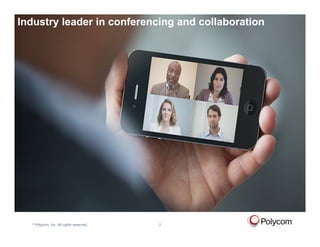
Industry leader in conferencing and collaboration

  Introduction to Polycom


  ©   Polycom, Inc. All rights reserved.   2
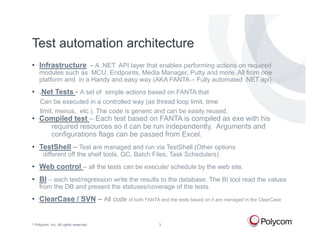
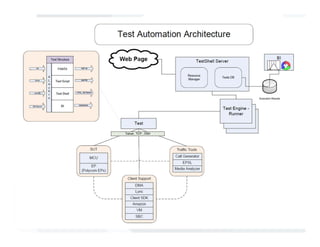
Test automation architecture
• Infrastructure - A .NET API layer that enables performing actions on required
      modules such as MCU, Endpoints, Media Manager, Putty and more. All from one
      platform and in a Handy and easy way (AKA FANTA – Fully automated .NET api).
• .Net Tests - A set of simple actions based on FANTA that
       Can be executed in a controlled way (as thread loop limit, time
       limit, menus, etc.). The code is generic and can be easily reused.
• Compiled test – Each test based on FANTA is compiled as exe with his
    required resources so it can be run independently. Arguments and
    configurations flags can be passed from Excel.
• TestShell – Test are managed and run via TestShell (Other options
         different off the shelf tools, QC, Batch Files, Task Schedulers)
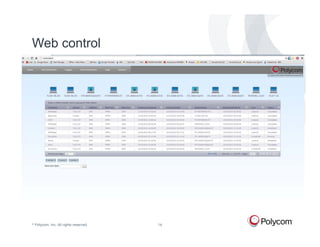
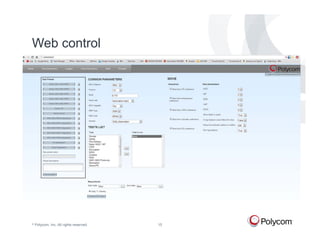
• Web control – all the tests can be execute/ schedule by the web site.
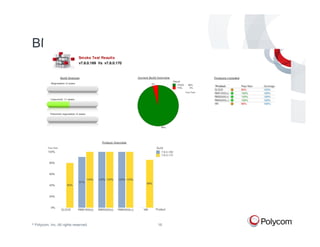
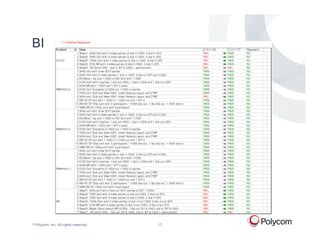
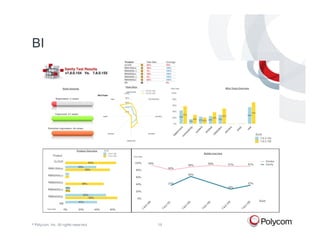
• BI – each test/regression write the results to the database. The BI tool read the values
      from the DB and present the statuses/coverage of the tests.
• ClearCase / SVN – All code of both FANTA and the tests based on it are managed in the ClearCase


©   Polycom, Inc. All rights reserved.             3
©   Polycom, Inc. All rights reserved.
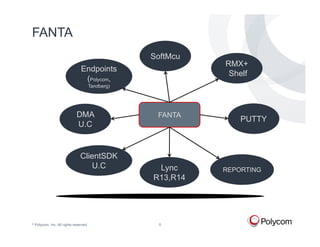
FANTA
                                                     SoftMcu
                                                               RMX+
                                 Endpoints
                                                                Shelf
                                  (Polycom,
                                         Tandberg)


                              DMA                     FANTA
                                                                   PUTTY
                              U.C


                                 ClientSDK
                                     U.C              Lync     REPORTING
                                                     R13,R14


©   Polycom, Inc. All rights reserved.                5
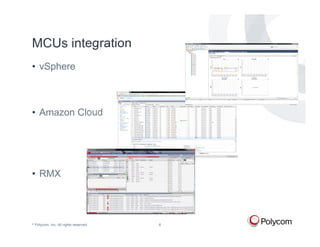
MCUs integration
• vSphere


• Amazon Cloud


• RMX


©   Polycom, Inc. All rights reserved.   6
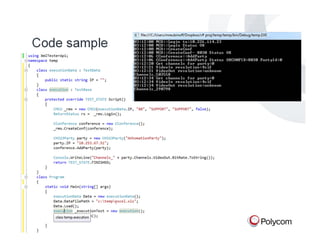
Code sample


©   Polycom, Inc. All rights reserved.   7
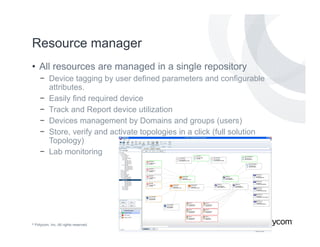
Resource manager
• All resources are managed in a single repository
       − Device tagging by user defined parameters and configurable
         attributes.
       − Easily find required device
       − Track and Report device utilization
       − Devices management by Domains and groups (users)
       − Store, verify and activate topologies in a click (full solution
         Topology)
       − Lab monitoring


©   Polycom, Inc. All rights reserved.   8
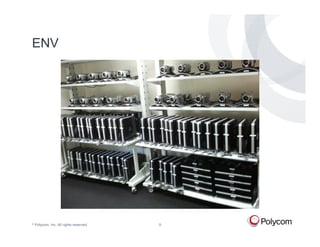
ENV


©   Polycom, Inc. All rights reserved.   9
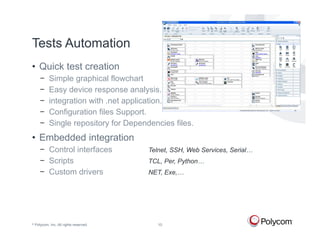
Tests Automation
• Quick test creation
       −     Simple graphical flowchart
       −     Easy device response analysis.
       −     integration with .net application.
       −     Configuration files Support.
       −     Single repository for Dependencies files.
• Embedded integration
       − Control interfaces              Telnet, SSH, Web Services, Serial…
       − Scripts                         TCL, Per, Python…
       − Custom drivers                  NET, Exe,…


©   Polycom, Inc. All rights reserved.      10
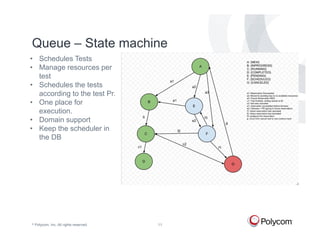
Queue – State machine
• Schedules Tests
• Manage resources per
  test
• Schedules the tests
  according to the test Pr.
• One place for
  execution.
• Domain support
• Keep the scheduler in
  the DB


©   Polycom, Inc. All rights reserved.   11
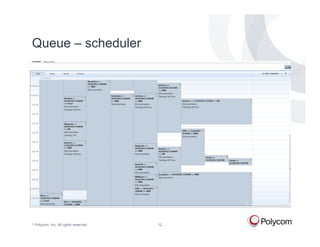
Queue – scheduler


©   Polycom, Inc. All rights reserved.   12
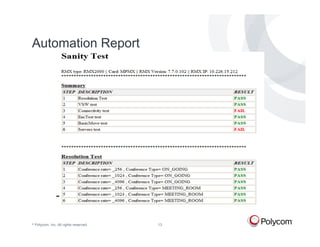
Automation Report


©   Polycom, Inc. All rights reserved.   13
Web control


©   Polycom, Inc. All rights reserved.   14
Web control


©   Polycom, Inc. All rights reserved.   15
BI


©   Polycom, Inc. All rights reserved.   16
BI


©   Polycom, Inc. All rights reserved.   17
BI


©   Polycom, Inc. All rights reserved.   18
Challenges
• Testing in Real-time environment.
• Flexibility.
• Test development methodology.
• Test engineers training. (Manual & Automatic).
• Resource management / Test configuration
• Control different devices.
• Stabilize the environment.
• Analysis & reports.


©   Polycom, Inc. All rights reserved.   19
Next Step
• Control more devices (MAC PCs, more platforms).
• Enlarge automation coverage.
• Automation framework enhancement (Web support –
  RSS, SQL management)
• Automatic analysis (compare to previous results)
•…


©   Polycom, Inc. All rights reserved.   20
Questions?


©   Polycom, Inc. All rights reserved.

Polycom Automation Framework - Polycom

  • 1.
    Automation solution @Polycom Moshe Reubinoff – Automation Team Leader Guy Bachar – Testing Manager © Polycom, Inc. All rights reserved.
  • 2.
    Industry leader inconferencing and collaboration Introduction to Polycom © Polycom, Inc. All rights reserved. 2
  • 3.
    Test automation architecture •Infrastructure - A .NET API layer that enables performing actions on required modules such as MCU, Endpoints, Media Manager, Putty and more. All from one platform and in a Handy and easy way (AKA FANTA – Fully automated .NET api). • .Net Tests - A set of simple actions based on FANTA that Can be executed in a controlled way (as thread loop limit, time limit, menus, etc.). The code is generic and can be easily reused. • Compiled test – Each test based on FANTA is compiled as exe with his required resources so it can be run independently. Arguments and configurations flags can be passed from Excel. • TestShell – Test are managed and run via TestShell (Other options different off the shelf tools, QC, Batch Files, Task Schedulers) • Web control – all the tests can be execute/ schedule by the web site. • BI – each test/regression write the results to the database. The BI tool read the values from the DB and present the statuses/coverage of the tests. • ClearCase / SVN – All code of both FANTA and the tests based on it are managed in the ClearCase © Polycom, Inc. All rights reserved. 3
  • 4.
    © Polycom, Inc. All rights reserved.
  • 5.
    FANTA SoftMcu RMX+ Endpoints Shelf (Polycom, Tandberg) DMA FANTA PUTTY U.C ClientSDK U.C Lync REPORTING R13,R14 © Polycom, Inc. All rights reserved. 5
  • 6.
    MCUs integration • vSphere •Amazon Cloud • RMX © Polycom, Inc. All rights reserved. 6
  • 7.
    Code sample © Polycom, Inc. All rights reserved. 7
  • 8.
    Resource manager • Allresources are managed in a single repository − Device tagging by user defined parameters and configurable attributes. − Easily find required device − Track and Report device utilization − Devices management by Domains and groups (users) − Store, verify and activate topologies in a click (full solution Topology) − Lab monitoring © Polycom, Inc. All rights reserved. 8
  • 9.
    ENV © Polycom, Inc. All rights reserved. 9
  • 10.
    Tests Automation • Quicktest creation − Simple graphical flowchart − Easy device response analysis. − integration with .net application. − Configuration files Support. − Single repository for Dependencies files. • Embedded integration − Control interfaces Telnet, SSH, Web Services, Serial… − Scripts TCL, Per, Python… − Custom drivers NET, Exe,… © Polycom, Inc. All rights reserved. 10
  • 11.
    Queue – Statemachine • Schedules Tests • Manage resources per test • Schedules the tests according to the test Pr. • One place for execution. • Domain support • Keep the scheduler in the DB © Polycom, Inc. All rights reserved. 11
  • 12.
    Queue – scheduler © Polycom, Inc. All rights reserved. 12
  • 13.
    Automation Report © Polycom, Inc. All rights reserved. 13
  • 14.
    Web control © Polycom, Inc. All rights reserved. 14
  • 15.
    Web control © Polycom, Inc. All rights reserved. 15
  • 16.
    BI © Polycom, Inc. All rights reserved. 16
  • 17.
    BI © Polycom, Inc. All rights reserved. 17
  • 18.
    BI © Polycom, Inc. All rights reserved. 18
  • 19.
    Challenges • Testing inReal-time environment. • Flexibility. • Test development methodology. • Test engineers training. (Manual & Automatic). • Resource management / Test configuration • Control different devices. • Stabilize the environment. • Analysis & reports. © Polycom, Inc. All rights reserved. 19
  • 20.
    Next Step • Controlmore devices (MAC PCs, more platforms). • Enlarge automation coverage. • Automation framework enhancement (Web support – RSS, SQL management) • Automatic analysis (compare to previous results) •… © Polycom, Inc. All rights reserved. 20
  • 21.
    Questions? © Polycom, Inc. All rights reserved.