1
Objectives Overview
• MS-Access
• MS-Access Database Objects
• MS Access Data Types
• Define the term Database, Data and Information
• Database Management System
• Characteristics Of Database
• The Hierarchy of Data
• Some Shortcuts
2
3
Introduction
 What’s MS-Access?
 MS-Access is a relational database application
designed to handle thousand of records
depending upon the user needs
 MS-Access can simply list a collection of
names and addresses in a single table, or
manage complex relationships between data in
several tables
MS-Access Database Objects
 In Access, a database application is composed of
database objects which include:
 Tables
 Forms
 Queries
 Reports
4
MS-Access Database Objects
• Table: is an object that is used to define and store
data. When you create a new table, Access asks
you to define fields which is also known as
column heading.
• Tables contain fields or columns that store
different kinds of data.
• Each field must have a unique name, and data
type.
5
MS-Access Database Objects
• Query: An object that provides a custom view of
data from one or more tables. Queries are a way
of searching for and compiling data from one or
more tables.
• Running a query is like asking a detailed question
of your database.
• You can define queries to Select, Update, Insert,
or Delete data.
6
MS-Access Database Objects
• Form: is a window on the screen that provides
areas for entering or modifying data in a
database.
• Forms are used for entering, modifying, and
viewing records.
• The reason forms are used so often is that they
are an easy way to guide people toward entering
data correctly
7
MS-Access Database Objects
• Report: allows users to design a report on the
screen, retrieve data into the report design, and
then display or print the report
• You can view a report on your screen before you
print it.
• If forms are for input purposes, then reports are
for output
8
MS-Access Database Objects
• You can use MS-Access to manage all of your
information in one file. Within an Access database
file.
• Tables: to store your data.
• Queries: to find and retrieve just the data that
you want.
• Forms: to view, add, and update data in tables.
• Reports: to analyze or print data in a specific
layout.
9
MS Access Data Types
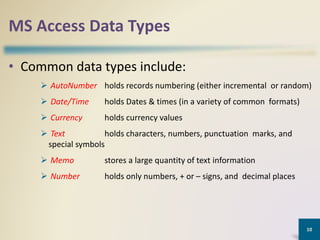
• Common data types include:
 AutoNumber holds records numbering (either incremental or random)
 Date/Time holds Dates & times (in a variety of common formats)
 Currency holds currency values
 Text holds characters, numbers, punctuation marks, and
special symbols
 Memo stores a large quantity of text information
 Number holds only numbers, + or – signs, and decimal places
10
11
Cont.
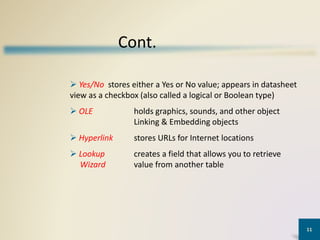
 Yes/No stores either a Yes or No value; appears in datasheet
view as a checkbox (also called a logical or Boolean type)
 OLE holds graphics, sounds, and other object
Linking & Embedding objects
 Hyperlink stores URLs for Internet locations
 Lookup creates a field that allows you to retrieve
Wizard value from another table
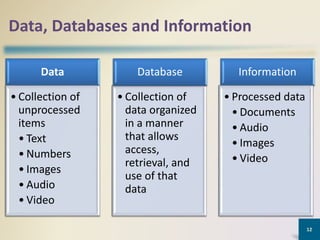
Data, Databases and Information
Data
• Collection of
data organized
in a manner
that allows
access,
retrieval, and
use of that
data
Database
• Collection of
unprocessed
items
• Text
• Numbers
• Images
• Audio
• Video
Information
• Processed data
• Documents
• Audio
• Images
• Video
12
Database Management System (DBMS)
• Database Management System (DBMS) is a
software package designed to define, manipulate,
retrieve and manage data in a database.
• A DBMS generally manipulates the data itself, the
data format, field names, record structure and file
structure. It also defines rules to validate and
manipulate this data
13
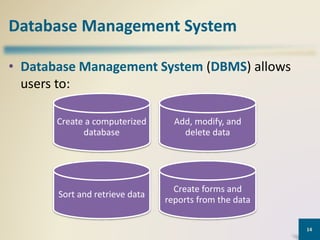
Database Management System
• Database Management System (DBMS) allows
users to:
14
Create a computerized
database
Add, modify, and
delete data
Sort and retrieve data
Create forms and
reports from the data
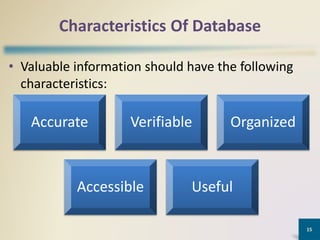
Characteristics Of Database
• Valuable information should have the following
characteristics:
15
Accurate Verifiable Organized
Accessible Useful
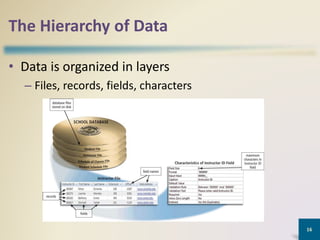
The Hierarchy of Data
• Data is organized in layers
– Files, records, fields, characters
16
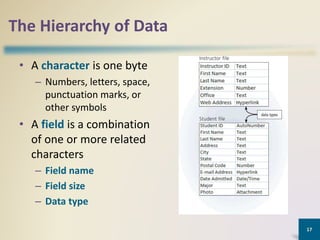
The Hierarchy of Data
• A character is one byte
– Numbers, letters, space,
punctuation marks, or
other symbols
• A field is a combination
of one or more related
characters
– Field name
– Field size
– Data type
17
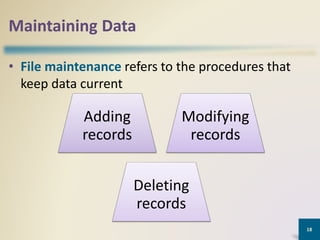
Maintaining Data
• File maintenance refers to the procedures that
keep data current
18
Adding
records
Modifying
records
Deleting
records
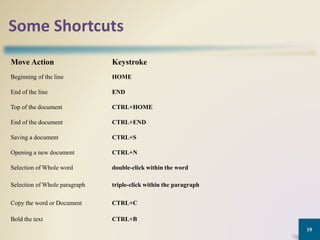
Some Shortcuts
Move Action Keystroke
Beginning of the line HOME
End of the line END
Top of the document CTRL+HOME
End of the document CTRL+END
Saving a document CTRL+S
Opening a new document CTRL+N
Selection of Whole word double-click within the word
Selection of Whole paragraph triple-click within the paragraph
Copy the word or Document CTRL+C
Bold the text CTRL+B
19
20
END

Chapter 9 Microsoft Access Database.pptx

  • 1.
  • 2.
    Objectives Overview • MS-Access •MS-Access Database Objects • MS Access Data Types • Define the term Database, Data and Information • Database Management System • Characteristics Of Database • The Hierarchy of Data • Some Shortcuts 2
  • 3.
    3 Introduction  What’s MS-Access? MS-Access is a relational database application designed to handle thousand of records depending upon the user needs  MS-Access can simply list a collection of names and addresses in a single table, or manage complex relationships between data in several tables
  • 4.
    MS-Access Database Objects In Access, a database application is composed of database objects which include:  Tables  Forms  Queries  Reports 4
  • 5.
    MS-Access Database Objects •Table: is an object that is used to define and store data. When you create a new table, Access asks you to define fields which is also known as column heading. • Tables contain fields or columns that store different kinds of data. • Each field must have a unique name, and data type. 5
  • 6.
    MS-Access Database Objects •Query: An object that provides a custom view of data from one or more tables. Queries are a way of searching for and compiling data from one or more tables. • Running a query is like asking a detailed question of your database. • You can define queries to Select, Update, Insert, or Delete data. 6
  • 7.
    MS-Access Database Objects •Form: is a window on the screen that provides areas for entering or modifying data in a database. • Forms are used for entering, modifying, and viewing records. • The reason forms are used so often is that they are an easy way to guide people toward entering data correctly 7
  • 8.
    MS-Access Database Objects •Report: allows users to design a report on the screen, retrieve data into the report design, and then display or print the report • You can view a report on your screen before you print it. • If forms are for input purposes, then reports are for output 8
  • 9.
    MS-Access Database Objects •You can use MS-Access to manage all of your information in one file. Within an Access database file. • Tables: to store your data. • Queries: to find and retrieve just the data that you want. • Forms: to view, add, and update data in tables. • Reports: to analyze or print data in a specific layout. 9
  • 10.
    MS Access DataTypes • Common data types include:  AutoNumber holds records numbering (either incremental or random)  Date/Time holds Dates & times (in a variety of common formats)  Currency holds currency values  Text holds characters, numbers, punctuation marks, and special symbols  Memo stores a large quantity of text information  Number holds only numbers, + or – signs, and decimal places 10
  • 11.
    11 Cont.  Yes/No storeseither a Yes or No value; appears in datasheet view as a checkbox (also called a logical or Boolean type)  OLE holds graphics, sounds, and other object Linking & Embedding objects  Hyperlink stores URLs for Internet locations  Lookup creates a field that allows you to retrieve Wizard value from another table
  • 12.
    Data, Databases andInformation Data • Collection of data organized in a manner that allows access, retrieval, and use of that data Database • Collection of unprocessed items • Text • Numbers • Images • Audio • Video Information • Processed data • Documents • Audio • Images • Video 12
  • 13.
    Database Management System(DBMS) • Database Management System (DBMS) is a software package designed to define, manipulate, retrieve and manage data in a database. • A DBMS generally manipulates the data itself, the data format, field names, record structure and file structure. It also defines rules to validate and manipulate this data 13
  • 14.
    Database Management System •Database Management System (DBMS) allows users to: 14 Create a computerized database Add, modify, and delete data Sort and retrieve data Create forms and reports from the data
  • 15.
    Characteristics Of Database •Valuable information should have the following characteristics: 15 Accurate Verifiable Organized Accessible Useful
  • 16.
    The Hierarchy ofData • Data is organized in layers – Files, records, fields, characters 16
  • 17.
    The Hierarchy ofData • A character is one byte – Numbers, letters, space, punctuation marks, or other symbols • A field is a combination of one or more related characters – Field name – Field size – Data type 17
  • 18.
    Maintaining Data • Filemaintenance refers to the procedures that keep data current 18 Adding records Modifying records Deleting records
  • 19.
    Some Shortcuts Move ActionKeystroke Beginning of the line HOME End of the line END Top of the document CTRL+HOME End of the document CTRL+END Saving a document CTRL+S Opening a new document CTRL+N Selection of Whole word double-click within the word Selection of Whole paragraph triple-click within the paragraph Copy the word or Document CTRL+C Bold the text CTRL+B 19
  • 20.