L SR
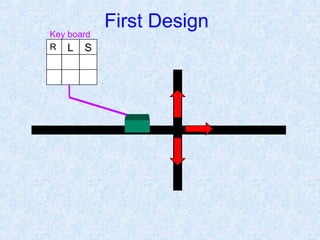
First Design
Key board
A
B
Second Design
A
B
C D
C DB
Key board Third Design
1 2 3
4 5 6
7 8 9
0
1
1
1 1 1
1
0
1
1
1
0
1 1 1
1 0 1
Contents:
Introduction
Block Diagram and Pin Description of the 8051
Registers
Memory mapping in 8051
Stack in the 8051
I/O Port Programming
Timer
Interrupt
Why do we need to learn
Microprocessors/controllers?
 The microprocessor is the core of
computer systems.
 Nowadays many communication, digital
entertainment, portable devices, are
controlled by them.
 A designer should know what types of
components he needs, ways to reduce
production costs and product reliable.
Different aspects of a
microprocessor/controller
 Hardware :Interface to the real world
 Software :order how to deal with inputs
The necessary tools for a
microprocessor/controller
 CPU: Central Processing Unit
 I/O: Input /Output
 Bus: Address bus & Data bus
 Memory: RAM & ROM
 Timer
 Interrupt
 Serial Port
 Parallel Port
CPU
General-
Purpose
Micro-
processor
RAM ROM I/O
Port
Timer
Serial
COM
Port
Data Bus
Address Bus
General-Purpose Microprocessor System
Microprocessors:
 CPU for Computers
 No RAM, ROM, I/O on CPU chip itself
 Example : Intel’s x86, Motorola’s 680x0
Many chips on mother’s board
General-purpose microprocessor
RAM ROM
I/O
Port
Timer
Serial
COM
Port
Microcontroller
CPU
 A smaller computer
 On-chip RAM, ROM, I/O ports...
 Example : Motorola’s 6811, Intel’s 8051, Zilog’s Z8 and
PIC 16X
A single chip
Microcontroller :
Microprocessor
 CPU is stand-alone, RAM,
ROM, I/O, timer are
separate
 designer can decide on the
amount of ROM, RAM and
I/O ports.
 expansive
 versatility
 general-purpose
Microcontroller
• CPU, RAM, ROM, I/O and
timer are all on a single chip
• fix amount of on-chip ROM,
RAM, I/O ports
• for applications in which cost,
power and space are critical
• single-purpose
Microprocessor vs. Microcontroller
Block Diagram
CPU
On-chip
RAM
On-chip
ROM for
program
code
4 I/O Ports
Timer 0
Serial
PortOSC
Interrupt
Control
External interrupts
Timer 1
Timer/Counter
Bus
Control
TxD RxDP0 P1 P2 P3
Address/Data
Counter
Inputs
Pin Description of the 8051
1
2
3
4
5
6
7
8
9
10
11
12
13
14
15
16
17
18
19
20
40
39
38
37
36
35
34
33
32
31
30
29
28
27
26
25
24
23
22
21
P1.0
P1.1
P1.2
P1.3
P1.4
P1.5
P1.6
P1.7
RST
(RXD)P3.0
(TXD)P3.1
(T0)P3.4
(T1)P3.5
XTAL2
XTAL1
GND
(INT0)P3.2
(INT1)P3.3
(RD)P3.7
(WR)P3.6
Vcc
P0.0(AD0
)P0.1(AD1)
P0.2(AD2
)P0.3(AD3)
P0.4(AD4)
P0.5(AD5)
P0.6(AD6)
P0.7(AD7)
EA/VPP
ALE/PROG
PSEN
P2.7(A15)
P2.6(A14
)P2.5(A13
)P2.4(A12
)P2.3(A11
)P2.2(A10)
P2.1(A9)
P2.0(A8)
8051
(8031)

Figure (b). Power-On RESET Circuit
30 pF
30 pF
8.2 K
10 uF
+
Vcc
11.0592 MHz
EA/VPP
X1
X2
RST
31
19
18
9

Port 0 with Pull-Up Resistors
P0.0
P0.1
P0.2
P0.3
P0.4
P0.5
P0.6
P0.7
DS5000
8751
8951
Vcc
10 K
Port0
Registers
A
B
R0
R1
R3
R4
R2
R5
R7
R6
DPH DPL
PC
DPTR
PC
Some 8051 16-bit Register
Some 8-bitt Registers of
the 8051
Stack in the 8051
 The register used to access
the stack is called SP
(stack pointer) register.
 The stack pointer in the
8051 is only 8 bits wide,
which means that it can
take value 00 to FFH.
When 8051 powered up,
the SP register contains
value 07.
7FH
30H
2FH
20H
1FH
17H
10H
0FH
07H
08H
18H
00H
Register Bank 0
)Stack) Register Bank 1
Register Bank 2
Register Bank 3
Bit-Addressable RAM
Scratch pad RAM
:Timer:
Interrupt :
Numerical Bases Used in
Programming
 Hexadecimal
 Binary
 BCD
Hexadecimal Basis
 Hexadecimal Digits:
1 2 3 4 5 6 7 8 9 A B C D E F
A=10
B=11
C=12
D=13
E=14
F=15
Decimal, Binary, BCD, & Hexadecimal
Numbers
(43)10=
(0100 0011)BCD=
( 0010 1011 )2 =
( 2 B )16
Register Addressing Mode
MOV Rn, A ;n=0,..,7
ADD A, Rn
MOV DPL, R6
MOV DPTR, A
MOV Rm, Rn
Direct Addressing Mode
Although the entire of 128 bytes of RAM can be
accessed using direct addressing mode, it is most often
used to access RAM loc. 30 – 7FH.
MOV R0, 40H
MOV 56H, A
MOV A, 4 ; ≡ MOV A, R4
MOV 6, 2 ; copy R2 to R6
; MOV R6,R2 is invalid !
Immediate Addressing Mode
MOV A,#65H
MOV R6,#65H
MOV DPTR,#2343H
MOV P1,#65H
SETB bit ; bit=1
CLR bit ; bit=0
SETB C ; CY=1
SETB P0.0 ;bit 0 from port 0 =1
SETB P3.7 ;bit 7 from port 3 =1
SETB ACC.2 ;bit 2 from ACCUMULATOR =1
SETB 05 ;set high D5 of RAM loc. 20h
Note:
CLR instruction is as same as SETB
i.e.:
CLR C ;CY=0
But following instruction is only for CLR:
CLR A ;A=0
DEC byte ;byte=byte-1
INC byte ;byte=byte+1
INC R7
DEC A
DEC 40H ; [40]=[40]-1
LOOP and JUMP Instructions
JZ Jump if A=0
JNZ Jump if A/=0
DJNZ Decrement and jump if A/=0
CJNE A,byte Jump if A/=byte
CJNE reg,#data Jump if byte/=#data
JC Jump if CY=1
JNC Jump if CY=0
JB Jump if bit=1
JNB Jump if bit=0
JBC Jump if bit=1 and clear bit
Conditional Jumps :
Call instruction
SETB P0.0
.
.
CALL UP
.
.
.
CLR P0.0
.
.
RET
UP:

Microcontroller 8051

  • 1.
  • 2.
  • 3.
    A B C D C DB Keyboard Third Design
  • 4.
    1 2 3 45 6 7 8 9 0 1 1 1 1 1 1 0 1 1 1 0 1 1 1 1 0 1
  • 15.
    Contents: Introduction Block Diagram andPin Description of the 8051 Registers Memory mapping in 8051 Stack in the 8051 I/O Port Programming Timer Interrupt
  • 16.
    Why do weneed to learn Microprocessors/controllers?  The microprocessor is the core of computer systems.  Nowadays many communication, digital entertainment, portable devices, are controlled by them.  A designer should know what types of components he needs, ways to reduce production costs and product reliable.
  • 17.
    Different aspects ofa microprocessor/controller  Hardware :Interface to the real world  Software :order how to deal with inputs
  • 18.
    The necessary toolsfor a microprocessor/controller  CPU: Central Processing Unit  I/O: Input /Output  Bus: Address bus & Data bus  Memory: RAM & ROM  Timer  Interrupt  Serial Port  Parallel Port
  • 19.
    CPU General- Purpose Micro- processor RAM ROM I/O Port Timer Serial COM Port DataBus Address Bus General-Purpose Microprocessor System Microprocessors:  CPU for Computers  No RAM, ROM, I/O on CPU chip itself  Example : Intel’s x86, Motorola’s 680x0 Many chips on mother’s board General-purpose microprocessor
  • 20.
    RAM ROM I/O Port Timer Serial COM Port Microcontroller CPU  Asmaller computer  On-chip RAM, ROM, I/O ports...  Example : Motorola’s 6811, Intel’s 8051, Zilog’s Z8 and PIC 16X A single chip Microcontroller :
  • 21.
    Microprocessor  CPU isstand-alone, RAM, ROM, I/O, timer are separate  designer can decide on the amount of ROM, RAM and I/O ports.  expansive  versatility  general-purpose Microcontroller • CPU, RAM, ROM, I/O and timer are all on a single chip • fix amount of on-chip ROM, RAM, I/O ports • for applications in which cost, power and space are critical • single-purpose Microprocessor vs. Microcontroller
  • 22.
    Block Diagram CPU On-chip RAM On-chip ROM for program code 4I/O Ports Timer 0 Serial PortOSC Interrupt Control External interrupts Timer 1 Timer/Counter Bus Control TxD RxDP0 P1 P2 P3 Address/Data Counter Inputs
  • 23.
    Pin Description ofthe 8051 1 2 3 4 5 6 7 8 9 10 11 12 13 14 15 16 17 18 19 20 40 39 38 37 36 35 34 33 32 31 30 29 28 27 26 25 24 23 22 21 P1.0 P1.1 P1.2 P1.3 P1.4 P1.5 P1.6 P1.7 RST (RXD)P3.0 (TXD)P3.1 (T0)P3.4 (T1)P3.5 XTAL2 XTAL1 GND (INT0)P3.2 (INT1)P3.3 (RD)P3.7 (WR)P3.6 Vcc P0.0(AD0 )P0.1(AD1) P0.2(AD2 )P0.3(AD3) P0.4(AD4) P0.5(AD5) P0.6(AD6) P0.7(AD7) EA/VPP ALE/PROG PSEN P2.7(A15) P2.6(A14 )P2.5(A13 )P2.4(A12 )P2.3(A11 )P2.2(A10) P2.1(A9) P2.0(A8) 8051 (8031) 
  • 24.
    Figure (b). Power-OnRESET Circuit 30 pF 30 pF 8.2 K 10 uF + Vcc 11.0592 MHz EA/VPP X1 X2 RST 31 19 18 9 
  • 25.
    Port 0 withPull-Up Resistors P0.0 P0.1 P0.2 P0.3 P0.4 P0.5 P0.6 P0.7 DS5000 8751 8951 Vcc 10 K Port0
  • 26.
    Registers A B R0 R1 R3 R4 R2 R5 R7 R6 DPH DPL PC DPTR PC Some 805116-bit Register Some 8-bitt Registers of the 8051
  • 27.
    Stack in the8051  The register used to access the stack is called SP (stack pointer) register.  The stack pointer in the 8051 is only 8 bits wide, which means that it can take value 00 to FFH. When 8051 powered up, the SP register contains value 07. 7FH 30H 2FH 20H 1FH 17H 10H 0FH 07H 08H 18H 00H Register Bank 0 )Stack) Register Bank 1 Register Bank 2 Register Bank 3 Bit-Addressable RAM Scratch pad RAM
  • 28.
  • 29.
  • 30.
    Numerical Bases Usedin Programming  Hexadecimal  Binary  BCD
  • 31.
    Hexadecimal Basis  HexadecimalDigits: 1 2 3 4 5 6 7 8 9 A B C D E F A=10 B=11 C=12 D=13 E=14 F=15
  • 32.
    Decimal, Binary, BCD,& Hexadecimal Numbers (43)10= (0100 0011)BCD= ( 0010 1011 )2 = ( 2 B )16
  • 33.
    Register Addressing Mode MOVRn, A ;n=0,..,7 ADD A, Rn MOV DPL, R6 MOV DPTR, A MOV Rm, Rn
  • 34.
    Direct Addressing Mode Althoughthe entire of 128 bytes of RAM can be accessed using direct addressing mode, it is most often used to access RAM loc. 30 – 7FH. MOV R0, 40H MOV 56H, A MOV A, 4 ; ≡ MOV A, R4 MOV 6, 2 ; copy R2 to R6 ; MOV R6,R2 is invalid !
  • 35.
    Immediate Addressing Mode MOVA,#65H MOV R6,#65H MOV DPTR,#2343H MOV P1,#65H
  • 36.
    SETB bit ;bit=1 CLR bit ; bit=0 SETB C ; CY=1 SETB P0.0 ;bit 0 from port 0 =1 SETB P3.7 ;bit 7 from port 3 =1 SETB ACC.2 ;bit 2 from ACCUMULATOR =1 SETB 05 ;set high D5 of RAM loc. 20h Note: CLR instruction is as same as SETB i.e.: CLR C ;CY=0 But following instruction is only for CLR: CLR A ;A=0
  • 37.
    DEC byte ;byte=byte-1 INCbyte ;byte=byte+1 INC R7 DEC A DEC 40H ; [40]=[40]-1
  • 38.
    LOOP and JUMPInstructions JZ Jump if A=0 JNZ Jump if A/=0 DJNZ Decrement and jump if A/=0 CJNE A,byte Jump if A/=byte CJNE reg,#data Jump if byte/=#data JC Jump if CY=1 JNC Jump if CY=0 JB Jump if bit=1 JNB Jump if bit=0 JBC Jump if bit=1 and clear bit Conditional Jumps :
  • 39.
    Call instruction SETB P0.0 . . CALLUP . . . CLR P0.0 . . RET UP:

Editor's Notes

  • #20 Intel’s x86: 8086,8088,80386,80486, Pentium Motorola’s 680x0: 68000, 68010, 68020,68030,6040
  • #22 versatility 多用途的: any number of applications for PC