Enterprise IPv6
                                    Deployment


                                     Michael De Leo
                                     Office of the CTO
                                     mdeleo@cisco.com

                          Presentation_ID   © 2007 Cisco Systems, Inc. All rights reserved.   Cisco Public   1


                                    Reference Materials

                                      Deploying IPv6 in Campus Networks:
                                       http://www.cisco.com/univercd/cc/td/doc/solution/
                                       campipv6.pdf
                                      Deploying IPv6 in Branch Networks:
                                       http://www.cisco.com/univercd/cc/td/doc/solution/
                                       brchipv6.pdf
                                      CCO IPv6 Main Page:
                                       http://www.cisco.com/go/ipv6
                                      Cisco Network Designs:
                                       http://www.cisco.com/go/srnd


                          Presentation_ID   © 2007 Cisco Systems, Inc. All rights reserved.   Cisco Public   2


© 2007, Cisco Systems, Inc. All rights reserved.                                                                 1
Presentation_ID.scr
Agenda

                                      Address Considerations
                                      General Concepts
                                      Infrastructure Deployment
                                             Campus/Data Center
                                             WAN/Branch
                                             Remote Access

                                      Planning and Deployment Summary
                                      Appendix—For Reference Only


                          Presentation_ID   © 2007 Cisco Systems, Inc. All rights reserved.   Cisco Public   3


                                    The Need for IPv6


                          Presentation_ID   © 2007 Cisco Systems, Inc. All rights reserved.   Cisco Public   4


© 2007, Cisco Systems, Inc. All rights reserved.                                                                 2
Presentation_ID.scr
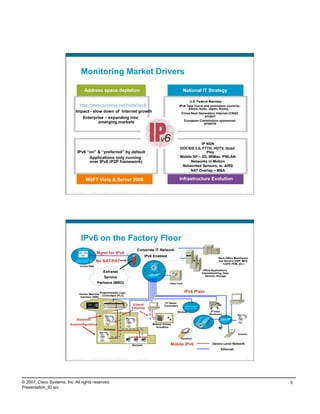
Monitoring Market Drivers

                                        Address space depletion                                                                             National IT Strategy

                                                                                                                                                U.S. Federal Mandate
                                                                                                                                         IPv6 Task Force and promotion councils:
                                                                                                                                               Africa, India, Japan, Korea,…
                                                                                                                                           China Next Generation Internet (CNGI)
                                                                                                                                                           project
                                                                                                                                            European Commission sponsored
                                                                                                                                                          projects


                                                                                                                                                     IP NGN
                                                                                                                                         DOCSIS 3.0, FTTH, HDTV, Quad
                                IPv6 “on” & “preferred” by default                                                                                      Play
                                      Applications only running                                                                          Mobile SP – 3G, WiMax, PWLAN
                                      over IPv6 (P2P framework)                                                                                Networks in Motion
                                                                                                                                          Networked Sensors, ie: AIRS
                                                                                                                                              NAT Overlap – M&A

                                            MSFT Vista & Server 2008                                                                     Infrastructure Evolution

                          Presentation_ID     © 2007 Cisco Systems, Inc. All rights reserved.      Cisco Public                                                                         5


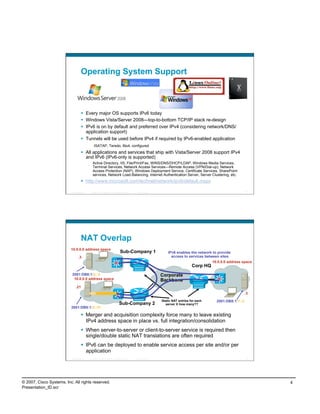
                                    IPv6 on the Factory Floor
                                                                                                   Corporate IT Network
                                                    Mgmt for IPv6
                                                                                                           IPv6 Enabled                                             Back-Office Mainframes
                                                   No NAT/PAT                                                                                                       and Servers (ERP, MES,
                                                                                                                                                                       CAPP, PDM, etc.)
                                   Central NMS
                                                                                                                                                        Office Applications,
                                                            Extranet                                                                                   Internetworking, Data
                                                                                                                                                          Servers, Storage
                                                         Service
                                                     Partners (MRO)                                                            Video Feed


                                                        Programmable Logic                                                                  IPv6 IPsec
                                  Human Machine
                                                          Controllers (PLC)
                                   Interface (HMI)

                                                                                                                            PC Based
                                                                                                Extend                     Controllers
                                                                                                Ethernet
                                                                                                                                       Wireless               IP Video
                                                                                                                                                             Monitoring

                                Stateless
                          Autoconfiguration                                                                       Motors, Drives,
                                                                                                                    Actuators
                                                             Robotics
                                                                                                                                                                                  Scanner
                                                                                                                                          Handheld

                                                                                                Sensors                         Mobile IPv6                    Device Level Network
                                                                                                                                                                      Ethernet

                          Presentation_ID     © 2007 Cisco Systems, Inc. All rights reserved.      Cisco Public                                                                         6


© 2007, Cisco Systems, Inc. All rights reserved.                                                                                                                                             3
Presentation_ID.scr
Operating System Support


                                       Every major OS supports IPv6 today
                                       Windows Vista/Server 2008—top-to-bottom TCP/IP stack re-design
                                       IPv6 is on by default and preferred over IPv4 (considering network/DNS/
                                        application support)
                                       Tunnels will be used before IPv4 if required by IPv6-enabled application
                                               ISATAP, Teredo, 6to4, configured
                                       All applications and services that ship with Vista/Server 2008 support IPv4
                                        and IPv6 (IPv6-only is supported)
                                             Active Directory, IIS, File/Print/Fax, WINS/DNS/DHCP/LDAP, Windows Media Services,
                                             Terminal Services, Network Access Services—Remote Access (VPN/Dial-up), Network
                                             Access Protection (NAP), Windows Deployment Service, Certificate Services, SharePoint
                                             services, Network Load-Balancing, Internet Authentication Server, Server Clustering, etc.
                                       http://www.microsoft.com/technet/network/ipv6/default.mspx

                          Presentation_ID   © 2007 Cisco Systems, Inc. All rights reserved.   Cisco Public                                                     7


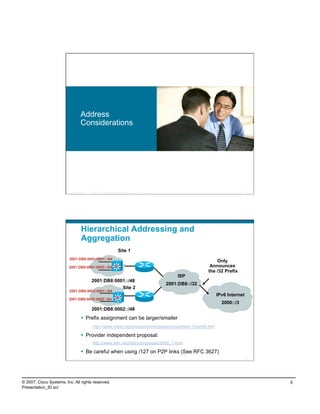
                                     NAT Overlap
                          10.0.0.0 address space
                                                                               Sub-Company 1                     IPv6 enables the network to provide
                                 .3                                                                                access to services between sites
                                                                                                                                          10.0.0.0 address space
                                                                                                                                 Corp HQ
                           2001:DB8:1:2::3                                                                   Corporate
                            10.0.0.0 address space                                                           Backbone
                               .21
                                                                                                                                                              .3

                                                                                                             Static NAT entries for each    2001:DB8:1:1::3
                                                                              Sub-Company 2                    server X how many??
                          2001:DB8:1:3::21

                                       Merger and acquisition complexity force many to leave existing
                                        IPv4 address space in place vs. full integration/consolidation
                                       When server-to-server or client-to-server service is required then
                                        single/double static NAT translations are often required
                                       IPv6 can be deployed to enable service access per site and/or per
                                        application
                          Presentation_ID   © 2007 Cisco Systems, Inc. All rights reserved.   Cisco Public                                                     8


© 2007, Cisco Systems, Inc. All rights reserved.                                                                                                                   4
Presentation_ID.scr
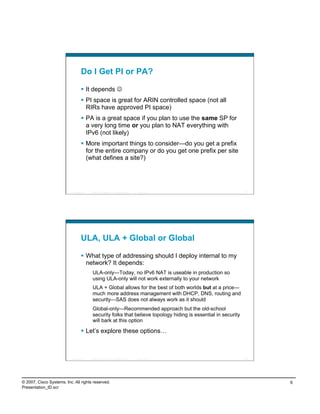
Address
                                    Considerations


                          Presentation_ID   © 2007 Cisco Systems, Inc. All rights reserved.   Cisco Public                                       9


                                    Hierarchical Addressing and
                                    Aggregation
                                                                             Site 1
                         2001:DB8:0001:0001::/64
                                                                                                                                 Only
                         2001:DB8:0001:0002::/64                                                                              Announces
                                                                                                                             the /32 Prefix
                                                                                                                 ISP
                                            2001:DB8:0001::/48
                                                                                                             2001:DB8::/32
                                                        Site 2
                         2001:DB8:0002:0001::/64
                                                                                                                                IPv6 Internet
                         2001:DB8:0002:0002::/64
                                                                                                                                   2000::/3
                                            2001:DB8:0002::/48
                                      Prefix assignment can be larger/smaller
                                             http://www.icann.org/announcements/announcement-12oct06.htm

                                      Provider independent proposal:
                                             http://www.arin.net/policy/proposals/2005_1.html

                                      Be careful when using /127 on P2P links (See RFC 3627)
                          Presentation_ID   © 2007 Cisco Systems, Inc. All rights reserved.   Cisco Public                                      10


© 2007, Cisco Systems, Inc. All rights reserved.                                                                                                     5
Presentation_ID.scr
Do I Get PI or PA?

                                      It depends 
                                      PI space is great for ARIN controlled space (not all
                                       RIRs have approved PI space)
                                      PA is a great space if you plan to use the same SP for
                                       a very long time or you plan to NAT everything with
                                       IPv6 (not likely)
                                      More important things to consider—do you get a prefix
                                       for the entire company or do you get one prefix per site
                                       (what defines a site?)


                          Presentation_ID   © 2007 Cisco Systems, Inc. All rights reserved.   Cisco Public          11


                                    ULA, ULA + Global or Global

                                      What type of addressing should I deploy internal to my
                                       network? It depends:
                                             ULA-only—Today, no IPv6 NAT is useable in production so
                                             using ULA-only will not work externally to your network
                                             ULA + Global allows for the best of both worlds but at a price—
                                             much more address management with DHCP, DNS, routing and
                                             security—SAS does not always work as it should
                                             Global-only—Recommended approach but the old-school
                                             security folks that believe topology hiding is essential in security
                                             will bark at this option

                                      Let’s explore these options…


                          Presentation_ID   © 2007 Cisco Systems, Inc. All rights reserved.   Cisco Public          12


© 2007, Cisco Systems, Inc. All rights reserved.                                                                         6
Presentation_ID.scr
Unique-Local Addressing (RFC4193)
                                      Used for internal communications, inter-site VPNs
                                             Not routable on the internet—basically RFC1918 for IPv6 only better—less likelihood of
                                             collisions
                                      Default prefix is /48
                                             /48 limits use in large organizations that will need more space
                                             Semi-random generator prohibits generating sequentially ‘useable’ prefixes—no easy way
                                             to have aggregation when using multiple /48s
                                             Why not hack the generator to produce something larger than a /48 or even sequential /
                                             48s?
                                             Is it ‘legal’ to use something other than a /48? Perhaps the entire space? Forget legal, is it
                                             practical? Probably, but with dangers—remember the idea for ULA; internal addressing
                                             with a slim likelihood of address collisions with M&A. By consuming a larger space or the
                                             entire ULA space you will significantly increase the chances of pain in the future with M&A
                                      Routing/security control
                                             You must always implement filters/ACLs to block any packets going in or out of your
                                             network (at the Internet perimeter) that contain a SA/DA that is in the ULA range— today
                                             this is the only way the ULA scope can be enforced
                                      Generate your own ULA: http://www.sixxs.net/tools/grh/ula/
                                                                        Generated ULA= fd9c:58ed:7d73::/48

                                                       * MAC address=00:0D:9D:93:A0:C3 (Hewlett Packard)
                                                               * EUI64 address=020D9Dfffe93A0C3
                                                         * NTP date=cc5ff71943807789 cc5ff71976b28d86
                          Presentation_ID   © 2007 Cisco Systems, Inc. All rights reserved.   Cisco Public                                                               13


                                    ULA-Only
                                                                                                                                  Internet
                                                                                                               Global – 2001:DB8:CAFE::/               Requires NAT for IPv6
                                                                                         Branch 1                          48         tern
                                                                                                                                           al
                                                                                                                                        x
                                                                                                                               Glob
                                                                                                                                    al E                      Corp HQ
                                                                                                                                                rnal
                                                                                                                                            Inte
                                                                                                                                      ULA
                               FD9C:58ED:7D73:2800::/64
                                                                                                                Corporate
                                                                                                                Backbone
                                                                                      Branch 2

                                                                                                             ULA Space FD9C:58ED:7D73::/48

                                 FD9C:58ED:7D73:3000::/64                                                                                     FD9C:58ED:7D73::2::/64
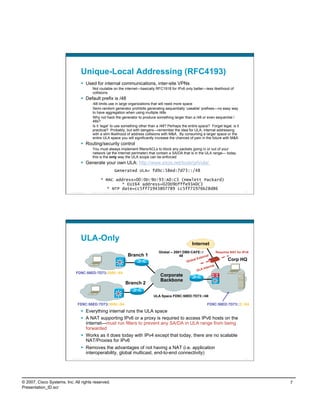
                                      Everything internal runs the ULA space
                                      A NAT supporting IPv6 or a proxy is required to access IPv6 hosts on the
                                       internet—must run filters to prevent any SA/DA in ULA range from being
                                       forwarded
                                      Works as it does today with IPv4 except that today, there are no scalable
                                       NAT/Proxies for IPv6
                                      Removes the advantages of not having a NAT (i.e. application
                                       interoperability, global multicast, end-to-end connectivity)
                          Presentation_ID   © 2007 Cisco Systems, Inc. All rights reserved.   Cisco Public                                                               14


© 2007, Cisco Systems, Inc. All rights reserved.                                                                                                                               7
Presentation_ID.scr
ULA + Global
                                                                                                                                 Internet
                                                                                                               Global – 2001:DB8:CAFE::/
                                                                                         Branch 1                          48
                                                                                                                                                     Corp HQ


                               FD9C:58ED:7D73:2800::/64                                                         Corporate
                               2001:DB8:CAFE:2800::/64
                                                                                                                Backbone
                                                                                      Branch 2

                                                                                                             ULA Space FD9C:58ED:7D73::/48
                                                                                                              Global – 2001:DB8:CAFE::/48
                                 FD9C:58ED:7D73:3000::/64                                                                                  FD9C:58ED:7D73::2::/64
                                 2001:DB8:CAFE:3000::/64                                                                                    2001:DB8:CAFE:2::/64
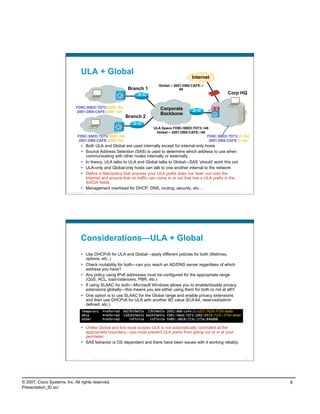
                                      Both ULA and Global are used internally except for internal-only hosts
                                      Source Address Selection (SAS) is used to determine which address to use when
                                       communicating with other nodes internally or externally
                                      In theory, ULA talks to ULA and Global talks to Global—SAS ‘should’ work this out
                                      ULA-only and Global-only hosts can talk to one another internal to the network
                                      Define a filter/policy that ensures your ULA prefix does not ‘leak’ out onto the
                                       Internet and ensure that no traffic can come in or out that has a ULA prefix in the
                                       SA/DA fields
                                      Management overhead for DHCP, DNS, routing, security, etc…
                          Presentation_ID   © 2007 Cisco Systems, Inc. All rights reserved.   Cisco Public                                                    15


                                    Considerations—ULA + Global
                                      Use DHCPv6 for ULA and Global—apply different policies for both (lifetimes,
                                       options, etc..)
                                      Check routability for both—can you reach an AD/DNS server regardless of which
                                       address you have?
                                      Any policy using IPv6 addresses must be configured for the appropriate range
                                       (QoS, ACL, load-balancers, PBR, etc.)
                                      If using SLAAC for both—Microsoft Windows allows you to enable/disable privacy
                                       extensions globally—this means you are either using them for both or not at all!!!
                                      One option is to use SLAAC for the Global range and enable privacy extensions
                                       and then use DHCPv6 for ULA with another IID value (EUI-64, reserved/admin
                                       defined, etc.)
                                     Temporary           Preferred                 6d23h59m55s 23h59m55s 2001:db8:cafe:2:cd22:7629:f726:6a6b
                                     Dhcp                Preferred                 13d1h33m55s 6d1h33m55s fd9c:58ed:7d73:1002:8828:723c:275e:846d
                                     Other               Preferred                    infinite   infinite fe80::8828:723c:275e:846d%8

                                      Unlike Global and link-local scopes ULA is not automatically controlled at the
                                       appropriate boundary—you must prevent ULA prefix from going out or in at your
                                       perimeter
                                      SAS behavior is OS dependent and there have been issues with it working reliably


                          Presentation_ID   © 2007 Cisco Systems, Inc. All rights reserved.   Cisco Public                                                    16


© 2007, Cisco Systems, Inc. All rights reserved.                                                                                                                    8
Presentation_ID.scr
Randomized IID and Privacy Extensions
                                      Enabled by default on Microsoft Windows
                                      Enable/disable via GPO or CLI

                                netsh interface ipv6 set global randomizeidentifiers=disabled store=persistent
                                       netsh interface ipv6 set privacy state=disabled store=persistent


                                             Alternatively, use DHCP (see later) to a specific pool
                                      Randomized address are generated for non-temporary
                                       autoconfigured addresses including public and link-local—used
                                       instead of EUI-64 addresses
                                      Randomized addresses engage Optimistic DAD—likelihood of
                                       duplicate LL address is rare so RS can be sent before full DAD
                                       completion
                                      Windows Vista/2008 send RS while DAD is being performed to
                                       save time for interface initialization (read RFC4862 on why this
                                       is ok)
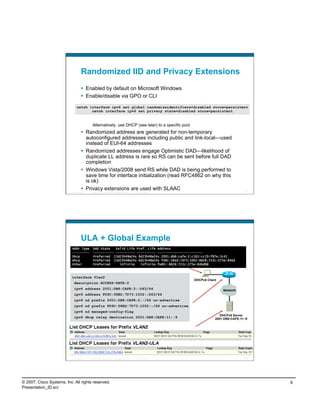
                                      Privacy extensions are used with SLAAC
                          Presentation_ID   © 2007 Cisco Systems, Inc. All rights reserved.   Cisco Public                                17


                                    ULA + Global Example
                           Addr Type          DAD State   Valid Life Pref. Life Address
                           ---------          ----------- ---------- ---------- ------------------------
                           Dhcp               Preferred 13d23h48m24s 6d23h48m24s 2001:db8:cafe:2:c1b5:cc19:f87e:3c41
                           Dhcp               Preferred 13d23h48m24s 6d23h48m24s fd9c:58ed:7d73:1002:8828:723c:275e:846d
                           Other              Preferred     infinite   infinite fe80::8828:723c:275e:846d%8


                           interface Vlan2
                                                                                                             DHCPv6 Client
                             description ACCESS-DATA-2
                             ipv6 address 2001:DB8:CAFE:2::D63/64                                                            Network
                             ipv6 address FD9C:58ED:7D73:1002::D63/64
                             ipv6 nd prefix 2001:DB8:CAFE:2::/64 no-advertise
                             ipv6 nd prefix FD9C:58ED:7D73:1002::/64 no-advertise
                             ipv6 nd managed-config-flag
                                                                                                                            DHCPv6 Server
                             ipv6 dhcp relay destination 2001:DB8:CAFE:11::9                                             2001:DB8:CAFE:11::9


                          Presentation_ID   © 2007 Cisco Systems, Inc. All rights reserved.   Cisco Public                                18


© 2007, Cisco Systems, Inc. All rights reserved.                                                                                               9
Presentation_ID.scr
Global-Only
                                                                                                                                   Internet
                                                                                                                 Global – 2001:DB8:CAFE::/
                                                                                         Branch 1                            48
                                                                                                                                                       Corp HQ


                                2001:DB8:CAFE:2800::/64                                                          Corporate
                                                                                                                 Backbone
                                                                                      Branch 2

                                                                                                                Global – 2001:DB8:CAFE::/48

                                  2001:DB8:CAFE:3000::/64                                                                                     2001:DB8:CAFE:2::/64

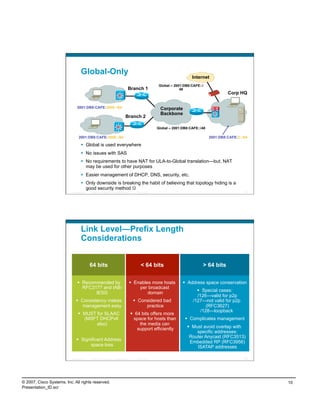
                                      Global is used everywhere
                                      No issues with SAS
                                      No requirements to have NAT for ULA-to-Global translation—but, NAT
                                       may be used for other purposes
                                      Easier management of DHCP, DNS, security, etc.
                                      Only downside is breaking the habit of believing that topology hiding is a
                                       good security method 
                          Presentation_ID   © 2007 Cisco Systems, Inc. All rights reserved.      Cisco Public                                                   19


                                    Link Level—Prefix Length
                                    Considerations


                                            64 bits                                                  < 64 bits                           > 64 bits

                                  Recommended by                                           Enables more hosts                 Address space conservation
                                   RFC3177 and IAB/                                            per broadcast
                                                                                                                                        Special cases:
                                        IESG                                                       domain
                                                                                                                                      /126—valid for p2p
                                 Consistency makes                                              Considered bad                    /127—not valid for p2p
                                   management easy                                                   practice                              (RFC3627)
                                                                                                                                        /128—loopback
                                   MUST for SLAAC                                              64 bits offers more
                                    (MSFT DHCPv6                                                space for hosts than             Complicates management
                                         also)                                                     the media can
                                                                                                  support efficiently             Must avoid overlap with
                                                                                                                                     specific addresses:
                                                                                                                                 Router Anycast (RFC3513)
                                 Significant Address
                                                                                                                                  Embedded RP (RFC3956)
                                      space loss                                                                                     ISATAP addresses

                          Presentation_ID   © 2007 Cisco Systems, Inc. All rights reserved.      Cisco Public                                                   20


© 2007, Cisco Systems, Inc. All rights reserved.                                                                                                                     10
Presentation_ID.scr
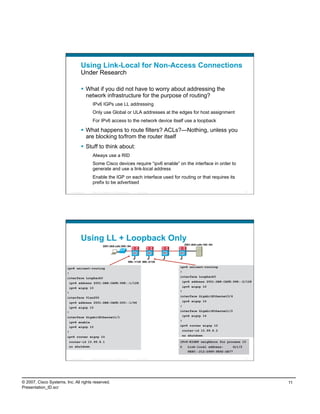
Using Link-Local for Non-Access Connections
                                      Under Research

                                        What if you did not have to worry about addressing the
                                         network infrastructure for the purpose of routing?
                                               IPv6 IGPs use LL addressing
                                               Only use Global or ULA addresses at the edges for host assignment
                                               For IPv6 access to the network device itself use a loopback

                                        What happens to route filters? ACLs?—Nothing, unless you
                                         are blocking to/from the router itself
                                        Stuff to think about:
                                               Always use a RID
                                               Some Cisco devices require “ipv6 enable” on the interface in order to
                                               generate and use a link-local address
                                               Enable the IGP on each interface used for routing or that requires its
                                               prefix to be advertised
                            Presentation_ID   © 2007 Cisco Systems, Inc. All rights reserved.     Cisco Public                                           21


                                      Using LL + Loopback Only
                                                                                                                       2001:db8:cafe:100::/64
                                                            2001:db8:cafe:200::/64


                                                                                           998::1/128 998::2/128

                        ipv6 unicast-routing                                                                       ipv6 unicast-routing

                        !                                                                                          !
                        interface Loopback0                                                                        interface Loopback0

                         ipv6 address 2001:DB8:CAFE:998::1/128                                                      ipv6 address 2001:DB8:CAFE:998::2/128

                         ipv6 eigrp 10                                                                              ipv6 eigrp 10
                        !                                                                                          !

                        interface Vlan200                                                                          interface GigabitEthernet3/4

                         ipv6 address 2001:DB8:CAFE:200::1/64                                                       ipv6 eigrp 10

                         ipv6 eigrp 10                                                                             !
                        !                                                                                          interface GigabitEthernet1/2

                        interface GigabitEthernet1/1                                                                ipv6 eigrp 10

                         ipv6 enable                                                                               !
                         ipv6 eigrp 10                                                                             ipv6 router eigrp 10

                        !                                                                                           router-id 10.99.8.2

                        ipv6 router eigrp 10                                                                        no shutdown

                         router-id 10.99.8.1                                                                       IPv6-EIGRP neighbors for process 10
                         no shutdown                                                                               0     Link-local address:     Gi1/2
                                                                                                                         FE80::212:D9FF:FE92:DE77

                            Presentation_ID   © 2007 Cisco Systems, Inc. All rights reserved.     Cisco Public                                           22


© 2007, Cisco Systems, Inc. All rights reserved.                                                                                                              11
Presentation_ID.scr
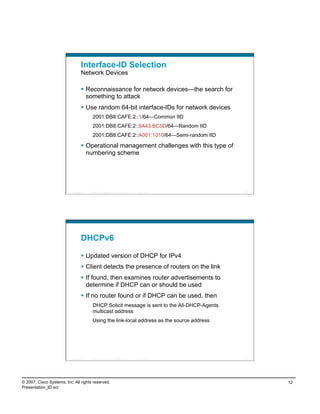
Interface-ID Selection
                                    Network Devices

                                      Reconnaissance for network devices—the search for
                                       something to attack
                                      Use random 64-bit interface-IDs for network devices
                                             2001:DB8:CAFE:2::1/64—Common IID
                                             2001:DB8:CAFE:2::9A43:BC5D/64—Random IID
                                             2001:DB8:CAFE:2::A001:1010/64—Semi-random IID

                                      Operational management challenges with this type of
                                       numbering scheme


                          Presentation_ID   © 2007 Cisco Systems, Inc. All rights reserved.   Cisco Public   23


                                    DHCPv6

                                      Updated version of DHCP for IPv4
                                      Client detects the presence of routers on the link
                                      If found, then examines router advertisements to
                                       determine if DHCP can or should be used
                                      If no router found or if DHCP can be used, then
                                             DHCP Solicit message is sent to the All-DHCP-Agents
                                             multicast address
                                             Using the link-local address as the source address


                          Presentation_ID   © 2007 Cisco Systems, Inc. All rights reserved.   Cisco Public   24


© 2007, Cisco Systems, Inc. All rights reserved.                                                                  12
Presentation_ID.scr
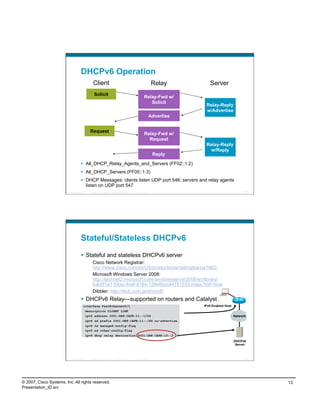
DHCPv6 Operation
                                                 Client                                                          Relay         Server
                                                  Solicit
                                                                                                         Relay-Fwd w/
                                                                                                            Solicit
                                                                                                                             Relay-Reply
                                                                                                                             w/Advertise
                                                                                                                Advertise


                                              Request
                                                                                                         Relay-Fwd w/
                                                                                                           Request
                                                                                                                             Relay-Reply
                                                                                                                               w/Reply
                                                                                                                 Reply
                                      All_DHCP_Relay_Agents_and_Servers (FF02::1:2)
                                      All_DHCP_Servers (FF05::1:3)
                                      DHCP Messages: clients listen UDP port 546; servers and relay agents
                                       listen on UDP port 547
                          Presentation_ID      © 2007 Cisco Systems, Inc. All rights reserved.   Cisco Public                                         25


                                    Stateful/Stateless DHCPv6
                                      Stateful and stateless DHCPv6 server
                                                Cisco Network Registrar:
                                                http://www.cisco.com/en/US/products/sw/netmgtsw/ps1982/
                                                Microsoft Windows Server 2008:
                                                http://technet2.microsoft.com/windowsserver2008/en/library/
                                                bab0f1a1-54aa-4cef-9164-139e8bcc44751033.mspx?mfr=true
                                                Dibbler: http://klub.com.pl/dhcpv6/
                                      DHCPv6 Relay—supported on routers and Catalyst
                                       interface FastEthernet0/1                                                            IPv6 Enabled Host
                                            description CLIENT LINK
                                            ipv6 address 2001:DB8:CAFE:11::1/64                                                                 Network
                                            ipv6 nd prefix 2001:DB8:CAFE:11::/64 no-advertise
                                            ipv6 nd managed-config-flag
                                            ipv6 nd other-config-flag
                                            ipv6 dhcp relay destination 2001:DB8:CAFE:10::2
                                                                                                                                                DHCPv6
                                                                                                                                                 Server


                          Presentation_ID      © 2007 Cisco Systems, Inc. All rights reserved.   Cisco Public                                         26


© 2007, Cisco Systems, Inc. All rights reserved.                                                                                                           13
Presentation_ID.scr
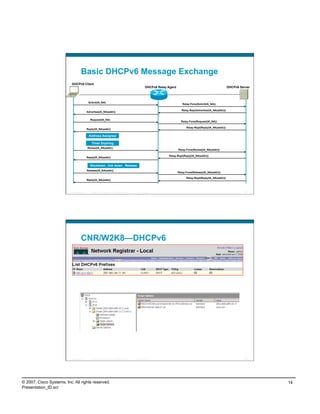
Basic DHCPv6 Message Exchange
                           DHCPv6 Client
                                                                                                          DHCPv6 Relay Agent                                           DHCPv6 Server


                                             Solicit(IA_NA)
                                                                                                                                  Relay-Forw(Solicit(IA_NA))

                                                                                                                                  Relay-Repl(Advertise(IA_NA(addr)))
                                            Advertise(IA_NA(addr))


                                              Request(IA_NA)
                                                                                                                                 Relay-Forw(Request(IA_NA))

                                                                                                                                     Relay-Repl(Reply(IA_NA(addr)))
                                            Reply(IA_NA(addr))

                                             Address Assigned

                                               Timer Expiring
                                            Renew(IA_NA(addr))
                                                                                                                               Relay-Forw(Renew(IA_NA(addr)))

                                                                                                                       Relay-Repl(Reply(IA_NA(addr)))
                                            Reply(IA_NA(addr))


                                              Shutdown , link down , Release
                                            Release(IA_NA(addr))
                                                                                                                               Relay-Forw(Release(IA_NA(addr)))

                                                                                                                                     Relay-Repl(Reply(IA_NA(addr)))
                                            Reply(IA_NA(addr))


                          Presentation_ID      © 2007 Cisco Systems, Inc. All rights reserved.   Cisco Public                                                                    27


                                    CNR/W2K8—DHCPv6


                          Presentation_ID      © 2007 Cisco Systems, Inc. All rights reserved.   Cisco Public                                                                    28


© 2007, Cisco Systems, Inc. All rights reserved.                                                                                                                                       14
Presentation_ID.scr
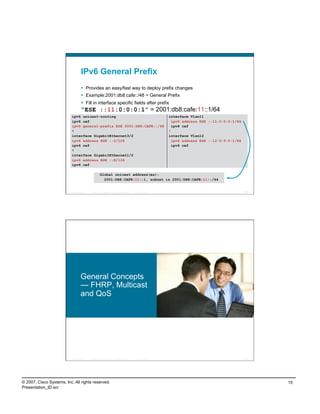
IPv6 General Prefix
                                      Provides an easy/fast way to deploy prefix changes
                                      Example:2001:db8:cafe::/48 = General Prefix
                                      Fill in interface specific fields after prefix
                                    “ESE ::11:0:0:0:1” = 2001:db8:cafe:11::1/64
                           ipv6 unicast-routing                                                              interface Vlan11
                           ipv6 cef                                                                            ipv6 address ESE ::11:0:0:0:1/64
                           ipv6 general-prefix ESE 2001:DB8:CAFE::/48                                          ipv6 cef
                           !                                                                                 !
                           interface GigabitEthernet3/2                                                      interface Vlan12
                           ipv6 address ESE ::2/126                                                            ipv6 address ESE ::12:0:0:0:1/64
                           ipv6 cef                                                                            ipv6 cef
                           !
                           interface GigabitEthernet1/2
                           ipv6 address ESE ::E/126
                           ipv6 cef

                                                      Global unicast address(es):
                                                        2001:DB8:CAFE:11::1, subnet is 2001:DB8:CAFE:11::/64


                          Presentation_ID   © 2007 Cisco Systems, Inc. All rights reserved.   Cisco Public                                        29


                                    General Concepts
                                    — FHRP, Multicast
                                    and QoS


                          Presentation_ID   © 2007 Cisco Systems, Inc. All rights reserved.   Cisco Public                                        30


© 2007, Cisco Systems, Inc. All rights reserved.                                                                                                       15
Presentation_ID.scr
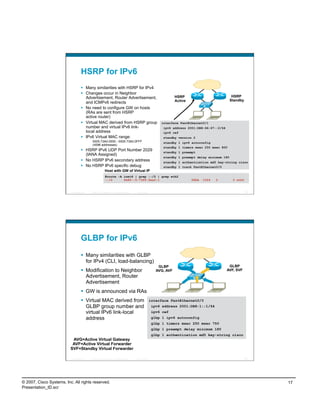
First Hop Router Redundancy
                                                                                                                  HSRP for v6
                                                                                                  Modification to Neighbor Advertisement, router
                                     HSRP                                          HSRP            Advertisement, and ICMPv6 redirects
                                     Active                                      Standby
                                                                                                  Virtual MAC derived from HSRP group number
                                                                                                   and virtual IPv6 link-local address

                                                                                                                  GLBP for v6
                                                                                                  Modification to Neighbor Advertisement, Router
                                      GLBP                                           GLBP           Advertisement—GW is announced via RAs
                                      AVG,                                            AVF,
                                       AVF                                            SVF         Virtual MAC derived from GLBP group number
                                                                                                           and virtual IPv6 link-local address

                                                                                                  Neighbor Unreachability Detection
                              RA Sent                                                                            For rudimentary HA at the first HOP
                          Reach-time =
                           5,000 msec                                                                Hosts use NUD “reachable time” to cycle to
                                                                                                      next known default gateway (30s by default)

                          Presentation_ID     © 2007 Cisco Systems, Inc. All rights reserved.   Cisco Public                                                                 31


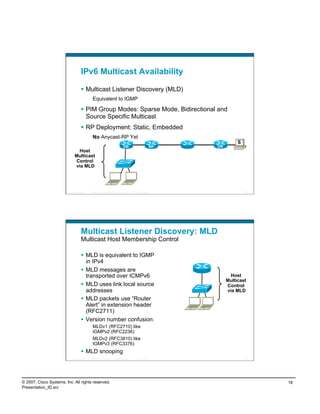
                                    First-Hop Redundancy
                                      When HSRP,GLBP and VRRP for IPv6 are not available
                                      NUD can be used for rudimentary HA at the first-hop (today this only applies to the
                                       Campus/DC—HSRP is available on routers)
                                               (config-if)#ipv6 nd reachable-time 5000
                                      Hosts use NUD “reachable time” to cycle to next known default gateway (30
                                       seconds by default)
                                      Can be combined with default router preference to determine primary gw:
                                               (config-if)#ipv6 nd router-preference {high | medium | low}
                                            Default Gateway . . . . . . . . . : 10.121.10.1
                                                                                fe80::211:bcff:fec0:d000%4
                                                                                fe80::211:bcff:fec0:c800%4

                                            Reachable Time                                              : 6s                 Access
                                                                                                                              Layer
                                                                                                                                              Distribution
                                                                                                                                                 Layer
                                            Base Reachable Time                                         : 5s

                                                                                                                                      RA


                                                                                                                                       HSRP                  To Core Layer
                                                                                                                                       IPv4

                                                                                                                                      RA

                                                                 HSRP for IPv4
                                                   RA’s with adjusted reachable-time for IPv6

                          Presentation_ID     © 2007 Cisco Systems, Inc. All rights reserved.   Cisco Public                                                                 32


© 2007, Cisco Systems, Inc. All rights reserved.                                                                                                                                  16
Presentation_ID.scr
HSRP for IPv6
                                      Many similarities with HSRP for IPv4
                                      Changes occur in Neighbor
                                       Advertisement, Router Advertisement,                                                HSRP                           HSRP
                                                                                                                           Active                        Standby
                                       and ICMPv6 redirects
                                      No need to configure GW on hosts
                                       (RAs are sent from HSRP
                                       active router)
                                      Virtual MAC derived from HSRP group                                        interface FastEthernet0/1
                                       number and virtual IPv6 link-                                               ipv6 address 2001:DB8:66:67::2/64
                                       local address                                                               ipv6 cef
                                      IPv6 Virtual MAC range:                                                     standby version 2
                                             0005.73A0.0000 - 0005.73A0.0FFF                                       standby 1 ipv6 autoconfig
                                             (4096 addresses)
                                                                                                                   standby 1 timers msec 250 msec 800
                                      HSRP IPv6 UDP Port Number 2029                                              standby 1 preempt
                                       (IANA Assigned)
                                                                                                                   standby 1 preempt delay minimum 180
                                      No HSRP IPv6 secondary address                                              standby 1 authentication md5 key-string cisco
                                      No HSRP IPv6 specific debug                                                 standby 1 track FastEthernet0/0
                                                            Host with GW of Virtual IP
                                                            #route -A inet6 | grep ::/0 | grep eth2
                                                            ::/0      fe80::5:73ff:fea0:1                                           UGDA   1024   0       0 eth2


                          Presentation_ID   © 2007 Cisco Systems, Inc. All rights reserved.   Cisco Public                                                         33


                                    GLBP for IPv6
                                      Many similarities with GLBP
                                       for IPv4 (CLI, load-balancing)
                                                                                                                 GLBP                                   GLBP
                                      Modification to Neighbor                                                 AVG, AVF                               AVF, SVF
                                       Advertisement, Router
                                       Advertisement
                                      GW is announced via RAs
                                      Virtual MAC derived from                                              interface FastEthernet0/0
                                       GLBP group number and                                                 ipv6 address 2001:DB8:1::1/64
                                       virtual IPv6 link-local                                               ipv6 cef
                                       address                                                                glbp 1 ipv6 autoconfig
                                                                                                              glbp 1 timers msec 250 msec 750
                                                                                                              glbp 1 preempt delay minimum 180
                                                                                                              glbp 1 authentication md5 key-string cisco
                           AVG=Active Virtual Gateway
                           AVF=Active Virtual Forwarder
                          SVF=Standby Virtual Forwarder

                          Presentation_ID   © 2007 Cisco Systems, Inc. All rights reserved.   Cisco Public                                                         34


© 2007, Cisco Systems, Inc. All rights reserved.                                                                                                                        17
Presentation_ID.scr
IPv6 Multicast Availability

                                      Multicast Listener Discovery (MLD)
                                             Equivalent to IGMP

                                      PIM Group Modes: Sparse Mode, Bidirectional and
                                       Source Specific Multicast
                                      RP Deployment: Static, Embedded
                                             No Anycast-RP Yet
                                                                                                                            S
                                                                                   DR                        RP   DR
                              Host
                             Multicast
                             Control
                             via MLD


                          Presentation_ID   © 2007 Cisco Systems, Inc. All rights reserved.   Cisco Public                      35


                                    Multicast Listener Discovery: MLD
                                    Multicast Host Membership Control

                                      MLD is equivalent to IGMP
                                       in IPv4
                                      MLD messages are
                                       transported over ICMPv6                                                          Host
                                                                                                                       Multicast
                                      MLD uses link local source                                                      Control
                                       addresses                                                                       via MLD
                                      MLD packets use “Router
                                       Alert” in extension header
                                       (RFC2711)
                                      Version number confusion:
                                             MLDv1 (RFC2710) like
                                             IGMPv2 (RFC2236)
                                             MLDv2 (RFC3810) like
                                             IGMPv3 (RFC3376)
                                      MLD snooping
                          Presentation_ID   © 2007 Cisco Systems, Inc. All rights reserved.   Cisco Public                      36


© 2007, Cisco Systems, Inc. All rights reserved.                                                                                     18
Presentation_ID.scr
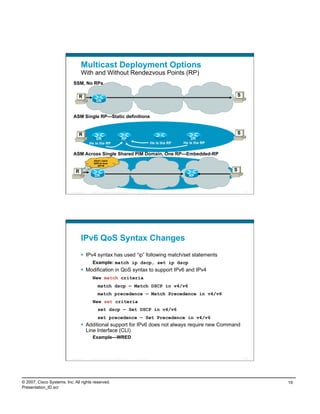
Multicast Deployment Options
                                    With and Without Rendezvous Points (RP)
                            SSM, No RPs

                                  R                                                                                                         S
                                                   DR


                            ASM Single RP—Static definitions


                                  R                                                                                                         S
                                                DR                                RP                                             DR
                                            He is the RP                                                      He is the RP   He is the RP


                            ASM Across Single Shared PIM Domain, One RP—Embedded-RP
                                                Alert! I want
                                                GRP=A from
                                                   RP=B

                               R                                                                                                            S
                                                 DR                                                                             RP


                          Presentation_ID    © 2007 Cisco Systems, Inc. All rights reserved.   Cisco Public                                     37


                                    IPv6 QoS Syntax Changes
                                      IPv4 syntax has used “ip” following match/set statements
                                              Example: match ip dscp, set ip dscp
                                      Modification in QoS syntax to support IPv6 and IPv4
                                              New match criteria
                                                    match dscp — Match DSCP in v4/v6
                                                    match precedence — Match Precedence in v4/v6
                                              New set criteria
                                                    set dscp — Set DSCP in v4/v6
                                                    set precedence — Set Precedence in v4/v6
                                      Additional support for IPv6 does not always require new Command
                                       Line Interface (CLI)
                                              Example—WRED


                          Presentation_ID    © 2007 Cisco Systems, Inc. All rights reserved.   Cisco Public                                     38


© 2007, Cisco Systems, Inc. All rights reserved.                                                                                                     19
Presentation_ID.scr
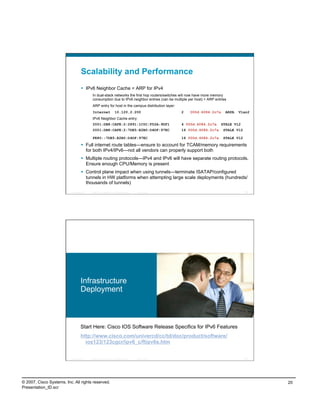
Scalability and Performance
                                      IPv6 Neighbor Cache = ARP for IPv4
                                             In dual-stack networks the first hop routers/switches will now have more memory
                                             consumption due to IPv6 neighbor entries (can be multiple per host) + ARP entries
                                             ARP entry for host in the campus distribution layer:
                                             Internet                   10.120.2.200                         2   000d.6084.2c7a     ARPA   Vlan2
                                             IPv6 Neighbor Cache entry:
                                             2001:DB8:CAFE:2:2891:1C0C:F52A:9DF1                             4 000d.6084.2c7a     STALE Vl2
                                             2001:DB8:CAFE:2:7DE5:E2B0:D4DF:97EC                             16 000d.6084.2c7a    STALE Vl2

                                             FE80::7DE5:E2B0:D4DF:97EC                                       16 000d.6084.2c7a    STALE Vl2

                                      Full internet route tables—ensure to account for TCAM/memory requirements
                                       for both IPv4/IPv6—not all vendors can properly support both
                                      Multiple routing protocols—IPv4 and IPv6 will have separate routing protocols.
                                       Ensure enough CPU/Memory is present
                                      Control plane impact when using tunnels—terminate ISATAP/configured
                                       tunnels in HW platforms when attempting large scale deployments (hundreds/
                                       thousands of tunnels)
                          Presentation_ID   © 2007 Cisco Systems, Inc. All rights reserved.   Cisco Public                                    39


                                    Infrastructure
                                    Deployment


                                    Start Here: Cisco IOS Software Release Specifics for IPv6 Features
                                    http://www.cisco.com/univercd/cc/td/doc/product/software/
                                      ios123/123cgcr/ipv6_c/ftipv6s.htm


                          Presentation_ID   © 2007 Cisco Systems, Inc. All rights reserved.   Cisco Public                                    40


© 2007, Cisco Systems, Inc. All rights reserved.                                                                                                   20
Presentation_ID.scr
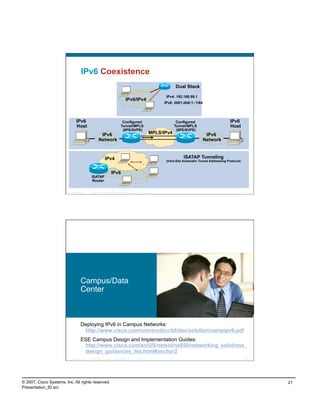
IPv6 Coexistence
                                                                                                                         Dual Stack

                                                                                                                   IPv4: 192.168.99.1
                                                                                      IPv6/IPv4
                                                                                                                  IPv6: 2001:db8:1::1/64


                               IPv6                                              Configured                               Configured                         IPv6
                               Host                                             Tunnel/MPLS                              Tunnel/MPLS                         Host
                                                                                 (6PE/6VPE)                               (6PE/6VPE)
                                                      IPv6                                                   MPLS/IPv4                      IPv6
                                                     Network                                                                               Network


                                                            IPv4                                                              ISATAP Tunneling
                                                                                                                   (Intra-Site Automatic Tunnel Addressing Protocol)


                                                                    IPv6
                                            ISATAP
                                             Router


                          Presentation_ID   © 2007 Cisco Systems, Inc. All rights reserved.   Cisco Public                                                             41


                                    Campus/Data
                                    Center


                                    Deploying IPv6 in Campus Networks:
                                     http://www.cisco.com/univercd/cc/td/doc/solution/campipv6.pdf
                                    ESE Campus Design and Implementation Guides:
                                     http://www.cisco.com/en/US/netsol/ns656/networking_solutions_
                                     design_guidances_list.html#anchor2
                          Presentation_ID   © 2007 Cisco Systems, Inc. All rights reserved.   Cisco Public                                                             42


© 2007, Cisco Systems, Inc. All rights reserved.                                                                                                                            21
Presentation_ID.scr
Campus IPv6 Deployment
                                    Three Major Options

                                      Dual-stack—The way to go for obvious reasons:
                                       performance, security, QoS, multicast and management
                                             Layer 3 switches should support IPv6 forwarding in hardware
                                      Hybrid—Dual-stack where possible, tunnels for the rest, but
                                       all leveraging the existing design/gear
                                             Pro—Leverage existing gear and network design (traditional L2/L3 and
                                             routed access)
                                             Con—Tunnels (especially ISATAP) cause unnatural things to be done
                                             to infrastructure (like core acting as access layer) and ISATAP does
                                             not support IPv6 multicast
                                      IPv6 Service Block—A new network block used for interim
                                       connectivity for IPv6 overlay network
                                             Pro—Separation, control and flexibility (still supports traditional L2/L3
                                             and routed access)
                                             Con—Cost (more gear), does not fully leverage existing design, still
                                             have to plan for a real dual-stack deployment and ISATAP does not
                                             support IPv6 multicast
                          Presentation_ID   © 2007 Cisco Systems, Inc. All rights reserved.   Cisco Public                                                                 43


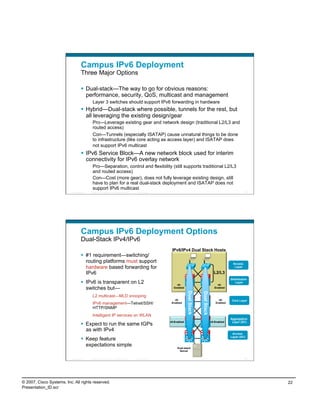
                                    Campus IPv6 Deployment Options
                                    Dual-Stack IPv4/IPv6
                                                                                                              IPv6/IPv4 Dual Stack Hosts
                                      #1 requirement—switching/
                                       routing platforms must support                                                                                             Access
                                       hardware based forwarding for                                                                                               Layer

                                       IPv6                                                                                                           L2/L3
                                                                                                                                                                 Distribution
                                      IPv6 is transparent on L2                                                 v6-                                     v6-
                                                                                                                                                                    Layer

                                       switches but—                                                           Enabled                                 Enabled
                                                                                                                          Dual Stack


                                                                                                                                       Dual Stack


                                             L2 multicast—MLD snooping
                                                                                                                v6-                                      v6-      Core Layer
                                             IPv6 management—Telnet/SSH/                                      Enabled                                  Enabled

                                             HTTP/SNMP
                                             Intelligent IP services on WLAN
                                                                                                                                                                 Aggregation
                                                                                                             v6-Enabled                             v6-Enabled    Layer (DC)
                                      Expect to run the same IGPs
                                       as with IPv4
                                                                                                                                                                  Access
                                                                                                                                                                 Layer (DC)
                                      Keep feature
                                       expectations simple                                                        Dual-stack
                                                                                                                   Server

                          Presentation_ID   © 2007 Cisco Systems, Inc. All rights reserved.   Cisco Public                                                                 44


© 2007, Cisco Systems, Inc. All rights reserved.                                                                                                                                22
Presentation_ID.scr
Access Layer: Dual Stack
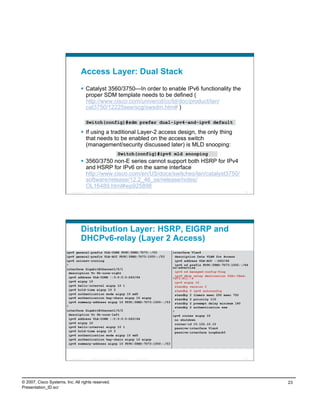
                                      Catalyst 3560/3750—In order to enable IPv6 functionality the
                                       proper SDM template needs to be defined (
                                       http://www.cisco.com/univercd/cc/td/doc/product/lan/
                                       cat3750/12225see/scg/swsdm.htm# )

                                            Switch(config)#sdm prefer dual-ipv4-and-ipv6 default

                                      If using a traditional Layer-2 access design, the only thing
                                       that needs to be enabled on the access switch
                                       (management/security discussed later) is MLD snooping:
                                                                             Switch(config)#ipv6 mld snooping
                                      3560/3750 non-E series cannot support both HSRP for IPv4
                                       and HSRP for IPv6 on the same interface
                                       http://www.cisco.com/en/US/docs/switches/lan/catalyst3750/
                                       software/release/12.2_46_se/release/notes/
                                       OL16489.html#wp925898
                          Presentation_ID    © 2007 Cisco Systems, Inc. All rights reserved.   Cisco Public                                          45


                                    Distribution Layer: HSRP, EIGRP and
                                    DHCPv6-relay (Layer 2 Access)
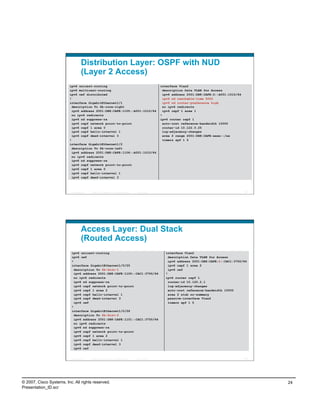
                        ipv6 general-prefix ULA-CORE FD9C:58ED:7D73::/53                                      interface Vlan4
                        ipv6 general-prefix ULA-ACC FD9C:58ED:7D73:1000::/53                                    description Data VLAN for Access
                        ipv6 unicast-routing                                                                    ipv6 address ULA-ACC ::D63/64
                        !                                                                                       ipv6 nd prefix FD9C:58ED:7D73:1002::/64
                        interface GigabitEthernet1/0/1                                                        no-advertise
                          description To 6k-core-right                                                          ipv6 nd managed-config-flag
                          ipv6 address ULA-CORE ::3:0:0:0:D63/64                                                ipv6 dhcp relay destination fd9c:58ed:
                                                                                                              7d73:811::9
                          ipv6 eigrp 10                                                                         ipv6 eigrp 10
                          ipv6 hello-interval eigrp 10 1                                                        standby version 2
                          ipv6 hold-time eigrp 10 3                                                             standby 2 ipv6 autoconfig
                          ipv6 authentication mode eigrp 10 md5                                                 standby 2 timers msec 250 msec 750
                          ipv6 authentication key-chain eigrp 10 eigrp                                          standby 2 priority 110
                          ipv6 summary-address eigrp 10 FD9C:58ED:7D73:1000::/53                                standby 2 preempt delay minimum 180
                        !                                                                                       standby 2 authentication ese
                        interface GigabitEthernet1/0/2                                                        !
                          description To 6k-core-left                                                         ipv6 router eigrp 10
                          ipv6 address ULA-CORE ::C:0:0:0:D63/64                                                no shutdown
                          ipv6 eigrp 10                                                                         router-id 10.122.10.10
                          ipv6 hello-interval eigrp 10 1                                                        passive-interface Vlan4
                          ipv6 hold-time eigrp 10 3                                                             passive-interface Loopback0
                          ipv6 authentication mode eigrp 10 md5
                          ipv6 authentication key-chain eigrp 10 eigrp
                          ipv6 summary-address eigrp 10 FD9C:58ED:7D73:1000::/53


                          Presentation_ID    © 2007 Cisco Systems, Inc. All rights reserved.   Cisco Public                                          46


© 2007, Cisco Systems, Inc. All rights reserved.                                                                                                          23
Presentation_ID.scr
Distribution Layer: OSPF with NUD
                                    (Layer 2 Access)
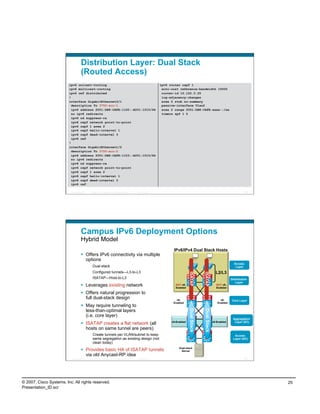
                          ipv6 unicast-routing                                                               interface Vlan2
                          ipv6 multicast-routing                                                               description Data VLAN for Access
                          ipv6 cef distributed                                                                 ipv6 address 2001:DB8:CAFE:2::A001:1010/64
                          !                                                                                    ipv6 nd reachable-time 5000
                          interface GigabitEthernet1/1                                                         ipv6 nd router-preference high
                            description To 6k-core-right                                                       no ipv6 redirects
                            ipv6 address 2001:DB8:CAFE:1105::A001:1010/64                                      ipv6 ospf 1 area 1
                            no ipv6 redirects                                                                !
                            ipv6 nd suppress-ra                                                              ipv6 router ospf 1
                            ipv6 ospf network point-to-point                                                   auto-cost reference-bandwidth 10000
                            ipv6 ospf 1 area 0                                                                 router-id 10.122.0.25
                            ipv6 ospf hello-interval 1                                                         log-adjacency-changes
                            ipv6 ospf dead-interval 3                                                          area 2 range 2001:DB8:CAFE:xxxx::/xx
                          !                                                                                    timers spf 1 5
                          interface GigabitEthernet1/2
                            description To 6k-core-left
                            ipv6 address 2001:DB8:CAFE:1106::A001:1010/64
                            no ipv6 redirects
                            ipv6 nd suppress-ra
                            ipv6 ospf network point-to-point
                            ipv6 ospf 1 area 0
                            ipv6 ospf hello-interval 1
                            ipv6 ospf dead-interval 3


                          Presentation_ID   © 2007 Cisco Systems, Inc. All rights reserved.   Cisco Public                                                  47


                                    Access Layer: Dual Stack
                                    (Routed Access)
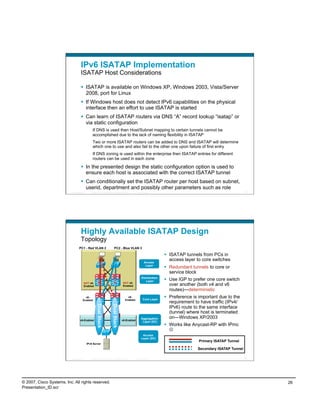
                           ipv6 unicast-routing                                                                 interface Vlan2
                           ipv6 cef                                                                               description Data VLAN for Access
                           !                                                                                      ipv6 address 2001:DB8:CAFE:2::CAC1:3750/64
                           interface GigabitEthernet1/0/25                                                        ipv6 ospf 1 area 2
                             description To 6k-dist-1                                                             ipv6 cef
                             ipv6 address 2001:DB8:CAFE:1100::CAC1:3750/64                                      !
                             no ipv6 redirects                                                                  ipv6 router ospf 1
                             ipv6 nd suppress-ra                                                                  router-id 10.120.2.1
                             ipv6 ospf network point-to-point                                                     log-adjacency-changes
                             ipv6 ospf 1 area 2                                                                   auto-cost reference-bandwidth 10000
                             ipv6 ospf hello-interval 1                                                           area 2 stub no-summary
                             ipv6 ospf dead-interval 3                                                            passive-interface Vlan2
                             ipv6 cef                                                                             timers spf 1 5
                           !
                           interface GigabitEthernet1/0/26
                             description To 6k-dist-2
                             ipv6 address 2001:DB8:CAFE:1101::CAC1:3750/64
                             no ipv6 redirects
                             ipv6 nd suppress-ra
                             ipv6 ospf network point-to-point
                             ipv6 ospf 1 area 2
                             ipv6 ospf hello-interval 1
                             ipv6 ospf dead-interval 3
                             ipv6 cef


                          Presentation_ID   © 2007 Cisco Systems, Inc. All rights reserved.   Cisco Public                                                  48


© 2007, Cisco Systems, Inc. All rights reserved.                                                                                                                 24
Presentation_ID.scr
Distribution Layer: Dual Stack
                                    (Routed Access)
                         ipv6 unicast-routing                                                                ipv6 router ospf 1
                         ipv6 multicast-routing                                                               auto-cost reference-bandwidth 10000
                         ipv6 cef distributed                                                                 router-id 10.122.0.25
                         !                                                                                    log-adjacency-changes
                         interface GigabitEthernet3/1                                                         area 2 stub no-summary
                           description To 3750-acc-1                                                          passive-interface Vlan2
                           ipv6 address 2001:DB8:CAFE:1100::A001:1010/64                                      area 2 range 2001:DB8:CAFE:xxxx::/xx
                           no ipv6 redirects                                                                  timers spf 1 5
                           ipv6 nd suppress-ra
                           ipv6 ospf network point-to-point
                           ipv6 ospf 1 area 2
                           ipv6 ospf hello-interval 1
                           ipv6 ospf dead-interval 3
                           ipv6 cef
                         !
                         interface GigabitEthernet1/2
                           description To 3750-acc-2
                           ipv6 address 2001:DB8:CAFE:1103::A001:1010/64
                           no ipv6 redirects
                           ipv6 nd suppress-ra
                           ipv6 ospf network point-to-point
                           ipv6 ospf 1 area 2
                           ipv6 ospf hello-interval 1
                           ipv6 ospf dead-interval 3
                           ipv6 cef

                          Presentation_ID   © 2007 Cisco Systems, Inc. All rights reserved.   Cisco Public                                                                        49


                                    Campus IPv6 Deployment Options
                                    Hybrid Model
                                                                                                                    IPv6/IPv4 Dual Stack Hosts
                                      Offers IPv6 connectivity via multiple
                                       options
                                                                                                                                                                         Access
                                             Dual-stack                                                                                                                   Layer
                                             Configured tunnels—L3-to-L3                                                                                    L2/L3
                                                                                                                                ISATAP


                                                                                                                                             ISATAP


                                             ISATAP—Host-to-L3                                                                                                         Distribution
                                                                                                                                                                          Layer
                                      Leverages existing network                                                    NOT v6-
                                                                                                                     Enabled
                                                                                                                                                             NOT v6-
                                                                                                                                                             Enabled

                                      Offers natural progression to
                                       full dual-stack design                                                         v6-                                      v6-      Core Layer
                                                                                                                    Enabled                                  Enabled
                                      May require tunneling to
                                       less-than-optimal layers
                                                                                                                                Dual Stack


                                                                                                                                             Dual Stack


                                       (i.e. core layer)
                                                                                                                                                                        Aggregation
                                                                                                                   v6-Enabled                             v6-Enabled     Layer (DC)
                                      ISATAP creates a flat network (all
                                       hosts on same tunnel are peers)
                                             Create tunnels per VLAN/subnet to keep                                                                                      Access
                                             same segregation as existing design (not                                                                                   Layer (DC)
                                             clean today)
                                                                                                                        Dual-stack
                                      Provides basic HA of ISATAP tunnels                                               Server
                                       via old Anycast-RP idea
                          Presentation_ID   © 2007 Cisco Systems, Inc. All rights reserved.   Cisco Public                                                                        50


© 2007, Cisco Systems, Inc. All rights reserved.                                                                                                                                       25
Presentation_ID.scr
IPv6 ISATAP Implementation
                                    ISATAP Host Considerations

                                      ISATAP is available on Windows XP, Windows 2003, Vista/Server
                                       2008, port for Linux
                                      If Windows host does not detect IPv6 capabilities on the physical
                                       interface then an effort to use ISATAP is started
                                      Can learn of ISATAP routers via DNS “A” record lookup “isatap” or
                                       via static configuration
                                                If DNS is used then Host/Subnet mapping to certain tunnels cannot be
                                                accomplished due to the lack of naming flexibility in ISATAP
                                                Two or more ISATAP routers can be added to DNS and ISATAP will determine
                                                which one to use and also fail to the other one upon failure of first entry
                                                If DNS zoning is used within the enterprise then ISATAP entries for different
                                                routers can be used in each zone

                                      In the presented design the static configuration option is used to
                                       ensure each host is associated with the correct ISATAP tunnel
                                      Can conditionally set the ISATAP router per host based on subnet,
                                       userid, department and possibly other parameters such as role
                          Presentation_ID      © 2007 Cisco Systems, Inc. All rights reserved.     Cisco Public                                                 51


                                    Highly Available ISATAP Design
                                    Topology
                                  PC1 - Red VLAN 2                          PC2 - Blue VLAN 3

                                                                                                                        ISATAP tunnels from PCs in
                                                                                                                         access layer to core switches
                                                                                                          Access
                                                                                                           Layer
                                                                                                                        Redundant tunnels to core or
                                                                                                                         service block
                                                                                                       Distribution
                                                                                                          Layer         Use IGP to prefer one core switch
                                                                                      NOT v6-
                                        NOT v6-
                                        Enabled                                       Enabled                            over another (both v4 and v6
                                                                                                                         routes)—deterministic
                                        v6-                                               v6-
                                                                                                         Core Layer
                                                                                                                        Preference is important due to the
                                      Enabled                                           Enabled
                                                                                                                         requirement to have traffic (IPv4/
                                                      Dual Stack


                                                                         Dual Stack


                                                                                                                         IPv6) route to the same interface
                                                                                                                         (tunnel) where host is terminated
                                                                                                       Aggregation       on—Windows XP/2003
                                   v6-Enabled                                         v6-Enabled
                                                                                                        Layer (DC)
                                                                                                                        Works like Anycast-RP with IPmc
                                                                                                                         
                                                                                                        Access
                                                                                                       Layer (DC)
                                                                                                                                      Primary ISATAP Tunnel
                                            IPv6 Server
                                                                                                                                      Secondary ISATAP Tunnel

                          Presentation_ID      © 2007 Cisco Systems, Inc. All rights reserved.     Cisco Public                                                 52


© 2007, Cisco Systems, Inc. All rights reserved.                                                                                                                     26
Presentation_ID.scr
IPv6 Campus ISATAP Configuration
                                    Redundant Tunnels
                           ISATAP Primary                                                                       ISATAP Secondary
                           interface Tunnel2                                                                   interface Tunnel2
                            ipv6 address 2001:DB8:CAFE:2::/64 eui-64                                             ipv6 address 2001:DB8:CAFE:2::/64 eui-64
                                                                                                                 no ipv6 nd suppress-ra
                            no ipv6 nd suppress-ra
                                                                                                                 ipv6 ospf 1 area 2
                               ipv6 ospf 1 area 2
                                                                                                                 ipv6 ospf cost 10
                            tunnel source Loopback2
                                                                                                                 tunnel source Loopback2
                            tunnel mode ipv6ip isatap
                                                                                                                 tunnel mode ipv6ip isatap
                           !                                                                                   !
                           interface Tunnel3                                                                   interface Tunnel3
                            ipv6 address 2001:DB8:CAFE:3::/64 eui-64                                             ipv6 address 2001:DB8:CAFE:3::/64 eui-64
                            no ipv6 nd suppress-ra                                                               no ipv6 nd suppress-ra
                               ipv6 ospf 1 area 2                                                                ipv6 ospf 1 area 2
                            tunnel source Loopback3                                                              ipv6 ospf cost 10
                            tunnel mode ipv6ip isatap                                                            tunnel source Loopback3
                           !                                                                                     tunnel mode ipv6ip isatap
                                                                                                               !
                           interface Loopback2
                                                                                                               interface Loopback2
                            description Tunnel source for ISATAP-VLAN2
                                                                                                                 ip address 10.122.10.102 255.255.255.255
                            ip address 10.122.10.102 255.255.255.255
                                                                                                                 delay 1000
                           !
                                                                                                               !
                           interface Loopback3                                                                 interface Loopback3
                            description Tunnel source for ISATAP-VLAN3                                           ip address 10.122.10.103 255.255.255.255
                            ip address 10.122.10.103 255.255.255.255                                             delay 1000

                          Presentation_ID     © 2007 Cisco Systems, Inc. All rights reserved.   Cisco Public                                                53


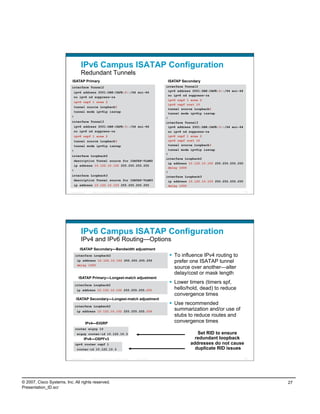
                                    IPv6 Campus ISATAP Configuration
                                    IPv4 and IPv6 Routing—Options
                                   ISATAP Secondary—Bandwidth adjustment
                               interface Loopback2                                                                To influence IPv4 routing to
                                ip address 10.122.10.102 255.255.255.255                                           prefer one ISATAP tunnel
                                delay 1000
                                                                                                                   source over another—alter
                                                                                                                   delay/cost or mask length
                                  ISATAP Primary—Longest-match adjustment
                               interface Loopback2
                                                                                                                  Lower timers (timers spf,
                                ip address 10.122.10.102 255.255.255.255                                           hello/hold, dead) to reduce
                                                                                                                   convergence times
                                ISATAP Secondary—Longest-match adjustment
                               interface Loopback2
                                                                                                                  Use recommended
                                ip address 10.122.10.102 255.255.255.254
                                                                                                                   summarization and/or use of
                                                                                                                   stubs to reduce routes and
                                            IPv4—EIGRP                                                             convergence times
                               router eigrp 10
                                eigrp router-id 10.122.10.3                                                                    Set RID to ensure
                                        IPv6—OSPFv3                                                                           redundant loopback
                               ipv6 router ospf 1                                                                           addresses do not cause
                                router-id 10.122.10.3                                                                         duplicate RID issues

                          Presentation_ID     © 2007 Cisco Systems, Inc. All rights reserved.   Cisco Public                                                54


© 2007, Cisco Systems, Inc. All rights reserved.                                                                                                                 27
Presentation_ID.scr
Distribution Layer Routes
                                    Primary/Secondary Paths to ISATAP Tunnel Sources

                                                                                               dist-2             core-2
                                                                                    acc-2

                                                                                                                                     Loopback 2—10.122.10.102
                                                                                                                             Used as SECONDARY ISATAP tunnel source

                                               VLAN 2
                                            10.120.2.0/24                                                                          Loopback 2—10.122.10.102
                                                                                  acc-1
                                                                                                                             Used as PRIMARY ISATAP tunnel source
                                                                                               dist-1             core-1
                                                                                                     Preferred route to 10.122.10.102

                                                                                                             Preferred route to 10.122.10.102 on FAILURE

                                Before Failure
                                dist-1#show ip route | b 10.122.10.102/32
                                D           10.122.10.102/32 [90/130816] via 10.122.0.41, 00:09:23, GigabitEthernet1/0/27

                                After Failure
                                dist-1#show ip route | b 10.122.10.102/32
                                D            10.122.10.102/32 [90/258816] via 10.122.0.49, 00:00:08, GigabitEthernet1/0/28


                          Presentation_ID   © 2007 Cisco Systems, Inc. All rights reserved.   Cisco Public                                                             55


                                    IPv6 Campus ISATAP Configuration
                                    ISATAP Client Configuration
                           Windows XP/Vista Host
                          C:>netsh int ipv6 isatap set router 10.122.10.103                                                                                  New tunnel
                          Ok.                                                                                                                                  comes up
                                                                                                                                                             when failure
                                                                                                                              10.120.3.101                       occurs
                          interface Tunnel3
                           ipv6 address 2001:DB8:CAFE:3::/64 eui-64
                           no ipv6 nd suppress-ra
                              ipv6 eigrp 10
                           tunnel source Loopback3
                           tunnel mode ipv6ip isatap
                          !                                                                                                          int tu3                 int tu3
                          interface Loopback3
                           description Tunnel source for ISATAP-VLAN3                                                                int lo3                     int lo3
                                                                                                                              10.122.10.103                  10.122.10.103
                           ip address 10.122.10.103 255.255.255.255


                          Tunnel adapter Automatic Tunneling Pseudo-Interface:
                          Connection-specific DNS Suffix                                          . :
                          IP Address. . . . . . . . . . . . : 2001:db8:cafe:3:0:5efe:10.120.3.101
                          IP Address. . . . . . . . . . . . : fe80::5efe:10.120.3.101%2
                          Default Gateway . . . . . . . . . : fe80::5efe:10.122.10.103%2


                          Presentation_ID   © 2007 Cisco Systems, Inc. All rights reserved.   Cisco Public                                                             56


© 2007, Cisco Systems, Inc. All rights reserved.                                                                                                                             28
Presentation_ID.scr
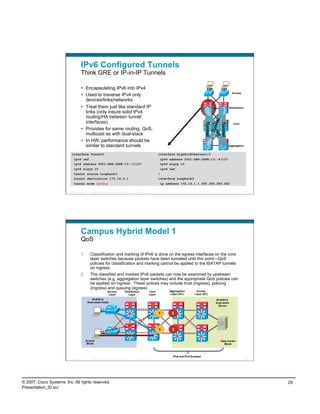
IPv6 Configured Tunnels
                                    Think GRE or IP-in-IP Tunnels

                                      Encapsulating IPv6 into IPv4
                                                                                                                                                                              Access
                                      Used to traverse IPv4 only
                                       devices/links/networks
                                      Treat them just like standard IP                                                                                                     Distribution
                                       links (only insure solid IPv4
                                       routing/HA between tunnel


                                                                                                                                                                el
                                       interfaces)


                                                                                                                                                         Tunnel


                                                                                                                                                         Tunnel
                                                                                                                                                                               Core


                                                                                                                                                                  n
                                                                                                                                                         Tun
                                                                                                                                                              Tun
                                      Provides for same routing, QoS,


                                                                                                                                                             nel
                                       multicast as with dual-stack
                                      In HW, performance should be
                                       similar to standard tunnels                                                                                                         Aggregation


                           interface Tunnel0                                                                             interface GigabitEthernet1/1
                            ipv6 cef                                                                                      ipv6 address 2001:DB8:CAFE:13::4/127
                            ipv6 address 2001:DB8:CAFE:13::1/127                                                          ipv6 eigrp 10
                            ipv6 eigrp 10                                                                                 ipv6 cef
                            tunnel source Loopback3                                                                      !
                            tunnel destination 172.16.2.1                                                                interface Loopback3
                            tunnel mode ipv6ip                                                                            ip address 172.16.1.1 255.255.255.252

                          Presentation_ID      © 2007 Cisco Systems, Inc. All rights reserved.    Cisco Public                                                                             57


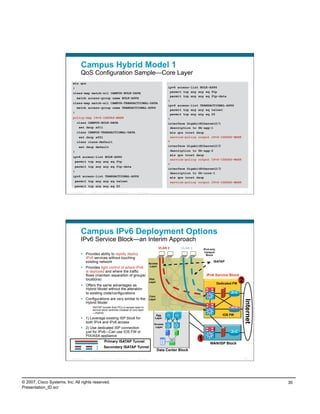
                                    Campus Hybrid Model 1
                                    QoS

                                    1.         Classification and marking of IPv6 is done on the egress interfaces on the core
                                               layer switches because packets have been tunneled until this point—QoS
                                               policies for classification and marking cannot be applied to the ISATAP tunnels
                                               on ingress
                                    2.         The classified and marked IPv6 packets can now be examined by upstream
                                               switches (e.g. aggregation layer switches) and the appropriate QoS policies can
                                               be applied on ingress. These polices may include trust (ingress), policing
                                               (ingress) and queuing (egress)
                                                                   Access               Distribution             Core          Aggregation        Access
                                                                    Layer                  Layer                 Layer          Layer (DC)       Layer (DC)

                                                IPv6/IPv4                                                                                                        IPv6/IPv4
                                             Dual-stack Hosts                                                                                                    Dual-stack
                                                                                                                                                                   Server

                                                                                                                         1      2


                                                                                                                         1      2


                                            Access                                                                                                                    Data Center
                                             Block                                                                                                                      Block


                                                                                                                                 IPv6 and IPv4 Enabled
                          Presentation_ID      © 2007 Cisco Systems, Inc. All rights reserved.    Cisco Public                                                                             58


© 2007, Cisco Systems, Inc. All rights reserved.                                                                                                                                                29
Presentation_ID.scr
Campus Hybrid Model 1
                                    QoS Configuration Sample—Core Layer
                           mls qos
                           !                                                                                               ipv6 access-list BULK-APPS
                           class-map match-all CAMPUS-BULK-DATA                                                              permit tcp any any eq ftp
                                                                                                                             permit tcp any any eq ftp-data
                                match access-group name BULK-APPS
                                                                                                                           !
                           class-map match-all CAMPUS-TRANSACTIONAL-DATA
                                                                                                                           ipv6 access-list TRANSACTIONAL-APPS
                             match access-group name TRANSACTIONAL-APPS
                                                                                                                             permit tcp any any eq telnet
                           !                                                                                                 permit tcp any any eq 22
                           policy-map IPv6-ISATAP-MARK                                                                     !
                                class CAMPUS-BULK-DATA                                                                     interface GigabitEthernet2/1
                                 set dscp af11                                                                               description to 6k-agg-1
                                class CAMPUS-TRANSACTIONAL-DATA                                                              mls qos trust dscp
                                 set dscp af21                                                                               service-policy output IPv6-ISATAP-MARK
                                class class-default                                                                        !
                                  set dscp default                                                                         interface GigabitEthernet2/2
                           !                                                                                                 description to 6k-agg-2
                                                                                                                             mls qos trust dscp
                           ipv6 access-list BULK-APPS
                                                                                                                             service-policy output IPv6-ISATAP-MARK
                            permit tcp any any eq ftp
                                                                                                                           !
                             permit tcp any any eq ftp-data
                                                                                                                           interface GigabitEthernet2/3
                           !                                                                                                 description to 6k-core-1
                           ipv6 access-list TRANSACTIONAL-APPS                                                               mls qos trust dscp
                             permit tcp any any eq telnet                                                                    service-policy output IPv6-ISATAP-MARK
                             permit tcp any any eq 22
                          Presentation_ID   © 2007 Cisco Systems, Inc. All rights reserved.   Cisco Public                                                                    59


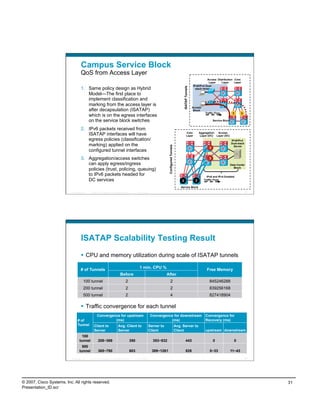
                                    Campus IPv6 Deployment Options
                                    IPv6 Service Block—an Interim Approach
                                                                                                                      VLAN 2      VLAN 3       IPv4-only
                                                                                                                                                Campus
                                      Provides ability to rapidly deploy                                                                        Block
                                       IPv6 services without touching
                                       existing network                                                      Access
                                                                                                                                                      ISATAP
                                                                                                              Layer
                                      Provides tight control of where IPv6
                                       is deployed and where the traffic
                                       flows (maintain separation of groups/                                                                     IPv6 Service Block
                                       locations)                                                            Dist.
                                                                                                             Layer
                                                                                                                                                           Dedicated FW
                                                                                                                                                                          2
                                      Offers the same advantages as
                                       Hybrid Model without the alteration
                                       to existing code/configurations
                                                                                                             Core
                                      Configurations are very similar to the                                Layer
                                                                                                                                                                              Internet


                                       Hybrid Model
                                             ISATAP tunnels from PCs in access layer to
                                             service block switches (instead of core layer
                                             —Hybrid)
                                                                                                                  Agg                                         IOS FW
                                      1) Leverage existing ISP block for                                        Layer
                                       both IPv4 and IPv6 access                                                Access
                                      2) Use dedicated ISP connection                                           Layer
                                       just for IPv6—Can use IOS FW or
                                       PIX/ASA appliance
                                                            Primary ISATAP Tunnel
                                                                                                                                           1
                                                                                                                                                    WAN/ISP Block
                                                           Secondary ISATAP Tunnel
                                                                                                                     Data Center Block

                          Presentation_ID   © 2007 Cisco Systems, Inc. All rights reserved.   Cisco Public                                                                    60


© 2007, Cisco Systems, Inc. All rights reserved.                                                                                                                                         30
Presentation_ID.scr
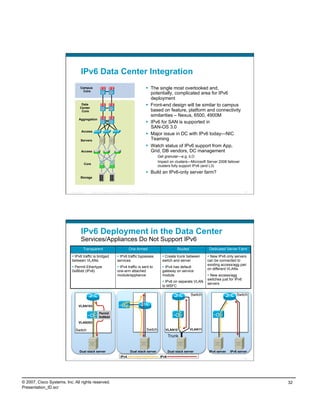
Campus Service Block
                                    QoS from Access Layer
                                                                                                                                                                                     Access Distribution Core
                                                                                                                                                                                      Layer    Layer     Layer
                                                                                                                                                                          IPv6/IPv4 Dual-
                                    1.  Same policy design as Hybrid


                                                                                                                                                         ISATAP Tunnels
                                                                                                                                                                            stack Hosts

                                        Model—The first place to
                                        implement classification and
                                        marking from the access layer is
                                                                                                                                                                          Access
                                        after decapsulation (ISATAP)                                                                                                       Block
                                                                                                                                                                                    Traffic Flow            1      1
                                        which is on the egress interfaces
                                        on the service block switches                                                                                                                      Service Block


                                    2.  IPv6 packets received from
                                        ISATAP interfaces will have                                                                                              Core
                                                                                                                                                                 Layer
                                                                                                                                                                                Aggregation  Access
                                                                                                                                                                                 Layer (DC) Layer (DC)
                                        egress policies (classification/                                                                                                                                   IPv6/IPv4
                                        marking) applied on the                                                                                                                                            Dual-stack


                                                                                                                            Configured Tunnels
                                                                                                                                                                                                             Server
                                                                                                                                                                                       3
                                        configured tunnel interfaces
                                    3.  Aggregation/access switches                                                                                                                    3
                                        can apply egress/ingress                                                                                                                                           Data Center
                                                                                                                                                                                                             Block
                                        policies (trust, policing, queuing)
                                        to IPv6 packets headed for                                                                                                                   IPv6 and IPv4 Enabled
                                        DC services                                                                                                  2                      2      Traffic Flow

                                                                                                                                                     Service Block
                          Presentation_ID   © 2007 Cisco Systems, Inc. All rights reserved.     Cisco Public                                                                                                            61


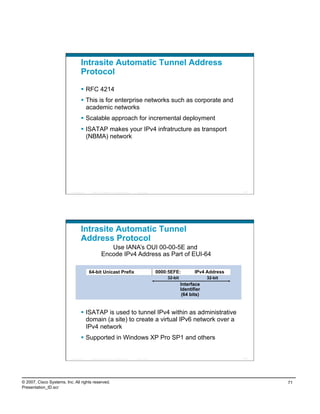
                                    ISATAP Scalability Testing Result
                                      CPU and memory utilization during scale of ISATAP tunnels

                                                                                                  1 min. CPU %
                                    # of Tunnels                                                                                                                                     Free Memory
                                                                               Before                                      After
                                       100 tunnel                                     2                                          2                                                     845246288
                                       200 tunnel                                     2                                          2                                                     839256168
                                       500 tunnel                                     2                                          4                                                     827418904

                                      Traffic convergence for each tunnel
                                                   Convergence for upstream                                     Convergence for downstream                                          Convergence for
                                 # of                       (ms)                                                          (ms)                                                      Recovery (ms)
                                 Tunnel        Client to                     Avg. Client to                    Server to                         Avg. Server to
                                               Server                        Server                            Client                            Client                             upstream downstream
                                     100
                                   tunnel           208~369                               350                    353~532                                      443                          0                 0
                                     500
                                   tunnel           365~780                               603                    389~1261                                     828                      0~33                11~43

                          Presentation_ID   © 2007 Cisco Systems, Inc. All rights reserved.     Cisco Public                                                                                                            62


© 2007, Cisco Systems, Inc. All rights reserved.                                                                                                                                                                             31
Presentation_ID.scr
IPv6 Data Center Integration
                                    Campus                                                                       The single most overlooked and,
                                     Core
                                                                                                                  potentially, complicated area for IPv6
                                                                                                                  deployment
                                    Data                                                                         Front-end design will be similar to campus
                                   Center
                                    Core                                                                          based on feature, platform and connectivity
                                                                                                                  similarities – Nexus, 6500, 4900M
                                  Aggregation
                                                                                                                 IPv6 for SAN is supported in
                                                                                                                  SAN-OS 3.0
                                     Access
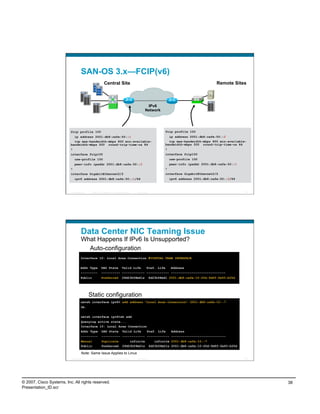
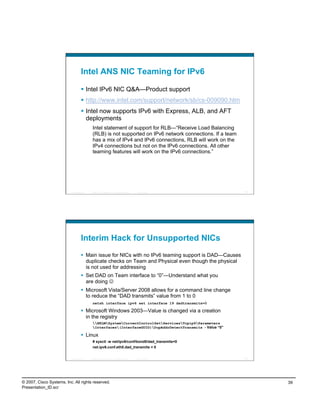
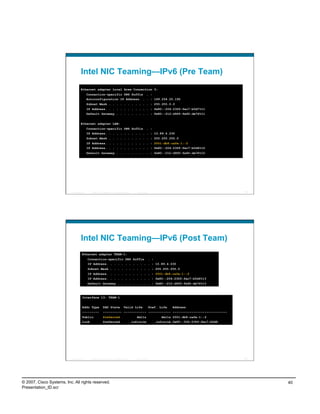
                                                                                                                 Major issue in DC with IPv6 today—NIC
                                    Servers                                                                       Teaming
                                                                                                                 Watch status of IPv6 support from App,
                                     Access                                                                       Grid, DB vendors, DC management
                                                                                                                        Get granular—e.g. iLO
                                                                                                                        Impact on clusters—Microsoft Server 2008 failover
                                        Core
                                                                                                                        clusters fully support IPv6 (and L3)
                                                                                                                 Build an IPv6-only server farm?
                                    Storage


                          Presentation_ID      © 2007 Cisco Systems, Inc. All rights reserved.       Cisco Public                                                                63


                                    IPv6 Deployment in the Data Center
                                    Services/Appliances Do Not Support IPv6
                                       Transparent                                           One-Armed                                Routed             Dedicated Server Farm

                             IPv6 traffic is bridged                            IPv6 traffic bypasses                     Create trunk between         New IPv6 only servers
                           between VLANs                                       services                                   switch and server             can be connected to
                                                                                                                                                        existing access/agg pair
                             Permit Ethertype                                   IPv4 traffic is sent to                   IPv4 has default
                                                                                                                                                        on different VLANs
                           0x86dd (IPv6)                                       one-arm attached                           gateway on service
                                                                               module/appliance                           module                          New access/agg
                                                                                                                                                        switches just for IPv6
                                                                                                                            IPv6 on separate VLAN
                                                                                                                                                        servers
                                                                                                                          to MSFC

                                                                                                                                               Switch                      Switch


                                  VLAN103

                                                        Permit
                                                        0x86dd
                                  VLAN203

                              Switch                                                                           Switch       VLAN10             VLAN11

                                                                                                                                Trunk


                                   Dual stack server                                             Dual stack server              Dual stack server        IPv4 server   IPv6 server
                                                                                   IPv4                                  IPv6
                          Presentation_ID      © 2007 Cisco Systems, Inc. All rights reserved.       Cisco Public                                                                64


© 2007, Cisco Systems, Inc. All rights reserved.                                                                                                                                      32
Presentation_ID.scr
What About Translation?
                                      NAT-PT
                                             Moved to Historic in IETF (RFC4966)
                                             Only in IOS (no HW support for NAT-PT)
                                             Limited ALG support
                                             Can be complex to configure and troubleshoot
                                      Portproxy
                                             Offered in Microsoft Windows (XP, 2003, Vista, 2008)
                                             Basically, it is protocol and port forwarding
                                             Allows v4-to-v6, v6-to-v6 and v6-to-v4
                                             Load is CPU bound
                                             Very simple to configure (on a per host basis or as an appliance)
                                      IVI
                                             draft-xli-behave-ivi-01.txt – Prefix-specific and Stateless Address Mapping
                                             “IV”=4, “VI”=6 – Based on Roman numerals
                                             IVI is good at what translators due but it is just as bad with what translators
                                             can’t do 
                                      Open source solutions that also provide basic SLB – Linux IP Virtual Server
                                       (Google contributed IPv6 code), Balance, Distributor, etc…
                          Presentation_ID   © 2007 Cisco Systems, Inc. All rights reserved.   Cisco Public                                                    65


                                    Microsoft Windows PortProxy
                                      Can be treated like an
                                       appliance
                                             One-arm                                                         2001:db8:cafe:12::25

                                             Dual-attached (better perf)
                                                                                                             10.121.12.25

                                      Outside traffic comes in PortProxy
                                                                One-Arm
                                                                            VIP=10.121.5.20
                                       on IPv6—PortProxy to
                                                                          ACE                                                                        PortProxy
                                       v4 (VIP address on ACE)                                                                                      Dual-Attached

                                      Traffic is IPv4 to server

                                                                                                                             IPv4-only Web Server


                          Presentation_ID   © 2007 Cisco Systems, Inc. All rights reserved.   Cisco Public                                                    66


© 2007, Cisco Systems, Inc. All rights reserved.                                                                                                                    33
Presentation_ID.scr
PortProxy Configuration/Monitoring

                                                              adsf
                                          netsh interface portproxy>sh all
                                          Listen on ipv6:                                                            Connect to ipv4:
                                          Address                                     Port                           Address                 Port
                                          --------------- ----------                                                 --------------- ----------
                                          2001:db8:cafe:12::25 80                                                    10.121.5.20             80


                                          Active Connections
                                                      Proto           Local Address                                            Foreign Address             State
                                                      TCP             10.121.12.25:58141                                       10.121.5.20:http            ESTABLISHED
                                                      TCP             [2001:db8:cafe:12::25]:80                                    [2001:db8:cafe:10::17]:52047          ESTABLISHED


                            conn-id                               np dir proto vlan source                                                          destination               state
                            ----------+--+---+-----+----+---------------------+---------------------+------+
                            14                                    1     in        TCP              5            10.121.12.25:58573                  10.121.5.20:80            ESTAB
                            13                                    1     out TCP                    5            10.121.14.15:80                     10.121.5.12:1062          ESTAB


                          Presentation_ID               © 2007 Cisco Systems, Inc. All rights reserved.         Cisco Public                                                             67


                                            PortProxy Performance
                                            Throughput Example

                                                                              HTTP Throughput Comparison ‐ Direct vs. PortProxy 

                                                                                                       247.2 
                                                        250 
                                                                                                                                                  206.4 
                                                                                                                                 192 
                                                        200 
                                 Throughput (Mbps) 


                                                                                                                                                                       Direct v6‐v6 
                                                        150                                                                                                            PortProxy v6v4 
                                                                                                                                                                       PortProxy v6v6 
                                                        100 


                                                            50 


                                                             0 

                                                                                                                     download‐1gig (1.2G) 


                          Presentation_ID               © 2007 Cisco Systems, Inc. All rights reserved.         Cisco Public                                                             68


© 2007, Cisco Systems, Inc. All rights reserved.                                                                                                                                              34
Presentation_ID.scr
PortProxy Performance
                                    CPU Utilization on PortProxy Server


                          Presentation_ID      © 2007 Cisco Systems, Inc. All rights reserved.   Cisco Public                                                     69


                                    Cisco IPv6 Storage Networking
                                                                                                         SAN-OS 3.x

                           Core (Host Implementation)                                                   Applications and Mgmt
                                              IPv6 (RFC 2460)                                            Telnet, TFTP, FTP, SCP, DNS         Security
                                         ICMPv6 (RFC 2463)                                                   Resolver, HTTP, Ping,
                                                                                                                 Traceroute, SSH           IPv6 Access Control
                               Neighbor Discovery (RFC 2461)
                                                                                                          Cisco IP, IP-Forwarding and               lists
                                 Stateless Auto-configuration
                                                                                                                    VRRP MIBs                 IPv6 IPsec (3.2)
                                VRRP for IPv6 for application
                                                                                                                  SNMP over IPv6
                                    redundancy (IETF Draft)


                                     SAN Applications
                               IP Storage—iSCSI, ISNS, and
                                             FCIP
                               Zone Server, FC Name Server
                                        IPv6 over FC
                                Other modules—eg. NTP, fc-
                                          tunnel etc.

                                                                                                                             MDS 9500 Family
                          Presentation_ID      © 2007 Cisco Systems, Inc. All rights reserved.   Cisco Public                                                     70


© 2007, Cisco Systems, Inc. All rights reserved.                                                                                                                       35
Presentation_ID.scr
iSCSI/VRRP for IPv6
                                                Initiator Configured
                                                  to See Targets at
                                                   Virtual Address                                      Real GigE Address
                                                                                                                         MDS-1
                                                                                                 IPv6: 2001:db8:cafe:12::5                                        Storage Array
                                                              IPv6 Network                                                                      FC SAN
                         2001:db8:cafe:10::14
                                                                                                                                                         pWWN a
                                                  iSCSI
                                                                                                                         Virtual Address
                                                                                                                    IPv6: 2001:db8:cafe:12::5


                                                                                                        Real GigE Address
                                                                                                   IP: 2001:db8:cafe:12::6


                                             Initiator with                                                                  MDS-2
                                             NIC Teaming
                                       Same configuration requirements and operation as with IPv4
                                       Can use automatic preemption—configure VR address to be the
                                        same as physical interface of “primary”
                                       Host-side HA uses NIC teaming (see slides for NIC teaming)
                                       SAN-OS 3.2 will support iSCSI with IPsec
                           Presentation_ID     © 2007 Cisco Systems, Inc. All rights reserved.       Cisco Public                                                           71


                                     iSCSI IPv6 Example—MDS
                                     Initiator/Target

                                             iscsi virtual-target name iscsi-atto-target
                                                pWWN 21:00:00:10:86:10:46:9c
                                                initiator iqn.1991-05.com.microsoft:w2k8-svr-01.cisco.com permit
                                             iscsi initiator name iqn.1991-05.com.microsoft:w2k8-svr-01.cisco.com
                                                static pWWN 24:01:00:0d:ec:24:7c:42
                                                vsan 1
                                             zone default-zone permit vsan 1
                                             zone name iscsi-zone vsan 1
                                                   member symbolic-nodename iqn.1991-05.com.microsoft:w2k8-svr-01.cisco.com
                                                   member pwwn 21:00:00:10:86:10:46:9c
                                                   member pwwn 24:01:00:0d:ec:24:7c:42
                                                 member symbolic-nodename iscsi-atto-target
                                             zone name Generic vsan 1
                                                   member pwwn 21:00:00:10:86:10:46:9c
                                             zoneset name iscsi_zoneset vsan 1
                                                 member iscsi-zone
                                             zoneset name Generic vsan 1
                                                   member Generic


                           Presentation_ID     © 2007 Cisco Systems, Inc. All rights reserved.       Cisco Public                                                           72


© 2007, Cisco Systems, Inc. All rights reserved.                                                                                                                                  36
Presentation_ID.scr
iSCSI/VRRP IPv6 Example—MDS
                                    Interface

                              MDS-1                                                                                        MDS-2
                             interface GigabitEthernet2/1                                                                  interface GigabitEthernet2/1
                                  ipv6 address 2001:db8:cafe:12::5/64                                                        ipv6 address 2001:db8:cafe:12::6/64
                                  no shutdown                                                                                no shutdown
                                  vrrp ipv6 1                                                                                vrrp ipv6 1
                                      address 2001:db8:cafe:12::5                                                              address 2001:db8:cafe:12::5
                                      no shutdown                                                                              no shutdown


                               mds-1# show vrrp ipv6 vr 1
                               Interface VR IpVersion Pri    Time Pre State   VR IP addr
                               ------------------------------------------------------------------
                                   GigE2/1           1        IPv6               255          100cs             master   2001:db8:cafe:12::5

                               mds-2# show vrrp ipv6 vr 1
                               Interface VR IpVersion Pri    Time Pre State   VR IP addr
                               ------------------------------------------------------------------
                                   GigE2/1           1        IPv6               100          100cs             backup   2001:db8:cafe:12::5


                          Presentation_ID   © 2007 Cisco Systems, Inc. All rights reserved.      Cisco Public                                                                73


                                    iSCSI Initiator Example—W2K8 IPv6
                                                                                                                 1


                            iscsi initiator name iqn.1991-05.com.microsoft:w2k8-svr-01.cisco.com


                                                                                                                     2


                                                                                                                                3


                             interface GigabitEthernet2/1
                                ipv6 address 2001:db8:cafe:12::5/64

                                                                                                      mds9216-1# show fcns database vsan 1
                                                                                                      VSAN 1:
                                                                                                      ---------------------------------------------------------------------
                                                                                                      FCID      TYPE PWWN                     (VENDOR) FC4-TYPE:FEATURE
                                                                                                      ---------------------------------------------------------------------
                                                                                                      0x670400       N   21:00:00:10:86:10:46:9c           scsi-fcp:target
                                                                                                      0x670405       N   24:01:00:0d:ec:24:7c:42 (Cisco)   scsi-fcp:init isc..w

                          Presentation_ID   © 2007 Cisco Systems, Inc. All rights reserved.      Cisco Public                                                                74


© 2007, Cisco Systems, Inc. All rights reserved.                                                                                                                                  37
Presentation_ID.scr
SAN-OS 3.x—FCIP(v6)
                                                      FC         Central Site                                                                             Remote Sites
                                                           FC


                                      FC
                                                                                                                                                     FC
                                            FC


                                                                                                                                                     FC
                                                      FC
                                                                                                              IPv6
                                                                                                             Network


                          fcip profile 100                                                                                  fcip profile 100
                            ip address 2001:db8:cafe:50::1                                                                    ip address 2001:db8:cafe:50::2
                            tcp max-bandwidth-mbps 800 min-available-                                                         tcp max-bandwidth-mbps 800 min-available-
                          bandwidth-mbps 500 round-trip-time-us 84                                                          bandwidth-mbps 500 round-trip-time-us 84
                          !                                                                                                 !
                          interface fcip100                                                                                 interface fcip100
                              use-profile 100                                                                                   use-profile 100
                              peer-info ipaddr 2001:db8:cafe:50::2                                                              peer-info ipaddr 2001:db8:cafe:50::1
                          !                                                                                                 !
                          interface GigabitEthernet2/2                                                                      interface GigabitEthernet2/2
                              ipv6 address 2001:db8:cafe:50::1/64                                                               ipv6 address 2001:db8:cafe:50::2/64


                          Presentation_ID         © 2007 Cisco Systems, Inc. All rights reserved.   Cisco Public                                                       75


                                    Data Center NIC Teaming Issue
                                    What Happens If IPv6 Is Unsupported?
                                      Auto-configuration
                                    Interface 10: Local Area Connection #VIRTUAL TEAM INTERFACE


                                    Addr Type                   DAD State               Valid Life             Pref. Life       Address
                                    ---------                   ---------- ------------ ------------ -----------------------------
                                    Public                      Preferred               29d23h58m41s               6d23h58m41 2001:db8:cafe:10:20d:9dff:fe93:b25d


                                                 Static configuration
                                    netsh interface ipv6> add address "Local Area Connection" 2001:db8:cafe:10::7
                                    Ok.


                                    netsh interface ipv6>sh add
                                    Querying active state...
                                    Interface 10: Local Area Connection
                                    Addr Type                   DAD State               Valid Life             Pref. Life        Address
                                    ---------                   ---------- ------------ ------------ -----------------------------
                                    Manual                      Duplicate                   infinite                  infinite 2001:db8:cafe:10::7
                                    Public                      Preferred               29d23h59m21s               6d23h59m21s 2001:db8:cafe:10:20d:9dff:fe93:b25d

                                     Note: Same Issue Applies to Linux
                          Presentation_ID         © 2007 Cisco Systems, Inc. All rights reserved.   Cisco Public                                                       76


© 2007, Cisco Systems, Inc. All rights reserved.                                                                                                                            38
Presentation_ID.scr
Intel ANS NIC Teaming for IPv6

                                      Intel IPv6 NIC Q&A—Product support
                                      http://www.intel.com/support/network/sb/cs-009090.htm
                                      Intel now supports IPv6 with Express, ALB, and AFT
                                       deployments
                                             Intel statement of support for RLB—“Receive Load Balancing
                                             (RLB) is not supported on IPv6 network connections. If a team
                                             has a mix of IPv4 and IPv6 connections, RLB will work on the
                                             IPv4 connections but not on the IPv6 connections. All other
                                             teaming features will work on the IPv6 connections.”


                          Presentation_ID   © 2007 Cisco Systems, Inc. All rights reserved.   Cisco Public    77


                                    Interim Hack for Unsupported NICs
                                      Main issue for NICs with no IPv6 teaming support is DAD—Causes
                                       duplicate checks on Team and Physical even though the physical
                                       is not used for addressing
                                      Set DAD on Team interface to “0”—Understand what you
                                       are doing 
                                      Microsoft Vista/Server 2008 allows for a command line change
                                       to reduce the “DAD transmits” value from 1 to 0
                                             netsh interface ipv6 set interface 19 dadtransmits=0

                                      Microsoft Windows 2003—Value is changed via a creation
                                       in the registry
                                             HKLMSystemCurrentControlSetServicesTcpip6Parameters
                                             Interfaces(InterfaceGUID)DupAddrDetectTransmits - Value “0”

                                      Linux
                                             # sysctl -w net/ipv6/conf/bond0/dad_transmits=0
                                             net.ipv6.conf.eth0.dad_transmits = 0


                          Presentation_ID   © 2007 Cisco Systems, Inc. All rights reserved.   Cisco Public    78


© 2007, Cisco Systems, Inc. All rights reserved.                                                                   39
Presentation_ID.scr
Intel NIC Teaming—IPv6 (Pre Team)
                                    Ethernet adapter Local Area Connection 3:
                                            Connection-specific DNS Suffix . :
                                            Autoconfiguration IP Address. . . : 169.254.25.192
                                            Subnet Mask . . . . . . . . . . . : 255.255.0.0
                                            IP Address. . . . . . . . . . . . : fe80::204:23ff:fec7:b0d7%11
                                            Default Gateway . . . . . . . . . : fe80::212:d9ff:fe92:de76%11


                                    Ethernet adapter LAN:
                                            Connection-specific DNS Suffix . :
                                            IP Address. . . . . . . . . . . . : 10.89.4.230
                                            Subnet Mask . . . . . . . . . . . : 255.255.255.0
                                            IP Address. . . . . . . . . . . . : 2001:db8:cafe:1::2
                                            IP Address. . . . . . . . . . . . : fe80::204:23ff:fec7:b0d6%12
                                            Default Gateway . . . . . . . . . : fe80::212:d9ff:fe92:de76%12


                          Presentation_ID     © 2007 Cisco Systems, Inc. All rights reserved.      Cisco Public                                          79


                                    Intel NIC Teaming—IPv6 (Post Team)
                                      Ethernet adapter TEAM-1:
                                            Connection-specific DNS Suffix . :
                                            IP Address. . . . . . . . . . . . : 10.89.4.230
                                            Subnet Mask . . . . . . . . . . . : 255.255.255.0
                                            IP Address. . . . . . . . . . . . : 2001:db8:cafe:1::2
                                            IP Address. . . . . . . . . . . . : fe80::204:23ff:fec7:b0d6%13
                                            Default Gateway . . . . . . . . . : fe80::212:d9ff:fe92:de76%13


                                      Interface 13: TEAM-1


                                      Addr Type             DAD State                 Valid Life                  Pref. Life   Address
                                      ---------             ---------- ------------ ------------ -----------------------------
                                      Public                Preferred                              4m11s                4m11s 2001:db8:cafe:1::2
                                      Link                  Preferred                           infinite             infinite fe80::204:23ff:fec7:b0d6


                          Presentation_ID     © 2007 Cisco Systems, Inc. All rights reserved.      Cisco Public                                          80


© 2007, Cisco Systems, Inc. All rights reserved.                                                                                                              40
Presentation_ID.scr
Data Center—IPv6 on FWSM
                                     Transparent Firewall Mode—Example
                               FWSM Version 3.1(3) <context>
                               !
                               firewall transparent                                                            Today, IPv6 inspection is
                               hostname WEBAPP                                                                  supported in the routed
                               !                                                                                firewall mode
                               interface inside
                                   nameif inside                                                               Transparent mode can allow
                                bridge-group 1                                                                  IPv6 traffic to be bridged (no
                                security-level 100
                               !
                                                                                                                inspection)
                               interface outside
                                nameif outside
                                bridge-group 1
                                security-level 0
                               !
                               interface BVI1
                                ip address 10.121.10.254 255.255.255.0
                               !
                               access-list BRIDGE_TRAFFIC ethertype permit bpdu
                               access-list BRIDGE_TRAFFIC ethertype permit 86dd                                        Permit ethertype 0x86dd
                               !                                                                                           (IPv6 ethertype)
                               access-group BRIDGE_TRAFFIC in interface inside
                               access-group BRIDGE_TRAFFIC in interface outside
                          Presentation_ID   © 2007 Cisco Systems, Inc. All rights reserved.   Cisco Public                                       81


                                     Data Center—IPv6 on FWSM
                                     Routed Firewall Mode—Example
                           FWSM Version 3.1(3) <context>
                           !
                           hostname WEBAPP
                           !
                           interface inside
                            nameif inside
                            security-level 100
                               ipv6 address 2001:db8:cafe:10::f00d:1/64
                           !
                           interface outside
                               nameif outside
                            security-level 0
                            ipv6 address 2001:db8:cafe:101::f00d:1/64                                               GW to MSFC outside
                           !                                                                                             VLAN intf.
                           ipv6 route outside ::/0 2001:db8:cafe:101::1
                           ipv6 access-list IPv6_1 permit icmp6 any 2001:db8:cafe:10::/64
                           ipv6 access-list IPv6_1 permit tcp 2001:db8:cafe:2::/64 host 2001:db8:cafe:10::7 eq www
                           access-group IPv6_1 in interface outside


                          Presentation_ID   © 2007 Cisco Systems, Inc. All rights reserved.   Cisco Public                                       82


© 2007, Cisco Systems, Inc. All rights reserved.                                                                                                      41
Presentation_ID.scr
WAN/Branch


                                    Deploying IPv6 in Branch Networks:
                                       http://www.cisco.com/univercd/cc/td/doc/solution/brchipv6.pdf
                                    ESE WAN/Branch Design and Implementation Guides:
                                       http://www.cisco.com/en/US/netsol/ns656/
                                       networking_solutions_design_guidances_list.html#anchor1
                                    http://www.cisco.com/en/US/netsol/ns656/
                                       networking_solutions_design_guidances_list.html#anchor10
                          Presentation_ID   © 2007 Cisco Systems, Inc. All rights reserved.   Cisco Public                           83


                                    WAN/Branch Deployment
                                      Cisco routers have supported IPv6
                                                                                                                     Corporate
                                       for a long time                                                                Network

                                      Dual-stack should be the focus of
                                       your implementation—but, some
                                       situations still call for tunneling
                                      Support for every media/WAN
                                       type you want to use (Frame                                                     SP
                                                                                                                      Cloud
                                       Relay, leased-line, broadband,
                                       MPLS, etc.)                                                                   Dual
                                      Don’t assume all features                                                     Stack
                                       for every technology are
                                                                                                             Dual                Dual
                                       IPv6-enabled                                                          Stack               Stack

                                      Better feature support in WAN/
                                       branch than in
                                       campus/DC

                          Presentation_ID   © 2007 Cisco Systems, Inc. All rights reserved.   Cisco Public                           84


© 2007, Cisco Systems, Inc. All rights reserved.                                                                                          42
Presentation_ID.scr
IPv6 Enabled Branch
                                    Take Your Pick—Mix-and-Match
                                         Branch                                                               Branch                            Branch
                                       Single Tier                                                           Dual Tier                         Multi-Tier

                                                         HQ                                                          HQ                                   HQ

                                                                                                                                                MPLS
                                                                                               Internet            Frame
                                        Internet


                                 Dual-Stack                                                                                                    Dual-Stack
                            IPSec VPN (IPv4/IPv6)                                                     Dual-Stack                             IPSec VPN or
                           IOS Firewall (IPv4/IPv6)                                           IPSec VPN or Frame Relay                     MPLS (6PE/6VPE)
                              Integrated Switch                                                 IOS Firewall (IPv4/IPv6)                  Firewall (IPv4/IPv6)
                               (MLD-snooping)                                                  Switches (MLD-snooping)                  Switches (MLD-snooping)
                          Presentation_ID   © 2007 Cisco Systems, Inc. All rights reserved.   Cisco Public                                                      85


                                    DMVPN with IPv6
                                    Example Tunnel Configuration
                          Spoke Router                                                                                     Hub Router
                         interface Tunnel0                                                                                 interface Tunnel0
                          ipv6 address 2001:DB8:CAFE:1261::2/64                                                             ipv6 address 2001:DB8:CAFE:1261::1/64
                          ipv6 enable                                                                                       ipv6 enable
                          ipv6 mtu 1400                                                                                     ipv6 mtu 1400
                          ipv6 eigrp 10                                                                                     ipv6 eigrp 10
                          ipv6 nhrp authentication ESE                                                                      no ipv6 split-horizon eigrp 10
                          ipv6 nhrp map multicast 172.17.1.3                                                                ipv6 hold-time eigrp 10 35
                          ipv6 nhrp map 2001:DB8:CAFE:1261::1/128 172.17.1.3                                                no ipv6 next-hop-self eigrp 10
                          ipv6 nhrp network-id 100000                                                                       ipv6 nhrp authentication ESE
                          ipv6 nhrp holdtime 600                                                                            ipv6 nhrp map multicast dynamic
                          ipv6 nhrp nhs 2001:DB8:CAFE:1261::1                                                               ipv6 nhrp network-id 100000
                          ipv6 nhrp cache non-authoritative                                                                 ipv6 nhrp holdtime 600
                          tunnel source 172.16.1.2                                                                          ipv6 nhrp cache non-authoritative
                          tunnel mode gre multipoint                                                                        tunnel source GigabitEthernet0/1
                          tunnel key 100000                                                                                 tunnel mode gre multipoint
                          tunnel protection ipsec profile SPOKE                                                             tunnel key 100000
                                                                                                                            tunnel protection ipsec profile HUB


                                             Spoke                                                              Internet                       Hub

                          Presentation_ID   © 2007 Cisco Systems, Inc. All rights reserved.   Cisco Public                                                      86


© 2007, Cisco Systems, Inc. All rights reserved.                                                                                                                     43
Presentation_ID.scr
Single-Tier Profile
                                       Totally integrated solution—Branch router and integrated
                                        EtherSwitch module—IOS FW and VPN for IPv6 and IPv4
                                       When SP does not offer IPv6 services, use IPv4 IPSec VPNs for
                                        manually configured tunnels (IPv6-in-IPv4) or DMVPN for IPv6
                                       When SP does offer IPv6 services, use IPv6 IPSec VPNs (latest
                                        AIM/VAM supports IPv6 IPSec)
                                                                          Single-Tier                                                   Headquarters
                                                Branch
                                                                                                                T1
                                                                                                                     Internet
                                                                                                            ADSL
                                            Dual-Stack Host
                                              (IPv4/IPv6)

                                                                                                                                Primary DMVPN Tunnel (IPv4
                                                                                          IPv4
                                                                                                                                Secondary DMVPN Tunnel (IPv4)
                                                                                          IPv6
                                                                                                                                Primary IPSec-protected configured
                                                                                                                                       tunnel (IPv6-in-IPv4)
                                                                                                                                    Secondary IPSec-protected
                                                                                                                                  configured tunnel (IPv6-in-IPv4)

                          Presentation_ID     © 2007 Cisco Systems, Inc. All rights reserved.    Cisco Public                                                        87


                                     Single-Tier Profile
                                     LAN Configuration—DHCPv6                                                                                  Branch Router
                                ipv6 unicast-routing
                                ipv6 multicast-routing
                                ipv6 cef
                                !
                                ipv6 dhcp pool DATA_VISTA
                                 address prefix 2001:DB8:CAFE:1100::/64
                                    dns-server 2001:DB8:CAFE:10:20D:9DFF:FE93:B25D
                                  domain-name cisco.com
                                !
                                interface GigabitEthernet1/0.100
                                  description DATA VLAN for Computers
                                  encapsulation dot1Q 100
                                  ipv6 address 2001:DB8:CAFE:1100::BAD1:A001/64
                                  ipv6 nd prefix 2001:DB8:CAFE:1100::/64 no-advertise
                                  ipv6 nd managed-config-flag
                                  ipv6 dhcp server DATA_VISTA


                               ipv6 mld snooping
                                                                                                                                   EtherSwitch Module
                               !
                               interface Vlan100
                                 description VLAN100 for PCs and Switch management
                                 ipv6 address 2001:DB8:CAFE:1100::BAD2:F126/64

                          Presentation_ID     © 2007 Cisco Systems, Inc. All rights reserved.    Cisco Public                                                        88


© 2007, Cisco Systems, Inc. All rights reserved.                                                                                                                          44
Presentation_ID.scr
Single-Tier Profile
                                    IPSec Configuration—1
                              crypto isakmp policy 1
                               encr 3des
                               authentication pre-share
                              crypto isakmp key CISCO address 172.17.1.3                                             Peer at HQ (Primary)
                              crypto isakmp key SYSTEMS address 172.17.1.4                                           Peer at HQ (Secondary)
                              crypto isakmp keepalive 10
                              !                                                                                                                   Branch
                              crypto ipsec transform-set HE1 esp-3des esp-sha-hmac
                              crypto ipsec transform-set HE2 esp-3des esp-sha-hmac
                              !
                              crypto map IPv6-HE1 local-address Serial0/0/0
                              crypto map IPv6-HE1 1 ipsec-isakmp
                               set peer 172.17.1.3
                               set transform-set HE1                                                                               Internet
                               match address VPN-TO-HE1
                              !
                              crypto map IPv6-HE2 local-address Loopback0
                              crypto map IPv6-HE2 1 ipsec-isakmp
                               set peer 172.17.1.4
                                                                                                                    Secondary                     Primary
                               set transform-set HE2
                               match address VPN-TO-HE2                                                                          Headquarters

                          Presentation_ID   © 2007 Cisco Systems, Inc. All rights reserved.   Cisco Public                                                  89


                                    Single-Tier Profile
                                    IPSec Configuration—2
                          interface Tunnel3                                                                  interface Dialer1
                           description IPv6 tunnel to HQ Head-end 1                                           description PPPoE to BB provider
                           delay 500                                                                          crypto map IPv6-HE2
                           ipv6 address 2001:DB8:CAFE:1261::BAD1:A001/64                                     !
                           ipv6 mtu 1400                                                                     ip access-list extended VPN-TO-HE1
                           tunnel source Serial0/0/0                                                          permit 41 host 172.16.1.2 host 172.17.1.3
                           tunnel destination 172.17.1.3                                                     ip access-list extended VPN-TO-HE2
                              tunnel mode ipv6ip                                                              permit 41 host 10.124.100.1 host 172.17.1.4
                          !
                          interface Tunnel4                                                                    Adjust delay to prefer Tunnel3
                           description IPv6 tunnel to HQ Head-end 2
                           delay 2000                                                                          Adjust MTU to avoid
                           ipv6 address 2001:DB8:CAFE:1271::BAD1:A001/64                                        fragmentation on router
                           ipv6 mtu 1400                                                                        (PMTUD on client will not
                           tunnel source Loopback0
                                                                                                                account for IPSec/Tunnel
                           tunnel destination 172.17.1.4
                           tunnel mode ipv6ip
                                                                                                                overheard)
                          !
                          interface Serial0/0/0
                                                                                                               Permit “41” (IPv6) instead
                           description to T1 Link Provider (PRIMARY)                                            of “gre”
                              crypto map IPv6-HE1


                          Presentation_ID   © 2007 Cisco Systems, Inc. All rights reserved.   Cisco Public                                                  90


© 2007, Cisco Systems, Inc. All rights reserved.                                                                                                                 45
Presentation_ID.scr
Single-Tier Profile
                                    Routing
                         ipv6 unicast-routing                                                                 interface Loopback0
                         ipv6 cef                                                                                 ipv6 eigrp 10
                         !                                                                                    !
                         key chain ESE                                                                        interface GigabitEthernet1/0.100
                          key 1                                                                                description DATA VLAN for Computers
                           key-string 7 111B180B101719                                                         ipv6 eigrp 10
                         !                                                                                    !
                         interface Tunnel3                                                                    ipv6 router eigrp 10
                          description IPv6 tunnel to HQ Head-end 1                                             router-id 10.124.100.1
                          delay 500                                                                            stub connected summary
                             ipv6 eigrp 10                                                                     no shutdown
                          ipv6 hold-time eigrp 10 35                                                           passive-interface GigabitEthernet1/0.100
                          ipv6 authentication mode eigrp 10 md5                                                passive-interface GigabitEthernet1/0.200
                          ipv6 authentication key-chain eigrp 10 ESE                                           passive-interface GigabitEthernet1/0.300
                         !                                                                                     passive-interface Loopback0
                         interface Tunnel4
                          description IPv6 tunnel to HQ Head-end 2
                          delay 2000
                                                                                                             EtherSwitch Module
                          ipv6 eigrp 10
                          ipv6 hold-time eigrp 10 35
                                                                                                             ipv6 route ::/0 Vlan100 FE80::217:94FF:FE90:2829
                          ipv6 authentication mode eigrp 10 md5
                          ipv6 authentication key-chain eigrp 10 ESE

                          Presentation_ID   © 2007 Cisco Systems, Inc. All rights reserved.   Cisco Public                                                91


                                    Single-Tier Profile
                                    Security—1

                                    ipv6 inspect name v6FW tcp                                                            Inspection profile for TCP,
                                    ipv6 inspect name v6FW icmp                                                              ICMP, FTP and UDP
                                    ipv6 inspect name v6FW ftp
                                    ipv6 inspect name v6FW udp
                                    !
                                    interface Tunnel3                                                                    ACL used by IOS FW for
                                      ipv6 traffic-filter INET-WAN-v6 in                                                    dynamic entries
                                        no ipv6 redirects
                                      no ipv6 unreachables                                                               Apply firewall inspection
                                      ipv6 inspect v6FW out                                                                 For egress traffic
                                      ipv6 virtual-reassembly
                                                                                                                          Used by firewall to create
                                    !                                                                                    dynamic ACLs and protect
                                    interface GigabitEthernet1/0.100                                                          against various
                                    ipv6 traffic-filter DATA_LAN-v6 in                                                     fragmentation attacks
                                    !
                                    line vty 0 4
                                                                                                                         Apply LAN ACL (next slide)
                                    ipv6 access-class MGMT-IN in                                                         ACL used to restrict
                                                                                                                         management access


                          Presentation_ID   © 2007 Cisco Systems, Inc. All rights reserved.   Cisco Public                                                92


© 2007, Cisco Systems, Inc. All rights reserved.                                                                                                                46
Presentation_ID.scr
Single-Tier Profile                                                              Sample Only

                                    Security—2

                                            ipv6 access-list MGMT-IN
                                            remark permit mgmt only to loopback
                                            permit tcp 2001:DB8:CAFE::/48 host 2001:DB8:CAFE:1000::BAD1:A001
                                            deny ipv6 any any log-input
                                            !
                                            ipv6 access-list DATA_LAN-v6
                                            remark PERMIT ICMPv6 PACKETS FROM HOSTS WITH PREFIX CAFE:1100::/64
                                            permit icmp 2001:DB8:CAFE:1100::/64 any
                                            remark PERMIT IPv6 PACKETS FROM HOSTS WITH PREFIX CAFE:1100::64
                                            permit ipv6 2001:DB8:CAFE:1100::/64 any
                                            remark PERMIT ALL ICMPv6 PACKETS SOURCED BY HOSTS USING THE LINK-LOCAL PREFIX
                                            permit icmp FE80::/10 any
                                            remark PERMIT DHCPv6 ALL-DHCP-AGENTS REQUESTS FROM HOSTS
                                            permit udp any eq 546 any eq 547
                                            remark DENY ALL OTHER IPv6 PACKETS AND LOG
                                            deny ipv6 any any log-input


                          Presentation_ID     © 2007 Cisco Systems, Inc. All rights reserved.   Cisco Public                 93


                                                                                                                     Sample Only
                                    Single-Tier Profile
                                    Security—3
                                                 ipv6 access-list INET-WAN-v6
                                                   remark PERMIT EIGRP for IPv6
                                                   permit 88 any any
                                                   remark PERMIT PIM for IPv6
                                                   permit 103 any any
                                                   remark PERMIT ALL ICMPv6 PACKETS SOURCED USING THE LINK-LOCAL PREFIX
                                                   permit icmp FE80::/10 any
                                                   remark PERMIT SSH TO LOCAL LOOPBACK
                                                   permit tcp any host 2001:DB8:CAFE:1000::BAD1:A001 eq 22
                                                   remark PERMIT ALL ICMPv6 PACKETS TO LOCAL LOOPBACK,VPN tunnels,VLANs
                                                   permit icmp any host 2001:DB8:CAFE:1000::BAD1:A001
                                                   permit icmp any host 2001:DB8:CAFE:1261::BAD1:A001
                                                   permit icmp any host 2001:DB8:CAFE:1271::BAD1:A001
                                                   permit icmp any 2001:DB8:CAFE:1100::/64
                                                   permit icmp any 2001:DB8:CAFE:1200::/64
                                                   permit icmp any 2001:DB8:CAFE:1300::/64
                                                   remark PERMIT ALL IPv6 PACKETS TO VLANs
                                                   permit ipv6 any 2001:DB8:CAFE:1100::/64
                                                   permit ipv6 any 2001:DB8:CAFE:1200::/64
                                                   permit ipv6 any 2001:DB8:CAFE:1300::/64
                                                   deny ipv6 any any log


                          Presentation_ID     © 2007 Cisco Systems, Inc. All rights reserved.   Cisco Public                 94


© 2007, Cisco Systems, Inc. All rights reserved.                                                                                   47
Presentation_ID.scr
Single-Tier Profile
                                    QoS
                                                                                                                 interface GigabitEthernet1/0.100
                          class-map match-any BRANCH-TRANSACTIONAL-DATA
                                                                                                                  description DATA VLAN for Computers
                           match protocol citrix
                                                                                                                  service-policy input BRANCH-LAN-EDGE-IN
                           match protocol ldap
                                                                                                                 !
                           match protocol sqlnet
                                                                                                                 interface Serial0/0/0
                           match protocol http url "*cisco.com"
                                                                                                                  description to T1 Link Provider
                           match access-group name BRANCH-TRANSACTIONAL-V6
                                                                                                                  max-reserved-bandwidth 100
                          !
                                                                                                                  service-policy output BRANCH-WAN-EDGE
                          policy-map BRANCH-WAN-EDGE
                           class TRANSACTIONAL-DATA
                            bandwidth percent 12
                                                                                                                 Some features of QoS do
                              random-detect dscp-based
                          !
                                                                                                                  not yet support IPv6
                          policy-map BRANCH-LAN-EDGE-IN
                           class BRANCH-TRANSACTIONAL-DATA
                                                                                                                 NBAR is used for IPv4, but
                              set dscp af21                                                                       ACLs must be used for IPv6
                          !                                                                                       (until NBAR supports IPv6)
                          ipv6 access-list BRANCH-TRANSACTIONAL-V6
                           remark Microsoft RDP traffic-mark dscp af21                                           Match/Set v4/v6 packets in
                           permit tcp any any eq 3389                                                             same policy
                           permit udp any any eq 3389


                          Presentation_ID   © 2007 Cisco Systems, Inc. All rights reserved.     Cisco Public                                          95


                                    Dual-Tier Profile
                                      Redundant set of branch routers—separate branch switch
                                       (multiple switches can use StackWise technology)
                                      Each branch router uses a single frame-relay connection
                                      All dual-stack (branch LAN and WAN)—no tunnels needed

                                                                                Dual-Tier
                                             Branch                                                                          Headquarters


                                                                                                                Frame
                                                                                                                Relay
                                            Dual-Stack Host
                                              (IPv4/IPv6)


                                                                                              IPv4
                                                                                              IPv6


                          Presentation_ID   © 2007 Cisco Systems, Inc. All rights reserved.     Cisco Public                                          96


© 2007, Cisco Systems, Inc. All rights reserved.                                                                                                            48
Presentation_ID.scr
Dual-Tier Profile
                                       Configuration
                         Branch Router 1                                                                            Branch Router 2
                         interface Serial0/1/0.17 point-to-point                                                    interface Serial0/2/0.18 point-to-point
                          description TO FRAME-RELAY PROVIDER                                                        description TO FRAME-RELAY PROVIDER
                          ipv6 address 2001:DB8:CAFE:1262::BAD1:1010/64                                              ipv6 address 2001:DB8:CAFE:1272::BAD1:1020/64
                          ipv6 eigrp 10                                                                              ipv6 eigrp 10
                          ipv6 hold-time eigrp 10 35                                                                 ipv6 hold-time eigrp 10 35
                          ipv6 authentication mode eigrp 10 md5                                                      ipv6 authentication mode eigrp 10 md5
                          ipv6 authentication key-chain eigrp 10 ESE                                                 ipv6 authentication key-chain eigrp 10 ESE
                          frame-relay interface-dlci 17                                                              frame-relay interface-dlci 18
                              class QOS-BR2-MAP                                                                         class QOS-BR2-MAP
                         !                                                                                          !
                         interface FastEthernet0/0.100                                                              interface FastEthernet0/0.100
                          ipv6 address 2001:DB8:CAFE:2100::BAD1:1010/64                                              ipv6 address 2001:DB8:CAFE:2100::BAD1:1020/64
                          ipv6 traffic-filter DATA_LAN-v6 in                                                         ipv6 traffic-filter DATA_LAN-v6 in
                             ipv6 nd other-config-flag                                                                  ipv6 nd other-config-flag
                          ipv6 dhcp server DATA_VISTA                                                                   ipv6 eigrp 10
                          ipv6 eigrp 10                                                                              standby version 2
                          standby version 2                                                                          standby 201 ipv6 autoconfig
                             standby 201 ipv6 autoconfig                                                             standby 201 preempt
                          standby 201 priority 120                                                                   standby 201 authentication ese
                          standby 201 preempt delay minimum 30
                          standby 201 authentication ese
                          standby 201 track Serial0/1/0.17 90
                             Presentation_ID   © 2007 Cisco Systems, Inc. All rights reserved.    Cisco Public                                                    97


                                       Multi-Tier Profile
                                         All branch elements are redundant and separate
                                                WAN tier—WAN connections—can be anything (frame/IPSec)—
                                                MPLS shown here
                                                Firewall tier—redundant ASA firewalls
                                                Access tier—internal services routers (like a campus distribution layer)
                                                LAN tier—access switches (like a campus access layer
                                         Dual-stack is used on every tier—If SP provides IPv6 services via
                                          MPLS. If not, tunnels can be used from WAN tier to HQ site
                                                                                           Multi-Tier


                                                        LAN Tier                Access Tier         Firewall      WAN Tier                    Headquarters
                                                                                                      Tier


                                                                                                                                 MPLS
                                     Dual-Stack
                                        Host
                                     (IPv4/IPv6)                                                 IPv4            Branch
                                                                                                 IPv6

                             Presentation_ID   © 2007 Cisco Systems, Inc. All rights reserved.    Cisco Public                                                    98


© 2007, Cisco Systems, Inc. All rights reserved.                                                                                                                       49
Presentation_ID.scr
IPv6 IPSec Example
                                    IKE/IPSec Policies
                             IPv6 2001:DB8:CAFE:999::1                                                                 2001:DB8:CAFE:999::2 IPv6
                           Network                                                                                                        Network
                                                                                                              IPv6
                                                                                                             Network
                                            Router1                                                                                   Router2

                          crypto isakmp policy 1                                                              crypto isakmp policy 1
                            authentication pre-share                                                            authentication pre-share
                          crypto isakmp key CISCOKEY address ipv6                                             crypto isakmp key CISCOKEY address ipv6
                          2001:DB8:CAFE:999::2/128                                                            2001:DB8:CAFE:999::1/128
                          crypto isakmp keepalive 10 2                                                        crypto isakmp keepalive 10 2
                          !                                                                                   !
                          crypto ipsec transform-set v6STRONG                                                 crypto ipsec transform-set v6STRONG
                          esp-3des esp-sha-hmac                                                               esp-3des esp-sha-hmac
                          !                                                                                   !
                          crypto ipsec profile v6PRO                                                          crypto ipsec profile v6PRO
                            set transform-set v6STRONG                                                          set transform-set v6STRONG


                          Presentation_ID   © 2007 Cisco Systems, Inc. All rights reserved.   Cisco Public                                          99


                                    IPv6 IPSec Example
                                    Tunnels
                             IPv6 2001:DB8:CAFE:999::1                                                                 2001:DB8:CAFE:999::2 IPv6
                           Network                                                                                                        Network
                                                                                                              IPv6
                                                                                                             Network
                                            Router1                                                                                   Router2

                          interface Tunnel0                                                                   interface Tunnel0
                            ipv6 address 2001:DB8:CAFE:F00D::1/127                                              ipv6 address 2001:DB8:CAFE:F00D::2/127
                            ipv6 eigrp 10                                                                       ipv6 eigrp 10
                            ipv6 mtu 1400                                                                       ipv6 mtu 1400
                            tunnel source Serial2/0                                                             tunnel source Serial2/0
                            tunnel destination 2001:DB8:CAFE:                                                   tunnel destination 2001:DB8:CAFE:
                          999::2                                                                              999::1
                            tunnel mode ipsec ipv6                                                              tunnel mode ipsec ipv6
                            tunnel protection ipsec profile v6PRO                                               tunnel protection ipsec profile v6PRO
                          !                                                                                   !
                          interface Ethernet0/0                                                               interface Ethernet0/0
                            ipv6 address 2001:DB8:CAFE:100::1/64                                                ipv6 address 2001:DB8:CAFE:200::1/64
                            ipv6 eigrp 10                                                                       ipv6 eigrp 10
                          !                                                                                   !
                          interface Serial2/0                                                                 interface Serial2/0
                            ipv6 address 2001:DB8:CAFE:999::1/127                                               ipv6 address 2001:DB8:CAFE:999::2/127


                          Presentation_ID   © 2007 Cisco Systems, Inc. All rights reserved.   Cisco Public                                         100


© 2007, Cisco Systems, Inc. All rights reserved.                                                                                                         50
Presentation_ID.scr
IPv6 IPSec Example
                                    Show Output
                             IPv6 2001:DB8:CAFE:999::1                                                                 2001:DB8:CAFE:999::2 IPv6
                           Network                                                                                                        Network
                                                                                                              IPv6
                                                                                                             Network
                                            Router1                                                                                        Router2

                                 Router1#show crypto engine connections active
                                 Crypto Engine Connections
                                    ID Intfc Type Algorithm             Encrypt                                 Decrypt   IP-Address
                                     3 Tu0    ipsec 3DES+SHA                   0                                     17   2001:DB8:CAFE:999::1
                                     4 Tu0    ipsec 3DES+SHA                 16                                       0   2001:DB8:CAFE:999::1
                                  1006 Tu0    IKE   SHA+DES                    0                                      0   2001:DB8:CAFE:999::1

                                 Router1#show crypto sessions
                                 Crypto session current status
                                 Interface: Tunnel0
                                 Session status: UP-ACTIVE
                                 Peer: 2001:DB8:CAFE:999::2 port 500
                                   IKE SA: local 2001:DB8:CAFE:999::1/500
                                           remote 2001:DB8:CAFE:999::2/500 Active
                                   ipsec FLOW: permit 41 ::/0 ::/0
                                         Active SAs: 2, origin: crypto map


                          Presentation_ID   © 2007 Cisco Systems, Inc. All rights reserved.   Cisco Public                                           101


                                    Remote Access


                          Presentation_ID   © 2007 Cisco Systems, Inc. All rights reserved.   Cisco Public                                           102


© 2007, Cisco Systems, Inc. All rights reserved.                                                                                                           51
Presentation_ID.scr
Cisco IPv6 Security                                                                                    IPv6 IPSec Tunnels
                                                                                                                                                IOS 12.4(4)T
                                                                                                                                           IPv6 HW Encryption
                                                                                                                                            7200 VAM2+ SPA
                                            Client-based IPsec VPN                                                                              ISR AIM VPN


                                            Client-based SSL
                                                                                                                  Internet


                                                                                                                                                  IOS 12.4(9)T—RFC
                                                                                                                                                      4552—OSPFv3
                                                            Cisco VPN Client 4.x                                                                      Authentication
                                                    IPv4 IPSec Termination (PIX/ASA/IOS VPN/
                                                                  Concentrator)                                                                      All IOS—packet
                                              IPv6 Tunnel Termination (IOS ISATAP or Configured
                                                                                                                                                       filtering e-ACL
                                                                   Tunnels)                                                                        IPv6 over DMVPN
                                                           AnyConnect Client 2.x
                                               SSL/TLS or DTLS (datagram TLS = TLS over UDP                                                  IPv6 Firewall
                                                 Tunnel transports both IPv4 and IPv6 and the                                      IOS Firewall 12.3T, 12.4, 12.4T
                                              packets exit the tunnel at the hub ASA as native IPv4                                            FWSM 3.x
                                                                    and IPv6.
                                                                                                                               PIX 7.x +, including ASA 5500 series
                          Presentation_ID      © 2007 Cisco Systems, Inc. All rights reserved.     Cisco Public                                                        103


                                    AnyConnect 2.x—SSL VPN
                                                                                                 asa-edge-1#show vpn-sessiondb svc
                                                                                                 Session Type: SVC
                                                                                                 Username     : ciscoese               Index       :        14
                                                                                                 Assigned IP : 10.123.2.200            Public IP   :        10.124.2.18
                                                                                                 Assigned IPv6: 2001:db8:cafe:101::101
                                                                                                 Protocol     : Clientless SSL-Tunnel DTLS-Tunnel
                                                                                                 License      : SSL VPN
                                                                                                 Encryption   : RC4 AES128             Hashing     :        SHA1
                                                                                                 Bytes Tx     : 79763                  Bytes Rx    :        176080
                                                                                                 Group Policy : AnyGrpPolicy           Tunnel Group:        ANYCONNECT
                                                                                                 Login Time   : 14:09:25 MST Mon Dec 17 2007
                                                                                                 Duration     : 0h:47m:48s
                                                                                                 NAC Result   : Unknown
                                                                                                 VLAN Mapping : N/A                    VLAN        :        none


                                                                                                                               Cisco ASA


                                   Dual-Stack Host
                                  AnyConnect Client

                          Presentation_ID      © 2007 Cisco Systems, Inc. All rights reserved.     Cisco Public                                                        104


© 2007, Cisco Systems, Inc. All rights reserved.                                                                                                                             52
Presentation_ID.scr
AnyConnect 2.x—Summary
                                    Configuration
                             interface GigabitEthernet0/0
                               nameif outside
                               security-level 0
                               ip address 10.123.1.4 255.255.255.0
                               ipv6 enable                                                                                                         Outside
                             !
                             interface GigabitEthernet0/1
                               nameif inside
                               security-level 100
                               ip address 10.123.2.4 255.255.255.0
                               ipv6 address 2001:db8:cafe:101::ffff/64                                                   2001:db8:cafe:101::ffff   Inside
                             !
                             ipv6 local pool ANYv6POOL 2001:db8:cafe:101::101/64 200


                             webvpn                                                                          crypto ca trustpoint ASDM_TrustPoint0
                              enable outside                                                                  enrollment self
                              svc enable                                                                      fqdn asa-edge-1.cisco.com
                              tunnel-group-list enable                                                        subject-name CN=asa-edge-1
                             group-policy AnyGrpPolicy internal                                               keypair esevpnkeypair
                             group-policy AnyGrpPolicy attributes                                             no client-types
                              vpn-tunnel-protocol svc                                                         crl configure
                              default-domain value cisco.com                                                 ssl trust-point ASDM_TrustPoint0 outside
                              address-pools value AnyPool
                             tunnel-group ANYCONNECT type remote-access
                             tunnel-group ANYCONNECT general-attributes                                       http://www.cisco.com/en/US/docs/security/
                              address-pool AnyPool                                                               vpn_client/anyconnect/anyconnect20/
                              ipv6-address-pool ANYv6POOL                                                    administrative/guide/admin6.html#wp1002258
                              default-group-policy AnyGrpPolicy
                             tunnel-group ANYCONNECT webvpn-attributes
                              group-alias ANYCONNECT enable


                          Presentation_ID   © 2007 Cisco Systems, Inc. All rights reserved.   Cisco Public                                                  105


                                    IPv6 for Remote Devices
                                      Remote hosts can use a VPN client
                                       or router to establish connectivity
                                       back to enterprise
                                      Possible over IPv4 today, not possible
                                       over IPv6—yet
                                      How you allow access to IPv6 services
                                       at central site or Internet in a                                                                    Internet
                                       secure fashion?
                                             Enabling IPv6 traffic inside the Cisco VPN
                                             client tunnel
                                                                                                                                             Corporate
                                             Allow remote host to establish a v6-in-v4 tunnel                                                 Network
                                             either automatically or manually
                                                 ISATAP—Intra Site Automatic Tunnel
                                                 Addressing Protocol
                                                 Configured—Static configuration for each
                                                 side of tunnel
                                             Same split-tunneling issues exists
                          Presentation_ID   © 2007 Cisco Systems, Inc. All rights reserved.   Cisco Public                                                  106


© 2007, Cisco Systems, Inc. All rights reserved.                                                                                                                  53
Presentation_ID.scr
IPv6-in-IPv4 Tunnel Example—
                                    Cisco VPN Client

                                                                                                              IPv4 IPSec Termination
                                                                                                                (PIX/ASA/IOS VPN/
                                                                                    Tunnel(s)                      Concentrator)            IPv6 Tunnel
                                 Remote User                                                                                                Termination

                                                                              IPv6 Traffic
                                                                              IPv4 Traffic                                             IPv6 Link
                                                                                                                    IPv4 Link

                                                                 Internet                                                       Corporate
                                                                                                                                 Network

                                                                                                             Firewall
                                                                                                                                            Dual-Stack server


                                            IPSec VPN
                                            IPv6-in-IPv4 Tunnel


                          Presentation_ID   © 2007 Cisco Systems, Inc. All rights reserved.   Cisco Public                                                107


                                    Considerations
                                      Cisco IOS® version supporting IPv6 configured/
                                       ISATAP tunnels
                                             Configured—12.3(1)M/12.3(2)T/12.2(14)S and above (12.4M/12.4T)
                                             ISATAP—12.3(1)M, 12.3(2)T, 12.2(14)S and above (12.4M/12.4T)
                                             Catalyst® 6500 with Sup720/32—12.2(17a)SX1—HW forwarding

                                      Be aware of the security issues if split-tunneling is used
                                             Attacker can come in IPv6 interface and jump on the IPv4 interface (encrypted
                                             to enterprise)
                                             In Windows Firewall—default policy is to DENY packets from one interface
                                             to another

                                      Remember that the IPv6 tunneled traffic is still encapsulated as
                                       a tunnel when it leaves the VPN device
                                      Allow IPv6 tunneled traffic across access lists (Protocol 41)


                          Presentation_ID   © 2007 Cisco Systems, Inc. All rights reserved.   Cisco Public                                                108


© 2007, Cisco Systems, Inc. All rights reserved.                                                                                                                54
Presentation_ID.scr
Split Tunneling
                                      Ensure that the IPv6 traffic is properly routed through the IPv4
                                       IPSec tunnel
                                      IPv6 traffic MAY take a path via the clear (unencrypted) route
                                      This is bad if you are unaware that it is happening

                                            Without Split Tunneling                                                    With Split Tunneling
                                                         http://www.cisco.com/                                          http://www.cisco.com/

                                    Central Site                                                                Central Site

                                                                                                                                           Clear IPv6
                                                                                                                                             Traffic


                                VPN Head End                                                                   VPN Head End
                                                                                                                          Encrypted IPv4        VPN Host
                                                                                         VPN Host                             Traffic
                          Presentation_ID     © 2007 Cisco Systems, Inc. All rights reserved.   Cisco Public                                               109


                                    Required Stuff: Client Side

                                      Client operating system with IPv6
                                               Microsoft Windows XP SP1/2003 and Vista/Server 2008
                                               (Supports Configured/ISATAP)
                                               Linux (7.3 or higher)—USAGI port required for ISATAP
                                               Mac OS X (10.2 or higher)—Currently need a VPN device on
                                               client network
                                               SunOS (8 or higher)—Currently need a VPN device on
                                               client network
                                               See reference slide for links/OS listing

                                      Cisco VPN Client 4.0.1 and higher for
                                       configured/ISATAP


                          Presentation_ID     © 2007 Cisco Systems, Inc. All rights reserved.   Cisco Public                                               110


© 2007, Cisco Systems, Inc. All rights reserved.                                                                                                                 55
Presentation_ID.scr
IPv6 Using Cisco VPN Client
                                    Example: Client Configuration (Windows XP): ISATAP

                                      Microsoft Windows XP (SP1 or higher)
                                      IPv6 must be installed
                                      XP will automatically attempt to resolve the name “ISATAP”
                                             Local host name
                                             Hosts file—SystemRootsystem32driversetc
                                             DNS name query
                                             NetBIOS and Lmhosts

                                      Manual ISATAP router entry can be made
                                             netsh interface ipv6 isatap set router 20.1.1.1

                                      Key fact here is that no additional configuration on the client is
                                       needed again!
                                      Use previous ISATAP configurations shown for router-side
                                            Note: ISATAP is supported on some versions of Linux/BSD (manual router entry is required)
                          Presentation_ID   © 2007 Cisco Systems, Inc. All rights reserved.   Cisco Public                                                    111


                                    Does It Work?
                                                                                                                                            Catalyst 6500/Sup 720
                                                                                                             Windows XP Client   VPN 3000        Dual-Stack


                                                                                                                         10.1.99.102—VPN Address
                                                                                                             2001:DB8:c003:1101:0:5efe:10.1.99.102—IPv6 address


                           Interface 2: Automatic Tunneling Pseudo-Interface

                           Addr Type          DAD State Valid Life    Pref. Life   Address
                           ---------          ---------- ------------ ------------ -----------------------------
                           Public             Preferred   29d23h56m5s 6d23h56m5s 2001:db8:c003:1101:0:5efe:10.1.99.102
                           Link               Preferred   infinite     infinite   fe80::5efe:10.1.99.102

                           netsh interface ipv6>show route
                           Querying active state...

                           Publish          Type                  Met          Prefix                               Idx   Gateway/Interface Name
                           -------          --------             ----          ------------------------             ---   ---------------------
                           no               Autoconf                9          2001:db8:c003:1101::/64                2   Automatic Tunneling Pseudo-Interface
                           no               Manual                  1          ::/0                                   2   fe80::5efe:20.1.1.1

                          Presentation_ID   © 2007 Cisco Systems, Inc. All rights reserved.   Cisco Public                                                   112


© 2007, Cisco Systems, Inc. All rights reserved.                                                                                                                    56
Presentation_ID.scr
Planning and
                                    Deployment
                                    Summary


                          Presentation_ID   © 2007 Cisco Systems, Inc. All rights reserved.   Cisco Public                                     113


                                    IPv6 Integration Outline

                                                     Pre-Deployment                                                 Deployment
                                                         Phases                                                       Phases

                                                 •  Establish the network                                     •  Transport considerations
                                                        starting point                                                for integration
                                             •  Importance of a network                                       •  Campus IPv6 integration
                                            assessment and available tools                                              options
                                            •  Defining early IPv6 security                                  •  WAN IPv6 integration options
                                               guidelines and requirements
                                                                                                                   •  Advanced IPv6
                                                 •  Additional IPv6 “pre-                                             services options
                                                deployment” tasks needing
                                                       consideration


                          Presentation_ID   © 2007 Cisco Systems, Inc. All rights reserved.   Cisco Public                                     114


© 2007, Cisco Systems, Inc. All rights reserved.                                                                                                     57
Presentation_ID.scr
Integration/Coexistence Starting Points
                                    Example: Integration Demarc/Start Points in Campus/WAN

                                    1       Start dual-stack on hosts/OS                                             3   Start dual-stack on the WAN/campus
                                                                                                                         core/edge routers
                                    2       Start dual-stack in campus distribution
                                            layer (details follow)                                                   4   NAT-PT for servers/apps only capable
                                                                                                                         of IPv4 (temporary only)
                                                     10.1.3.0/24
                                                                                         1                                                              v4 and v6
                                                    2001::/64
                                                                                                                Dual-Stack                              10.1.4.0/24
                                                    L2                                 3                         IPv4-IPv6
                                                                                                               Core and Edge                            2001::/64

                              v6-
                                                                2
                            Enabled
                                               v4 and v6                                                                                                  v4 Only
                                                                                                                                   Dual-Stack
                                                                                                                                   IPv4-IPv6
                                                                                                                                    Routers
                                v6 Only                                                                                                                10.1.2.0/24

                              2001::/64

                         IPv6 Server
                                                                NAT-PT
                              IPv4-Only
                               Segment                                                               4
                          Presentation_ID     © 2007 Cisco Systems, Inc. All rights reserved.   Cisco Public                                                    115


                                    Pre-Deployment Checklist
                                            Other Critical Network Planning Requirements
                                     Establish starting point, network assessment, security
                                      guidelines
                                     Acquire IPv6 address block and create IPv6
                                      addressing scheme
                                     Create and budget for an IPv6 lab that closely emulates all network
                                      elements (routers, switches, hosts, OS)
                                     Upgrade DNS server to support IPv6
                                     Establish network management considerations (hardware, MIBs
                                      required for v6, etc.)
                                     Routing and multicast protocol and selection/evaluation process
                                      (align with IPv4 choice is possible)
                                     Consider options for centralized ISATAP router (see
                                      campus example)
                                     Evaluate IPv6-capable transport services available from current
                                      Service Provider (SP)
                          Presentation_ID     © 2007 Cisco Systems, Inc. All rights reserved.   Cisco Public                                                    116


© 2007, Cisco Systems, Inc. All rights reserved.                                                                                                                      58
Presentation_ID.scr
Transport Deployment Options for
                                    Integration
                                            Applied to Campus, WAN, Branch, and Other
                                      Campus (also applies to Data Center)
                                               Dual-stack (IPv4/v6 enabled on all L3 devices—core/distr/access)
                                               Hybrid (combination dual-stack, tunnels, ISATAP)
                                               Services block (dedicated for IPv6 ISATAP tunnel termination)
                                      WAN (used for core or branch interconnect)
                                               Dual-stack core/edge
                                               WAN L2 transport (IPv4/v6 over ATM/FR, PPP/HDLC, T1/T3, OC-x)
                                               Metro Service (Ethernet, point-to-point, point-to-multipoint)
                                      VPN/transport considerations
                                               Self-deployed MPLS VPNs: PE to PE (VPN or non-VPN service)
                                               SP Offering L3 VPN service: CE to CE (encryption? QoS? multicast?)
                                               Overlay 6 over 4 IPSec: site-to-site, VPN client-based using ISATAP
                                               IPv6 over WiFi (802.1x is not required to be supported over IPv6)
                                      Other service options
                                               Broadband, internet (as transport), remote access supporting IPv6
                          Presentation_ID     © 2007 Cisco Systems, Inc. All rights reserved.   Cisco Public                                          117


                                    General IPv6 Requirements
                                                 Considered in Each Place in the Network
                                      General Coexistence                                                       IP Multicast
                                               IPv4 and IPv6 coexist with no                                        Optimize traffic utilization
                                               impact on performance                                                with a broad range of
                                               Flexible integration tools                                           deployment types
                                      Routing                                                                   Security
                                               High-performance IPv6-aware                                          User-based policy
                                               routing protocols                                                    enforcement
                                      QoS                                                                          Stress host-based features
                                                                                                                    Privacy extensions
                                               Identify and prioritize traffic
                                               based upon a wide-variety                                            Monitoring and reporting
                                               of criteria                                                       Mobility
                                               Contiguous over campus,                                              Access to applications and
                                               WAN, branch                                                          services while in motion
                                               SP offered                                                           Design into core infrastructure
                                                                                                                    for IPv4 and IPv6
                                            Each Category Applied to Campus, WAN, Branch, Other
                          Presentation_ID     © 2007 Cisco Systems, Inc. All rights reserved.   Cisco Public                                          118


© 2007, Cisco Systems, Inc. All rights reserved.                                                                                                            59
Presentation_ID.scr
The Scope of IPv6 Deployment
                                                                    Web Content Management
                                                                 Applications & Application Suites


                                                                                                                                                       Roll-out Releases & Planning
                                                                                                                                                       Staff Training and Operations
                                     Data                         Client                                            Collaboration
                                                                                                                                      Sensors &
                                    Center                       Access                       Printers               Devices &
                                                                                                                                      Controllers
                                    Servers                       (PC’s)                                             Gateways

                                                                            Networked Device Support
                                              Load
                                                                                Security                                     Optimization
                          DNS &             Balancing                                                          Content                        VPN
                                                                               (Firewalls                                    (WAAS, SSL
                          DHCP              & Content                                                         Distribution                   Access
                                                                               & IDS/IPS)                                    acceleration)
                                            Switching
                                                                Networked Infrastructure Services
                                                                                    Deployment Dual-Stack
                                                                        IPv6 over IPv4 Tunnels                                        IPv6 over MPLS
                                                                      (Configured, 6to4, ISATAP, GRE)                                   (6PE/6VPE)
                                                                          Scenario
                                                        IP Services (QoS, Multicast, Mobility, Translation)
                           Hardware                                                              IP                    Routing
                                                       Connectivity                                                                  Instrumentation
                            Support                                                           Addressing               Protocols
                                                                         Basic Network Infrastructure                                                                119
                          Presentation_ID   © 2007 Cisco Systems, Inc. All rights reserved.    Cisco Public


                                    Conclusion

                                      Start learning now—books, presentations, your own
                                       pilot lab
                                      Create a virtual team of IT representatives from every
                                       area of IT to ensure coverage for OS, Apps, Network
                                       and Operations/Management
                                      Microsoft Windows Vista and Server 2008 will have
                                       IPv6 enabled by default—understand what impact any
                                       OS has on the network
                                      Things to consider:
                                             Full parity between IPv4 and IPv6 is the goal, but not a
                                             reality today
                                             Watch the standards and policies
                          Presentation_ID   © 2007 Cisco Systems, Inc. All rights reserved.    Cisco Public                                                          120


© 2007, Cisco Systems, Inc. All rights reserved.                                                                                                                                       60
Presentation_ID.scr
Recommended Reading


                          “Deploying IPv6 Broadband Networks” by Adeel Ahmed and Salman Asadullah - John Wiley & Sons Publications®


                                                                  Source: Cisco Press
                          Presentation_ID   © 2007 Cisco Systems, Inc. All rights reserved.   Cisco Public                            121


                                    Recommended Reading
                                      Cisco Self-Study: Implementing
                                       Cisco IPv6 Networks (IPV6),
                                       ISBN: 1-58705-086-2
                                      Deploying IPv6 Networks,
                                       ISBN: 1-58705-210-5
                                      Global IPv6 Strategies,
                                       ISBN: 1-58705-343-8


                          Presentation_ID   © 2007 Cisco Systems, Inc. All rights reserved.   Cisco Public                            122


© 2007, Cisco Systems, Inc. All rights reserved.                                                                                            61
Presentation_ID.scr
Q&A


                          Presentation_ID   © 2007 Cisco Systems, Inc. All rights reserved.   Cisco Public   123


                          Presentation_ID   © 2007 Cisco Systems, Inc. All rights reserved.   Cisco Public   124


© 2007, Cisco Systems, Inc. All rights reserved.                                                                   62
Presentation_ID.scr
Appendix Slides


                                    For Reference Only


                          Presentation_ID   © 2007 Cisco Systems, Inc. All rights reserved.   Cisco Public   125


                                    Appendix: Microsoft
                                    Windows Vista/
                                    Server 2008


                          Presentation_ID   © 2007 Cisco Systems, Inc. All rights reserved.   Cisco Public   126


© 2007, Cisco Systems, Inc. All rights reserved.                                                                   63
Presentation_ID.scr
Understand the Behavior of Vista

                                      IPv6 is preferred over IPv4
                                             Vista sends IPv6 NA/NS/RS upon link-up
                                                      Attempts DHCP for IPv6
                                                      If no DHCP or local RA received with Global or ULA, then try
                                                      ISATAP
                                                      If no ISATAP, then try Teredo

                                      Become familiar with Teredo
                                       http://www.microsoft.com/technet/prodtechnol/
                                       winxppro/maintain/teredo.mspx
                                      ANY application built on the Peer-to-Peer Framework
                                       REQUIRES IPv6 and will NOT function over IPv4—
                                       http://www.microsoft.com/technet/network/p2p/
                                       default.mspx
                          Presentation_ID   © 2007 Cisco Systems, Inc. All rights reserved.   Cisco Public                                                               127


                                    In More Detail—Vista on Link-Up
                                    No Network Services
                          No.      Time                     Source                                   Destination         Protocol Info
                                1 0.000000                  ::                                       ff02::1:ffae:4361   ICMPv6 Neighbor solicitation
                                2 0.000030                  fe80::80aa:fd5:f7ae:4361                  ff02::2            ICMPv6 Router solicitation
                                3 0.000080                  fe80::80aa:fd5:f7ae:4361                  ff02::16           ICMPv6 Multicast Listener Report Message v2
                                4 1.155917                  fe80::80aa:fd5:f7ae:4361                  ff02::1:3          UDP       Source port: 49722 Destination port: 5355
                                5 1.156683                  169.254.67.97                            224.0.0.252         UDP       Source port: 49723 Destination port: 5355
                                6 3.484709                  169.254.67.97                            169.254.255.255      NBNS Name query NB ISATAP<00>
                                7 126.409530                fe80::80aa:fd5:f7ae:4361                  ff02::1:2          DHCPv6 Information-request
                                8 128.886397                0.0.0.0                                  255.255.255.255      DHCP DHCP Discover—Transaction ID 0x6c8d6efa


                                    1.      Unspecified address :: Ú Solicited node address NS/DAD
                                    2.      Looking for a local router Ú ff02::2 RS
                                    3.      Looking for MLD enabled routers Ú ff02::16 MLDv2 report
                                    4.      LLMNR for IPv6—ff02::1:3—advertise hostname
                                    5.      LLMNR for IPv4—224.0.0.252 from RFC 3927 address
                                    6.      No global or ULA received via step 1/2—Try ISATAP                                                   fe80::80aa:fd5:f7ae:4361
                                                                                                                                                       ese-vista1
                                    7.      Try DHCP for IPv6—ff02::1:2
                                    8.      Try DHCP for IPv4

                          Presentation_ID   © 2007 Cisco Systems, Inc. All rights reserved.   Cisco Public                                                               128


© 2007, Cisco Systems, Inc. All rights reserved.                                                                                                                               64
Presentation_ID.scr
IPv4 Network—No IPv6 Network Services
                                    What Does Vista Try to Do?
                           No. Time            Source          Destination       Protocol Info
                             13 8.813509 10.120.2.1             10.120.2.2        DHCP DHCP ACK                              - Transaction ID 0x2b8af443
                           ....
                           Bootstrap Protocol
                                ...
                               Your (client) IP address: 10.120.2.2 (10.120.2.2)
                                ...
                                Option: (t=3,l=4) Router = 10.120.2.1
                                Option: (t=6,l=4) Domain Name Server = 10.121.11.4
                                Option: (t=15,l=9) Domain Name = "cisco.com"
                                ..
                           No. Time      Source                              Destination             Protocol Info
                             70 13.360756 10.120.2.2                           10.121.11.4              DNS       Standard query A isatap.cisco.com
                           No. Time      Source                              Destination             Protocol Info
                             138 25.362181 10.120.2.2                           10.121.11.4              DNS       Standard query A teredo.ipv6.microsoft.com
                           No. Time      Source                              Destination             Protocol Info
                             580 296.686197 10.120.2.2                           10.120.3.2              TCP       49211 > epmap [SYN] Seq=0 Len=0 MSS=1460 WS=8
                             581 296.687721 10.120.3.2                           10.120.2.2              TCP       epmap > 49211 [SYN, ACK] Seq=0 Ack=1 Win=2097152
                             582 296.687794 10.120.2.2                           10.120.3.2              TCP       49211 > epmap [ACK] Seq=1 Ack=1 Win=65536 Len=0
                             583 296.687913 10.120.2.2                           10.120.3.2              DCERPC Bind: call_id: 1, 2 context items, 1st IOXIDResolver V0.0


                                                                                                   IPv4-only Router
                          10.120.2.2                                                                                                                       10.120.3.2
                          ese-vista1                                                                                                                       ese-vista2

                                                                                ISATAP??

                                                                                 Teredo??
                          Presentation_ID   © 2007 Cisco Systems, Inc. All rights reserved.   Cisco Public                                                              129


                                    What Is Teredo?
                                      RFC4380
                                      Tunnel IPv6 through NATs (NAT types defined in RFC3489)
                                             Full Cone NATs (aka one-to-one)—Supported by Teredo
                                             Restricted NATs—Supported by Teredo
                                             Symmetric NATs—Supported by Teredo with Vista/Server 2008 if only one Teredo client is
                                             behind a Symmetric NATs

                                      Uses UDP port 3544
                                      Is complex—many sequences for communication and has several
                                       attack vectors
                                      Available on:
                                             Microsoft Windows XP SP1 w/Advanced Networking Pack
                                             Microsoft Windows Server 2003 SP1
                                             Microsoft Windows Vista (enabled by default—inactive until application requires it)
                                             Microsoft Server 2008
                                             http://www.microsoft.com/technet/prodtechnol/winxppro/maintain/teredo.mspx
                                             Linux, BSD and Mac OS X—“Miredo”
                                             http://www.simphalempin.com/dev/miredo/
                          Presentation_ID   © 2007 Cisco Systems, Inc. All rights reserved.   Cisco Public                                                              130


© 2007, Cisco Systems, Inc. All rights reserved.                                                                                                                              65
Presentation_ID.scr
Teredo Components
                                       Teredo Client—Dual-stack node that supports Teredo tunneling to
                                        other Teredo clients or IPv6 nodes
                                        (via a relay)
                                       Teredo Server—Dual-stack node connected to IPv4 Internet and
                                        IPv6 Internet. Assists in addressing of Teredo clients and initial
                                        communication between clients and/or IPv6-only hosts—Listens on
                                        UDP port 3544
                                       Teredo Relay—Dual-stack router that forwards packets between
                                        Teredo clients and IPv6-only hosts
                                       Teredo Host-Specific Relay—Dual-stack node that is connected to
                                        IPv4 Internet and IPv6 Internet and can communicate with Teredo
                                        Clients without the need for a Teredo Relay


                           Presentation_ID   © 2007 Cisco Systems, Inc. All rights reserved.   Cisco Public                                                      131


                                     Teredo Overview
                                                                                                                                        IPv6 or IPv6
                                                                                                                                       over IPv4 traffic
                                                             IPv6 over IPv4 traffic

                                                                                                                     Teredo                           IPv6-only host
                                                                                                               host-specific relay

                         Teredo client


                                                                                                                  Teredo server
                                                                                     IPv4 Internet                                   IPv6 Internet

                                             NAT
                                                                                                                   Teredo relay
                                                                                     NAT

                                                                                                                                       IPv6 traffic
                                                                                                              Teredo client

                                     *From Microsoft “Teredo Overview” paper
                           Presentation_ID   © 2007 Cisco Systems, Inc. All rights reserved.   Cisco Public                                                      132


© 2007, Cisco Systems, Inc. All rights reserved.                                                                                                                       66
Presentation_ID.scr
Teredo Address

                                            32 bits                                  32 bits                    16 bits    16 bits                          32 bits
                                                                                                                          Obfuscated
                                        Teredo                             Teredo Server
                                                                                                                           External
                                                                                                                                                  Obfuscated
                                                                                                                Flags
                                        prefix                             IPv4 Address
                                                                                                                             Port               External Address


                                      Teredo IPv6 prefix (2001::/32—previously was 3FFE:831F::/32)
                                      Teredo Server IPv4 address: global address of the server
                                      Flags: defines NAT type (e.g. Cone NAT)
                                      Obfuscated External Port: UDP port number to be used with
                                       the IPv4 address
                                      Obfuscated External Address: contains the global address
                                       of the NAT


                          Presentation_ID      © 2007 Cisco Systems, Inc. All rights reserved.   Cisco Public                                                                         133


                                    Initial Configuration for Client
                                    1.        RS message sent from Teredo client to server—RS from LL address with Cone flag set
                                    2.        Server responds with RA—RS has Cone flag set—server sends RA from alternate v4
                                              address—if client receives the RA, client is behind cone NAT
                                    3.        If RA is not received by client, client sends another RA with Cone flag not set
                                    4.        Server responds with RA from v4 address = destination v4 address from RS—if client
                                              receives the RA, client is behind restricted NAT
                                    5.        To ensure client is not behind symmetric NAT, client sends another RS to secondary server
                                    6.        2nd server sends an RA to client—client compares mapped address and UDP ports in the
                                              Origin indicators of the RA received by both servers. If different, then the NAT is mapping
                                              same internal address/port to different external address/port and NAT is a symmetric NAT
                                    7.        Client constructs Teredo address from RA
                                              First 64 bits are the value from prefix received in RA (32 bits for IPv6 Teredo prefix + 32 bits of hex representation of IPv4 Teredo
                                                     server address)
                                              Next 16 bits are the Flags field (0x0000 = Restricted NAT, 0x8000 = Cone NAT)
                                              Next 16 bits are external obscured UDP port from Origin indicator in RA                                                      Teredo
                                              Last 32 bits are obscured external IP address from Origin indicator in RA
                                                                                                                                                            6             Server 2

                                                                                                       5
                                                                           Teredo                                               IPv4
                                                                            Client                 3             NAT          Internet
                                                                                                  1                                                     4              Teredo
                             7 2001:0:4136:e37e:0:fbaa:b97e:fe4e
                                                                                                                                                        2             Server 1
                                    Teredo        Teredo        Flags Ext. UDP External v4
                                     Prefix      Server v4             Port v4  address


                          Presentation_ID      © 2007 Cisco Systems, Inc. All rights reserved.   Cisco Public                                                                         134


© 2007, Cisco Systems, Inc. All rights reserved.                                                                                                                                            67
Presentation_ID.scr
What Happens on the Wire—1
                                No. Time      Source        Destination      Protocol Info
                                  15 25.468050 172.16.1.103     151.164.11.201     DNS                       Standard query A teredo.ipv6.microsoft.com
                                No. Time       Source           Destination      Protocol Info
                                   16 25.481609 151.164.11.201       172.16.1.103      DNS                   Standard query response A 65.54.227.126 A
                                65.54.227.127 A 65.54.227.120 A 65.54.227.124

                                     netsh interface ipv6>sh teredo
                                     Teredo Parameters
                                     ---------------------------------------------
                                     Type                           : client
                                     Server Name                    : teredo.ipv6.microsoft.com
                                     Client Refresh Interval        : default
                                     Client Port                    : default
                                     State                          : probe(cone)
                                     Type                           : teredo client
                                     Network                        : unmanaged
                                     NAT                            : cone

                                    netsh interface ipv6>sh teredo
                                    Teredo Parameters
                                    ---------------------------------------------
                                    Type                           : client
                                    Server Name                    : teredo.ipv6.microsoft.com
                                    Client Refresh Interval        : default
                                    Client Port                    : default
                                    State                          : qualified
                                    Type                           : teredo client
                                    Network                        : unmanaged
                                    NAT                            : restricted
                          Presentation_ID   © 2007 Cisco Systems, Inc. All rights reserved.   Cisco Public                                                 135


                                    What Happens on the Wire—2
                           No. Time           Source                       Destination               Protocol Info                              Send RS Cone
                               28 33.595460 fe80::8000:ffff:ffff:fffd      ff02::2                  ICMPv6 Router solicitation
                           Internet Protocol, Src: 172.16.1.103 (172.16.1.103), Dst: 65.54.227.126 (65.54.227.126)                              Flag=1 (Cone
                           User Datagram Protocol, Src Port: 1109 (1109), Dst Port: 3544 (3544)                                                 NAT), every 4
                                                                                                                                                   seconds
                           No. Time           Source                       Destination              Protocol Info
                               29 37.593598 fe80::8000:ffff:ffff:fffd      ff02::2                  ICMPv6 Router solicitation
                           Internet Protocol, Src: 172.16.1.103 (172.16.1.103), Dst: 65.54.227.126 (65.54.227.126)
                                                                                                                                               If no reply, send
                           No. Time           Source                                    Destination            Protocol Info
                               31 45.546052 fe80::ffff:ffff:fffd           ff02::2                  ICMPv6 Router solicitation                      Flag=0
                           Internet Protocol, Src: 172.16.1.103 (172.16.1.103), Dst: 65.54.227.127 (65.54.227.127)                             (restricted NAT)
                           User Datagram Protocol, Src Port: 1109 (1109), Dst Port: 3544 (3544)
                           No. Time           Source                                    Destination            Protocol Info                     Receive RA
                               32 46.039706 fe80::8000:f227:bec9:1c81 fe80::ffff:ffff:fffd          ICMPv6 Router advertisement                  with Origin
                           Internet Protocol, Src: 65.54.227.127 (65.54.227.127), Dst: 172.16.1.103 (172.16.1.103)                               header and
                           User Datagram Protocol, Src Port: 3544 (3544), Dst Port: 1109 (1109)
                            Teredo Origin Indication header                                                                                         prefix
                                 Origin UDP port: 1109
                                 Origin IPv4 address: 70.120.2.1 (70.120.2.1)
                           Prefix: 2001:0:4136:e37e::                                                                                           Send RS to 2nd
                           No. Time           Source                                    Destination            Protocol Info                    server to check
                               33 46.093832 fe80::ffff:ffff:fffd           ff02::2                  ICMPv6 Router solicitation                   for symmetric
                           Internet Protocol, Src: 172.16.1.103 (172.16.1.103), Dst: 65.54.227.126 (65.54.227.126)                                    NAT
                           User Datagram Protocol, Src Port: 1109 (1109), Dst Port: 3544 (3544)
                                                                                                                                                  Compare 2nd
                           No. Time           Source                                    Destination            Protocol Info                      RA—Origin
                               34 46.398745 fe80::8000:f227:bec9:1c81 fe80::ffff:ffff:fffd          ICMPv6 Router advertisement
                           Internet Protocol, Src: 65.54.227.126 (65.54.227.126), Dst: 172.16.1.103 (172.16.1.103)                                port/address
                              Teredo Origin Indication header                                                                                   from 2nd server
                                 Origin UDP port: 1109
                                 Origin IPv4 address: 70.120.2.1 (70.120.2.1)
                           Prefix: 2001:0:4136:e37e::

                          Presentation_ID   © 2007 Cisco Systems, Inc. All rights reserved.   Cisco Public                                                 136


© 2007, Cisco Systems, Inc. All rights reserved.                                                                                                                   68
Presentation_ID.scr
What Happens on the Wire—3
                         No. Time      Source                                  Destination            Protocol Info
                         82 139.258206 172.16.1.103                                           151.164.11.201      DNS         Standard query AAAA            DNS lookup
                         www.kame.net
                         No. Time      Source             Destination                                        Protocol Info                                    Response
                         83 139.530547 151.164.11.201     172.16.1.103                                       DNS     Standard query response AAAA
                         2001:200:0:8002:203:47ff:fea5:3085
                         No. Time         Source                               Destination                       Protocol Info                              ICMP to host
                         96 148.960607 2001:0:4136:e37e:0:fbaa:b97e:fe4e 2001:200:0:8002:203:47ff:fea5:3085 ICMPv6 Echo                                      via Teredo
                         request
                         Internet Protocol, Src: 172.16.1.103 (172.16.1.103), Dst: 65.54.227.126 (65.54.227.126)                                               Server
                         User Datagram Protocol, Src Port: 1109 (1109), Dst Port: 3544 (3544)
                         No. Time      Source                                                 Destination                       Protocol Info            Relay sends
                         97 149.405579 fe80::8000:5445:5245:444f                              2001:0:4136:e37e:0:fbaa:b97e:fe4e IPv6 IPv6 no next header
                                                                                                                                                               Bubble
                         Internet Protocol, Src: 65.54.227.126 (65.54.227.126), Dst: 172.16.1.103 (172.16.1.103)                                              packet to
                         Teredo IPv6 over UDP tunneling                                                                                                       client via
                            Teredo Origin Indication header
                              Origin UDP port: 50206                                                                                                        server—client
                              Origin IPv4 address: 66.117.47.227 (66.117.47.227)                                                                            receives relay
                                                                                                                                                             address-port
                         No. Time      Source                                 Destination               Protocol Info
                         98 149.405916 172.16.1.103                           66.117.47.227             UDP     Source port: 1109 Destination port: 50206
                                                                                                                                                              Packets to/
                         No. Time      Source                                 Destination               Protocol Info                                          from IPv6
                         99 149.463719 66.117.47.227                          172.16.1.103              UDP     Source port: 50206 Destination port: 1109
                                                                                                                                                                host and
                         No. Time      Source                                 Destination               Protocol Info                                       client traverse
                         100 149.464100 172.16.1.103                          66.117.47.227             UDP     Source port: 1109 Destination port: 50206         relay
                         No. Time       Source             Destination          Protocol Info
                         101 149.789493 66.117.47.227      172.16.1.103         UDP     Source port: 50206 Destination port: 1109
                         ………
                                 According to MSFT, if Teredo is the only IPv6 path, AAAA query should not be sent—being researched:
                                                     http://msdn2.microsoft.com/en-us/library/aa965910.aspx
                          Presentation_ID   © 2007 Cisco Systems, Inc. All rights reserved.   Cisco Public                                                           137


                                    What Happens on the Wire—3 (Cont.)
                          Interface 7: Teredo Tunneling Pseudo-Interface
                          Addr Type             DAD State Valid Life    Pref. Life                                           Address
                          ---------             ---------- ------------ ------------                                         -----------------------------
                          Public                Preferred      infinite     infinite                                         2001:0:4136:e37e:0:fbaa:b97e:fe4e
                          Link                  Preferred      infinite     infinite                                         fe80::ffff:ffff:fffd


                          C:>ping www.kame.net
                          Pinging www.kame.net [2001:200:0:8002:203:47ff:fea5:3085] with 32 bytes of data

                          Reply         from    2001:200:0:8002:203:47ff:fea5:3085:                                         time=829ms
                          Reply         from    2001:200:0:8002:203:47ff:fea5:3085:                                         time=453ms
                          Reply         from    2001:200:0:8002:203:47ff:fea5:3085:                                         time=288ms
                          Reply         from    2001:200:0:8002:203:47ff:fea5:3085:                                         time=438ms


                          Presentation_ID   © 2007 Cisco Systems, Inc. All rights reserved.   Cisco Public                                                           138


© 2007, Cisco Systems, Inc. All rights reserved.                                                                                                                              69
Presentation_ID.scr
Maintaining NAT Mapping

                                      Every 30 seconds (adjustable) clients send a single
                                       bubble packet to Teredo server to refresh NAT state
                                             Bubble packet = Used to create and maintain NAT mapping
                                             and consists of an IPv6 header with no IPv6 payload
                                             (Payload 59—No next header)

                                   No. Time     Source                                                       Destination   Protocol Info
                                   35 46.399072 2001:0:4136:e37e:0:fbaa:b97e:fe4e                            ff02::1       IPv6 IPv6 no next header
                                   Frame 35 (82 bytes on wire, 82 bytes captured)
                                   Ethernet II, Src: Foxconn_2d:a1:4e (00:15:58:2d:a1:4e), Dst: 01:00:5e:00:00:fd (01:00:5e:00:00:fd)
                                   Internet Protocol, Src: 172.16.1.103 (172.16.1.103), Dst: 224.0.0.253 (224.0.0.253)
                                   User Datagram Protocol, Src Port: 1109 (1109), Dst Port: 3544 (3544)
                                   Teredo IPv6 over UDP tunneling
                                   Internet Protocol Version 6
                                      Version: 6
                                      Traffic class: 0x00
                                      Flowlabel: 0x00000
                                      Payload length: 0
                                      Next header: IPv6 no next header (0x3b)
                                      Hop limit: 21
                                      Source address: 2001:0:4136:e37e:0:fbaa:b97e:fe4e
                                      Destination address: ff02::1


                          Presentation_ID   © 2007 Cisco Systems, Inc. All rights reserved.   Cisco Public                                            139


                                    Appendix: ISATAP
                                    Overview


                          Presentation_ID   © 2007 Cisco Systems, Inc. All rights reserved.   Cisco Public                                            140


© 2007, Cisco Systems, Inc. All rights reserved.                                                                                                            70
Presentation_ID.scr
Intrasite Automatic Tunnel Address
                                    Protocol

                                      RFC 4214
                                      This is for enterprise networks such as corporate and
                                       academic networks
                                      Scalable approach for incremental deployment
                                      ISATAP makes your IPv4 infratructure as transport
                                       (NBMA) network


                          Presentation_ID    © 2007 Cisco Systems, Inc. All rights reserved.   Cisco Public                                      141


                                    Intrasite Automatic Tunnel
                                    Address Protocol
                                                            Use IANA’s OUI 00-00-5E and
                                                         Encode IPv4 Address as Part of EUI-64

                                            64-bit Unicast Prefix                                             0000:5EFE:          IPv4 Address
                                                                                                                  32-bit                32-bit
                                                                                                                           Interface
                                                                                                                           Identifier
                                                                                                                            (64 bits)


                                      ISATAP is used to tunnel IPv4 within as administrative
                                       domain (a site) to create a virtual IPv6 network over a
                                       IPv4 network
                                      Supported in Windows XP Pro SP1 and others


                          Presentation_ID    © 2007 Cisco Systems, Inc. All rights reserved.   Cisco Public                                      142


© 2007, Cisco Systems, Inc. All rights reserved.                                                                                                       71
Presentation_ID.scr
Automatic Advertisement
                                    of ISATAP Prefix
                            ISATAP Host A                                                IPv4 Network               ISATAP Router 1
                                                                                                                    E0
                     IPv6
                                                                                       ISATAP Tunnel                                       Network


                                 ICMPv6 Type 133 (RS)
                                 IPv4 Source: 206.123.20.100
                                 IPv4 Destination: 206.123.31.200
                                 IPv6 Source: fe80::5efe:ce7b:1464
                                IPv6 Destination: fe80::5efe:ce7b:1fc8
                                       Send me ISATAP Prefix
                                                  ICMPv6 Type 134 (RA)
                                                                                                              IPv4 Source: 206.123.31.200
                                                                                                              IPv4 Destination: 206.123.20.100
                                                                                                              IPv6 Source: fe80::5efe:ce7b:1fc8
                                                                                                             IPv6 Destination: fe80::5efe:ce7b:1464
                                                                                                             ISATAP Prefix: 2001:db8:ffff :2::/64    


                          Presentation_ID   © 2007 Cisco Systems, Inc. All rights reserved.   Cisco Public                                              143


                                    Automatic Address Assignment
                                    of Host and Router
                            ISATAP Host A                                                IPv4 Network               ISATAP Router 1
                                                                                                                    E0
                     IPv6
                                                                                       ISATAP Tunnel                                       Network
                                 206.123.20.100 fe80::5efe:ce7b:                                                    206.123.31.200 fe80::5efe:ce7b:
                                 1464 2001:db8:ffff:2::5efe:ce7b:                                                   1fc8 2001:db8:ffff:2::5efe:ce7b:
                                              1464                                                                               1fc8


                                      ISATAP host A receives the ISATAP prefix
                                       2001:db8:ffff:2::/64 from ISATAP Router 1
                                      When ISATAP host A wants to send IPv6 packets to
                                       2001:db8:ffff:2::5efe:ce7b:1fc8, ISATAP host A
                                       encapsulates IPv6 packets in IPv4. The IPv4 packets of
                                       the IPv6 encapsulated packets use IPv4 source and
                                       destination address.

                          Presentation_ID   © 2007 Cisco Systems, Inc. All rights reserved.   Cisco Public                                              144


© 2007, Cisco Systems, Inc. All rights reserved.                                                                                                              72
Presentation_ID.scr
Appendix: Multicast


                          Presentation_ID   © 2007 Cisco Systems, Inc. All rights reserved.    Cisco Public                                            145


                                    IPv4 and IPv6 Multicast Comparison

                                    Service                                                               IPv4 Solution          IPv6 Solution

                                    Addressing Range                                                     32-bit, Class D    128-bit (112-bit Group)

                                                                                                                            Protocol Independent,
                                                                                                 Protocol Independent,
                                    Routing                                                                                  All IGPs and MBGP
                                                                                                  All IGPs and MBGP
                                                                                                                             with v6 mcast SAFI
                                                                                                   PIM-DM, PIM-SM,
                                                                                                                             PIM-SM, PIM-SSM,
                                    Forwarding                                                    PIM-SSM, PIM-bidir,
                                                                                                                             PIM-bidir, PIM-BSR
                                                                                                       PIM-BSR

                                    Group Management                                                    IGMPv1, v2, v3            MLDv1, v2


                                    Domain Control                                                    Boundary, Border         Scope Identifier

                                                                                              MSDP Across Independent      Single RP Within Globally
                                    Interdomain Solutions
                                                                                                   PIM Domains                 Shared Domains

                          Presentation_ID   © 2007 Cisco Systems, Inc. All rights reserved.    Cisco Public                                            146


© 2007, Cisco Systems, Inc. All rights reserved.                                                                                                             73
Presentation_ID.scr
MLDv1: Joining a Group (REPORT)
                              FE80::209:5BFF:FE08:A674                                                                    FE80::250:8BFF:FE55:78DE


                                                        H1                                                                             H2


                                                1                                                                                2
                                                 Destination:                                                                             Destination:
                              1      FF3E:40:2001:DB8:C003:1109:1111:1111                                                 2   FF3E:40:2001:DB8:C003:1109:1111:1111
                                               ICMPv6 Type: 131                                                                         ICMPv6 Type: 131


                                  1 H1 sends a REPORT for the group                                                               FE80::207:85FF:FE80:692
                                                                                                                   rtr-a
                                  2 H2 sends a REPORT for the group

                                                                                                                                            Source

                                                                                                      Group:FF3E:40:2001:DB8:C003:1109:1111:1111
                          Presentation_ID   © 2007 Cisco Systems, Inc. All rights reserved.   Cisco Public                                                      147


                                    MLDv1: Host Management
                                    (Group-Specific Query)

                           FE80::209:5BFF:FE08:A674                                                                   FE80::250:8BFF:FE55:78DE


                                                    H1                                                                               H2

                                                                                                    3 REPORT to group
                                                                                                             ICMPv6 Type: 131
                                            1
                                    Destination:                                                                                          Destination:
                          1           FF02::2                                                                         2
                                                                                                                              FF3E:40:2001:DB8:C003:1109:1111:1111
                                  ICMPv6 Type: 132                                                                                      ICMPv6 Type: 130


                           1 H1 sends DONE to FF02::2                                                                            FE80::207:85FF:FE80:692
                                                                                                                 rtr-a
                           2 RTR-A sends Group-Specific Query
                           3 H2 sends REPORT for the group                                                                                Source

                                                                                              Group:FF3E:40:2001:DB8:C003:1109:1111:1111
                          Presentation_ID   © 2007 Cisco Systems, Inc. All rights reserved.   Cisco Public                                                      148


© 2007, Cisco Systems, Inc. All rights reserved.                                                                                                                      74
Presentation_ID.scr
Other MLD Operations

                                      Leave/DONE
                                             Last host leaves—sends DONE (Type 132)
                                             Router will respond with group-specific query (Type 130)
                                             Router will use the last member query response interval
                                             (Default=1 sec) for each query
                                             Query is sent twice and if no reports occur then entry is
                                             removed (2 seconds)

                                      General Query (Type 130)
                                             Sent to learn of listeners on the attached link
                                             Sets the multicast address field to zero
                                             Sent every 125 seconds (configurable)

                          Presentation_ID   © 2007 Cisco Systems, Inc. All rights reserved.   Cisco Public   149


                                    A Few Notes on Tunnels—

                                      PIM uses tunnels when RPs/sources are known
                                      Source registering (on first-hop router)
                                             Uses virtual tunnel interface (appear in OIL for [S,G])
                                             Created automatically on first-hop router when
                                             RP is known
                                             Cisco IOS® keeps tunnel as long as RP is known
                                             Unidirectional (transmit only) tunnels
                                             PIM Register-Stop messages are sent directly from RP
                                             to registering router (not through tunnel!)


                          Presentation_ID   © 2007 Cisco Systems, Inc. All rights reserved.   Cisco Public   150


© 2007, Cisco Systems, Inc. All rights reserved.                                                                   75
Presentation_ID.scr
PIM Tunnels (DR-to-RP)
                           branch#show ipv6 pim tunnel
                           Tunnel1*
                             Type : PIM Encap
                             RP     : 2001:DB8:C003:1116::2                                                           Corporate
                             Source: 2001:DB8:C003:111E::2                                                            Network
                                                                                                             Source
                                                                                                                         L0
                           branch#show interface tunnel 1
                           Tunnel1 is up, line protocol is up                                                 RP
                             Hardware is Tunnel
                             MTU 1514 bytes, BW 9 Kbit, DLY 500000 usec,
                                reliability 255/255, txload 1/255, rxload 1/255
                             Encapsulation TUNNEL, loopback not set
                             Keepalive not set
                             Tunnel source 2001:DB8:C003:111E::2 (Serial0/2),
                           destination 2001:DB8:C003:1116::2
                             Tunnel protocol/transport PIM/IPv6, key disabled,
                           sequencing disabled
                             Checksumming of packets disabled                                                 DR
                             Tunnel is transmit only
                             Last input never, output never, output hang never
                             Last clearing of "show interface" counters never
                           … output truncated…


                          Presentation_ID   © 2007 Cisco Systems, Inc. All rights reserved.   Cisco Public                        151


                                    PIM Tunnels (RP)

                                      Source registering (on RP)  two virtual tunnels
                                       are created
                                             One transmit only for registering sources locally connected
                                             to the RP
                                             One receive only for decapsulation of incoming registers
                                             from remote designated routers
                                             No one-to-one relationship between virtual tunnels on
                                             designated routers and RP!


                          Presentation_ID   © 2007 Cisco Systems, Inc. All rights reserved.   Cisco Public                        152


© 2007, Cisco Systems, Inc. All rights reserved.                                                                                        76
Presentation_ID.scr
PIM Tunnels (RP-for-Source)
                           RP-router#show ipv6 pim tunnel
                           Tunnel0*
                             Type : PIM Encap
                             RP     : 2001:DB8:C003:1116::2                                                                Corporate
                             Source: 2001:DB8:C003:1116::2                                                                 Network
                           Tunnel1*
                             Type : PIM Decap                                                                Source
                             RP     : 2001:DB8:C003:1116::2                                                           Tu
                                                                                                                              L0
                             Source: -
                                                                                                              RP
                           RP-router#show interface tunnel 1
                           Tunnel1 is up, line protocol is up
                             Hardware is Tunnel
                             MTU 1514 bytes, BW 9 Kbit, DLY 500000 usec,
                                reliability 255/255, txload 1/255, rxload 1/255
                             Encapsulation TUNNEL, loopback not set
                             Keepalive not set
                             Tunnel source 2001:DB8:C003:1116::2
                           (FastEthernet0/0), destination 2001:DB8:C003:1116::2
                             Tunnel protocol/transport PIM/IPv6, key disabled,
                           sequencing disabled
                             Checksumming of packets disabled
                             Tunnel is receive only

                           … output truncated…


                          Presentation_ID   © 2007 Cisco Systems, Inc. All rights reserved.   Cisco Public                             153


                                    Tunneling v6 Multicast

                                    v6 in v4
                                      v6 in v4 most widely used
                                             tunnel mode ipv6ip <----- IS-IS cannot traverse

                                      v6 in v4 GRE (IS-IS can traverse)
                                             tunnel mode gre ip

                                      ISATAP/6to4 do not support IPv6 multicast
                                    v6 in v6
                                      v6 in v6
                                             tunnel mode ipv6

                                      v6 in v6 GRE
                                             tunnel mode gre ipv6
                          Presentation_ID   © 2007 Cisco Systems, Inc. All rights reserved.   Cisco Public                             154


© 2007, Cisco Systems, Inc. All rights reserved.                                                                                             77
Presentation_ID.scr
Source Specific Multicast (SSM)
                                      No configuration required                                             router#show ipv6 pim range-list
                                       other than enabling                                                   config SSM Exp: never Learnt from : ::
                                             ipv6 multicast-routing                                           FF33::/32 Up: 1d00h
                                                                                                              FF34::/32 Up: 1d00h
                                      SSM group ranges are
                                                                                                              FF35::/32 Up: 1d00h
                                       automatically defined
                                                                                                              FF36::/32 Up: 1d00h
                                      Requires MLDv2                                                         FF37::/32 Up: 1d00h
                                       on host or SSM                                                         FF38::/32 Up: 1d00h
                                       Mapping feature                                                        FF39::/32 Up: 1d00h
                                                                                                              FF3A::/32 Up: 1d00h
                                                                                                              FF3B::/32 Up: 1d00h
                                                                                                              FF3C::/32 Up: 1d00h
                                                                                                              FF3D::/32 Up: 1d00h
                                                                                                              FF3E::/32 Up: 1d00h
                                                                                                              FF3F::/32 Up: 1d00h


                          Presentation_ID   © 2007 Cisco Systems, Inc. All rights reserved.   Cisco Public                                      155


                                    SSM-Mapping

                                      Delay in SSM deployment (both IPv4 and IPv6) is
                                       based mainly on lack of IGMPv3 and MLDv2 availability
                                       on the endpoints
                                      SSM-Mapping allows for the deployment of SSM in
                                       the network infrastructure without requiring MLDv2
                                       (for IPv6) on the endpoint
                                      SSM-Mapping enabled router will map MLDv1 reports
                                       to a source (which do not natively include the source
                                       like with MLDv2)
                                             Range of groups can be statically defined or used with DNS
                                             Wildcards can be used to define range of groups


                          Presentation_ID   © 2007 Cisco Systems, Inc. All rights reserved.   Cisco Public                                      156


© 2007, Cisco Systems, Inc. All rights reserved.                                                                                                      78
Presentation_ID.scr
SSM-Mapping
                           core-1#show ipv6 mroute | begin 2001:DB8:CAFE:11::11                                2001:DB8:CAFE:11::11
                           (2001:DB8:CAFE:11::11, FF33::DEAD), 00:01:20/00:03:06, flags: sT
                             Incoming interface: GigabitEthernet3/3                                                   FF33::DEAD
                             RPF nbr: FE80::20E:39FF:FEAD:9B00                                                                        Corporate
                             Immediate Outgoing interface list:                                                                        Network
                               GigabitEthernet5/1, Forward, 00:01:20/00:03:06
                                                                                                               Source

                          Static Mapping:
                           ipv6 multicast-routing
                           !
                           ipv6 mld ssm-map enable
                           ipv6 mld ssm-map static MAP 2001:DB8:CAFE:11::11
                           no ipv6 mld ssm-map query dns
                                                                                                                                          SSM
                           !
                           ipv6 access-list MAP
                             permit ipv6 any host FF33::DEAD


                          DNS Mapping (the default):
                           ipv6 multicast-routing                                                                                        MLDv1
                           !
                           ipv6 mld ssm-map enable
                           !
                           ip domain multicast ssm-map.cisco.com
                           ip name-server 10.1.1.1


                          Presentation_ID   © 2007 Cisco Systems, Inc. All rights reserved.   Cisco Public                                  157


                                    IPv6 Multicast Static RP

                                      Easier than before as PIM
                                       is auto-enabled on every interface                                                     Corporate
                                                                                                                               Network
                                                                                                             Source
                                                                                                                             L0
                          ipv6 multicast-routing
                          !                                                                                                    RP
                          interface Loopback0
                            description IPV6 IPmc RP
                            no ip address                                                                              IP
                            ipv6 address 2001:DB8:C003:110A::1/64                                                     WAN
                          !
                          ipv6 pim rp-address 2001:DB8:C003:110A::1/64


                          ipv6 multicast-routing
                          !
                          ipv6 pim rp-address 2001:DB8:C003:110A::1/64


                          Presentation_ID   © 2007 Cisco Systems, Inc. All rights reserved.   Cisco Public                                  158


© 2007, Cisco Systems, Inc. All rights reserved.                                                                                                  79
Presentation_ID.scr
IPv6 Multicast PIM BSR: Configuration
                                wan-top#sh run | incl ipv6 pim bsr

                                ipv6 pim bsr candidate-bsr 2001:DB8:C003:1116::2
                                ipv6 pim bsr candidate-rp 2001:DB8:C003:1116::2


                                                                                                     RP—2001:DB8:C003:1116::2

                                                                  Corporate                                      IP
                                                                   Network                                      WAN

                                    Source
                                                                                                 RP—2001:DB8:C003:110A::1

                                wan-bottom#sh run | incl ipv6 pim bsr

                                ipv6 pim bsr candidate-bsr 2001:DB8:C003:110A::1
                                ipv6 pim bsr candidate-rp 2001:DB8:C003:110A::1


                          Presentation_ID   © 2007 Cisco Systems, Inc. All rights reserved.   Cisco Public                      159


                                    Bidirectional PIM (Bidir)

                                      The same many-to-many model as before
                                      Configure Bidir RP and range via the usual
                                        ip pim rp-address syntax with the optional bidir
                                       keyword

                                        !
                                        ipv6 pim rp-address 2001:DB8:C003:110A::1 bidir
                                        !
                                        #show ipv6 pim range | include BD

                                        Static BD RP: 2001:DB8:C003:110A::1 Exp: never Learnt from : ::


                          Presentation_ID   © 2007 Cisco Systems, Inc. All rights reserved.   Cisco Public                      160


© 2007, Cisco Systems, Inc. All rights reserved.                                                                                      80
Presentation_ID.scr
Embedded-RP Addressing Overview

                                      RFC 3956
                                      Relies on a subset of RFC3306—IPv6 unicast-
                                       prefix-based multicast group addresses with
                                       special encoding rules:
                                             Group address carries the RP address for the group!
                                                        8            4                4            4          4        8       64   32
                                                     FF | Flags| Scope |Rsvd | RPaddr| Plen | Network Prefix | Group ID


                                                                                              New Address format defined :
                                                            Flags = 0RPT, R = 1, P = 1, T = 1=> RP address embedded
                                                                                                                  (0111 = 7)
                                                          Example Group: FF7E:0140:2001:0DB8:C003:111D:0000:1112
                                                                                 Embedded RP: 2001:0DB8:C003:111D::1


                          Presentation_ID   © 2007 Cisco Systems, Inc. All rights reserved.    Cisco Public                              161


                                    Embedded-RP

                                      PIM-SM protocol operations with embedded-RP:
                                             Intradomain transition into embedded-RP is easy:
                                                      Non-supporting routers simply need to be configured
                                                      statically or via BSR for the embedded-RPs!
                                      Embedded-RP is just a method to learn ONE RP
                                       address for a multicast group:
                                             It can not replace RP-redundancy as possible with BSR
                                             or MSDP/Anycast-RP
                                      Embedded-RP does not (yet) support Bidir-PIM
                                             Simply extending the mapping function to define Bidir-PIM RPs
                                             is not sufficient:
                                                      In Bidir-PIM routers carry per-RP state (DF per interface)
                                                      prior to any data packet arriving; this would need to be
                                                      changed in Bidir-PIM if Embedded-RP was to be supported
                          Presentation_ID   © 2007 Cisco Systems, Inc. All rights reserved.    Cisco Public                              162


© 2007, Cisco Systems, Inc. All rights reserved.                                                                                               81
Presentation_ID.scr
Embedded-RP Configuration Example
                                                                                                                    RP to be used as an
                                                               Corporate                                             Embedded-RP needs to be
                                                                Network                                              configured with address/group
                                Source                                                                               range
                                                                      L0
                                            RP                                                                      All other non-RP routers
                                                                                                                     require no special
                                                                                                                     configuration
                                                     IP
                                                    WAN


                                                                                                   ipv6 pim rp-address 2001:DB8:C003:111D::1 ERP
                                                                                                   !
                                                                                                   ipv6 access-list ERP
                                                                                                     permit ipv6 any FF7E:140:2001:DB8:C003:111D::/96


                          Presentation_ID        © 2007 Cisco Systems, Inc. All rights reserved.   Cisco Public                                         163


                                    Embedded RP—Does It Work?
                         branch#show ipv6 pim group
                                                                                                                                        IP
                         FF7E:140:2001:DB8:C003:111D ::/96*                                                                            WAN
                             RP      : 2001:DB8:C003:111D::1
                             Protocol: SM
                             Client : Embedded
                             Groups : 1
                                                                                                                                                To RP
                             Info    : RPF: Se0/0.1,FE80::210:7FF:FEDD:40


                                                                                                                                             Receiver
                         branch#show ipv6 mroute active                                                                                       Sends
                         Active IPv6 Multicast Sources - sending >= 4 kbps                                                                    Report
                         Group: FF7E:140:2001:DB8:C003:111D:0:1112
                           Source: 2001:DB8:C003:1109::2
                             Rate: 21 pps/122 kbps(1sec), 124 kbps(last 100 sec)

                         branch#show ipv6 pim range | include Embedded

                         Embedded SM RP: 2001:DB8:C003:111D::1 Exp: never Learnt from : ::

                          FF7E:140:2001:DB8:C003:111D::/96 Up: 00:00:24


                          Presentation_ID        © 2007 Cisco Systems, Inc. All rights reserved.   Cisco Public                                         164


© 2007, Cisco Systems, Inc. All rights reserved.                                                                                                              82
Presentation_ID.scr
Multicast Applications

                                      Microsoft Windows Media Server/Player (9–11)
                                       http://www.microsoft.com/windows/windowsmedia/
                                       default.aspx
                                      VideoLAN
                                       www.videolan.org
                                      DVTS (Digital Video Transport System)
                                       http://www.sfc.wide.ad.jp/DVTS/http://www.dvts.jp/en/
                                       dvts.html
                                      Internet radio stations over IPv6
                                       http://www.ipv6.ecs.soton.ac.uk/virginradio/
                                             Supported on iTunes 4.5, Windows Media Player, XMMS
                                             1.2.8, etc.
                                      Many more applications—Google is your friend :-)
                          Presentation_ID   © 2007 Cisco Systems, Inc. All rights reserved.   Cisco Public   165


                                    Appendix: Multicast


                          Presentation_ID   © 2007 Cisco Systems, Inc. All rights reserved.   Cisco Public   166


© 2007, Cisco Systems, Inc. All rights reserved.                                                                   83
Presentation_ID.scr
IPv6 QoS: Header Fields
                                      IPv6 traffic class
                                             Exactly the same as TOS field                                   Version Traffic Class      Flow Label
                                             in IPv4
                                      IPv6 Flow Label (RFC 3697)                                                                     Next
                                                                                                                Payload Length                Hop Limit
                                             A new 20-bit field in the IPv6                                                          Header
                                             basic header which:
                                                      Labels packets belonging
                                                      to particular flows
                                                                                                                          Source Address
                                                      Can be used for special
                                                      sender requests
                                             Per RFC, Flow Label must
                                             not be modified by
                                             intermediate routers
                                                                                                                       Destination Address
                                      Keep an eye out for work
                                       being doing to leverage the
                                       flow label
                          Presentation_ID   © 2007 Cisco Systems, Inc. All rights reserved.   Cisco Public                                           167


                                    Simple QoS Example: IPv4 and IPv6
                           class-map match-any BRANCH-BULK-DATA                                                      ACL Match To Set DSCP
                             match access-group name BULK-DATA-IPV6                                            (If Packets Are Not Already Marked)
                             match access-group name BULK-DATA
                           class-map match-all BULK-DATA                                                      service-policy input RBR-LAN-EDGE-IN
                             match dscp af11
                           !
                           policy-map RBR-WAN-EDGE
                             class BULK-DATA
                              bandwidth percent 4
                              random-detect
                           !
                           policy-map RBR-LAN-EDGE-IN
                             class BRANCH-BULK-DATA
                              set dscp af11
                           !
                           ip access-list extended BULK-DATA
                             permit tcp any any eq ftp
                             permit tcp any any eq ftp-data                                                     service-policy output RBR-WAN-EDGE
                           !
                           ipv6 access-list BULK-DATA-IPV6
                             permit tcp any any eq ftp
                             permit tcp any any eq ftp-data

                                                                                                             ACLs to Match for Both
                                                                                                              IPv4 and IPv6 Packets

                          Presentation_ID   © 2007 Cisco Systems, Inc. All rights reserved.   Cisco Public                                           168


© 2007, Cisco Systems, Inc. All rights reserved.                                                                                                           84
Presentation_ID.scr
Configuring Cisco IOS NAT-PT


                                                                           DNS
                                                                                                              interface FastEthernet0/0
                                                                                                                  ipv6 address 2001:DB8:C003:1::1/64
                                                                                                                  ipv6 cef
                                                                                                                  ipv6 nat
                                                       .10
                          .100
                    !
                                                                                                              interface FastEthernet0/1
                                            192.168.1.0/24
                                   F0/1
               ip address 192.168.1.1 255.255.255.0
                                                                                                                  ipv6 nat prefix 2010::/96
                                                                                                                  ipv6 nat
                                                                                                              !
                                                                                                              ipv6 nat v4v6 source 192.168.1.100 2010::100
                               NAT Prefix 2010::/96
                                           F0/0
           !
                                                                                                              ipv6 nat v6v4 source route-map MAP1 pool V4POOL
                                                                                                              ipv6 nat v6v4 pool V4POOL 192.168.2.1
                                                                                                              192.168.2.10 prefix-length 24
                                     2001:DB8:C003:1::/64
                                                    !
                                                                                                              route-map MAP1 permit 10
                                                                                                                match interface FastEthernet0/1
                                  2001:DB8:C003:1::10

                          Presentation_ID   © 2007 Cisco Systems, Inc. All rights reserved.           Cisco Public                                        169


                                    IPv6 Security
                                      RFC “mandates” privacy and encryption
                                      Same IPSec you already know
                                      Two security extension headers defined; all implementations
                                       required to support (IPSec)
                                             Authentication Header (AH)
                                             Encapsulating Security Payload (ESP)
                                             Key distribution protocols are under development
                                             Support for manual key configuration required
                                      IPv6 Security is more than IPSec!
                                      New concept of privacy addressing
                                             On by default in Microsoft XP SP1+
                                             Randomly generated address
                                      Nearly impossible to perform successful network scans
                          Presentation_ID   © 2007 Cisco Systems, Inc. All rights reserved.           Cisco Public                                        170


© 2007, Cisco Systems, Inc. All rights reserved.                                                                                                                85
Presentation_ID.scr
IPv6 Protocol Challenges

                                      Inherits many challenges found in IPv4
                                             Same applications
                                             Same TCP, UDP layers

                                      Many new features
                                             Autoconfiguration (router advertisements)
                                             ND—Neighbor Discovery (altering ICMPv6 packets)
                                             DAD—Multiple (bad) addresses
                                             Mobile IPv6—binding update, etc.


                          Presentation_ID   © 2007 Cisco Systems, Inc. All rights reserved.   Cisco Public          171


                                    IPv6 Security Considerations
                                      If all hosts are performing encryption, what
                                       happens to:
                                             Intrusion detection
                                             Intrusion prevention (inline filtering)
                                             Virus protection
                                             Deep packet inspection
                                             Proxies
                                      The real world will likely implement:
                                             Decoupling of end to end encryption (terminate connections on a bulk
                                             encryption device)
                                             Use of authentication headers providing packet integrity, but not
                                             encryption
                                             Extensive use of personal (host-based) firewalls and
                                             host-based IDS (Cisco Security Agent) to augment network-based
                                             security tools
                          Presentation_ID   © 2007 Cisco Systems, Inc. All rights reserved.   Cisco Public          172


© 2007, Cisco Systems, Inc. All rights reserved.                                                                          86
Presentation_ID.scr
IPv6 Transition Mechanism Challenges

                                      Dual stack
                                             Consider security for both protocols
                                             Cross v4/v6 abuse
                                             Resiliency (shared resources)

                                      Tunnels
                                             Bypass firewalls (protocol 41)
                                             Relayed DoS attacks from v6 to v4 and vice versa

                                      Translation mechanisms
                                             Prevent end-to-end network and transport layer security


                          Presentation_ID   © 2007 Cisco Systems, Inc. All rights reserved.   Cisco Public                                      173


                                    Basic IPv6 Packet Filtering
                                    (Access Control List)
                                      When Used for Traffic Filtering, IPv6 Access
                                      Control Lists (ACL) Offers the Same Level of
                                                    Support as in IPv4
                                      Every IPv6 ACL has implicit permit icmp any any nd-na
                                       and permit icmp any any nd-ns
                                      Implicit deny all at the end of access list
                                                                                                                           HTTP
                            interface FastEthernet0/0
                              ipv6 address 2001:DB8:C003:1101::1/64                                                        ANY      IPv6 Internet
                              ipv6 traffic-filter V6FILTER in
                            !
                            ipv6 access-list V6FILTER
                              permit tcp any host 2001:DB8:C003:1102::10 eq web
                                                                                                                                   F0/0
                            !


                                                                                                                   Web Server
                                                                                                             2001:DB8:C003:1102::10/64

                          Presentation_ID   © 2007 Cisco Systems, Inc. All rights reserved.   Cisco Public                                      174


© 2007, Cisco Systems, Inc. All rights reserved.                                                                                                      87
Presentation_ID.scr
Cisco IOS IPv6 Firewall Feature Set
                                    Example: Nothing New from IPv4
                                        Cisco IOS Firewall Released 12.3(7)T
                                 ipv6 unicast-routing
                                 ipv6 cef
                                                                                                                        IPv6
                                 !                                                                                    Internet
                                 ipv6 inspect audit-trail
                                 ipv6 inspect max-incomplete low 150
                                 ipv6 inspect max-incomplete high 250
                                 ipv6 inspect one-minute low 100                                                           F0/0
                                 ipv6 inspect one-minute high 200
                                 ipv6 inspect name V6FW tcp timeout 300                                        HTTP
                                 ipv6 inspect name V6FW udp
                                 ipv6 inspect name V6FW icmp                                                   FTP
                                 !
                                 interface FastEthernet0/0                                                     ANY
                                 ipv6 address 2001:DB8:C003:1112::2/64
                                 ipv6 cef
                                 ipv6 traffic-filter EXAMPLE in
                                 ipv6 inspect V6FW in
                                 !
                                 ipv6 access-list EXAMPLE
                                 permit tcp any host 2001:DB8:C003:1113::2 eq www
                                 permit tcp any host 2001:DB8:C003:1113::2 eq ftp
                                 deny ipv6 any any log                                                          Web/FTP Server
                                                                                                             2001:DB8:C003:1113::2
                                    http://www.cisco.com/en/US/products/sw/iosswrel/ps5207/ps5761/index.html
                          Presentation_ID   © 2007 Cisco Systems, Inc. All rights reserved.   Cisco Public                        175


                                    PIX/ASA: ACL
                                    Very Similar to Cisco IOS
                                   interface Ethernet0
                                    nameif outside
                                    ipv6 address 2001:db8:c000:1051::37/64
                                    ipv6 enable
                                   interface Ethernet1
                                    nameif inside
                                    ipv6 address 2001:db8:c000:1052::1/64
                                    ipv6 enable

                                   ipv6 unicast-routing

                                   ipv6 route outside ::/0 2001:db8:c000:1051::1

                                   ipv6 access-list SECURE permit tcp any host 2001:db8:c000:1052::7 eq telnet
                                   ipv6 access-list SECURE permit icmp6 any 2001:db8:c000:1052::/64

                                   access-group SECURE in interface outside


                          Presentation_ID   © 2007 Cisco Systems, Inc. All rights reserved.   Cisco Public                        176


© 2007, Cisco Systems, Inc. All rights reserved.                                                                                        88
Presentation_ID.scr
© 2007, Cisco Systems, Inc. All rights reserved.   89
Presentation_ID.scr

Michael De Leo Global IPv6 Summit México 2009

  • 1.
    Enterprise IPv6 Deployment Michael De Leo Office of the CTO mdeleo@cisco.com Presentation_ID © 2007 Cisco Systems, Inc. All rights reserved. Cisco Public 1 Reference Materials   Deploying IPv6 in Campus Networks: http://www.cisco.com/univercd/cc/td/doc/solution/ campipv6.pdf   Deploying IPv6 in Branch Networks: http://www.cisco.com/univercd/cc/td/doc/solution/ brchipv6.pdf   CCO IPv6 Main Page: http://www.cisco.com/go/ipv6   Cisco Network Designs: http://www.cisco.com/go/srnd Presentation_ID © 2007 Cisco Systems, Inc. All rights reserved. Cisco Public 2 © 2007, Cisco Systems, Inc. All rights reserved. 1 Presentation_ID.scr
  • 2.
    Agenda   Address Considerations   General Concepts   Infrastructure Deployment Campus/Data Center WAN/Branch Remote Access   Planning and Deployment Summary   Appendix—For Reference Only Presentation_ID © 2007 Cisco Systems, Inc. All rights reserved. Cisco Public 3 The Need for IPv6 Presentation_ID © 2007 Cisco Systems, Inc. All rights reserved. Cisco Public 4 © 2007, Cisco Systems, Inc. All rights reserved. 2 Presentation_ID.scr
  • 3.
    Monitoring Market Drivers Address space depletion National IT Strategy U.S. Federal Mandate IPv6 Task Force and promotion councils: Africa, India, Japan, Korea,… China Next Generation Internet (CNGI) project European Commission sponsored projects IP NGN DOCSIS 3.0, FTTH, HDTV, Quad IPv6 “on” & “preferred” by default Play Applications only running Mobile SP – 3G, WiMax, PWLAN over IPv6 (P2P framework) Networks in Motion Networked Sensors, ie: AIRS NAT Overlap – M&A MSFT Vista & Server 2008 Infrastructure Evolution Presentation_ID © 2007 Cisco Systems, Inc. All rights reserved. Cisco Public 5 IPv6 on the Factory Floor Corporate IT Network Mgmt for IPv6 IPv6 Enabled Back-Office Mainframes No NAT/PAT and Servers (ERP, MES, CAPP, PDM, etc.) Central NMS Office Applications, Extranet Internetworking, Data Servers, Storage Service Partners (MRO) Video Feed Programmable Logic IPv6 IPsec Human Machine Controllers (PLC) Interface (HMI) PC Based Extend Controllers Ethernet Wireless IP Video Monitoring Stateless Autoconfiguration Motors, Drives, Actuators Robotics Scanner Handheld Sensors Mobile IPv6 Device Level Network Ethernet Presentation_ID © 2007 Cisco Systems, Inc. All rights reserved. Cisco Public 6 © 2007, Cisco Systems, Inc. All rights reserved. 3 Presentation_ID.scr
  • 4.
    Operating System Support   Every major OS supports IPv6 today   Windows Vista/Server 2008—top-to-bottom TCP/IP stack re-design   IPv6 is on by default and preferred over IPv4 (considering network/DNS/ application support)   Tunnels will be used before IPv4 if required by IPv6-enabled application ISATAP, Teredo, 6to4, configured   All applications and services that ship with Vista/Server 2008 support IPv4 and IPv6 (IPv6-only is supported) Active Directory, IIS, File/Print/Fax, WINS/DNS/DHCP/LDAP, Windows Media Services, Terminal Services, Network Access Services—Remote Access (VPN/Dial-up), Network Access Protection (NAP), Windows Deployment Service, Certificate Services, SharePoint services, Network Load-Balancing, Internet Authentication Server, Server Clustering, etc.   http://www.microsoft.com/technet/network/ipv6/default.mspx Presentation_ID © 2007 Cisco Systems, Inc. All rights reserved. Cisco Public 7 NAT Overlap 10.0.0.0 address space Sub-Company 1 IPv6 enables the network to provide .3 access to services between sites 10.0.0.0 address space Corp HQ 2001:DB8:1:2::3 Corporate 10.0.0.0 address space Backbone .21 .3 Static NAT entries for each 2001:DB8:1:1::3 Sub-Company 2 server X how many?? 2001:DB8:1:3::21   Merger and acquisition complexity force many to leave existing IPv4 address space in place vs. full integration/consolidation   When server-to-server or client-to-server service is required then single/double static NAT translations are often required   IPv6 can be deployed to enable service access per site and/or per application Presentation_ID © 2007 Cisco Systems, Inc. All rights reserved. Cisco Public 8 © 2007, Cisco Systems, Inc. All rights reserved. 4 Presentation_ID.scr
  • 5.
    Address Considerations Presentation_ID © 2007 Cisco Systems, Inc. All rights reserved. Cisco Public 9 Hierarchical Addressing and Aggregation Site 1 2001:DB8:0001:0001::/64 Only 2001:DB8:0001:0002::/64 Announces the /32 Prefix ISP 2001:DB8:0001::/48 2001:DB8::/32 Site 2 2001:DB8:0002:0001::/64 IPv6 Internet 2001:DB8:0002:0002::/64 2000::/3 2001:DB8:0002::/48   Prefix assignment can be larger/smaller http://www.icann.org/announcements/announcement-12oct06.htm   Provider independent proposal: http://www.arin.net/policy/proposals/2005_1.html   Be careful when using /127 on P2P links (See RFC 3627) Presentation_ID © 2007 Cisco Systems, Inc. All rights reserved. Cisco Public 10 © 2007, Cisco Systems, Inc. All rights reserved. 5 Presentation_ID.scr
  • 6.
    Do I GetPI or PA?   It depends    PI space is great for ARIN controlled space (not all RIRs have approved PI space)   PA is a great space if you plan to use the same SP for a very long time or you plan to NAT everything with IPv6 (not likely)   More important things to consider—do you get a prefix for the entire company or do you get one prefix per site (what defines a site?) Presentation_ID © 2007 Cisco Systems, Inc. All rights reserved. Cisco Public 11 ULA, ULA + Global or Global   What type of addressing should I deploy internal to my network? It depends: ULA-only—Today, no IPv6 NAT is useable in production so using ULA-only will not work externally to your network ULA + Global allows for the best of both worlds but at a price— much more address management with DHCP, DNS, routing and security—SAS does not always work as it should Global-only—Recommended approach but the old-school security folks that believe topology hiding is essential in security will bark at this option   Let’s explore these options… Presentation_ID © 2007 Cisco Systems, Inc. All rights reserved. Cisco Public 12 © 2007, Cisco Systems, Inc. All rights reserved. 6 Presentation_ID.scr
  • 7.
    Unique-Local Addressing (RFC4193)   Used for internal communications, inter-site VPNs Not routable on the internet—basically RFC1918 for IPv6 only better—less likelihood of collisions   Default prefix is /48 /48 limits use in large organizations that will need more space Semi-random generator prohibits generating sequentially ‘useable’ prefixes—no easy way to have aggregation when using multiple /48s Why not hack the generator to produce something larger than a /48 or even sequential / 48s? Is it ‘legal’ to use something other than a /48? Perhaps the entire space? Forget legal, is it practical? Probably, but with dangers—remember the idea for ULA; internal addressing with a slim likelihood of address collisions with M&A. By consuming a larger space or the entire ULA space you will significantly increase the chances of pain in the future with M&A   Routing/security control You must always implement filters/ACLs to block any packets going in or out of your network (at the Internet perimeter) that contain a SA/DA that is in the ULA range— today this is the only way the ULA scope can be enforced   Generate your own ULA: http://www.sixxs.net/tools/grh/ula/ Generated ULA= fd9c:58ed:7d73::/48 * MAC address=00:0D:9D:93:A0:C3 (Hewlett Packard) * EUI64 address=020D9Dfffe93A0C3 * NTP date=cc5ff71943807789 cc5ff71976b28d86 Presentation_ID © 2007 Cisco Systems, Inc. All rights reserved. Cisco Public 13 ULA-Only Internet Global – 2001:DB8:CAFE::/ Requires NAT for IPv6 Branch 1 48 tern al x Glob al E Corp HQ rnal Inte ULA FD9C:58ED:7D73:2800::/64 Corporate Backbone Branch 2 ULA Space FD9C:58ED:7D73::/48 FD9C:58ED:7D73:3000::/64 FD9C:58ED:7D73::2::/64   Everything internal runs the ULA space   A NAT supporting IPv6 or a proxy is required to access IPv6 hosts on the internet—must run filters to prevent any SA/DA in ULA range from being forwarded   Works as it does today with IPv4 except that today, there are no scalable NAT/Proxies for IPv6   Removes the advantages of not having a NAT (i.e. application interoperability, global multicast, end-to-end connectivity) Presentation_ID © 2007 Cisco Systems, Inc. All rights reserved. Cisco Public 14 © 2007, Cisco Systems, Inc. All rights reserved. 7 Presentation_ID.scr
  • 8.
    ULA + Global Internet Global – 2001:DB8:CAFE::/ Branch 1 48 Corp HQ FD9C:58ED:7D73:2800::/64 Corporate 2001:DB8:CAFE:2800::/64 Backbone Branch 2 ULA Space FD9C:58ED:7D73::/48 Global – 2001:DB8:CAFE::/48 FD9C:58ED:7D73:3000::/64 FD9C:58ED:7D73::2::/64 2001:DB8:CAFE:3000::/64 2001:DB8:CAFE:2::/64   Both ULA and Global are used internally except for internal-only hosts   Source Address Selection (SAS) is used to determine which address to use when communicating with other nodes internally or externally   In theory, ULA talks to ULA and Global talks to Global—SAS ‘should’ work this out   ULA-only and Global-only hosts can talk to one another internal to the network   Define a filter/policy that ensures your ULA prefix does not ‘leak’ out onto the Internet and ensure that no traffic can come in or out that has a ULA prefix in the SA/DA fields   Management overhead for DHCP, DNS, routing, security, etc… Presentation_ID © 2007 Cisco Systems, Inc. All rights reserved. Cisco Public 15 Considerations—ULA + Global   Use DHCPv6 for ULA and Global—apply different policies for both (lifetimes, options, etc..)   Check routability for both—can you reach an AD/DNS server regardless of which address you have?   Any policy using IPv6 addresses must be configured for the appropriate range (QoS, ACL, load-balancers, PBR, etc.)   If using SLAAC for both—Microsoft Windows allows you to enable/disable privacy extensions globally—this means you are either using them for both or not at all!!!   One option is to use SLAAC for the Global range and enable privacy extensions and then use DHCPv6 for ULA with another IID value (EUI-64, reserved/admin defined, etc.) Temporary Preferred 6d23h59m55s 23h59m55s 2001:db8:cafe:2:cd22:7629:f726:6a6b Dhcp Preferred 13d1h33m55s 6d1h33m55s fd9c:58ed:7d73:1002:8828:723c:275e:846d Other Preferred infinite infinite fe80::8828:723c:275e:846d%8   Unlike Global and link-local scopes ULA is not automatically controlled at the appropriate boundary—you must prevent ULA prefix from going out or in at your perimeter   SAS behavior is OS dependent and there have been issues with it working reliably Presentation_ID © 2007 Cisco Systems, Inc. All rights reserved. Cisco Public 16 © 2007, Cisco Systems, Inc. All rights reserved. 8 Presentation_ID.scr
  • 9.
    Randomized IID andPrivacy Extensions   Enabled by default on Microsoft Windows   Enable/disable via GPO or CLI netsh interface ipv6 set global randomizeidentifiers=disabled store=persistent netsh interface ipv6 set privacy state=disabled store=persistent Alternatively, use DHCP (see later) to a specific pool   Randomized address are generated for non-temporary autoconfigured addresses including public and link-local—used instead of EUI-64 addresses   Randomized addresses engage Optimistic DAD—likelihood of duplicate LL address is rare so RS can be sent before full DAD completion   Windows Vista/2008 send RS while DAD is being performed to save time for interface initialization (read RFC4862 on why this is ok)   Privacy extensions are used with SLAAC Presentation_ID © 2007 Cisco Systems, Inc. All rights reserved. Cisco Public 17 ULA + Global Example Addr Type DAD State Valid Life Pref. Life Address --------- ----------- ---------- ---------- ------------------------ Dhcp Preferred 13d23h48m24s 6d23h48m24s 2001:db8:cafe:2:c1b5:cc19:f87e:3c41 Dhcp Preferred 13d23h48m24s 6d23h48m24s fd9c:58ed:7d73:1002:8828:723c:275e:846d Other Preferred infinite infinite fe80::8828:723c:275e:846d%8 interface Vlan2 DHCPv6 Client description ACCESS-DATA-2 ipv6 address 2001:DB8:CAFE:2::D63/64 Network ipv6 address FD9C:58ED:7D73:1002::D63/64 ipv6 nd prefix 2001:DB8:CAFE:2::/64 no-advertise ipv6 nd prefix FD9C:58ED:7D73:1002::/64 no-advertise ipv6 nd managed-config-flag DHCPv6 Server ipv6 dhcp relay destination 2001:DB8:CAFE:11::9 2001:DB8:CAFE:11::9 Presentation_ID © 2007 Cisco Systems, Inc. All rights reserved. Cisco Public 18 © 2007, Cisco Systems, Inc. All rights reserved. 9 Presentation_ID.scr
  • 10.
    Global-Only Internet Global – 2001:DB8:CAFE::/ Branch 1 48 Corp HQ 2001:DB8:CAFE:2800::/64 Corporate Backbone Branch 2 Global – 2001:DB8:CAFE::/48 2001:DB8:CAFE:3000::/64 2001:DB8:CAFE:2::/64   Global is used everywhere   No issues with SAS   No requirements to have NAT for ULA-to-Global translation—but, NAT may be used for other purposes   Easier management of DHCP, DNS, security, etc.   Only downside is breaking the habit of believing that topology hiding is a good security method  Presentation_ID © 2007 Cisco Systems, Inc. All rights reserved. Cisco Public 19 Link Level—Prefix Length Considerations 64 bits < 64 bits > 64 bits   Recommended by   Enables more hosts   Address space conservation RFC3177 and IAB/ per broadcast   Special cases: IESG domain /126—valid for p2p   Consistency makes   Considered bad /127—not valid for p2p management easy practice (RFC3627) /128—loopback   MUST for SLAAC   64 bits offers more (MSFT DHCPv6 space for hosts than   Complicates management also) the media can support efficiently   Must avoid overlap with specific addresses: Router Anycast (RFC3513)   Significant Address Embedded RP (RFC3956) space loss ISATAP addresses Presentation_ID © 2007 Cisco Systems, Inc. All rights reserved. Cisco Public 20 © 2007, Cisco Systems, Inc. All rights reserved. 10 Presentation_ID.scr
  • 11.
    Using Link-Local forNon-Access Connections Under Research   What if you did not have to worry about addressing the network infrastructure for the purpose of routing? IPv6 IGPs use LL addressing Only use Global or ULA addresses at the edges for host assignment For IPv6 access to the network device itself use a loopback   What happens to route filters? ACLs?—Nothing, unless you are blocking to/from the router itself   Stuff to think about: Always use a RID Some Cisco devices require “ipv6 enable” on the interface in order to generate and use a link-local address Enable the IGP on each interface used for routing or that requires its prefix to be advertised Presentation_ID © 2007 Cisco Systems, Inc. All rights reserved. Cisco Public 21 Using LL + Loopback Only 2001:db8:cafe:100::/64 2001:db8:cafe:200::/64 998::1/128 998::2/128 ipv6 unicast-routing ipv6 unicast-routing ! ! interface Loopback0 interface Loopback0 ipv6 address 2001:DB8:CAFE:998::1/128 ipv6 address 2001:DB8:CAFE:998::2/128 ipv6 eigrp 10 ipv6 eigrp 10 ! ! interface Vlan200 interface GigabitEthernet3/4 ipv6 address 2001:DB8:CAFE:200::1/64 ipv6 eigrp 10 ipv6 eigrp 10 ! ! interface GigabitEthernet1/2 interface GigabitEthernet1/1 ipv6 eigrp 10 ipv6 enable ! ipv6 eigrp 10 ipv6 router eigrp 10 ! router-id 10.99.8.2 ipv6 router eigrp 10 no shutdown router-id 10.99.8.1 IPv6-EIGRP neighbors for process 10 no shutdown 0 Link-local address: Gi1/2 FE80::212:D9FF:FE92:DE77 Presentation_ID © 2007 Cisco Systems, Inc. All rights reserved. Cisco Public 22 © 2007, Cisco Systems, Inc. All rights reserved. 11 Presentation_ID.scr
  • 12.
    Interface-ID Selection Network Devices   Reconnaissance for network devices—the search for something to attack   Use random 64-bit interface-IDs for network devices 2001:DB8:CAFE:2::1/64—Common IID 2001:DB8:CAFE:2::9A43:BC5D/64—Random IID 2001:DB8:CAFE:2::A001:1010/64—Semi-random IID   Operational management challenges with this type of numbering scheme Presentation_ID © 2007 Cisco Systems, Inc. All rights reserved. Cisco Public 23 DHCPv6   Updated version of DHCP for IPv4   Client detects the presence of routers on the link   If found, then examines router advertisements to determine if DHCP can or should be used   If no router found or if DHCP can be used, then DHCP Solicit message is sent to the All-DHCP-Agents multicast address Using the link-local address as the source address Presentation_ID © 2007 Cisco Systems, Inc. All rights reserved. Cisco Public 24 © 2007, Cisco Systems, Inc. All rights reserved. 12 Presentation_ID.scr
  • 13.
    DHCPv6 Operation Client Relay Server Solicit Relay-Fwd w/ Solicit Relay-Reply w/Advertise Advertise Request Relay-Fwd w/ Request Relay-Reply w/Reply Reply   All_DHCP_Relay_Agents_and_Servers (FF02::1:2)   All_DHCP_Servers (FF05::1:3)   DHCP Messages: clients listen UDP port 546; servers and relay agents listen on UDP port 547 Presentation_ID © 2007 Cisco Systems, Inc. All rights reserved. Cisco Public 25 Stateful/Stateless DHCPv6   Stateful and stateless DHCPv6 server Cisco Network Registrar: http://www.cisco.com/en/US/products/sw/netmgtsw/ps1982/ Microsoft Windows Server 2008: http://technet2.microsoft.com/windowsserver2008/en/library/ bab0f1a1-54aa-4cef-9164-139e8bcc44751033.mspx?mfr=true Dibbler: http://klub.com.pl/dhcpv6/   DHCPv6 Relay—supported on routers and Catalyst interface FastEthernet0/1 IPv6 Enabled Host description CLIENT LINK ipv6 address 2001:DB8:CAFE:11::1/64 Network ipv6 nd prefix 2001:DB8:CAFE:11::/64 no-advertise ipv6 nd managed-config-flag ipv6 nd other-config-flag ipv6 dhcp relay destination 2001:DB8:CAFE:10::2 DHCPv6 Server Presentation_ID © 2007 Cisco Systems, Inc. All rights reserved. Cisco Public 26 © 2007, Cisco Systems, Inc. All rights reserved. 13 Presentation_ID.scr
  • 14.
    Basic DHCPv6 MessageExchange DHCPv6 Client DHCPv6 Relay Agent DHCPv6 Server Solicit(IA_NA) Relay-Forw(Solicit(IA_NA)) Relay-Repl(Advertise(IA_NA(addr))) Advertise(IA_NA(addr)) Request(IA_NA) Relay-Forw(Request(IA_NA)) Relay-Repl(Reply(IA_NA(addr))) Reply(IA_NA(addr)) Address Assigned Timer Expiring Renew(IA_NA(addr)) Relay-Forw(Renew(IA_NA(addr))) Relay-Repl(Reply(IA_NA(addr))) Reply(IA_NA(addr)) Shutdown , link down , Release Release(IA_NA(addr)) Relay-Forw(Release(IA_NA(addr))) Relay-Repl(Reply(IA_NA(addr))) Reply(IA_NA(addr)) Presentation_ID © 2007 Cisco Systems, Inc. All rights reserved. Cisco Public 27 CNR/W2K8—DHCPv6 Presentation_ID © 2007 Cisco Systems, Inc. All rights reserved. Cisco Public 28 © 2007, Cisco Systems, Inc. All rights reserved. 14 Presentation_ID.scr
  • 15.
    IPv6 General Prefix   Provides an easy/fast way to deploy prefix changes   Example:2001:db8:cafe::/48 = General Prefix   Fill in interface specific fields after prefix “ESE ::11:0:0:0:1” = 2001:db8:cafe:11::1/64 ipv6 unicast-routing interface Vlan11 ipv6 cef ipv6 address ESE ::11:0:0:0:1/64 ipv6 general-prefix ESE 2001:DB8:CAFE::/48 ipv6 cef ! ! interface GigabitEthernet3/2 interface Vlan12 ipv6 address ESE ::2/126 ipv6 address ESE ::12:0:0:0:1/64 ipv6 cef ipv6 cef ! interface GigabitEthernet1/2 ipv6 address ESE ::E/126 ipv6 cef Global unicast address(es): 2001:DB8:CAFE:11::1, subnet is 2001:DB8:CAFE:11::/64 Presentation_ID © 2007 Cisco Systems, Inc. All rights reserved. Cisco Public 29 General Concepts — FHRP, Multicast and QoS Presentation_ID © 2007 Cisco Systems, Inc. All rights reserved. Cisco Public 30 © 2007, Cisco Systems, Inc. All rights reserved. 15 Presentation_ID.scr
  • 16.
    First Hop RouterRedundancy HSRP for v6   Modification to Neighbor Advertisement, router HSRP HSRP Advertisement, and ICMPv6 redirects Active Standby   Virtual MAC derived from HSRP group number and virtual IPv6 link-local address GLBP for v6   Modification to Neighbor Advertisement, Router GLBP GLBP Advertisement—GW is announced via RAs AVG, AVF, AVF SVF   Virtual MAC derived from GLBP group number and virtual IPv6 link-local address Neighbor Unreachability Detection RA Sent   For rudimentary HA at the first HOP Reach-time = 5,000 msec   Hosts use NUD “reachable time” to cycle to next known default gateway (30s by default) Presentation_ID © 2007 Cisco Systems, Inc. All rights reserved. Cisco Public 31 First-Hop Redundancy   When HSRP,GLBP and VRRP for IPv6 are not available   NUD can be used for rudimentary HA at the first-hop (today this only applies to the Campus/DC—HSRP is available on routers) (config-if)#ipv6 nd reachable-time 5000   Hosts use NUD “reachable time” to cycle to next known default gateway (30 seconds by default)   Can be combined with default router preference to determine primary gw: (config-if)#ipv6 nd router-preference {high | medium | low} Default Gateway . . . . . . . . . : 10.121.10.1 fe80::211:bcff:fec0:d000%4 fe80::211:bcff:fec0:c800%4 Reachable Time : 6s Access Layer Distribution Layer Base Reachable Time : 5s RA HSRP To Core Layer IPv4 RA HSRP for IPv4 RA’s with adjusted reachable-time for IPv6 Presentation_ID © 2007 Cisco Systems, Inc. All rights reserved. Cisco Public 32 © 2007, Cisco Systems, Inc. All rights reserved. 16 Presentation_ID.scr
  • 17.
    HSRP for IPv6   Many similarities with HSRP for IPv4   Changes occur in Neighbor Advertisement, Router Advertisement, HSRP HSRP Active Standby and ICMPv6 redirects   No need to configure GW on hosts (RAs are sent from HSRP active router)   Virtual MAC derived from HSRP group interface FastEthernet0/1 number and virtual IPv6 link- ipv6 address 2001:DB8:66:67::2/64 local address ipv6 cef   IPv6 Virtual MAC range: standby version 2 0005.73A0.0000 - 0005.73A0.0FFF standby 1 ipv6 autoconfig (4096 addresses) standby 1 timers msec 250 msec 800   HSRP IPv6 UDP Port Number 2029 standby 1 preempt (IANA Assigned) standby 1 preempt delay minimum 180   No HSRP IPv6 secondary address standby 1 authentication md5 key-string cisco   No HSRP IPv6 specific debug standby 1 track FastEthernet0/0 Host with GW of Virtual IP #route -A inet6 | grep ::/0 | grep eth2 ::/0 fe80::5:73ff:fea0:1 UGDA 1024 0 0 eth2 Presentation_ID © 2007 Cisco Systems, Inc. All rights reserved. Cisco Public 33 GLBP for IPv6   Many similarities with GLBP for IPv4 (CLI, load-balancing) GLBP GLBP   Modification to Neighbor AVG, AVF AVF, SVF Advertisement, Router Advertisement   GW is announced via RAs   Virtual MAC derived from interface FastEthernet0/0 GLBP group number and ipv6 address 2001:DB8:1::1/64 virtual IPv6 link-local ipv6 cef address glbp 1 ipv6 autoconfig glbp 1 timers msec 250 msec 750 glbp 1 preempt delay minimum 180 glbp 1 authentication md5 key-string cisco AVG=Active Virtual Gateway AVF=Active Virtual Forwarder SVF=Standby Virtual Forwarder Presentation_ID © 2007 Cisco Systems, Inc. All rights reserved. Cisco Public 34 © 2007, Cisco Systems, Inc. All rights reserved. 17 Presentation_ID.scr
  • 18.
    IPv6 Multicast Availability   Multicast Listener Discovery (MLD) Equivalent to IGMP   PIM Group Modes: Sparse Mode, Bidirectional and Source Specific Multicast   RP Deployment: Static, Embedded No Anycast-RP Yet S DR RP DR Host Multicast Control via MLD Presentation_ID © 2007 Cisco Systems, Inc. All rights reserved. Cisco Public 35 Multicast Listener Discovery: MLD Multicast Host Membership Control   MLD is equivalent to IGMP in IPv4   MLD messages are transported over ICMPv6 Host Multicast   MLD uses link local source Control addresses via MLD   MLD packets use “Router Alert” in extension header (RFC2711)   Version number confusion: MLDv1 (RFC2710) like IGMPv2 (RFC2236) MLDv2 (RFC3810) like IGMPv3 (RFC3376)   MLD snooping Presentation_ID © 2007 Cisco Systems, Inc. All rights reserved. Cisco Public 36 © 2007, Cisco Systems, Inc. All rights reserved. 18 Presentation_ID.scr
  • 19.
    Multicast Deployment Options With and Without Rendezvous Points (RP) SSM, No RPs R S DR ASM Single RP—Static definitions R S DR RP DR He is the RP He is the RP He is the RP ASM Across Single Shared PIM Domain, One RP—Embedded-RP Alert! I want GRP=A from RP=B R S DR RP Presentation_ID © 2007 Cisco Systems, Inc. All rights reserved. Cisco Public 37 IPv6 QoS Syntax Changes   IPv4 syntax has used “ip” following match/set statements Example: match ip dscp, set ip dscp   Modification in QoS syntax to support IPv6 and IPv4 New match criteria match dscp — Match DSCP in v4/v6 match precedence — Match Precedence in v4/v6 New set criteria set dscp — Set DSCP in v4/v6 set precedence — Set Precedence in v4/v6   Additional support for IPv6 does not always require new Command Line Interface (CLI) Example—WRED Presentation_ID © 2007 Cisco Systems, Inc. All rights reserved. Cisco Public 38 © 2007, Cisco Systems, Inc. All rights reserved. 19 Presentation_ID.scr
  • 20.
    Scalability and Performance   IPv6 Neighbor Cache = ARP for IPv4 In dual-stack networks the first hop routers/switches will now have more memory consumption due to IPv6 neighbor entries (can be multiple per host) + ARP entries ARP entry for host in the campus distribution layer: Internet 10.120.2.200 2 000d.6084.2c7a ARPA Vlan2 IPv6 Neighbor Cache entry: 2001:DB8:CAFE:2:2891:1C0C:F52A:9DF1 4 000d.6084.2c7a STALE Vl2 2001:DB8:CAFE:2:7DE5:E2B0:D4DF:97EC 16 000d.6084.2c7a STALE Vl2 FE80::7DE5:E2B0:D4DF:97EC 16 000d.6084.2c7a STALE Vl2   Full internet route tables—ensure to account for TCAM/memory requirements for both IPv4/IPv6—not all vendors can properly support both   Multiple routing protocols—IPv4 and IPv6 will have separate routing protocols. Ensure enough CPU/Memory is present   Control plane impact when using tunnels—terminate ISATAP/configured tunnels in HW platforms when attempting large scale deployments (hundreds/ thousands of tunnels) Presentation_ID © 2007 Cisco Systems, Inc. All rights reserved. Cisco Public 39 Infrastructure Deployment Start Here: Cisco IOS Software Release Specifics for IPv6 Features http://www.cisco.com/univercd/cc/td/doc/product/software/ ios123/123cgcr/ipv6_c/ftipv6s.htm Presentation_ID © 2007 Cisco Systems, Inc. All rights reserved. Cisco Public 40 © 2007, Cisco Systems, Inc. All rights reserved. 20 Presentation_ID.scr
  • 21.
    IPv6 Coexistence Dual Stack IPv4: 192.168.99.1 IPv6/IPv4 IPv6: 2001:db8:1::1/64 IPv6 Configured Configured IPv6 Host Tunnel/MPLS Tunnel/MPLS Host (6PE/6VPE) (6PE/6VPE) IPv6 MPLS/IPv4 IPv6 Network Network IPv4 ISATAP Tunneling (Intra-Site Automatic Tunnel Addressing Protocol) IPv6 ISATAP Router Presentation_ID © 2007 Cisco Systems, Inc. All rights reserved. Cisco Public 41 Campus/Data Center Deploying IPv6 in Campus Networks: http://www.cisco.com/univercd/cc/td/doc/solution/campipv6.pdf ESE Campus Design and Implementation Guides: http://www.cisco.com/en/US/netsol/ns656/networking_solutions_ design_guidances_list.html#anchor2 Presentation_ID © 2007 Cisco Systems, Inc. All rights reserved. Cisco Public 42 © 2007, Cisco Systems, Inc. All rights reserved. 21 Presentation_ID.scr
  • 22.
    Campus IPv6 Deployment Three Major Options   Dual-stack—The way to go for obvious reasons: performance, security, QoS, multicast and management Layer 3 switches should support IPv6 forwarding in hardware   Hybrid—Dual-stack where possible, tunnels for the rest, but all leveraging the existing design/gear Pro—Leverage existing gear and network design (traditional L2/L3 and routed access) Con—Tunnels (especially ISATAP) cause unnatural things to be done to infrastructure (like core acting as access layer) and ISATAP does not support IPv6 multicast   IPv6 Service Block—A new network block used for interim connectivity for IPv6 overlay network Pro—Separation, control and flexibility (still supports traditional L2/L3 and routed access) Con—Cost (more gear), does not fully leverage existing design, still have to plan for a real dual-stack deployment and ISATAP does not support IPv6 multicast Presentation_ID © 2007 Cisco Systems, Inc. All rights reserved. Cisco Public 43 Campus IPv6 Deployment Options Dual-Stack IPv4/IPv6 IPv6/IPv4 Dual Stack Hosts   #1 requirement—switching/ routing platforms must support Access hardware based forwarding for Layer IPv6 L2/L3 Distribution   IPv6 is transparent on L2 v6- v6- Layer switches but— Enabled Enabled Dual Stack Dual Stack L2 multicast—MLD snooping v6- v6- Core Layer IPv6 management—Telnet/SSH/ Enabled Enabled HTTP/SNMP Intelligent IP services on WLAN Aggregation v6-Enabled v6-Enabled Layer (DC)   Expect to run the same IGPs as with IPv4 Access Layer (DC)   Keep feature expectations simple Dual-stack Server Presentation_ID © 2007 Cisco Systems, Inc. All rights reserved. Cisco Public 44 © 2007, Cisco Systems, Inc. All rights reserved. 22 Presentation_ID.scr
  • 23.
    Access Layer: DualStack   Catalyst 3560/3750—In order to enable IPv6 functionality the proper SDM template needs to be defined ( http://www.cisco.com/univercd/cc/td/doc/product/lan/ cat3750/12225see/scg/swsdm.htm# ) Switch(config)#sdm prefer dual-ipv4-and-ipv6 default   If using a traditional Layer-2 access design, the only thing that needs to be enabled on the access switch (management/security discussed later) is MLD snooping: Switch(config)#ipv6 mld snooping   3560/3750 non-E series cannot support both HSRP for IPv4 and HSRP for IPv6 on the same interface http://www.cisco.com/en/US/docs/switches/lan/catalyst3750/ software/release/12.2_46_se/release/notes/ OL16489.html#wp925898 Presentation_ID © 2007 Cisco Systems, Inc. All rights reserved. Cisco Public 45 Distribution Layer: HSRP, EIGRP and DHCPv6-relay (Layer 2 Access) ipv6 general-prefix ULA-CORE FD9C:58ED:7D73::/53 interface Vlan4 ipv6 general-prefix ULA-ACC FD9C:58ED:7D73:1000::/53 description Data VLAN for Access ipv6 unicast-routing ipv6 address ULA-ACC ::D63/64 ! ipv6 nd prefix FD9C:58ED:7D73:1002::/64 interface GigabitEthernet1/0/1 no-advertise description To 6k-core-right ipv6 nd managed-config-flag ipv6 address ULA-CORE ::3:0:0:0:D63/64 ipv6 dhcp relay destination fd9c:58ed: 7d73:811::9 ipv6 eigrp 10 ipv6 eigrp 10 ipv6 hello-interval eigrp 10 1 standby version 2 ipv6 hold-time eigrp 10 3 standby 2 ipv6 autoconfig ipv6 authentication mode eigrp 10 md5 standby 2 timers msec 250 msec 750 ipv6 authentication key-chain eigrp 10 eigrp standby 2 priority 110 ipv6 summary-address eigrp 10 FD9C:58ED:7D73:1000::/53 standby 2 preempt delay minimum 180 ! standby 2 authentication ese interface GigabitEthernet1/0/2 ! description To 6k-core-left ipv6 router eigrp 10 ipv6 address ULA-CORE ::C:0:0:0:D63/64 no shutdown ipv6 eigrp 10 router-id 10.122.10.10 ipv6 hello-interval eigrp 10 1 passive-interface Vlan4 ipv6 hold-time eigrp 10 3 passive-interface Loopback0 ipv6 authentication mode eigrp 10 md5 ipv6 authentication key-chain eigrp 10 eigrp ipv6 summary-address eigrp 10 FD9C:58ED:7D73:1000::/53 Presentation_ID © 2007 Cisco Systems, Inc. All rights reserved. Cisco Public 46 © 2007, Cisco Systems, Inc. All rights reserved. 23 Presentation_ID.scr
  • 24.
    Distribution Layer: OSPFwith NUD (Layer 2 Access) ipv6 unicast-routing interface Vlan2 ipv6 multicast-routing description Data VLAN for Access ipv6 cef distributed ipv6 address 2001:DB8:CAFE:2::A001:1010/64 ! ipv6 nd reachable-time 5000 interface GigabitEthernet1/1 ipv6 nd router-preference high description To 6k-core-right no ipv6 redirects ipv6 address 2001:DB8:CAFE:1105::A001:1010/64 ipv6 ospf 1 area 1 no ipv6 redirects ! ipv6 nd suppress-ra ipv6 router ospf 1 ipv6 ospf network point-to-point auto-cost reference-bandwidth 10000 ipv6 ospf 1 area 0 router-id 10.122.0.25 ipv6 ospf hello-interval 1 log-adjacency-changes ipv6 ospf dead-interval 3 area 2 range 2001:DB8:CAFE:xxxx::/xx ! timers spf 1 5 interface GigabitEthernet1/2 description To 6k-core-left ipv6 address 2001:DB8:CAFE:1106::A001:1010/64 no ipv6 redirects ipv6 nd suppress-ra ipv6 ospf network point-to-point ipv6 ospf 1 area 0 ipv6 ospf hello-interval 1 ipv6 ospf dead-interval 3 Presentation_ID © 2007 Cisco Systems, Inc. All rights reserved. Cisco Public 47 Access Layer: Dual Stack (Routed Access) ipv6 unicast-routing interface Vlan2 ipv6 cef description Data VLAN for Access ! ipv6 address 2001:DB8:CAFE:2::CAC1:3750/64 interface GigabitEthernet1/0/25 ipv6 ospf 1 area 2 description To 6k-dist-1 ipv6 cef ipv6 address 2001:DB8:CAFE:1100::CAC1:3750/64 ! no ipv6 redirects ipv6 router ospf 1 ipv6 nd suppress-ra router-id 10.120.2.1 ipv6 ospf network point-to-point log-adjacency-changes ipv6 ospf 1 area 2 auto-cost reference-bandwidth 10000 ipv6 ospf hello-interval 1 area 2 stub no-summary ipv6 ospf dead-interval 3 passive-interface Vlan2 ipv6 cef timers spf 1 5 ! interface GigabitEthernet1/0/26 description To 6k-dist-2 ipv6 address 2001:DB8:CAFE:1101::CAC1:3750/64 no ipv6 redirects ipv6 nd suppress-ra ipv6 ospf network point-to-point ipv6 ospf 1 area 2 ipv6 ospf hello-interval 1 ipv6 ospf dead-interval 3 ipv6 cef Presentation_ID © 2007 Cisco Systems, Inc. All rights reserved. Cisco Public 48 © 2007, Cisco Systems, Inc. All rights reserved. 24 Presentation_ID.scr
  • 25.
    Distribution Layer: DualStack (Routed Access) ipv6 unicast-routing ipv6 router ospf 1 ipv6 multicast-routing auto-cost reference-bandwidth 10000 ipv6 cef distributed router-id 10.122.0.25 ! log-adjacency-changes interface GigabitEthernet3/1 area 2 stub no-summary description To 3750-acc-1 passive-interface Vlan2 ipv6 address 2001:DB8:CAFE:1100::A001:1010/64 area 2 range 2001:DB8:CAFE:xxxx::/xx no ipv6 redirects timers spf 1 5 ipv6 nd suppress-ra ipv6 ospf network point-to-point ipv6 ospf 1 area 2 ipv6 ospf hello-interval 1 ipv6 ospf dead-interval 3 ipv6 cef ! interface GigabitEthernet1/2 description To 3750-acc-2 ipv6 address 2001:DB8:CAFE:1103::A001:1010/64 no ipv6 redirects ipv6 nd suppress-ra ipv6 ospf network point-to-point ipv6 ospf 1 area 2 ipv6 ospf hello-interval 1 ipv6 ospf dead-interval 3 ipv6 cef Presentation_ID © 2007 Cisco Systems, Inc. All rights reserved. Cisco Public 49 Campus IPv6 Deployment Options Hybrid Model IPv6/IPv4 Dual Stack Hosts   Offers IPv6 connectivity via multiple options Access Dual-stack Layer Configured tunnels—L3-to-L3 L2/L3 ISATAP ISATAP ISATAP—Host-to-L3 Distribution Layer   Leverages existing network NOT v6- Enabled NOT v6- Enabled   Offers natural progression to full dual-stack design v6- v6- Core Layer Enabled Enabled   May require tunneling to less-than-optimal layers Dual Stack Dual Stack (i.e. core layer) Aggregation v6-Enabled v6-Enabled Layer (DC)   ISATAP creates a flat network (all hosts on same tunnel are peers) Create tunnels per VLAN/subnet to keep Access same segregation as existing design (not Layer (DC) clean today) Dual-stack   Provides basic HA of ISATAP tunnels Server via old Anycast-RP idea Presentation_ID © 2007 Cisco Systems, Inc. All rights reserved. Cisco Public 50 © 2007, Cisco Systems, Inc. All rights reserved. 25 Presentation_ID.scr
  • 26.
    IPv6 ISATAP Implementation ISATAP Host Considerations   ISATAP is available on Windows XP, Windows 2003, Vista/Server 2008, port for Linux   If Windows host does not detect IPv6 capabilities on the physical interface then an effort to use ISATAP is started   Can learn of ISATAP routers via DNS “A” record lookup “isatap” or via static configuration If DNS is used then Host/Subnet mapping to certain tunnels cannot be accomplished due to the lack of naming flexibility in ISATAP Two or more ISATAP routers can be added to DNS and ISATAP will determine which one to use and also fail to the other one upon failure of first entry If DNS zoning is used within the enterprise then ISATAP entries for different routers can be used in each zone   In the presented design the static configuration option is used to ensure each host is associated with the correct ISATAP tunnel   Can conditionally set the ISATAP router per host based on subnet, userid, department and possibly other parameters such as role Presentation_ID © 2007 Cisco Systems, Inc. All rights reserved. Cisco Public 51 Highly Available ISATAP Design Topology PC1 - Red VLAN 2 PC2 - Blue VLAN 3   ISATAP tunnels from PCs in access layer to core switches Access Layer   Redundant tunnels to core or service block Distribution Layer   Use IGP to prefer one core switch NOT v6- NOT v6- Enabled Enabled over another (both v4 and v6 routes)—deterministic v6- v6- Core Layer   Preference is important due to the Enabled Enabled requirement to have traffic (IPv4/ Dual Stack Dual Stack IPv6) route to the same interface (tunnel) where host is terminated Aggregation on—Windows XP/2003 v6-Enabled v6-Enabled Layer (DC)   Works like Anycast-RP with IPmc  Access Layer (DC) Primary ISATAP Tunnel IPv6 Server Secondary ISATAP Tunnel Presentation_ID © 2007 Cisco Systems, Inc. All rights reserved. Cisco Public 52 © 2007, Cisco Systems, Inc. All rights reserved. 26 Presentation_ID.scr
  • 27.
    IPv6 Campus ISATAPConfiguration Redundant Tunnels ISATAP Primary ISATAP Secondary interface Tunnel2 interface Tunnel2 ipv6 address 2001:DB8:CAFE:2::/64 eui-64 ipv6 address 2001:DB8:CAFE:2::/64 eui-64 no ipv6 nd suppress-ra no ipv6 nd suppress-ra ipv6 ospf 1 area 2 ipv6 ospf 1 area 2 ipv6 ospf cost 10 tunnel source Loopback2 tunnel source Loopback2 tunnel mode ipv6ip isatap tunnel mode ipv6ip isatap ! ! interface Tunnel3 interface Tunnel3 ipv6 address 2001:DB8:CAFE:3::/64 eui-64 ipv6 address 2001:DB8:CAFE:3::/64 eui-64 no ipv6 nd suppress-ra no ipv6 nd suppress-ra ipv6 ospf 1 area 2 ipv6 ospf 1 area 2 tunnel source Loopback3 ipv6 ospf cost 10 tunnel mode ipv6ip isatap tunnel source Loopback3 ! tunnel mode ipv6ip isatap ! interface Loopback2 interface Loopback2 description Tunnel source for ISATAP-VLAN2 ip address 10.122.10.102 255.255.255.255 ip address 10.122.10.102 255.255.255.255 delay 1000 ! ! interface Loopback3 interface Loopback3 description Tunnel source for ISATAP-VLAN3 ip address 10.122.10.103 255.255.255.255 ip address 10.122.10.103 255.255.255.255 delay 1000 Presentation_ID © 2007 Cisco Systems, Inc. All rights reserved. Cisco Public 53 IPv6 Campus ISATAP Configuration IPv4 and IPv6 Routing—Options ISATAP Secondary—Bandwidth adjustment interface Loopback2   To influence IPv4 routing to ip address 10.122.10.102 255.255.255.255 prefer one ISATAP tunnel delay 1000 source over another—alter delay/cost or mask length ISATAP Primary—Longest-match adjustment interface Loopback2   Lower timers (timers spf, ip address 10.122.10.102 255.255.255.255 hello/hold, dead) to reduce convergence times ISATAP Secondary—Longest-match adjustment interface Loopback2   Use recommended ip address 10.122.10.102 255.255.255.254 summarization and/or use of stubs to reduce routes and IPv4—EIGRP convergence times router eigrp 10 eigrp router-id 10.122.10.3 Set RID to ensure IPv6—OSPFv3 redundant loopback ipv6 router ospf 1 addresses do not cause router-id 10.122.10.3 duplicate RID issues Presentation_ID © 2007 Cisco Systems, Inc. All rights reserved. Cisco Public 54 © 2007, Cisco Systems, Inc. All rights reserved. 27 Presentation_ID.scr
  • 28.
    Distribution Layer Routes Primary/Secondary Paths to ISATAP Tunnel Sources dist-2 core-2 acc-2 Loopback 2—10.122.10.102 Used as SECONDARY ISATAP tunnel source VLAN 2 10.120.2.0/24 Loopback 2—10.122.10.102 acc-1 Used as PRIMARY ISATAP tunnel source dist-1 core-1 Preferred route to 10.122.10.102 Preferred route to 10.122.10.102 on FAILURE Before Failure dist-1#show ip route | b 10.122.10.102/32 D 10.122.10.102/32 [90/130816] via 10.122.0.41, 00:09:23, GigabitEthernet1/0/27 After Failure dist-1#show ip route | b 10.122.10.102/32 D 10.122.10.102/32 [90/258816] via 10.122.0.49, 00:00:08, GigabitEthernet1/0/28 Presentation_ID © 2007 Cisco Systems, Inc. All rights reserved. Cisco Public 55 IPv6 Campus ISATAP Configuration ISATAP Client Configuration Windows XP/Vista Host C:>netsh int ipv6 isatap set router 10.122.10.103 New tunnel Ok. comes up when failure 10.120.3.101 occurs interface Tunnel3 ipv6 address 2001:DB8:CAFE:3::/64 eui-64 no ipv6 nd suppress-ra ipv6 eigrp 10 tunnel source Loopback3 tunnel mode ipv6ip isatap ! int tu3 int tu3 interface Loopback3 description Tunnel source for ISATAP-VLAN3 int lo3 int lo3 10.122.10.103 10.122.10.103 ip address 10.122.10.103 255.255.255.255 Tunnel adapter Automatic Tunneling Pseudo-Interface: Connection-specific DNS Suffix . : IP Address. . . . . . . . . . . . : 2001:db8:cafe:3:0:5efe:10.120.3.101 IP Address. . . . . . . . . . . . : fe80::5efe:10.120.3.101%2 Default Gateway . . . . . . . . . : fe80::5efe:10.122.10.103%2 Presentation_ID © 2007 Cisco Systems, Inc. All rights reserved. Cisco Public 56 © 2007, Cisco Systems, Inc. All rights reserved. 28 Presentation_ID.scr
  • 29.
    IPv6 Configured Tunnels Think GRE or IP-in-IP Tunnels   Encapsulating IPv6 into IPv4 Access   Used to traverse IPv4 only devices/links/networks   Treat them just like standard IP Distribution links (only insure solid IPv4 routing/HA between tunnel el interfaces) Tunnel Tunnel Core n Tun Tun   Provides for same routing, QoS, nel multicast as with dual-stack   In HW, performance should be similar to standard tunnels Aggregation interface Tunnel0 interface GigabitEthernet1/1 ipv6 cef ipv6 address 2001:DB8:CAFE:13::4/127 ipv6 address 2001:DB8:CAFE:13::1/127 ipv6 eigrp 10 ipv6 eigrp 10 ipv6 cef tunnel source Loopback3 ! tunnel destination 172.16.2.1 interface Loopback3 tunnel mode ipv6ip ip address 172.16.1.1 255.255.255.252 Presentation_ID © 2007 Cisco Systems, Inc. All rights reserved. Cisco Public 57 Campus Hybrid Model 1 QoS 1.  Classification and marking of IPv6 is done on the egress interfaces on the core layer switches because packets have been tunneled until this point—QoS policies for classification and marking cannot be applied to the ISATAP tunnels on ingress 2.  The classified and marked IPv6 packets can now be examined by upstream switches (e.g. aggregation layer switches) and the appropriate QoS policies can be applied on ingress. These polices may include trust (ingress), policing (ingress) and queuing (egress) Access Distribution Core Aggregation Access Layer Layer Layer Layer (DC) Layer (DC) IPv6/IPv4 IPv6/IPv4 Dual-stack Hosts Dual-stack Server 1 2 1 2 Access Data Center Block Block IPv6 and IPv4 Enabled Presentation_ID © 2007 Cisco Systems, Inc. All rights reserved. Cisco Public 58 © 2007, Cisco Systems, Inc. All rights reserved. 29 Presentation_ID.scr
  • 30.
    Campus Hybrid Model1 QoS Configuration Sample—Core Layer mls qos ! ipv6 access-list BULK-APPS class-map match-all CAMPUS-BULK-DATA permit tcp any any eq ftp permit tcp any any eq ftp-data match access-group name BULK-APPS ! class-map match-all CAMPUS-TRANSACTIONAL-DATA ipv6 access-list TRANSACTIONAL-APPS match access-group name TRANSACTIONAL-APPS permit tcp any any eq telnet ! permit tcp any any eq 22 policy-map IPv6-ISATAP-MARK ! class CAMPUS-BULK-DATA interface GigabitEthernet2/1 set dscp af11 description to 6k-agg-1 class CAMPUS-TRANSACTIONAL-DATA mls qos trust dscp set dscp af21 service-policy output IPv6-ISATAP-MARK class class-default ! set dscp default interface GigabitEthernet2/2 ! description to 6k-agg-2 mls qos trust dscp ipv6 access-list BULK-APPS service-policy output IPv6-ISATAP-MARK permit tcp any any eq ftp ! permit tcp any any eq ftp-data interface GigabitEthernet2/3 ! description to 6k-core-1 ipv6 access-list TRANSACTIONAL-APPS mls qos trust dscp permit tcp any any eq telnet service-policy output IPv6-ISATAP-MARK permit tcp any any eq 22 Presentation_ID © 2007 Cisco Systems, Inc. All rights reserved. Cisco Public 59 Campus IPv6 Deployment Options IPv6 Service Block—an Interim Approach VLAN 2 VLAN 3 IPv4-only Campus   Provides ability to rapidly deploy Block IPv6 services without touching existing network Access ISATAP Layer   Provides tight control of where IPv6 is deployed and where the traffic flows (maintain separation of groups/ IPv6 Service Block locations) Dist. Layer Dedicated FW 2   Offers the same advantages as Hybrid Model without the alteration to existing code/configurations Core   Configurations are very similar to the Layer Internet Hybrid Model ISATAP tunnels from PCs in access layer to service block switches (instead of core layer —Hybrid) Agg IOS FW   1) Leverage existing ISP block for Layer both IPv4 and IPv6 access Access   2) Use dedicated ISP connection Layer just for IPv6—Can use IOS FW or PIX/ASA appliance Primary ISATAP Tunnel 1 WAN/ISP Block Secondary ISATAP Tunnel Data Center Block Presentation_ID © 2007 Cisco Systems, Inc. All rights reserved. Cisco Public 60 © 2007, Cisco Systems, Inc. All rights reserved. 30 Presentation_ID.scr
  • 31.
    Campus Service Block QoS from Access Layer Access Distribution Core Layer Layer Layer IPv6/IPv4 Dual- 1.  Same policy design as Hybrid ISATAP Tunnels stack Hosts Model—The first place to implement classification and marking from the access layer is Access after decapsulation (ISATAP) Block Traffic Flow 1 1 which is on the egress interfaces on the service block switches Service Block 2.  IPv6 packets received from ISATAP interfaces will have Core Layer Aggregation Access Layer (DC) Layer (DC) egress policies (classification/ IPv6/IPv4 marking) applied on the Dual-stack Configured Tunnels Server 3 configured tunnel interfaces 3.  Aggregation/access switches 3 can apply egress/ingress Data Center Block policies (trust, policing, queuing) to IPv6 packets headed for IPv6 and IPv4 Enabled DC services 2 2 Traffic Flow Service Block Presentation_ID © 2007 Cisco Systems, Inc. All rights reserved. Cisco Public 61 ISATAP Scalability Testing Result   CPU and memory utilization during scale of ISATAP tunnels 1 min. CPU % # of Tunnels Free Memory Before After 100 tunnel 2 2 845246288 200 tunnel 2 2 839256168 500 tunnel 2 4 827418904   Traffic convergence for each tunnel Convergence for upstream Convergence for downstream Convergence for # of (ms) (ms) Recovery (ms) Tunnel Client to Avg. Client to Server to Avg. Server to Server Server Client Client upstream downstream 100 tunnel 208~369 350 353~532 443 0 0 500 tunnel 365~780 603 389~1261 828 0~33 11~43 Presentation_ID © 2007 Cisco Systems, Inc. All rights reserved. Cisco Public 62 © 2007, Cisco Systems, Inc. All rights reserved. 31 Presentation_ID.scr
  • 32.
    IPv6 Data CenterIntegration Campus   The single most overlooked and, Core potentially, complicated area for IPv6 deployment Data   Front-end design will be similar to campus Center Core based on feature, platform and connectivity similarities – Nexus, 6500, 4900M Aggregation   IPv6 for SAN is supported in SAN-OS 3.0 Access   Major issue in DC with IPv6 today—NIC Servers Teaming   Watch status of IPv6 support from App, Access Grid, DB vendors, DC management Get granular—e.g. iLO Impact on clusters—Microsoft Server 2008 failover Core clusters fully support IPv6 (and L3)   Build an IPv6-only server farm? Storage Presentation_ID © 2007 Cisco Systems, Inc. All rights reserved. Cisco Public 63 IPv6 Deployment in the Data Center Services/Appliances Do Not Support IPv6 Transparent One-Armed Routed Dedicated Server Farm   IPv6 traffic is bridged   IPv6 traffic bypasses   Create trunk between   New IPv6 only servers between VLANs services switch and server can be connected to existing access/agg pair   Permit Ethertype   IPv4 traffic is sent to   IPv4 has default on different VLANs 0x86dd (IPv6) one-arm attached gateway on service module/appliance module   New access/agg switches just for IPv6   IPv6 on separate VLAN servers to MSFC Switch Switch VLAN103 Permit 0x86dd VLAN203 Switch Switch VLAN10 VLAN11 Trunk Dual stack server Dual stack server Dual stack server IPv4 server IPv6 server IPv4 IPv6 Presentation_ID © 2007 Cisco Systems, Inc. All rights reserved. Cisco Public 64 © 2007, Cisco Systems, Inc. All rights reserved. 32 Presentation_ID.scr
  • 33.
    What About Translation?   NAT-PT Moved to Historic in IETF (RFC4966) Only in IOS (no HW support for NAT-PT) Limited ALG support Can be complex to configure and troubleshoot   Portproxy Offered in Microsoft Windows (XP, 2003, Vista, 2008) Basically, it is protocol and port forwarding Allows v4-to-v6, v6-to-v6 and v6-to-v4 Load is CPU bound Very simple to configure (on a per host basis or as an appliance)   IVI draft-xli-behave-ivi-01.txt – Prefix-specific and Stateless Address Mapping “IV”=4, “VI”=6 – Based on Roman numerals IVI is good at what translators due but it is just as bad with what translators can’t do    Open source solutions that also provide basic SLB – Linux IP Virtual Server (Google contributed IPv6 code), Balance, Distributor, etc… Presentation_ID © 2007 Cisco Systems, Inc. All rights reserved. Cisco Public 65 Microsoft Windows PortProxy   Can be treated like an appliance One-arm 2001:db8:cafe:12::25 Dual-attached (better perf) 10.121.12.25   Outside traffic comes in PortProxy One-Arm VIP=10.121.5.20 on IPv6—PortProxy to ACE PortProxy v4 (VIP address on ACE) Dual-Attached   Traffic is IPv4 to server IPv4-only Web Server Presentation_ID © 2007 Cisco Systems, Inc. All rights reserved. Cisco Public 66 © 2007, Cisco Systems, Inc. All rights reserved. 33 Presentation_ID.scr
  • 34.
    PortProxy Configuration/Monitoring   adsf netsh interface portproxy>sh all Listen on ipv6: Connect to ipv4: Address Port Address Port --------------- ---------- --------------- ---------- 2001:db8:cafe:12::25 80 10.121.5.20 80 Active Connections Proto Local Address Foreign Address State TCP 10.121.12.25:58141 10.121.5.20:http ESTABLISHED TCP [2001:db8:cafe:12::25]:80 [2001:db8:cafe:10::17]:52047 ESTABLISHED conn-id np dir proto vlan source destination state ----------+--+---+-----+----+---------------------+---------------------+------+ 14 1 in TCP 5 10.121.12.25:58573 10.121.5.20:80 ESTAB 13 1 out TCP 5 10.121.14.15:80 10.121.5.12:1062 ESTAB Presentation_ID © 2007 Cisco Systems, Inc. All rights reserved. Cisco Public 67 PortProxy Performance Throughput Example HTTP Throughput Comparison ‐ Direct vs. PortProxy  247.2  250  206.4  192  200  Throughput (Mbps)  Direct v6‐v6  150  PortProxy v6v4  PortProxy v6v6  100  50  0  download‐1gig (1.2G)  Presentation_ID © 2007 Cisco Systems, Inc. All rights reserved. Cisco Public 68 © 2007, Cisco Systems, Inc. All rights reserved. 34 Presentation_ID.scr
  • 35.
    PortProxy Performance CPU Utilization on PortProxy Server Presentation_ID © 2007 Cisco Systems, Inc. All rights reserved. Cisco Public 69 Cisco IPv6 Storage Networking SAN-OS 3.x Core (Host Implementation) Applications and Mgmt   IPv6 (RFC 2460)   Telnet, TFTP, FTP, SCP, DNS Security   ICMPv6 (RFC 2463) Resolver, HTTP, Ping, Traceroute, SSH   IPv6 Access Control   Neighbor Discovery (RFC 2461)   Cisco IP, IP-Forwarding and lists   Stateless Auto-configuration VRRP MIBs   IPv6 IPsec (3.2)   VRRP for IPv6 for application   SNMP over IPv6 redundancy (IETF Draft) SAN Applications   IP Storage—iSCSI, ISNS, and FCIP   Zone Server, FC Name Server   IPv6 over FC   Other modules—eg. NTP, fc- tunnel etc. MDS 9500 Family Presentation_ID © 2007 Cisco Systems, Inc. All rights reserved. Cisco Public 70 © 2007, Cisco Systems, Inc. All rights reserved. 35 Presentation_ID.scr
  • 36.
    iSCSI/VRRP for IPv6 Initiator Configured to See Targets at Virtual Address Real GigE Address MDS-1 IPv6: 2001:db8:cafe:12::5 Storage Array IPv6 Network FC SAN 2001:db8:cafe:10::14 pWWN a iSCSI Virtual Address IPv6: 2001:db8:cafe:12::5 Real GigE Address IP: 2001:db8:cafe:12::6 Initiator with MDS-2 NIC Teaming   Same configuration requirements and operation as with IPv4   Can use automatic preemption—configure VR address to be the same as physical interface of “primary”   Host-side HA uses NIC teaming (see slides for NIC teaming)   SAN-OS 3.2 will support iSCSI with IPsec Presentation_ID © 2007 Cisco Systems, Inc. All rights reserved. Cisco Public 71 iSCSI IPv6 Example—MDS Initiator/Target iscsi virtual-target name iscsi-atto-target pWWN 21:00:00:10:86:10:46:9c initiator iqn.1991-05.com.microsoft:w2k8-svr-01.cisco.com permit iscsi initiator name iqn.1991-05.com.microsoft:w2k8-svr-01.cisco.com static pWWN 24:01:00:0d:ec:24:7c:42 vsan 1 zone default-zone permit vsan 1 zone name iscsi-zone vsan 1 member symbolic-nodename iqn.1991-05.com.microsoft:w2k8-svr-01.cisco.com member pwwn 21:00:00:10:86:10:46:9c member pwwn 24:01:00:0d:ec:24:7c:42 member symbolic-nodename iscsi-atto-target zone name Generic vsan 1 member pwwn 21:00:00:10:86:10:46:9c zoneset name iscsi_zoneset vsan 1 member iscsi-zone zoneset name Generic vsan 1 member Generic Presentation_ID © 2007 Cisco Systems, Inc. All rights reserved. Cisco Public 72 © 2007, Cisco Systems, Inc. All rights reserved. 36 Presentation_ID.scr
  • 37.
    iSCSI/VRRP IPv6 Example—MDS Interface MDS-1 MDS-2 interface GigabitEthernet2/1 interface GigabitEthernet2/1 ipv6 address 2001:db8:cafe:12::5/64 ipv6 address 2001:db8:cafe:12::6/64 no shutdown no shutdown vrrp ipv6 1 vrrp ipv6 1 address 2001:db8:cafe:12::5 address 2001:db8:cafe:12::5 no shutdown no shutdown mds-1# show vrrp ipv6 vr 1 Interface VR IpVersion Pri Time Pre State VR IP addr ------------------------------------------------------------------ GigE2/1 1 IPv6 255 100cs master 2001:db8:cafe:12::5 mds-2# show vrrp ipv6 vr 1 Interface VR IpVersion Pri Time Pre State VR IP addr ------------------------------------------------------------------ GigE2/1 1 IPv6 100 100cs backup 2001:db8:cafe:12::5 Presentation_ID © 2007 Cisco Systems, Inc. All rights reserved. Cisco Public 73 iSCSI Initiator Example—W2K8 IPv6 1 iscsi initiator name iqn.1991-05.com.microsoft:w2k8-svr-01.cisco.com 2 3 interface GigabitEthernet2/1 ipv6 address 2001:db8:cafe:12::5/64 mds9216-1# show fcns database vsan 1 VSAN 1: --------------------------------------------------------------------- FCID TYPE PWWN (VENDOR) FC4-TYPE:FEATURE --------------------------------------------------------------------- 0x670400 N 21:00:00:10:86:10:46:9c scsi-fcp:target 0x670405 N 24:01:00:0d:ec:24:7c:42 (Cisco) scsi-fcp:init isc..w Presentation_ID © 2007 Cisco Systems, Inc. All rights reserved. Cisco Public 74 © 2007, Cisco Systems, Inc. All rights reserved. 37 Presentation_ID.scr
  • 38.
    SAN-OS 3.x—FCIP(v6) FC Central Site Remote Sites FC FC FC FC FC FC IPv6 Network fcip profile 100 fcip profile 100 ip address 2001:db8:cafe:50::1 ip address 2001:db8:cafe:50::2 tcp max-bandwidth-mbps 800 min-available- tcp max-bandwidth-mbps 800 min-available- bandwidth-mbps 500 round-trip-time-us 84 bandwidth-mbps 500 round-trip-time-us 84 ! ! interface fcip100 interface fcip100 use-profile 100 use-profile 100 peer-info ipaddr 2001:db8:cafe:50::2 peer-info ipaddr 2001:db8:cafe:50::1 ! ! interface GigabitEthernet2/2 interface GigabitEthernet2/2 ipv6 address 2001:db8:cafe:50::1/64 ipv6 address 2001:db8:cafe:50::2/64 Presentation_ID © 2007 Cisco Systems, Inc. All rights reserved. Cisco Public 75 Data Center NIC Teaming Issue What Happens If IPv6 Is Unsupported? Auto-configuration Interface 10: Local Area Connection #VIRTUAL TEAM INTERFACE Addr Type DAD State Valid Life Pref. Life Address --------- ---------- ------------ ------------ ----------------------------- Public Preferred 29d23h58m41s 6d23h58m41 2001:db8:cafe:10:20d:9dff:fe93:b25d Static configuration netsh interface ipv6> add address "Local Area Connection" 2001:db8:cafe:10::7 Ok. netsh interface ipv6>sh add Querying active state... Interface 10: Local Area Connection Addr Type DAD State Valid Life Pref. Life Address --------- ---------- ------------ ------------ ----------------------------- Manual Duplicate infinite infinite 2001:db8:cafe:10::7 Public Preferred 29d23h59m21s 6d23h59m21s 2001:db8:cafe:10:20d:9dff:fe93:b25d Note: Same Issue Applies to Linux Presentation_ID © 2007 Cisco Systems, Inc. All rights reserved. Cisco Public 76 © 2007, Cisco Systems, Inc. All rights reserved. 38 Presentation_ID.scr
  • 39.
    Intel ANS NICTeaming for IPv6   Intel IPv6 NIC Q&A—Product support   http://www.intel.com/support/network/sb/cs-009090.htm   Intel now supports IPv6 with Express, ALB, and AFT deployments Intel statement of support for RLB—“Receive Load Balancing (RLB) is not supported on IPv6 network connections. If a team has a mix of IPv4 and IPv6 connections, RLB will work on the IPv4 connections but not on the IPv6 connections. All other teaming features will work on the IPv6 connections.” Presentation_ID © 2007 Cisco Systems, Inc. All rights reserved. Cisco Public 77 Interim Hack for Unsupported NICs   Main issue for NICs with no IPv6 teaming support is DAD—Causes duplicate checks on Team and Physical even though the physical is not used for addressing   Set DAD on Team interface to “0”—Understand what you are doing    Microsoft Vista/Server 2008 allows for a command line change to reduce the “DAD transmits” value from 1 to 0 netsh interface ipv6 set interface 19 dadtransmits=0   Microsoft Windows 2003—Value is changed via a creation in the registry HKLMSystemCurrentControlSetServicesTcpip6Parameters Interfaces(InterfaceGUID)DupAddrDetectTransmits - Value “0”   Linux # sysctl -w net/ipv6/conf/bond0/dad_transmits=0 net.ipv6.conf.eth0.dad_transmits = 0 Presentation_ID © 2007 Cisco Systems, Inc. All rights reserved. Cisco Public 78 © 2007, Cisco Systems, Inc. All rights reserved. 39 Presentation_ID.scr
  • 40.
    Intel NIC Teaming—IPv6(Pre Team) Ethernet adapter Local Area Connection 3: Connection-specific DNS Suffix . : Autoconfiguration IP Address. . . : 169.254.25.192 Subnet Mask . . . . . . . . . . . : 255.255.0.0 IP Address. . . . . . . . . . . . : fe80::204:23ff:fec7:b0d7%11 Default Gateway . . . . . . . . . : fe80::212:d9ff:fe92:de76%11 Ethernet adapter LAN: Connection-specific DNS Suffix . : IP Address. . . . . . . . . . . . : 10.89.4.230 Subnet Mask . . . . . . . . . . . : 255.255.255.0 IP Address. . . . . . . . . . . . : 2001:db8:cafe:1::2 IP Address. . . . . . . . . . . . : fe80::204:23ff:fec7:b0d6%12 Default Gateway . . . . . . . . . : fe80::212:d9ff:fe92:de76%12 Presentation_ID © 2007 Cisco Systems, Inc. All rights reserved. Cisco Public 79 Intel NIC Teaming—IPv6 (Post Team) Ethernet adapter TEAM-1: Connection-specific DNS Suffix . : IP Address. . . . . . . . . . . . : 10.89.4.230 Subnet Mask . . . . . . . . . . . : 255.255.255.0 IP Address. . . . . . . . . . . . : 2001:db8:cafe:1::2 IP Address. . . . . . . . . . . . : fe80::204:23ff:fec7:b0d6%13 Default Gateway . . . . . . . . . : fe80::212:d9ff:fe92:de76%13 Interface 13: TEAM-1 Addr Type DAD State Valid Life Pref. Life Address --------- ---------- ------------ ------------ ----------------------------- Public Preferred 4m11s 4m11s 2001:db8:cafe:1::2 Link Preferred infinite infinite fe80::204:23ff:fec7:b0d6 Presentation_ID © 2007 Cisco Systems, Inc. All rights reserved. Cisco Public 80 © 2007, Cisco Systems, Inc. All rights reserved. 40 Presentation_ID.scr
  • 41.
    Data Center—IPv6 onFWSM Transparent Firewall Mode—Example FWSM Version 3.1(3) <context> ! firewall transparent   Today, IPv6 inspection is hostname WEBAPP supported in the routed ! firewall mode interface inside nameif inside   Transparent mode can allow bridge-group 1 IPv6 traffic to be bridged (no security-level 100 ! inspection) interface outside nameif outside bridge-group 1 security-level 0 ! interface BVI1 ip address 10.121.10.254 255.255.255.0 ! access-list BRIDGE_TRAFFIC ethertype permit bpdu access-list BRIDGE_TRAFFIC ethertype permit 86dd Permit ethertype 0x86dd ! (IPv6 ethertype) access-group BRIDGE_TRAFFIC in interface inside access-group BRIDGE_TRAFFIC in interface outside Presentation_ID © 2007 Cisco Systems, Inc. All rights reserved. Cisco Public 81 Data Center—IPv6 on FWSM Routed Firewall Mode—Example FWSM Version 3.1(3) <context> ! hostname WEBAPP ! interface inside nameif inside security-level 100 ipv6 address 2001:db8:cafe:10::f00d:1/64 ! interface outside nameif outside security-level 0 ipv6 address 2001:db8:cafe:101::f00d:1/64 GW to MSFC outside ! VLAN intf. ipv6 route outside ::/0 2001:db8:cafe:101::1 ipv6 access-list IPv6_1 permit icmp6 any 2001:db8:cafe:10::/64 ipv6 access-list IPv6_1 permit tcp 2001:db8:cafe:2::/64 host 2001:db8:cafe:10::7 eq www access-group IPv6_1 in interface outside Presentation_ID © 2007 Cisco Systems, Inc. All rights reserved. Cisco Public 82 © 2007, Cisco Systems, Inc. All rights reserved. 41 Presentation_ID.scr
  • 42.
    WAN/Branch Deploying IPv6 in Branch Networks: http://www.cisco.com/univercd/cc/td/doc/solution/brchipv6.pdf ESE WAN/Branch Design and Implementation Guides: http://www.cisco.com/en/US/netsol/ns656/ networking_solutions_design_guidances_list.html#anchor1 http://www.cisco.com/en/US/netsol/ns656/ networking_solutions_design_guidances_list.html#anchor10 Presentation_ID © 2007 Cisco Systems, Inc. All rights reserved. Cisco Public 83 WAN/Branch Deployment   Cisco routers have supported IPv6 Corporate for a long time Network   Dual-stack should be the focus of your implementation—but, some situations still call for tunneling   Support for every media/WAN type you want to use (Frame SP Cloud Relay, leased-line, broadband, MPLS, etc.) Dual   Don’t assume all features Stack for every technology are Dual Dual IPv6-enabled Stack Stack   Better feature support in WAN/ branch than in campus/DC Presentation_ID © 2007 Cisco Systems, Inc. All rights reserved. Cisco Public 84 © 2007, Cisco Systems, Inc. All rights reserved. 42 Presentation_ID.scr
  • 43.
    IPv6 Enabled Branch Take Your Pick—Mix-and-Match Branch Branch Branch Single Tier Dual Tier Multi-Tier HQ HQ HQ MPLS Internet Frame Internet Dual-Stack Dual-Stack IPSec VPN (IPv4/IPv6) Dual-Stack IPSec VPN or IOS Firewall (IPv4/IPv6) IPSec VPN or Frame Relay MPLS (6PE/6VPE) Integrated Switch IOS Firewall (IPv4/IPv6) Firewall (IPv4/IPv6) (MLD-snooping) Switches (MLD-snooping) Switches (MLD-snooping) Presentation_ID © 2007 Cisco Systems, Inc. All rights reserved. Cisco Public 85 DMVPN with IPv6 Example Tunnel Configuration Spoke Router Hub Router interface Tunnel0 interface Tunnel0 ipv6 address 2001:DB8:CAFE:1261::2/64 ipv6 address 2001:DB8:CAFE:1261::1/64 ipv6 enable ipv6 enable ipv6 mtu 1400 ipv6 mtu 1400 ipv6 eigrp 10 ipv6 eigrp 10 ipv6 nhrp authentication ESE no ipv6 split-horizon eigrp 10 ipv6 nhrp map multicast 172.17.1.3 ipv6 hold-time eigrp 10 35 ipv6 nhrp map 2001:DB8:CAFE:1261::1/128 172.17.1.3 no ipv6 next-hop-self eigrp 10 ipv6 nhrp network-id 100000 ipv6 nhrp authentication ESE ipv6 nhrp holdtime 600 ipv6 nhrp map multicast dynamic ipv6 nhrp nhs 2001:DB8:CAFE:1261::1 ipv6 nhrp network-id 100000 ipv6 nhrp cache non-authoritative ipv6 nhrp holdtime 600 tunnel source 172.16.1.2 ipv6 nhrp cache non-authoritative tunnel mode gre multipoint tunnel source GigabitEthernet0/1 tunnel key 100000 tunnel mode gre multipoint tunnel protection ipsec profile SPOKE tunnel key 100000 tunnel protection ipsec profile HUB Spoke Internet Hub Presentation_ID © 2007 Cisco Systems, Inc. All rights reserved. Cisco Public 86 © 2007, Cisco Systems, Inc. All rights reserved. 43 Presentation_ID.scr
  • 44.
    Single-Tier Profile   Totally integrated solution—Branch router and integrated EtherSwitch module—IOS FW and VPN for IPv6 and IPv4   When SP does not offer IPv6 services, use IPv4 IPSec VPNs for manually configured tunnels (IPv6-in-IPv4) or DMVPN for IPv6   When SP does offer IPv6 services, use IPv6 IPSec VPNs (latest AIM/VAM supports IPv6 IPSec) Single-Tier Headquarters Branch T1 Internet ADSL Dual-Stack Host (IPv4/IPv6) Primary DMVPN Tunnel (IPv4 IPv4 Secondary DMVPN Tunnel (IPv4) IPv6 Primary IPSec-protected configured tunnel (IPv6-in-IPv4) Secondary IPSec-protected configured tunnel (IPv6-in-IPv4) Presentation_ID © 2007 Cisco Systems, Inc. All rights reserved. Cisco Public 87 Single-Tier Profile LAN Configuration—DHCPv6 Branch Router ipv6 unicast-routing ipv6 multicast-routing ipv6 cef ! ipv6 dhcp pool DATA_VISTA address prefix 2001:DB8:CAFE:1100::/64 dns-server 2001:DB8:CAFE:10:20D:9DFF:FE93:B25D domain-name cisco.com ! interface GigabitEthernet1/0.100 description DATA VLAN for Computers encapsulation dot1Q 100 ipv6 address 2001:DB8:CAFE:1100::BAD1:A001/64 ipv6 nd prefix 2001:DB8:CAFE:1100::/64 no-advertise ipv6 nd managed-config-flag ipv6 dhcp server DATA_VISTA ipv6 mld snooping EtherSwitch Module ! interface Vlan100 description VLAN100 for PCs and Switch management ipv6 address 2001:DB8:CAFE:1100::BAD2:F126/64 Presentation_ID © 2007 Cisco Systems, Inc. All rights reserved. Cisco Public 88 © 2007, Cisco Systems, Inc. All rights reserved. 44 Presentation_ID.scr
  • 45.
    Single-Tier Profile IPSec Configuration—1 crypto isakmp policy 1 encr 3des authentication pre-share crypto isakmp key CISCO address 172.17.1.3 Peer at HQ (Primary) crypto isakmp key SYSTEMS address 172.17.1.4 Peer at HQ (Secondary) crypto isakmp keepalive 10 ! Branch crypto ipsec transform-set HE1 esp-3des esp-sha-hmac crypto ipsec transform-set HE2 esp-3des esp-sha-hmac ! crypto map IPv6-HE1 local-address Serial0/0/0 crypto map IPv6-HE1 1 ipsec-isakmp set peer 172.17.1.3 set transform-set HE1 Internet match address VPN-TO-HE1 ! crypto map IPv6-HE2 local-address Loopback0 crypto map IPv6-HE2 1 ipsec-isakmp set peer 172.17.1.4 Secondary Primary set transform-set HE2 match address VPN-TO-HE2 Headquarters Presentation_ID © 2007 Cisco Systems, Inc. All rights reserved. Cisco Public 89 Single-Tier Profile IPSec Configuration—2 interface Tunnel3 interface Dialer1 description IPv6 tunnel to HQ Head-end 1 description PPPoE to BB provider delay 500 crypto map IPv6-HE2 ipv6 address 2001:DB8:CAFE:1261::BAD1:A001/64 ! ipv6 mtu 1400 ip access-list extended VPN-TO-HE1 tunnel source Serial0/0/0 permit 41 host 172.16.1.2 host 172.17.1.3 tunnel destination 172.17.1.3 ip access-list extended VPN-TO-HE2 tunnel mode ipv6ip permit 41 host 10.124.100.1 host 172.17.1.4 ! interface Tunnel4   Adjust delay to prefer Tunnel3 description IPv6 tunnel to HQ Head-end 2 delay 2000   Adjust MTU to avoid ipv6 address 2001:DB8:CAFE:1271::BAD1:A001/64 fragmentation on router ipv6 mtu 1400 (PMTUD on client will not tunnel source Loopback0 account for IPSec/Tunnel tunnel destination 172.17.1.4 tunnel mode ipv6ip overheard) ! interface Serial0/0/0   Permit “41” (IPv6) instead description to T1 Link Provider (PRIMARY) of “gre” crypto map IPv6-HE1 Presentation_ID © 2007 Cisco Systems, Inc. All rights reserved. Cisco Public 90 © 2007, Cisco Systems, Inc. All rights reserved. 45 Presentation_ID.scr
  • 46.
    Single-Tier Profile Routing ipv6 unicast-routing interface Loopback0 ipv6 cef ipv6 eigrp 10 ! ! key chain ESE interface GigabitEthernet1/0.100 key 1 description DATA VLAN for Computers key-string 7 111B180B101719 ipv6 eigrp 10 ! ! interface Tunnel3 ipv6 router eigrp 10 description IPv6 tunnel to HQ Head-end 1 router-id 10.124.100.1 delay 500 stub connected summary ipv6 eigrp 10 no shutdown ipv6 hold-time eigrp 10 35 passive-interface GigabitEthernet1/0.100 ipv6 authentication mode eigrp 10 md5 passive-interface GigabitEthernet1/0.200 ipv6 authentication key-chain eigrp 10 ESE passive-interface GigabitEthernet1/0.300 ! passive-interface Loopback0 interface Tunnel4 description IPv6 tunnel to HQ Head-end 2 delay 2000 EtherSwitch Module ipv6 eigrp 10 ipv6 hold-time eigrp 10 35 ipv6 route ::/0 Vlan100 FE80::217:94FF:FE90:2829 ipv6 authentication mode eigrp 10 md5 ipv6 authentication key-chain eigrp 10 ESE Presentation_ID © 2007 Cisco Systems, Inc. All rights reserved. Cisco Public 91 Single-Tier Profile Security—1 ipv6 inspect name v6FW tcp Inspection profile for TCP, ipv6 inspect name v6FW icmp ICMP, FTP and UDP ipv6 inspect name v6FW ftp ipv6 inspect name v6FW udp ! interface Tunnel3 ACL used by IOS FW for ipv6 traffic-filter INET-WAN-v6 in dynamic entries no ipv6 redirects no ipv6 unreachables Apply firewall inspection ipv6 inspect v6FW out For egress traffic ipv6 virtual-reassembly Used by firewall to create ! dynamic ACLs and protect interface GigabitEthernet1/0.100 against various ipv6 traffic-filter DATA_LAN-v6 in fragmentation attacks ! line vty 0 4 Apply LAN ACL (next slide) ipv6 access-class MGMT-IN in ACL used to restrict management access Presentation_ID © 2007 Cisco Systems, Inc. All rights reserved. Cisco Public 92 © 2007, Cisco Systems, Inc. All rights reserved. 46 Presentation_ID.scr
  • 47.
    Single-Tier Profile Sample Only Security—2 ipv6 access-list MGMT-IN remark permit mgmt only to loopback permit tcp 2001:DB8:CAFE::/48 host 2001:DB8:CAFE:1000::BAD1:A001 deny ipv6 any any log-input ! ipv6 access-list DATA_LAN-v6 remark PERMIT ICMPv6 PACKETS FROM HOSTS WITH PREFIX CAFE:1100::/64 permit icmp 2001:DB8:CAFE:1100::/64 any remark PERMIT IPv6 PACKETS FROM HOSTS WITH PREFIX CAFE:1100::64 permit ipv6 2001:DB8:CAFE:1100::/64 any remark PERMIT ALL ICMPv6 PACKETS SOURCED BY HOSTS USING THE LINK-LOCAL PREFIX permit icmp FE80::/10 any remark PERMIT DHCPv6 ALL-DHCP-AGENTS REQUESTS FROM HOSTS permit udp any eq 546 any eq 547 remark DENY ALL OTHER IPv6 PACKETS AND LOG deny ipv6 any any log-input Presentation_ID © 2007 Cisco Systems, Inc. All rights reserved. Cisco Public 93 Sample Only Single-Tier Profile Security—3 ipv6 access-list INET-WAN-v6 remark PERMIT EIGRP for IPv6 permit 88 any any remark PERMIT PIM for IPv6 permit 103 any any remark PERMIT ALL ICMPv6 PACKETS SOURCED USING THE LINK-LOCAL PREFIX permit icmp FE80::/10 any remark PERMIT SSH TO LOCAL LOOPBACK permit tcp any host 2001:DB8:CAFE:1000::BAD1:A001 eq 22 remark PERMIT ALL ICMPv6 PACKETS TO LOCAL LOOPBACK,VPN tunnels,VLANs permit icmp any host 2001:DB8:CAFE:1000::BAD1:A001 permit icmp any host 2001:DB8:CAFE:1261::BAD1:A001 permit icmp any host 2001:DB8:CAFE:1271::BAD1:A001 permit icmp any 2001:DB8:CAFE:1100::/64 permit icmp any 2001:DB8:CAFE:1200::/64 permit icmp any 2001:DB8:CAFE:1300::/64 remark PERMIT ALL IPv6 PACKETS TO VLANs permit ipv6 any 2001:DB8:CAFE:1100::/64 permit ipv6 any 2001:DB8:CAFE:1200::/64 permit ipv6 any 2001:DB8:CAFE:1300::/64 deny ipv6 any any log Presentation_ID © 2007 Cisco Systems, Inc. All rights reserved. Cisco Public 94 © 2007, Cisco Systems, Inc. All rights reserved. 47 Presentation_ID.scr
  • 48.
    Single-Tier Profile QoS interface GigabitEthernet1/0.100 class-map match-any BRANCH-TRANSACTIONAL-DATA description DATA VLAN for Computers match protocol citrix service-policy input BRANCH-LAN-EDGE-IN match protocol ldap ! match protocol sqlnet interface Serial0/0/0 match protocol http url "*cisco.com" description to T1 Link Provider match access-group name BRANCH-TRANSACTIONAL-V6 max-reserved-bandwidth 100 ! service-policy output BRANCH-WAN-EDGE policy-map BRANCH-WAN-EDGE class TRANSACTIONAL-DATA bandwidth percent 12   Some features of QoS do random-detect dscp-based ! not yet support IPv6 policy-map BRANCH-LAN-EDGE-IN class BRANCH-TRANSACTIONAL-DATA   NBAR is used for IPv4, but set dscp af21 ACLs must be used for IPv6 ! (until NBAR supports IPv6) ipv6 access-list BRANCH-TRANSACTIONAL-V6 remark Microsoft RDP traffic-mark dscp af21   Match/Set v4/v6 packets in permit tcp any any eq 3389 same policy permit udp any any eq 3389 Presentation_ID © 2007 Cisco Systems, Inc. All rights reserved. Cisco Public 95 Dual-Tier Profile   Redundant set of branch routers—separate branch switch (multiple switches can use StackWise technology)   Each branch router uses a single frame-relay connection   All dual-stack (branch LAN and WAN)—no tunnels needed Dual-Tier Branch Headquarters Frame Relay Dual-Stack Host (IPv4/IPv6) IPv4 IPv6 Presentation_ID © 2007 Cisco Systems, Inc. All rights reserved. Cisco Public 96 © 2007, Cisco Systems, Inc. All rights reserved. 48 Presentation_ID.scr
  • 49.
    Dual-Tier Profile Configuration Branch Router 1 Branch Router 2 interface Serial0/1/0.17 point-to-point interface Serial0/2/0.18 point-to-point description TO FRAME-RELAY PROVIDER description TO FRAME-RELAY PROVIDER ipv6 address 2001:DB8:CAFE:1262::BAD1:1010/64 ipv6 address 2001:DB8:CAFE:1272::BAD1:1020/64 ipv6 eigrp 10 ipv6 eigrp 10 ipv6 hold-time eigrp 10 35 ipv6 hold-time eigrp 10 35 ipv6 authentication mode eigrp 10 md5 ipv6 authentication mode eigrp 10 md5 ipv6 authentication key-chain eigrp 10 ESE ipv6 authentication key-chain eigrp 10 ESE frame-relay interface-dlci 17 frame-relay interface-dlci 18 class QOS-BR2-MAP class QOS-BR2-MAP ! ! interface FastEthernet0/0.100 interface FastEthernet0/0.100 ipv6 address 2001:DB8:CAFE:2100::BAD1:1010/64 ipv6 address 2001:DB8:CAFE:2100::BAD1:1020/64 ipv6 traffic-filter DATA_LAN-v6 in ipv6 traffic-filter DATA_LAN-v6 in ipv6 nd other-config-flag ipv6 nd other-config-flag ipv6 dhcp server DATA_VISTA ipv6 eigrp 10 ipv6 eigrp 10 standby version 2 standby version 2 standby 201 ipv6 autoconfig standby 201 ipv6 autoconfig standby 201 preempt standby 201 priority 120 standby 201 authentication ese standby 201 preempt delay minimum 30 standby 201 authentication ese standby 201 track Serial0/1/0.17 90 Presentation_ID © 2007 Cisco Systems, Inc. All rights reserved. Cisco Public 97 Multi-Tier Profile   All branch elements are redundant and separate WAN tier—WAN connections—can be anything (frame/IPSec)— MPLS shown here Firewall tier—redundant ASA firewalls Access tier—internal services routers (like a campus distribution layer) LAN tier—access switches (like a campus access layer   Dual-stack is used on every tier—If SP provides IPv6 services via MPLS. If not, tunnels can be used from WAN tier to HQ site Multi-Tier LAN Tier Access Tier Firewall WAN Tier Headquarters Tier MPLS Dual-Stack Host (IPv4/IPv6) IPv4 Branch IPv6 Presentation_ID © 2007 Cisco Systems, Inc. All rights reserved. Cisco Public 98 © 2007, Cisco Systems, Inc. All rights reserved. 49 Presentation_ID.scr
  • 50.
    IPv6 IPSec Example IKE/IPSec Policies IPv6 2001:DB8:CAFE:999::1 2001:DB8:CAFE:999::2 IPv6 Network Network IPv6 Network Router1 Router2 crypto isakmp policy 1 crypto isakmp policy 1 authentication pre-share authentication pre-share crypto isakmp key CISCOKEY address ipv6 crypto isakmp key CISCOKEY address ipv6 2001:DB8:CAFE:999::2/128 2001:DB8:CAFE:999::1/128 crypto isakmp keepalive 10 2 crypto isakmp keepalive 10 2 ! ! crypto ipsec transform-set v6STRONG crypto ipsec transform-set v6STRONG esp-3des esp-sha-hmac esp-3des esp-sha-hmac ! ! crypto ipsec profile v6PRO crypto ipsec profile v6PRO set transform-set v6STRONG set transform-set v6STRONG Presentation_ID © 2007 Cisco Systems, Inc. All rights reserved. Cisco Public 99 IPv6 IPSec Example Tunnels IPv6 2001:DB8:CAFE:999::1 2001:DB8:CAFE:999::2 IPv6 Network Network IPv6 Network Router1 Router2 interface Tunnel0 interface Tunnel0 ipv6 address 2001:DB8:CAFE:F00D::1/127 ipv6 address 2001:DB8:CAFE:F00D::2/127 ipv6 eigrp 10 ipv6 eigrp 10 ipv6 mtu 1400 ipv6 mtu 1400 tunnel source Serial2/0 tunnel source Serial2/0 tunnel destination 2001:DB8:CAFE: tunnel destination 2001:DB8:CAFE: 999::2 999::1 tunnel mode ipsec ipv6 tunnel mode ipsec ipv6 tunnel protection ipsec profile v6PRO tunnel protection ipsec profile v6PRO ! ! interface Ethernet0/0 interface Ethernet0/0 ipv6 address 2001:DB8:CAFE:100::1/64 ipv6 address 2001:DB8:CAFE:200::1/64 ipv6 eigrp 10 ipv6 eigrp 10 ! ! interface Serial2/0 interface Serial2/0 ipv6 address 2001:DB8:CAFE:999::1/127 ipv6 address 2001:DB8:CAFE:999::2/127 Presentation_ID © 2007 Cisco Systems, Inc. All rights reserved. Cisco Public 100 © 2007, Cisco Systems, Inc. All rights reserved. 50 Presentation_ID.scr
  • 51.
    IPv6 IPSec Example Show Output IPv6 2001:DB8:CAFE:999::1 2001:DB8:CAFE:999::2 IPv6 Network Network IPv6 Network Router1 Router2 Router1#show crypto engine connections active Crypto Engine Connections ID Intfc Type Algorithm Encrypt Decrypt IP-Address 3 Tu0 ipsec 3DES+SHA 0 17 2001:DB8:CAFE:999::1 4 Tu0 ipsec 3DES+SHA 16 0 2001:DB8:CAFE:999::1 1006 Tu0 IKE SHA+DES 0 0 2001:DB8:CAFE:999::1 Router1#show crypto sessions Crypto session current status Interface: Tunnel0 Session status: UP-ACTIVE Peer: 2001:DB8:CAFE:999::2 port 500 IKE SA: local 2001:DB8:CAFE:999::1/500 remote 2001:DB8:CAFE:999::2/500 Active ipsec FLOW: permit 41 ::/0 ::/0 Active SAs: 2, origin: crypto map Presentation_ID © 2007 Cisco Systems, Inc. All rights reserved. Cisco Public 101 Remote Access Presentation_ID © 2007 Cisco Systems, Inc. All rights reserved. Cisco Public 102 © 2007, Cisco Systems, Inc. All rights reserved. 51 Presentation_ID.scr
  • 52.
    Cisco IPv6 Security   IPv6 IPSec Tunnels   IOS 12.4(4)T   IPv6 HW Encryption   7200 VAM2+ SPA Client-based IPsec VPN   ISR AIM VPN Client-based SSL Internet   IOS 12.4(9)T—RFC 4552—OSPFv3   Cisco VPN Client 4.x Authentication IPv4 IPSec Termination (PIX/ASA/IOS VPN/ Concentrator)   All IOS—packet IPv6 Tunnel Termination (IOS ISATAP or Configured filtering e-ACL Tunnels)   IPv6 over DMVPN   AnyConnect Client 2.x SSL/TLS or DTLS (datagram TLS = TLS over UDP   IPv6 Firewall Tunnel transports both IPv4 and IPv6 and the   IOS Firewall 12.3T, 12.4, 12.4T packets exit the tunnel at the hub ASA as native IPv4   FWSM 3.x and IPv6.   PIX 7.x +, including ASA 5500 series Presentation_ID © 2007 Cisco Systems, Inc. All rights reserved. Cisco Public 103 AnyConnect 2.x—SSL VPN asa-edge-1#show vpn-sessiondb svc Session Type: SVC Username : ciscoese Index : 14 Assigned IP : 10.123.2.200 Public IP : 10.124.2.18 Assigned IPv6: 2001:db8:cafe:101::101 Protocol : Clientless SSL-Tunnel DTLS-Tunnel License : SSL VPN Encryption : RC4 AES128 Hashing : SHA1 Bytes Tx : 79763 Bytes Rx : 176080 Group Policy : AnyGrpPolicy Tunnel Group: ANYCONNECT Login Time : 14:09:25 MST Mon Dec 17 2007 Duration : 0h:47m:48s NAC Result : Unknown VLAN Mapping : N/A VLAN : none Cisco ASA Dual-Stack Host AnyConnect Client Presentation_ID © 2007 Cisco Systems, Inc. All rights reserved. Cisco Public 104 © 2007, Cisco Systems, Inc. All rights reserved. 52 Presentation_ID.scr
  • 53.
    AnyConnect 2.x—Summary Configuration interface GigabitEthernet0/0 nameif outside security-level 0 ip address 10.123.1.4 255.255.255.0 ipv6 enable Outside ! interface GigabitEthernet0/1 nameif inside security-level 100 ip address 10.123.2.4 255.255.255.0 ipv6 address 2001:db8:cafe:101::ffff/64 2001:db8:cafe:101::ffff Inside ! ipv6 local pool ANYv6POOL 2001:db8:cafe:101::101/64 200 webvpn crypto ca trustpoint ASDM_TrustPoint0 enable outside enrollment self svc enable fqdn asa-edge-1.cisco.com tunnel-group-list enable subject-name CN=asa-edge-1 group-policy AnyGrpPolicy internal keypair esevpnkeypair group-policy AnyGrpPolicy attributes no client-types vpn-tunnel-protocol svc crl configure default-domain value cisco.com ssl trust-point ASDM_TrustPoint0 outside address-pools value AnyPool tunnel-group ANYCONNECT type remote-access tunnel-group ANYCONNECT general-attributes http://www.cisco.com/en/US/docs/security/ address-pool AnyPool vpn_client/anyconnect/anyconnect20/ ipv6-address-pool ANYv6POOL administrative/guide/admin6.html#wp1002258 default-group-policy AnyGrpPolicy tunnel-group ANYCONNECT webvpn-attributes group-alias ANYCONNECT enable Presentation_ID © 2007 Cisco Systems, Inc. All rights reserved. Cisco Public 105 IPv6 for Remote Devices   Remote hosts can use a VPN client or router to establish connectivity back to enterprise   Possible over IPv4 today, not possible over IPv6—yet   How you allow access to IPv6 services at central site or Internet in a Internet secure fashion? Enabling IPv6 traffic inside the Cisco VPN client tunnel Corporate Allow remote host to establish a v6-in-v4 tunnel Network either automatically or manually ISATAP—Intra Site Automatic Tunnel Addressing Protocol Configured—Static configuration for each side of tunnel Same split-tunneling issues exists Presentation_ID © 2007 Cisco Systems, Inc. All rights reserved. Cisco Public 106 © 2007, Cisco Systems, Inc. All rights reserved. 53 Presentation_ID.scr
  • 54.
    IPv6-in-IPv4 Tunnel Example— Cisco VPN Client IPv4 IPSec Termination (PIX/ASA/IOS VPN/ Tunnel(s) Concentrator) IPv6 Tunnel Remote User Termination IPv6 Traffic IPv4 Traffic IPv6 Link IPv4 Link Internet Corporate Network Firewall Dual-Stack server IPSec VPN IPv6-in-IPv4 Tunnel Presentation_ID © 2007 Cisco Systems, Inc. All rights reserved. Cisco Public 107 Considerations   Cisco IOS® version supporting IPv6 configured/ ISATAP tunnels Configured—12.3(1)M/12.3(2)T/12.2(14)S and above (12.4M/12.4T) ISATAP—12.3(1)M, 12.3(2)T, 12.2(14)S and above (12.4M/12.4T) Catalyst® 6500 with Sup720/32—12.2(17a)SX1—HW forwarding   Be aware of the security issues if split-tunneling is used Attacker can come in IPv6 interface and jump on the IPv4 interface (encrypted to enterprise) In Windows Firewall—default policy is to DENY packets from one interface to another   Remember that the IPv6 tunneled traffic is still encapsulated as a tunnel when it leaves the VPN device   Allow IPv6 tunneled traffic across access lists (Protocol 41) Presentation_ID © 2007 Cisco Systems, Inc. All rights reserved. Cisco Public 108 © 2007, Cisco Systems, Inc. All rights reserved. 54 Presentation_ID.scr
  • 55.
    Split Tunneling   Ensure that the IPv6 traffic is properly routed through the IPv4 IPSec tunnel   IPv6 traffic MAY take a path via the clear (unencrypted) route   This is bad if you are unaware that it is happening Without Split Tunneling With Split Tunneling http://www.cisco.com/ http://www.cisco.com/ Central Site Central Site Clear IPv6 Traffic VPN Head End VPN Head End Encrypted IPv4 VPN Host VPN Host Traffic Presentation_ID © 2007 Cisco Systems, Inc. All rights reserved. Cisco Public 109 Required Stuff: Client Side   Client operating system with IPv6 Microsoft Windows XP SP1/2003 and Vista/Server 2008 (Supports Configured/ISATAP) Linux (7.3 or higher)—USAGI port required for ISATAP Mac OS X (10.2 or higher)—Currently need a VPN device on client network SunOS (8 or higher)—Currently need a VPN device on client network See reference slide for links/OS listing   Cisco VPN Client 4.0.1 and higher for configured/ISATAP Presentation_ID © 2007 Cisco Systems, Inc. All rights reserved. Cisco Public 110 © 2007, Cisco Systems, Inc. All rights reserved. 55 Presentation_ID.scr
  • 56.
    IPv6 Using CiscoVPN Client Example: Client Configuration (Windows XP): ISATAP   Microsoft Windows XP (SP1 or higher)   IPv6 must be installed   XP will automatically attempt to resolve the name “ISATAP” Local host name Hosts file—SystemRootsystem32driversetc DNS name query NetBIOS and Lmhosts   Manual ISATAP router entry can be made netsh interface ipv6 isatap set router 20.1.1.1   Key fact here is that no additional configuration on the client is needed again!   Use previous ISATAP configurations shown for router-side Note: ISATAP is supported on some versions of Linux/BSD (manual router entry is required) Presentation_ID © 2007 Cisco Systems, Inc. All rights reserved. Cisco Public 111 Does It Work? Catalyst 6500/Sup 720 Windows XP Client VPN 3000 Dual-Stack 10.1.99.102—VPN Address 2001:DB8:c003:1101:0:5efe:10.1.99.102—IPv6 address Interface 2: Automatic Tunneling Pseudo-Interface Addr Type DAD State Valid Life Pref. Life Address --------- ---------- ------------ ------------ ----------------------------- Public Preferred 29d23h56m5s 6d23h56m5s 2001:db8:c003:1101:0:5efe:10.1.99.102 Link Preferred infinite infinite fe80::5efe:10.1.99.102 netsh interface ipv6>show route Querying active state... Publish Type Met Prefix Idx Gateway/Interface Name ------- -------- ---- ------------------------ --- --------------------- no Autoconf 9 2001:db8:c003:1101::/64 2 Automatic Tunneling Pseudo-Interface no Manual 1 ::/0 2 fe80::5efe:20.1.1.1 Presentation_ID © 2007 Cisco Systems, Inc. All rights reserved. Cisco Public 112 © 2007, Cisco Systems, Inc. All rights reserved. 56 Presentation_ID.scr
  • 57.
    Planning and Deployment Summary Presentation_ID © 2007 Cisco Systems, Inc. All rights reserved. Cisco Public 113 IPv6 Integration Outline Pre-Deployment Deployment Phases Phases •  Establish the network •  Transport considerations starting point for integration •  Importance of a network •  Campus IPv6 integration assessment and available tools options •  Defining early IPv6 security •  WAN IPv6 integration options guidelines and requirements •  Advanced IPv6 •  Additional IPv6 “pre- services options deployment” tasks needing consideration Presentation_ID © 2007 Cisco Systems, Inc. All rights reserved. Cisco Public 114 © 2007, Cisco Systems, Inc. All rights reserved. 57 Presentation_ID.scr
  • 58.
    Integration/Coexistence Starting Points Example: Integration Demarc/Start Points in Campus/WAN 1 Start dual-stack on hosts/OS 3 Start dual-stack on the WAN/campus core/edge routers 2 Start dual-stack in campus distribution layer (details follow) 4 NAT-PT for servers/apps only capable of IPv4 (temporary only) 10.1.3.0/24 1 v4 and v6 2001::/64 Dual-Stack 10.1.4.0/24 L2 3 IPv4-IPv6 Core and Edge 2001::/64 v6- 2 Enabled v4 and v6 v4 Only Dual-Stack IPv4-IPv6 Routers v6 Only 10.1.2.0/24 2001::/64 IPv6 Server NAT-PT IPv4-Only Segment 4 Presentation_ID © 2007 Cisco Systems, Inc. All rights reserved. Cisco Public 115 Pre-Deployment Checklist Other Critical Network Planning Requirements  Establish starting point, network assessment, security guidelines  Acquire IPv6 address block and create IPv6 addressing scheme  Create and budget for an IPv6 lab that closely emulates all network elements (routers, switches, hosts, OS)  Upgrade DNS server to support IPv6  Establish network management considerations (hardware, MIBs required for v6, etc.)  Routing and multicast protocol and selection/evaluation process (align with IPv4 choice is possible)  Consider options for centralized ISATAP router (see campus example)  Evaluate IPv6-capable transport services available from current Service Provider (SP) Presentation_ID © 2007 Cisco Systems, Inc. All rights reserved. Cisco Public 116 © 2007, Cisco Systems, Inc. All rights reserved. 58 Presentation_ID.scr
  • 59.
    Transport Deployment Optionsfor Integration Applied to Campus, WAN, Branch, and Other   Campus (also applies to Data Center) Dual-stack (IPv4/v6 enabled on all L3 devices—core/distr/access) Hybrid (combination dual-stack, tunnels, ISATAP) Services block (dedicated for IPv6 ISATAP tunnel termination)   WAN (used for core or branch interconnect) Dual-stack core/edge WAN L2 transport (IPv4/v6 over ATM/FR, PPP/HDLC, T1/T3, OC-x) Metro Service (Ethernet, point-to-point, point-to-multipoint)   VPN/transport considerations Self-deployed MPLS VPNs: PE to PE (VPN or non-VPN service) SP Offering L3 VPN service: CE to CE (encryption? QoS? multicast?) Overlay 6 over 4 IPSec: site-to-site, VPN client-based using ISATAP IPv6 over WiFi (802.1x is not required to be supported over IPv6)   Other service options Broadband, internet (as transport), remote access supporting IPv6 Presentation_ID © 2007 Cisco Systems, Inc. All rights reserved. Cisco Public 117 General IPv6 Requirements Considered in Each Place in the Network   General Coexistence   IP Multicast IPv4 and IPv6 coexist with no Optimize traffic utilization impact on performance with a broad range of Flexible integration tools deployment types   Routing   Security High-performance IPv6-aware User-based policy routing protocols enforcement   QoS Stress host-based features Privacy extensions Identify and prioritize traffic based upon a wide-variety Monitoring and reporting of criteria   Mobility Contiguous over campus, Access to applications and WAN, branch services while in motion SP offered Design into core infrastructure for IPv4 and IPv6 Each Category Applied to Campus, WAN, Branch, Other Presentation_ID © 2007 Cisco Systems, Inc. All rights reserved. Cisco Public 118 © 2007, Cisco Systems, Inc. All rights reserved. 59 Presentation_ID.scr
  • 60.
    The Scope ofIPv6 Deployment Web Content Management Applications & Application Suites Roll-out Releases & Planning Staff Training and Operations Data Client Collaboration Sensors & Center Access Printers Devices & Controllers Servers (PC’s) Gateways Networked Device Support Load Security Optimization DNS & Balancing Content VPN (Firewalls (WAAS, SSL DHCP & Content Distribution Access & IDS/IPS) acceleration) Switching Networked Infrastructure Services Deployment Dual-Stack IPv6 over IPv4 Tunnels IPv6 over MPLS (Configured, 6to4, ISATAP, GRE) (6PE/6VPE) Scenario IP Services (QoS, Multicast, Mobility, Translation) Hardware IP Routing Connectivity Instrumentation Support Addressing Protocols Basic Network Infrastructure 119 Presentation_ID © 2007 Cisco Systems, Inc. All rights reserved. Cisco Public Conclusion   Start learning now—books, presentations, your own pilot lab   Create a virtual team of IT representatives from every area of IT to ensure coverage for OS, Apps, Network and Operations/Management   Microsoft Windows Vista and Server 2008 will have IPv6 enabled by default—understand what impact any OS has on the network   Things to consider: Full parity between IPv4 and IPv6 is the goal, but not a reality today Watch the standards and policies Presentation_ID © 2007 Cisco Systems, Inc. All rights reserved. Cisco Public 120 © 2007, Cisco Systems, Inc. All rights reserved. 60 Presentation_ID.scr
  • 61.
    Recommended Reading “Deploying IPv6 Broadband Networks” by Adeel Ahmed and Salman Asadullah - John Wiley & Sons Publications® Source: Cisco Press Presentation_ID © 2007 Cisco Systems, Inc. All rights reserved. Cisco Public 121 Recommended Reading   Cisco Self-Study: Implementing Cisco IPv6 Networks (IPV6), ISBN: 1-58705-086-2   Deploying IPv6 Networks, ISBN: 1-58705-210-5   Global IPv6 Strategies, ISBN: 1-58705-343-8 Presentation_ID © 2007 Cisco Systems, Inc. All rights reserved. Cisco Public 122 © 2007, Cisco Systems, Inc. All rights reserved. 61 Presentation_ID.scr
  • 62.
    Q&A Presentation_ID © 2007 Cisco Systems, Inc. All rights reserved. Cisco Public 123 Presentation_ID © 2007 Cisco Systems, Inc. All rights reserved. Cisco Public 124 © 2007, Cisco Systems, Inc. All rights reserved. 62 Presentation_ID.scr
  • 63.
    Appendix Slides For Reference Only Presentation_ID © 2007 Cisco Systems, Inc. All rights reserved. Cisco Public 125 Appendix: Microsoft Windows Vista/ Server 2008 Presentation_ID © 2007 Cisco Systems, Inc. All rights reserved. Cisco Public 126 © 2007, Cisco Systems, Inc. All rights reserved. 63 Presentation_ID.scr
  • 64.
    Understand the Behaviorof Vista   IPv6 is preferred over IPv4 Vista sends IPv6 NA/NS/RS upon link-up Attempts DHCP for IPv6 If no DHCP or local RA received with Global or ULA, then try ISATAP If no ISATAP, then try Teredo   Become familiar with Teredo http://www.microsoft.com/technet/prodtechnol/ winxppro/maintain/teredo.mspx   ANY application built on the Peer-to-Peer Framework REQUIRES IPv6 and will NOT function over IPv4— http://www.microsoft.com/technet/network/p2p/ default.mspx Presentation_ID © 2007 Cisco Systems, Inc. All rights reserved. Cisco Public 127 In More Detail—Vista on Link-Up No Network Services No. Time Source Destination Protocol Info 1 0.000000 :: ff02::1:ffae:4361 ICMPv6 Neighbor solicitation 2 0.000030 fe80::80aa:fd5:f7ae:4361 ff02::2 ICMPv6 Router solicitation 3 0.000080 fe80::80aa:fd5:f7ae:4361 ff02::16 ICMPv6 Multicast Listener Report Message v2 4 1.155917 fe80::80aa:fd5:f7ae:4361 ff02::1:3 UDP Source port: 49722 Destination port: 5355 5 1.156683 169.254.67.97 224.0.0.252 UDP Source port: 49723 Destination port: 5355 6 3.484709 169.254.67.97 169.254.255.255 NBNS Name query NB ISATAP<00> 7 126.409530 fe80::80aa:fd5:f7ae:4361 ff02::1:2 DHCPv6 Information-request 8 128.886397 0.0.0.0 255.255.255.255 DHCP DHCP Discover—Transaction ID 0x6c8d6efa 1.  Unspecified address :: Ú Solicited node address NS/DAD 2.  Looking for a local router Ú ff02::2 RS 3.  Looking for MLD enabled routers Ú ff02::16 MLDv2 report 4.  LLMNR for IPv6—ff02::1:3—advertise hostname 5.  LLMNR for IPv4—224.0.0.252 from RFC 3927 address 6.  No global or ULA received via step 1/2—Try ISATAP fe80::80aa:fd5:f7ae:4361 ese-vista1 7.  Try DHCP for IPv6—ff02::1:2 8.  Try DHCP for IPv4 Presentation_ID © 2007 Cisco Systems, Inc. All rights reserved. Cisco Public 128 © 2007, Cisco Systems, Inc. All rights reserved. 64 Presentation_ID.scr
  • 65.
    IPv4 Network—No IPv6Network Services What Does Vista Try to Do? No. Time Source Destination Protocol Info 13 8.813509 10.120.2.1 10.120.2.2 DHCP DHCP ACK - Transaction ID 0x2b8af443 .... Bootstrap Protocol ... Your (client) IP address: 10.120.2.2 (10.120.2.2) ... Option: (t=3,l=4) Router = 10.120.2.1 Option: (t=6,l=4) Domain Name Server = 10.121.11.4 Option: (t=15,l=9) Domain Name = "cisco.com" .. No. Time Source Destination Protocol Info 70 13.360756 10.120.2.2 10.121.11.4 DNS Standard query A isatap.cisco.com No. Time Source Destination Protocol Info 138 25.362181 10.120.2.2 10.121.11.4 DNS Standard query A teredo.ipv6.microsoft.com No. Time Source Destination Protocol Info 580 296.686197 10.120.2.2 10.120.3.2 TCP 49211 > epmap [SYN] Seq=0 Len=0 MSS=1460 WS=8 581 296.687721 10.120.3.2 10.120.2.2 TCP epmap > 49211 [SYN, ACK] Seq=0 Ack=1 Win=2097152 582 296.687794 10.120.2.2 10.120.3.2 TCP 49211 > epmap [ACK] Seq=1 Ack=1 Win=65536 Len=0 583 296.687913 10.120.2.2 10.120.3.2 DCERPC Bind: call_id: 1, 2 context items, 1st IOXIDResolver V0.0 IPv4-only Router 10.120.2.2 10.120.3.2 ese-vista1 ese-vista2 ISATAP?? Teredo?? Presentation_ID © 2007 Cisco Systems, Inc. All rights reserved. Cisco Public 129 What Is Teredo?   RFC4380   Tunnel IPv6 through NATs (NAT types defined in RFC3489) Full Cone NATs (aka one-to-one)—Supported by Teredo Restricted NATs—Supported by Teredo Symmetric NATs—Supported by Teredo with Vista/Server 2008 if only one Teredo client is behind a Symmetric NATs   Uses UDP port 3544   Is complex—many sequences for communication and has several attack vectors   Available on: Microsoft Windows XP SP1 w/Advanced Networking Pack Microsoft Windows Server 2003 SP1 Microsoft Windows Vista (enabled by default—inactive until application requires it) Microsoft Server 2008 http://www.microsoft.com/technet/prodtechnol/winxppro/maintain/teredo.mspx Linux, BSD and Mac OS X—“Miredo” http://www.simphalempin.com/dev/miredo/ Presentation_ID © 2007 Cisco Systems, Inc. All rights reserved. Cisco Public 130 © 2007, Cisco Systems, Inc. All rights reserved. 65 Presentation_ID.scr
  • 66.
    Teredo Components   Teredo Client—Dual-stack node that supports Teredo tunneling to other Teredo clients or IPv6 nodes (via a relay)   Teredo Server—Dual-stack node connected to IPv4 Internet and IPv6 Internet. Assists in addressing of Teredo clients and initial communication between clients and/or IPv6-only hosts—Listens on UDP port 3544   Teredo Relay—Dual-stack router that forwards packets between Teredo clients and IPv6-only hosts   Teredo Host-Specific Relay—Dual-stack node that is connected to IPv4 Internet and IPv6 Internet and can communicate with Teredo Clients without the need for a Teredo Relay Presentation_ID © 2007 Cisco Systems, Inc. All rights reserved. Cisco Public 131 Teredo Overview IPv6 or IPv6 over IPv4 traffic IPv6 over IPv4 traffic Teredo IPv6-only host host-specific relay Teredo client Teredo server IPv4 Internet IPv6 Internet NAT Teredo relay NAT IPv6 traffic Teredo client *From Microsoft “Teredo Overview” paper Presentation_ID © 2007 Cisco Systems, Inc. All rights reserved. Cisco Public 132 © 2007, Cisco Systems, Inc. All rights reserved. 66 Presentation_ID.scr
  • 67.
    Teredo Address 32 bits 32 bits 16 bits 16 bits 32 bits Obfuscated Teredo Teredo Server External Obfuscated Flags prefix IPv4 Address Port External Address   Teredo IPv6 prefix (2001::/32—previously was 3FFE:831F::/32)   Teredo Server IPv4 address: global address of the server   Flags: defines NAT type (e.g. Cone NAT)   Obfuscated External Port: UDP port number to be used with the IPv4 address   Obfuscated External Address: contains the global address of the NAT Presentation_ID © 2007 Cisco Systems, Inc. All rights reserved. Cisco Public 133 Initial Configuration for Client 1.  RS message sent from Teredo client to server—RS from LL address with Cone flag set 2.  Server responds with RA—RS has Cone flag set—server sends RA from alternate v4 address—if client receives the RA, client is behind cone NAT 3.  If RA is not received by client, client sends another RA with Cone flag not set 4.  Server responds with RA from v4 address = destination v4 address from RS—if client receives the RA, client is behind restricted NAT 5.  To ensure client is not behind symmetric NAT, client sends another RS to secondary server 6.  2nd server sends an RA to client—client compares mapped address and UDP ports in the Origin indicators of the RA received by both servers. If different, then the NAT is mapping same internal address/port to different external address/port and NAT is a symmetric NAT 7.  Client constructs Teredo address from RA First 64 bits are the value from prefix received in RA (32 bits for IPv6 Teredo prefix + 32 bits of hex representation of IPv4 Teredo server address) Next 16 bits are the Flags field (0x0000 = Restricted NAT, 0x8000 = Cone NAT) Next 16 bits are external obscured UDP port from Origin indicator in RA Teredo Last 32 bits are obscured external IP address from Origin indicator in RA 6 Server 2 5 Teredo IPv4 Client 3 NAT Internet 1 4 Teredo 7 2001:0:4136:e37e:0:fbaa:b97e:fe4e 2 Server 1 Teredo Teredo Flags Ext. UDP External v4 Prefix Server v4 Port v4 address Presentation_ID © 2007 Cisco Systems, Inc. All rights reserved. Cisco Public 134 © 2007, Cisco Systems, Inc. All rights reserved. 67 Presentation_ID.scr
  • 68.
    What Happens onthe Wire—1 No. Time Source Destination Protocol Info 15 25.468050 172.16.1.103 151.164.11.201 DNS Standard query A teredo.ipv6.microsoft.com No. Time Source Destination Protocol Info 16 25.481609 151.164.11.201 172.16.1.103 DNS Standard query response A 65.54.227.126 A 65.54.227.127 A 65.54.227.120 A 65.54.227.124 netsh interface ipv6>sh teredo Teredo Parameters --------------------------------------------- Type : client Server Name : teredo.ipv6.microsoft.com Client Refresh Interval : default Client Port : default State : probe(cone) Type : teredo client Network : unmanaged NAT : cone netsh interface ipv6>sh teredo Teredo Parameters --------------------------------------------- Type : client Server Name : teredo.ipv6.microsoft.com Client Refresh Interval : default Client Port : default State : qualified Type : teredo client Network : unmanaged NAT : restricted Presentation_ID © 2007 Cisco Systems, Inc. All rights reserved. Cisco Public 135 What Happens on the Wire—2 No. Time Source Destination Protocol Info Send RS Cone 28 33.595460 fe80::8000:ffff:ffff:fffd ff02::2 ICMPv6 Router solicitation Internet Protocol, Src: 172.16.1.103 (172.16.1.103), Dst: 65.54.227.126 (65.54.227.126) Flag=1 (Cone User Datagram Protocol, Src Port: 1109 (1109), Dst Port: 3544 (3544) NAT), every 4 seconds No. Time Source Destination Protocol Info 29 37.593598 fe80::8000:ffff:ffff:fffd ff02::2 ICMPv6 Router solicitation Internet Protocol, Src: 172.16.1.103 (172.16.1.103), Dst: 65.54.227.126 (65.54.227.126) If no reply, send No. Time Source Destination Protocol Info 31 45.546052 fe80::ffff:ffff:fffd ff02::2 ICMPv6 Router solicitation Flag=0 Internet Protocol, Src: 172.16.1.103 (172.16.1.103), Dst: 65.54.227.127 (65.54.227.127) (restricted NAT) User Datagram Protocol, Src Port: 1109 (1109), Dst Port: 3544 (3544) No. Time Source Destination Protocol Info Receive RA 32 46.039706 fe80::8000:f227:bec9:1c81 fe80::ffff:ffff:fffd ICMPv6 Router advertisement with Origin Internet Protocol, Src: 65.54.227.127 (65.54.227.127), Dst: 172.16.1.103 (172.16.1.103) header and User Datagram Protocol, Src Port: 3544 (3544), Dst Port: 1109 (1109) Teredo Origin Indication header prefix Origin UDP port: 1109 Origin IPv4 address: 70.120.2.1 (70.120.2.1) Prefix: 2001:0:4136:e37e:: Send RS to 2nd No. Time Source Destination Protocol Info server to check 33 46.093832 fe80::ffff:ffff:fffd ff02::2 ICMPv6 Router solicitation for symmetric Internet Protocol, Src: 172.16.1.103 (172.16.1.103), Dst: 65.54.227.126 (65.54.227.126) NAT User Datagram Protocol, Src Port: 1109 (1109), Dst Port: 3544 (3544) Compare 2nd No. Time Source Destination Protocol Info RA—Origin 34 46.398745 fe80::8000:f227:bec9:1c81 fe80::ffff:ffff:fffd ICMPv6 Router advertisement Internet Protocol, Src: 65.54.227.126 (65.54.227.126), Dst: 172.16.1.103 (172.16.1.103) port/address Teredo Origin Indication header from 2nd server Origin UDP port: 1109 Origin IPv4 address: 70.120.2.1 (70.120.2.1) Prefix: 2001:0:4136:e37e:: Presentation_ID © 2007 Cisco Systems, Inc. All rights reserved. Cisco Public 136 © 2007, Cisco Systems, Inc. All rights reserved. 68 Presentation_ID.scr
  • 69.
    What Happens onthe Wire—3 No. Time Source Destination Protocol Info 82 139.258206 172.16.1.103 151.164.11.201 DNS Standard query AAAA DNS lookup www.kame.net No. Time Source Destination Protocol Info Response 83 139.530547 151.164.11.201 172.16.1.103 DNS Standard query response AAAA 2001:200:0:8002:203:47ff:fea5:3085 No. Time Source Destination Protocol Info ICMP to host 96 148.960607 2001:0:4136:e37e:0:fbaa:b97e:fe4e 2001:200:0:8002:203:47ff:fea5:3085 ICMPv6 Echo via Teredo request Internet Protocol, Src: 172.16.1.103 (172.16.1.103), Dst: 65.54.227.126 (65.54.227.126) Server User Datagram Protocol, Src Port: 1109 (1109), Dst Port: 3544 (3544) No. Time Source Destination Protocol Info Relay sends 97 149.405579 fe80::8000:5445:5245:444f 2001:0:4136:e37e:0:fbaa:b97e:fe4e IPv6 IPv6 no next header Bubble Internet Protocol, Src: 65.54.227.126 (65.54.227.126), Dst: 172.16.1.103 (172.16.1.103) packet to Teredo IPv6 over UDP tunneling client via Teredo Origin Indication header Origin UDP port: 50206 server—client Origin IPv4 address: 66.117.47.227 (66.117.47.227) receives relay address-port No. Time Source Destination Protocol Info 98 149.405916 172.16.1.103 66.117.47.227 UDP Source port: 1109 Destination port: 50206 Packets to/ No. Time Source Destination Protocol Info from IPv6 99 149.463719 66.117.47.227 172.16.1.103 UDP Source port: 50206 Destination port: 1109 host and No. Time Source Destination Protocol Info client traverse 100 149.464100 172.16.1.103 66.117.47.227 UDP Source port: 1109 Destination port: 50206 relay No. Time Source Destination Protocol Info 101 149.789493 66.117.47.227 172.16.1.103 UDP Source port: 50206 Destination port: 1109 ……… According to MSFT, if Teredo is the only IPv6 path, AAAA query should not be sent—being researched: http://msdn2.microsoft.com/en-us/library/aa965910.aspx Presentation_ID © 2007 Cisco Systems, Inc. All rights reserved. Cisco Public 137 What Happens on the Wire—3 (Cont.) Interface 7: Teredo Tunneling Pseudo-Interface Addr Type DAD State Valid Life Pref. Life Address --------- ---------- ------------ ------------ ----------------------------- Public Preferred infinite infinite 2001:0:4136:e37e:0:fbaa:b97e:fe4e Link Preferred infinite infinite fe80::ffff:ffff:fffd C:>ping www.kame.net Pinging www.kame.net [2001:200:0:8002:203:47ff:fea5:3085] with 32 bytes of data Reply from 2001:200:0:8002:203:47ff:fea5:3085: time=829ms Reply from 2001:200:0:8002:203:47ff:fea5:3085: time=453ms Reply from 2001:200:0:8002:203:47ff:fea5:3085: time=288ms Reply from 2001:200:0:8002:203:47ff:fea5:3085: time=438ms Presentation_ID © 2007 Cisco Systems, Inc. All rights reserved. Cisco Public 138 © 2007, Cisco Systems, Inc. All rights reserved. 69 Presentation_ID.scr
  • 70.
    Maintaining NAT Mapping   Every 30 seconds (adjustable) clients send a single bubble packet to Teredo server to refresh NAT state Bubble packet = Used to create and maintain NAT mapping and consists of an IPv6 header with no IPv6 payload (Payload 59—No next header) No. Time Source Destination Protocol Info 35 46.399072 2001:0:4136:e37e:0:fbaa:b97e:fe4e ff02::1 IPv6 IPv6 no next header Frame 35 (82 bytes on wire, 82 bytes captured) Ethernet II, Src: Foxconn_2d:a1:4e (00:15:58:2d:a1:4e), Dst: 01:00:5e:00:00:fd (01:00:5e:00:00:fd) Internet Protocol, Src: 172.16.1.103 (172.16.1.103), Dst: 224.0.0.253 (224.0.0.253) User Datagram Protocol, Src Port: 1109 (1109), Dst Port: 3544 (3544) Teredo IPv6 over UDP tunneling Internet Protocol Version 6 Version: 6 Traffic class: 0x00 Flowlabel: 0x00000 Payload length: 0 Next header: IPv6 no next header (0x3b) Hop limit: 21 Source address: 2001:0:4136:e37e:0:fbaa:b97e:fe4e Destination address: ff02::1 Presentation_ID © 2007 Cisco Systems, Inc. All rights reserved. Cisco Public 139 Appendix: ISATAP Overview Presentation_ID © 2007 Cisco Systems, Inc. All rights reserved. Cisco Public 140 © 2007, Cisco Systems, Inc. All rights reserved. 70 Presentation_ID.scr
  • 71.
    Intrasite Automatic TunnelAddress Protocol   RFC 4214   This is for enterprise networks such as corporate and academic networks   Scalable approach for incremental deployment   ISATAP makes your IPv4 infratructure as transport (NBMA) network Presentation_ID © 2007 Cisco Systems, Inc. All rights reserved. Cisco Public 141 Intrasite Automatic Tunnel Address Protocol Use IANA’s OUI 00-00-5E and Encode IPv4 Address as Part of EUI-64 64-bit Unicast Prefix 0000:5EFE: IPv4 Address 32-bit 32-bit Interface Identifier (64 bits)   ISATAP is used to tunnel IPv4 within as administrative domain (a site) to create a virtual IPv6 network over a IPv4 network   Supported in Windows XP Pro SP1 and others Presentation_ID © 2007 Cisco Systems, Inc. All rights reserved. Cisco Public 142 © 2007, Cisco Systems, Inc. All rights reserved. 71 Presentation_ID.scr
  • 72.
    Automatic Advertisement of ISATAP Prefix ISATAP Host A IPv4 Network ISATAP Router 1 E0 IPv6 ISATAP Tunnel Network ICMPv6 Type 133 (RS) IPv4 Source: 206.123.20.100 IPv4 Destination: 206.123.31.200 IPv6 Source: fe80::5efe:ce7b:1464 IPv6 Destination: fe80::5efe:ce7b:1fc8 Send me ISATAP Prefix ICMPv6 Type 134 (RA) IPv4 Source: 206.123.31.200 IPv4 Destination: 206.123.20.100 IPv6 Source: fe80::5efe:ce7b:1fc8 IPv6 Destination: fe80::5efe:ce7b:1464 ISATAP Prefix: 2001:db8:ffff :2::/64 Presentation_ID © 2007 Cisco Systems, Inc. All rights reserved. Cisco Public 143 Automatic Address Assignment of Host and Router ISATAP Host A IPv4 Network ISATAP Router 1 E0 IPv6 ISATAP Tunnel Network 206.123.20.100 fe80::5efe:ce7b: 206.123.31.200 fe80::5efe:ce7b: 1464 2001:db8:ffff:2::5efe:ce7b: 1fc8 2001:db8:ffff:2::5efe:ce7b: 1464 1fc8   ISATAP host A receives the ISATAP prefix 2001:db8:ffff:2::/64 from ISATAP Router 1   When ISATAP host A wants to send IPv6 packets to 2001:db8:ffff:2::5efe:ce7b:1fc8, ISATAP host A encapsulates IPv6 packets in IPv4. The IPv4 packets of the IPv6 encapsulated packets use IPv4 source and destination address. Presentation_ID © 2007 Cisco Systems, Inc. All rights reserved. Cisco Public 144 © 2007, Cisco Systems, Inc. All rights reserved. 72 Presentation_ID.scr
  • 73.
    Appendix: Multicast Presentation_ID © 2007 Cisco Systems, Inc. All rights reserved. Cisco Public 145 IPv4 and IPv6 Multicast Comparison Service IPv4 Solution IPv6 Solution Addressing Range 32-bit, Class D 128-bit (112-bit Group) Protocol Independent, Protocol Independent, Routing All IGPs and MBGP All IGPs and MBGP with v6 mcast SAFI PIM-DM, PIM-SM, PIM-SM, PIM-SSM, Forwarding PIM-SSM, PIM-bidir, PIM-bidir, PIM-BSR PIM-BSR Group Management IGMPv1, v2, v3 MLDv1, v2 Domain Control Boundary, Border Scope Identifier MSDP Across Independent Single RP Within Globally Interdomain Solutions PIM Domains Shared Domains Presentation_ID © 2007 Cisco Systems, Inc. All rights reserved. Cisco Public 146 © 2007, Cisco Systems, Inc. All rights reserved. 73 Presentation_ID.scr
  • 74.
    MLDv1: Joining aGroup (REPORT) FE80::209:5BFF:FE08:A674 FE80::250:8BFF:FE55:78DE H1 H2 1 2 Destination: Destination: 1 FF3E:40:2001:DB8:C003:1109:1111:1111 2 FF3E:40:2001:DB8:C003:1109:1111:1111 ICMPv6 Type: 131 ICMPv6 Type: 131 1 H1 sends a REPORT for the group FE80::207:85FF:FE80:692 rtr-a 2 H2 sends a REPORT for the group Source Group:FF3E:40:2001:DB8:C003:1109:1111:1111 Presentation_ID © 2007 Cisco Systems, Inc. All rights reserved. Cisco Public 147 MLDv1: Host Management (Group-Specific Query) FE80::209:5BFF:FE08:A674 FE80::250:8BFF:FE55:78DE H1 H2 3 REPORT to group ICMPv6 Type: 131 1 Destination: Destination: 1 FF02::2 2 FF3E:40:2001:DB8:C003:1109:1111:1111 ICMPv6 Type: 132 ICMPv6 Type: 130 1 H1 sends DONE to FF02::2 FE80::207:85FF:FE80:692 rtr-a 2 RTR-A sends Group-Specific Query 3 H2 sends REPORT for the group Source Group:FF3E:40:2001:DB8:C003:1109:1111:1111 Presentation_ID © 2007 Cisco Systems, Inc. All rights reserved. Cisco Public 148 © 2007, Cisco Systems, Inc. All rights reserved. 74 Presentation_ID.scr
  • 75.
    Other MLD Operations   Leave/DONE Last host leaves—sends DONE (Type 132) Router will respond with group-specific query (Type 130) Router will use the last member query response interval (Default=1 sec) for each query Query is sent twice and if no reports occur then entry is removed (2 seconds)   General Query (Type 130) Sent to learn of listeners on the attached link Sets the multicast address field to zero Sent every 125 seconds (configurable) Presentation_ID © 2007 Cisco Systems, Inc. All rights reserved. Cisco Public 149 A Few Notes on Tunnels—   PIM uses tunnels when RPs/sources are known   Source registering (on first-hop router) Uses virtual tunnel interface (appear in OIL for [S,G]) Created automatically on first-hop router when RP is known Cisco IOS® keeps tunnel as long as RP is known Unidirectional (transmit only) tunnels PIM Register-Stop messages are sent directly from RP to registering router (not through tunnel!) Presentation_ID © 2007 Cisco Systems, Inc. All rights reserved. Cisco Public 150 © 2007, Cisco Systems, Inc. All rights reserved. 75 Presentation_ID.scr
  • 76.
    PIM Tunnels (DR-to-RP) branch#show ipv6 pim tunnel Tunnel1* Type : PIM Encap RP : 2001:DB8:C003:1116::2 Corporate Source: 2001:DB8:C003:111E::2 Network Source L0 branch#show interface tunnel 1 Tunnel1 is up, line protocol is up RP Hardware is Tunnel MTU 1514 bytes, BW 9 Kbit, DLY 500000 usec, reliability 255/255, txload 1/255, rxload 1/255 Encapsulation TUNNEL, loopback not set Keepalive not set Tunnel source 2001:DB8:C003:111E::2 (Serial0/2), destination 2001:DB8:C003:1116::2 Tunnel protocol/transport PIM/IPv6, key disabled, sequencing disabled Checksumming of packets disabled DR Tunnel is transmit only Last input never, output never, output hang never Last clearing of "show interface" counters never … output truncated… Presentation_ID © 2007 Cisco Systems, Inc. All rights reserved. Cisco Public 151 PIM Tunnels (RP)   Source registering (on RP)  two virtual tunnels are created One transmit only for registering sources locally connected to the RP One receive only for decapsulation of incoming registers from remote designated routers No one-to-one relationship between virtual tunnels on designated routers and RP! Presentation_ID © 2007 Cisco Systems, Inc. All rights reserved. Cisco Public 152 © 2007, Cisco Systems, Inc. All rights reserved. 76 Presentation_ID.scr
  • 77.
    PIM Tunnels (RP-for-Source) RP-router#show ipv6 pim tunnel Tunnel0* Type : PIM Encap RP : 2001:DB8:C003:1116::2 Corporate Source: 2001:DB8:C003:1116::2 Network Tunnel1* Type : PIM Decap Source RP : 2001:DB8:C003:1116::2 Tu L0 Source: - RP RP-router#show interface tunnel 1 Tunnel1 is up, line protocol is up Hardware is Tunnel MTU 1514 bytes, BW 9 Kbit, DLY 500000 usec, reliability 255/255, txload 1/255, rxload 1/255 Encapsulation TUNNEL, loopback not set Keepalive not set Tunnel source 2001:DB8:C003:1116::2 (FastEthernet0/0), destination 2001:DB8:C003:1116::2 Tunnel protocol/transport PIM/IPv6, key disabled, sequencing disabled Checksumming of packets disabled Tunnel is receive only … output truncated… Presentation_ID © 2007 Cisco Systems, Inc. All rights reserved. Cisco Public 153 Tunneling v6 Multicast v6 in v4   v6 in v4 most widely used tunnel mode ipv6ip <----- IS-IS cannot traverse   v6 in v4 GRE (IS-IS can traverse) tunnel mode gre ip   ISATAP/6to4 do not support IPv6 multicast v6 in v6   v6 in v6 tunnel mode ipv6   v6 in v6 GRE tunnel mode gre ipv6 Presentation_ID © 2007 Cisco Systems, Inc. All rights reserved. Cisco Public 154 © 2007, Cisco Systems, Inc. All rights reserved. 77 Presentation_ID.scr
  • 78.
    Source Specific Multicast(SSM)   No configuration required router#show ipv6 pim range-list other than enabling config SSM Exp: never Learnt from : :: ipv6 multicast-routing FF33::/32 Up: 1d00h FF34::/32 Up: 1d00h   SSM group ranges are FF35::/32 Up: 1d00h automatically defined FF36::/32 Up: 1d00h   Requires MLDv2 FF37::/32 Up: 1d00h on host or SSM FF38::/32 Up: 1d00h Mapping feature FF39::/32 Up: 1d00h FF3A::/32 Up: 1d00h FF3B::/32 Up: 1d00h FF3C::/32 Up: 1d00h FF3D::/32 Up: 1d00h FF3E::/32 Up: 1d00h FF3F::/32 Up: 1d00h Presentation_ID © 2007 Cisco Systems, Inc. All rights reserved. Cisco Public 155 SSM-Mapping   Delay in SSM deployment (both IPv4 and IPv6) is based mainly on lack of IGMPv3 and MLDv2 availability on the endpoints   SSM-Mapping allows for the deployment of SSM in the network infrastructure without requiring MLDv2 (for IPv6) on the endpoint   SSM-Mapping enabled router will map MLDv1 reports to a source (which do not natively include the source like with MLDv2) Range of groups can be statically defined or used with DNS Wildcards can be used to define range of groups Presentation_ID © 2007 Cisco Systems, Inc. All rights reserved. Cisco Public 156 © 2007, Cisco Systems, Inc. All rights reserved. 78 Presentation_ID.scr
  • 79.
    SSM-Mapping core-1#show ipv6 mroute | begin 2001:DB8:CAFE:11::11 2001:DB8:CAFE:11::11 (2001:DB8:CAFE:11::11, FF33::DEAD), 00:01:20/00:03:06, flags: sT Incoming interface: GigabitEthernet3/3 FF33::DEAD RPF nbr: FE80::20E:39FF:FEAD:9B00 Corporate Immediate Outgoing interface list: Network GigabitEthernet5/1, Forward, 00:01:20/00:03:06 Source Static Mapping: ipv6 multicast-routing ! ipv6 mld ssm-map enable ipv6 mld ssm-map static MAP 2001:DB8:CAFE:11::11 no ipv6 mld ssm-map query dns SSM ! ipv6 access-list MAP permit ipv6 any host FF33::DEAD DNS Mapping (the default): ipv6 multicast-routing MLDv1 ! ipv6 mld ssm-map enable ! ip domain multicast ssm-map.cisco.com ip name-server 10.1.1.1 Presentation_ID © 2007 Cisco Systems, Inc. All rights reserved. Cisco Public 157 IPv6 Multicast Static RP   Easier than before as PIM is auto-enabled on every interface Corporate Network Source L0 ipv6 multicast-routing ! RP interface Loopback0 description IPV6 IPmc RP no ip address IP ipv6 address 2001:DB8:C003:110A::1/64 WAN ! ipv6 pim rp-address 2001:DB8:C003:110A::1/64 ipv6 multicast-routing ! ipv6 pim rp-address 2001:DB8:C003:110A::1/64 Presentation_ID © 2007 Cisco Systems, Inc. All rights reserved. Cisco Public 158 © 2007, Cisco Systems, Inc. All rights reserved. 79 Presentation_ID.scr
  • 80.
    IPv6 Multicast PIMBSR: Configuration wan-top#sh run | incl ipv6 pim bsr ipv6 pim bsr candidate-bsr 2001:DB8:C003:1116::2 ipv6 pim bsr candidate-rp 2001:DB8:C003:1116::2 RP—2001:DB8:C003:1116::2 Corporate IP Network WAN Source RP—2001:DB8:C003:110A::1 wan-bottom#sh run | incl ipv6 pim bsr ipv6 pim bsr candidate-bsr 2001:DB8:C003:110A::1 ipv6 pim bsr candidate-rp 2001:DB8:C003:110A::1 Presentation_ID © 2007 Cisco Systems, Inc. All rights reserved. Cisco Public 159 Bidirectional PIM (Bidir)   The same many-to-many model as before   Configure Bidir RP and range via the usual ip pim rp-address syntax with the optional bidir keyword ! ipv6 pim rp-address 2001:DB8:C003:110A::1 bidir ! #show ipv6 pim range | include BD Static BD RP: 2001:DB8:C003:110A::1 Exp: never Learnt from : :: Presentation_ID © 2007 Cisco Systems, Inc. All rights reserved. Cisco Public 160 © 2007, Cisco Systems, Inc. All rights reserved. 80 Presentation_ID.scr
  • 81.
    Embedded-RP Addressing Overview   RFC 3956   Relies on a subset of RFC3306—IPv6 unicast- prefix-based multicast group addresses with special encoding rules: Group address carries the RP address for the group! 8 4 4 4 4 8 64 32 FF | Flags| Scope |Rsvd | RPaddr| Plen | Network Prefix | Group ID New Address format defined : Flags = 0RPT, R = 1, P = 1, T = 1=> RP address embedded (0111 = 7) Example Group: FF7E:0140:2001:0DB8:C003:111D:0000:1112 Embedded RP: 2001:0DB8:C003:111D::1 Presentation_ID © 2007 Cisco Systems, Inc. All rights reserved. Cisco Public 161 Embedded-RP   PIM-SM protocol operations with embedded-RP: Intradomain transition into embedded-RP is easy: Non-supporting routers simply need to be configured statically or via BSR for the embedded-RPs!   Embedded-RP is just a method to learn ONE RP address for a multicast group: It can not replace RP-redundancy as possible with BSR or MSDP/Anycast-RP   Embedded-RP does not (yet) support Bidir-PIM Simply extending the mapping function to define Bidir-PIM RPs is not sufficient: In Bidir-PIM routers carry per-RP state (DF per interface) prior to any data packet arriving; this would need to be changed in Bidir-PIM if Embedded-RP was to be supported Presentation_ID © 2007 Cisco Systems, Inc. All rights reserved. Cisco Public 162 © 2007, Cisco Systems, Inc. All rights reserved. 81 Presentation_ID.scr
  • 82.
    Embedded-RP Configuration Example   RP to be used as an Corporate Embedded-RP needs to be Network configured with address/group Source range L0 RP   All other non-RP routers require no special configuration IP WAN ipv6 pim rp-address 2001:DB8:C003:111D::1 ERP ! ipv6 access-list ERP permit ipv6 any FF7E:140:2001:DB8:C003:111D::/96 Presentation_ID © 2007 Cisco Systems, Inc. All rights reserved. Cisco Public 163 Embedded RP—Does It Work? branch#show ipv6 pim group IP FF7E:140:2001:DB8:C003:111D ::/96* WAN RP : 2001:DB8:C003:111D::1 Protocol: SM Client : Embedded Groups : 1 To RP Info : RPF: Se0/0.1,FE80::210:7FF:FEDD:40 Receiver branch#show ipv6 mroute active Sends Active IPv6 Multicast Sources - sending >= 4 kbps Report Group: FF7E:140:2001:DB8:C003:111D:0:1112 Source: 2001:DB8:C003:1109::2 Rate: 21 pps/122 kbps(1sec), 124 kbps(last 100 sec) branch#show ipv6 pim range | include Embedded Embedded SM RP: 2001:DB8:C003:111D::1 Exp: never Learnt from : :: FF7E:140:2001:DB8:C003:111D::/96 Up: 00:00:24 Presentation_ID © 2007 Cisco Systems, Inc. All rights reserved. Cisco Public 164 © 2007, Cisco Systems, Inc. All rights reserved. 82 Presentation_ID.scr
  • 83.
    Multicast Applications   Microsoft Windows Media Server/Player (9–11) http://www.microsoft.com/windows/windowsmedia/ default.aspx   VideoLAN www.videolan.org   DVTS (Digital Video Transport System) http://www.sfc.wide.ad.jp/DVTS/http://www.dvts.jp/en/ dvts.html   Internet radio stations over IPv6 http://www.ipv6.ecs.soton.ac.uk/virginradio/ Supported on iTunes 4.5, Windows Media Player, XMMS 1.2.8, etc.   Many more applications—Google is your friend :-) Presentation_ID © 2007 Cisco Systems, Inc. All rights reserved. Cisco Public 165 Appendix: Multicast Presentation_ID © 2007 Cisco Systems, Inc. All rights reserved. Cisco Public 166 © 2007, Cisco Systems, Inc. All rights reserved. 83 Presentation_ID.scr
  • 84.
    IPv6 QoS: HeaderFields   IPv6 traffic class Exactly the same as TOS field Version Traffic Class Flow Label in IPv4   IPv6 Flow Label (RFC 3697) Next Payload Length Hop Limit A new 20-bit field in the IPv6 Header basic header which: Labels packets belonging to particular flows Source Address Can be used for special sender requests Per RFC, Flow Label must not be modified by intermediate routers Destination Address   Keep an eye out for work being doing to leverage the flow label Presentation_ID © 2007 Cisco Systems, Inc. All rights reserved. Cisco Public 167 Simple QoS Example: IPv4 and IPv6 class-map match-any BRANCH-BULK-DATA ACL Match To Set DSCP match access-group name BULK-DATA-IPV6 (If Packets Are Not Already Marked) match access-group name BULK-DATA class-map match-all BULK-DATA service-policy input RBR-LAN-EDGE-IN match dscp af11 ! policy-map RBR-WAN-EDGE class BULK-DATA bandwidth percent 4 random-detect ! policy-map RBR-LAN-EDGE-IN class BRANCH-BULK-DATA set dscp af11 ! ip access-list extended BULK-DATA permit tcp any any eq ftp permit tcp any any eq ftp-data service-policy output RBR-WAN-EDGE ! ipv6 access-list BULK-DATA-IPV6 permit tcp any any eq ftp permit tcp any any eq ftp-data ACLs to Match for Both IPv4 and IPv6 Packets Presentation_ID © 2007 Cisco Systems, Inc. All rights reserved. Cisco Public 168 © 2007, Cisco Systems, Inc. All rights reserved. 84 Presentation_ID.scr
  • 85.
    Configuring Cisco IOSNAT-PT DNS interface FastEthernet0/0 ipv6 address 2001:DB8:C003:1::1/64 ipv6 cef ipv6 nat .10 .100 ! interface FastEthernet0/1 192.168.1.0/24 F0/1 ip address 192.168.1.1 255.255.255.0 ipv6 nat prefix 2010::/96 ipv6 nat ! ipv6 nat v4v6 source 192.168.1.100 2010::100 NAT Prefix 2010::/96 F0/0 ! ipv6 nat v6v4 source route-map MAP1 pool V4POOL ipv6 nat v6v4 pool V4POOL 192.168.2.1 192.168.2.10 prefix-length 24 2001:DB8:C003:1::/64 ! route-map MAP1 permit 10 match interface FastEthernet0/1 2001:DB8:C003:1::10 Presentation_ID © 2007 Cisco Systems, Inc. All rights reserved. Cisco Public 169 IPv6 Security   RFC “mandates” privacy and encryption   Same IPSec you already know   Two security extension headers defined; all implementations required to support (IPSec) Authentication Header (AH) Encapsulating Security Payload (ESP) Key distribution protocols are under development Support for manual key configuration required   IPv6 Security is more than IPSec!   New concept of privacy addressing On by default in Microsoft XP SP1+ Randomly generated address   Nearly impossible to perform successful network scans Presentation_ID © 2007 Cisco Systems, Inc. All rights reserved. Cisco Public 170 © 2007, Cisco Systems, Inc. All rights reserved. 85 Presentation_ID.scr
  • 86.
    IPv6 Protocol Challenges   Inherits many challenges found in IPv4 Same applications Same TCP, UDP layers   Many new features Autoconfiguration (router advertisements) ND—Neighbor Discovery (altering ICMPv6 packets) DAD—Multiple (bad) addresses Mobile IPv6—binding update, etc. Presentation_ID © 2007 Cisco Systems, Inc. All rights reserved. Cisco Public 171 IPv6 Security Considerations   If all hosts are performing encryption, what happens to: Intrusion detection Intrusion prevention (inline filtering) Virus protection Deep packet inspection Proxies   The real world will likely implement: Decoupling of end to end encryption (terminate connections on a bulk encryption device) Use of authentication headers providing packet integrity, but not encryption Extensive use of personal (host-based) firewalls and host-based IDS (Cisco Security Agent) to augment network-based security tools Presentation_ID © 2007 Cisco Systems, Inc. All rights reserved. Cisco Public 172 © 2007, Cisco Systems, Inc. All rights reserved. 86 Presentation_ID.scr
  • 87.
    IPv6 Transition MechanismChallenges   Dual stack Consider security for both protocols Cross v4/v6 abuse Resiliency (shared resources)   Tunnels Bypass firewalls (protocol 41) Relayed DoS attacks from v6 to v4 and vice versa   Translation mechanisms Prevent end-to-end network and transport layer security Presentation_ID © 2007 Cisco Systems, Inc. All rights reserved. Cisco Public 173 Basic IPv6 Packet Filtering (Access Control List) When Used for Traffic Filtering, IPv6 Access Control Lists (ACL) Offers the Same Level of Support as in IPv4   Every IPv6 ACL has implicit permit icmp any any nd-na and permit icmp any any nd-ns   Implicit deny all at the end of access list HTTP interface FastEthernet0/0 ipv6 address 2001:DB8:C003:1101::1/64 ANY IPv6 Internet ipv6 traffic-filter V6FILTER in ! ipv6 access-list V6FILTER permit tcp any host 2001:DB8:C003:1102::10 eq web F0/0 ! Web Server 2001:DB8:C003:1102::10/64 Presentation_ID © 2007 Cisco Systems, Inc. All rights reserved. Cisco Public 174 © 2007, Cisco Systems, Inc. All rights reserved. 87 Presentation_ID.scr
  • 88.
    Cisco IOS IPv6Firewall Feature Set Example: Nothing New from IPv4 Cisco IOS Firewall Released 12.3(7)T ipv6 unicast-routing ipv6 cef IPv6 ! Internet ipv6 inspect audit-trail ipv6 inspect max-incomplete low 150 ipv6 inspect max-incomplete high 250 ipv6 inspect one-minute low 100 F0/0 ipv6 inspect one-minute high 200 ipv6 inspect name V6FW tcp timeout 300 HTTP ipv6 inspect name V6FW udp ipv6 inspect name V6FW icmp FTP ! interface FastEthernet0/0 ANY ipv6 address 2001:DB8:C003:1112::2/64 ipv6 cef ipv6 traffic-filter EXAMPLE in ipv6 inspect V6FW in ! ipv6 access-list EXAMPLE permit tcp any host 2001:DB8:C003:1113::2 eq www permit tcp any host 2001:DB8:C003:1113::2 eq ftp deny ipv6 any any log Web/FTP Server 2001:DB8:C003:1113::2 http://www.cisco.com/en/US/products/sw/iosswrel/ps5207/ps5761/index.html Presentation_ID © 2007 Cisco Systems, Inc. All rights reserved. Cisco Public 175 PIX/ASA: ACL Very Similar to Cisco IOS interface Ethernet0 nameif outside ipv6 address 2001:db8:c000:1051::37/64 ipv6 enable interface Ethernet1 nameif inside ipv6 address 2001:db8:c000:1052::1/64 ipv6 enable ipv6 unicast-routing ipv6 route outside ::/0 2001:db8:c000:1051::1 ipv6 access-list SECURE permit tcp any host 2001:db8:c000:1052::7 eq telnet ipv6 access-list SECURE permit icmp6 any 2001:db8:c000:1052::/64 access-group SECURE in interface outside Presentation_ID © 2007 Cisco Systems, Inc. All rights reserved. Cisco Public 176 © 2007, Cisco Systems, Inc. All rights reserved. 88 Presentation_ID.scr
  • 89.
    © 2007, CiscoSystems, Inc. All rights reserved. 89 Presentation_ID.scr