How did you use media
technologies in the
construction and
research, planning and
evaluation stages?
Research and Planning –
Throughout both my research and planning stages of my coursework, the main piece
of technology that I used were the iMac computers. It was these that introduced me
to a whole new world of design techniques in the form of ‘Photoshop’, which is at its
best on this make of computers. During my research and planning stages there are
aspects of my research that involved primary research into regional magazines by
physically buying magazines to gain more knowledge, as well as viewing digital
previews online, furthering my technology use. For both of these I needed to find
tutorials to use to the best of my ability as they were new to me. Another aspect
which I needed to find tutorials for was the use of the digital camera and lighting
techniques when producing images for my final piece and ancillary tasks.
Research –
During my research into Regional Magazines, websites such as ‘Kent Life’ and Billboard
Advertisements helped me to understand the codes and conventions for my own product. I
used the internet to conduct the main bulk of the research. After producing sufficient
research into the many regional magazines and examples of web pages, I conducted
primary research by purchasing magazines and finding billboard advertisements in my local
area. Another aspect of my research was from YouTube, I spent several lessons at the start
of the course increasing my knowledge on the design of regional magazines and certain
editorial processes to increase the realism of my piece, and this is where I found most of
the tutorials for ‘prezi’ and ‘slideshare’, as well as on their own site.
Planning –
Planning my production enabled me to create several drafts before settling on my final
piece; which in turn meant I could take time and care to ensure I was happy with my
finished product. In relation to planning using digital technologies, along with sketched
drafts, I produced a draft on ‘Photoshop’ of my Billboard The planning stages were
constantly being altered throughout my coursework as I encountered many problems
that my. One of the key things that effected the planning and overall design of my focus
group were also not happy with. E-mail, Facebook and other social network sites also
assisted in my research as contacting my focus group through the web was a much
quicker process.
Construction –
When constructing my final regional magazine and two ancillary tasks, again, I used
‘Photoshop’ which was my main production tool as well as ‘Weebly’ when creating my
two web pages. As I produced a music magazine for my year 12 production, I was well
introduced to ‘Photoshop’ as a programme already, but some aspects such as creating
the design of my magazine advertisement was a new experience in which I picked up
new skills for. This new form of post-production along with creating my web pages, gave
me the opportunity to research tutorials in how to correctly use ‘Weebly’ to create a
much more professional look to my website. To produce the high quality images used
across all of my tasks, I used a Cannon digital camera to take the pictures needed. Once
again, I had previously used this camera in my year 12 coursework but I did gain a more
in-depth knowledge of this piece of certain equipment was key to a successful final
piece so I once again looked at many tutorials and received advice.
Image Creation –
During my post production, creating an advertisement was one of the main tasks I
wanted to have a sense of professionalism. Using a few tutorials on how to create an
advertisement and removing a background from an image, I successfully produced the
final piece which is included in my final regional magazine production. As well as this
other effects were useful, even simple tools such as brightness and contrast made a big
difference to my images, creating a totally different vibe.
http://www.youtube.com/watch?v=hQV_ub-llMk - Tutorial on advertisement creation.
http://www.youtube.com/watch?v=ZPOGXYJtafw - Tutorial on removing a background.
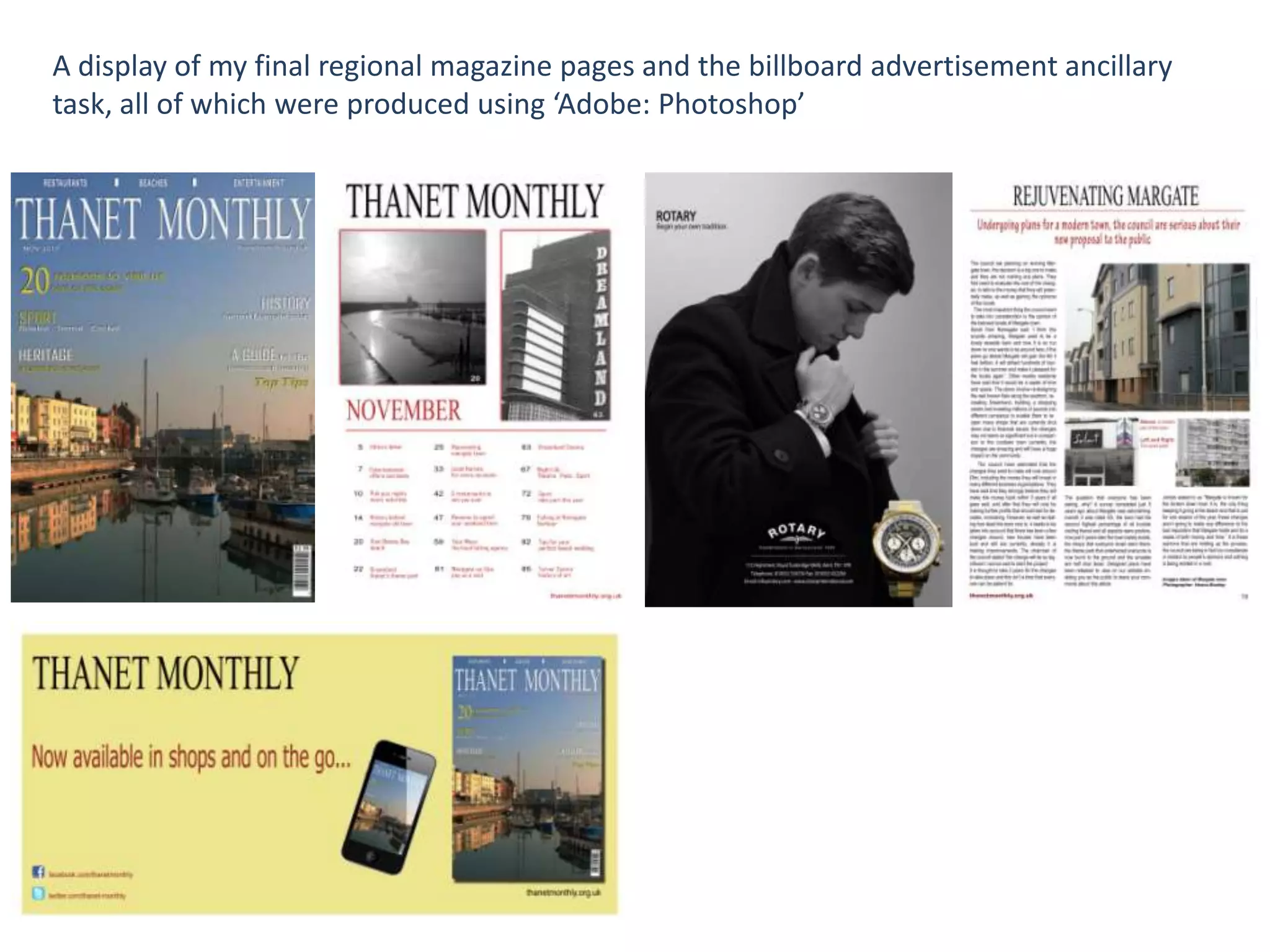
A display of my final regional magazine pages and the billboard advertisement ancillary
task, all of which were produced using ‘Adobe: Photoshop’
Evaluation –
When completing my evaluation of my A2 coursework production, I used the programmes
‘Prezi’ and ‘Slide Share’ which enabled me to present my questions in a more user friendly
way and easy for people to navigate my different answers. Also, the use of these
programmes furthered my use of digital technologies. This created a more visual
evaluation which included many images of my final piece, first drafts and my creative
processes. This gives a highly detailed and in-depth view of the many stages of production
I went through. In the image below you can see the layout of my evaluation which I
created on Microsoft Word, also, this ‘Slide Share’ was originally created on Power Point.

Media A2 Coursework Evaluation

  • 1.
    How did youuse media technologies in the construction and research, planning and evaluation stages?
  • 2.
    Research and Planning– Throughout both my research and planning stages of my coursework, the main piece of technology that I used were the iMac computers. It was these that introduced me to a whole new world of design techniques in the form of ‘Photoshop’, which is at its best on this make of computers. During my research and planning stages there are aspects of my research that involved primary research into regional magazines by physically buying magazines to gain more knowledge, as well as viewing digital previews online, furthering my technology use. For both of these I needed to find tutorials to use to the best of my ability as they were new to me. Another aspect which I needed to find tutorials for was the use of the digital camera and lighting techniques when producing images for my final piece and ancillary tasks.
  • 3.
    Research – During myresearch into Regional Magazines, websites such as ‘Kent Life’ and Billboard Advertisements helped me to understand the codes and conventions for my own product. I used the internet to conduct the main bulk of the research. After producing sufficient research into the many regional magazines and examples of web pages, I conducted primary research by purchasing magazines and finding billboard advertisements in my local area. Another aspect of my research was from YouTube, I spent several lessons at the start of the course increasing my knowledge on the design of regional magazines and certain editorial processes to increase the realism of my piece, and this is where I found most of the tutorials for ‘prezi’ and ‘slideshare’, as well as on their own site.
  • 4.
    Planning – Planning myproduction enabled me to create several drafts before settling on my final piece; which in turn meant I could take time and care to ensure I was happy with my finished product. In relation to planning using digital technologies, along with sketched drafts, I produced a draft on ‘Photoshop’ of my Billboard The planning stages were constantly being altered throughout my coursework as I encountered many problems that my. One of the key things that effected the planning and overall design of my focus group were also not happy with. E-mail, Facebook and other social network sites also assisted in my research as contacting my focus group through the web was a much quicker process.
  • 5.
    Construction – When constructingmy final regional magazine and two ancillary tasks, again, I used ‘Photoshop’ which was my main production tool as well as ‘Weebly’ when creating my two web pages. As I produced a music magazine for my year 12 production, I was well introduced to ‘Photoshop’ as a programme already, but some aspects such as creating the design of my magazine advertisement was a new experience in which I picked up new skills for. This new form of post-production along with creating my web pages, gave me the opportunity to research tutorials in how to correctly use ‘Weebly’ to create a much more professional look to my website. To produce the high quality images used across all of my tasks, I used a Cannon digital camera to take the pictures needed. Once again, I had previously used this camera in my year 12 coursework but I did gain a more in-depth knowledge of this piece of certain equipment was key to a successful final piece so I once again looked at many tutorials and received advice.
  • 6.
    Image Creation – Duringmy post production, creating an advertisement was one of the main tasks I wanted to have a sense of professionalism. Using a few tutorials on how to create an advertisement and removing a background from an image, I successfully produced the final piece which is included in my final regional magazine production. As well as this other effects were useful, even simple tools such as brightness and contrast made a big difference to my images, creating a totally different vibe. http://www.youtube.com/watch?v=hQV_ub-llMk - Tutorial on advertisement creation. http://www.youtube.com/watch?v=ZPOGXYJtafw - Tutorial on removing a background.
  • 7.
    A display ofmy final regional magazine pages and the billboard advertisement ancillary task, all of which were produced using ‘Adobe: Photoshop’
  • 8.
    Evaluation – When completingmy evaluation of my A2 coursework production, I used the programmes ‘Prezi’ and ‘Slide Share’ which enabled me to present my questions in a more user friendly way and easy for people to navigate my different answers. Also, the use of these programmes furthered my use of digital technologies. This created a more visual evaluation which included many images of my final piece, first drafts and my creative processes. This gives a highly detailed and in-depth view of the many stages of production I went through. In the image below you can see the layout of my evaluation which I created on Microsoft Word, also, this ‘Slide Share’ was originally created on Power Point.