maXbox Starter 39 
Start with GEO Maps 
1.1 Go with OpenStreetMap 
Today we run through GEO Maps coding. 
To find a street nowadays is easy; open a browser and search for. 
One of the questions that comes up when encoding those coordinates is 
how they can be useful in a script with for example in maXbox: 
OpenMapX('cathedral cologne'); 
OpenMapX('50.94134 6.95813'); //string! 
With a GPS or navigation: The Global Positioning System (GPS) is a space-based 
satellite navigation system that provides location and time 
information in all weather conditions. But you need a map to visualize. 
 Each GPS satellite continuously broadcasts a navigation message at a 
rate of 50 bits per second. A message takes 750 seconds to complete! 
Such a record does have as minimum navi information:
procedure GPSRecord 
begin 
writeln('time,date,latitude,longitude,altitude,nsat,speed,course'); 
end 
This isn't very different from a normal weather station clock, isn't it? Now 
we define our map search to get the map in your standard browser. We 
use the mapquest API from: 
http://open.mapquestapi.com/nominatim/ 
The following example demonstrates a simple map search request for 
“Cathedral Cologne“ using the Nominatim quest. Only three parameters 
are being requested (menu: ViewGEO Map View): 
1. format - Output format being called. [html/json/xml] 
2. json_callback - Callback function used to display results below. 
3. q - Query string being searched for. 
We set first a const in the script to send the request: 
Const 
AMAPFILENAME2= 'maxmapfile.html'; 
UrlMapQuestAPICode2='http://open.mapquestapi.com/nominatim/v1/search 
.php?format=%s&json_callback=renderBasicSearchNarrative&q=%s'; 
How are these 3 arguments linked together: 
• format=%s 
• json_callback=renderBasicSearchNarrative 
• q=%s 
You'll notice that the json_callback parameter is already set. The format 
and the query string indeed is up to you. We use a html format to prepare 
open a browser with the map, se here's the call: 
if GetMAPX('html',ExePath+'cologne2mapX.html','cathedral cologne') 
then writeln('Cologne Map found'); 
By the way: Most of GPS and data formats is found by the NMEA. 
The NMEA is the National Marine Electronics Association. It is to be a 
worldwide, self-sustaining organization committed to enhancing the 
technology and safety of electronics used in marine applications and you 
see also a standard for GPS data formats. 
How it works: The GPS satellites transmit signals to a GPS receiver. These 
receivers passively receive those signals; they do not transmit and require 
a clear view of the sky, so they can only be used effectively outdoors, or 
from time to time in trains or gadgets;-). 
2
Type 
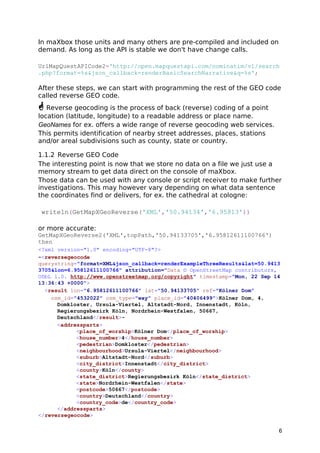
TReceive_Func = TGPS.SerialRxChar(Sender: TObject); 
Lets back to our easy call 
GetMAPX('html',ExePath+'cologne2mapX.html','cathedral cologne') 
OpenMap('ubs ag burgdorf'); 
You also find a procedure with same meaning 
GetGeoMAP('html',ExePath+AMAPFILENAME2,'dom cologne') 
Note: in both cases, this code is assuming D2007 or earlier as maXbox 
follows. In D2009 and later, String is Unicode now, so you need to know 
the Encoding of the TStream contents ahead of time in order for the bytes 
to be interpretted as, or converted to, Unicode correctly. 
Otherwise, you would have to change to operate on AnsiString or the new 
RawByteString instead. 
1.1.1 The Dark side of the Code 
Obviously the most important device required for this software to work, is 
the map from the internet provider OpenStreetMap. All browser devices with 
a Java Script ECMA compatible connection are supported. 
The Java Script code which sends the request and displays the result can 
be viewed here as an XML output for example: 
Test mX4 Ref: XML, JSON, HTML 
<reversegeocode timestamp="Thu, 12 Sep 14 20:52:32 +0000" attribution="Data 
© OpenStreetMap contributors, ODbL 1.0. 
http://www.openstreetmap.org/copyright" 
querystring="format=html&json_callback=renderExampleThreeResults&lat=47.039 
7826&lon=7.62914761277888"><result place_id="15120759" osm_type="node" 
osm_id="1378799522" ref="UBS AG" lat="47.0398676" lon="7.6291424">UBS AG, 
Bahnhofstrasse, Oberstadt, Burgdorf, Verwaltungskreis Emmental, 
Verwaltungsregion Emmental-Oberaargau, Bern, 3414, 
Switzerland</result><addressparts><atm>UBS 
AG</atm><road>Bahnhofstrasse</road><neighbourhood>Oberstadt</neighbourhood> 
<town>Burgdorf</town><county>Verwaltungskreis 
Emmental</county><state_district>Verwaltungsregion Emmental- 
Oberaargau</state_district><state>Bern</state><postcode>3414</postcode><cou 
ntry>Switzerland</country><country_code>ch</country_code> 
</addressparts></reversegeocode> 
3
From the result let's go back to the code behind. 
As you already know the tool is split up into the toolbar across the top, the 
editor or code part in the centre and the output window at the bottom. 
Change that in the menu /view at our own style. 
 Before this starter code will work you will need to download maXbox 
from a website. You'll get it from 
http://www.softwareschule.ch/maxbox.htm . Once the download has 
finished, unzip the file, making sure that you preserve the folder structure 
as it is. Test it with F9 / F2 or press Compile and you should hear a test 
sound. So far so good now we’ll open the examples: 
509_GEOMap3.txt 
If you can’t find the two files try also direct as a file 
http://www.softwareschule.ch/examples/509_GEOMap3.txt 
Now let’s take a look at the code of this app. One of our first line is 
creating the object mapStream and the encoded URL we use first methods 
to configure our HTTPGet() calling Port and IP of the mapquest API with the 
help of HTTPEncode. The object makes a bind connection with the Active 
method by passing an encoded URL with a memory stream: 
procedure GetMapScript(C_form,apath: string; const Data:string); 
var encURL: string; 
mapStream: TMemoryStream; 
begin 
encURL:= Format(UrlMapQuestAPICode2, [c_form,HTTPEncode(Data)]); 
mapStream:= TMemoryStream.create; 
try 
HttpGet(EncURL, mapStream); //WinInet 
mapStream.Position:= 0; 
mapStream.Savetofile(apath) 
OpenDoc(apath); 
finally 
mapStream.Free; 
end; 
end; 
The OpenDoc() procedure is used to get a browser open, you remember 
the call above: 
GetMAPScript('html',ExePath+'cologne2mapX.html', 
'cathedral cologne') 
As we decode this with Format like above: 
• format=html 
• json_callback=renderBasicSearchNarrative 
• q=cathedral cologne 
And this is how another function with download works: 
4
function GetMapXScript(C_form,apath: string; const Data: string): boolean; 
var encodedURL: string; 
begin 
encodedURL:= Format(UrlMapQuestAPICode2,[c_form,HTTPEncode(Data)]); 
try 
//instead HttpGet(EncodedURL, mapStream); //WinInet 
Result:= UrlDownloadToFile(Nil,PChar(encodedURL),PChar(apath),0,Nil)= 0; 
OpenDoc(apath); 
finally 
encodedURL:= ''; 
end; 
end; 
This function is shorter than the first one because we use no streams in 
between. Working with streams in Free Pascal or Delphi you have to 
include some units to be able to use or code your functions direct in the 
script as you like: 
function DownloadFile(SourceFile, DestFile: string): Boolean; 
begin 
//TCIPStatus TBindStatus TURLTemplate of URLMon 
try 
Result:= 
UrlDownloadToFile(Nil,PChar(SourceFile),PChar(DestFile),0,Nil)= 0; 
except 
Result:= False; 
end; 
end; 
5
In maXbox those units and many others are pre-compiled and included on 
demand. As long as the API is stable we don't have change calls. 
UrlMapQuestAPICode2='http://open.mapquestapi.com/nominatim/v1/search 
.php?format=%s&json_callback=renderBasicSearchNarrative&q=%s'; 
After these steps, we can start with programming the rest of the GEO code 
called reverse GEO code. 
 Reverse geocoding is the process of back (reverse) coding of a point 
location (latitude, longitude) to a readable address or place name. 
GeoNames for ex. offers a wide range of reverse geocoding web services. 
This permits identification of nearby street addresses, places, stations 
and/or areal subdivisions such as county, state or country. 
1.1.2 Reverse GEO Code 
The interesting point is now that we store no data on a file we just use a 
memory stream to get data direct on the console of maXbox. 
Those data can be used with any console or script receiver to make further 
investigations. This may however vary depending on what data sentence 
the coordinates find or delivers, for ex. the cathedral at cologne: 
writeln(GetMapXGeoReverse('XML','50.94134','6.95813')) 
or more accurate: 
GetMapXGeoReverse2('XML',topPath,'50.94133705','6.95812611100766') 
then 
<?xml version="1.0" encoding="UTF-8"?> 
-<reversegeocode 
querystring="format=XML&json_callback=renderExampleThreeResults&lat=50.9413 
3705&lon=6.95812611100766" attribution="Data © OpenStreetMap contributors, 
ODbL 1.0. http://www.openstreetmap.org/copyright" timestamp="Mon, 22 Sep 14 
13:36:43 +0000"> 
<result lon="6.95812611100766" lat="50.94133705" ref="Kölner Dom" 
osm_id="4532022" osm_type="way" place_id="40406499">Kölner Dom, 4, 
Domkloster, Ursula-Viertel, Altstadt-Nord, Innenstadt, Köln, 
Regierungsbezirk Köln, Nordrhein-Westfalen, 50667, 
Deutschland</result>- 
<addressparts> 
<place_of_worship>Kölner Dom</place_of_worship> 
<house_number>4</house_number> 
<pedestrian>Domkloster</pedestrian> 
<neighbourhood>Ursula-Viertel</neighbourhood> 
<suburb>Altstadt-Nord</suburb> 
<city_district>Innenstadt</city_district> 
<county>Köln</county> 
<state_district>Regierungsbezirk Köln</state_district> 
<state>Nordrhein-Westfalen</state> 
<postcode>50667</postcode> 
<country>Deutschland</country> 
<country_code>de</country_code> 
</addressparts> 
</reversegeocode> 
6
Reverse geocoding can be carried out systematically by services which 
process a coordinate similarly to a geocoding process. 
For ex., when a GPS coordinate is entered the street address is interpol-ated 
from a range assigned to the road segment in a reference dataset 
that the point is nearest to. 
osm_id="4532022" osm_type="way" place_id="40406499">Kölner Dom, 4, 
Domkloster, Ursula-Viertel, Altstadt-Nord, Innenstadt, Köln, 
Regierungsbezirk Köln, Nordrhein-Westfalen, 50667, 
Deutschland</result>- 
Each table has a way column containing the geometry for the object in 
the chosen projection. Two indices are created for each table: one for the 
way column and one for the osm_id column, see above. 
Geometry uses coordinates in the EPSG:900913 AKA G00GlE projection 
and can be easily used in e.g. OpenLayers based JavaScript. 
Now for the code behind the call. We need another mapquest API of the get 
request service: 
UrlMapQuestAPI3:= 'http://open.mapquestapi.com/nominatim/v1/reverse.php? 
format=%s&json_callback=renderExampleThreeResults&lat=%s&lon=%s'; 
As you can see it's a PHP server side service: 
encodedURL: 
http://open.mapquestapi.com/nominatim/v1/reverse.php? 
The function maps a stream to a string and is similar to above, except we 
don't save a file, but you can save the stream as an XML or Json file: 
mapstream.savetofile(apath) and OpenDoc(apath); 
function GetMapXGeoReverse2(C_form,apath: string; const lat,long: 
string):boolean; 
var encodedURL, UrlMapQuestAPI, bufstr: string; 
mapStream: TMemoryStream; 
begin 
UrlMapQuestAPI:= 'http://open.mapquestapi.com/nominatim/v1/reverse.php? 
format=%s&json_callback=renderExampleThreeResults&lat=%s&lon=%s'; 
encodedURL:= Format(UrlMapQuestAPI,[c_form, lat, long]); 
mapStream:= TMemoryStream.create; 
try 
HttpGet(EncodedURL, mapStream); {WinInet} 
mapStream.Position:= 0; 
writeln('stream size: '+inttostr(mapstream.size)); //mapStream.memory; 
bufstr:= StreamToString(mapstream); 
writeln('stream back: '+bufstr) 
finally 
encodedURL:= ''; 
mapStream.Free; 
end; 
end; 
7
Two ways to map a stream to a string: 
1. Read the available Size of the TStream, allocate a String of that length, 
and then Read() the TStream contents into the String: 
function StreamToString2(Stream: TStream): String; 
var 
len: Integer; 
begin 
len:= Stream.Size - Stream.Position; 
SetLength(Result, len); 
if len > 0 then Stream.ReadBuffer(Result, len); 
writeln('test - buffer read check!') 
end; 
2. Create an intermediate TStringStream, CopyFrom() the TStream to the 
TStringStream, and then read the TStringStream.DataString property: 
{code:maXbox} 
function StreamToString3(Stream: TStream): String; 
begin 
with TStringStream.Create('') do 
try 
CopyFrom(Stream, Stream.Size-Stream.Position); 
Result:= DataString; 
finally 
Free; 
end; 
end; 
 TMemoryStream and TFileStream are both decendants of TStream and 
they work exactly the same way. 
The problem I mostly found is that if we write one stream to another, we 
have to reset the origins before using it again like 
(MS.Seek(0,soFromBeginning);. 
Another point is to direct test a pair of coordinates. You can also convert 
coordinates (lat and long) to a map on the internet (Appendix). 
http://www.gps-coordinates.net/ 
You can find the address corresponding to GPS coordinates or latitude, 
longitude and address of any point on OpenStreetMap. 
Hope you did already work with the Starter 34 on GPS topics: 
http://sourceforge.net/p/maxbox/wikimax/main/ 
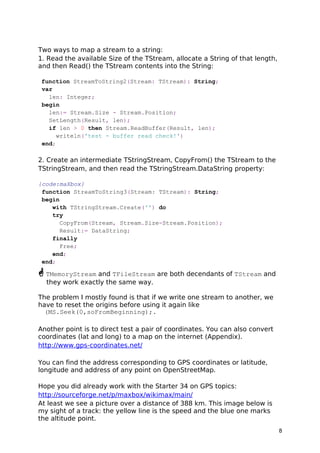
At least we see a picture over a distance of 388 km. This image below is 
my sight of a track: the yellow line is the speed and the blue one marks 
the altitude point. 
8
 Almanac data is data that describes the orbital courses of the satellites. 
Every satellite will broadcast almanac data for EVERY satellite. Your GPS 
receiver uses this data to determine which satellites it expects to see in 
the local sky; then it can determine which satellites it should track. 
1.2 GPS and Arduino Conclusion 
I would also recommend the book “Arduino Cookbook” by Michael 
Margolis. Here are a few ideas of more complicated projects that I have 
seen made with an Arduino. 
• A box that will only open when it is at a certain location in the world (It 
connects a GPS to the Arduino. Search on “Reverse Geo-cache” to see 
some examples.) 
• Or a controller for a 3D printer to print out the landscape the GPS or 
OpenMAPX() has just scanned! 
Feedback @ 
max@kleiner.com 
Literature: Kleiner et al., Patterns konkret, 2003, Software & Support 
http://en.wikipedia.org/wiki/Reverse_geocoding 
http://www.kleiner.ch/kleiner/gpsmax.htm 
http://www.softwareschule.ch/examples/475_GPS_mX2.txt 
Stream Ref: 
http://embarcadero.newsgroups.archived.at/public.delphi.vcl.components.usin 
g/200907/0907292775.html 
• Arduino Example. 
http://www.softwareschule.ch/download/Arduino_C_2014_6_basta_box.pdf 
http://sourceforge.net/projects/maxbox 
9
1.3 Appendix Map Study 
maXmap 
DD (decimal degrees)* 
Latitude 48.725447N (48.656280963566495) 
Longitude 7.143274E (6.991813648492098) 
1 Rue du Canal, 57405 Guntzviller, France 
Latitude : 48.725447 | Longitude : 7.143274 Altitude : 287 meters 
Here another map search zoom of OpenMAPX: 
RTClock: Arduino by Silvia Rothen http://www.ecotronics.ch/ecotron/arduinocheatsheet.htm 
10

maXbox Starter 39 GEO Maps Tutorial

  • 1.
    maXbox Starter 39 Start with GEO Maps 1.1 Go with OpenStreetMap Today we run through GEO Maps coding. To find a street nowadays is easy; open a browser and search for. One of the questions that comes up when encoding those coordinates is how they can be useful in a script with for example in maXbox: OpenMapX('cathedral cologne'); OpenMapX('50.94134 6.95813'); //string! With a GPS or navigation: The Global Positioning System (GPS) is a space-based satellite navigation system that provides location and time information in all weather conditions. But you need a map to visualize.  Each GPS satellite continuously broadcasts a navigation message at a rate of 50 bits per second. A message takes 750 seconds to complete! Such a record does have as minimum navi information:
  • 2.
    procedure GPSRecord begin writeln('time,date,latitude,longitude,altitude,nsat,speed,course'); end This isn't very different from a normal weather station clock, isn't it? Now we define our map search to get the map in your standard browser. We use the mapquest API from: http://open.mapquestapi.com/nominatim/ The following example demonstrates a simple map search request for “Cathedral Cologne“ using the Nominatim quest. Only three parameters are being requested (menu: ViewGEO Map View): 1. format - Output format being called. [html/json/xml] 2. json_callback - Callback function used to display results below. 3. q - Query string being searched for. We set first a const in the script to send the request: Const AMAPFILENAME2= 'maxmapfile.html'; UrlMapQuestAPICode2='http://open.mapquestapi.com/nominatim/v1/search .php?format=%s&json_callback=renderBasicSearchNarrative&q=%s'; How are these 3 arguments linked together: • format=%s • json_callback=renderBasicSearchNarrative • q=%s You'll notice that the json_callback parameter is already set. The format and the query string indeed is up to you. We use a html format to prepare open a browser with the map, se here's the call: if GetMAPX('html',ExePath+'cologne2mapX.html','cathedral cologne') then writeln('Cologne Map found'); By the way: Most of GPS and data formats is found by the NMEA. The NMEA is the National Marine Electronics Association. It is to be a worldwide, self-sustaining organization committed to enhancing the technology and safety of electronics used in marine applications and you see also a standard for GPS data formats. How it works: The GPS satellites transmit signals to a GPS receiver. These receivers passively receive those signals; they do not transmit and require a clear view of the sky, so they can only be used effectively outdoors, or from time to time in trains or gadgets;-). 2
  • 3.
    Type TReceive_Func =TGPS.SerialRxChar(Sender: TObject); Lets back to our easy call GetMAPX('html',ExePath+'cologne2mapX.html','cathedral cologne') OpenMap('ubs ag burgdorf'); You also find a procedure with same meaning GetGeoMAP('html',ExePath+AMAPFILENAME2,'dom cologne') Note: in both cases, this code is assuming D2007 or earlier as maXbox follows. In D2009 and later, String is Unicode now, so you need to know the Encoding of the TStream contents ahead of time in order for the bytes to be interpretted as, or converted to, Unicode correctly. Otherwise, you would have to change to operate on AnsiString or the new RawByteString instead. 1.1.1 The Dark side of the Code Obviously the most important device required for this software to work, is the map from the internet provider OpenStreetMap. All browser devices with a Java Script ECMA compatible connection are supported. The Java Script code which sends the request and displays the result can be viewed here as an XML output for example: Test mX4 Ref: XML, JSON, HTML <reversegeocode timestamp="Thu, 12 Sep 14 20:52:32 +0000" attribution="Data © OpenStreetMap contributors, ODbL 1.0. http://www.openstreetmap.org/copyright" querystring="format=html&json_callback=renderExampleThreeResults&lat=47.039 7826&lon=7.62914761277888"><result place_id="15120759" osm_type="node" osm_id="1378799522" ref="UBS AG" lat="47.0398676" lon="7.6291424">UBS AG, Bahnhofstrasse, Oberstadt, Burgdorf, Verwaltungskreis Emmental, Verwaltungsregion Emmental-Oberaargau, Bern, 3414, Switzerland</result><addressparts><atm>UBS AG</atm><road>Bahnhofstrasse</road><neighbourhood>Oberstadt</neighbourhood> <town>Burgdorf</town><county>Verwaltungskreis Emmental</county><state_district>Verwaltungsregion Emmental- Oberaargau</state_district><state>Bern</state><postcode>3414</postcode><cou ntry>Switzerland</country><country_code>ch</country_code> </addressparts></reversegeocode> 3
  • 4.
    From the resultlet's go back to the code behind. As you already know the tool is split up into the toolbar across the top, the editor or code part in the centre and the output window at the bottom. Change that in the menu /view at our own style.  Before this starter code will work you will need to download maXbox from a website. You'll get it from http://www.softwareschule.ch/maxbox.htm . Once the download has finished, unzip the file, making sure that you preserve the folder structure as it is. Test it with F9 / F2 or press Compile and you should hear a test sound. So far so good now we’ll open the examples: 509_GEOMap3.txt If you can’t find the two files try also direct as a file http://www.softwareschule.ch/examples/509_GEOMap3.txt Now let’s take a look at the code of this app. One of our first line is creating the object mapStream and the encoded URL we use first methods to configure our HTTPGet() calling Port and IP of the mapquest API with the help of HTTPEncode. The object makes a bind connection with the Active method by passing an encoded URL with a memory stream: procedure GetMapScript(C_form,apath: string; const Data:string); var encURL: string; mapStream: TMemoryStream; begin encURL:= Format(UrlMapQuestAPICode2, [c_form,HTTPEncode(Data)]); mapStream:= TMemoryStream.create; try HttpGet(EncURL, mapStream); //WinInet mapStream.Position:= 0; mapStream.Savetofile(apath) OpenDoc(apath); finally mapStream.Free; end; end; The OpenDoc() procedure is used to get a browser open, you remember the call above: GetMAPScript('html',ExePath+'cologne2mapX.html', 'cathedral cologne') As we decode this with Format like above: • format=html • json_callback=renderBasicSearchNarrative • q=cathedral cologne And this is how another function with download works: 4
  • 5.
    function GetMapXScript(C_form,apath: string;const Data: string): boolean; var encodedURL: string; begin encodedURL:= Format(UrlMapQuestAPICode2,[c_form,HTTPEncode(Data)]); try //instead HttpGet(EncodedURL, mapStream); //WinInet Result:= UrlDownloadToFile(Nil,PChar(encodedURL),PChar(apath),0,Nil)= 0; OpenDoc(apath); finally encodedURL:= ''; end; end; This function is shorter than the first one because we use no streams in between. Working with streams in Free Pascal or Delphi you have to include some units to be able to use or code your functions direct in the script as you like: function DownloadFile(SourceFile, DestFile: string): Boolean; begin //TCIPStatus TBindStatus TURLTemplate of URLMon try Result:= UrlDownloadToFile(Nil,PChar(SourceFile),PChar(DestFile),0,Nil)= 0; except Result:= False; end; end; 5
  • 6.
    In maXbox thoseunits and many others are pre-compiled and included on demand. As long as the API is stable we don't have change calls. UrlMapQuestAPICode2='http://open.mapquestapi.com/nominatim/v1/search .php?format=%s&json_callback=renderBasicSearchNarrative&q=%s'; After these steps, we can start with programming the rest of the GEO code called reverse GEO code.  Reverse geocoding is the process of back (reverse) coding of a point location (latitude, longitude) to a readable address or place name. GeoNames for ex. offers a wide range of reverse geocoding web services. This permits identification of nearby street addresses, places, stations and/or areal subdivisions such as county, state or country. 1.1.2 Reverse GEO Code The interesting point is now that we store no data on a file we just use a memory stream to get data direct on the console of maXbox. Those data can be used with any console or script receiver to make further investigations. This may however vary depending on what data sentence the coordinates find or delivers, for ex. the cathedral at cologne: writeln(GetMapXGeoReverse('XML','50.94134','6.95813')) or more accurate: GetMapXGeoReverse2('XML',topPath,'50.94133705','6.95812611100766') then <?xml version="1.0" encoding="UTF-8"?> -<reversegeocode querystring="format=XML&json_callback=renderExampleThreeResults&lat=50.9413 3705&lon=6.95812611100766" attribution="Data © OpenStreetMap contributors, ODbL 1.0. http://www.openstreetmap.org/copyright" timestamp="Mon, 22 Sep 14 13:36:43 +0000"> <result lon="6.95812611100766" lat="50.94133705" ref="Kölner Dom" osm_id="4532022" osm_type="way" place_id="40406499">Kölner Dom, 4, Domkloster, Ursula-Viertel, Altstadt-Nord, Innenstadt, Köln, Regierungsbezirk Köln, Nordrhein-Westfalen, 50667, Deutschland</result>- <addressparts> <place_of_worship>Kölner Dom</place_of_worship> <house_number>4</house_number> <pedestrian>Domkloster</pedestrian> <neighbourhood>Ursula-Viertel</neighbourhood> <suburb>Altstadt-Nord</suburb> <city_district>Innenstadt</city_district> <county>Köln</county> <state_district>Regierungsbezirk Köln</state_district> <state>Nordrhein-Westfalen</state> <postcode>50667</postcode> <country>Deutschland</country> <country_code>de</country_code> </addressparts> </reversegeocode> 6
  • 7.
    Reverse geocoding canbe carried out systematically by services which process a coordinate similarly to a geocoding process. For ex., when a GPS coordinate is entered the street address is interpol-ated from a range assigned to the road segment in a reference dataset that the point is nearest to. osm_id="4532022" osm_type="way" place_id="40406499">Kölner Dom, 4, Domkloster, Ursula-Viertel, Altstadt-Nord, Innenstadt, Köln, Regierungsbezirk Köln, Nordrhein-Westfalen, 50667, Deutschland</result>- Each table has a way column containing the geometry for the object in the chosen projection. Two indices are created for each table: one for the way column and one for the osm_id column, see above. Geometry uses coordinates in the EPSG:900913 AKA G00GlE projection and can be easily used in e.g. OpenLayers based JavaScript. Now for the code behind the call. We need another mapquest API of the get request service: UrlMapQuestAPI3:= 'http://open.mapquestapi.com/nominatim/v1/reverse.php? format=%s&json_callback=renderExampleThreeResults&lat=%s&lon=%s'; As you can see it's a PHP server side service: encodedURL: http://open.mapquestapi.com/nominatim/v1/reverse.php? The function maps a stream to a string and is similar to above, except we don't save a file, but you can save the stream as an XML or Json file: mapstream.savetofile(apath) and OpenDoc(apath); function GetMapXGeoReverse2(C_form,apath: string; const lat,long: string):boolean; var encodedURL, UrlMapQuestAPI, bufstr: string; mapStream: TMemoryStream; begin UrlMapQuestAPI:= 'http://open.mapquestapi.com/nominatim/v1/reverse.php? format=%s&json_callback=renderExampleThreeResults&lat=%s&lon=%s'; encodedURL:= Format(UrlMapQuestAPI,[c_form, lat, long]); mapStream:= TMemoryStream.create; try HttpGet(EncodedURL, mapStream); {WinInet} mapStream.Position:= 0; writeln('stream size: '+inttostr(mapstream.size)); //mapStream.memory; bufstr:= StreamToString(mapstream); writeln('stream back: '+bufstr) finally encodedURL:= ''; mapStream.Free; end; end; 7
  • 8.
    Two ways tomap a stream to a string: 1. Read the available Size of the TStream, allocate a String of that length, and then Read() the TStream contents into the String: function StreamToString2(Stream: TStream): String; var len: Integer; begin len:= Stream.Size - Stream.Position; SetLength(Result, len); if len > 0 then Stream.ReadBuffer(Result, len); writeln('test - buffer read check!') end; 2. Create an intermediate TStringStream, CopyFrom() the TStream to the TStringStream, and then read the TStringStream.DataString property: {code:maXbox} function StreamToString3(Stream: TStream): String; begin with TStringStream.Create('') do try CopyFrom(Stream, Stream.Size-Stream.Position); Result:= DataString; finally Free; end; end;  TMemoryStream and TFileStream are both decendants of TStream and they work exactly the same way. The problem I mostly found is that if we write one stream to another, we have to reset the origins before using it again like (MS.Seek(0,soFromBeginning);. Another point is to direct test a pair of coordinates. You can also convert coordinates (lat and long) to a map on the internet (Appendix). http://www.gps-coordinates.net/ You can find the address corresponding to GPS coordinates or latitude, longitude and address of any point on OpenStreetMap. Hope you did already work with the Starter 34 on GPS topics: http://sourceforge.net/p/maxbox/wikimax/main/ At least we see a picture over a distance of 388 km. This image below is my sight of a track: the yellow line is the speed and the blue one marks the altitude point. 8
  • 9.
     Almanac datais data that describes the orbital courses of the satellites. Every satellite will broadcast almanac data for EVERY satellite. Your GPS receiver uses this data to determine which satellites it expects to see in the local sky; then it can determine which satellites it should track. 1.2 GPS and Arduino Conclusion I would also recommend the book “Arduino Cookbook” by Michael Margolis. Here are a few ideas of more complicated projects that I have seen made with an Arduino. • A box that will only open when it is at a certain location in the world (It connects a GPS to the Arduino. Search on “Reverse Geo-cache” to see some examples.) • Or a controller for a 3D printer to print out the landscape the GPS or OpenMAPX() has just scanned! Feedback @ max@kleiner.com Literature: Kleiner et al., Patterns konkret, 2003, Software & Support http://en.wikipedia.org/wiki/Reverse_geocoding http://www.kleiner.ch/kleiner/gpsmax.htm http://www.softwareschule.ch/examples/475_GPS_mX2.txt Stream Ref: http://embarcadero.newsgroups.archived.at/public.delphi.vcl.components.usin g/200907/0907292775.html • Arduino Example. http://www.softwareschule.ch/download/Arduino_C_2014_6_basta_box.pdf http://sourceforge.net/projects/maxbox 9
  • 10.
    1.3 Appendix MapStudy maXmap DD (decimal degrees)* Latitude 48.725447N (48.656280963566495) Longitude 7.143274E (6.991813648492098) 1 Rue du Canal, 57405 Guntzviller, France Latitude : 48.725447 | Longitude : 7.143274 Altitude : 287 meters Here another map search zoom of OpenMAPX: RTClock: Arduino by Silvia Rothen http://www.ecotronics.ch/ecotron/arduinocheatsheet.htm 10