NS2:  OTcl Command – Getting Started by Teerawat Issariyakul http://www.ns2ultimate.com July 2010 http://www.ns2ultimate.com
Outline Introduction Motivation What we would like to do OTcl Command http://www.ns2ultimate.com
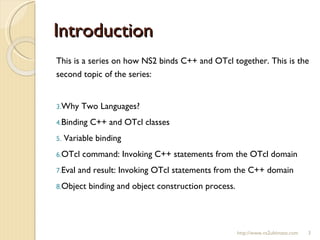
Introduction This is a series on how NS2 binds C++ and OTcl together. This is the second topic of the series:  Why Two Languages? Binding C++ and OTcl classes Variable binding OTcl command: Invoking C++ statements from the OTcl domain Eval and result: Invoking OTcl statements from the C++ domain Object binding and object construction process. http://www.ns2ultimate.com
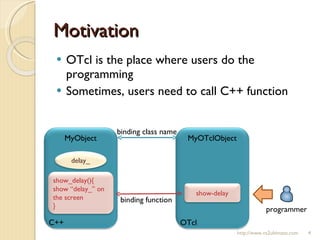
Motivation OTcl is the place where users do the programming Sometimes, users need to call C++ function http://www.ns2ultimate.com MyObject programmer C++ MyOTclObject OTcl binding function binding class name delay_ show_delay(){ show “delay_” on the screen } show-delay
What we would like to do http://www.ns2ultimate.com C++: class =  MyObject  (see above) variable =  delay_ function:  show_delay() OTcl: class =  MyOTclObject  (see above) variable = none OTcl command:  show-delay Binding class name [see  here  and  here ] MyObject C++ MyOTclObject OTcl binding function binding class name (see above) delay_ show_delay(){ show “delay_” on the screen } show-delay
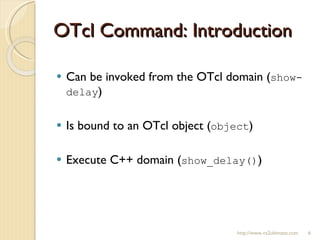
OTcl Command: Introduction Can be invoked from the OTcl domain ( show-delay ) Is bound to an OTcl object ( object ) Execute C++ domain ( show_delay() ) http://www.ns2ultimate.com
OTcl Command: C++ files In the following, I will use files in the previous post:  otcl.cc, otcl.h, otcl.tcl Add a C++ variable  delay_  to class  MyObject http://www.ns2ultimate.com class MyObject : public TclObject { public: MyObject(); virtual ~MyObject(){}; protected: int count_; double delay_; double speed_; double virtual_time_; int is_running_; int command(int argc, const char*const* argv);  }; otcl.h
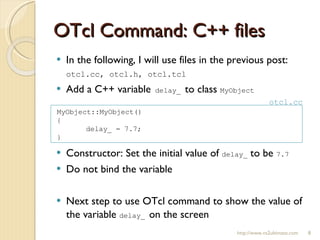
OTcl Command: C++ files In the following, I will use files in the previous post:  otcl.cc, otcl.h, otcl.tcl Add a C++ variable  delay_  to class  MyObject Constructor: Set the initial value of  delay_  to be  7.7 Do not bind the variable Next step to use OTcl command to show the value of the variable  delay_  on the screen http://www.ns2ultimate.com MyObject::MyObject() { delay_ = 7.7; } otcl.cc
OTcl Command: Definition Define within C++ class (e.g.  MyObject ) Define by function “ command(…) ” Example: Insert the following into the file  otcl.cc Do not forget to add a C++ variable  delay_  to class  MyObject http://www.ns2ultimate.com int  MyObject::command(int argc, const char*const* argv)  { if (argc==2) { if (strcmp(argv[1], "show-delay") == 0) { printf("Delay is %g\n", delay_); return (TCL_OK); } } return TclObject::command(argc, argv); }; OTcl command name what this  OTcl command do
Summary of Key Steps Use files  otcl.cc  and  otcl.h  in the previous post Add the details as stated earlier run “ make ” to incorporate C++ changes in to NS2 [see detail  here ] Create file  otcl.tcl  for testing 4.1 Create an OTcl object object 4.2 Invoke the OTcl command “show-delay” associated with object 4.4 Change the C++ constructor: set  delay_  to be 9.9 4.5 Repeat 4.2 and 4.3 http://www.ns2ultimate.com
OTcl Command: Invocation File  otcl.tcl   Run the file  otcl.tcl http://www.ns2ultimate.com set ns [new Simulator] set obj [new  MyOTclObject ] $obj show-delay
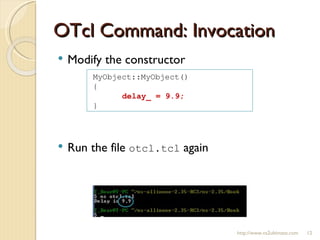
OTcl Command: Invocation Modify the constructor Run the file  otcl.tcl  again http://www.ns2ultimate.com MyObject::MyObject() { delay_ = 9.9; }
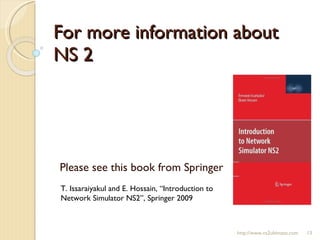
For more information about NS 2 Please see this book from Springer T. Issaraiyakul and E. Hossain, “Introduction to Network Simulator NS2”, Springer 2009 http://www.ns2ultimate.com

20100712-OTcl Command -- Getting Started

  • 1.
    NS2: OTclCommand – Getting Started by Teerawat Issariyakul http://www.ns2ultimate.com July 2010 http://www.ns2ultimate.com
  • 2.
    Outline Introduction MotivationWhat we would like to do OTcl Command http://www.ns2ultimate.com
  • 3.
    Introduction This isa series on how NS2 binds C++ and OTcl together. This is the second topic of the series: Why Two Languages? Binding C++ and OTcl classes Variable binding OTcl command: Invoking C++ statements from the OTcl domain Eval and result: Invoking OTcl statements from the C++ domain Object binding and object construction process. http://www.ns2ultimate.com
  • 4.
    Motivation OTcl isthe place where users do the programming Sometimes, users need to call C++ function http://www.ns2ultimate.com MyObject programmer C++ MyOTclObject OTcl binding function binding class name delay_ show_delay(){ show “delay_” on the screen } show-delay
  • 5.
    What we wouldlike to do http://www.ns2ultimate.com C++: class = MyObject (see above) variable = delay_ function: show_delay() OTcl: class = MyOTclObject (see above) variable = none OTcl command: show-delay Binding class name [see here and here ] MyObject C++ MyOTclObject OTcl binding function binding class name (see above) delay_ show_delay(){ show “delay_” on the screen } show-delay
  • 6.
    OTcl Command: IntroductionCan be invoked from the OTcl domain ( show-delay ) Is bound to an OTcl object ( object ) Execute C++ domain ( show_delay() ) http://www.ns2ultimate.com
  • 7.
    OTcl Command: C++files In the following, I will use files in the previous post: otcl.cc, otcl.h, otcl.tcl Add a C++ variable delay_ to class MyObject http://www.ns2ultimate.com class MyObject : public TclObject { public: MyObject(); virtual ~MyObject(){}; protected: int count_; double delay_; double speed_; double virtual_time_; int is_running_; int command(int argc, const char*const* argv); }; otcl.h
  • 8.
    OTcl Command: C++files In the following, I will use files in the previous post: otcl.cc, otcl.h, otcl.tcl Add a C++ variable delay_ to class MyObject Constructor: Set the initial value of delay_ to be 7.7 Do not bind the variable Next step to use OTcl command to show the value of the variable delay_ on the screen http://www.ns2ultimate.com MyObject::MyObject() { delay_ = 7.7; } otcl.cc
  • 9.
    OTcl Command: DefinitionDefine within C++ class (e.g. MyObject ) Define by function “ command(…) ” Example: Insert the following into the file otcl.cc Do not forget to add a C++ variable delay_ to class MyObject http://www.ns2ultimate.com int MyObject::command(int argc, const char*const* argv) { if (argc==2) { if (strcmp(argv[1], "show-delay") == 0) { printf("Delay is %g\n", delay_); return (TCL_OK); } } return TclObject::command(argc, argv); }; OTcl command name what this OTcl command do
  • 10.
    Summary of KeySteps Use files otcl.cc and otcl.h in the previous post Add the details as stated earlier run “ make ” to incorporate C++ changes in to NS2 [see detail here ] Create file otcl.tcl for testing 4.1 Create an OTcl object object 4.2 Invoke the OTcl command “show-delay” associated with object 4.4 Change the C++ constructor: set delay_ to be 9.9 4.5 Repeat 4.2 and 4.3 http://www.ns2ultimate.com
  • 11.
    OTcl Command: InvocationFile otcl.tcl Run the file otcl.tcl http://www.ns2ultimate.com set ns [new Simulator] set obj [new MyOTclObject ] $obj show-delay
  • 12.
    OTcl Command: InvocationModify the constructor Run the file otcl.tcl again http://www.ns2ultimate.com MyObject::MyObject() { delay_ = 9.9; }
  • 13.
    For more informationabout NS 2 Please see this book from Springer T. Issaraiyakul and E. Hossain, “Introduction to Network Simulator NS2”, Springer 2009 http://www.ns2ultimate.com

Editor's Notes

  • #3 Tip: Add your own speaker notes here.
  • #4 Tip: Add your own speaker notes here.
  • #5 Tip: Add your own speaker notes here.
  • #6 Tip: Add your own speaker notes here.
  • #7 Tip: Add your own speaker notes here.
  • #8 Tip: Add your own speaker notes here.
  • #9 Tip: Add your own speaker notes here.
  • #10 Tip: Add your own speaker notes here.
  • #11 Tip: Add your own speaker notes here.
  • #12 Tip: Add your own speaker notes here.
  • #13 Tip: Add your own speaker notes here.