June 21, 2017 1
Continuous Integration Tools
June 21, 2017 www.snipe.co.in 2
Prepared :Snipe Team
June 21, 2017 3
Agenda
•continuous integration
-Various Build tools
•Hudson Overview
- what is Hudson
- Features of Hudson
- Why Hudson?
- Hudson History
• Jenkins Overview
- What is Jenkins
-Features Jenkins
-Why Jenkins?
- Jenkins History
• Difference B/W Hudson and Jenkins
June 21, 2017 4
Continuous Integration
• What is Continuous Integration?
•Continuous Integration (CI) is a development practice that requires
developers to integrate code into a shared repository several times a
day. Each check-in is then verified by an automated build, allowing
teams to detect problems early.
•By integrating regularly, you can detect errors quickly, and locate
them more easily.
June 21, 2017 5
CI - Means
• CI – What does it really mean?
At a regular frequency (ideally at every commit), the system
is:
•Integrated
•All changes up until that point are combined into the project
•Built
•The code is compiled into an executable or package
•Tested
•Automated test suites are run
•Archived
•Versioned and stored so it can be distributed as is, if desired
•Deployed
•Loaded onto a system where the developers can interact with it
June 21, 2017 6
CI – Workflow
• CI – Workflow
June 21, 2017 7
Build tools
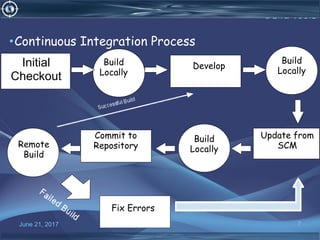
•Continuous Integration Process
Initial
Checkout
Build
Locally
Develop
Commit to
Repository
Fix Errors
Build
Locally
Build
Locally
Remote
Build
Update from
SCM
June 21, 2017 8
CI - Benifits
•Benefits of Continuous Integration?
•Say goodbye to long and tense integrations
•Increase visibility which enables greater communication
•Catch issues fast and nip them in the bud
•Spend less time debugging and more time adding features
•Proceed in the confidence you’re building on a solid foundation
•Stop waiting to find out if your code’s going to work
•Reduce integration problems allowing you to deliver software more rapidly
June 21, 2017 9
CI -Tools
•CI – The tools
•Code Repositories
•SVN, Mercurial, Git
•Continuous Build Systems
•Jenkins, Hudson, Cruise Control
•Test Frameworks
•JUnit, Cucumber, CppUnit
•Artefact Repositories
•Nexus, Artifactory, Archiva
June 21, 2017 10
Hudson Overview
• What is Hudson ?
• Continuous Integration is a software development practice where
members of a team integrate their work frequently, usually each
person integrates at least daily - leading to multiple integrations per
day. Each integration is verified by an automated build (including test)
to detect integration errors as quickly as possible. Many teams find
that this approach leads to significantly reduced integration problems
and allows a team to develop cohesive software more rapidly
• Hudson excels at integrating with almost every tool you can think of.
• Use Apache Maven, Apache Ant or Gradle or anything you can start
with a command line script for builds and send messages via email,
SMS, IRC and Skype for notifications.
June 21, 2017 11
Hudson Benifits
• Hudson Benefits
•Never gets bored doing builds and tests
• Catches problems fast
• Alerts developers while code is fresh in their minds
• Prevents bugs from propagating downstream
• Cheaper to fix bugs earlier, before QA or Deployment
June 21, 2017 12
Hudson Architecture
• Hudson Architecture
June 21, 2017 13
Jenkins Overview
June 21, 2017 14
Jenkins - History
• Jenkins - History
•2005 - Hudson was first release by Kohsuke Kawaguchi Sun
Microsystems
• 2010 – Oracle bought Sun Microsystems
•Due to a naming dispute, Hudson was renamed to Jenkins
•Oracle continued development of Hudson (as a branch of the
original)
June 21, 2017 15
Jenkins – Fitting in
• Jenkins – Fitting in
June 21, 2017 16
Flexibality
• Why Jenkins? Flexibility!
•Jenkins is a highly configurable system by itself.
• The additional community developed plugins provide even more
flexibility.
•By combining Jenkins with Ant, Gradle, or other Build Automation
tools, the possibilities are limitless
June 21, 2017 17
Why Jenkins
• Why Jenkins? Free/OSS
•Jenkins is released under the MIT License
•There is a large support community and thorough documentation
•It’s easy to write plugins
•Think something is wrong with it? You can fix it!
June 21, 2017 18
Jenkins - Do
• What can Jenkins do?
•Generate test reports
•Integrate with many different Version Control Systems
•Push to various artifact repositories
•Deploys directly to production or test environments
•Notify stakeholders of build status
•…and much more
June 21, 2017 19
Jenkins Does
•Putting it all together
•While an integral part of a CI system, Jenkins is by no means the only
component
•In order for a CI system to function, a common repository for the codebase
needs to exist
•A database of artifacts needs to exist, so deliveries can be made at past
iterations
•The last step in a CI process is the deployment of the components built
•…and none of this matters if the developers don’t use the system; procedures
need to ensure the system is used as intended
June 21, 2017 20
Who use
•
June 21, 2017 21
Supporters
• Running Jenkins yourself
•Jenkins is packaged as a WAR, so you can drop it into whichever servlet container you
prefer to use
•Jenkins comes pre-packaged with a servlet if you just want a light-weight
implementation
•Native/Supported packages exist for
•Windows
•Ubuntu/Debian
•Redhat/Fedora/CentOS
•Mac OSX
•openSUSE
•FreeBSD
•OpenBSD
•Solaris/OpenIndiana
June 21, 2017 22
Update
• Running Jenkins yourself – Updates
•Jenkins has two release lines
•Standard releases
•Weekly bug fixes and features
•Long-Term Support releases
•Updates about every 3 months
•Uses a “Stable but older” version from the standard release
line
•Changes are limited to backported, well-tested modifications
June 21, 2017 23
Cloud-based solutions
•Letting someone else run Jenkins
•There are also cloud-based solutions that can provide a Jenkins instance
•Cloudbees - http://www.cloudbees.com/
•ShiningPanda - https://www.shiningpanda.com/
June 21, 2017 24
Jenkins - Agile
•Tying it into Agile
•For an Agile team, Jenkins provides everything needed for a robust
continuous build system
•Jenkins supports Agile principles by constantly providing access to
working copies of software
•Jenkins’ extensibility allows the system to adapt to many different pre-
existing environments
June 21, 2017 25
Jenkins – Why not Hudson?
•Why Choose Jenkins?
•Because everyone else has
• adoption metrics indicating clear shift in the user base.
June 21, 2017 26
Jenkins – Why not Hudson?
•Why Choose Jenkins?(cont..)
•Because the Hudson team has moved to develop Jenkins
•The crew that has been developing Hudson core since its inception is
now working on Jenkins. So you can trust our expertise and the the
passion to keep pushing the software forward
•Because a large number of plugin authors have chosen to
support their plugins on Jenkins
•Substantial majority of the plugin developers have chosen to stick
with the Jenkins project. So you can expect bug fixes and new
improvements to them from Jenkins.
June 21, 2017 27
Jenkins – Why not Hudson?
•Why Choose Jenkins?(cont..)
•Because we'll make incremental iterative improvements to
the code
•The Jenkins team follows the tradition in the Hudson project of
making compatible, iterative improvements to the code base that
protects your existing data and in-house plugins.
June 21, 2017 28
Jenkins – Why not Hudson?
•Why Choose Jenkins?(cont..)
•Because the community supports us
•Compare the users group activity from February, 2011 on
between Jenkins and Oracle Hudson
fig. Hudson fig. Jenkins
June 21, 2017 29
Statistics
• Statistics
•The below Java leader board shows Jenkins is most used CI Server in
the industry
June 21, 2017 30
Statistics
• Statistics
June 21, 2017 31
Conclusion
•Conclusion
•Continuous integration is a necessity on complex projects due to the
benefits it provides regarding early detection of problems.
•A good continuous build system should be flexible enough to fit into pre-
existing development environments and provide all the features a team
expects from such a system.
•Jenkins, a continuous build system, can be an integral part of any
continuous integration system due to it’s core feature set and
extensibility through a plugin system.
June 21, 2017 32
References
•References
•Continuous Integration – Martin Fowler
•http://www.martinfowler.com/articles/continuousIntegration.html
•Hudson
•http://hudson-ci.org/
•Hudson Continuous Integration Server
•http://www.code-magazine.com/articleprint.aspx?
quickid=0906071&printmode=true
•The Hudson Book
•http://www.eclipse.org/hudson/the-hudson-book/book-hudson.pdf
June 21, 2017 33
References
•References
•Jenkins
•https://wiki.jenkins-ci.org
•Monkey Image
•http://corrines-corner2006.blogspot.com/2011/09/freebie-
monday_26.html
•What is Continuous Integration
•http://confluence.public.thoughtworks.org/display/CCNET/What+is+
Continuous+Integration
June 21, 2017 34
Thank You

Ci

  • 1.
    June 21, 20171 Continuous Integration Tools
  • 2.
    June 21, 2017www.snipe.co.in 2 Prepared :Snipe Team
  • 3.
    June 21, 20173 Agenda •continuous integration -Various Build tools •Hudson Overview - what is Hudson - Features of Hudson - Why Hudson? - Hudson History • Jenkins Overview - What is Jenkins -Features Jenkins -Why Jenkins? - Jenkins History • Difference B/W Hudson and Jenkins
  • 4.
    June 21, 20174 Continuous Integration • What is Continuous Integration? •Continuous Integration (CI) is a development practice that requires developers to integrate code into a shared repository several times a day. Each check-in is then verified by an automated build, allowing teams to detect problems early. •By integrating regularly, you can detect errors quickly, and locate them more easily.
  • 5.
    June 21, 20175 CI - Means • CI – What does it really mean? At a regular frequency (ideally at every commit), the system is: •Integrated •All changes up until that point are combined into the project •Built •The code is compiled into an executable or package •Tested •Automated test suites are run •Archived •Versioned and stored so it can be distributed as is, if desired •Deployed •Loaded onto a system where the developers can interact with it
  • 6.
    June 21, 20176 CI – Workflow • CI – Workflow
  • 7.
    June 21, 20177 Build tools •Continuous Integration Process Initial Checkout Build Locally Develop Commit to Repository Fix Errors Build Locally Build Locally Remote Build Update from SCM
  • 8.
    June 21, 20178 CI - Benifits •Benefits of Continuous Integration? •Say goodbye to long and tense integrations •Increase visibility which enables greater communication •Catch issues fast and nip them in the bud •Spend less time debugging and more time adding features •Proceed in the confidence you’re building on a solid foundation •Stop waiting to find out if your code’s going to work •Reduce integration problems allowing you to deliver software more rapidly
  • 9.
    June 21, 20179 CI -Tools •CI – The tools •Code Repositories •SVN, Mercurial, Git •Continuous Build Systems •Jenkins, Hudson, Cruise Control •Test Frameworks •JUnit, Cucumber, CppUnit •Artefact Repositories •Nexus, Artifactory, Archiva
  • 10.
    June 21, 201710 Hudson Overview • What is Hudson ? • Continuous Integration is a software development practice where members of a team integrate their work frequently, usually each person integrates at least daily - leading to multiple integrations per day. Each integration is verified by an automated build (including test) to detect integration errors as quickly as possible. Many teams find that this approach leads to significantly reduced integration problems and allows a team to develop cohesive software more rapidly • Hudson excels at integrating with almost every tool you can think of. • Use Apache Maven, Apache Ant or Gradle or anything you can start with a command line script for builds and send messages via email, SMS, IRC and Skype for notifications.
  • 11.
    June 21, 201711 Hudson Benifits • Hudson Benefits •Never gets bored doing builds and tests • Catches problems fast • Alerts developers while code is fresh in their minds • Prevents bugs from propagating downstream • Cheaper to fix bugs earlier, before QA or Deployment
  • 12.
    June 21, 201712 Hudson Architecture • Hudson Architecture
  • 13.
    June 21, 201713 Jenkins Overview
  • 14.
    June 21, 201714 Jenkins - History • Jenkins - History •2005 - Hudson was first release by Kohsuke Kawaguchi Sun Microsystems • 2010 – Oracle bought Sun Microsystems •Due to a naming dispute, Hudson was renamed to Jenkins •Oracle continued development of Hudson (as a branch of the original)
  • 15.
    June 21, 201715 Jenkins – Fitting in • Jenkins – Fitting in
  • 16.
    June 21, 201716 Flexibality • Why Jenkins? Flexibility! •Jenkins is a highly configurable system by itself. • The additional community developed plugins provide even more flexibility. •By combining Jenkins with Ant, Gradle, or other Build Automation tools, the possibilities are limitless
  • 17.
    June 21, 201717 Why Jenkins • Why Jenkins? Free/OSS •Jenkins is released under the MIT License •There is a large support community and thorough documentation •It’s easy to write plugins •Think something is wrong with it? You can fix it!
  • 18.
    June 21, 201718 Jenkins - Do • What can Jenkins do? •Generate test reports •Integrate with many different Version Control Systems •Push to various artifact repositories •Deploys directly to production or test environments •Notify stakeholders of build status •…and much more
  • 19.
    June 21, 201719 Jenkins Does •Putting it all together •While an integral part of a CI system, Jenkins is by no means the only component •In order for a CI system to function, a common repository for the codebase needs to exist •A database of artifacts needs to exist, so deliveries can be made at past iterations •The last step in a CI process is the deployment of the components built •…and none of this matters if the developers don’t use the system; procedures need to ensure the system is used as intended
  • 20.
    June 21, 201720 Who use •
  • 21.
    June 21, 201721 Supporters • Running Jenkins yourself •Jenkins is packaged as a WAR, so you can drop it into whichever servlet container you prefer to use •Jenkins comes pre-packaged with a servlet if you just want a light-weight implementation •Native/Supported packages exist for •Windows •Ubuntu/Debian •Redhat/Fedora/CentOS •Mac OSX •openSUSE •FreeBSD •OpenBSD •Solaris/OpenIndiana
  • 22.
    June 21, 201722 Update • Running Jenkins yourself – Updates •Jenkins has two release lines •Standard releases •Weekly bug fixes and features •Long-Term Support releases •Updates about every 3 months •Uses a “Stable but older” version from the standard release line •Changes are limited to backported, well-tested modifications
  • 23.
    June 21, 201723 Cloud-based solutions •Letting someone else run Jenkins •There are also cloud-based solutions that can provide a Jenkins instance •Cloudbees - http://www.cloudbees.com/ •ShiningPanda - https://www.shiningpanda.com/
  • 24.
    June 21, 201724 Jenkins - Agile •Tying it into Agile •For an Agile team, Jenkins provides everything needed for a robust continuous build system •Jenkins supports Agile principles by constantly providing access to working copies of software •Jenkins’ extensibility allows the system to adapt to many different pre- existing environments
  • 25.
    June 21, 201725 Jenkins – Why not Hudson? •Why Choose Jenkins? •Because everyone else has • adoption metrics indicating clear shift in the user base.
  • 26.
    June 21, 201726 Jenkins – Why not Hudson? •Why Choose Jenkins?(cont..) •Because the Hudson team has moved to develop Jenkins •The crew that has been developing Hudson core since its inception is now working on Jenkins. So you can trust our expertise and the the passion to keep pushing the software forward •Because a large number of plugin authors have chosen to support their plugins on Jenkins •Substantial majority of the plugin developers have chosen to stick with the Jenkins project. So you can expect bug fixes and new improvements to them from Jenkins.
  • 27.
    June 21, 201727 Jenkins – Why not Hudson? •Why Choose Jenkins?(cont..) •Because we'll make incremental iterative improvements to the code •The Jenkins team follows the tradition in the Hudson project of making compatible, iterative improvements to the code base that protects your existing data and in-house plugins.
  • 28.
    June 21, 201728 Jenkins – Why not Hudson? •Why Choose Jenkins?(cont..) •Because the community supports us •Compare the users group activity from February, 2011 on between Jenkins and Oracle Hudson fig. Hudson fig. Jenkins
  • 29.
    June 21, 201729 Statistics • Statistics •The below Java leader board shows Jenkins is most used CI Server in the industry
  • 30.
    June 21, 201730 Statistics • Statistics
  • 31.
    June 21, 201731 Conclusion •Conclusion •Continuous integration is a necessity on complex projects due to the benefits it provides regarding early detection of problems. •A good continuous build system should be flexible enough to fit into pre- existing development environments and provide all the features a team expects from such a system. •Jenkins, a continuous build system, can be an integral part of any continuous integration system due to it’s core feature set and extensibility through a plugin system.
  • 32.
    June 21, 201732 References •References •Continuous Integration – Martin Fowler •http://www.martinfowler.com/articles/continuousIntegration.html •Hudson •http://hudson-ci.org/ •Hudson Continuous Integration Server •http://www.code-magazine.com/articleprint.aspx? quickid=0906071&printmode=true •The Hudson Book •http://www.eclipse.org/hudson/the-hudson-book/book-hudson.pdf
  • 33.
    June 21, 201733 References •References •Jenkins •https://wiki.jenkins-ci.org •Monkey Image •http://corrines-corner2006.blogspot.com/2011/09/freebie- monday_26.html •What is Continuous Integration •http://confluence.public.thoughtworks.org/display/CCNET/What+is+ Continuous+Integration
  • 34.
    June 21, 201734 Thank You