June 26, 2017 www.snipe.co.in 1
Prepared By : Snipe Team
June 26, 2017 2
Installer Benchmark
June 26, 2017 3
Agenda
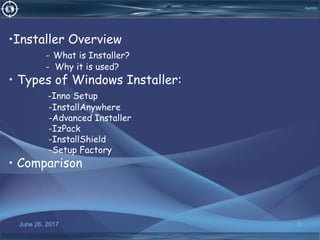
•Installer Overview
- What is Installer?
- Why it is used?
• Types of Windows Installer:
-Inno Setup
-InstallAnywhere
-Advanced Installer
-IzPack
-InstallShield
-Setup Factory
• Comparison
June 26, 2017 4
installer Overview
•What is Installer?
-Windows Installer is a component of the Windows operating system
that simplifies the application installation process.
-Windows Installer is a software component and application
programming interface (API) of Microsoft Windows used for the
installation, maintenance, and removal of software.
• Why it is used?
-Windows Installer manages the installation and removal of
applications by applying a set of centrally defined setup rules during the
installation process.
June 26, 2017 5
Inno Setup
• Definition:
• Inno Setup is a free installer for Windows programs.
• First introduced in 1997, Inno Setup today rivals and even surpasses many
commercial installers in feature set and stability.
 Inno Setup version 5.5.6.
Features:
• Support for every Windows release since 2000, including: Windows 10, Windows
8.1, Windows 8, Windows Server 2012, Windows 7, Windows Server 2008 R2,
Windows Vista, Windows Server 2008, Windows XP, Windows Server 2003, and
Windows 2000.
• Extensive support for installation of 64-bit applications on the 64-bit editions of
Windows.
.
June 26, 2017 6
Inno Setup
•Creation of shortcuts anywhere, including in the Start Menu and on the desktop.
•Running other programs before, during or after install.
•Support for multilingual  installs, including right-to-left language support.
•Support for passworded and encrypted installs.
•Support for digitally signed installs and uninstalls.
•Silent install and silent uninstall.
•Unicode installs.
• Integrated preprocessor option for advanced compile-time
customization.
• Integrated Pascal scripting engine option for advanced run-time
install and uninstall customization.
June 26, 2017 7
Inno Setup
June 26, 2017 8
Inno Setup
Disadvantages:
•When you install a new version of your application without uninstalling
the old version first, you will get a second entry in Control
Panel's Add/Remove Programs.
•After uninstalling, the directories created during installation still exist.
•Setup isn't waiting for programs executed by [Run] entries to finish.
• Some languages are missing on the Select Setup Language dialog, or it
doesn't show up at all.
June 26, 2017 9
INSTALL ANYWHERE
• Definition:
• InstallAnywhere is a Java-based software tool for creating installers or software
packages, for multiple platforms. It can also be used to create Virtual Appliances for
Linux platforms using an existing installers or software packages.
• It was initially released in 2000.
Features:
• InstallAnywhere is the leading multiplatform installation development solution for
application producers who need to deliver a professional and consistent cross installation
experience for physical, virtual and cloud environments.
• InstallAnywhere creates reliable installations for on-premises platforms – Windows,
Linux, Apple, Solaris, AIX , HP-UX, and IBM.
June 26, 2017 10
INSTALL ANYWHERE
• enables you to take existing and new software products to a virtual and
cloud infrastructure, and create Docker containers—all from a single
InstallAnywhere project.
• Saves time creating multiplatform installations.
• Helps avoid risk exposure and non-compliance.
• Offers flexibility to create silent, console, and GUI installations.
• Reuses shared code through merge modules.
• Creates standalone builds to support continuous integration.
• Simplifies installation creation for multi-tier or web/server applications.
June 26, 2017 11
ADVANCED INSTALLER
•Definition:
• Advanced Installer is a powerful and easy to use setup authoring tool
which offers full Windows Installer support and more.
• You can configure every aspect of your installer through a simple
graphical user interface or through its command line.
• Advanced Installer was added by ChrisJn in Sep 2011 and the lastest
update was made in Nov 2014. 
• It's possible to update the information on Advanced Installer
or report it as discontinued, duplicated or spam.
June 26, 2017 12
ADVANCED INSTALLER
• Features:
• A dialog editor with beautiful themes.
•Windows Installer patches.
• Multilingual installers with full localization support.
• Application virtualization.
• A Repackager for capturing existing installers and more.
• Full Internet Information Services (IIS) support.
• A licensing module for adding license registration support to your application. A built-in
Updater application for handling your updates automatically Import from Visual
Studio,InstallShield LE, WiX, Eclipse, Inno Setup, NSIS and regular MSI/MSM packages.
• Definition:
• IzPack is a one-stop solution for packaging, distributing and
deploying applications.
• It is fully cross-platform and generates a single installer. As
such, it is an alternative to native solutions such as platform-
specific installers and package managers.
• Features:
• Apache Ant integration.
• Embedding the installation file using a config element.
• System properties as variables.
• Automated Installers.
June 26, 2017 13
IzPack Installer
Continue..
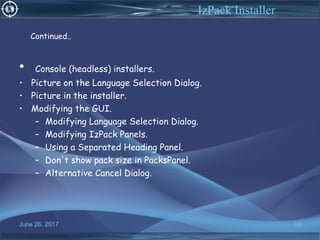
• Console (headless) installers.
• Picture on the Language Selection Dialog.
• Picture in the installer.
• Modifying the GUI.
– Modifying Language Selection Dialog.
– Modifying IzPack Panels.
– Using a Separated Heading Panel.
– Don't show pack size in PacksPanel.
– Alternative Cancel Dialog.
June 26, 2017 14
IzPack Installer
Continued..
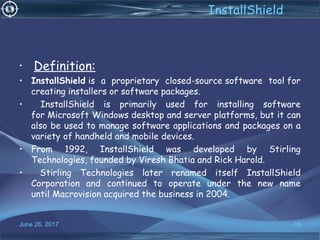
• Definition:
• InstallShield is a proprietary closed-source software tool for
creating installers or software packages.
• InstallShield is primarily used for installing software
for Microsoft Windows desktop and server platforms, but it can
also be used to manage software applications and packages on a
variety of handheld and mobile devices.
• From 1992, InstallShield was developed by Stirling
Technologies, founded by Viresh Bhatia and Rick Harold.
• Stirling Technologies later renamed itself InstallShield
Corporation and continued to operate under the new name
until Macrovision acquired the business in 2004.
June 26, 2017 15
InstallShield
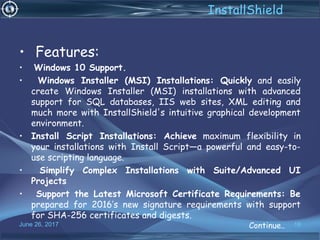
• Features:
• Windows 10 Support. 
• Windows Installer (MSI) Installations: Quickly and easily
create Windows Installer (MSI) installations with advanced
support for SQL databases, IIS web sites, XML editing and
much more with InstallShield's intuitive graphical development
environment.
• Install Script Installations: Achieve maximum flexibility in
your installations with Install Script—a powerful and easy-to-
use scripting language.
• Simplify Complex Installations with Suite/Advanced UI
Projects
• Support the Latest Microsoft Certificate Requirements: Be
prepared for 2016’s new signature requirements with support
for SHA-256 certificates and digests.
June 26, 2017 16
InstallShield
Continue..
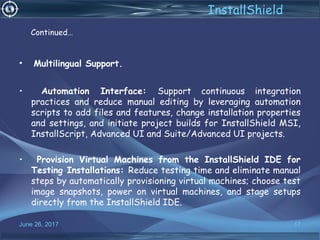
• Multilingual Support.
• Automation Interface: Support continuous integration
practices and reduce manual editing by leveraging automation
scripts to add files and features, change installation properties
and settings, and initiate project builds for InstallShield MSI,
InstallScript, Advanced UI and Suite/Advanced UI projects.
• Provision Virtual Machines from the InstallShield IDE for
Testing Installations: Reduce testing time and eliminate manual
steps by automatically provisioning virtual machines; choose test
image snapshots, power on virtual machines, and stage setups
directly from the InstallShield IDE.
June 26, 2017 17
InstallShield
Continued…
• Definition:
• Setup Factory 9.5 is the trusted and reliable way to make
software installers for your Windows software applications.
•  Setup Factory was designed to be fast and easy to use. Simply
drag and drop your files onto the project window and you’re
ready to build. 
June 26, 2017 18
Setup Factory
• Features:
• Easy to Use Software Installation Builder.
• Advanced Installer Features.
• Customize the Look of Your Software Installer.
• Installer Scripting System for 100% Flexibility.
• Productivity and Team Workflow Features.
• 100% Windows Compatibility – Both 32 Bit and 64 Bit.
• Comprehensive User’s Guide.
June 26, 2017 19
Setup Factory
June 26, 2017 20
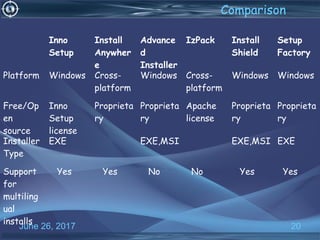
Inno
Setup
Install
Anywher
e
Advance
d
Installer
IzPack Install
Shield
Setup
Factory
Platform Windows Cross-
platform
Windows Cross-
platform
Windows Windows
Free/Op
en
source
Inno
Setup
license
Proprieta
ry
Proprieta
ry
Apache
license
Proprieta
ry
Proprieta
ry
Installer
Type
EXE EXE,MSI EXE,MSI EXE
Support
for
multiling
ual
installs
Yes Yes No No Yes Yes
Comparison
June 26, 2017 21

Installer benchmarking

  • 1.
    June 26, 2017www.snipe.co.in 1 Prepared By : Snipe Team
  • 2.
    June 26, 20172 Installer Benchmark
  • 3.
    June 26, 20173 Agenda •Installer Overview - What is Installer? - Why it is used? • Types of Windows Installer: -Inno Setup -InstallAnywhere -Advanced Installer -IzPack -InstallShield -Setup Factory • Comparison
  • 4.
    June 26, 20174 installer Overview •What is Installer? -Windows Installer is a component of the Windows operating system that simplifies the application installation process. -Windows Installer is a software component and application programming interface (API) of Microsoft Windows used for the installation, maintenance, and removal of software. • Why it is used? -Windows Installer manages the installation and removal of applications by applying a set of centrally defined setup rules during the installation process.
  • 5.
    June 26, 20175 Inno Setup • Definition: • Inno Setup is a free installer for Windows programs. • First introduced in 1997, Inno Setup today rivals and even surpasses many commercial installers in feature set and stability.  Inno Setup version 5.5.6. Features: • Support for every Windows release since 2000, including: Windows 10, Windows 8.1, Windows 8, Windows Server 2012, Windows 7, Windows Server 2008 R2, Windows Vista, Windows Server 2008, Windows XP, Windows Server 2003, and Windows 2000. • Extensive support for installation of 64-bit applications on the 64-bit editions of Windows. .
  • 6.
    June 26, 20176 Inno Setup •Creation of shortcuts anywhere, including in the Start Menu and on the desktop. •Running other programs before, during or after install. •Support for multilingual  installs, including right-to-left language support. •Support for passworded and encrypted installs. •Support for digitally signed installs and uninstalls. •Silent install and silent uninstall. •Unicode installs.
  • 7.
    • Integrated preprocessoroption for advanced compile-time customization. • Integrated Pascal scripting engine option for advanced run-time install and uninstall customization. June 26, 2017 7 Inno Setup
  • 8.
    June 26, 20178 Inno Setup Disadvantages: •When you install a new version of your application without uninstalling the old version first, you will get a second entry in Control Panel's Add/Remove Programs. •After uninstalling, the directories created during installation still exist. •Setup isn't waiting for programs executed by [Run] entries to finish. • Some languages are missing on the Select Setup Language dialog, or it doesn't show up at all.
  • 9.
    June 26, 20179 INSTALL ANYWHERE • Definition: • InstallAnywhere is a Java-based software tool for creating installers or software packages, for multiple platforms. It can also be used to create Virtual Appliances for Linux platforms using an existing installers or software packages. • It was initially released in 2000. Features: • InstallAnywhere is the leading multiplatform installation development solution for application producers who need to deliver a professional and consistent cross installation experience for physical, virtual and cloud environments. • InstallAnywhere creates reliable installations for on-premises platforms – Windows, Linux, Apple, Solaris, AIX , HP-UX, and IBM.
  • 10.
    June 26, 201710 INSTALL ANYWHERE • enables you to take existing and new software products to a virtual and cloud infrastructure, and create Docker containers—all from a single InstallAnywhere project. • Saves time creating multiplatform installations. • Helps avoid risk exposure and non-compliance. • Offers flexibility to create silent, console, and GUI installations. • Reuses shared code through merge modules. • Creates standalone builds to support continuous integration. • Simplifies installation creation for multi-tier or web/server applications.
  • 11.
    June 26, 201711 ADVANCED INSTALLER •Definition: • Advanced Installer is a powerful and easy to use setup authoring tool which offers full Windows Installer support and more. • You can configure every aspect of your installer through a simple graphical user interface or through its command line. • Advanced Installer was added by ChrisJn in Sep 2011 and the lastest update was made in Nov 2014.  • It's possible to update the information on Advanced Installer or report it as discontinued, duplicated or spam.
  • 12.
    June 26, 201712 ADVANCED INSTALLER • Features: • A dialog editor with beautiful themes. •Windows Installer patches. • Multilingual installers with full localization support. • Application virtualization. • A Repackager for capturing existing installers and more. • Full Internet Information Services (IIS) support. • A licensing module for adding license registration support to your application. A built-in Updater application for handling your updates automatically Import from Visual Studio,InstallShield LE, WiX, Eclipse, Inno Setup, NSIS and regular MSI/MSM packages.
  • 13.
    • Definition: • IzPackis a one-stop solution for packaging, distributing and deploying applications. • It is fully cross-platform and generates a single installer. As such, it is an alternative to native solutions such as platform- specific installers and package managers. • Features: • Apache Ant integration. • Embedding the installation file using a config element. • System properties as variables. • Automated Installers. June 26, 2017 13 IzPack Installer Continue..
  • 14.
    • Console (headless)installers. • Picture on the Language Selection Dialog. • Picture in the installer. • Modifying the GUI. – Modifying Language Selection Dialog. – Modifying IzPack Panels. – Using a Separated Heading Panel. – Don't show pack size in PacksPanel. – Alternative Cancel Dialog. June 26, 2017 14 IzPack Installer Continued..
  • 15.
    • Definition: • InstallShield isa proprietary closed-source software tool for creating installers or software packages. • InstallShield is primarily used for installing software for Microsoft Windows desktop and server platforms, but it can also be used to manage software applications and packages on a variety of handheld and mobile devices. • From 1992, InstallShield was developed by Stirling Technologies, founded by Viresh Bhatia and Rick Harold. • Stirling Technologies later renamed itself InstallShield Corporation and continued to operate under the new name until Macrovision acquired the business in 2004. June 26, 2017 15 InstallShield
  • 16.
    • Features: • Windows10 Support.  • Windows Installer (MSI) Installations: Quickly and easily create Windows Installer (MSI) installations with advanced support for SQL databases, IIS web sites, XML editing and much more with InstallShield's intuitive graphical development environment. • Install Script Installations: Achieve maximum flexibility in your installations with Install Script—a powerful and easy-to- use scripting language. • Simplify Complex Installations with Suite/Advanced UI Projects • Support the Latest Microsoft Certificate Requirements: Be prepared for 2016’s new signature requirements with support for SHA-256 certificates and digests. June 26, 2017 16 InstallShield Continue..
  • 17.
    • Multilingual Support. •Automation Interface: Support continuous integration practices and reduce manual editing by leveraging automation scripts to add files and features, change installation properties and settings, and initiate project builds for InstallShield MSI, InstallScript, Advanced UI and Suite/Advanced UI projects. • Provision Virtual Machines from the InstallShield IDE for Testing Installations: Reduce testing time and eliminate manual steps by automatically provisioning virtual machines; choose test image snapshots, power on virtual machines, and stage setups directly from the InstallShield IDE. June 26, 2017 17 InstallShield Continued…
  • 18.
    • Definition: • SetupFactory 9.5 is the trusted and reliable way to make software installers for your Windows software applications. •  Setup Factory was designed to be fast and easy to use. Simply drag and drop your files onto the project window and you’re ready to build.  June 26, 2017 18 Setup Factory
  • 19.
    • Features: • Easyto Use Software Installation Builder. • Advanced Installer Features. • Customize the Look of Your Software Installer. • Installer Scripting System for 100% Flexibility. • Productivity and Team Workflow Features. • 100% Windows Compatibility – Both 32 Bit and 64 Bit. • Comprehensive User’s Guide. June 26, 2017 19 Setup Factory
  • 20.
    June 26, 201720 Inno Setup Install Anywher e Advance d Installer IzPack Install Shield Setup Factory Platform Windows Cross- platform Windows Cross- platform Windows Windows Free/Op en source Inno Setup license Proprieta ry Proprieta ry Apache license Proprieta ry Proprieta ry Installer Type EXE EXE,MSI EXE,MSI EXE Support for multiling ual installs Yes Yes No No Yes Yes Comparison
  • 21.