Warm Welcome
Matrix User Terminals
Convergence at Your Command
Matrix User Terminals
 VoIP Phones
 Digital Key Phones
 Digital Softphones
 Mobile Softphones
 Analog Telephones
VoIP Phones
SPARSH VP330
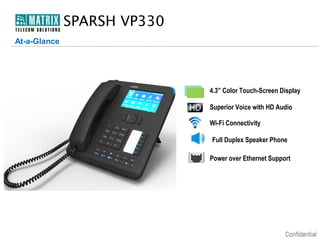
At-a-Glance

4.3” Color Touch-Screen Display
Superior Voice with HD Audio
Wi-Fi Connectivity
Full Duplex Speaker Phone
Power over Ethernet Support
SPARSH VP330
Front View

1
2
3
7

1 Ringer LED
2 Large Touch Screen Display
3 Navigation Cluster
4 Direct Station Select Keys

6
4
5

5 Dedicated Feature Keys
6 Alpha-Numeric Dial Pad
7 Handset with HD Audio
SPARSH VP330
Rear View

1 3.5 mm Audio Jack
2 Standard Headset Jack
1

3
5
4

3 USB Port for Wi-Fi Dongle
4 Adjustable Foot Stand
2

5 2 Ethernet Ports for PC/Network
SPARSH VP330
Product Variants

SPARSH VP330

4.3” TFT Color Display

SPARSH VP330E

4.3” TFT Color Display with PoE
SPARSH VP330
Key Features
Display

4.3” Large Color Touch-Screen

Feature Keys

Hold, Transfer, Conference, Mute, Redial, Voice Mail, Speaker and
Volume Adjustment Keys with LED Indication

DSS Keys

6 Dedicated DSS Keys with LED Indication

Busy Lamp Field

BLF Keys for Remote Station Status Display

Headset

3.5 mm Jack, Standard Headset Jack

Wi-Fi

IEEE 802.11 b/g
64/128-bit WEP data encryption
Wi-Fi Protected Access (WPA/WPA2-PSK)

Wi-Fi Security
VoIP Security
Speaker

SRTP and TLS
Full Duplex Hands-free Operation with G.722 HD Audio

Power over Ethernet Integrated IEEE 802.3f Power over Ethernet
(PoE)
SPARSH VP330
Key Features
Presence Sharing

User Presence Sharing – Available, Offline, Away, On the Phone, Do Not
Disturb

Installation Mounting
Wall and Table-Top (35° & 55°)
Colors
Supported Platforms

Black and White
Works with ETERNITY Range of IP-PBXs: ETERNITY NE/PE/GE/ME
 
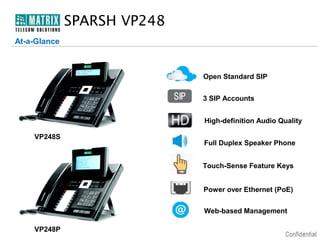
SPARSH VP248
At-a-Glance

Open Standard SIP
3 SIP Accounts
High-definition Audio Quality
VP248S

Full Duplex Speaker Phone
Touch-Sense Feature Keys
Power over Ethernet (PoE)
Web-based Management

VP248P
SPARSH VP248
Key Features

 Open-Standard SIP Support
 3 SIP Accounts
 Easy Interoperable with Third-Party IP Servers
 Auto Configuration
 17 Touch-Sense Feature Keys
 16 Direct Station Selection (DSS) with BLF
 Full-Duplex Speaker Phone
 Web-based Remote Administration
 Call Conference
Digital Key Phones
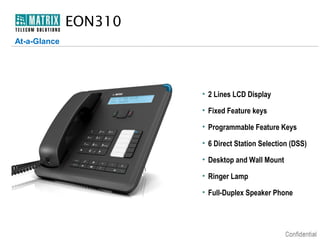
EON310
At-a-Glance

• 2 Lines LCD Display
• Fixed Feature keys
• Programmable Feature Keys
• 6 Direct Station Selection (DSS)
• Desktop and Wall Mount
• Ringer Lamp
• Full-Duplex Speaker Phone
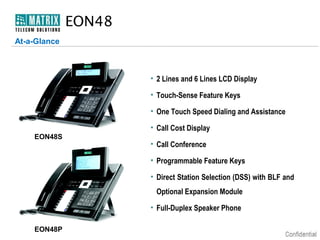
EON48
At-a-Glance

• 2 Lines and 6 Lines LCD Display
• Touch-Sense Feature Keys
• One Touch Speed Dialing and Assistance
• Call Cost Display
EON48S

• Call Conference
• Programmable Feature Keys
• Direct Station Selection (DSS) with BLF and
Optional Expansion Module
• Full-Duplex Speaker Phone

EON48P
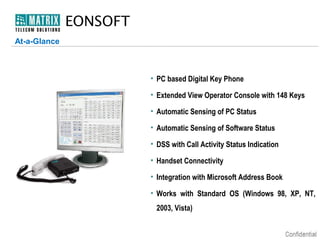
EONSOFT
At-a-Glance

• PC based Digital Key Phone
• Extended View Operator Console with 148 Keys
• Automatic Sensing of PC Status
• Automatic Sensing of Software Status
• DSS with Call Activity Status Indication
• Handset Connectivity
• Integration with Microsoft Address Book
• Works with Standard OS (Windows 98, XP, NT,
2003, Vista)
Mobile Softphones
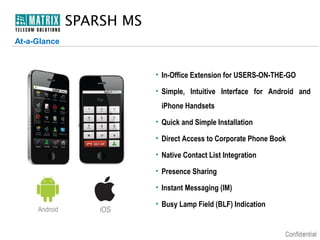
SPARSH MS
At-a-Glance

• In-Office Extension for USERS-ON-THE-GO
• Simple, Intuitive Interface for Android and
iPhone Handsets
• Quick and Simple Installation
• Direct Access to Corporate Phone Book
• Native Contact List Integration
• Presence Sharing
• Instant Messaging (IM)
Android

iOS

• Busy Lamp Field (BLF) Indication
Analog Telephone
NEO10
At-a-Glance

• 3 Lines LCD Display
• CLI Display with FSK and DTMF
• 10 One-Touch Speed Dial Keys
• Message Wait Indicator with LED
• Tone and Pulse Dialing Modes
• Call Logs Up to 76 Entries
• Wall and Desk Mount
Thank You
• Type of Presentation: User Terminals Introduction Presentation
• Number of Slides: 21
• Revised on: 1st Feb, 2013
• Version-Release Number: V1.R2

For Further Information Please Contact:
Email ID: Info.Telecom@MatrixComSec.com
Visit us at www.MatrixComSec.com

Matrix Telecom Solutions: User Terminals Introduction

  • 1.
  • 2.
  • 3.
    Matrix User Terminals VoIP Phones  Digital Key Phones  Digital Softphones  Mobile Softphones  Analog Telephones
  • 4.
  • 5.
    SPARSH VP330 At-a-Glance 4.3” ColorTouch-Screen Display Superior Voice with HD Audio Wi-Fi Connectivity Full Duplex Speaker Phone Power over Ethernet Support
  • 6.
    SPARSH VP330 Front View 1 2 3 7 1Ringer LED 2 Large Touch Screen Display 3 Navigation Cluster 4 Direct Station Select Keys 6 4 5 5 Dedicated Feature Keys 6 Alpha-Numeric Dial Pad 7 Handset with HD Audio
  • 7.
    SPARSH VP330 Rear View 13.5 mm Audio Jack 2 Standard Headset Jack 1 3 5 4 3 USB Port for Wi-Fi Dongle 4 Adjustable Foot Stand 2 5 2 Ethernet Ports for PC/Network
  • 8.
    SPARSH VP330 Product Variants SPARSHVP330 4.3” TFT Color Display SPARSH VP330E 4.3” TFT Color Display with PoE
  • 9.
    SPARSH VP330 Key Features Display 4.3”Large Color Touch-Screen Feature Keys Hold, Transfer, Conference, Mute, Redial, Voice Mail, Speaker and Volume Adjustment Keys with LED Indication DSS Keys 6 Dedicated DSS Keys with LED Indication Busy Lamp Field BLF Keys for Remote Station Status Display Headset 3.5 mm Jack, Standard Headset Jack Wi-Fi IEEE 802.11 b/g 64/128-bit WEP data encryption Wi-Fi Protected Access (WPA/WPA2-PSK) Wi-Fi Security VoIP Security Speaker SRTP and TLS Full Duplex Hands-free Operation with G.722 HD Audio Power over Ethernet Integrated IEEE 802.3f Power over Ethernet (PoE)
  • 10.
    SPARSH VP330 Key Features PresenceSharing User Presence Sharing – Available, Offline, Away, On the Phone, Do Not Disturb Installation Mounting Wall and Table-Top (35° & 55°) Colors Supported Platforms Black and White Works with ETERNITY Range of IP-PBXs: ETERNITY NE/PE/GE/ME  
  • 11.
    SPARSH VP248 At-a-Glance Open StandardSIP 3 SIP Accounts High-definition Audio Quality VP248S Full Duplex Speaker Phone Touch-Sense Feature Keys Power over Ethernet (PoE) Web-based Management VP248P
  • 12.
    SPARSH VP248 Key Features Open-Standard SIP Support  3 SIP Accounts  Easy Interoperable with Third-Party IP Servers  Auto Configuration  17 Touch-Sense Feature Keys  16 Direct Station Selection (DSS) with BLF  Full-Duplex Speaker Phone  Web-based Remote Administration  Call Conference
  • 13.
  • 14.
    EON310 At-a-Glance • 2 LinesLCD Display • Fixed Feature keys • Programmable Feature Keys • 6 Direct Station Selection (DSS) • Desktop and Wall Mount • Ringer Lamp • Full-Duplex Speaker Phone
  • 15.
    EON48 At-a-Glance • 2 Linesand 6 Lines LCD Display • Touch-Sense Feature Keys • One Touch Speed Dialing and Assistance • Call Cost Display EON48S • Call Conference • Programmable Feature Keys • Direct Station Selection (DSS) with BLF and Optional Expansion Module • Full-Duplex Speaker Phone EON48P
  • 16.
    EONSOFT At-a-Glance • PC basedDigital Key Phone • Extended View Operator Console with 148 Keys • Automatic Sensing of PC Status • Automatic Sensing of Software Status • DSS with Call Activity Status Indication • Handset Connectivity • Integration with Microsoft Address Book • Works with Standard OS (Windows 98, XP, NT, 2003, Vista)
  • 17.
  • 18.
    SPARSH MS At-a-Glance • In-OfficeExtension for USERS-ON-THE-GO • Simple, Intuitive Interface for Android and iPhone Handsets • Quick and Simple Installation • Direct Access to Corporate Phone Book • Native Contact List Integration • Presence Sharing • Instant Messaging (IM) Android iOS • Busy Lamp Field (BLF) Indication
  • 19.
  • 20.
    NEO10 At-a-Glance • 3 LinesLCD Display • CLI Display with FSK and DTMF • 10 One-Touch Speed Dial Keys • Message Wait Indicator with LED • Tone and Pulse Dialing Modes • Call Logs Up to 76 Entries • Wall and Desk Mount
  • 21.
  • 22.
    • Type ofPresentation: User Terminals Introduction Presentation • Number of Slides: 21 • Revised on: 1st Feb, 2013 • Version-Release Number: V1.R2 For Further Information Please Contact: Email ID: Info.Telecom@MatrixComSec.com Visit us at www.MatrixComSec.com