
Confidea® G3
Confidea® Evolution
G2
2013
G3
2014
G1
2008
Market introduction
First Quad band
wireless conference system
First with full
wired – wireless capability
Major Confidea Upgrade
Improved robustness
Introduction of ATM
Voice activation
Latest RF technology
Spectrum analysis: &
Visualisation & Control
RFID authentication
Touch & Mobile
friendly web control
Confidea® G3
What‟s New?A quick overview
What‟s New ?
Confidea® G3
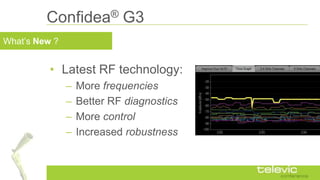
• Latest RF technology:
– More frequencies
– Better RF diagnostics
– More control
– Increased robustness
What‟s New ?
Confidea® G3
• Refreshed design
– Simpler and more intuitive discussion unit
What‟s New ?
Confidea® G3
• Integrated RFID Card Reader
What‟s New ?
Confidea® G3
• New microphone
– Design look
– New light ring
• Dark on „OFF‟
• Red on „ON‟
• Green on “Request”
What‟s New ?
Confidea® G3
• More power friendly
– Same battery
– Better autonomy
– > 28 Hours !
What‟s New ?
Confidea® G3
• More powerful
built-in web server
– Intuitive control
– Optimized for
Touch & Mobile
• AES encryption
Confidea® G3
What‟s New?In detail
Latest RF technology
• Complies with existing and emerging
international and national RF regulations
– Transmit power regulations
– Radar detection
– Channel allocation
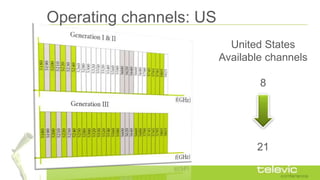
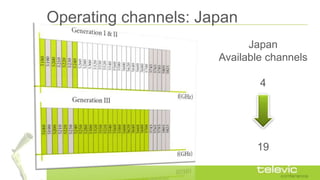
• Additional Confidea operating frequencies
(Japan, US, Canada, …)
Operating channels: US
United States
Available channels
8
21
Operating channels: Japan
Japan
Available channels
4
19
Operating channels: Europe
Europe
Available channels
23
24
RF diagnostic and control
• Real time spectrum monitoring
– Preferred frequencies that guarantee high audio quality
• Diagnostics during installation and operation
– Detect other Confidea systems in range
• Easy frequency planning for multi room Confidea setup
• Dynamic frequency selection
– Easy frequency planning
– Favorite frequency list
– Block frequencies that are not to be used
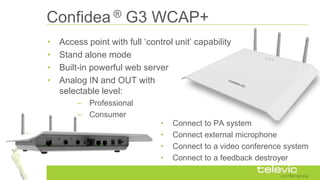
Confidea ® G3 WCAP+
• Access point with full „control unit‟ capability
• Stand alone mode
• Built-in powerful web server
• Analog IN and OUT with
selectable level:
– Professional
– Consumer
• Connect to PA system
• Connect external microphone
• Connect to a video conference system
• Connect to a feedback destroyer
Confidea® G3
Simple Integration
A few examples
Application Confidea® G3
Basic discussion
Equipment list:
– Confidea WCAP+ G3
– Delegate/Chairman units
– Laptop/Tablet/Smartphone for setup
and control
Out-of-the box operation with
minimum amount of equipment
Application Confidea® G3
Advanced Discussion
Equipment list:
– Confidea WCAP+ G3
– Delegate/Chairman units
– Laptop/Desktop for setup and control
– CoCon Discussion & Signage
Added Control and Display
with CoCon Control Software
Application Confidea® G3
Discussion & Voting
Equipment list:
– Confidea WCAP+ G3
– Delegate/Chairman units
– Laptop/Desktop for setup and control
– CoCon Discussion & Voting
– CoCon Signage & Authentication (optional)
Voting Control and Display
with CoCon Control Software
Confidea® G3
Discussion & Voting
Available models
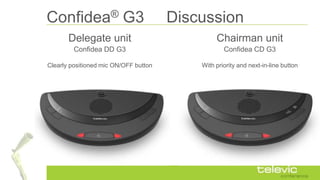
Confidea® G3 Discussion
Confidea DD G3 Confidea CD G3
Delegate unit Chairman unit
With priority and next-in-line buttonClearly positioned mic ON/OFF button
Confidea® G3 Discussion
• Design update
• Simplified user
interface
• New
microphone
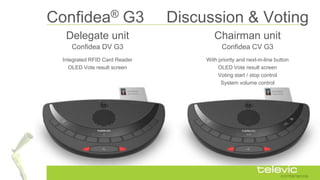
Confidea® G3 Discussion & Voting
Confidea DV G3 Confidea CV G3
Delegate unit Chairman unit
With priority and next-in-line button
OLED Vote result screen
Voting start / stop control
System volume control
Integrated RFID Card Reader
OLED Vote result screen
Confidea® G3 Discussion & Voting
• Design update
• RFID Card Reader
– Identification
– Authentication
– Assigning voting rights
• Compatible with existing cards
(e.g. for building access control)
New
Microphone
Confidea® G3
Built-in Web Control
Some highlights
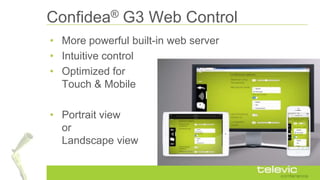
Confidea® G3 Web Control
• More powerful built-in web server
• Intuitive control
• Optimized for
Touch & Mobile
• Portrait view
or
Landscape view
Confidea® G3 Web Control
Operator function
• Speaker list
• Request view
• Delegate overview
• Named list
• Minimized view possible
Confidea® G3 Web Control
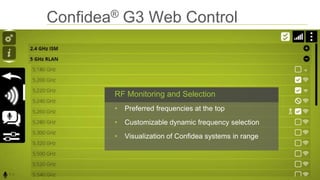
RF Monitoring and Selection
• Preferred frequencies at the top
• Customizable dynamic frequency selection
• Visualization of Confidea systems in range
Confidea® G3 Web Control
Detailed system logging
• Logging of system events
• To facilitate support
Confidea® G3 Web Control
Delegate/Unit Management
• Define groups
• Assign colors
• Add labels with delegate names
• Assign delegates to groups
Confidea® G3 Web Control
Display detailed unit status info
• Live battery status monitoring
• RF Link quality
• Unit software version
www.televic-conference.com

Confidea Wireless Generation 3

  • 1.
  • 2.
    Confidea® Evolution G2 2013 G3 2014 G1 2008 Market introduction FirstQuad band wireless conference system First with full wired – wireless capability Major Confidea Upgrade Improved robustness Introduction of ATM Voice activation Latest RF technology Spectrum analysis: & Visualisation & Control RFID authentication Touch & Mobile friendly web control
  • 3.
  • 4.
    What‟s New ? Confidea®G3 • Latest RF technology: – More frequencies – Better RF diagnostics – More control – Increased robustness
  • 5.
    What‟s New ? Confidea®G3 • Refreshed design – Simpler and more intuitive discussion unit
  • 6.
    What‟s New ? Confidea®G3 • Integrated RFID Card Reader
  • 7.
    What‟s New ? Confidea®G3 • New microphone – Design look – New light ring • Dark on „OFF‟ • Red on „ON‟ • Green on “Request”
  • 8.
    What‟s New ? Confidea®G3 • More power friendly – Same battery – Better autonomy – > 28 Hours !
  • 9.
    What‟s New ? Confidea®G3 • More powerful built-in web server – Intuitive control – Optimized for Touch & Mobile • AES encryption
  • 10.
  • 11.
    Latest RF technology •Complies with existing and emerging international and national RF regulations – Transmit power regulations – Radar detection – Channel allocation • Additional Confidea operating frequencies (Japan, US, Canada, …)
  • 12.
    Operating channels: US UnitedStates Available channels 8 21
  • 13.
  • 14.
  • 15.
    RF diagnostic andcontrol • Real time spectrum monitoring – Preferred frequencies that guarantee high audio quality • Diagnostics during installation and operation – Detect other Confidea systems in range • Easy frequency planning for multi room Confidea setup • Dynamic frequency selection – Easy frequency planning – Favorite frequency list – Block frequencies that are not to be used
  • 16.
    Confidea ® G3WCAP+ • Access point with full „control unit‟ capability • Stand alone mode • Built-in powerful web server • Analog IN and OUT with selectable level: – Professional – Consumer • Connect to PA system • Connect external microphone • Connect to a video conference system • Connect to a feedback destroyer
  • 17.
  • 18.
    Application Confidea® G3 Basicdiscussion Equipment list: – Confidea WCAP+ G3 – Delegate/Chairman units – Laptop/Tablet/Smartphone for setup and control Out-of-the box operation with minimum amount of equipment
  • 19.
    Application Confidea® G3 AdvancedDiscussion Equipment list: – Confidea WCAP+ G3 – Delegate/Chairman units – Laptop/Desktop for setup and control – CoCon Discussion & Signage Added Control and Display with CoCon Control Software
  • 20.
    Application Confidea® G3 Discussion& Voting Equipment list: – Confidea WCAP+ G3 – Delegate/Chairman units – Laptop/Desktop for setup and control – CoCon Discussion & Voting – CoCon Signage & Authentication (optional) Voting Control and Display with CoCon Control Software
  • 21.
    Confidea® G3 Discussion &Voting Available models
  • 22.
    Confidea® G3 Discussion ConfideaDD G3 Confidea CD G3 Delegate unit Chairman unit With priority and next-in-line buttonClearly positioned mic ON/OFF button
  • 23.
    Confidea® G3 Discussion •Design update • Simplified user interface • New microphone
  • 24.
    Confidea® G3 Discussion& Voting Confidea DV G3 Confidea CV G3 Delegate unit Chairman unit With priority and next-in-line button OLED Vote result screen Voting start / stop control System volume control Integrated RFID Card Reader OLED Vote result screen
  • 25.
    Confidea® G3 Discussion& Voting • Design update • RFID Card Reader – Identification – Authentication – Assigning voting rights • Compatible with existing cards (e.g. for building access control) New Microphone
  • 26.
    Confidea® G3 Built-in WebControl Some highlights
  • 27.
    Confidea® G3 WebControl • More powerful built-in web server • Intuitive control • Optimized for Touch & Mobile • Portrait view or Landscape view
  • 28.
    Confidea® G3 WebControl Operator function • Speaker list • Request view • Delegate overview • Named list • Minimized view possible
  • 29.
    Confidea® G3 WebControl RF Monitoring and Selection • Preferred frequencies at the top • Customizable dynamic frequency selection • Visualization of Confidea systems in range
  • 30.
    Confidea® G3 WebControl Detailed system logging • Logging of system events • To facilitate support
  • 31.
    Confidea® G3 WebControl Delegate/Unit Management • Define groups • Assign colors • Add labels with delegate names • Assign delegates to groups
  • 32.
    Confidea® G3 WebControl Display detailed unit status info • Live battery status monitoring • RF Link quality • Unit software version
  • 33.