




WARM WELCOME
Presentation Agenda
•

DVR Introduction

•

Matrix SATATYA Introduction

• SATATYA DVR Solution
 Hardware Solution
 Software Solution

• SATATYA DVR Key Features
•

SATATYA DVR Feature List
Digital Video Recorder (DVR)
Introduction
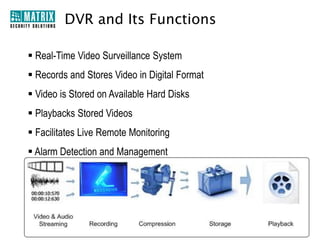
DVR and Its Functions
Playback

Storage
Compression

Recording

Video & Audio
Streaming
Benefits of DVR System
• Provides Enhanced Security Round the Clock
• Reduce Cost of Security Personal
• Theft Reduction
• Increases Productivity
• Comprehensive End-to-End Surveillance
Matrix SATATYA DVR
Introduction
What is SATATYA DVR?
•

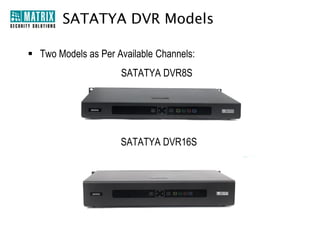
DVRs with 4, 8 and 16 Channels

•

Standard and Premium Models

•

Stand-Alone and Network Surveillance System

•

Plug-n-Play Device

•

Combination of Hardware and Software

•

Central Monitoring System (CMS), Web Client and Mobile Viewer (MV)

•

Comprehensive Solution for Small, Medium and Large Enterprises
Why SATATYA DVR?
Remote Monitoring Using
Advance CMS, Web Client
and Mobile Viewer

Flexibly Record either
Manually, Continuously, Sc
heduled, Motion, Alarm
and Event based

Synchronous Playback of
All Channels

Link One Audio Channel
with Multiple Video
Channels

Dual Streaming

Pentaplex Functions
Why SATATYA DVR?

Advanced Alarm
Management

Check System Health
Status on a Single Window

Customized Layout Styles

Matrix DDNS Server for
Remote Viewing without
any Static IP
SATATYA DVR Integration
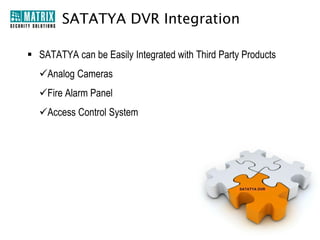
• SATATYA can be Easily Integrated with Third Party Products

Analog Cameras

Fire Alarm Panel

Access Control
System
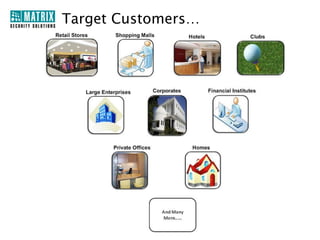
Target Customers…

Retail Stores

Hotels

Shopping
Malls

Large
Enterprise

Financial
Institutes

Corporates

Private
Offices

And
Many
More

Clubs

Residential
Areas
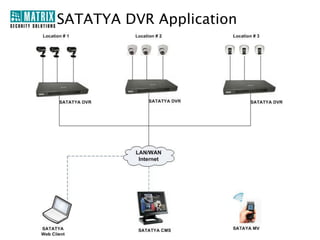
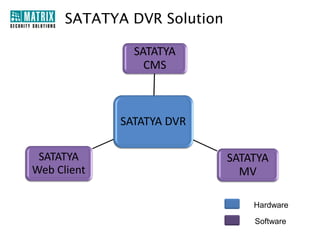
SATATYA DVR Solution
SATATYA
CMS
SATATYA DS
Hardware

Web Client

SATATYA DVR
SATATYA
Web Client

CMS

Mobile Client

SATATYA
MV
Hardware
Software
SATATYA DVR Hardware
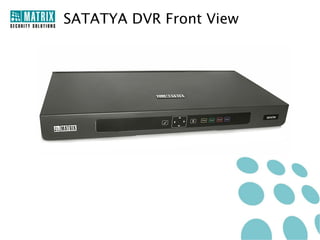
SATATYA DVR Front View
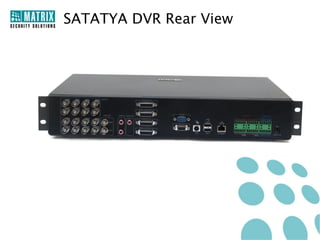
SATATYA DVR Rear View
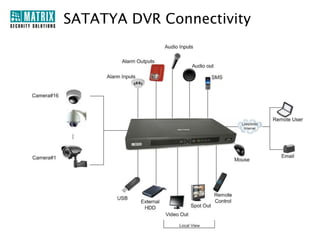
SATATYA DVR Connectivity
Front Panel of SATATYA DVR Range

SATATYA DVR Essential

SATATYA DVR Standard

SATATYA DVR Premium
Technical Specifications
Model→

SATATYA DVR4E

SATATYA DVR4S

Front Panel

No

Yes

Video Output

1 Main Video (BNC), VGA

1 Main Video (BNC), VGA

Audio Output

1 Channel, BNC

1 Channel, RCA

Alarm

No

Yes

Image Resolution

2CIF Real Time

CIF Real Time

Synchronous
Playback

4

4

Backup

Manual Backup to USB

Manual and Scheduled Backup
to USB/FTP

SATA Ports

1 Port(2TB Capacity)

1 Port(2TB Capacity)

USB Ports

2

1
Technical Specifications
Model→

SATATYA DVR8E

SATATYA DVR8S

SATATYA DVR8P

Front Panel

No

Yes

Yes

Video Output

1 Main, 1 VGA

1 Main, 1 Spot, 1
VGA

1 Main, 1 Spot, 1
VGA, 1 HDMI

Audio Output

1 Channel, BNC

1 Channel, BNC

1 Channel, BNC

Alarm Output

No

Yes

Yes

Image Resolution

CIF Real Time

CIF Real Time

CIF Real Time

Synchronous
Playback

4

8

8

Backup

Manual Backup to
USB

Manual and
Scheduled Backup to
USB/FTP

Manual and
Scheduled Backup to
USB/FTP

SATA Ports
(2 TB Each)

1

2

2

USB Ports

2

1

1
Technical Specifications
Model→

SATATYA DVR16S

SATATYA DVR16P

Front Panel

Yes

Yes

Video Output

1 Main, 1 Spot, 1 VGA

1 Main, 1 Spot, 1 VGA, 1 HDMI

Loop Output

No

16 Channel, Loop Output

Audio Output

1 Channel, RCA

1 Channel, RCA

Alarm Output

Yes

Yes

Image Resolution

CIF Real Time

CIF Real Time

Synchronous
Playback

16

16

Backup

Manual Backup over USB,
Scheduled Backup over
USB/FTP

Manual and Scheduled Backup
over USB/FTP

SATA Ports(2TB
Each)

2

2

USB Ports

2

2
SATATYA DVR
Software Key Features
H.264 Compression Format

• Latest Video Compression Standard
• Reduces the Video Size
• No Compromise on Image Quality
• High Resolution of Video
• Less Network Bandwidth and Greater Storage Space
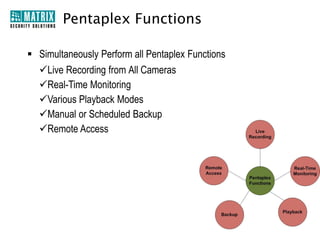
Pentaplex Functions
• Simultaneously Perform all Pentaplex Functions
Live Recording from All Cameras
Manual or Scheduled Backup
Remote Access

Live
Recording

Playback

Real-Time Monitoring

Various Playback Modes
Real-Time
Monitoring

Backup

Remote
Access
Advanced Recording Options
• Manual, Continuous and Scheduled Recording
• Event based Recording
• Pre-Alarm and Post-Alarm Recording
• Privacy Masking while Recording
• Recording on Detection of Motion
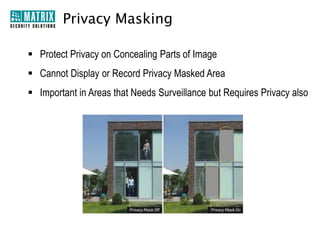
Privacy Masking
• Protect Privacy on Concealing Parts of Image
• Cannot Display or Record Privacy Masked Area
• Important in Areas that Needs Surveillance but Requires Privacy also

Privacy Mask Off

Privacy Mask On
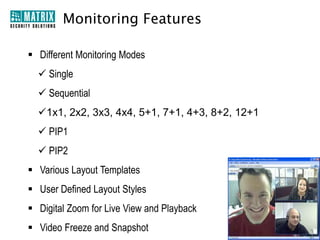
Monitoring Features
• Different Monitoring Modes
 Single
 Sequential
 1x1, 2x2, 3x3, 4x4, 5+1, 7+1, 4+3, 8+2, 12+1
 PIP1

 PIP2

• Various Layout Templates
• User Defined Layout Styles

• Digital Zoom for Live View and Playback
• Video Freeze and Snapshot
Advanced Search Options
Date
Selection

Camera
Selection

Event
Legends

Channel
Selection

Cursor

Time
Selection
Playback Functions
• Live and Remote Playback
• Different Speed Control

• Fast and Slow Forward
• Single Step Forward
• Next and Previous Video

• Synchronous Playback for All Channels
Notification on Event
Events and Alerts
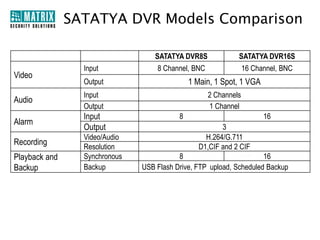
• Connect Up to 16 Alarm Input Devices
• Connect Up to 3 Alarm Output Devices
• Types of Alarm
 Video Loss
 Video Tamper
 Motion Detection

• Take Quick Actions On Generation of Alarm
 Send SMS and Email Notifications
 Take PTZ Tour
 Upload Image on FTP
Storage

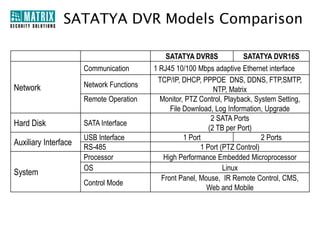
• Up to 4TB Storage Capacity
• Up to 2 SATA HDD Support
• Storage on FIFO Basis
Backup
•
•
•
•

Manual Backup on USB Port
Scheduled Backup on Network
Export in Native File Format
Export to AVI on USB/FTP
Video Output
• VGA, HDMI and Main Video Output Ports to Connect Monitor or TV
• Spot Output for Live Monitoring of Video
Access to SATATYA DVR
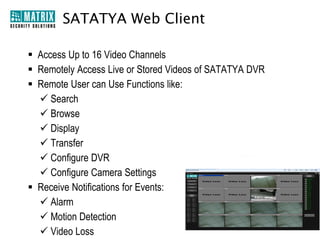
• Access Live or Recorded Video
• Up to 10 Concurrent Login Sessions

• Authorized User can Access Video through
 SATATYA CMS
 SATATYA Web Client
 SATATYA Mobile Viewer (MV)

CMS

Web
Client

MV
Remote Functions
• Live Camera Monitoring with PTZ Control
• Menu Configuration

• Record Video
• Live View and Playback
Dual Streaming
• Main Stream and Sub-stream Options
• Records with High Resolution on Main Stream

• Transmits with Lower Bit Rate on Sub-stream
• Preserves Bandwidth and Increases Remote Viewing Performance
Other Features
• 10,000 Events Log
• 3 User Access Level (Default)
• Embedded Web Server
• Intuitive GUI
• Linux Embedded OS
• Online Users List
• Web-based Interface

• System Health Check
• Camera Grouping

• Multiple Concurrent Login
Sessions (Up to 10)
• Multiple Programmable Users
(Up to 16)
Security Features
• Video Access Rights

• Three Authorization Access Levels
 Administrator, Operator and Viewer

•

High Level of Access Security
 IP Access Control
 Blocking Online Users
 Password Protection
 Secure Remote Access
Matrix Dyn DNS
•
•
•
•

System Constantly Updates IP to DDNS Server
User can Easily Access the System from Anywhere
Saves Time
Eliminates Cost of Separate DDNS Server
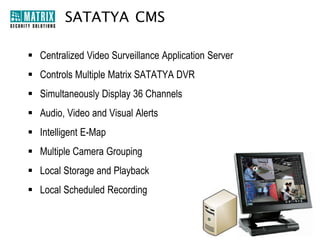
Centralized Management Software
• 36 Channels/ Up to 10 Pages
• Different Layout Styles

• Audio/Visual Alerts
• Video Alerts
• Record Plan

• Monitoring Plan
• Device/Camera Group
• Playback Search
• Event Log Search
Web Client
• Asynchronous/Synchronous Playback
• Event Log
• Camera wise Record, Search, Storage, Backup
• Health Status of Device
• PTZ Settings
• User Account Management
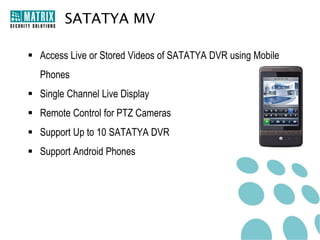
Mobile Viewer
• 2×2 Layout
• Digital Zoom
• PTZ Tour
• Set Favorite Channel
• Snapshots in Live View
• Add up to 10 Devices
• Main Stream and Sub Stream in Live View
Box
Cameras

SATATYA
Analog
Cameras
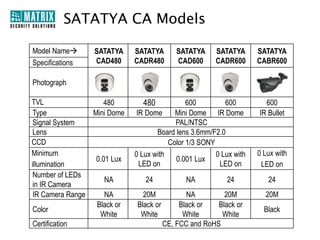
SATATYA Camera Range
PTZ

IR Dome

CADRP700VL90SW

CADR480FL60CB/W
CADR600FL36SB/W
CADR600FL60SB/W

IR Bullet

Dome

CABR600FL60SB/W
CABR600FL36SB/W
CABR600VL12SG

CAD480FL60CB/W
CAD600FL36SB/W
CAD600FL36CB/W

Box

CABX600RLSS
Camera Features
Backlight Compensation (BLC)

Auto White Balance (AWB)

Wide Dynamic Range (WDR)

Digital Noise Reduction (DNR)

Highlight Compensation Capability
(HLC)
Technical Specifications of PTZ Camera
Model→

PTZ Camera

Variants

SATATYA CADRP700VL90SW

TVL

700

Image Sensor

1/3” Super Sony HAD CCD II

Minimum Illumination

Color: 0.015 Lux,
B/W: 0.001 Lux

Number of LEDs in IR
Camera

12 pieces IR array lights

IR Camera Range

120-150 m
360˚ endless pan range
5˚- -90˚(Auto Flip) tilt range
30× Zoom
IP66, RoHS

Pan/Tilt/Zoom

Certification
SATATYA DVR Features List
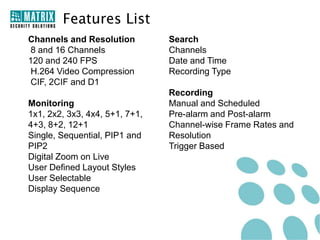
Features List
Channels and Resolution
8 and 16 Channels
120 and 240 FPS
H.264 Video Compression
CIF, 2CIF and D1

Search
Timeline based Search
Channels
Date and Time
Recording Type

Monitoring
1x1, 2x2, 3x3, 4x4, 5+1, 7+1, 4+3
, 8+2, 12+1
Single, Sequential, PIP1 and
PIP2
Digital Zoom on Live
User Defined Layout Styles
User Selectable
Display Sequence

Recording
Manual and Scheduled
Pre-alarm and Post-alarm
Channel-wise Frame Rates and
Resolution
Trigger Based
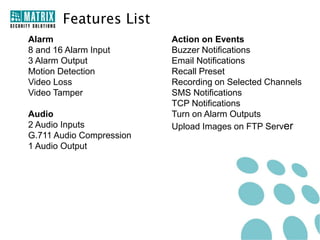
Features List
Alarm
8 and 16 Alarm Input
3 Alarm Output
Motion Detection
Video Loss
Video Tamper
Audio
2 Audio Inputs
G.711 Audio Compression
1 Audio Output

Action on Events
Buzzer Notifications
Email Notifications
Recall Preset
Recording on Selected Channels
SMS Notifications
TCP Notifications
Turn on Alarm Outputs
Upload Images on FTP Server
Features List
Remote Functions
Live Camera Monitoring with PTZ
Control
Menu Configuration
Record Video
Live View and Playback
Firmware Upgrade

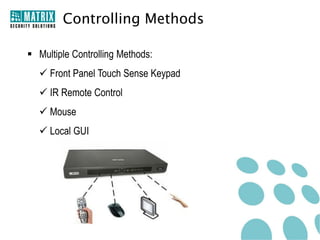
Control
IR Remote Control
Front Panel Keypad
Mouse

Security
IP Access Control List
Block Online Users
Secure Remote Access
Video Access Rights
Thank You
For Further Information Please Contact:
Email ID: Security@MatrixComSec.com
Tel: +91 265 2630555
Visit us at www.MatrixSecuSol.com
Version: V1R4

Matrix Security Solutions: SATATYA DVR - Digital Video Recorders

  • 1.
  • 3.
    Presentation Agenda • DVR Introduction • MatrixSATATYA Introduction • SATATYA DVR Solution  Hardware Solution  Software Solution • SATATYA DVR Key Features • SATATYA DVR Feature List
  • 4.
    Digital Video Recorder(DVR) Introduction
  • 5.
    DVR and ItsFunctions Playback Storage Compression Recording Video & Audio Streaming
  • 6.
    Benefits of DVRSystem • Provides Enhanced Security Round the Clock • Reduce Cost of Security Personal • Theft Reduction • Increases Productivity • Comprehensive End-to-End Surveillance
  • 7.
  • 8.
    What is SATATYADVR? • DVRs with 4, 8 and 16 Channels • Standard and Premium Models • Stand-Alone and Network Surveillance System • Plug-n-Play Device • Combination of Hardware and Software • Central Monitoring System (CMS), Web Client and Mobile Viewer (MV) • Comprehensive Solution for Small, Medium and Large Enterprises
  • 9.
    Why SATATYA DVR? RemoteMonitoring Using Advance CMS, Web Client and Mobile Viewer Flexibly Record either Manually, Continuously, Sc heduled, Motion, Alarm and Event based Synchronous Playback of All Channels Link One Audio Channel with Multiple Video Channels Dual Streaming Pentaplex Functions
  • 10.
    Why SATATYA DVR? AdvancedAlarm Management Check System Health Status on a Single Window Customized Layout Styles Matrix DDNS Server for Remote Viewing without any Static IP
  • 11.
    SATATYA DVR Integration •SATATYA can be Easily Integrated with Third Party Products Analog Cameras Fire Alarm Panel Access Control System
  • 12.
  • 13.
  • 14.
    SATATYA DVR Solution SATATYA CMS SATATYADS Hardware Web Client SATATYA DVR SATATYA Web Client CMS Mobile Client SATATYA MV Hardware Software
  • 15.
  • 16.
  • 17.
  • 18.
  • 19.
    Front Panel ofSATATYA DVR Range SATATYA DVR Essential SATATYA DVR Standard SATATYA DVR Premium
  • 20.
    Technical Specifications Model→ SATATYA DVR4E SATATYADVR4S Front Panel No Yes Video Output 1 Main Video (BNC), VGA 1 Main Video (BNC), VGA Audio Output 1 Channel, BNC 1 Channel, RCA Alarm No Yes Image Resolution 2CIF Real Time CIF Real Time Synchronous Playback 4 4 Backup Manual Backup to USB Manual and Scheduled Backup to USB/FTP SATA Ports 1 Port(2TB Capacity) 1 Port(2TB Capacity) USB Ports 2 1
  • 21.
    Technical Specifications Model→ SATATYA DVR8E SATATYADVR8S SATATYA DVR8P Front Panel No Yes Yes Video Output 1 Main, 1 VGA 1 Main, 1 Spot, 1 VGA 1 Main, 1 Spot, 1 VGA, 1 HDMI Audio Output 1 Channel, BNC 1 Channel, BNC 1 Channel, BNC Alarm Output No Yes Yes Image Resolution CIF Real Time CIF Real Time CIF Real Time Synchronous Playback 4 8 8 Backup Manual Backup to USB Manual and Scheduled Backup to USB/FTP Manual and Scheduled Backup to USB/FTP SATA Ports (2 TB Each) 1 2 2 USB Ports 2 1 1
  • 22.
    Technical Specifications Model→ SATATYA DVR16S SATATYADVR16P Front Panel Yes Yes Video Output 1 Main, 1 Spot, 1 VGA 1 Main, 1 Spot, 1 VGA, 1 HDMI Loop Output No 16 Channel, Loop Output Audio Output 1 Channel, RCA 1 Channel, RCA Alarm Output Yes Yes Image Resolution CIF Real Time CIF Real Time Synchronous Playback 16 16 Backup Manual Backup over USB, Scheduled Backup over USB/FTP Manual and Scheduled Backup over USB/FTP SATA Ports(2TB Each) 2 2 USB Ports 2 2
  • 23.
  • 24.
    H.264 Compression Format •Latest Video Compression Standard • Reduces the Video Size • No Compromise on Image Quality • High Resolution of Video • Less Network Bandwidth and Greater Storage Space
  • 25.
    Pentaplex Functions • SimultaneouslyPerform all Pentaplex Functions Live Recording from All Cameras Manual or Scheduled Backup Remote Access Live Recording Playback Real-Time Monitoring Various Playback Modes Real-Time Monitoring Backup Remote Access
  • 26.
    Advanced Recording Options •Manual, Continuous and Scheduled Recording • Event based Recording • Pre-Alarm and Post-Alarm Recording • Privacy Masking while Recording • Recording on Detection of Motion
  • 27.
    Privacy Masking • ProtectPrivacy on Concealing Parts of Image • Cannot Display or Record Privacy Masked Area • Important in Areas that Needs Surveillance but Requires Privacy also Privacy Mask Off Privacy Mask On
  • 28.
    Monitoring Features • DifferentMonitoring Modes  Single  Sequential  1x1, 2x2, 3x3, 4x4, 5+1, 7+1, 4+3, 8+2, 12+1  PIP1  PIP2 • Various Layout Templates • User Defined Layout Styles • Digital Zoom for Live View and Playback • Video Freeze and Snapshot
  • 29.
  • 30.
    Playback Functions • Liveand Remote Playback • Different Speed Control • Fast and Slow Forward • Single Step Forward • Next and Previous Video • Synchronous Playback for All Channels
  • 31.
  • 32.
    Events and Alerts •Connect Up to 16 Alarm Input Devices • Connect Up to 3 Alarm Output Devices • Types of Alarm  Video Loss  Video Tamper  Motion Detection • Take Quick Actions On Generation of Alarm  Send SMS and Email Notifications  Take PTZ Tour  Upload Image on FTP
  • 33.
    Storage • Up to4TB Storage Capacity • Up to 2 SATA HDD Support • Storage on FIFO Basis
  • 34.
    Backup • • • • Manual Backup onUSB Port Scheduled Backup on Network Export in Native File Format Export to AVI on USB/FTP
  • 35.
    Video Output • VGA,HDMI and Main Video Output Ports to Connect Monitor or TV • Spot Output for Live Monitoring of Video
  • 36.
    Access to SATATYADVR • Access Live or Recorded Video • Up to 10 Concurrent Login Sessions • Authorized User can Access Video through  SATATYA CMS  SATATYA Web Client  SATATYA Mobile Viewer (MV) CMS Web Client MV
  • 37.
    Remote Functions • LiveCamera Monitoring with PTZ Control • Menu Configuration • Record Video • Live View and Playback
  • 38.
    Dual Streaming • MainStream and Sub-stream Options • Records with High Resolution on Main Stream • Transmits with Lower Bit Rate on Sub-stream • Preserves Bandwidth and Increases Remote Viewing Performance
  • 39.
    Other Features • 10,000Events Log • 3 User Access Level (Default) • Embedded Web Server • Intuitive GUI • Linux Embedded OS • Online Users List • Web-based Interface • System Health Check • Camera Grouping • Multiple Concurrent Login Sessions (Up to 10) • Multiple Programmable Users (Up to 16)
  • 40.
    Security Features • VideoAccess Rights • Three Authorization Access Levels  Administrator, Operator and Viewer • High Level of Access Security  IP Access Control  Blocking Online Users  Password Protection  Secure Remote Access
  • 41.
    Matrix Dyn DNS • • • • SystemConstantly Updates IP to DDNS Server User can Easily Access the System from Anywhere Saves Time Eliminates Cost of Separate DDNS Server
  • 42.
    Centralized Management Software •36 Channels/ Up to 10 Pages • Different Layout Styles • Audio/Visual Alerts • Video Alerts • Record Plan • Monitoring Plan • Device/Camera Group • Playback Search • Event Log Search
  • 43.
    Web Client • Asynchronous/SynchronousPlayback • Event Log • Camera wise Record, Search, Storage, Backup • Health Status of Device • PTZ Settings • User Account Management
  • 44.
    Mobile Viewer • 2×2Layout • Digital Zoom • PTZ Tour • Set Favorite Channel • Snapshots in Live View • Add up to 10 Devices • Main Stream and Sub Stream in Live View
  • 45.
  • 46.
    SATATYA Camera Range PTZ IRDome CADRP700VL90SW CADR480FL60CB/W CADR600FL36SB/W CADR600FL60SB/W IR Bullet Dome CABR600FL60SB/W CABR600FL36SB/W CABR600VL12SG CAD480FL60CB/W CAD600FL36SB/W CAD600FL36CB/W Box CABX600RLSS
  • 47.
    Camera Features Backlight Compensation(BLC) Auto White Balance (AWB) Wide Dynamic Range (WDR) Digital Noise Reduction (DNR) Highlight Compensation Capability (HLC)
  • 48.
    Technical Specifications ofPTZ Camera Model→ PTZ Camera Variants SATATYA CADRP700VL90SW TVL 700 Image Sensor 1/3” Super Sony HAD CCD II Minimum Illumination Color: 0.015 Lux, B/W: 0.001 Lux Number of LEDs in IR Camera 12 pieces IR array lights IR Camera Range 120-150 m 360˚ endless pan range 5˚- -90˚(Auto Flip) tilt range 30× Zoom IP66, RoHS Pan/Tilt/Zoom Certification
  • 49.
  • 50.
    Features List Channels andResolution 8 and 16 Channels 120 and 240 FPS H.264 Video Compression CIF, 2CIF and D1 Search Timeline based Search Channels Date and Time Recording Type Monitoring 1x1, 2x2, 3x3, 4x4, 5+1, 7+1, 4+3 , 8+2, 12+1 Single, Sequential, PIP1 and PIP2 Digital Zoom on Live User Defined Layout Styles User Selectable Display Sequence Recording Manual and Scheduled Pre-alarm and Post-alarm Channel-wise Frame Rates and Resolution Trigger Based
  • 51.
    Features List Alarm 8 and16 Alarm Input 3 Alarm Output Motion Detection Video Loss Video Tamper Audio 2 Audio Inputs G.711 Audio Compression 1 Audio Output Action on Events Buzzer Notifications Email Notifications Recall Preset Recording on Selected Channels SMS Notifications TCP Notifications Turn on Alarm Outputs Upload Images on FTP Server
  • 52.
    Features List Remote Functions LiveCamera Monitoring with PTZ Control Menu Configuration Record Video Live View and Playback Firmware Upgrade Control IR Remote Control Front Panel Keypad Mouse Security IP Access Control List Block Online Users Secure Remote Access Video Access Rights
  • 53.
  • 54.
    For Further InformationPlease Contact: Email ID: Security@MatrixComSec.com Tel: +91 265 2630555 Visit us at www.MatrixSecuSol.com Version: V1R4