
Hearty Welcome
Presentation Agenda
• Benefits of IP in Surveillance
• Matrix SATATYA NVR400 Introduction
• SATATYA NVR400 Solution
 SATATYA NVR400 Hardware
 SATATYA NVR400 Software
• SATATYA NVR400 Key Features
• SATATYA NVR400 Feature List
IP Surveillance
Benefits of IP Surveillance
• Superior Image Quality
• Scalability and Flexibility
• Remote Accessibility
• Eliminates Point-to-point Cabling
• Provides Cost-efficiencies
• Easy and Reliable Installation
• Convenience of Leveraging existing Network Infrastructure
Matrix SATATYA NVR
Introduction
What is SATATYA NVR?
• Industrial grade 4, 8, 12 and 16 Channel NVRs
• Compatible with Wide Range of IP Cameras
• Stand-Alone and Network Surveillance System
• Centralized Management Software, Web Client and Mobile
Viewer
• Comprehensive Solution for Small, Medium and Large
Enterprises
Why SATATYA NVR?
Key Features
Management
Viewing
Alerts

Matrix SATATYA
Centrally Manage Multiple NVRs from One
NVR
CMS, Web Client and Mobile Viewer

SMS/Email Notification for Motion, Camera
Tamper and Hard Disk Full

Connectivity 3G, DynDNS and Matrix DNS Server

Recording
Backup
Durability
Support

Continuous, Manual, Motion, Alarm and
Event
Scheduled and Manual Backup on USB and
NAS
Rugged Design with Heavy-Duty
Components
Lifelong Support

Benefit
Hassle-free Management
Management and Monitoring
from Anywhere in the World
Prevents Losses
Saves Cost of Buying a Static IP

Optimize Storage
Safeguard all Recorded Data
No Maintenance
Livelong Investment Protection
Target Customers
SATATYA NVR400 Solution

SATATYA DS
Hardware

SATATYA
CMS
Web Client
Hardware

CMS

SATATYA
Web Client

SATATYA
NVR400

Software

Mobile Client

SATATYA
MV
SATATYA NVR400 Hardware
SATATYA NVR400 Front and Back
View
SATATYA NVR400 Specifications
Video
Audio
Alarm

Input
Output
Input
Output
Input
Output

RAID Support
Hard Disk
SATA Interface
Video/Audio
Recording

Resolution
Auto Recycling

* As Per Camera Support

SATATYA NVR400
Up to 16 IP Cameras
1 VGA, 2 HDMI
1 Channel, RCA Port
1 Channel, RCA Port
8
4
Single Disk, RAID 0,RAID 1
2 SATA Ports (2 TB per Port)
H.264,MPEG-4,Motion
JPEG/G.711,G.726,AAC,PCM
Max. upto 2 MP *
Alert & Stop Recording Overwrite, Cleanup(Specified Percentage when HDD Full, Backed
up Files, Older than Number of Days)
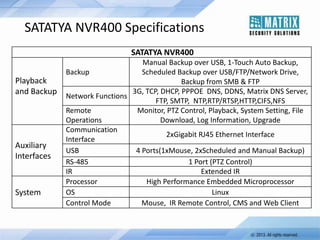
SATATYA NVR400 Specifications
SATATYA NVR400

Playback
and Backup

Auxiliary
Interfaces

System

Manual Backup over USB, 1-Touch Auto Backup,
Backup
Scheduled Backup over USB/FTP/Network Drive,
Backup from SMB & FTP
3G, TCP, DHCP, PPPOE DNS, DDNS, Matrix DNS Server,
Network Functions
FTP, SMTP, NTP,RTP/RTSP,HTTP,CIFS,NFS
Remote
Monitor, PTZ Control, Playback, System Setting, File
Operations
Download, Log Information, Upgrade
Communication
2xGigabit RJ45 Ethernet Interface
Interface
USB
4 Ports(1xMouse, 2xScheduled and Manual Backup)
RS-485
1 Port (PTZ Control)
IR
Extended IR
Processor
High Performance Embedded Microprocessor
OS
Linux
Control Mode
Mouse, IR Remote Control, CMS and Web Client
SATATYA NVR400 Connectivity
SATATYA NVR400 Software
SATATYA CMS
• Centralized Video Surveillance Application Server
• Controls Multiple Matrix SATATYA NVRs

• Simultaneously Display 36 Channels
• Audio, Video and Visual Alerts
• Intelligent E-Map

• Multiple Camera Grouping
• Local Storage and Playback
• Local Scheduled Recording
• Export in AVI Format
SATATYA Mobile Viewer
• Live Access of SATATYA NVR using Mobile Phones
• Up to 10 different DVR and NVR Support

• PTZ Camera Control
• Favorite Channel Allocation for Quick View
• Snapshot in Live View

• Mainstream or Substream View
SATATYA NVR400 Local Client
• View, Configure and Control Single or Multiple NVRs
• Full Screen Mode Live Monitoring

•
•
•
•
•
•
•
•

Sequence Live Monitoring on Main and Spot Outputs
Simultaneous Live and Playback View on HDMI Output
Pentaplex Functions
Playback Functions
User Login and Access Privilege
Alarm Notification and Management
Spot View on Second HDMI Output
Asynchronous Playback
SATATYA NVR400
Key Features
Advanced Recording Options
• H.264, MPEG-4,Motion JPEG

• Channel-wise Frame Rate Selection
• Full HD Recording
• Manual, Continuous, Scheduled, Alarm and Event-based

Recording
• Pre-Alarm and Post-Alarm Recording
Monitoring Features
• Picture in Picture (PIP) and Different Layout Styles

• Digital Zoom and Video Freeze in Live Viewing
• Remote Control of up to 16 PTZ Cameras
• Programmable PTZ tour

• Dual Stream for Preserving Bandwidth and Improving
Remote Viewing Experience
• Directly Stream from Camera
• Channel-wise Live Functioning Status of the DVR
Easy Search and Playback
• Smart Search Using Filters like Channel Name, Number,

Date, Time as well as Event or Recording Type
• Simultaneous Playback of All Channels
• Playback Options like Fast Forward and Reverse, Previous

and Next Video and Many Others
• Video Freeze and Snapshot of Recorded Videos
Alerts and Events
• Audio, Video and Visual Alerts
• Recognizes Event like Motion, Alarm, Manual Trigger, Video
Loss, Video Tamper, Disk error, Network Disconnection, etc.
• Quick Alerts On Occurrence of Above Events like:
 Send SMS and Email Notifications
 Take PTZ Tour
 Recording Initiation on Assigned Camera
 Upload Image on FTP or Email

 Buzzer Notification
Storage
• Up to 4TB Storage Capacity
• Up to 2 SATA HDD Support
• Storage on FIFO Basis

• Send Storage Alert for HDD Free Space
•

HDD Clean-up Options:
 Clean-up Backed-up Files after Every Backup
 Clean-up Files Older than Specified Days
RAID Support
• Embedded with RAID0 and RAID1
• RAID0:
 Increases the Speed of Data Read/Write
• RAID1:

 Mirrors Data on Both the Hard Disks
 Easily Recover Data if one Disk Fails
 Reduces the chances of Complete Data Lost
Backup
• Manual Backup over USB

• One Touch Auto Backup
• Scheduled Backup over USB/FTP/Network Drive
• Backup from SMB and FTP

• Export in Native File Format
• Export in AVI File Format
Enhanced Connectivity
• 3G Support over USB
• Free Matrix DNS Server Support

• Dynamic and Static IP Support
Security Features
• Video Access Rights
• Three Authorization Access Levels
 Administrator, Operator and Viewer
• High Level of Access Security
 IP Access Control
 Blocking Online Users
 Password Protection while Restart and Shutdown
 Secure Remote Access
Other Features
• 10,000 Events Log
• 3 User Access Level (Default)
• Embedded Web Server
• Intuitive GUI
• Linux Embedded OS
• Online Users List
• Web-based Interface

• System Health Check
• Camera Grouping

• Multiple Concurrent Login
Sessions (Up to 10)
• Multiple Programmable
Users (Up to 20)
Supported Cameras
• ONVIF

• Vivotek

• Axis

• Zavio

• Samsung

• HikVision

• Panasonic

• Planet

• Acti
• Sony

• D- Link
Feature List
Features List
Channels and Resolution
4,8,12 and 16 Channels
Mega-pixel Resolution*
H.264,MPEG-4 and Motion JPEG
Video Compression
QCIF, CIF, 2CIF, D1 and MP*
Monitoring
1x1, 2x2, 3x3, 4x4, 5+1, 7+1, 4+3, 8+2,
12+1
Single, Sequential, PIP1 and PIP2
Digital Zoom on Live and Playback
User Selectable Monitoring Layout
User Selectable Display Sequence

* As Per Camera Support

Search
Channels
Date and Time
Recording Type
Recording
Manual and Scheduled
Pre-alarm and Post-alarm
Channel-wise Frame Rates,
Codec, Quality & Resolution
Trigger Based
Features List
Alarm
8 Alarm Input
4 Alarm Output
Motion Detection*
Video Loss
Video Tamper*
Audio
1 Audio Input
1 Audio Output
G.711,G.726, AAC,PCM Audio
Compression

* As Per Camera Support

Action on Events
Buzzer Notifications
Email Notifications
Recall PTZ Preset Position
Recording on Selected Channels
SMS Notifications
TCP Notifications
Turn On/Off Alarm Outputs(Camera +
Device)
Upload Images on
FTP/Email/Network Drive
Features List
Remote Functions
Live Camera Monitoring with
PTZ Control
Menu Configuration
Record Video
Live View and Playback
Firmware Upgrade
Control
IR Remote Control
IR Extension for Remote Control
Front Panel Backup Button

Security
IP Access Control List
Block Online Users
Secure Remote Access
Video Access Rights
Copyright © Matrix Comsec 2009-2010
For Further Information Please Contact:
Email ID: Security@MatrixComSec.com
Tel: +91 265 2630555
Visit us at www.MatrixSecuSol.com
Version: V1R1

Matrix Security Solutions: SATATYA NVR - Network Video Recorder

  • 1.
  • 2.
    Presentation Agenda • Benefitsof IP in Surveillance • Matrix SATATYA NVR400 Introduction • SATATYA NVR400 Solution  SATATYA NVR400 Hardware  SATATYA NVR400 Software • SATATYA NVR400 Key Features • SATATYA NVR400 Feature List
  • 3.
  • 4.
    Benefits of IPSurveillance • Superior Image Quality • Scalability and Flexibility • Remote Accessibility • Eliminates Point-to-point Cabling • Provides Cost-efficiencies • Easy and Reliable Installation • Convenience of Leveraging existing Network Infrastructure
  • 5.
  • 6.
    What is SATATYANVR? • Industrial grade 4, 8, 12 and 16 Channel NVRs • Compatible with Wide Range of IP Cameras • Stand-Alone and Network Surveillance System • Centralized Management Software, Web Client and Mobile Viewer • Comprehensive Solution for Small, Medium and Large Enterprises
  • 7.
    Why SATATYA NVR? KeyFeatures Management Viewing Alerts Matrix SATATYA Centrally Manage Multiple NVRs from One NVR CMS, Web Client and Mobile Viewer SMS/Email Notification for Motion, Camera Tamper and Hard Disk Full Connectivity 3G, DynDNS and Matrix DNS Server Recording Backup Durability Support Continuous, Manual, Motion, Alarm and Event Scheduled and Manual Backup on USB and NAS Rugged Design with Heavy-Duty Components Lifelong Support Benefit Hassle-free Management Management and Monitoring from Anywhere in the World Prevents Losses Saves Cost of Buying a Static IP Optimize Storage Safeguard all Recorded Data No Maintenance Livelong Investment Protection
  • 8.
  • 9.
  • 10.
    SATATYA NVR400 Solution SATATYADS Hardware SATATYA CMS Web Client Hardware CMS SATATYA Web Client SATATYA NVR400 Software Mobile Client SATATYA MV
  • 11.
  • 12.
    SATATYA NVR400 Frontand Back View
  • 13.
    SATATYA NVR400 Specifications Video Audio Alarm Input Output Input Output Input Output RAIDSupport Hard Disk SATA Interface Video/Audio Recording Resolution Auto Recycling * As Per Camera Support SATATYA NVR400 Up to 16 IP Cameras 1 VGA, 2 HDMI 1 Channel, RCA Port 1 Channel, RCA Port 8 4 Single Disk, RAID 0,RAID 1 2 SATA Ports (2 TB per Port) H.264,MPEG-4,Motion JPEG/G.711,G.726,AAC,PCM Max. upto 2 MP * Alert & Stop Recording Overwrite, Cleanup(Specified Percentage when HDD Full, Backed up Files, Older than Number of Days)
  • 14.
    SATATYA NVR400 Specifications SATATYANVR400 Playback and Backup Auxiliary Interfaces System Manual Backup over USB, 1-Touch Auto Backup, Backup Scheduled Backup over USB/FTP/Network Drive, Backup from SMB & FTP 3G, TCP, DHCP, PPPOE DNS, DDNS, Matrix DNS Server, Network Functions FTP, SMTP, NTP,RTP/RTSP,HTTP,CIFS,NFS Remote Monitor, PTZ Control, Playback, System Setting, File Operations Download, Log Information, Upgrade Communication 2xGigabit RJ45 Ethernet Interface Interface USB 4 Ports(1xMouse, 2xScheduled and Manual Backup) RS-485 1 Port (PTZ Control) IR Extended IR Processor High Performance Embedded Microprocessor OS Linux Control Mode Mouse, IR Remote Control, CMS and Web Client
  • 15.
  • 16.
  • 17.
    SATATYA CMS • CentralizedVideo Surveillance Application Server • Controls Multiple Matrix SATATYA NVRs • Simultaneously Display 36 Channels • Audio, Video and Visual Alerts • Intelligent E-Map • Multiple Camera Grouping • Local Storage and Playback • Local Scheduled Recording • Export in AVI Format
  • 18.
    SATATYA Mobile Viewer •Live Access of SATATYA NVR using Mobile Phones • Up to 10 different DVR and NVR Support • PTZ Camera Control • Favorite Channel Allocation for Quick View • Snapshot in Live View • Mainstream or Substream View
  • 19.
    SATATYA NVR400 LocalClient • View, Configure and Control Single or Multiple NVRs • Full Screen Mode Live Monitoring • • • • • • • • Sequence Live Monitoring on Main and Spot Outputs Simultaneous Live and Playback View on HDMI Output Pentaplex Functions Playback Functions User Login and Access Privilege Alarm Notification and Management Spot View on Second HDMI Output Asynchronous Playback
  • 20.
  • 21.
    Advanced Recording Options •H.264, MPEG-4,Motion JPEG • Channel-wise Frame Rate Selection • Full HD Recording • Manual, Continuous, Scheduled, Alarm and Event-based Recording • Pre-Alarm and Post-Alarm Recording
  • 22.
    Monitoring Features • Picturein Picture (PIP) and Different Layout Styles • Digital Zoom and Video Freeze in Live Viewing • Remote Control of up to 16 PTZ Cameras • Programmable PTZ tour • Dual Stream for Preserving Bandwidth and Improving Remote Viewing Experience • Directly Stream from Camera • Channel-wise Live Functioning Status of the DVR
  • 23.
    Easy Search andPlayback • Smart Search Using Filters like Channel Name, Number, Date, Time as well as Event or Recording Type • Simultaneous Playback of All Channels • Playback Options like Fast Forward and Reverse, Previous and Next Video and Many Others • Video Freeze and Snapshot of Recorded Videos
  • 24.
    Alerts and Events •Audio, Video and Visual Alerts • Recognizes Event like Motion, Alarm, Manual Trigger, Video Loss, Video Tamper, Disk error, Network Disconnection, etc. • Quick Alerts On Occurrence of Above Events like:  Send SMS and Email Notifications  Take PTZ Tour  Recording Initiation on Assigned Camera  Upload Image on FTP or Email  Buzzer Notification
  • 25.
    Storage • Up to4TB Storage Capacity • Up to 2 SATA HDD Support • Storage on FIFO Basis • Send Storage Alert for HDD Free Space • HDD Clean-up Options:  Clean-up Backed-up Files after Every Backup  Clean-up Files Older than Specified Days
  • 26.
    RAID Support • Embeddedwith RAID0 and RAID1 • RAID0:  Increases the Speed of Data Read/Write • RAID1:  Mirrors Data on Both the Hard Disks  Easily Recover Data if one Disk Fails  Reduces the chances of Complete Data Lost
  • 27.
    Backup • Manual Backupover USB • One Touch Auto Backup • Scheduled Backup over USB/FTP/Network Drive • Backup from SMB and FTP • Export in Native File Format • Export in AVI File Format
  • 28.
    Enhanced Connectivity • 3GSupport over USB • Free Matrix DNS Server Support • Dynamic and Static IP Support
  • 29.
    Security Features • VideoAccess Rights • Three Authorization Access Levels  Administrator, Operator and Viewer • High Level of Access Security  IP Access Control  Blocking Online Users  Password Protection while Restart and Shutdown  Secure Remote Access
  • 30.
    Other Features • 10,000Events Log • 3 User Access Level (Default) • Embedded Web Server • Intuitive GUI • Linux Embedded OS • Online Users List • Web-based Interface • System Health Check • Camera Grouping • Multiple Concurrent Login Sessions (Up to 10) • Multiple Programmable Users (Up to 20)
  • 31.
    Supported Cameras • ONVIF •Vivotek • Axis • Zavio • Samsung • HikVision • Panasonic • Planet • Acti • Sony • D- Link
  • 32.
  • 33.
    Features List Channels andResolution 4,8,12 and 16 Channels Mega-pixel Resolution* H.264,MPEG-4 and Motion JPEG Video Compression QCIF, CIF, 2CIF, D1 and MP* Monitoring 1x1, 2x2, 3x3, 4x4, 5+1, 7+1, 4+3, 8+2, 12+1 Single, Sequential, PIP1 and PIP2 Digital Zoom on Live and Playback User Selectable Monitoring Layout User Selectable Display Sequence * As Per Camera Support Search Channels Date and Time Recording Type Recording Manual and Scheduled Pre-alarm and Post-alarm Channel-wise Frame Rates, Codec, Quality & Resolution Trigger Based
  • 34.
    Features List Alarm 8 AlarmInput 4 Alarm Output Motion Detection* Video Loss Video Tamper* Audio 1 Audio Input 1 Audio Output G.711,G.726, AAC,PCM Audio Compression * As Per Camera Support Action on Events Buzzer Notifications Email Notifications Recall PTZ Preset Position Recording on Selected Channels SMS Notifications TCP Notifications Turn On/Off Alarm Outputs(Camera + Device) Upload Images on FTP/Email/Network Drive
  • 35.
    Features List Remote Functions LiveCamera Monitoring with PTZ Control Menu Configuration Record Video Live View and Playback Firmware Upgrade Control IR Remote Control IR Extension for Remote Control Front Panel Backup Button Security IP Access Control List Block Online Users Secure Remote Access Video Access Rights
  • 36.
    Copyright © MatrixComsec 2009-2010
  • 37.
    For Further InformationPlease Contact: Email ID: Security@MatrixComSec.com Tel: +91 265 2630555 Visit us at www.MatrixSecuSol.com Version: V1R1