Page 1


                                   MaxMobile - A Complete Mobile Communications Solution
                                   MaxMobile finally delivers on the promise of converged communications. As the industry’s first true mobile PBX
                                   solution, MaxMobile provides a suite of applications to extend complete business PBX functionality to smart
                                   phone devices. MaxMobile applications were designed to natively run on each of the popular smart phone plat-
                                   forms – including iPhone, BlackBerry, Google Android, and (soon) Windows Mobile – taking full advantage of
                                   their respective capabilities with a familiar, intuitive user interface.


                                   With a simple one click log in MaxMobile registers the smart phone as the business PBX extension and dynami-
                                   cally redirects all PBX extension calls to the mobile phone – completely transparent to the calling party. Out-
                                   bound calls can be directed through the PBX or connected directly via the cellular network. Offering all critical
                                   PBX functionality, integrated with advanced smart phone features, MaxMobile converges all business and
                                   mobile communications on a single device.


With MaxMobile employees are

not only more productive;

they’ll never miss an important

call again. Businesses further

benefit from reduced telecom

costs, greater control of mobile

expenses, elimination of the

cost of desktop phones and

simplified system management.
Page 2


MaxMobile - Extends Business Features to Smart Phones
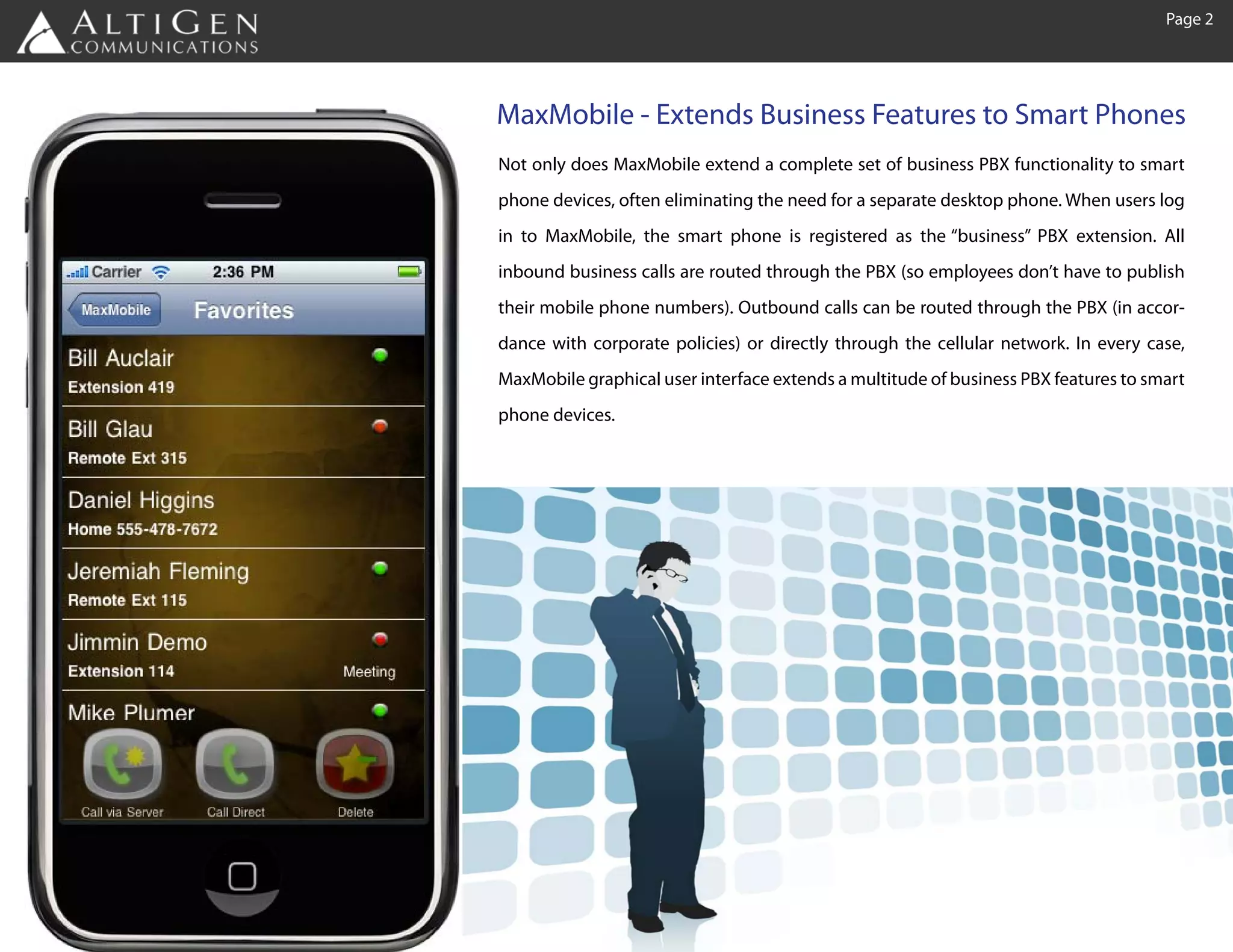
Not only does MaxMobile extend a complete set of business PBX functionality to smart
phone devices, often eliminating the need for a separate desktop phone. When users log
in to MaxMobile, the smart phone is registered as the “business” PBX extension. All
inbound business calls are routed through the PBX (so employees don’t have to publish
their mobile phone numbers). Outbound calls can be routed through the PBX (in accor-
dance with corporate policies) or directly through the cellular network. In every case,
MaxMobile graphical user interface extends a multitude of business PBX features to smart
phone devices.
Page 3


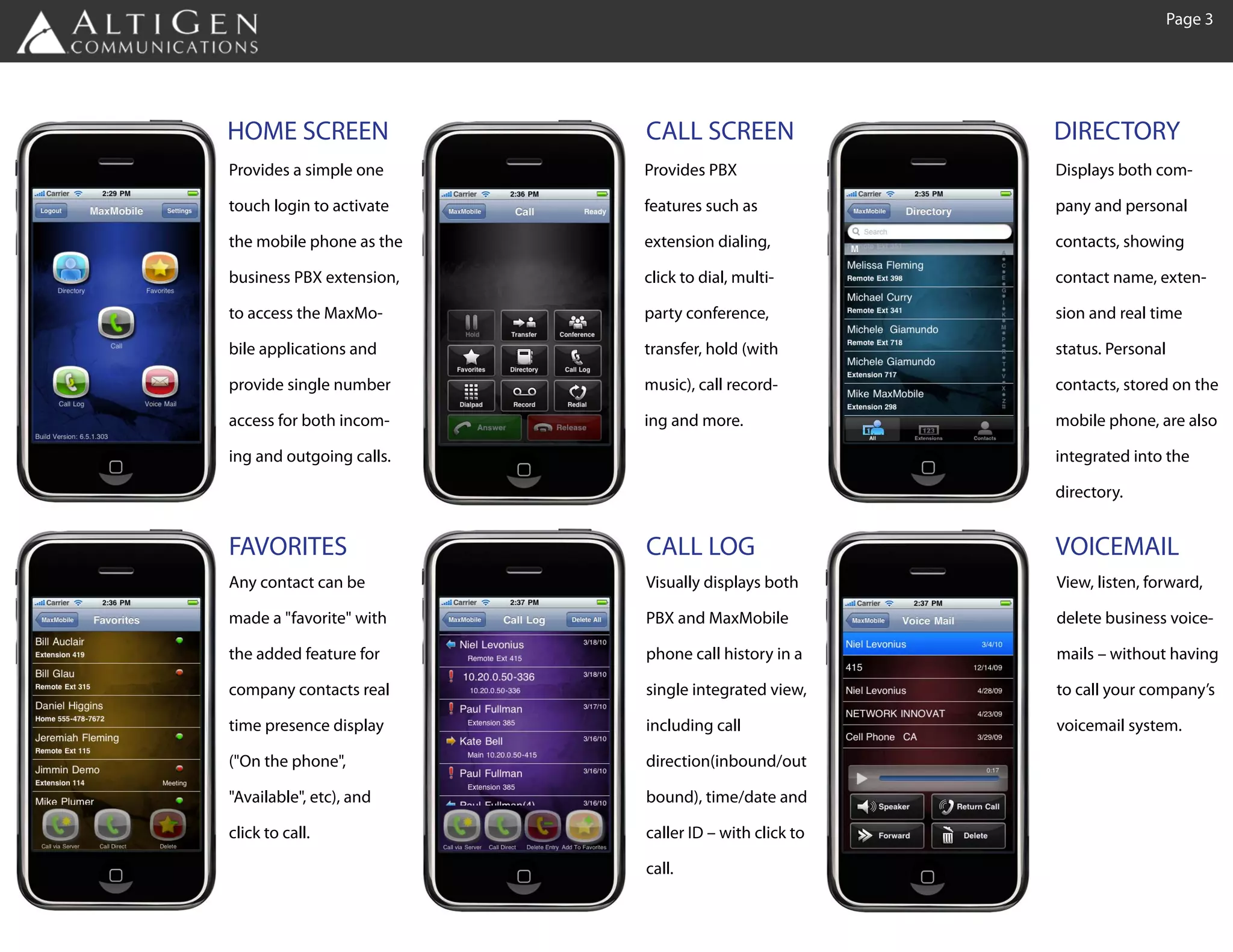
HOME SCREEN               CALL SCREEN                 DIRECTORY
Provides a simple one     Provides PBX                Displays both com-

touch login to activate   features such as            pany and personal

the mobile phone as the   extension dialing,          contacts, showing

business PBX extension,   click to dial, multi-       contact name, exten-

to access the MaxMo-      party conference,           sion and real time

bile applications and     transfer, hold (with        status. Personal

provide single number     music), call record-        contacts, stored on the

access for both incom-    ing and more.               mobile phone, are also

ing and outgoing calls.                               integrated into the

                                                      directory.


FAVORITES                 CALL LOG                    VOICEMAIL
Any contact can be        Visually displays both      View, listen, forward,

made a "favorite" with    PBX and MaxMobile           delete business voice-

the added feature for     phone call history in a     mails – without having

company contacts real     single integrated view,     to call your company’s

time presence display     including call              voicemail system.

("On the phone",          direction(inbound/out

"Available", etc), and    bound), time/date and

click to call.            caller ID – with click to

                          call.
Page 4


MaxMobile - Integrates the Mobile Workforce
MaxMobile offers several flexible deployment options based on your business communications requirements

Complete VoIP business phone system with integrated mobility
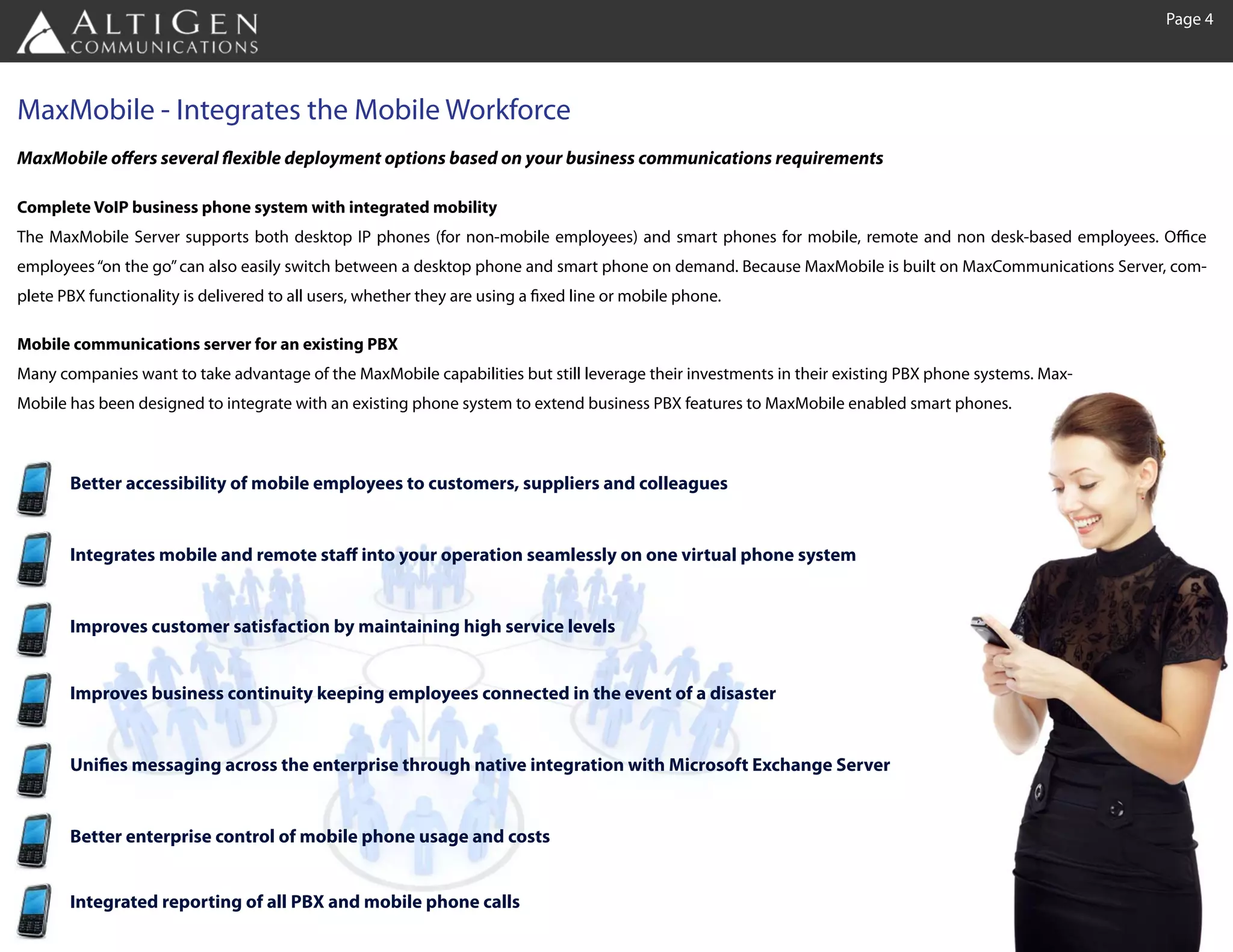
The MaxMobile Server supports both desktop IP phones (for non-mobile employees) and smart phones for mobile, remote and non desk-based employees. Office
employees “on the go” can also easily switch between a desktop phone and smart phone on demand. Because MaxMobile is built on MaxCommunications Server, com-
plete PBX functionality is delivered to all users, whether they are using a fixed line or mobile phone.

Mobile communications server for an existing PBX
Many companies want to take advantage of the MaxMobile capabilities but still leverage their investments in their existing PBX phone systems. Max-
Mobile has been designed to integrate with an existing phone system to extend business PBX features to MaxMobile enabled smart phones.


       Better accessibility of mobile employees to customers, suppliers and colleagues


       Integrates mobile and remote staff into your operation seamlessly on one virtual phone system


       Improves customer satisfaction by maintaining high service levels


       Improves business continuity keeping employees connected in the event of a disaster


       Unifies messaging across the enterprise through native integration with Microsoft Exchange Server


       Better enterprise control of mobile phone usage and costs


       Integrated reporting of all PBX and mobile phone calls
Page 5


Introducing the Fusion Smart Station - Eliminate the Desktop Phone
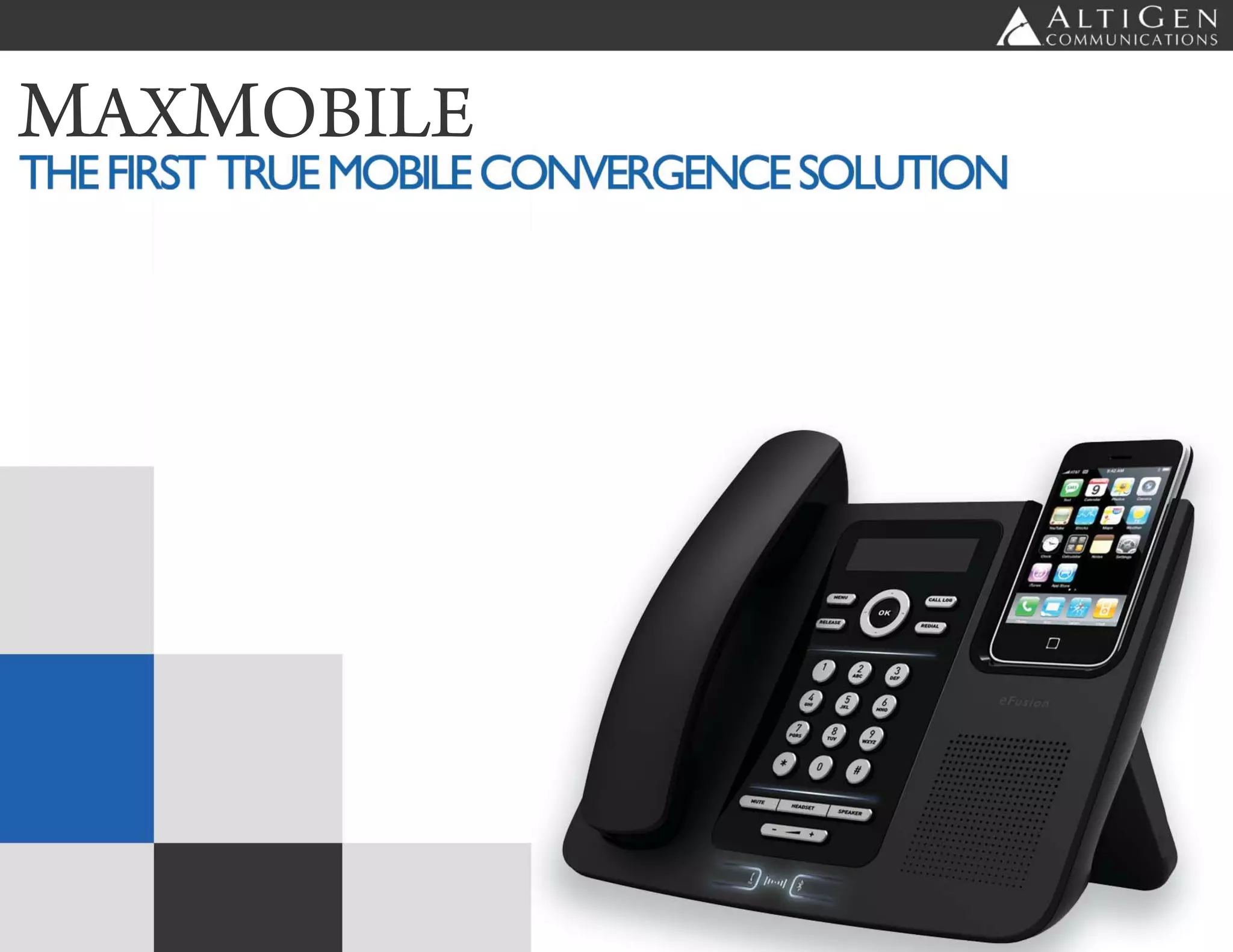
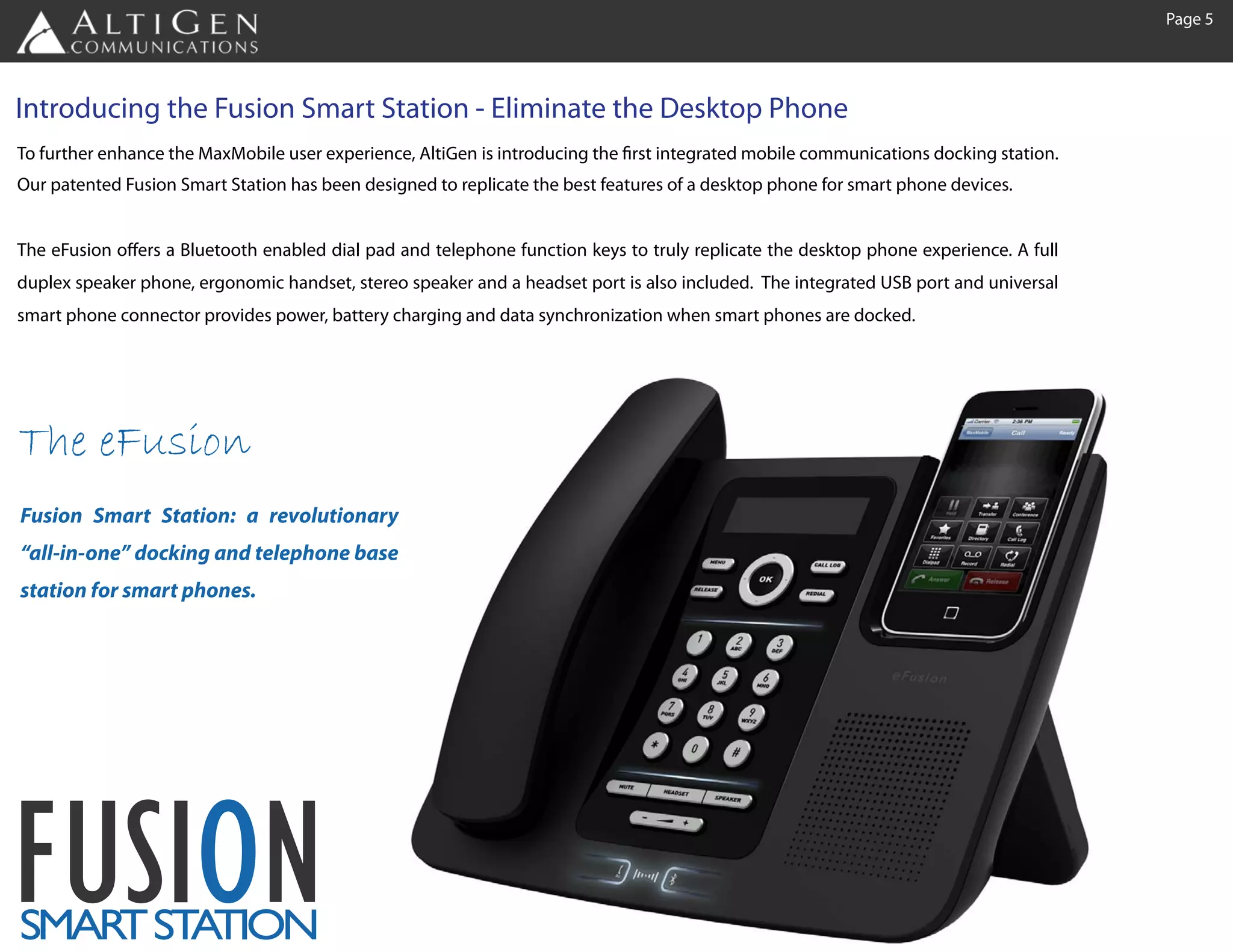
To further enhance the MaxMobile user experience, AltiGen is introducing the first integrated mobile communications docking station.
Our patented Fusion Smart Station has been designed to replicate the best features of a desktop phone for smart phone devices.


The eFusion offers a Bluetooth enabled dial pad and telephone function keys to truly replicate the desktop phone experience. A full
duplex speaker phone, ergonomic handset, stereo speaker and a headset port is also included. The integrated USB port and universal
smart phone connector provides power, battery charging and data synchronization when smart phones are docked.


The eFusion
Fusion Smart Station: a revolutionary
“all-in-one” docking and telephone base
station for smart phones.


FUSION
SMAR ST TION
    T A
Page 6


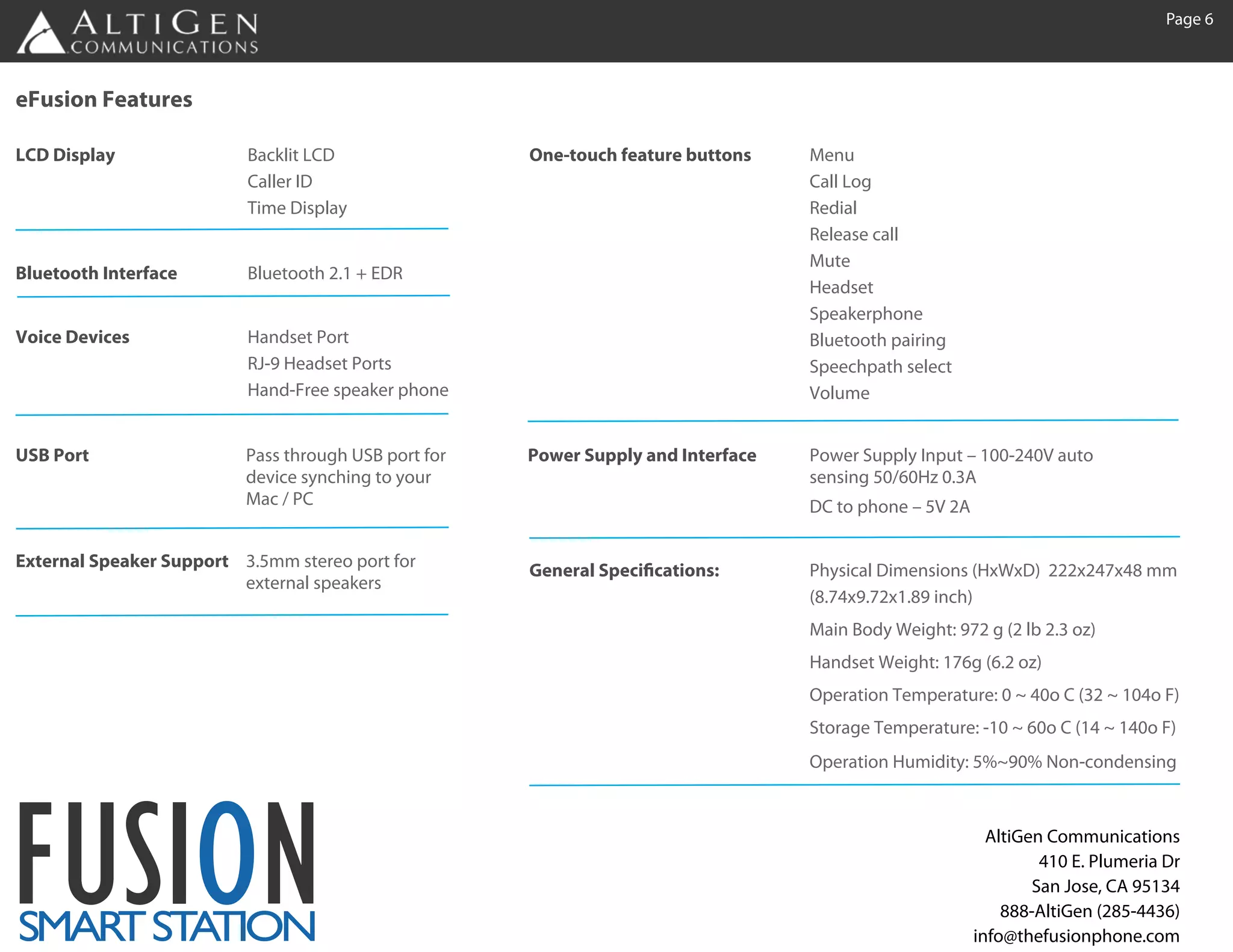
eFusion Features

LCD Display               Backlit LCD                 One-touch feature buttons    Menu
                          Caller ID                                                Call Log
                          Time Display                                             Redial
                                                                                   Release call
                                                                                   Mute
Bluetooth Interface       Bluetooth 2.1 + EDR
                                                                                   Headset
                                                                                   Speakerphone
Voice Devices             Handset Port                                             Bluetooth pairing
                          RJ-9 Headset Ports                                       Speechpath select
                          Hand-Free speaker phone                                  Volume


USB Port                  Pass through USB port for   Power Supply and Interface   Power Supply Input – 100-240V auto
                          device synching to your                                  sensing 50/60Hz 0.3A
                          Mac / PC                                                 DC to phone – 5V 2A

External Speaker Support 3.5mm stereo port for        General Specifications:      Physical Dimensions (HxWxD) 222x247x48 mm
                         external speakers
                                                                                   (8.74x9.72x1.89 inch)
                                                                                   Main Body Weight: 972 g (2 lb 2.3 oz)
                                                                                   Handset Weight: 176g (6.2 oz)
                                                                                   Operation Temperature: 0 ~ 40o C (32 ~ 104o F)
                                                                                   Storage Temperature: -10 ~ 60o C (14 ~ 140o F)
                                                                                   Operation Humidity: 5%~90% Non-condensing


FUSION
SMAR ST TION
    T A
                                                                                                           AltiGen Communications
                                                                                                                  410 E. Plumeria Dr
                                                                                                                 San Jose, CA 95134
                                                                                                             888-AltiGen (285-4436)
                                                                                                         info@thefusionphone.com

AltiGen MaxMobile and eFusion Smart Station

  • 2.
    Page 1 MaxMobile - A Complete Mobile Communications Solution MaxMobile finally delivers on the promise of converged communications. As the industry’s first true mobile PBX solution, MaxMobile provides a suite of applications to extend complete business PBX functionality to smart phone devices. MaxMobile applications were designed to natively run on each of the popular smart phone plat- forms – including iPhone, BlackBerry, Google Android, and (soon) Windows Mobile – taking full advantage of their respective capabilities with a familiar, intuitive user interface. With a simple one click log in MaxMobile registers the smart phone as the business PBX extension and dynami- cally redirects all PBX extension calls to the mobile phone – completely transparent to the calling party. Out- bound calls can be directed through the PBX or connected directly via the cellular network. Offering all critical PBX functionality, integrated with advanced smart phone features, MaxMobile converges all business and mobile communications on a single device. With MaxMobile employees are not only more productive; they’ll never miss an important call again. Businesses further benefit from reduced telecom costs, greater control of mobile expenses, elimination of the cost of desktop phones and simplified system management.
  • 3.
    Page 2 MaxMobile -Extends Business Features to Smart Phones Not only does MaxMobile extend a complete set of business PBX functionality to smart phone devices, often eliminating the need for a separate desktop phone. When users log in to MaxMobile, the smart phone is registered as the “business” PBX extension. All inbound business calls are routed through the PBX (so employees don’t have to publish their mobile phone numbers). Outbound calls can be routed through the PBX (in accor- dance with corporate policies) or directly through the cellular network. In every case, MaxMobile graphical user interface extends a multitude of business PBX features to smart phone devices.
  • 4.
    Page 3 HOME SCREEN CALL SCREEN DIRECTORY Provides a simple one Provides PBX Displays both com- touch login to activate features such as pany and personal the mobile phone as the extension dialing, contacts, showing business PBX extension, click to dial, multi- contact name, exten- to access the MaxMo- party conference, sion and real time bile applications and transfer, hold (with status. Personal provide single number music), call record- contacts, stored on the access for both incom- ing and more. mobile phone, are also ing and outgoing calls. integrated into the directory. FAVORITES CALL LOG VOICEMAIL Any contact can be Visually displays both View, listen, forward, made a "favorite" with PBX and MaxMobile delete business voice- the added feature for phone call history in a mails – without having company contacts real single integrated view, to call your company’s time presence display including call voicemail system. ("On the phone", direction(inbound/out "Available", etc), and bound), time/date and click to call. caller ID – with click to call.
  • 5.
    Page 4 MaxMobile -Integrates the Mobile Workforce MaxMobile offers several flexible deployment options based on your business communications requirements Complete VoIP business phone system with integrated mobility The MaxMobile Server supports both desktop IP phones (for non-mobile employees) and smart phones for mobile, remote and non desk-based employees. Office employees “on the go” can also easily switch between a desktop phone and smart phone on demand. Because MaxMobile is built on MaxCommunications Server, com- plete PBX functionality is delivered to all users, whether they are using a fixed line or mobile phone. Mobile communications server for an existing PBX Many companies want to take advantage of the MaxMobile capabilities but still leverage their investments in their existing PBX phone systems. Max- Mobile has been designed to integrate with an existing phone system to extend business PBX features to MaxMobile enabled smart phones. Better accessibility of mobile employees to customers, suppliers and colleagues Integrates mobile and remote staff into your operation seamlessly on one virtual phone system Improves customer satisfaction by maintaining high service levels Improves business continuity keeping employees connected in the event of a disaster Unifies messaging across the enterprise through native integration with Microsoft Exchange Server Better enterprise control of mobile phone usage and costs Integrated reporting of all PBX and mobile phone calls
  • 6.
    Page 5 Introducing theFusion Smart Station - Eliminate the Desktop Phone To further enhance the MaxMobile user experience, AltiGen is introducing the first integrated mobile communications docking station. Our patented Fusion Smart Station has been designed to replicate the best features of a desktop phone for smart phone devices. The eFusion offers a Bluetooth enabled dial pad and telephone function keys to truly replicate the desktop phone experience. A full duplex speaker phone, ergonomic handset, stereo speaker and a headset port is also included. The integrated USB port and universal smart phone connector provides power, battery charging and data synchronization when smart phones are docked. The eFusion Fusion Smart Station: a revolutionary “all-in-one” docking and telephone base station for smart phones. FUSION SMAR ST TION T A
  • 7.
    Page 6 eFusion Features LCDDisplay Backlit LCD One-touch feature buttons Menu Caller ID Call Log Time Display Redial Release call Mute Bluetooth Interface Bluetooth 2.1 + EDR Headset Speakerphone Voice Devices Handset Port Bluetooth pairing RJ-9 Headset Ports Speechpath select Hand-Free speaker phone Volume USB Port Pass through USB port for Power Supply and Interface Power Supply Input – 100-240V auto device synching to your sensing 50/60Hz 0.3A Mac / PC DC to phone – 5V 2A External Speaker Support 3.5mm stereo port for General Specifications: Physical Dimensions (HxWxD) 222x247x48 mm external speakers (8.74x9.72x1.89 inch) Main Body Weight: 972 g (2 lb 2.3 oz) Handset Weight: 176g (6.2 oz) Operation Temperature: 0 ~ 40o C (32 ~ 104o F) Storage Temperature: -10 ~ 60o C (14 ~ 140o F) Operation Humidity: 5%~90% Non-condensing FUSION SMAR ST TION T A AltiGen Communications 410 E. Plumeria Dr San Jose, CA 95134 888-AltiGen (285-4436) info@thefusionphone.com