MATLAB Programming
STL File and Final Project
盧家鋒 Chia-Feng Lu, Ph.D.
Department of Biomedical Imaging
and Radiological Sciences, NYCU
alvin4016@nycu.edu.tw
http://cflu.lab.nycu.edu.tw, Chia-Feng Lu
Please install MeshLab software
▹ MeshLab
■ https://www.meshlab.net/#download
2
http://cflu.lab.nycu.edu.tw, Chia-Feng Lu
Contents
▹ Generate stereolithography(STL) file
▹ Instruction of final project
3
http://cflu.lab.nycu.edu.tw/CFLu_course_matlabimage.html
Please download the handout and materials from
產生STL模型檔
http://cflu.lab.nycu.edu.tw, Chia-Feng Lu
Faces & Vertices
▹ A=zeros(10,10,10);
▹ A(2:9,2:9,2:9)=1;
▹ [F,V] = isosurface(A,0);
Face #1
V1
V2
V3
Face #2 V4
1 2 3
2 3 4
4 10 2
5 2 1
5 1 2
5 3 1
F (Faces) V (Vertices)
Each face is composed of 3 vertices.
5
http://cflu.lab.nycu.edu.tw, Chia-Feng Lu
6
Patch of a Cube
▹ A=zeros(10,10,10);
▹ A(2:9,2:9,2:9)=1;
▹ [F,V] = isosurface(A,0);
▹ figure
▹ patch('Faces',F,'Vertices',V,'FaceColor',[0 1 0])
▹ lighting gouraud, camlight(0,0), view(30,30)
▹ axis equal
http://cflu.lab.nycu.edu.tw, Chia-Feng Lu
STL format
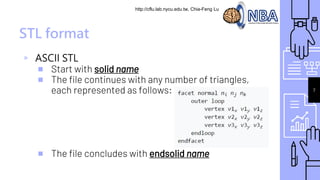
▹ ASCII STL
■ Start with solid name
■ The file continues with any number of triangles,
each represented as follows:
■ The file concludes with endsolid name
7
http://cflu.lab.nycu.edu.tw, Chia-Feng Lu
8
STL format
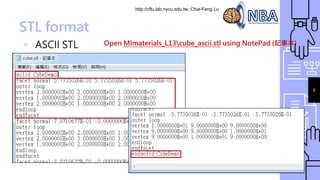
▹ ASCII STL Open MImaterials_L13cube_ascii.stl using NotePad (記事本)
http://cflu.lab.nycu.edu.tw, Chia-Feng Lu
STL format
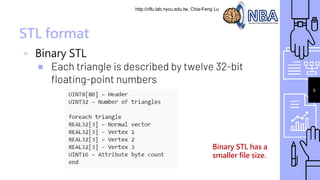
▹ Binary STL
■ Each triangle is described by twelve 32-bit
floating-point numbers
Binary STL has a
smaller file size.
9
http://cflu.lab.nycu.edu.tw, Chia-Feng Lu
Export STL
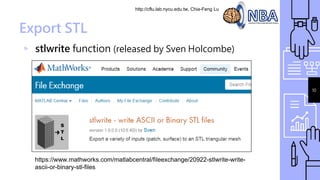
▹ stlwrite function (released by Sven Holcombe)
10
https://www.mathworks.com/matlabcentral/fileexchange/20922-stlwrite-write-
ascii-or-binary-stl-files
http://cflu.lab.nycu.edu.tw, Chia-Feng Lu
Export STL
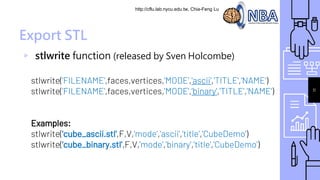
▹ stlwrite function (released by Sven Holcombe)
stlwrite('FILENAME',faces,vertices,'MODE','ascii','TITLE','NAME')
stlwrite('FILENAME',faces,vertices,'MODE',‘binary','TITLE','NAME')
Examples:
stlwrite('cube_ascii.stl',F,V,'mode','ascii','title','CubeDemo')
stlwrite('cube_binary.stl',F,V,'mode','binary','title','CubeDemo')
11
http://cflu.lab.nycu.edu.tw, Chia-Feng Lu
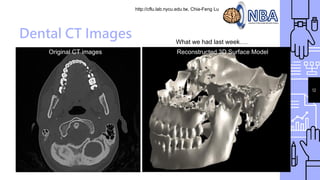
Dental CT Images
Original CT images Reconstructed 3D Surface Model
12
What we had last week….
http://cflu.lab.nycu.edu.tw, Chia-Feng Lu
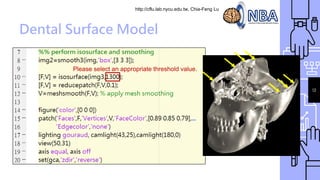
Dental Surface Model
13
Please select an appropriate threshold value.
http://cflu.lab.nycu.edu.tw, Chia-Feng Lu
14
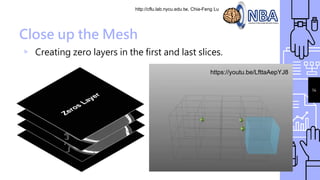
Close up the Mesh
▹ Creating zero layers in the first and last slices.
https://youtu.be/LfttaAepYJ8
http://cflu.lab.nycu.edu.tw, Chia-Feng Lu
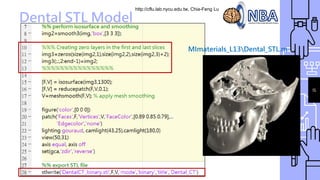
Dental STL Model
15
MImaterials_L13Dental_STL.m
http://cflu.lab.nycu.edu.tw, Chia-Feng Lu
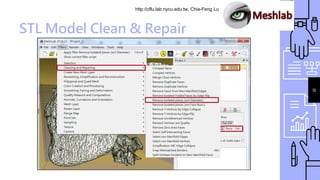
STL Model Clean & Repair
16
Instruction of
Final Project
http://cflu.lab.nycu.edu.tw, Chia-Feng Lu
18
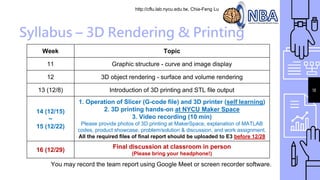
Syllabus – 3D Rendering & Printing
Week Topic
11 Graphic structure - curve and image display
12 3D object rendering - surface and volume rendering
13 (12/8) Introduction of 3D printing and STL file output
14 (12/15)
~
15 (12/22)
1. Operation of Slicer (G-code file) and 3D printer (self learning)
2. 3D printing hands-on at NYCU Maker Space
3. Video recording (10 min)
Please provide photos of 3D printing at MakerSpace, explanation of MATLAB
codes, product showcase, problem/solution & discussion, and work assignment.
All the required files of final report should be uploaded to E3 before 12/28
16 (12/29)
Final discussion at classroom in person
(Please bring your headphone!)
You may record the team report using Google Meet or screen recorder software.
http://cflu.lab.nycu.edu.tw, Chia-Feng Lu
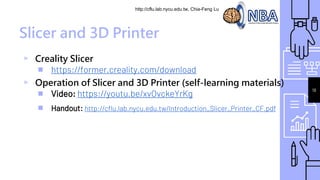
Slicer and 3D Printer
▹ Creality Slicer
■ https://former.creality.com/download
▹ Operation of Slicer and 3D Printer (self-learning materials)
■ Video: https://youtu.be/xvOvckeYrKg
■ Handout: http://cflu.lab.nycu.edu.tw/Introduction_Slicer_Printer_CF.pdf
19
http://cflu.lab.nycu.edu.tw, Chia-Feng Lu
20
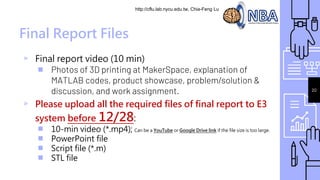
Final Report Files
▹ Final report video (10 min)
■ Photos of 3D printing at MakerSpace, explanation of
MATLAB codes, product showcase, problem/solution &
discussion, and work assignment.
▹ Please upload all the required files of final report to E3
system before 12/28:
■ 10-min video (*.mp4); Can be a YouTube or Google Drive link if the file size is too large.
■ PowerPoint file
■ Script file (*.m)
■ STL file
http://cflu.lab.nycu.edu.tw, Chia-Feng Lu
21
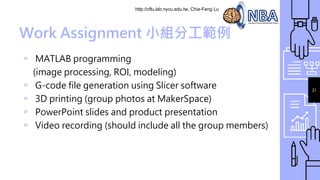
Work Assignment 小組分工範例
▹ MATLAB programming
(image processing, ROI, modeling)
▹ G-code file generation using Slicer software
▹ 3D printing (group photos at MakerSpace)
▹ PowerPoint slides and product presentation
▹ Video recording (should include all the group members)
http://cflu.lab.nycu.edu.tw, Chia-Feng Lu
22
http://cflu.lab.nycu.edu.tw, Chia-Feng Lu
23
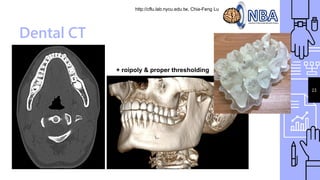
Dental CT
+ roipoly & proper thresholding
http://cflu.lab.nycu.edu.tw, Chia-Feng Lu
24
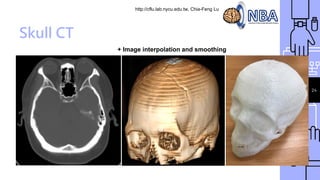
Skull CT
+ Image interpolation and smoothing
http://cflu.lab.nycu.edu.tw, Chia-Feng Lu
25
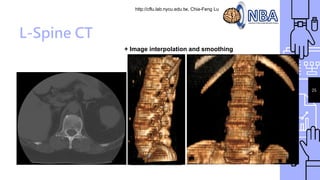
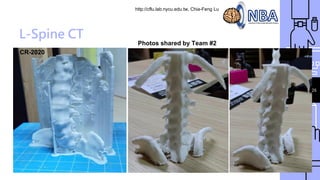
L-Spine CT
+ Image interpolation and smoothing
http://cflu.lab.nycu.edu.tw, Chia-Feng Lu
26
L-Spine CT
Photos shared by Team #2
CR-2020
http://cflu.lab.nycu.edu.tw, Chia-Feng Lu
28
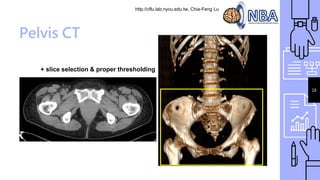
Pelvis CT
+ slice selection & proper thresholding
http://cflu.lab.nycu.edu.tw, Chia-Feng Lu
29
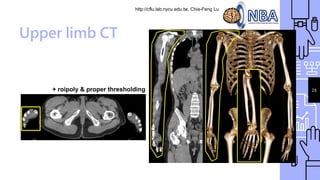
Upper limb CT
+ roipoly & proper thresholding
http://cflu.lab.nycu.edu.tw, Chia-Feng Lu
30
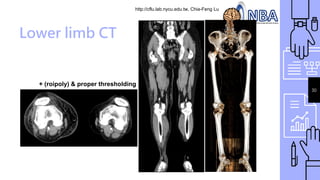
Lower limb CT
+ (roipoly) & proper thresholding
http://cflu.lab.nycu.edu.tw, Chia-Feng Lu
32
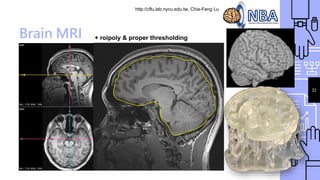
Brain MRI + roipoly & proper thresholding
http://cflu.lab.nycu.edu.tw, Chia-Feng Lu
33
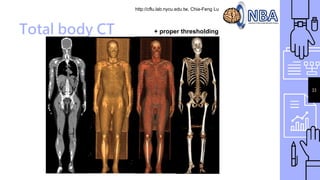
Total body CT + proper thresholding
http://cflu.lab.nycu.edu.tw, Chia-Feng Lu
34
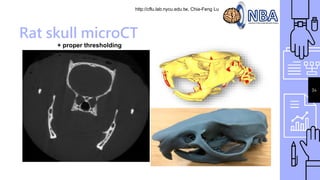
Rat skull microCT
+ proper thresholding
THE END
alvin4016@nycu.edu.tw

MatlabImage_Class13_CFLu.pdf