FACULTY OF ENGINEERING AND TECHNOLOGY
BACHELOR OF TECHNOLOGY
Enterprise Programing in Java LABORATORY
(203105373)
5th
SEMESTER
Computer Science & Engineering
Department
Laboratory Manual
CERTIFICATE
This is to certify that Mr. /Ms. G.HEMANTH with enrollment no
210303124469has successfully completed his/her laboratory experiments inthe
Enterprise Programing in Java(203105373) from the department ofCOMPUTER
SCIENCE & ENGINEERING during the academic year 2023
Date of Submission: ......................... Staff InCharge: .......................
Head of Department: .......................
TABLE OF CONTENT
Sr.
No.
Practical Title
Page No.
Date of
Performance
Date of
Completion
Sign. Marks
{Out of 10}
FROM TO
1.
Introduction to
Enterprise
Programming
2.
Introduction to
Design Patterns
3.
Database
Connectivity with
JDBC
4.
Unit Testing in Java
Enterprise
Applications
5.
Building a Web
Application with
Java EE – Servlets
6.
Building a Web
Application with
Java EE – Java
Server Pages
7.
Implementing
Security in Java EE
Applications
8.
Java Persistence
with JPA
9.
Application
Deployment and
Containerization
10.
Introduction to
Spring Framework
PARUL UNIVERSITY
FACULTY OF ENGINEERING AND TECHNOLOGY
Enterprise Programming in Java (203105261) B. Tech. 3
nd
year
210303124469
1
ERPNO: 210303124469
Experiment no-1
AIM: Introduction to Enterprise Programming
● Overview of enterprise programming and its significance.
● Introduction to Java Enterprise Edition (Java EE) and its components.
● Setting up the development environment (Java Development Kit, Eclipse/IntelliJ,
etc.).
Theory:-
Enterprise programming is a specialized field of software engineering that creates
systems for businesses. These systems are used to support large enterprise operations,
such as enterprise resource planning (ERP), customer relationship management, and
analytics.
Enterprise applications are meant to integrate systems in a company to create a smoother
workflow. They create a connection between different departments and can be adapted
tothe company's specific needs.
Enterprise applications can have the following benefits:
1) Improved integration
2) Fewer errors
3) Improved speed and efficiency
4) Complete access to information
5) Lower total costs in the supply chain
6) Shorter throughput times
Enterprise programming in Java is the use of the Java programming language to create
applications for large-scale businesses. Java is a popular choice for enterpriseprogramming
because it is object-oriented, portable, scalable, and secure.
Object-orientation makes Java code easy to maintain and extend. Portability means that
Java code can be run on a variety of platforms, without the need to recompile. Scalability
means that Java applications can be easily scaled up to handle large volumes of data and
traffic. Security is a major concern for enterprise applications, and Java provides a number of
features to help protect applications from attack.
PARUL UNIVERSITY
FACULTY OF ENGINEERING AND TECHNOLOGY
Enterprise Programming in Java (203105261) B. Tech. 3
nd
year
210303124469
2
ERPNO: 210303124469
The main Java EE components are:
Java Servlets: Java servlets are the building blocks of web applications. They are used to
handle HTTP requests and responses.
JavaServer Pages (JSP): JavaServer Pages are a technology that allows Java code to be
embedded in HTML pages. They are used to create dynamic web pages.
Enterprise JavaBeans (EJB): Enterprise JavaBeans are a technology that allows business logic
to be encapsulated in reusable components. They are used to create modular and scalable
applications.
Java Message Service (JMS): Java Message Service is a technology that allows applications
to send and receive messages. It is used to create distributed applications.
Java Transaction API (JTA): Java Transaction API is a technology that allows applications to
manage transactions. It is used to ensure the integrity of data in distributed applications .
To set up the Java Development Kit (JDK) and Eclipse, you can follow these steps:
1) Download and install the JDK. You can choose OpenJDK 19(LTS) as the
version and Openj19 as the JVM.
2) Set up environment variables. By default, Java is installed in the
“C:ProgramFilesJavajdkbin” folder.
3) Download and install the Eclipse IDE. You can find the installer at Eclipse
4) Choose the installation path to your JDK. You can't mix-and-match
between 32-bitand 64-bit.
Make a note of the installation folder so you can use it to start Eclipse
PARUL UNIVERSITY
FACULTY OF ENGINEERING AND TECHNOLOGY
Enterprise Programming in Java (203105261) B. Tech. 3
nd
year
210303124469
3
ERPNO: 210303124469
Experiment no-2
AIM:-Introduction to Design Patterns
● Explanation of design patterns and their importance in enterprise
programming.
● Study of commonly used design patterns in Java enterprise applications
(Singleton, Factory, Observer, etc.).
● Implementing a simple example using a design pattern.
Theory:-
Design patterns are a well-described solution to a common software problem. They are a
general solution to a recurring design problem in object-oriented systems. Design patterns
are needed to represent some of the best practices followed and adopted in software
development.
Design patterns are important in enterprise programming in Java because they can help to
improve the quality, maintainability, and scalability of software. They can also help to
makecode more reusable and easier to understand.
Some of the benefits of using design patterns in Java include:
1) Improved code quality: Design patterns can help to improve the quality of code by
providing a well-defined and tested solution to a common problem. This can help to
reduce the number of bugs and errors in code.
2) Increased maintainability: Design patterns can help to increase the maintainability
ofcode by making it easier to understand and modify. This is because design
patternsprovide a common vocabulary and set of concepts that developers can use
to communicate about code.
3) Improved scalability: Design patterns can help to improve the scalability of code by
making it easier to add new features and functionality. This is because design
patterns provide a way to decouple different parts of the system, making it easier to
change one part of the system without affecting the others.
PARUL UNIVERSITY
FACULTY OF ENGINEERING AND TECHNOLOGY
Enterprise Programming in Java (203105261) B. Tech. 3
nd
year
210303124469
4
ERPNO: 210303124469
Common design patterns in Java enterprise applications include:
1) Singleton: A design pattern that ensures that only one object of a particular class is
created.
2) Factory: A design pattern that allows for the creation of objects without having to
specify the exact type of object to be created.
3) Observer: A design pattern that allows objects to be notified of changes to other
objects.
These design patterns can be used to make Java enterprise applications more modular,
reusable, and maintainable.
Code:-
 Factory design
1) Core class
package com.FactoryDesign;
import java.util.Scanner;
public class Factory {
public static void main(String[] args) {
try {
int select;
ServiceProvider s=new ServiceProvider();
Scanner sc=new Scanner(System.in);
System.out.println("Welcome to Cinemas");
System.out.println("press 1 for PVR");
System.out.println("press 2 for Inox");
select=sc.nextInt();
Movie m=s.bookmyshow(select);
m.selectMovie();
} catch (Exception e) {
// TODO: handle exception
System.out.println("Please select the available
Theaterss");}
ServiceProvide.java
package com.FactoryDesign;
public class ServiceProvider {
public Movie bookmyshow(int select) {
if(select==1)
{
return new PVR();
}
else if (select==2) {
return new INOX();
}
else {
return null;
}
}
PARUL UNIVERSITY
FACULTY OF ENGINEERING AND TECHNOLOGY
Enterprise Programming in Java (203105261) B. Tech. 3
nd
year
210303124469
5
ERPNO: 210303124469
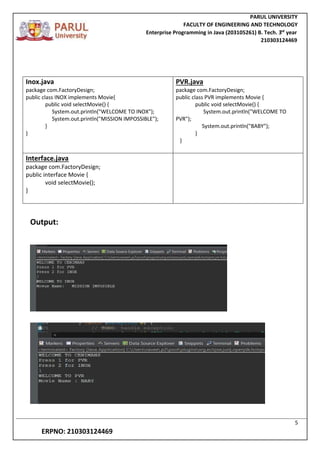
Output:
Inox.java
package com.FactoryDesign;
public class INOX implements Movie{
public void selectMovie() {
System.out.println("WELCOME TO INOX");
System.out.println("MISSION IMPOSSIBLE");
}
}
PVR.java
package com.FactoryDesign;
public class PVR implements Movie {
public void selectMovie() {
System.out.println("WELCOME TO
PVR");
System.out.println("BABY");
}
}
Interface.java
package com.FactoryDesign;
public interface Movie {
void selectMovie();
}
PARUL UNIVERSITY
FACULTY OF ENGINEERING AND TECHNOLOGY
Enterprise Programming in Java (203105261) B. Tech. 3
nd
year
210303124469
6
ERPNO: 210303124469
Experiment no-3
Aim:- Database Connectivity with JDBC
● Understanding the Java Database Connectivity (JDBC) API.
● Establishing database connections and executing SQL queries.
● Handling result sets and managing transactions using JDBC.
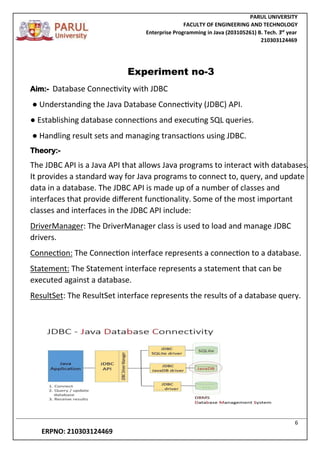
Theory:-
The JDBC API is a Java API that allows Java programs to interact with databases.
It provides a standard way for Java programs to connect to, query, and update
data in a database. The JDBC API is made up of a number of classes and
interfaces that provide different functionality. Some of the most important
classes and interfaces in the JDBC API include:
DriverManager: The DriverManager class is used to load and manage JDBC
drivers.
Connection: The Connection interface represents a connection to a database.
Statement: The Statement interface represents a statement that can be
executed against a database.
ResultSet: The ResultSet interface represents the results of a database query.
PARUL UNIVERSITY
FACULTY OF ENGINEERING AND TECHNOLOGY
Enterprise Programming in Java (203105261) B. Tech. 3
nd
year
210303124469
7
ERPNO: 210303124469
Code:-
import java.sql.*;
class jdbc2
{
public static void main(String args[])
{
try{ Class.forName("oracle.jdbc.driver.OracleDriver");
String url=" jdbc:oracle:thin:@localhost:1521:xe/mydb ";
String usrename="root";
String password="Gopi@911";
Connection co =DriverManager.getConnection(url,usrename,password);
String q="insert into student1(tname,tcity) values (?,?)";
//create a table in database with the name student1
PreparedStatement ps=co.prepareStatement(q);
ps.setString(1,"ramsai");
ps.setString(2,"vij");
ps.executeUpdate();
System.out.println("valuse inserted ");
co.close();
}
catch(Exception e){
e.printStackTrace();
}
}
}
Output:
PARUL UNIVERSITY
FACULTY OF ENGINEERING AND TECHNOLOGY
Enterprise Programming in Java (203105261) B. Tech. 3
nd
year
210303124469
8
ERPNO: 210303124469
Experiment no-4
Aim:- Unit Testing in Java Enterprise Applications
● Importance of unit testing in enterprise programming.
● Introduction to JUnit framework for Java unit testing.
● Writing unit tests for Java classes and components.
Theory:-
Unit testing is important in enterpriseprogramming because it helps to improve
the quality of the software. By testing individual units of code, unit testing can
help to identify and fix bugs early on, before they have a chance to propagate
through the code base.
This can save time and money in the long run, as it is much less expensive to fix
a bug early on than it is to fix it later on after it has affected other parts of the
code.
Unit testing also helps to improve the maintainability of the software. By
creating unit tests for each unit of code, developers can be confident that the
code will work as expected when they make changes to it.
This can make it easier to make changes to the code in the future,
as developers will not have to worry about breaking existing functionality.
Overall, unit testing is an important part of enterprise programming. It can help
to improve the quality, maintainability, and reliability of the software.
PARUL UNIVERSITY
FACULTY OF ENGINEERING AND TECHNOLOGY
Enterprise Programming in Java (203105261) B. Tech. 3
nd
year
210303124469
9
ERPNO: 210303124469
Code:-
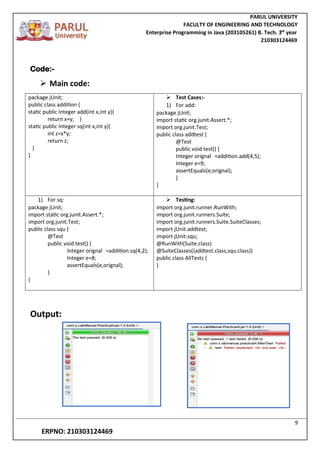
 Main code:
package jUnit;
public class addition {
static public Integer add(int x,int y){
return x+y; }
static public Integer sq(int x,int y){
int z=x*y;
return z;
}
}
 Test Cases:-
1) For add:
package jUnit;
import static org.junit.Assert.*;
import org.junit.Test;
public class addtest {
@Test
public void test() {
Integer orignal =addition.add(4,5);
Integer e=9;
assertEquals(e,orignal);
}
}
1) For sq:
package jUnit;
import static org.junit.Assert.*;
import org.junit.Test;
public class squ {
@Test
public void test() {
Integer orignal =addition.sq(4,2);
Integer e=8;
assertEquals(e,orignal);
}
}
 Testing:
import org.junit.runner.RunWith;
import org.junit.runners.Suite;
import org.junit.runners.Suite.SuiteClasses;
import jUnit.addtest;
import jUnit.squ;
@RunWith(Suite.class)
@SuiteClasses({addtest.class,squ.class})
public class AllTests {
}
Output:
PARUL UNIVERSITY
FACULTY OF ENGINEERING AND TECHNOLOGY
Enterprise Programming in Java (203105261) B. Tech. 3
nd
year
210303124469
10
ERPNO: 210303124469
Experiment no-5
Aim:- Building a Web Application with Java EE
● Introduction to Java Servlets
● Creating a basic web application using Servlets
● Handling user requests and generating dynamic web content
Theory:-
A Java servlet is a Java class that conforms to a certain set of rules and
conventions. It is used to extend the capabilities of web servers that host
applications accessed by means of a request-response programming model.
Although servlets can respond to any type of request, they are commonly used
to extend the applications hosted by web servers.
Servlets are used to create dynamic web pages. They can also be used to access
databases, send email, and perform other tasks. Servlets are a powerful tool
that can be used to create interactive and dynamic web applications.
Here are some of the benefits of using Java servlets:
1) They are platform-independent, meaning that they can be used on any
operating system that supports Java.
2) They are secure, as they are managed by a servlet container.
3) They are efficient, as they can be reused to handle multiple requests.
4) They are scalable, as they can be easily added to or removed from a web
application.
5) They are powerful, efficient, and scalable, and they can be used to create
dynamic and interactive web pages.
PARUL UNIVERSITY
FACULTY OF ENGINEERING AND TECHNOLOGY
Enterprise Programming in Java (203105261) B. Tech. 3
nd
year
210303124469
11
ERPNO: 210303124469
Code:-
 Registering:-
1) Html code :
<!DOCTYPE html>
<html>
<head>
<meta charset="UTF-8">
<title>Register</title>
</head>
<body>
<center>
<form action="RegisterAction" method="post">
/* <input type="hidden" name="action" value="login"> */
<table border="1">
<tr>
<th>Student Id:</th> <td><input type="text" name="id"></td>
</tr>
<tr>
<th>Password: </th> <td><input type="password" name="pa"></td>
</tr>
<tr>
<th>Student Name: </th> <td><input type="text" name="na"></td>
</tr>
<tr>
<th>Email: </th> <td><input type="email" name="em"></td>
</tr>
<tr>
<th>Contact No: </th> <td><input type="text" name="ph"></td>
</tr>
<tr>
<th>Gender: </th>
<td><input type="radio" name="gn" value="male"> Male
<input type="radio" name="gn" value="female"> Female
<input type="radio" name="gn" value="other"> Others</td>
</tr>
<tr >
<th colspan="2"><input type="submit" value="Register"></th>
</tr>
</table>
</form>
</center>
PARUL UNIVERSITY
FACULTY OF ENGINEERING AND TECHNOLOGY
Enterprise Programming in Java (203105261) B. Tech. 3
nd
year
210303124469
12
ERPNO: 210303124469
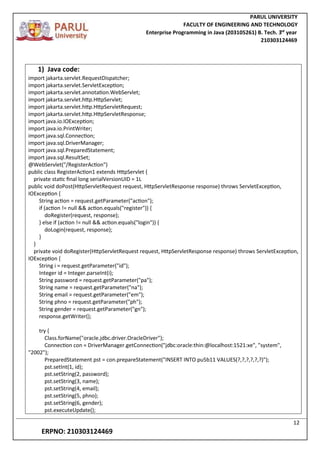
1) Java code:
import jakarta.servlet.RequestDispatcher;
import jakarta.servlet.ServletException;
import jakarta.servlet.annotation.WebServlet;
import jakarta.servlet.http.HttpServlet;
import jakarta.servlet.http.HttpServletRequest;
import jakarta.servlet.http.HttpServletResponse;
import java.io.IOException;
import java.io.PrintWriter;
import java.sql.Connection;
import java.sql.DriverManager;
import java.sql.PreparedStatement;
import java.sql.ResultSet;
@WebServlet("/RegisterAction")
public class RegisterAction1 extends HttpServlet {
private static final long serialVersionUID = 1L
public void doPost(HttpServletRequest request, HttpServletResponse response) throws ServletException,
IOException {
String action = request.getParameter("action");
if (action != null && action.equals("register")) {
doRegister(request, response);
} else if (action != null && action.equals("login")) {
doLogin(request, response);
}
}
private void doRegister(HttpServletRequest request, HttpServletResponse response) throws ServletException,
IOException {
String i = request.getParameter("id");
Integer id = Integer.parseInt(i);
String password = request.getParameter("pa");
String name = request.getParameter("na");
String email = request.getParameter("em");
String phno = request.getParameter("ph");
String gender = request.getParameter("gn");
response.getWriter();
try {
Class.forName("oracle.jdbc.driver.OracleDriver");
Connection con = DriverManager.getConnection("jdbc:oracle:thin:@localhost:1521:xe", "system",
"2002");
PreparedStatement pst = con.prepareStatement("INSERT INTO pu5b11 VALUES(?,?,?,?,?,?)");
pst.setInt(1, id);
pst.setString(2, password);
pst.setString(3, name);
pst.setString(4, email);
pst.setString(5, phno);
pst.setString(6, gender);
pst.executeUpdate();
PARUL UNIVERSITY
FACULTY OF ENGINEERING AND TECHNOLOGY
Enterprise Programming in Java (203105261) B. Tech. 3
nd
year
210303124469
13
ERPNO: 210303124469
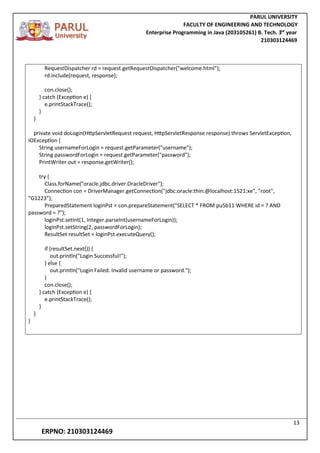
RequestDispatcher rd = request.getRequestDispatcher("welcome.html");
rd.include(request, response);
con.close();
} catch (Exception e) {
e.printStackTrace();
}
}
private void doLogin(HttpServletRequest request, HttpServletResponse response) throws ServletException,
IOException {
String usernameForLogin = request.getParameter("username");
String passwordForLogin = request.getParameter("password");
PrintWriter out = response.getWriter();
try {
Class.forName("oracle.jdbc.driver.OracleDriver");
Connection con = DriverManager.getConnection("jdbc:oracle:thin:@localhost:1521:xe", "root",
"G1223”);
PreparedStatement loginPst = con.prepareStatement("SELECT * FROM pu5b11 WHERE id = ? AND
password = ?");
loginPst.setInt(1, Integer.parseInt(usernameForLogin));
loginPst.setString(2, passwordForLogin);
ResultSet resultSet = loginPst.executeQuery();
if (resultSet.next()) {
out.println("Login Successful!");
} else {
out.println("Login Failed. Invalid username or password.");
}
con.close();
} catch (Exception e) {
e.printStackTrace();
}
}
}
PARUL UNIVERSITY
FACULTY OF ENGINEERING AND TECHNOLOGY
Enterprise Programming in Java (203105261) B. Tech. 3
nd
year
210303124469
14
ERPNO: 210303124469
 Authentication
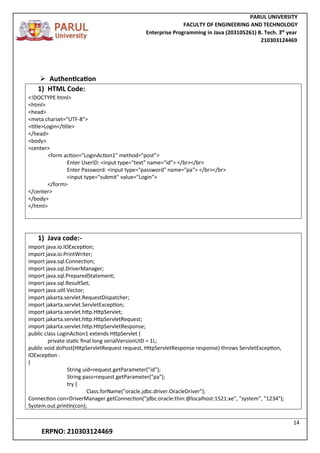
1) HTML Code:
<!DOCTYPE html>
<html>
<head>
<meta charset="UTF-8">
<title>Login</title>
</head>
<body>
<center>
<form action="LoginAction1" method="post">
Enter UserID: <input type="text" name="id"> </br></br>
Enter Password: <input type="password" name="pa"> </br></br>
<input type="submit" value="Login">
</form>
</center>
</body>
</html>
1) Java code:-
import java.io.IOException;
import java.io.PrintWriter;
import java.sql.Connection;
import java.sql.DriverManager;
import java.sql.PreparedStatement;
import java.sql.ResultSet;
import java.util.Vector;
import jakarta.servlet.RequestDispatcher;
import jakarta.servlet.ServletException;
import jakarta.servlet.http.HttpServlet;
import jakarta.servlet.http.HttpServletRequest;
import jakarta.servlet.http.HttpServletResponse;
public class LoginAction1 extends HttpServlet {
private static final long serialVersionUID = 1L;
public void doPost(HttpServletRequest request, HttpServletResponse response) throws ServletException,
IOException :
{
String uid=request.getParameter("id");
String pass=request.getParameter("pa");
try {
Class.forName("oracle.jdbc.driver.OracleDriver");
Connection con=DriverManager.getConnection("jdbc:oracle:thin:@localhost:1521:xe", "system", "1234");
System.out.println(con);
PARUL UNIVERSITY
FACULTY OF ENGINEERING AND TECHNOLOGY
Enterprise Programming in Java (203105261) B. Tech. 3
nd
year
210303124469
15
ERPNO: 210303124469
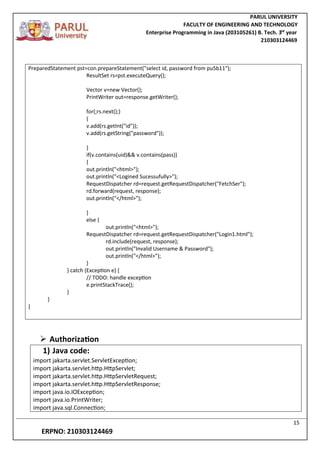
PreparedStatement pst=con.prepareStatement("select id, password from pu5b11");
ResultSet rs=pst.executeQuery();
Vector v=new Vector();
PrintWriter out=response.getWriter();
for(;rs.next();)
{
v.add(rs.getInt("id"));
v.add(rs.getString("password"));
}
if(v.contains(uid)&& v.contains(pass))
{
out.println("<html>");
out.println("<Logined Sucessufully>");
RequestDispatcher rd=request.getRequestDispatcher("FetchSer");
rd.forward(request, response);
out.println("</html>");
}
else {
out.println("<html>");
RequestDispatcher rd=request.getRequestDispatcher("Login1.html");
rd.include(request, response);
out.println("Invalid Username & Password");
out.println("</html>");
}
} catch (Exception e) {
// TODO: handle exception
e.printStackTrace();
}
}
}
 Authorization
1) Java code:
import jakarta.servlet.ServletException;
import jakarta.servlet.http.HttpServlet;
import jakarta.servlet.http.HttpServletRequest;
import jakarta.servlet.http.HttpServletResponse;
import java.io.IOException;
import java.io.PrintWriter;
import java.sql.Connection;
PARUL UNIVERSITY
FACULTY OF ENGINEERING AND TECHNOLOGY
Enterprise Programming in Java (203105261) B. Tech. 3
nd
year
210303124469
16
ERPNO: 210303124469
import java.sql.DriverManager;
import java.sql.PreparedStatement;
import java.sql.ResultSet;
public class FetchSer extends HttpServlet {
private static final long serialVersionUID = 1L;
public void doPost(HttpServletRequest request, HttpServletResponse response) throws
ServletException, IOException {
String uid=request.getParameter("id");
Integer id=Integer.parseInt(uid);
String pass=request.getParameter("pa");
PrintWriter out=response.getWriter();
try {
Class.forName("oracle.jdbc.driver.OracleDriver");
Connection con=DriverManager.getConnection("jdbc:oracle:thin:@localhost:1521:xe", "system",
"2002");
System.out.println(con);
PreparedStatement pst=con.prepareStatement("select * from pu5b9 where id=?");
pst.setInt(1, id);
ResultSet rs=pst.executeQuery();
for(;rs.next();)
{
out.println("<html>");
out.println("<Logined Sucessufully>");
out.println(rs.getInt("id"));
out.println(rs.getString("password"));
out.println(rs.getString("name"));
out.println(rs.getString("email"));
out.println(rs.getString("phno"));
out.println(rs.getString("gender"));
out.println("</html>");
}
}
catch (Exception e) {
// TODO: handle exception
e.printStackTrace();
}
}
}
PARUL UNIVERSITY
FACULTY OF ENGINEERING AND TECHNOLOGY
Enterprise Programming in Java (203105261) B. Tech. 3
nd
year
210303124469
17
ERPNO: 210303124469
PARUL UNIVERSITY
FACULTY OF ENGINEERING AND TECHNOLOGY
Enterprise Programming in Java (203105261) B. Tech. 3
nd
year
210303124469
18
ERPNO: 210303124469
Experiment no-6
Aim:- Building a Web Application with Java EE
● Introduction to Java Server Page
● Creating a basic web application using JSP
● Handling user requests and generating dynamic web content.
Theory:-
JavaServer Pages (JSP) is a Java-based technology that is used to create dynamic web
pages.It is a server-side technology, which means that the code is executed on the server
side and the results are sent to the client. JSP pages are made up of two types of content:
static content, such as HTML, and dynamic content, such as Java code. The Java code is
used to process data and generate output. JSP pages are compiled into servlets, which are
Java classes that run on the server.
JSP offers a number of advantages over other technologies for creating dynamic
webpages.First, it is easy to learn and use. Second, it is portable, meaning that JSP pages
can be deployed on any server that supports Java.
Third, it is secure, as the Java code is executed in a secure environment. Fourth, it is
scalable, meaning that JSP pages can be used to create high-traffic web applications.
JSP is a powerful technology that can be used to create dynamic and interactive web
pages.It is a good choice for developers who want to create web applications that are easy
to use, secure, and scalable.
Here are some of the benefits of using JSP:
1) Easy to learn and use: JSP is a relatively easy technology to learn and use, even for
developers who are not familiar with Java.
2) Portable: JSP pages can be deployed on any server that supports Java.
3) Secure: JSP pages are executed in a secure environment, which helps to
protect against security vulnerabilities.
4) Scalable: JSP pages can be used to create high-traffic web applications.
PARUL UNIVERSITY
FACULTY OF ENGINEERING AND TECHNOLOGY
Enterprise Programming in Java (203105261) B. Tech. 3
nd
year
210303124469
19
ERPNO: 210303124469
CODE:
1) JSP Code:
<%@ page language="java" contentType="text/html; charset=UTF-8"
pageEncoding="UTF-8"%>
<!DOCTYPE html>
<html>
<head>
<meta charset="UTF-8">
<title>Insert title here</title>
</head>
<body>
<center>
<form action="login1">
Enter the Username:<input type="text" name="a"> </br></br>
Enter the Password:<input type="password" name="b" ></br></br>
ReEnter the Password:<input type="password" name="c" ></br></br>
<input type="submit" value="enter">
</form>
</center>
</body>
</html>
PARUL UNIVERSITY
FACULTY OF ENGINEERING AND TECHNOLOGY
Enterprise Programming in Java (203105261) B. Tech. 3
nd
year
210303124469
20
ERPNO: 210303124469
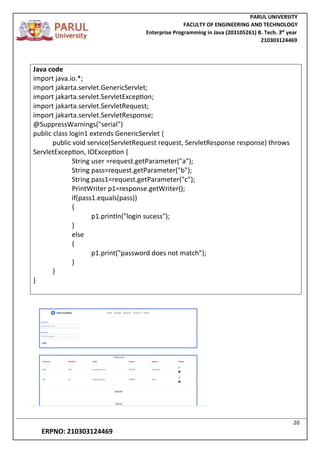
Java code
import java.io.*;
import jakarta.servlet.GenericServlet;
import jakarta.servlet.ServletException;
import jakarta.servlet.ServletRequest;
import jakarta.servlet.ServletResponse;
@SuppressWarnings("serial")
public class login1 extends GenericServlet {
public void service(ServletRequest request, ServletResponse response) throws
ServletException, IOException {
String user =request.getParameter("a");
String pass=request.getParameter("b");
String pass1=request.getParameter("c");
PrintWriter p1=response.getWriter();
if(pass1.equals(pass))
{
p1.println("login sucess");
}
else
{
p1.print("password does not match");
}
}
}
PARUL UNIVERSITY
FACULTY OF ENGINEERING AND TECHNOLOGY
Enterprise Programming in Java (203105261) B. Tech. 3
nd
year
210303124469
21
ERPNO: 210303124469
PARUL UNIVERSITY
FACULTY OF ENGINEERING AND TECHNOLOGY
Enterprise Programming in Java (203105261) B. Tech. 3
nd
year
210303124469
22
ERPNO: 210303124469
Experiment no-7
Aim:- Implementing Security in Java EE Applications
● Understanding the importance of security in enterprise applications.
● Configuring authentication and authorization in JavaEE using Servlets and JSP
● Exploring Java EE security mechanisms (role-based access, encryption, etc.).
Theory:-
Security in enterprise applications in Java is important because it protects sensitive data
and ensures the confidentiality, integrity, and availability of the application. Java EE
provides a comprehensive security framework that helps developers to secure their
applications. This framework includes features such as authentication, authorization, data
encryption, and transport security.
1) Authentication is the process of verifying the identity of a user. This can bed oneby
requiring the user to provide a username and password, or by using a more secure
authentication mechanism such as two-factor authentication.
2) Authorization is the process of determining what a user is allowed to do. This is
doneby assigning users to security roles, and then granting permissions to those
roles. For example, a user who is assigned the role of"administrator" maybe allowed
to create new users, while a user who is assigned the role of "employee" may only
be allowed to view data.
3) Data encryption is the process of scrambling data so that it cannot be readby
unauthorized users. This can be done by using a variety of encryption algorithms,
such as AES or RSA.
4) Transport security is the process of protecting data in transit from
unauthorizedaccess. This is typically done by using a secure protocol such as HTTPS.
PARUL UNIVERSITY
FACULTY OF ENGINEERING AND TECHNOLOGY
Enterprise Programming in Java (203105261) B. Tech. 3
nd
year
210303124469
23
ERPNO: 210303124469
CODE:
 Registration
JSP Codes
 Register.jsp
<%@ page language="java" contentType="text/html; charset=ISO-8859-1"
pageEncoding="ISO-8859-1"%>
<!DOCTYPE html>
<html>
<head>
<meta charset="ISO-8859-1">
<title>Registeration</title>
<style>
body {
background-image: url("https://encrypted-tbn0.gstatic.com/images?q=tbn:ANd9GcQs4FE-
MIuj7dTOihsU1d21RyOaQgrpL_l0wdMGH2u3&s");
background-size: cover;
background-repeat: no-repeat;
}
</style>
</head>
<body>
<center>
<form action="RegisterAction.jsp">
<table border="1">
<tr>
<th style="text-align: left;"> Student Id:</th> <td> <input type="text" name="id"></td>
</tr>
<tr>
<th style="text-align: left;"> Password:</th> <td> <input type="password" name="pa"></td>
</tr>
<tr>
<th style="text-align: left;"> Name:</th> <td> <input type="text" name="na"></td>
</tr>
<tr>
<th style="text-align: left;"> Email:</th> <td> <input type="email" name="em"></td>
</tr>
<tr>
PARUL UNIVERSITY
FACULTY OF ENGINEERING AND TECHNOLOGY
Enterprise Programming in Java (203105261) B. Tech. 3
nd
year
210303124469
24
ERPNO: 210303124469
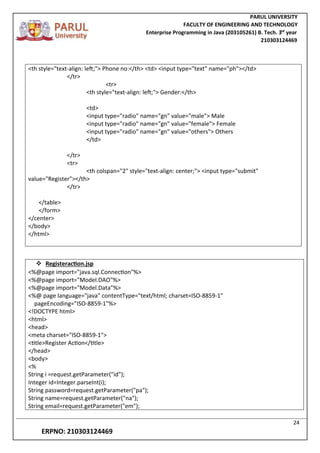
<th style="text-align: left;"> Phone no:</th> <td> <input type="text" name="ph"></td>
</tr>
<tr>
<th style="text-align: left;"> Gender:</th>
<td>
<input type="radio" name="gn" value="male"> Male
<input type="radio" name="gn" value="female"> Female
<input type="radio" name="gn" value="others"> Others
</td>
</tr>
<tr>
<th colspan="2" style="text-align: center;"> <input type="submit"
value="Register"></th>
</tr>
</table>
</form>
</center>
</body>
</html>
 Registeraction.jsp
<%@page import="java.sql.Connection"%>
<%@page import="Model.DAO"%>
<%@page import="Model.Data"%>
<%@ page language="java" contentType="text/html; charset=ISO-8859-1"
pageEncoding="ISO-8859-1"%>
<!DOCTYPE html>
<html>
<head>
<meta charset="ISO-8859-1">
<title>Register Action</title>
</head>
<body>
<%
String i =request.getParameter("id");
Integer id=Integer.parseInt(i);
String password=request.getParameter("pa");
String name=request.getParameter("na");
String email=request.getParameter("em");
PARUL UNIVERSITY
FACULTY OF ENGINEERING AND TECHNOLOGY
Enterprise Programming in Java (203105261) B. Tech. 3
nd
year
210303124469
25
ERPNO: 210303124469
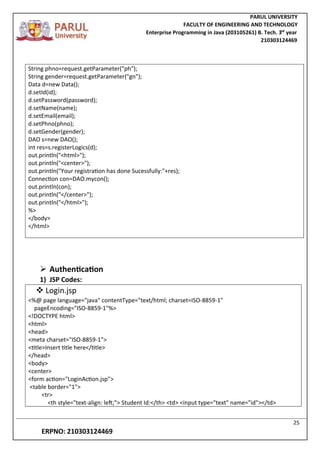
String phno=request.getParameter("ph");
String gender=request.getParameter("gn");
Data d=new Data();
d.setId(id);
d.setPassword(password);
d.setName(name);
d.setEmail(email);
d.setPhno(phno);
d.setGender(gender);
DAO s=new DAO();
int res=s.registerLogics(d);
out.println("<html>");
out.println("<center>");
out.println("Your registration has done Sucessfully:"+res);
Connection con=DAO.mycon();
out.println(con);
out.println("</center>");
out.println("</html>");
%>
</body>
</html>
 Authentication
1) JSP Codes:
 Login.jsp
<%@ page language="java" contentType="text/html; charset=ISO-8859-1"
pageEncoding="ISO-8859-1"%>
<!DOCTYPE html>
<html>
<head>
<meta charset="ISO-8859-1">
<title>Insert title here</title>
</head>
<body>
<center>
<form action="LoginAction.jsp">
<table border="1">
<tr>
<th style="text-align: left;"> Student Id:</th> <td> <input type="text" name="id"></td>
PARUL UNIVERSITY
FACULTY OF ENGINEERING AND TECHNOLOGY
Enterprise Programming in Java (203105261) B. Tech. 3
nd
year
210303124469
26
ERPNO: 210303124469
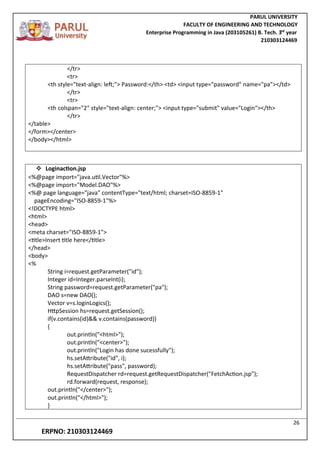
</tr>
<tr>
<th style="text-align: left;"> Password:</th> <td> <input type="password" name="pa"></td>
</tr>
<tr>
<th colspan="2" style="text-align: center;"> <input type="submit" value="Login"></th>
</tr>
</table>
</form></center>
</body></html>
 Loginaction.jsp
<%@page import="java.util.Vector"%>
<%@page import="Model.DAO"%>
<%@ page language="java" contentType="text/html; charset=ISO-8859-1"
pageEncoding="ISO-8859-1"%>
<!DOCTYPE html>
<html>
<head>
<meta charset="ISO-8859-1">
<title>Insert title here</title>
</head>
<body>
<%
String i=request.getParameter("id");
Integer id=Integer.parseInt(i);
String password=request.getParameter("pa");
DAO s=new DAO();
Vector v=s.loginLogics();
HttpSession hs=request.getSession();
if(v.contains(id)&& v.contains(password))
{
out.println("<html>");
out.println("<center>");
out.println("Login has done sucessfully");
hs.setAttribute("id", i);
hs.setAttribute("pass", password);
RequestDispatcher rd=request.getRequestDispatcher("FetchAction.jsp");
rd.forward(request, response);
out.println("</center>");
out.println("</html>");
}
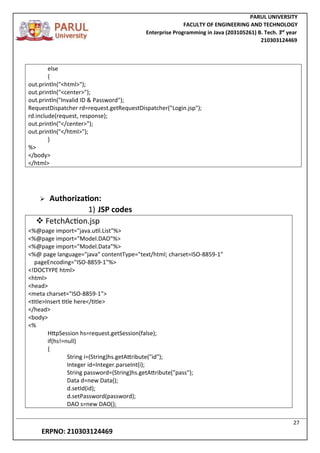
PARUL UNIVERSITY
FACULTY OF ENGINEERING AND TECHNOLOGY
Enterprise Programming in Java (203105261) B. Tech. 3
nd
year
210303124469
27
ERPNO: 210303124469
else
{
out.println("<html>");
out.println("<center>");
out.println("Invalid ID & Password");
RequestDispatcher rd=request.getRequestDispatcher("Login.jsp");
rd.include(request, response);
out.println("</center>");
out.println("</html>");
}
%>
</body>
</html>
 Authorization:
1) JSP codes
 FetchAction.jsp
<%@page import="java.util.List"%>
<%@page import="Model.DAO"%>
<%@page import="Model.Data"%>
<%@ page language="java" contentType="text/html; charset=ISO-8859-1"
pageEncoding="ISO-8859-1"%>
<!DOCTYPE html>
<html>
<head>
<meta charset="ISO-8859-1">
<title>Insert title here</title>
</head>
<body>
<%
HttpSession hs=request.getSession(false);
if(hs!=null)
{
String i=(String)hs.getAttribute("id");
Integer id=Integer.parseInt(i);
String password=(String)hs.getAttribute("pass");
Data d=new Data();
d.setId(id);
d.setPassword(password);
DAO s=new DAO();
PARUL UNIVERSITY
FACULTY OF ENGINEERING AND TECHNOLOGY
Enterprise Programming in Java (203105261) B. Tech. 3
nd
year
210303124469
28
ERPNO: 210303124469
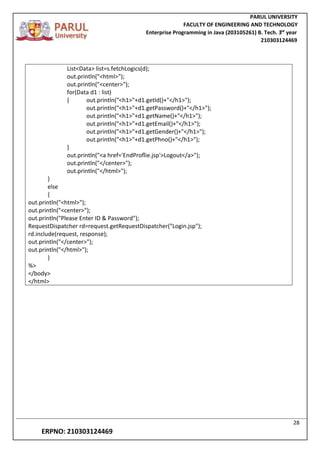
List<Data> list=s.fetchLogics(d);
out.println("<html>");
out.println("<center>");
for(Data d1 : list)
{ out.println("<h1>"+d1.getId()+"</h1>");
out.println("<h1>"+d1.getPassword()+"</h1>");
out.println("<h1>"+d1.getName()+"</h1>");
out.println("<h1>"+d1.getEmail()+"</h1>");
out.println("<h1>"+d1.getGender()+"</h1>");
out.println("<h1>"+d1.getPhno()+"</h1>");
}
out.println("<a href='EndProflie.jsp'>Logout</a>");
out.println("</center>");
out.println("</html>");
}
else
{
out.println("<html>");
out.println("<center>");
out.println("Please Enter ID & Password");
RequestDispatcher rd=request.getRequestDispatcher("Login.jsp");
rd.include(request, response);
out.println("</center>");
out.println("</html>");
}
%>
</body>
</html>
PARUL UNIVERSITY
FACULTY OF ENGINEERING AND TECHNOLOGY
Enterprise Programming in Java (203105261) B. Tech. 3
nd
year
210303124469
29
ERPNO: 210303124469
 Backend java codes:
 Data.java
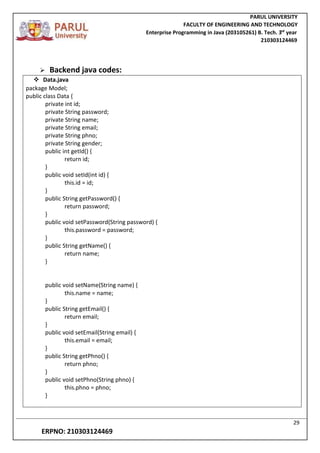
package Model;
public class Data {
private int id;
private String password;
private String name;
private String email;
private String phno;
private String gender;
public int getId() {
return id;
}
public void setId(int id) {
this.id = id;
}
public String getPassword() {
return password;
}
public void setPassword(String password) {
this.password = password;
}
public String getName() {
return name;
}
public void setName(String name) {
this.name = name;
}
public String getEmail() {
return email;
}
public void setEmail(String email) {
this.email = email;
}
public String getPhno() {
return phno;
}
public void setPhno(String phno) {
this.phno = phno;
}
PARUL UNIVERSITY
FACULTY OF ENGINEERING AND TECHNOLOGY
Enterprise Programming in Java (203105261) B. Tech. 3
nd
year
210303124469
30
ERPNO: 210303124469
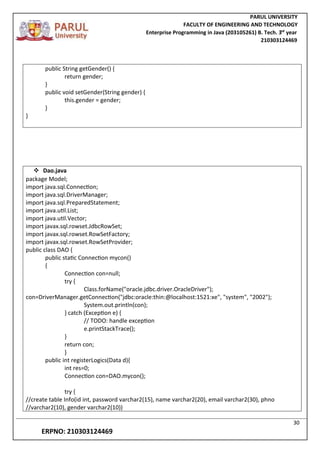
public String getGender() {
return gender;
}
public void setGender(String gender) {
this.gender = gender;
}
}
 Dao.java
package Model;
import java.sql.Connection;
import java.sql.DriverManager;
import java.sql.PreparedStatement;
import java.util.List;
import java.util.Vector;
import javax.sql.rowset.JdbcRowSet;
import javax.sql.rowset.RowSetFactory;
import javax.sql.rowset.RowSetProvider;
public class DAO {
public static Connection mycon()
{
Connection con=null;
try {
Class.forName("oracle.jdbc.driver.OracleDriver");
con=DriverManager.getConnection("jdbc:oracle:thin:@localhost:1521:xe", "system", "2002");
System.out.println(con);
} catch (Exception e) {
// TODO: handle exception
e.printStackTrace();
}
return con;
}
public int registerLogics(Data d){
int res=0;
Connection con=DAO.mycon();
try {
//create table Info(id int, password varchar2(15), name varchar2(20), email varchar2(30), phno
//varchar2(10), gender varchar2(10))
PARUL UNIVERSITY
FACULTY OF ENGINEERING AND TECHNOLOGY
Enterprise Programming in Java (203105261) B. Tech. 3
nd
year
210303124469
31
ERPNO: 210303124469
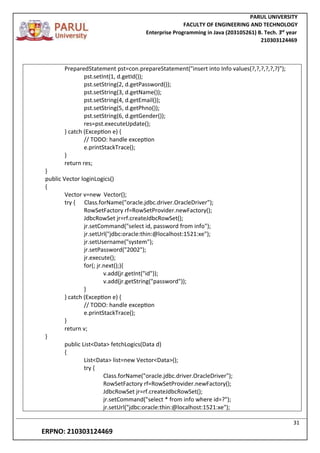
PreparedStatement pst=con.prepareStatement("insert into Info values(?,?,?,?,?,?)");
pst.setInt(1, d.getId());
pst.setString(2, d.getPassword());
pst.setString(3, d.getName());
pst.setString(4, d.getEmail());
pst.setString(5, d.getPhno());
pst.setString(6, d.getGender());
res=pst.executeUpdate();
} catch (Exception e) {
// TODO: handle exception
e.printStackTrace();
}
return res;
}
public Vector loginLogics()
{
Vector v=new Vector();
try { Class.forName("oracle.jdbc.driver.OracleDriver");
RowSetFactory rf=RowSetProvider.newFactory();
JdbcRowSet jr=rf.createJdbcRowSet();
jr.setCommand("select id, password from info");
jr.setUrl("jdbc:oracle:thin:@localhost:1521:xe");
jr.setUsername("system");
jr.setPassword("2002");
jr.execute();
for(; jr.next();){
v.add(jr.getInt("id"));
v.add(jr.getString("password"));
}
} catch (Exception e) {
// TODO: handle exception
e.printStackTrace();
}
return v;
}
public List<Data> fetchLogics(Data d)
{
List<Data> list=new Vector<Data>();
try {
Class.forName("oracle.jdbc.driver.OracleDriver");
RowSetFactory rf=RowSetProvider.newFactory();
JdbcRowSet jr=rf.createJdbcRowSet();
jr.setCommand("select * from info where id=?");
jr.setUrl("jdbc:oracle:thin:@localhost:1521:xe");
PARUL UNIVERSITY
FACULTY OF ENGINEERING AND TECHNOLOGY
Enterprise Programming in Java (203105261) B. Tech. 3
nd
year
210303124469
32
ERPNO: 210303124469
jr.setUsername("system");
jr.setPassword(“2002");
jr.setInt(1, d.getId());
jr.execute();
Data d1=new Data();
for(;jr.next();)
{ d1.setId(jr.getInt("id"));
d1.setPassword(jr.getString("password"));
d1.setName(jr.getString("name"));
d1.setEmail(jr.getString("email"));
d1.setPhno(jr.getString("phno"));
d1.setGender(jr.getString("gender"));
list.add(d1);
}
} catch (Exception e) {
// TODO: handle exception
e.printStackTrace();
}
return list;
}
}
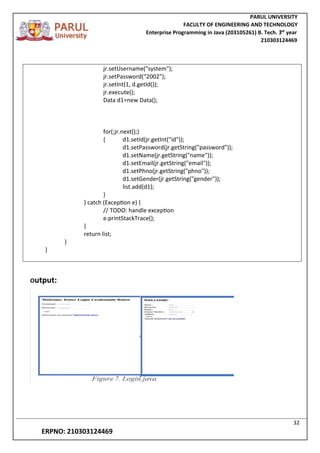
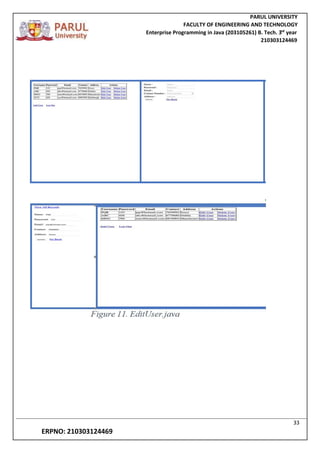
Output:
PARUL UNIVERSITY
FACULTY OF ENGINEERING AND TECHNOLOGY
Enterprise Programming in Java (203105261) B. Tech. 3
nd
year
210303124469
33
ERPNO: 210303124469
PARUL UNIVERSITY
FACULTY OF ENGINEERING AND TECHNOLOGY
Enterprise Programming in Java (203105261) B. Tech. 3
nd
year
210303124469
34
ERPNO: 210303124469
Experiment-8
AIM: Java Persistance with JPA
Hibernate is an open source object relational mapping {ORM}tool that
provides a framework to map object-oriented domain models to
relational databases for web applications.
Advantages:
Any changes made are encapsulated in the data source itself,
so that when those sources or their application programming
interfaces change, the applications that use ORM don't have to
make changes or even be aware of that information.
Programmers can have a consistent view of objects over time, although the sources that deliver
them, the sinks that receive them and the applications that access them may change.
Hconfig.java
package src;
import java.util.Properties;
import org.hibernate.SessionFactory;
import org.hibernate.boot.registry.StandardServiceRegistryBuilder;
import org.hibernate.cfg.Configuration;
import org.hibernate.cfg.Environment;
import org.hibernate.service.ServiceRegistry;
public class HConfig {
public static SessionFactory factory;
public static SessionFactory getSessionFactory() {
if(factory == null) {
try {
Configuration cfg = new Configuration();
Properties pro = new Properties();
pro.setProperty(Environment.DRIVER, "com.mysql.cj.jdbc.Driver");
pro.setProperty(Environment.URL, "jdbc:mysql://localhost:3306/xyz");
pro.setProperty(Environment.USER, "root");
pro.setProperty(Environment.PASS, "12345678");
pro.setProperty(Environment.HBM2DDL_AUTO, "update");
pro.setProperty(Environment.SHOW_SQL, "true");
PARUL UNIVERSITY
FACULTY OF ENGINEERING AND TECHNOLOGY
Enterprise Programming in Java (203105261) B. Tech. 3
nd
year
210303124469
35
ERPNO: 210303124469
pro.setProperty(Environment.DIALECT, "org.hibernate.dialect.MySQLDialect");
cfg.setProperties(pro);
cfg.addAnnotatedClass(Student.class);
ServiceRegistry sr = new StandardServiceRegistryBuilder()
.applySettings(cfg.getProperties()).build();
factory = cfg.buildSessionFactory();
} catch(Exception e) {
System.out.println(e.getMessage());
}
}
return factory;
}
}
DAO.java
package src;
import org.hibernate.Session;
import org.hibernate.Transaction;
public class DAO {
public void SaveOrUpdate(Student s) {
Session sess = HConfig.getSessionFactory().openSession();
Transaction tx = sess.beginTransaction();
sess.saveOrUpdate(s);
tx.commit();
sess.close();
HConfig.factory.close();
}
}
PARUL UNIVERSITY
FACULTY OF ENGINEERING AND TECHNOLOGY
Enterprise Programming in Java (203105261) B. Tech. 3
nd
year
210303124469
36
ERPNO: 210303124469
Student.java
@Entity
@Table(name="student_details")
public class Student {
@Id
private int id;
private String name;
private int marks;
public int getId() {
return id;
}
public void setId(int id) {
this.id = id;
}
public String getName() {
return name;
}
public void setName(String name) {
this.name = name;
}
public int getMarks() {
return marks;
}
public void setMarks(int marks) {
this.marks = marks;
}
@Override
public String toString() {
return "Student [id=" + id + ", name=" + name + ", marks=" + marks + "]";
}
}
PARUL UNIVERSITY
FACULTY OF ENGINEERING AND TECHNOLOGY
Enterprise Programming in Java (203105261) B. Tech. 3
nd
year
210303124469
37
ERPNO: 210303124469
package src;
import java.util.Date;
public class Hibernate {
public static void main(String[] args) {
Student s = new Student();
s.setName("Avinash");
s.setCollege("IITR");
s.setDivision("CSE");
s.setDate(new Date());
DAO d = new DAO();
d.SaveOrUpdate(s);
}
}
Output:
PARUL UNIVERSITY
FACULTY OF ENGINEERING AND TECHNOLOGY
Enterprise Programming in Java (203105261) B. Tech. 3
nd
year
210303124469
38
ERPNO: 210303124469
Experiment no-9
Aim:- Application Deployment andContainerization
Containerization:
Containerization is operating system-level virtualization or application-level virtualization
over multiple network resources so that software applications can run in isolated user
spaces called containers in any cloud or non-cloud environment, regardless of type or
vendor.
Apache Tomcat®:
The Apache Tomcat® software is an open-source implementation of the Jakarta Servlet,
Jakarta Server Pages, Jakarta Expression Language, Jakarta WebSocket, Jakarta Annotations,
and Jakarta Authentication specifications. These specifications are part of the Jakarta EE
platform.
The Jakarta EE platform is the evolution of the Java EE platform. Tomcat 10 and later
implement specifications developed as part of Jakarta EE. Tomcat 9 and earlier implement
specifications developed as part of Java EE.
Introduction:
Application deployment and containerization are integral parts of modern software
development and operations. They enable efficient, consistent, and scalable delivery of
applications. This set of practical notes aims to provide a comprehensive overview of these
critical concepts.
Part 1: Application Deployment
1.1 Efficiency and Scalability:
PARUL UNIVERSITY
FACULTY OF ENGINEERING AND TECHNOLOGY
Enterprise Programming in Java (203105261) B. Tech. 3
nd
year
210303124469
39
ERPNO: 210303124469
Efficient deployment ensures applications run optimally and can be easily scaled to meet
varying demand.
Implement load balancing and auto-scaling mechanisms for improved performance under
heavy traffic.
1.2 Consistency Across Environments:
Establish a standardized deployment process across development, testing, and production
environments.
Use configuration management tools like Ansible or Puppet for seamless environment
setup.
1.3 Security Best Practices:
Apply security patches promptly to protect against vulnerabilities.
Utilize firewalls, secure connections (HTTPS), and implement secure coding practices.
1.4 Monitoring and Logging:
Set up monitoring tools (e.g., Prometheus, Grafana) to track application performance and
resource utilization.
Implement comprehensive logging to facilitate effective troubleshooting and analysis of
application behavior.
1.5 Rollbacks and Recovery:
Develop a robust rollback strategy to swiftly revert to a stable version in case of
deployment failures.
Regularly perform disaster recovery drills to ensure quick restoration in critical situations.
1.6 Automation with CI/CD:
Adopt Continuous Integration (CI) and Continuous Deployment (CD) pipelines to automate
the build, test, and deployment process.
Leverage tools like Jenkins, GitLab CI/CD, or GitHub Actions for seamless automation.
Part 2: Containerization
PARUL UNIVERSITY
FACULTY OF ENGINEERING AND TECHNOLOGY
Enterprise Programming in Java (203105261) B. Tech. 3
nd
year
210303124469
40
ERPNO: 210303124469
2.1 Isolation and Portability:
Understand the benefits of containerization in providing a self-contained environment for
applications.
Utilize container platforms like Docker to package applications and their dependencies.
2.2 Resource Efficiency:
Compare containers to virtual machines and recognize the resource advantages, as
containers share the host OS kernel.
Optimize resource allocation to maximize container density on host systems.
2.3 Microservices Architecture:
Explore how containers enable microservices by encapsulating individual components of an
application.
Leverage container orchestration platforms like Kubernetes for managing microservices at
scale.
2.4 DevOps and CI/CD Pipelines:
Integrate containerization into DevOps practices to ensure consistent deployment across
different environments.
Use container registries (e.g., Docker Hub) to store and manage container images.
2.5 Scalability and Version Control:
Understand how containers facilitate seamless scaling to handle variable workloads.
Implement version control for container images to track changes and enable rollbacks.
Conclusion:
Application deployment and containerization are pivotal in achieving efficient, secure, and
scalable software delivery. By mastering these practices, development teams can ensure
consistent deployment, enhance security, and unlock the full potential of modern software
development.
PARUL UNIVERSITY
FACULTY OF ENGINEERING AND TECHNOLOGY
Enterprise Programming in Java (203105261) B. Tech. 3
nd
year
210303124469
41
ERPNO: 210303124469
Experiment no-10
Aim:- Introduction to Spring Framework
Introduction:
The Spring Framework is a comprehensive and widely used open-source
application development framework for building enterprise-level Java
applications. It provides a holistic and modular approach to developing robust
and scalable applications. This set of practical notes aims to provide a
foundational understanding of the key concepts and components of the Spring
Framework.
Part 1: Core Concepts of Spring
1.1 Inversion of Control (IoC) Container:
Understand the IoC principle, where control of object creation and lifecycle is
delegated to the Spring container.
Familiarize with bean configurations using XML, JavaConfig, and annotations.
1.2 Dependency Injection (DI):
Grasp the concept of DI, where objects receive their dependencies from an
external source, rather than creating them.
Learn to define and inject dependencies using constructor injection, setter
injection, and autowiring.
1.3 Aspect-Oriented Programming (AOP):
Comprehend AOP as a programming paradigm that allows separating cross-
cutting concerns from the main application logic.
PARUL UNIVERSITY
FACULTY OF ENGINEERING AND TECHNOLOGY
Enterprise Programming in Java (203105261) B. Tech. 3
nd
year
210303124469
42
ERPNO: 210303124469
Explore the creation of aspects and understand pointcuts, advice, and weaving.
Part 2: Spring Modules and Components
2.1 Spring Data Access/Integration:
Familiarize with the JDBC Template for simplified database access.
Learn about Object-Relational Mapping (ORM) support for Hibernate, JPA, and
other frameworks.
2.2 Spring MVC (Model-View-Controller):
Grasp the fundamental concepts of Spring MVC for building web applications.
Understand controllers, views, and models, and how they interact in the
request-response lifecycle.
2.3 Spring Security:
Gain insights into securing applications using Spring Security.
Implement authentication, authorization, and protection against common
security vulnerabilities.
2.4 Spring Boot:
Explore the Spring Boot framework for rapid application development.
Learn how to create standalone, production-ready Spring-based applications.
XML Configuration:
<!-- applicationContext.xml -->
<beans xmlns="http://www.springframework.org/schema/beans"
xmlns:xsi="http://www.w3.org/2001/XMLSchema-instance"
xsi:schemaLocation="http://www.springframework.org/schema/beans
PARUL UNIVERSITY
FACULTY OF ENGINEERING AND TECHNOLOGY
Enterprise Programming in Java (203105261) B. Tech. 3
nd
year
210303124469
43
ERPNO: 210303124469
http://www.springframework.org/schema/beans/spring-
beans.xsd">
<bean id="myBean" class="com.example.MyClass" />
</beans>
JavaConfig
@Configuration
public class AppConfig {
@Bean
public MyClass myBean() {
return new MyClass();
}
}
Configuration.java
package src;
import org.hibernate.Session;
import org.springframework.context.annotation.Bean;
import org.springframework.context.annotation.Configuration;
@Configuration
public class Configurations {
@Bean("session")
public Session session() {
Session session = HibernateConfig.getSessionFactory().openSession();
return session;
}
@Bean("demo")
public Demo demo() {
PARUL UNIVERSITY
FACULTY OF ENGINEERING AND TECHNOLOGY
Enterprise Programming in Java (203105261) B. Tech. 3
nd
year
210303124469
44
ERPNO: 210303124469
return new Demo(1, session());
}
}
HibernateConfig.java
package src;
import java.util.Properties;
import org.hibernate.SessionFactory;
import org.hibernate.boot.registry.StandardServiceRegistryBuilder;
import org.hibernate.cfg.Configuration;
import org.hibernate.cfg.Environment;
import org.hibernate.service.ServiceRegistry;
public class HibernateConfig {
private static SessionFactory sessionFactory;
public static SessionFactory getSessionFactory() {
if (sessionFactory == null) {
Properties properties = new Properties();
properties.setProperty(Environment.DRIVER, "com.mysql.cj.jdbc.Driver");
properties.setProperty(Environment.URL, "jdbc:mysql://localhost:3306/xyz");
properties.setProperty(Environment.USER, "root");
properties.setProperty(Environment.PASS, "12345678");
properties.setProperty(Environment.DIALECT, "org.hibernate.dialect.MySQLDialect");
properties.setProperty(Environment.HBM2DDL_AUTO, "update");
properties.setProperty(Environment.SHOW_SQL, "true");
Configuration configuration = new Configuration();
configuration.setProperties(properties);
configuration.addAnnotatedClass(Configurations.class);
ServiceRegistry serviceRegistry = new StandardServiceRegistryBuilder()
.applySettings(configuration.getProperties()).build();
sessionFactory = configuration.buildSessionFactory(serviceRegistry);
}
return sessionFactory;
}
}
PARUL UNIVERSITY
FACULTY OF ENGINEERING AND TECHNOLOGY
Enterprise Programming in Java (203105261) B. Tech. 3
nd
year
210303124469
45
ERPNO: 210303124469
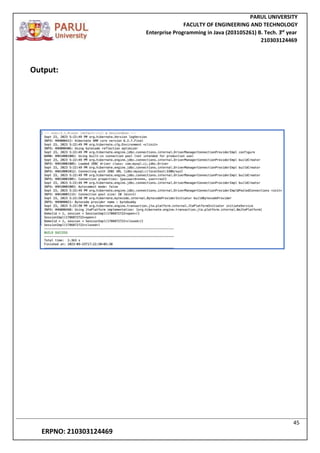
Output:

hem.pdf

  • 1.
    FACULTY OF ENGINEERINGAND TECHNOLOGY BACHELOR OF TECHNOLOGY Enterprise Programing in Java LABORATORY (203105373) 5th SEMESTER Computer Science & Engineering Department Laboratory Manual
  • 2.
    CERTIFICATE This is tocertify that Mr. /Ms. G.HEMANTH with enrollment no 210303124469has successfully completed his/her laboratory experiments inthe Enterprise Programing in Java(203105373) from the department ofCOMPUTER SCIENCE & ENGINEERING during the academic year 2023 Date of Submission: ......................... Staff InCharge: ....................... Head of Department: .......................
  • 3.
    TABLE OF CONTENT Sr. No. PracticalTitle Page No. Date of Performance Date of Completion Sign. Marks {Out of 10} FROM TO 1. Introduction to Enterprise Programming 2. Introduction to Design Patterns 3. Database Connectivity with JDBC 4. Unit Testing in Java Enterprise Applications 5. Building a Web Application with Java EE – Servlets 6. Building a Web Application with Java EE – Java Server Pages 7. Implementing Security in Java EE Applications 8. Java Persistence with JPA 9. Application Deployment and Containerization 10. Introduction to Spring Framework
  • 4.
    PARUL UNIVERSITY FACULTY OFENGINEERING AND TECHNOLOGY Enterprise Programming in Java (203105261) B. Tech. 3 nd year 210303124469 1 ERPNO: 210303124469 Experiment no-1 AIM: Introduction to Enterprise Programming ● Overview of enterprise programming and its significance. ● Introduction to Java Enterprise Edition (Java EE) and its components. ● Setting up the development environment (Java Development Kit, Eclipse/IntelliJ, etc.). Theory:- Enterprise programming is a specialized field of software engineering that creates systems for businesses. These systems are used to support large enterprise operations, such as enterprise resource planning (ERP), customer relationship management, and analytics. Enterprise applications are meant to integrate systems in a company to create a smoother workflow. They create a connection between different departments and can be adapted tothe company's specific needs. Enterprise applications can have the following benefits: 1) Improved integration 2) Fewer errors 3) Improved speed and efficiency 4) Complete access to information 5) Lower total costs in the supply chain 6) Shorter throughput times Enterprise programming in Java is the use of the Java programming language to create applications for large-scale businesses. Java is a popular choice for enterpriseprogramming because it is object-oriented, portable, scalable, and secure. Object-orientation makes Java code easy to maintain and extend. Portability means that Java code can be run on a variety of platforms, without the need to recompile. Scalability means that Java applications can be easily scaled up to handle large volumes of data and traffic. Security is a major concern for enterprise applications, and Java provides a number of features to help protect applications from attack.
  • 5.
    PARUL UNIVERSITY FACULTY OFENGINEERING AND TECHNOLOGY Enterprise Programming in Java (203105261) B. Tech. 3 nd year 210303124469 2 ERPNO: 210303124469 The main Java EE components are: Java Servlets: Java servlets are the building blocks of web applications. They are used to handle HTTP requests and responses. JavaServer Pages (JSP): JavaServer Pages are a technology that allows Java code to be embedded in HTML pages. They are used to create dynamic web pages. Enterprise JavaBeans (EJB): Enterprise JavaBeans are a technology that allows business logic to be encapsulated in reusable components. They are used to create modular and scalable applications. Java Message Service (JMS): Java Message Service is a technology that allows applications to send and receive messages. It is used to create distributed applications. Java Transaction API (JTA): Java Transaction API is a technology that allows applications to manage transactions. It is used to ensure the integrity of data in distributed applications . To set up the Java Development Kit (JDK) and Eclipse, you can follow these steps: 1) Download and install the JDK. You can choose OpenJDK 19(LTS) as the version and Openj19 as the JVM. 2) Set up environment variables. By default, Java is installed in the “C:ProgramFilesJavajdkbin” folder. 3) Download and install the Eclipse IDE. You can find the installer at Eclipse 4) Choose the installation path to your JDK. You can't mix-and-match between 32-bitand 64-bit. Make a note of the installation folder so you can use it to start Eclipse
  • 6.
    PARUL UNIVERSITY FACULTY OFENGINEERING AND TECHNOLOGY Enterprise Programming in Java (203105261) B. Tech. 3 nd year 210303124469 3 ERPNO: 210303124469 Experiment no-2 AIM:-Introduction to Design Patterns ● Explanation of design patterns and their importance in enterprise programming. ● Study of commonly used design patterns in Java enterprise applications (Singleton, Factory, Observer, etc.). ● Implementing a simple example using a design pattern. Theory:- Design patterns are a well-described solution to a common software problem. They are a general solution to a recurring design problem in object-oriented systems. Design patterns are needed to represent some of the best practices followed and adopted in software development. Design patterns are important in enterprise programming in Java because they can help to improve the quality, maintainability, and scalability of software. They can also help to makecode more reusable and easier to understand. Some of the benefits of using design patterns in Java include: 1) Improved code quality: Design patterns can help to improve the quality of code by providing a well-defined and tested solution to a common problem. This can help to reduce the number of bugs and errors in code. 2) Increased maintainability: Design patterns can help to increase the maintainability ofcode by making it easier to understand and modify. This is because design patternsprovide a common vocabulary and set of concepts that developers can use to communicate about code. 3) Improved scalability: Design patterns can help to improve the scalability of code by making it easier to add new features and functionality. This is because design patterns provide a way to decouple different parts of the system, making it easier to change one part of the system without affecting the others.
  • 7.
    PARUL UNIVERSITY FACULTY OFENGINEERING AND TECHNOLOGY Enterprise Programming in Java (203105261) B. Tech. 3 nd year 210303124469 4 ERPNO: 210303124469 Common design patterns in Java enterprise applications include: 1) Singleton: A design pattern that ensures that only one object of a particular class is created. 2) Factory: A design pattern that allows for the creation of objects without having to specify the exact type of object to be created. 3) Observer: A design pattern that allows objects to be notified of changes to other objects. These design patterns can be used to make Java enterprise applications more modular, reusable, and maintainable. Code:-  Factory design 1) Core class package com.FactoryDesign; import java.util.Scanner; public class Factory { public static void main(String[] args) { try { int select; ServiceProvider s=new ServiceProvider(); Scanner sc=new Scanner(System.in); System.out.println("Welcome to Cinemas"); System.out.println("press 1 for PVR"); System.out.println("press 2 for Inox"); select=sc.nextInt(); Movie m=s.bookmyshow(select); m.selectMovie(); } catch (Exception e) { // TODO: handle exception System.out.println("Please select the available Theaterss");} ServiceProvide.java package com.FactoryDesign; public class ServiceProvider { public Movie bookmyshow(int select) { if(select==1) { return new PVR(); } else if (select==2) { return new INOX(); } else { return null; } }
  • 8.
    PARUL UNIVERSITY FACULTY OFENGINEERING AND TECHNOLOGY Enterprise Programming in Java (203105261) B. Tech. 3 nd year 210303124469 5 ERPNO: 210303124469 Output: Inox.java package com.FactoryDesign; public class INOX implements Movie{ public void selectMovie() { System.out.println("WELCOME TO INOX"); System.out.println("MISSION IMPOSSIBLE"); } } PVR.java package com.FactoryDesign; public class PVR implements Movie { public void selectMovie() { System.out.println("WELCOME TO PVR"); System.out.println("BABY"); } } Interface.java package com.FactoryDesign; public interface Movie { void selectMovie(); }
  • 9.
    PARUL UNIVERSITY FACULTY OFENGINEERING AND TECHNOLOGY Enterprise Programming in Java (203105261) B. Tech. 3 nd year 210303124469 6 ERPNO: 210303124469 Experiment no-3 Aim:- Database Connectivity with JDBC ● Understanding the Java Database Connectivity (JDBC) API. ● Establishing database connections and executing SQL queries. ● Handling result sets and managing transactions using JDBC. Theory:- The JDBC API is a Java API that allows Java programs to interact with databases. It provides a standard way for Java programs to connect to, query, and update data in a database. The JDBC API is made up of a number of classes and interfaces that provide different functionality. Some of the most important classes and interfaces in the JDBC API include: DriverManager: The DriverManager class is used to load and manage JDBC drivers. Connection: The Connection interface represents a connection to a database. Statement: The Statement interface represents a statement that can be executed against a database. ResultSet: The ResultSet interface represents the results of a database query.
  • 10.
    PARUL UNIVERSITY FACULTY OFENGINEERING AND TECHNOLOGY Enterprise Programming in Java (203105261) B. Tech. 3 nd year 210303124469 7 ERPNO: 210303124469 Code:- import java.sql.*; class jdbc2 { public static void main(String args[]) { try{ Class.forName("oracle.jdbc.driver.OracleDriver"); String url=" jdbc:oracle:thin:@localhost:1521:xe/mydb "; String usrename="root"; String password="Gopi@911"; Connection co =DriverManager.getConnection(url,usrename,password); String q="insert into student1(tname,tcity) values (?,?)"; //create a table in database with the name student1 PreparedStatement ps=co.prepareStatement(q); ps.setString(1,"ramsai"); ps.setString(2,"vij"); ps.executeUpdate(); System.out.println("valuse inserted "); co.close(); } catch(Exception e){ e.printStackTrace(); } } } Output:
  • 11.
    PARUL UNIVERSITY FACULTY OFENGINEERING AND TECHNOLOGY Enterprise Programming in Java (203105261) B. Tech. 3 nd year 210303124469 8 ERPNO: 210303124469 Experiment no-4 Aim:- Unit Testing in Java Enterprise Applications ● Importance of unit testing in enterprise programming. ● Introduction to JUnit framework for Java unit testing. ● Writing unit tests for Java classes and components. Theory:- Unit testing is important in enterpriseprogramming because it helps to improve the quality of the software. By testing individual units of code, unit testing can help to identify and fix bugs early on, before they have a chance to propagate through the code base. This can save time and money in the long run, as it is much less expensive to fix a bug early on than it is to fix it later on after it has affected other parts of the code. Unit testing also helps to improve the maintainability of the software. By creating unit tests for each unit of code, developers can be confident that the code will work as expected when they make changes to it. This can make it easier to make changes to the code in the future, as developers will not have to worry about breaking existing functionality. Overall, unit testing is an important part of enterprise programming. It can help to improve the quality, maintainability, and reliability of the software.
  • 12.
    PARUL UNIVERSITY FACULTY OFENGINEERING AND TECHNOLOGY Enterprise Programming in Java (203105261) B. Tech. 3 nd year 210303124469 9 ERPNO: 210303124469 Code:-  Main code: package jUnit; public class addition { static public Integer add(int x,int y){ return x+y; } static public Integer sq(int x,int y){ int z=x*y; return z; } }  Test Cases:- 1) For add: package jUnit; import static org.junit.Assert.*; import org.junit.Test; public class addtest { @Test public void test() { Integer orignal =addition.add(4,5); Integer e=9; assertEquals(e,orignal); } } 1) For sq: package jUnit; import static org.junit.Assert.*; import org.junit.Test; public class squ { @Test public void test() { Integer orignal =addition.sq(4,2); Integer e=8; assertEquals(e,orignal); } }  Testing: import org.junit.runner.RunWith; import org.junit.runners.Suite; import org.junit.runners.Suite.SuiteClasses; import jUnit.addtest; import jUnit.squ; @RunWith(Suite.class) @SuiteClasses({addtest.class,squ.class}) public class AllTests { } Output:
  • 13.
    PARUL UNIVERSITY FACULTY OFENGINEERING AND TECHNOLOGY Enterprise Programming in Java (203105261) B. Tech. 3 nd year 210303124469 10 ERPNO: 210303124469 Experiment no-5 Aim:- Building a Web Application with Java EE ● Introduction to Java Servlets ● Creating a basic web application using Servlets ● Handling user requests and generating dynamic web content Theory:- A Java servlet is a Java class that conforms to a certain set of rules and conventions. It is used to extend the capabilities of web servers that host applications accessed by means of a request-response programming model. Although servlets can respond to any type of request, they are commonly used to extend the applications hosted by web servers. Servlets are used to create dynamic web pages. They can also be used to access databases, send email, and perform other tasks. Servlets are a powerful tool that can be used to create interactive and dynamic web applications. Here are some of the benefits of using Java servlets: 1) They are platform-independent, meaning that they can be used on any operating system that supports Java. 2) They are secure, as they are managed by a servlet container. 3) They are efficient, as they can be reused to handle multiple requests. 4) They are scalable, as they can be easily added to or removed from a web application. 5) They are powerful, efficient, and scalable, and they can be used to create dynamic and interactive web pages.
  • 14.
    PARUL UNIVERSITY FACULTY OFENGINEERING AND TECHNOLOGY Enterprise Programming in Java (203105261) B. Tech. 3 nd year 210303124469 11 ERPNO: 210303124469 Code:-  Registering:- 1) Html code : <!DOCTYPE html> <html> <head> <meta charset="UTF-8"> <title>Register</title> </head> <body> <center> <form action="RegisterAction" method="post"> /* <input type="hidden" name="action" value="login"> */ <table border="1"> <tr> <th>Student Id:</th> <td><input type="text" name="id"></td> </tr> <tr> <th>Password: </th> <td><input type="password" name="pa"></td> </tr> <tr> <th>Student Name: </th> <td><input type="text" name="na"></td> </tr> <tr> <th>Email: </th> <td><input type="email" name="em"></td> </tr> <tr> <th>Contact No: </th> <td><input type="text" name="ph"></td> </tr> <tr> <th>Gender: </th> <td><input type="radio" name="gn" value="male"> Male <input type="radio" name="gn" value="female"> Female <input type="radio" name="gn" value="other"> Others</td> </tr> <tr > <th colspan="2"><input type="submit" value="Register"></th> </tr> </table> </form> </center>
  • 15.
    PARUL UNIVERSITY FACULTY OFENGINEERING AND TECHNOLOGY Enterprise Programming in Java (203105261) B. Tech. 3 nd year 210303124469 12 ERPNO: 210303124469 1) Java code: import jakarta.servlet.RequestDispatcher; import jakarta.servlet.ServletException; import jakarta.servlet.annotation.WebServlet; import jakarta.servlet.http.HttpServlet; import jakarta.servlet.http.HttpServletRequest; import jakarta.servlet.http.HttpServletResponse; import java.io.IOException; import java.io.PrintWriter; import java.sql.Connection; import java.sql.DriverManager; import java.sql.PreparedStatement; import java.sql.ResultSet; @WebServlet("/RegisterAction") public class RegisterAction1 extends HttpServlet { private static final long serialVersionUID = 1L public void doPost(HttpServletRequest request, HttpServletResponse response) throws ServletException, IOException { String action = request.getParameter("action"); if (action != null && action.equals("register")) { doRegister(request, response); } else if (action != null && action.equals("login")) { doLogin(request, response); } } private void doRegister(HttpServletRequest request, HttpServletResponse response) throws ServletException, IOException { String i = request.getParameter("id"); Integer id = Integer.parseInt(i); String password = request.getParameter("pa"); String name = request.getParameter("na"); String email = request.getParameter("em"); String phno = request.getParameter("ph"); String gender = request.getParameter("gn"); response.getWriter(); try { Class.forName("oracle.jdbc.driver.OracleDriver"); Connection con = DriverManager.getConnection("jdbc:oracle:thin:@localhost:1521:xe", "system", "2002"); PreparedStatement pst = con.prepareStatement("INSERT INTO pu5b11 VALUES(?,?,?,?,?,?)"); pst.setInt(1, id); pst.setString(2, password); pst.setString(3, name); pst.setString(4, email); pst.setString(5, phno); pst.setString(6, gender); pst.executeUpdate();
  • 16.
    PARUL UNIVERSITY FACULTY OFENGINEERING AND TECHNOLOGY Enterprise Programming in Java (203105261) B. Tech. 3 nd year 210303124469 13 ERPNO: 210303124469 RequestDispatcher rd = request.getRequestDispatcher("welcome.html"); rd.include(request, response); con.close(); } catch (Exception e) { e.printStackTrace(); } } private void doLogin(HttpServletRequest request, HttpServletResponse response) throws ServletException, IOException { String usernameForLogin = request.getParameter("username"); String passwordForLogin = request.getParameter("password"); PrintWriter out = response.getWriter(); try { Class.forName("oracle.jdbc.driver.OracleDriver"); Connection con = DriverManager.getConnection("jdbc:oracle:thin:@localhost:1521:xe", "root", "G1223”); PreparedStatement loginPst = con.prepareStatement("SELECT * FROM pu5b11 WHERE id = ? AND password = ?"); loginPst.setInt(1, Integer.parseInt(usernameForLogin)); loginPst.setString(2, passwordForLogin); ResultSet resultSet = loginPst.executeQuery(); if (resultSet.next()) { out.println("Login Successful!"); } else { out.println("Login Failed. Invalid username or password."); } con.close(); } catch (Exception e) { e.printStackTrace(); } } }
  • 17.
    PARUL UNIVERSITY FACULTY OFENGINEERING AND TECHNOLOGY Enterprise Programming in Java (203105261) B. Tech. 3 nd year 210303124469 14 ERPNO: 210303124469  Authentication 1) HTML Code: <!DOCTYPE html> <html> <head> <meta charset="UTF-8"> <title>Login</title> </head> <body> <center> <form action="LoginAction1" method="post"> Enter UserID: <input type="text" name="id"> </br></br> Enter Password: <input type="password" name="pa"> </br></br> <input type="submit" value="Login"> </form> </center> </body> </html> 1) Java code:- import java.io.IOException; import java.io.PrintWriter; import java.sql.Connection; import java.sql.DriverManager; import java.sql.PreparedStatement; import java.sql.ResultSet; import java.util.Vector; import jakarta.servlet.RequestDispatcher; import jakarta.servlet.ServletException; import jakarta.servlet.http.HttpServlet; import jakarta.servlet.http.HttpServletRequest; import jakarta.servlet.http.HttpServletResponse; public class LoginAction1 extends HttpServlet { private static final long serialVersionUID = 1L; public void doPost(HttpServletRequest request, HttpServletResponse response) throws ServletException, IOException : { String uid=request.getParameter("id"); String pass=request.getParameter("pa"); try { Class.forName("oracle.jdbc.driver.OracleDriver"); Connection con=DriverManager.getConnection("jdbc:oracle:thin:@localhost:1521:xe", "system", "1234"); System.out.println(con);
  • 18.
    PARUL UNIVERSITY FACULTY OFENGINEERING AND TECHNOLOGY Enterprise Programming in Java (203105261) B. Tech. 3 nd year 210303124469 15 ERPNO: 210303124469 PreparedStatement pst=con.prepareStatement("select id, password from pu5b11"); ResultSet rs=pst.executeQuery(); Vector v=new Vector(); PrintWriter out=response.getWriter(); for(;rs.next();) { v.add(rs.getInt("id")); v.add(rs.getString("password")); } if(v.contains(uid)&& v.contains(pass)) { out.println("<html>"); out.println("<Logined Sucessufully>"); RequestDispatcher rd=request.getRequestDispatcher("FetchSer"); rd.forward(request, response); out.println("</html>"); } else { out.println("<html>"); RequestDispatcher rd=request.getRequestDispatcher("Login1.html"); rd.include(request, response); out.println("Invalid Username & Password"); out.println("</html>"); } } catch (Exception e) { // TODO: handle exception e.printStackTrace(); } } }  Authorization 1) Java code: import jakarta.servlet.ServletException; import jakarta.servlet.http.HttpServlet; import jakarta.servlet.http.HttpServletRequest; import jakarta.servlet.http.HttpServletResponse; import java.io.IOException; import java.io.PrintWriter; import java.sql.Connection;
  • 19.
    PARUL UNIVERSITY FACULTY OFENGINEERING AND TECHNOLOGY Enterprise Programming in Java (203105261) B. Tech. 3 nd year 210303124469 16 ERPNO: 210303124469 import java.sql.DriverManager; import java.sql.PreparedStatement; import java.sql.ResultSet; public class FetchSer extends HttpServlet { private static final long serialVersionUID = 1L; public void doPost(HttpServletRequest request, HttpServletResponse response) throws ServletException, IOException { String uid=request.getParameter("id"); Integer id=Integer.parseInt(uid); String pass=request.getParameter("pa"); PrintWriter out=response.getWriter(); try { Class.forName("oracle.jdbc.driver.OracleDriver"); Connection con=DriverManager.getConnection("jdbc:oracle:thin:@localhost:1521:xe", "system", "2002"); System.out.println(con); PreparedStatement pst=con.prepareStatement("select * from pu5b9 where id=?"); pst.setInt(1, id); ResultSet rs=pst.executeQuery(); for(;rs.next();) { out.println("<html>"); out.println("<Logined Sucessufully>"); out.println(rs.getInt("id")); out.println(rs.getString("password")); out.println(rs.getString("name")); out.println(rs.getString("email")); out.println(rs.getString("phno")); out.println(rs.getString("gender")); out.println("</html>"); } } catch (Exception e) { // TODO: handle exception e.printStackTrace(); } } }
  • 20.
    PARUL UNIVERSITY FACULTY OFENGINEERING AND TECHNOLOGY Enterprise Programming in Java (203105261) B. Tech. 3 nd year 210303124469 17 ERPNO: 210303124469
  • 21.
    PARUL UNIVERSITY FACULTY OFENGINEERING AND TECHNOLOGY Enterprise Programming in Java (203105261) B. Tech. 3 nd year 210303124469 18 ERPNO: 210303124469 Experiment no-6 Aim:- Building a Web Application with Java EE ● Introduction to Java Server Page ● Creating a basic web application using JSP ● Handling user requests and generating dynamic web content. Theory:- JavaServer Pages (JSP) is a Java-based technology that is used to create dynamic web pages.It is a server-side technology, which means that the code is executed on the server side and the results are sent to the client. JSP pages are made up of two types of content: static content, such as HTML, and dynamic content, such as Java code. The Java code is used to process data and generate output. JSP pages are compiled into servlets, which are Java classes that run on the server. JSP offers a number of advantages over other technologies for creating dynamic webpages.First, it is easy to learn and use. Second, it is portable, meaning that JSP pages can be deployed on any server that supports Java. Third, it is secure, as the Java code is executed in a secure environment. Fourth, it is scalable, meaning that JSP pages can be used to create high-traffic web applications. JSP is a powerful technology that can be used to create dynamic and interactive web pages.It is a good choice for developers who want to create web applications that are easy to use, secure, and scalable. Here are some of the benefits of using JSP: 1) Easy to learn and use: JSP is a relatively easy technology to learn and use, even for developers who are not familiar with Java. 2) Portable: JSP pages can be deployed on any server that supports Java. 3) Secure: JSP pages are executed in a secure environment, which helps to protect against security vulnerabilities. 4) Scalable: JSP pages can be used to create high-traffic web applications.
  • 22.
    PARUL UNIVERSITY FACULTY OFENGINEERING AND TECHNOLOGY Enterprise Programming in Java (203105261) B. Tech. 3 nd year 210303124469 19 ERPNO: 210303124469 CODE: 1) JSP Code: <%@ page language="java" contentType="text/html; charset=UTF-8" pageEncoding="UTF-8"%> <!DOCTYPE html> <html> <head> <meta charset="UTF-8"> <title>Insert title here</title> </head> <body> <center> <form action="login1"> Enter the Username:<input type="text" name="a"> </br></br> Enter the Password:<input type="password" name="b" ></br></br> ReEnter the Password:<input type="password" name="c" ></br></br> <input type="submit" value="enter"> </form> </center> </body> </html>
  • 23.
    PARUL UNIVERSITY FACULTY OFENGINEERING AND TECHNOLOGY Enterprise Programming in Java (203105261) B. Tech. 3 nd year 210303124469 20 ERPNO: 210303124469 Java code import java.io.*; import jakarta.servlet.GenericServlet; import jakarta.servlet.ServletException; import jakarta.servlet.ServletRequest; import jakarta.servlet.ServletResponse; @SuppressWarnings("serial") public class login1 extends GenericServlet { public void service(ServletRequest request, ServletResponse response) throws ServletException, IOException { String user =request.getParameter("a"); String pass=request.getParameter("b"); String pass1=request.getParameter("c"); PrintWriter p1=response.getWriter(); if(pass1.equals(pass)) { p1.println("login sucess"); } else { p1.print("password does not match"); } } }
  • 24.
    PARUL UNIVERSITY FACULTY OFENGINEERING AND TECHNOLOGY Enterprise Programming in Java (203105261) B. Tech. 3 nd year 210303124469 21 ERPNO: 210303124469
  • 25.
    PARUL UNIVERSITY FACULTY OFENGINEERING AND TECHNOLOGY Enterprise Programming in Java (203105261) B. Tech. 3 nd year 210303124469 22 ERPNO: 210303124469 Experiment no-7 Aim:- Implementing Security in Java EE Applications ● Understanding the importance of security in enterprise applications. ● Configuring authentication and authorization in JavaEE using Servlets and JSP ● Exploring Java EE security mechanisms (role-based access, encryption, etc.). Theory:- Security in enterprise applications in Java is important because it protects sensitive data and ensures the confidentiality, integrity, and availability of the application. Java EE provides a comprehensive security framework that helps developers to secure their applications. This framework includes features such as authentication, authorization, data encryption, and transport security. 1) Authentication is the process of verifying the identity of a user. This can bed oneby requiring the user to provide a username and password, or by using a more secure authentication mechanism such as two-factor authentication. 2) Authorization is the process of determining what a user is allowed to do. This is doneby assigning users to security roles, and then granting permissions to those roles. For example, a user who is assigned the role of"administrator" maybe allowed to create new users, while a user who is assigned the role of "employee" may only be allowed to view data. 3) Data encryption is the process of scrambling data so that it cannot be readby unauthorized users. This can be done by using a variety of encryption algorithms, such as AES or RSA. 4) Transport security is the process of protecting data in transit from unauthorizedaccess. This is typically done by using a secure protocol such as HTTPS.
  • 26.
    PARUL UNIVERSITY FACULTY OFENGINEERING AND TECHNOLOGY Enterprise Programming in Java (203105261) B. Tech. 3 nd year 210303124469 23 ERPNO: 210303124469 CODE:  Registration JSP Codes  Register.jsp <%@ page language="java" contentType="text/html; charset=ISO-8859-1" pageEncoding="ISO-8859-1"%> <!DOCTYPE html> <html> <head> <meta charset="ISO-8859-1"> <title>Registeration</title> <style> body { background-image: url("https://encrypted-tbn0.gstatic.com/images?q=tbn:ANd9GcQs4FE- MIuj7dTOihsU1d21RyOaQgrpL_l0wdMGH2u3&s"); background-size: cover; background-repeat: no-repeat; } </style> </head> <body> <center> <form action="RegisterAction.jsp"> <table border="1"> <tr> <th style="text-align: left;"> Student Id:</th> <td> <input type="text" name="id"></td> </tr> <tr> <th style="text-align: left;"> Password:</th> <td> <input type="password" name="pa"></td> </tr> <tr> <th style="text-align: left;"> Name:</th> <td> <input type="text" name="na"></td> </tr> <tr> <th style="text-align: left;"> Email:</th> <td> <input type="email" name="em"></td> </tr> <tr>
  • 27.
    PARUL UNIVERSITY FACULTY OFENGINEERING AND TECHNOLOGY Enterprise Programming in Java (203105261) B. Tech. 3 nd year 210303124469 24 ERPNO: 210303124469 <th style="text-align: left;"> Phone no:</th> <td> <input type="text" name="ph"></td> </tr> <tr> <th style="text-align: left;"> Gender:</th> <td> <input type="radio" name="gn" value="male"> Male <input type="radio" name="gn" value="female"> Female <input type="radio" name="gn" value="others"> Others </td> </tr> <tr> <th colspan="2" style="text-align: center;"> <input type="submit" value="Register"></th> </tr> </table> </form> </center> </body> </html>  Registeraction.jsp <%@page import="java.sql.Connection"%> <%@page import="Model.DAO"%> <%@page import="Model.Data"%> <%@ page language="java" contentType="text/html; charset=ISO-8859-1" pageEncoding="ISO-8859-1"%> <!DOCTYPE html> <html> <head> <meta charset="ISO-8859-1"> <title>Register Action</title> </head> <body> <% String i =request.getParameter("id"); Integer id=Integer.parseInt(i); String password=request.getParameter("pa"); String name=request.getParameter("na"); String email=request.getParameter("em");
  • 28.
    PARUL UNIVERSITY FACULTY OFENGINEERING AND TECHNOLOGY Enterprise Programming in Java (203105261) B. Tech. 3 nd year 210303124469 25 ERPNO: 210303124469 String phno=request.getParameter("ph"); String gender=request.getParameter("gn"); Data d=new Data(); d.setId(id); d.setPassword(password); d.setName(name); d.setEmail(email); d.setPhno(phno); d.setGender(gender); DAO s=new DAO(); int res=s.registerLogics(d); out.println("<html>"); out.println("<center>"); out.println("Your registration has done Sucessfully:"+res); Connection con=DAO.mycon(); out.println(con); out.println("</center>"); out.println("</html>"); %> </body> </html>  Authentication 1) JSP Codes:  Login.jsp <%@ page language="java" contentType="text/html; charset=ISO-8859-1" pageEncoding="ISO-8859-1"%> <!DOCTYPE html> <html> <head> <meta charset="ISO-8859-1"> <title>Insert title here</title> </head> <body> <center> <form action="LoginAction.jsp"> <table border="1"> <tr> <th style="text-align: left;"> Student Id:</th> <td> <input type="text" name="id"></td>
  • 29.
    PARUL UNIVERSITY FACULTY OFENGINEERING AND TECHNOLOGY Enterprise Programming in Java (203105261) B. Tech. 3 nd year 210303124469 26 ERPNO: 210303124469 </tr> <tr> <th style="text-align: left;"> Password:</th> <td> <input type="password" name="pa"></td> </tr> <tr> <th colspan="2" style="text-align: center;"> <input type="submit" value="Login"></th> </tr> </table> </form></center> </body></html>  Loginaction.jsp <%@page import="java.util.Vector"%> <%@page import="Model.DAO"%> <%@ page language="java" contentType="text/html; charset=ISO-8859-1" pageEncoding="ISO-8859-1"%> <!DOCTYPE html> <html> <head> <meta charset="ISO-8859-1"> <title>Insert title here</title> </head> <body> <% String i=request.getParameter("id"); Integer id=Integer.parseInt(i); String password=request.getParameter("pa"); DAO s=new DAO(); Vector v=s.loginLogics(); HttpSession hs=request.getSession(); if(v.contains(id)&& v.contains(password)) { out.println("<html>"); out.println("<center>"); out.println("Login has done sucessfully"); hs.setAttribute("id", i); hs.setAttribute("pass", password); RequestDispatcher rd=request.getRequestDispatcher("FetchAction.jsp"); rd.forward(request, response); out.println("</center>"); out.println("</html>"); }
  • 30.
    PARUL UNIVERSITY FACULTY OFENGINEERING AND TECHNOLOGY Enterprise Programming in Java (203105261) B. Tech. 3 nd year 210303124469 27 ERPNO: 210303124469 else { out.println("<html>"); out.println("<center>"); out.println("Invalid ID & Password"); RequestDispatcher rd=request.getRequestDispatcher("Login.jsp"); rd.include(request, response); out.println("</center>"); out.println("</html>"); } %> </body> </html>  Authorization: 1) JSP codes  FetchAction.jsp <%@page import="java.util.List"%> <%@page import="Model.DAO"%> <%@page import="Model.Data"%> <%@ page language="java" contentType="text/html; charset=ISO-8859-1" pageEncoding="ISO-8859-1"%> <!DOCTYPE html> <html> <head> <meta charset="ISO-8859-1"> <title>Insert title here</title> </head> <body> <% HttpSession hs=request.getSession(false); if(hs!=null) { String i=(String)hs.getAttribute("id"); Integer id=Integer.parseInt(i); String password=(String)hs.getAttribute("pass"); Data d=new Data(); d.setId(id); d.setPassword(password); DAO s=new DAO();
  • 31.
    PARUL UNIVERSITY FACULTY OFENGINEERING AND TECHNOLOGY Enterprise Programming in Java (203105261) B. Tech. 3 nd year 210303124469 28 ERPNO: 210303124469 List<Data> list=s.fetchLogics(d); out.println("<html>"); out.println("<center>"); for(Data d1 : list) { out.println("<h1>"+d1.getId()+"</h1>"); out.println("<h1>"+d1.getPassword()+"</h1>"); out.println("<h1>"+d1.getName()+"</h1>"); out.println("<h1>"+d1.getEmail()+"</h1>"); out.println("<h1>"+d1.getGender()+"</h1>"); out.println("<h1>"+d1.getPhno()+"</h1>"); } out.println("<a href='EndProflie.jsp'>Logout</a>"); out.println("</center>"); out.println("</html>"); } else { out.println("<html>"); out.println("<center>"); out.println("Please Enter ID & Password"); RequestDispatcher rd=request.getRequestDispatcher("Login.jsp"); rd.include(request, response); out.println("</center>"); out.println("</html>"); } %> </body> </html>
  • 32.
    PARUL UNIVERSITY FACULTY OFENGINEERING AND TECHNOLOGY Enterprise Programming in Java (203105261) B. Tech. 3 nd year 210303124469 29 ERPNO: 210303124469  Backend java codes:  Data.java package Model; public class Data { private int id; private String password; private String name; private String email; private String phno; private String gender; public int getId() { return id; } public void setId(int id) { this.id = id; } public String getPassword() { return password; } public void setPassword(String password) { this.password = password; } public String getName() { return name; } public void setName(String name) { this.name = name; } public String getEmail() { return email; } public void setEmail(String email) { this.email = email; } public String getPhno() { return phno; } public void setPhno(String phno) { this.phno = phno; }
  • 33.
    PARUL UNIVERSITY FACULTY OFENGINEERING AND TECHNOLOGY Enterprise Programming in Java (203105261) B. Tech. 3 nd year 210303124469 30 ERPNO: 210303124469 public String getGender() { return gender; } public void setGender(String gender) { this.gender = gender; } }  Dao.java package Model; import java.sql.Connection; import java.sql.DriverManager; import java.sql.PreparedStatement; import java.util.List; import java.util.Vector; import javax.sql.rowset.JdbcRowSet; import javax.sql.rowset.RowSetFactory; import javax.sql.rowset.RowSetProvider; public class DAO { public static Connection mycon() { Connection con=null; try { Class.forName("oracle.jdbc.driver.OracleDriver"); con=DriverManager.getConnection("jdbc:oracle:thin:@localhost:1521:xe", "system", "2002"); System.out.println(con); } catch (Exception e) { // TODO: handle exception e.printStackTrace(); } return con; } public int registerLogics(Data d){ int res=0; Connection con=DAO.mycon(); try { //create table Info(id int, password varchar2(15), name varchar2(20), email varchar2(30), phno //varchar2(10), gender varchar2(10))
  • 34.
    PARUL UNIVERSITY FACULTY OFENGINEERING AND TECHNOLOGY Enterprise Programming in Java (203105261) B. Tech. 3 nd year 210303124469 31 ERPNO: 210303124469 PreparedStatement pst=con.prepareStatement("insert into Info values(?,?,?,?,?,?)"); pst.setInt(1, d.getId()); pst.setString(2, d.getPassword()); pst.setString(3, d.getName()); pst.setString(4, d.getEmail()); pst.setString(5, d.getPhno()); pst.setString(6, d.getGender()); res=pst.executeUpdate(); } catch (Exception e) { // TODO: handle exception e.printStackTrace(); } return res; } public Vector loginLogics() { Vector v=new Vector(); try { Class.forName("oracle.jdbc.driver.OracleDriver"); RowSetFactory rf=RowSetProvider.newFactory(); JdbcRowSet jr=rf.createJdbcRowSet(); jr.setCommand("select id, password from info"); jr.setUrl("jdbc:oracle:thin:@localhost:1521:xe"); jr.setUsername("system"); jr.setPassword("2002"); jr.execute(); for(; jr.next();){ v.add(jr.getInt("id")); v.add(jr.getString("password")); } } catch (Exception e) { // TODO: handle exception e.printStackTrace(); } return v; } public List<Data> fetchLogics(Data d) { List<Data> list=new Vector<Data>(); try { Class.forName("oracle.jdbc.driver.OracleDriver"); RowSetFactory rf=RowSetProvider.newFactory(); JdbcRowSet jr=rf.createJdbcRowSet(); jr.setCommand("select * from info where id=?"); jr.setUrl("jdbc:oracle:thin:@localhost:1521:xe");
  • 35.
    PARUL UNIVERSITY FACULTY OFENGINEERING AND TECHNOLOGY Enterprise Programming in Java (203105261) B. Tech. 3 nd year 210303124469 32 ERPNO: 210303124469 jr.setUsername("system"); jr.setPassword(“2002"); jr.setInt(1, d.getId()); jr.execute(); Data d1=new Data(); for(;jr.next();) { d1.setId(jr.getInt("id")); d1.setPassword(jr.getString("password")); d1.setName(jr.getString("name")); d1.setEmail(jr.getString("email")); d1.setPhno(jr.getString("phno")); d1.setGender(jr.getString("gender")); list.add(d1); } } catch (Exception e) { // TODO: handle exception e.printStackTrace(); } return list; } } Output:
  • 36.
    PARUL UNIVERSITY FACULTY OFENGINEERING AND TECHNOLOGY Enterprise Programming in Java (203105261) B. Tech. 3 nd year 210303124469 33 ERPNO: 210303124469
  • 37.
    PARUL UNIVERSITY FACULTY OFENGINEERING AND TECHNOLOGY Enterprise Programming in Java (203105261) B. Tech. 3 nd year 210303124469 34 ERPNO: 210303124469 Experiment-8 AIM: Java Persistance with JPA Hibernate is an open source object relational mapping {ORM}tool that provides a framework to map object-oriented domain models to relational databases for web applications. Advantages: Any changes made are encapsulated in the data source itself, so that when those sources or their application programming interfaces change, the applications that use ORM don't have to make changes or even be aware of that information. Programmers can have a consistent view of objects over time, although the sources that deliver them, the sinks that receive them and the applications that access them may change. Hconfig.java package src; import java.util.Properties; import org.hibernate.SessionFactory; import org.hibernate.boot.registry.StandardServiceRegistryBuilder; import org.hibernate.cfg.Configuration; import org.hibernate.cfg.Environment; import org.hibernate.service.ServiceRegistry; public class HConfig { public static SessionFactory factory; public static SessionFactory getSessionFactory() { if(factory == null) { try { Configuration cfg = new Configuration(); Properties pro = new Properties(); pro.setProperty(Environment.DRIVER, "com.mysql.cj.jdbc.Driver"); pro.setProperty(Environment.URL, "jdbc:mysql://localhost:3306/xyz"); pro.setProperty(Environment.USER, "root"); pro.setProperty(Environment.PASS, "12345678"); pro.setProperty(Environment.HBM2DDL_AUTO, "update"); pro.setProperty(Environment.SHOW_SQL, "true");
  • 38.
    PARUL UNIVERSITY FACULTY OFENGINEERING AND TECHNOLOGY Enterprise Programming in Java (203105261) B. Tech. 3 nd year 210303124469 35 ERPNO: 210303124469 pro.setProperty(Environment.DIALECT, "org.hibernate.dialect.MySQLDialect"); cfg.setProperties(pro); cfg.addAnnotatedClass(Student.class); ServiceRegistry sr = new StandardServiceRegistryBuilder() .applySettings(cfg.getProperties()).build(); factory = cfg.buildSessionFactory(); } catch(Exception e) { System.out.println(e.getMessage()); } } return factory; } } DAO.java package src; import org.hibernate.Session; import org.hibernate.Transaction; public class DAO { public void SaveOrUpdate(Student s) { Session sess = HConfig.getSessionFactory().openSession(); Transaction tx = sess.beginTransaction(); sess.saveOrUpdate(s); tx.commit(); sess.close(); HConfig.factory.close(); } }
  • 39.
    PARUL UNIVERSITY FACULTY OFENGINEERING AND TECHNOLOGY Enterprise Programming in Java (203105261) B. Tech. 3 nd year 210303124469 36 ERPNO: 210303124469 Student.java @Entity @Table(name="student_details") public class Student { @Id private int id; private String name; private int marks; public int getId() { return id; } public void setId(int id) { this.id = id; } public String getName() { return name; } public void setName(String name) { this.name = name; } public int getMarks() { return marks; } public void setMarks(int marks) { this.marks = marks; } @Override public String toString() { return "Student [id=" + id + ", name=" + name + ", marks=" + marks + "]"; } }
  • 40.
    PARUL UNIVERSITY FACULTY OFENGINEERING AND TECHNOLOGY Enterprise Programming in Java (203105261) B. Tech. 3 nd year 210303124469 37 ERPNO: 210303124469 package src; import java.util.Date; public class Hibernate { public static void main(String[] args) { Student s = new Student(); s.setName("Avinash"); s.setCollege("IITR"); s.setDivision("CSE"); s.setDate(new Date()); DAO d = new DAO(); d.SaveOrUpdate(s); } } Output:
  • 41.
    PARUL UNIVERSITY FACULTY OFENGINEERING AND TECHNOLOGY Enterprise Programming in Java (203105261) B. Tech. 3 nd year 210303124469 38 ERPNO: 210303124469 Experiment no-9 Aim:- Application Deployment andContainerization Containerization: Containerization is operating system-level virtualization or application-level virtualization over multiple network resources so that software applications can run in isolated user spaces called containers in any cloud or non-cloud environment, regardless of type or vendor. Apache Tomcat®: The Apache Tomcat® software is an open-source implementation of the Jakarta Servlet, Jakarta Server Pages, Jakarta Expression Language, Jakarta WebSocket, Jakarta Annotations, and Jakarta Authentication specifications. These specifications are part of the Jakarta EE platform. The Jakarta EE platform is the evolution of the Java EE platform. Tomcat 10 and later implement specifications developed as part of Jakarta EE. Tomcat 9 and earlier implement specifications developed as part of Java EE. Introduction: Application deployment and containerization are integral parts of modern software development and operations. They enable efficient, consistent, and scalable delivery of applications. This set of practical notes aims to provide a comprehensive overview of these critical concepts. Part 1: Application Deployment 1.1 Efficiency and Scalability:
  • 42.
    PARUL UNIVERSITY FACULTY OFENGINEERING AND TECHNOLOGY Enterprise Programming in Java (203105261) B. Tech. 3 nd year 210303124469 39 ERPNO: 210303124469 Efficient deployment ensures applications run optimally and can be easily scaled to meet varying demand. Implement load balancing and auto-scaling mechanisms for improved performance under heavy traffic. 1.2 Consistency Across Environments: Establish a standardized deployment process across development, testing, and production environments. Use configuration management tools like Ansible or Puppet for seamless environment setup. 1.3 Security Best Practices: Apply security patches promptly to protect against vulnerabilities. Utilize firewalls, secure connections (HTTPS), and implement secure coding practices. 1.4 Monitoring and Logging: Set up monitoring tools (e.g., Prometheus, Grafana) to track application performance and resource utilization. Implement comprehensive logging to facilitate effective troubleshooting and analysis of application behavior. 1.5 Rollbacks and Recovery: Develop a robust rollback strategy to swiftly revert to a stable version in case of deployment failures. Regularly perform disaster recovery drills to ensure quick restoration in critical situations. 1.6 Automation with CI/CD: Adopt Continuous Integration (CI) and Continuous Deployment (CD) pipelines to automate the build, test, and deployment process. Leverage tools like Jenkins, GitLab CI/CD, or GitHub Actions for seamless automation. Part 2: Containerization
  • 43.
    PARUL UNIVERSITY FACULTY OFENGINEERING AND TECHNOLOGY Enterprise Programming in Java (203105261) B. Tech. 3 nd year 210303124469 40 ERPNO: 210303124469 2.1 Isolation and Portability: Understand the benefits of containerization in providing a self-contained environment for applications. Utilize container platforms like Docker to package applications and their dependencies. 2.2 Resource Efficiency: Compare containers to virtual machines and recognize the resource advantages, as containers share the host OS kernel. Optimize resource allocation to maximize container density on host systems. 2.3 Microservices Architecture: Explore how containers enable microservices by encapsulating individual components of an application. Leverage container orchestration platforms like Kubernetes for managing microservices at scale. 2.4 DevOps and CI/CD Pipelines: Integrate containerization into DevOps practices to ensure consistent deployment across different environments. Use container registries (e.g., Docker Hub) to store and manage container images. 2.5 Scalability and Version Control: Understand how containers facilitate seamless scaling to handle variable workloads. Implement version control for container images to track changes and enable rollbacks. Conclusion: Application deployment and containerization are pivotal in achieving efficient, secure, and scalable software delivery. By mastering these practices, development teams can ensure consistent deployment, enhance security, and unlock the full potential of modern software development.
  • 44.
    PARUL UNIVERSITY FACULTY OFENGINEERING AND TECHNOLOGY Enterprise Programming in Java (203105261) B. Tech. 3 nd year 210303124469 41 ERPNO: 210303124469 Experiment no-10 Aim:- Introduction to Spring Framework Introduction: The Spring Framework is a comprehensive and widely used open-source application development framework for building enterprise-level Java applications. It provides a holistic and modular approach to developing robust and scalable applications. This set of practical notes aims to provide a foundational understanding of the key concepts and components of the Spring Framework. Part 1: Core Concepts of Spring 1.1 Inversion of Control (IoC) Container: Understand the IoC principle, where control of object creation and lifecycle is delegated to the Spring container. Familiarize with bean configurations using XML, JavaConfig, and annotations. 1.2 Dependency Injection (DI): Grasp the concept of DI, where objects receive their dependencies from an external source, rather than creating them. Learn to define and inject dependencies using constructor injection, setter injection, and autowiring. 1.3 Aspect-Oriented Programming (AOP): Comprehend AOP as a programming paradigm that allows separating cross- cutting concerns from the main application logic.
  • 45.
    PARUL UNIVERSITY FACULTY OFENGINEERING AND TECHNOLOGY Enterprise Programming in Java (203105261) B. Tech. 3 nd year 210303124469 42 ERPNO: 210303124469 Explore the creation of aspects and understand pointcuts, advice, and weaving. Part 2: Spring Modules and Components 2.1 Spring Data Access/Integration: Familiarize with the JDBC Template for simplified database access. Learn about Object-Relational Mapping (ORM) support for Hibernate, JPA, and other frameworks. 2.2 Spring MVC (Model-View-Controller): Grasp the fundamental concepts of Spring MVC for building web applications. Understand controllers, views, and models, and how they interact in the request-response lifecycle. 2.3 Spring Security: Gain insights into securing applications using Spring Security. Implement authentication, authorization, and protection against common security vulnerabilities. 2.4 Spring Boot: Explore the Spring Boot framework for rapid application development. Learn how to create standalone, production-ready Spring-based applications. XML Configuration: <!-- applicationContext.xml --> <beans xmlns="http://www.springframework.org/schema/beans" xmlns:xsi="http://www.w3.org/2001/XMLSchema-instance" xsi:schemaLocation="http://www.springframework.org/schema/beans
  • 46.
    PARUL UNIVERSITY FACULTY OFENGINEERING AND TECHNOLOGY Enterprise Programming in Java (203105261) B. Tech. 3 nd year 210303124469 43 ERPNO: 210303124469 http://www.springframework.org/schema/beans/spring- beans.xsd"> <bean id="myBean" class="com.example.MyClass" /> </beans> JavaConfig @Configuration public class AppConfig { @Bean public MyClass myBean() { return new MyClass(); } } Configuration.java package src; import org.hibernate.Session; import org.springframework.context.annotation.Bean; import org.springframework.context.annotation.Configuration; @Configuration public class Configurations { @Bean("session") public Session session() { Session session = HibernateConfig.getSessionFactory().openSession(); return session; } @Bean("demo") public Demo demo() {
  • 47.
    PARUL UNIVERSITY FACULTY OFENGINEERING AND TECHNOLOGY Enterprise Programming in Java (203105261) B. Tech. 3 nd year 210303124469 44 ERPNO: 210303124469 return new Demo(1, session()); } } HibernateConfig.java package src; import java.util.Properties; import org.hibernate.SessionFactory; import org.hibernate.boot.registry.StandardServiceRegistryBuilder; import org.hibernate.cfg.Configuration; import org.hibernate.cfg.Environment; import org.hibernate.service.ServiceRegistry; public class HibernateConfig { private static SessionFactory sessionFactory; public static SessionFactory getSessionFactory() { if (sessionFactory == null) { Properties properties = new Properties(); properties.setProperty(Environment.DRIVER, "com.mysql.cj.jdbc.Driver"); properties.setProperty(Environment.URL, "jdbc:mysql://localhost:3306/xyz"); properties.setProperty(Environment.USER, "root"); properties.setProperty(Environment.PASS, "12345678"); properties.setProperty(Environment.DIALECT, "org.hibernate.dialect.MySQLDialect"); properties.setProperty(Environment.HBM2DDL_AUTO, "update"); properties.setProperty(Environment.SHOW_SQL, "true"); Configuration configuration = new Configuration(); configuration.setProperties(properties); configuration.addAnnotatedClass(Configurations.class); ServiceRegistry serviceRegistry = new StandardServiceRegistryBuilder() .applySettings(configuration.getProperties()).build(); sessionFactory = configuration.buildSessionFactory(serviceRegistry); } return sessionFactory; } }
  • 48.
    PARUL UNIVERSITY FACULTY OFENGINEERING AND TECHNOLOGY Enterprise Programming in Java (203105261) B. Tech. 3 nd year 210303124469 45 ERPNO: 210303124469 Output: