MATLAB, netCDF, and OPeNDAP

John Evans
john.evans@mathworks.com

© 2012 The MathWorks, Inc.
1
New In R2012a:
NetCDF Library version 4.1.3 and OPeNDAP
>> url = ['http://eosdap.hdfgroup.uiuc.edu:8080/opendap/data/NASAFILES' …
'/hdf4/AIRS.2008.10.27.L3.RetStd001.v5.2.2.0.G08303124144.hdf'];

>> ncdisp(url, 'TopographyU274');

>> help ncread;
>> data = ncread(url,'TopographyU274’);');
>> lon = ncread(url,'LongitudeU272');
>> lat = ncread(url,‘LatitudeU271');
>> data(data==0) = NaN;
>> pcolor(lon,lat,data’);
>> shading flat; colorbar

2
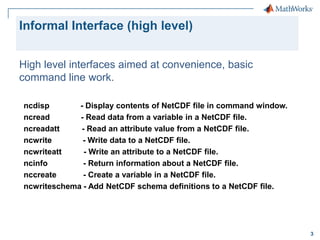
Informal Interface (high level)
High level interfaces aimed at convenience, basic
command line work.
ncdisp
- Display contents of NetCDF file in command window.
ncread
- Read data from a variable in a NetCDF file.
ncreadatt
- Read an attribute value from a NetCDF file.
ncwrite
- Write data to a NetCDF file.
ncwriteatt
- Write an attribute to a NetCDF file.
ncinfo
- Return information about a NetCDF file.
nccreate
- Create a variable in a NetCDF file.
ncwriteschema - Add NetCDF schema definitions to a NetCDF file.

3
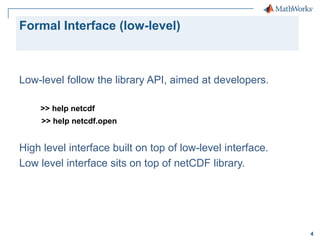
Formal Interface (low-level)

Low-level follow the library API, aimed at developers.
>> help netcdf
>> help netcdf.open

High level interface built on top of low-level interface.
Low level interface sits on top of netCDF library.

4
OPeNDAP with either interface
NetCDF library compiled with OPeNDAP support
Any customer code using either netCDF interface is now
OPeNDAP-enabled by default.
>> ncid = netcdf.open(url);
>> [numdims, numvars] = netcdf.inq(ncid);
>> info = ncinfo(url)

5
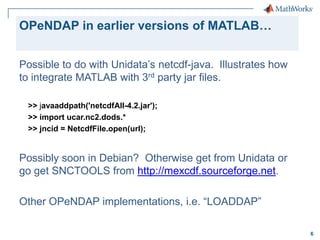
OPeNDAP in earlier versions of MATLAB…
Possible to do with Unidata’s netcdf-java. Illustrates how
to integrate MATLAB with 3rd party jar files.
>> javaaddpath('netcdfAll-4.2.jar');
>> import ucar.nc2.dods.*
>> jncid = NetcdfFile.open(url);

Possibly soon in Debian? Otherwise get from Unidata or
go get SNCTOOLS from http://mexcdf.sourceforge.net.
Other OPeNDAP implementations, i.e. “LOADDAP”
6
NetCDF Support

netCDF-3 and netCDF-4 classic model
  netCDF-4 groups, unsigned integer datatypes
 can read some HDF5 files


>> h5create(‘myfile.h5’,’/mydataset’,[100 200]);
>> h5disp(‘myfile.h5’);
>> ncdisp(‘myfile.h5’);

7
NetCDF Support (h5disp output)
HDF5 myfile.h5
Group '/'
Dataset 'myDataset1'
Size: 100x200
MaxSize: 100x200
Datatype: H5T_IEEE_F64LE (double)
ChunkSize: []
Filters: none
FillValue: 0.000000

8
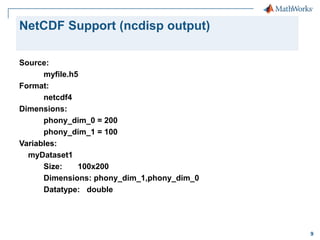
NetCDF Support (ncdisp output)
Source:
myfile.h5
Format:
netcdf4
Dimensions:
phony_dim_0 = 200
phony_dim_1 = 100
Variables:
myDataset1
Size:
100x200
Dimensions: phony_dim_1,phony_dim_0
Datatype: double

9
NPP Access Example via HDF5 High Level

>> h5file = [‘VISTO_npp_d20100906_t2105098_’, …
‘e2106344_b00012_c20110707163027621025_noaa_ops.h5’]
>> rdataset = ‘/Data_Products/VIIRS-IST-EDR/VIIRS-IST-EDR_Gran_0’
>> h5disp(h5file,rdataset);
HDF5 VISTO_npp_d20100906_t2105098_e2106344_ … noaa_ops.h5
Dataset 'VIIRS-IST-EDR_Gran_0'
Size: 5
MaxSize: Inf
Datatype: H5T_REFERENCE
ChunkSize: 5
Filters: none
FillValue: H5T_REFERENCE
Attributes:
'Ascending/Descending_Indicator': 0
'Beginning_Date': '20100906'
'Beginning_Time': '210509.899480Z'
'East_Bounding_Coordinate': -97.946198
.
.
.
10
NPP Access Example (continued)

>> dreferenced_data = h5read(h5file,rdataset);
dereferenced_data =
[2457600x1 uint16]
[2457600x1 uint8 ]
[2457600x1 uint8 ]
[2457600x1 uint8 ]
[
2x1 single]

11
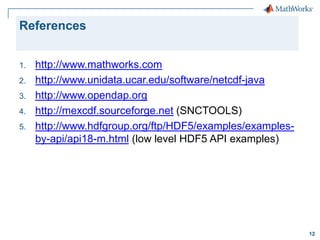
References
1.
2.
3.
4.
5.

http://www.mathworks.com
http://www.unidata.ucar.edu/software/netcdf-java
http://www.opendap.org
http://mexcdf.sourceforge.net (SNCTOOLS)
http://www.hdfgroup.org/ftp/HDF5/examples/examplesby-api/api18-m.html (low level HDF5 API examples)

12

MATLAB, netCDF, and OPeNDAP

  • 1.
    MATLAB, netCDF, andOPeNDAP John Evans john.evans@mathworks.com © 2012 The MathWorks, Inc. 1
  • 2.
    New In R2012a: NetCDFLibrary version 4.1.3 and OPeNDAP >> url = ['http://eosdap.hdfgroup.uiuc.edu:8080/opendap/data/NASAFILES' … '/hdf4/AIRS.2008.10.27.L3.RetStd001.v5.2.2.0.G08303124144.hdf']; >> ncdisp(url, 'TopographyU274'); >> help ncread; >> data = ncread(url,'TopographyU274’);'); >> lon = ncread(url,'LongitudeU272'); >> lat = ncread(url,‘LatitudeU271'); >> data(data==0) = NaN; >> pcolor(lon,lat,data’); >> shading flat; colorbar 2
  • 3.
    Informal Interface (highlevel) High level interfaces aimed at convenience, basic command line work. ncdisp - Display contents of NetCDF file in command window. ncread - Read data from a variable in a NetCDF file. ncreadatt - Read an attribute value from a NetCDF file. ncwrite - Write data to a NetCDF file. ncwriteatt - Write an attribute to a NetCDF file. ncinfo - Return information about a NetCDF file. nccreate - Create a variable in a NetCDF file. ncwriteschema - Add NetCDF schema definitions to a NetCDF file. 3
  • 4.
    Formal Interface (low-level) Low-levelfollow the library API, aimed at developers. >> help netcdf >> help netcdf.open High level interface built on top of low-level interface. Low level interface sits on top of netCDF library. 4
  • 5.
    OPeNDAP with eitherinterface NetCDF library compiled with OPeNDAP support Any customer code using either netCDF interface is now OPeNDAP-enabled by default. >> ncid = netcdf.open(url); >> [numdims, numvars] = netcdf.inq(ncid); >> info = ncinfo(url) 5
  • 6.
    OPeNDAP in earlierversions of MATLAB… Possible to do with Unidata’s netcdf-java. Illustrates how to integrate MATLAB with 3rd party jar files. >> javaaddpath('netcdfAll-4.2.jar'); >> import ucar.nc2.dods.* >> jncid = NetcdfFile.open(url); Possibly soon in Debian? Otherwise get from Unidata or go get SNCTOOLS from http://mexcdf.sourceforge.net. Other OPeNDAP implementations, i.e. “LOADDAP” 6
  • 7.
    NetCDF Support netCDF-3 andnetCDF-4 classic model   netCDF-4 groups, unsigned integer datatypes  can read some HDF5 files  >> h5create(‘myfile.h5’,’/mydataset’,[100 200]); >> h5disp(‘myfile.h5’); >> ncdisp(‘myfile.h5’); 7
  • 8.
    NetCDF Support (h5dispoutput) HDF5 myfile.h5 Group '/' Dataset 'myDataset1' Size: 100x200 MaxSize: 100x200 Datatype: H5T_IEEE_F64LE (double) ChunkSize: [] Filters: none FillValue: 0.000000 8
  • 9.
    NetCDF Support (ncdispoutput) Source: myfile.h5 Format: netcdf4 Dimensions: phony_dim_0 = 200 phony_dim_1 = 100 Variables: myDataset1 Size: 100x200 Dimensions: phony_dim_1,phony_dim_0 Datatype: double 9
  • 10.
    NPP Access Examplevia HDF5 High Level >> h5file = [‘VISTO_npp_d20100906_t2105098_’, … ‘e2106344_b00012_c20110707163027621025_noaa_ops.h5’] >> rdataset = ‘/Data_Products/VIIRS-IST-EDR/VIIRS-IST-EDR_Gran_0’ >> h5disp(h5file,rdataset); HDF5 VISTO_npp_d20100906_t2105098_e2106344_ … noaa_ops.h5 Dataset 'VIIRS-IST-EDR_Gran_0' Size: 5 MaxSize: Inf Datatype: H5T_REFERENCE ChunkSize: 5 Filters: none FillValue: H5T_REFERENCE Attributes: 'Ascending/Descending_Indicator': 0 'Beginning_Date': '20100906' 'Beginning_Time': '210509.899480Z' 'East_Bounding_Coordinate': -97.946198 . . . 10
  • 11.
    NPP Access Example(continued) >> dreferenced_data = h5read(h5file,rdataset); dereferenced_data = [2457600x1 uint16] [2457600x1 uint8 ] [2457600x1 uint8 ] [2457600x1 uint8 ] [ 2x1 single] 11
  • 12.