Proprietary and Confidential. Copyright 2018, The HDF Group.
HDF Town Hall 2022:
HSDS Performance
Features
John Readey – jreadey@hdfgroup.org
2
• Brief Overview of HSDS
• Streaming support
• Fancy indexing
• Performance Comparison
• Case Studies
Outline
3
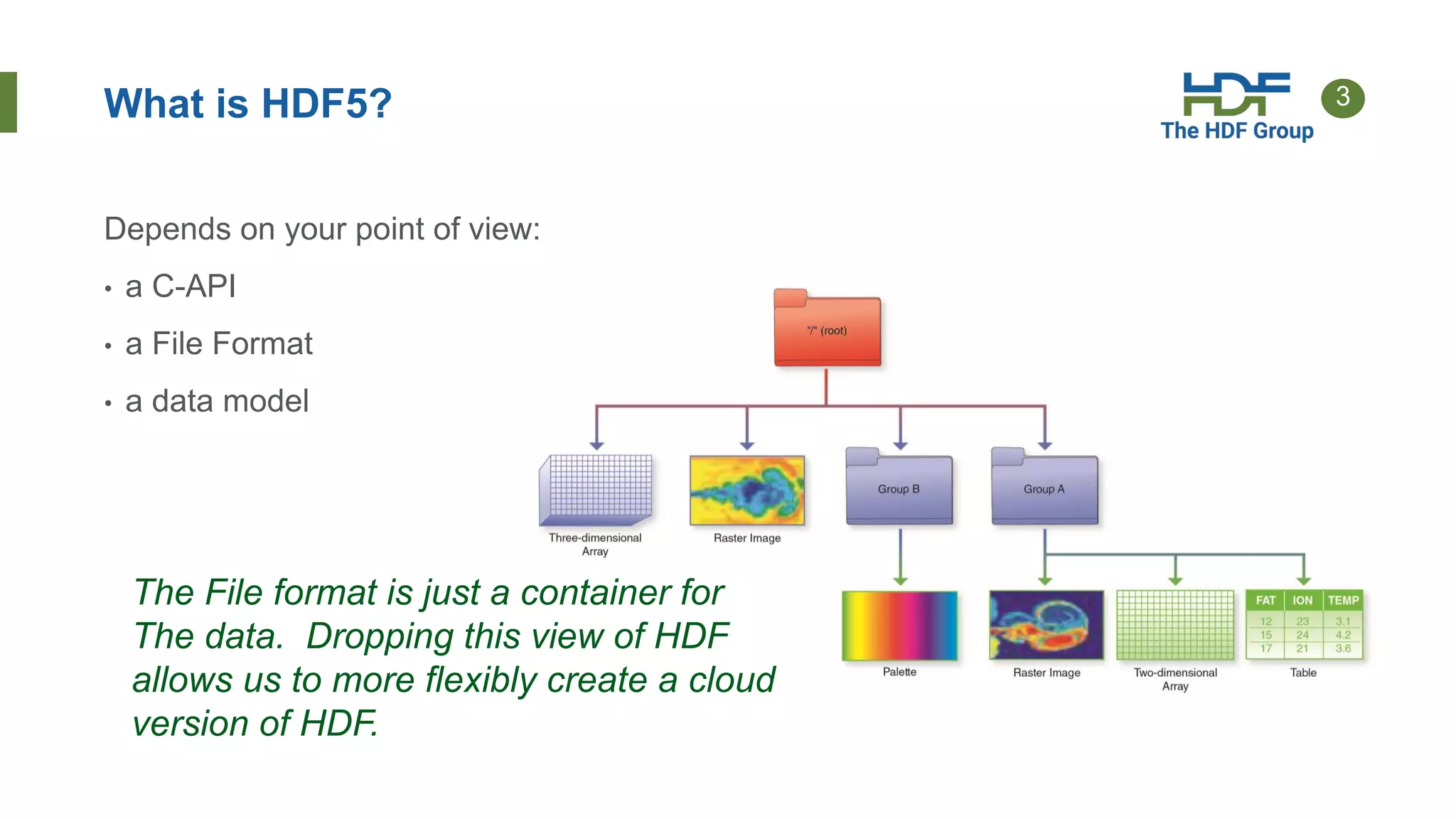
What is HDF5?
Depends on your point of view:
• a C-API
• a File Format
• a data model
The File format is just a container for
The data. Dropping this view of HDF
allows us to more flexibly create a cloud
version of HDF.
4
HDF for the Cloud
• Ideas
• Web based - provide a RESTful API that is feature compatible with HDF5 Lib
API
• Utilize object storage – cost effective, scalable throughput, redundant
• Elastic compute – scale throughput by autoscaling compute clusters
• Compatibility - Provide client SDK so existing HDF applications can just work
5
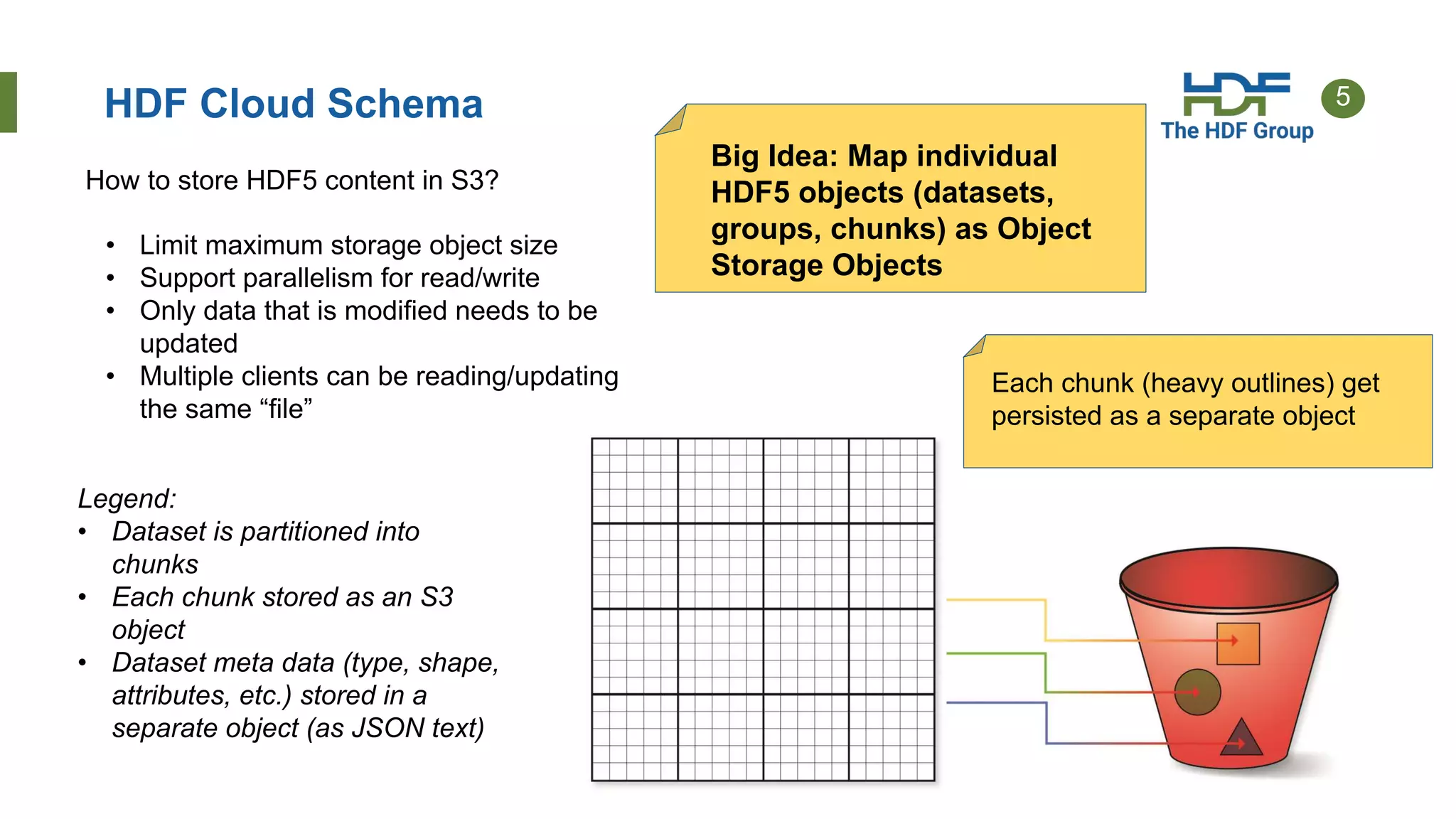
HDF Cloud Schema
Big Idea: Map individual
HDF5 objects (datasets,
groups, chunks) as Object
Storage Objects
• Limit maximum storage object size
• Support parallelism for read/write
• Only data that is modified needs to be
updated
• Multiple clients can be reading/updating
the same “file”
Legend:
• Dataset is partitioned into
chunks
• Each chunk stored as an S3
object
• Dataset meta data (type, shape,
attributes, etc.) stored in a
separate object (as JSON text)
How to store HDF5 content in S3?
Each chunk (heavy outlines) get
persisted as a separate object
6
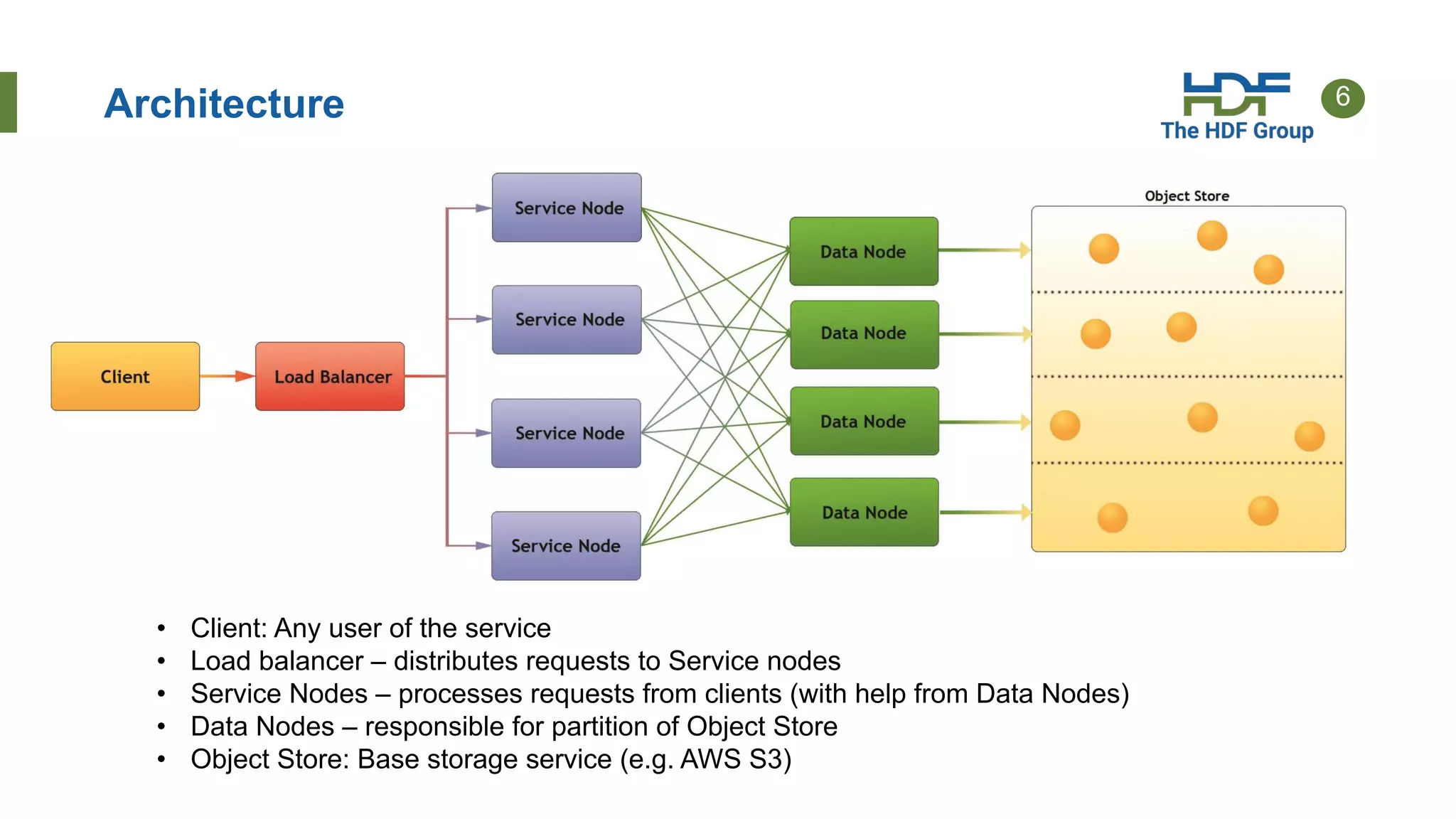
Architecture
Legend:
• Client: Any user of the service
• Load balancer – distributes requests to Service nodes
• Service Nodes – processes requests from clients (with help from Data Nodes)
• Data Nodes – responsible for partition of Object Store
• Object Store: Base storage service (e.g. AWS S3)
7
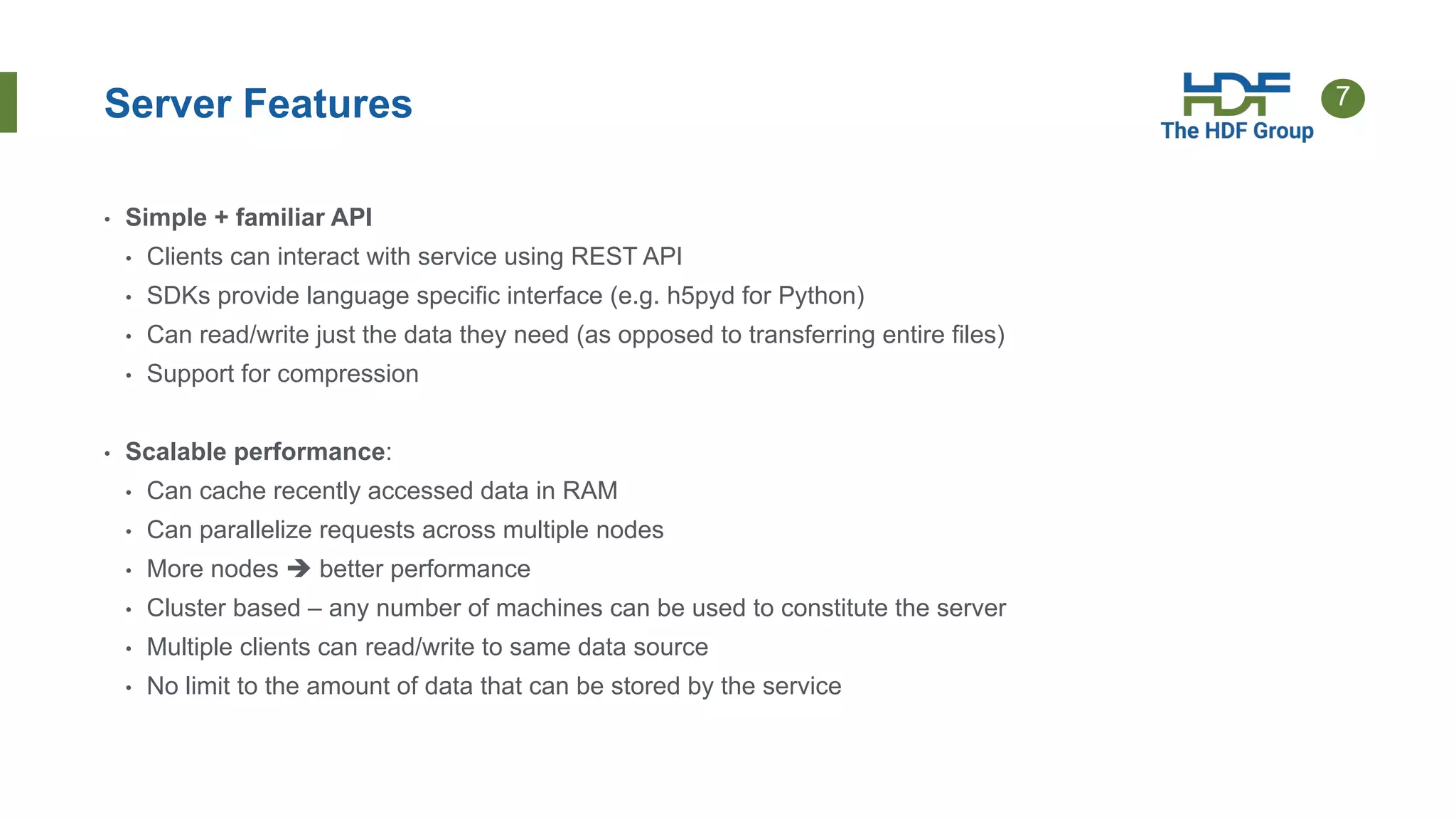
Server Features
• Simple + familiar API
• Clients can interact with service using REST API
• SDKs provide language specific interface (e.g. h5pyd for Python)
• Can read/write just the data they need (as opposed to transferring entire files)
• Support for compression
• Scalable performance:
• Can cache recently accessed data in RAM
• Can parallelize requests across multiple nodes
• More nodes  better performance
• Cluster based – any number of machines can be used to constitute the server
• Multiple clients can read/write to same data source
• No limit to the amount of data that can be stored by the service
8
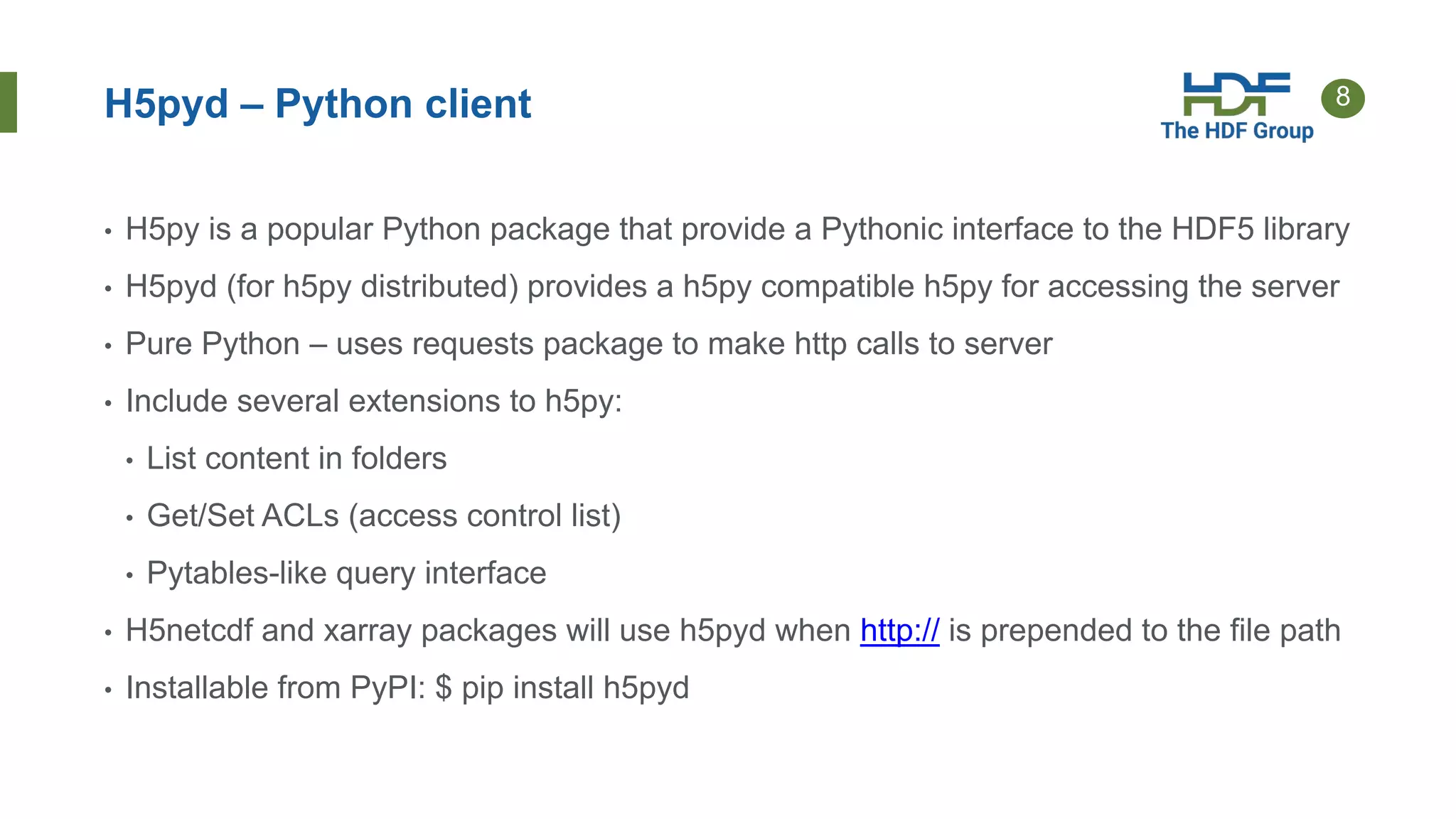
H5pyd – Python client
• H5py is a popular Python package that provide a Pythonic interface to the HDF5 library
• H5pyd (for h5py distributed) provides a h5py compatible h5py for accessing the server
• Pure Python – uses requests package to make http calls to server
• Include several extensions to h5py:
• List content in folders
• Get/Set ACLs (access control list)
• Pytables-like query interface
• H5netcdf and xarray packages will use h5pyd when http:// is prepended to the file path
• Installable from PyPI: $ pip install h5pyd
9
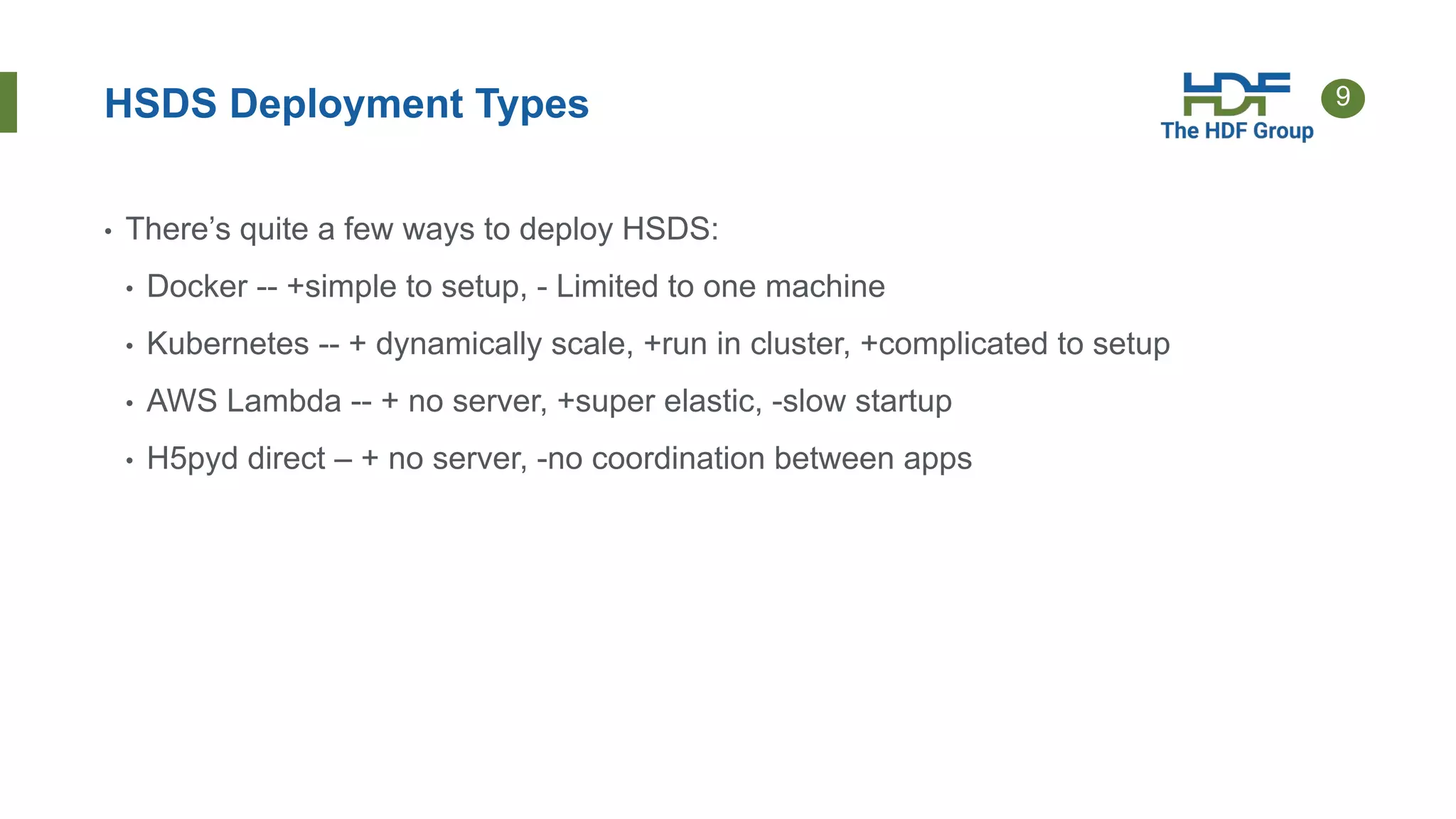
HSDS Deployment Types
• There’s quite a few ways to deploy HSDS:
• Docker -- +simple to setup, - Limited to one machine
• Kubernetes -- + dynamically scale, +run in cluster, +complicated to setup
• AWS Lambda -- + no server, +super elastic, -slow startup
• H5pyd direct – + no server, -no coordination between apps
10
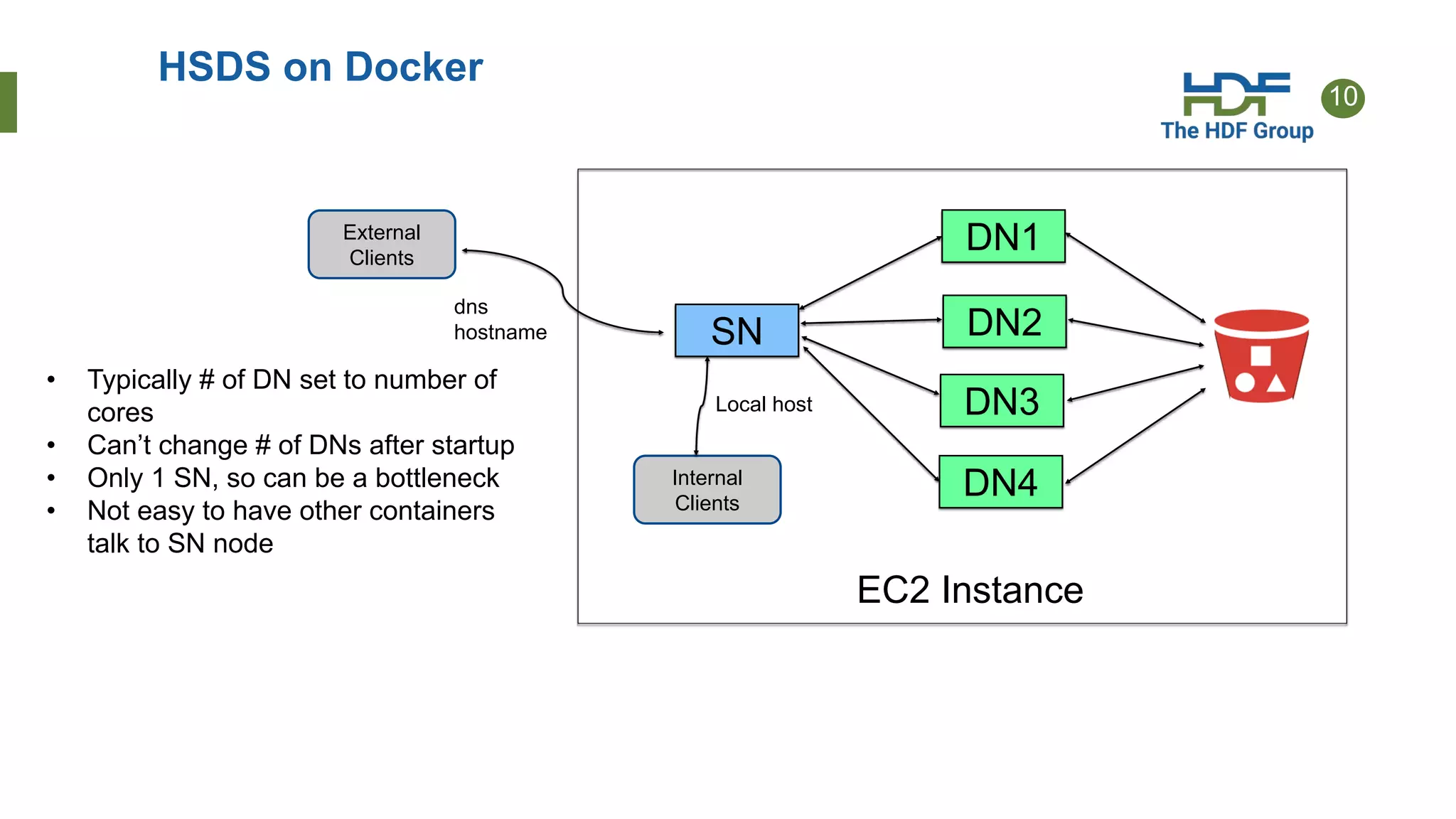
HSDS on Docker
SN
DN1
DN2
DN3
DN4
External
Clients
Internal
Clients
Local host
dns
hostname
EC2 Instance
• Typically # of DN set to number of
cores
• Can’t change # of DNs after startup
• Only 1 SN, so can be a bottleneck
• Not easy to have other containers
talk to SN node
11
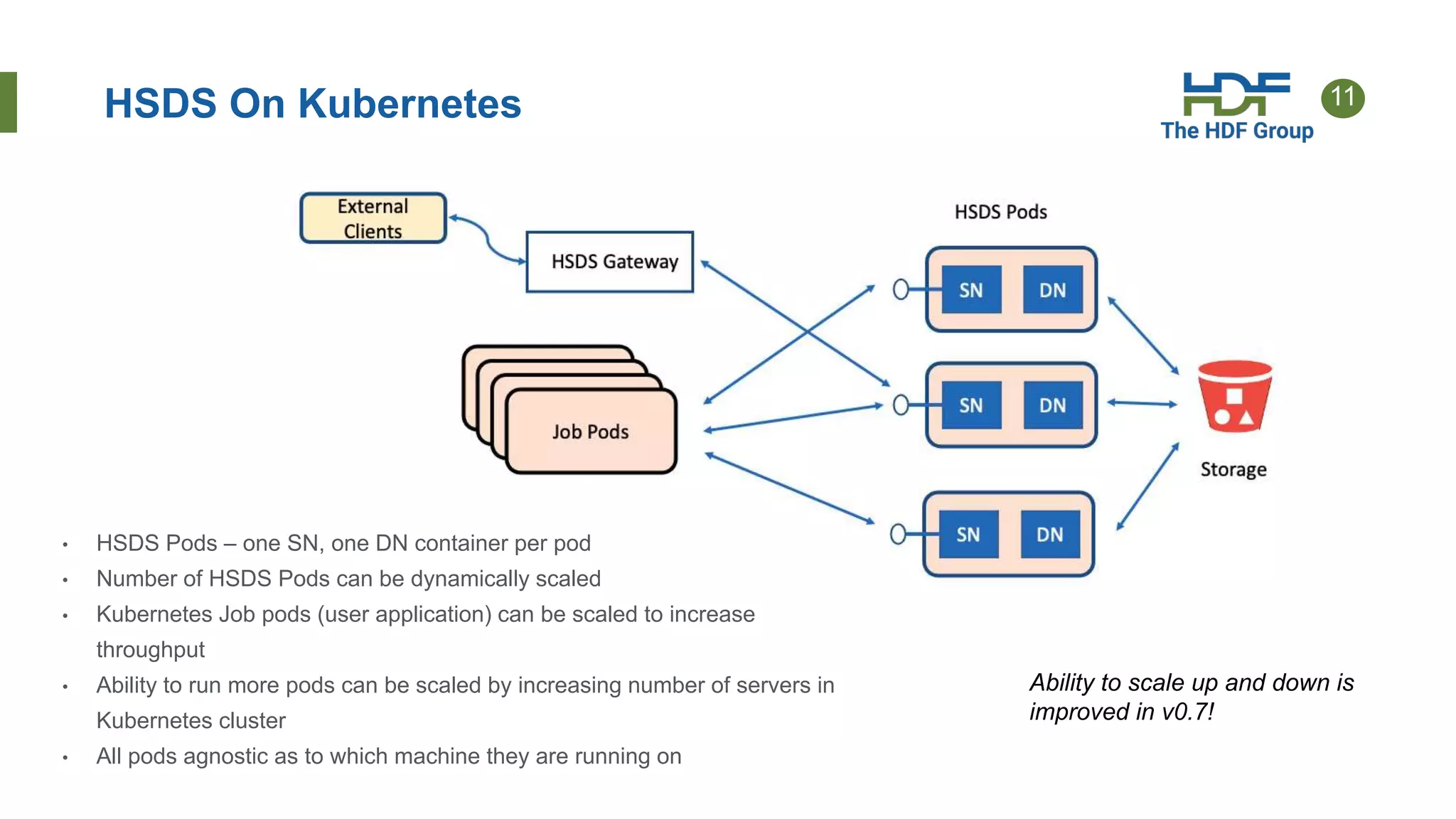
HSDS On Kubernetes
• HSDS Pods – one SN, one DN container per pod
• Number of HSDS Pods can be dynamically scaled
• Kubernetes Job pods (user application) can be scaled to increase
throughput
• Ability to run more pods can be scaled by increasing number of servers in
Kubernetes cluster
• All pods agnostic as to which machine they are running on
Ability to scale up and down is
improved in v0.7!
12
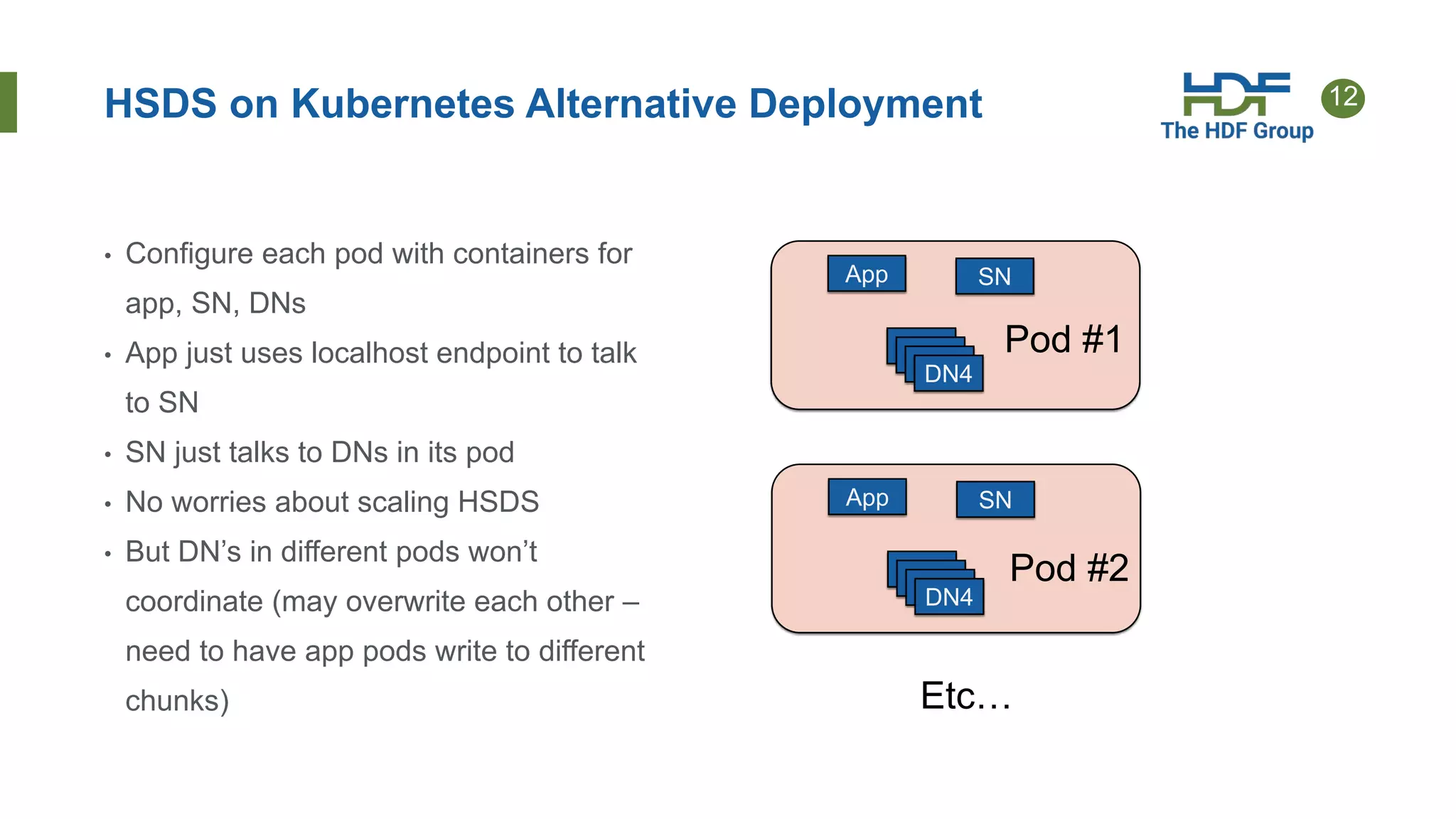
HSDS on Kubernetes Alternative Deployment
• Configure each pod with containers for
app, SN, DNs
• App just uses localhost endpoint to talk
to SN
• SN just talks to DNs in its pod
• No worries about scaling HSDS
• But DN’s in different pods won’t
coordinate (may overwrite each other –
need to have app pods write to different
chunks)
App SN
DN1
DN1
DN1
DN4
Pod #1
App SN
DN1
DN1
DN1
DN4
Pod #2
Etc…
13
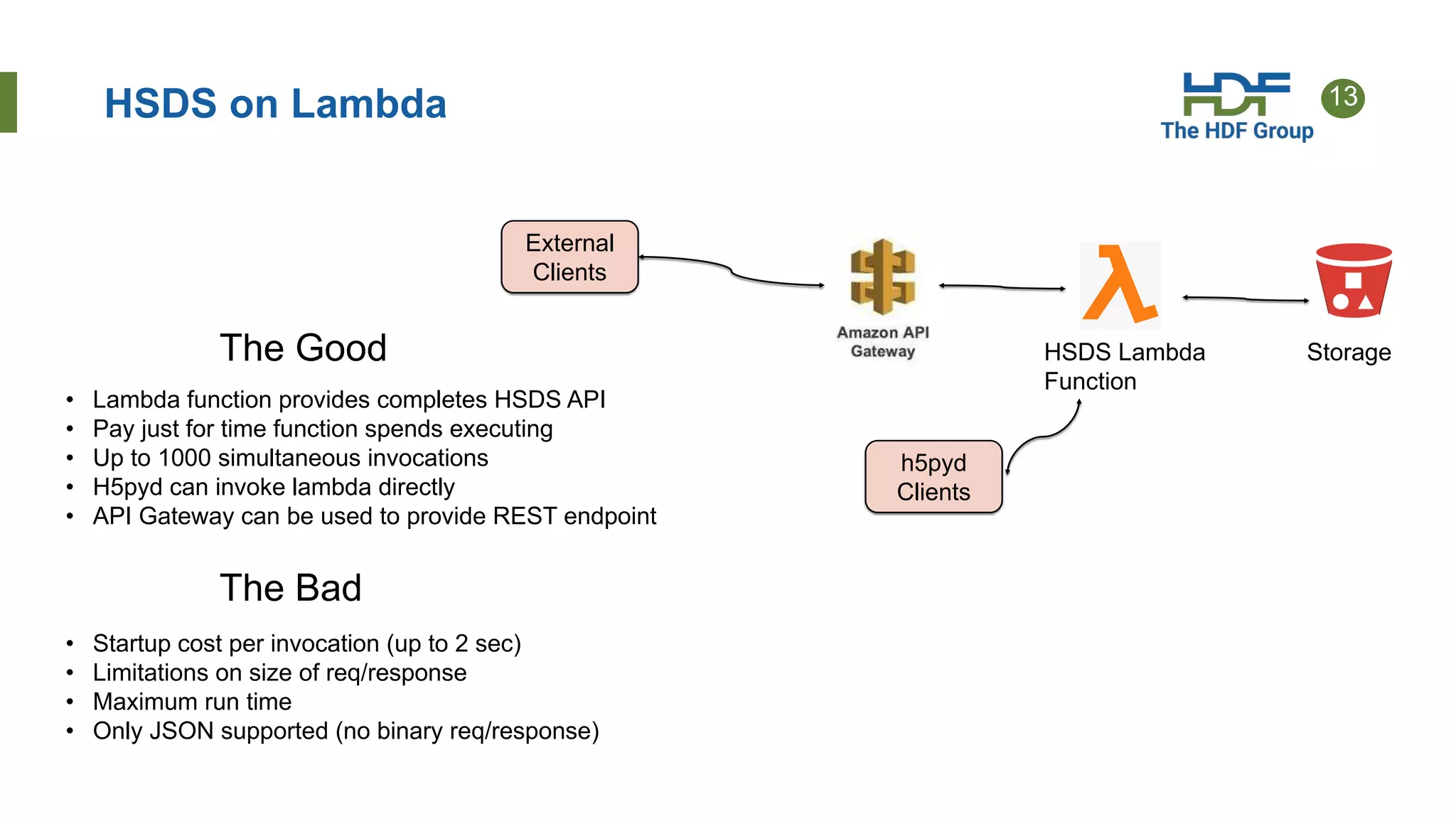
HSDS on Lambda
External
Clients
h5pyd
Clients
HSDS Lambda
Function
Storage
• Lambda function provides completes HSDS API
• Pay just for time function spends executing
• Up to 1000 simultaneous invocations
• H5pyd can invoke lambda directly
• API Gateway can be used to provide REST endpoint
The Good
The Bad
• Startup cost per invocation (up to 2 sec)
• Limitations on size of req/response
• Maximum run time
• Only JSON supported (no binary req/response)
14
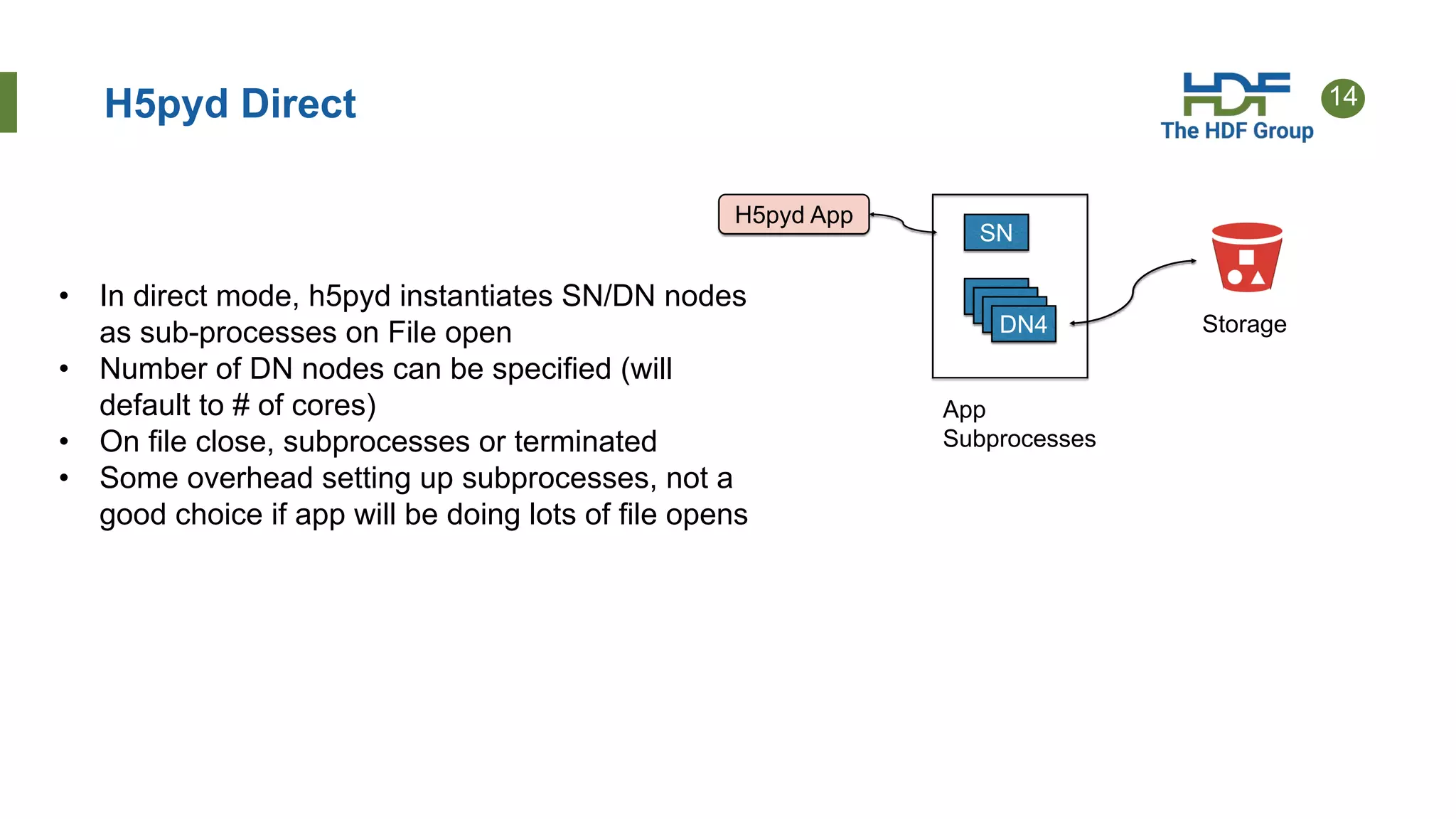
H5pyd Direct
H5pyd App
SN
DN1
DN1
DN1
DN4 Storage
App
Subprocesses
• In direct mode, h5pyd instantiates SN/DN nodes
as sub-processes on File open
• Number of DN nodes can be specified (will
default to # of cores)
• On file close, subprocesses or terminated
• Some overhead setting up subprocesses, not a
good choice if app will be doing lots of file opens
15
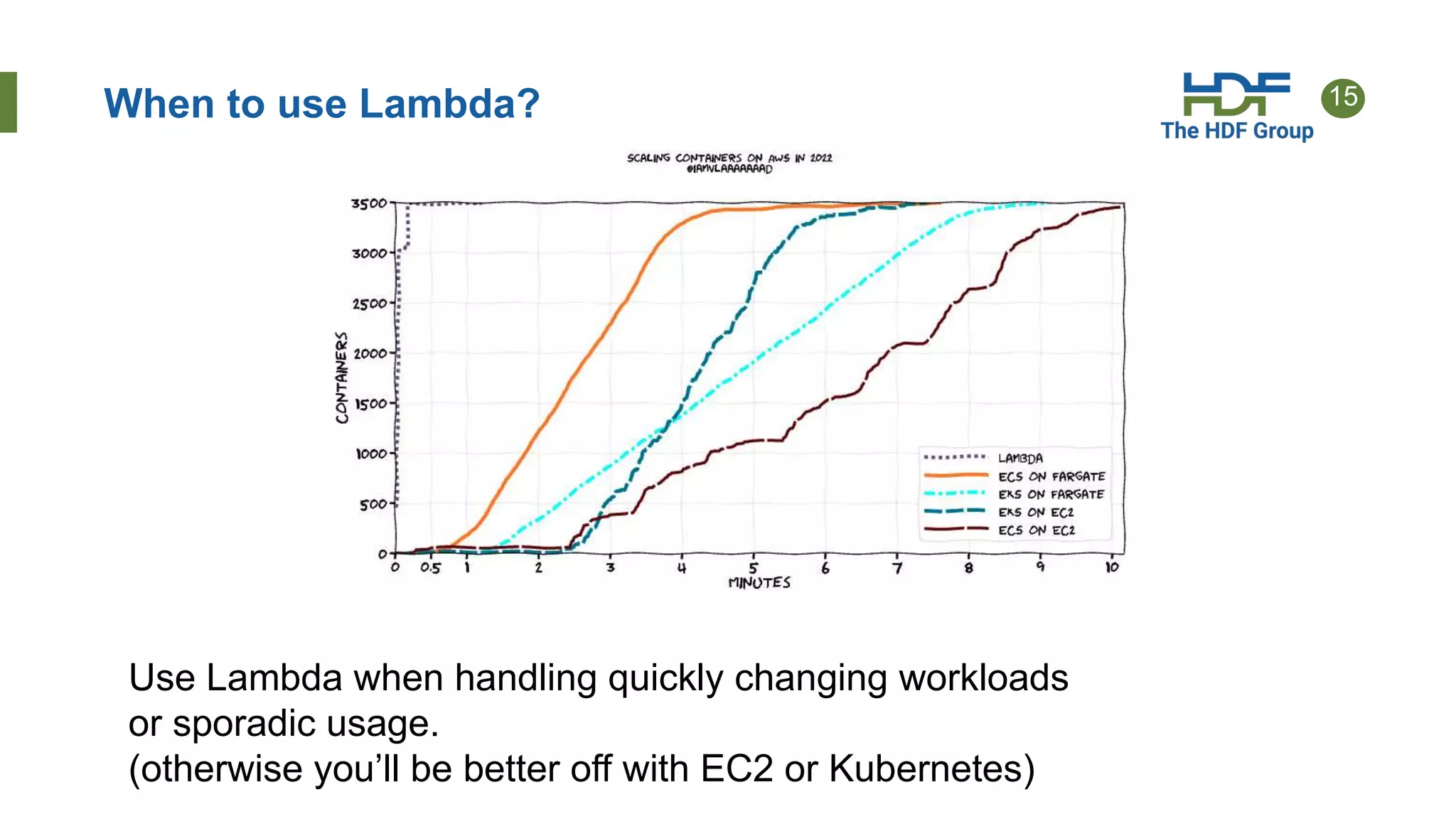
When to use Lambda?
Use Lambda when handling quickly changing workloads
or sporadic usage.
(otherwise you’ll be better off with EC2 or Kubernetes)
16
Streaming Support
• Previously HSDS had limits on the number of chunks that could be accessed in one request and the
number of bytes that could be read or written (server would send a 413 – Payload too large
response)
• Problem was the HSDS would need to allocate memory buffer to store the response (or request)
• Too large of request -> out of memory death!
• In v0.7, HSDS now internally paginates larger request
• So:
• No limit on the size of a binary request (+1GB/req is fine)
• Memory load on server is managed
• Client will start getting bytes back when the server is still processing latter chunks
17
Fancy Indexing
• Fancy indexing enables dataset selections based on start+stop+stride or set of indexes
• Example. N(0:100, (1,4,63,92))
• In v0.7 fancy indexes can be done in one request vs (a series of hyperslab selections)
• Some selections see 8x speed increase vs getting on index per request
• Example: retrieving 4000 random columns from a 17520 by 2018392 dataset
demonstrating good scaling as the number of HSDS nodes was increased:
• 4 nodes: 65.4s
• 8 nodes: 35.7s
• 16 nodes: 23.4 s
18
Time Series Performance Comparison
• How does HSDS do compared to other methods?
• Test case: read 1 column from 17568 x 2018392 dataset
• 80GB file, 40k chunks, 10GB read to return 4mb
• Compare:
• HDF5Lib with file on spinning disk
• HDF5Lib with file on SSD
• HDF5Lib with ros3 VFD with file on S3
• HSDS with file on S3
• Test with 1,2,4,8 HSDS nodes
19
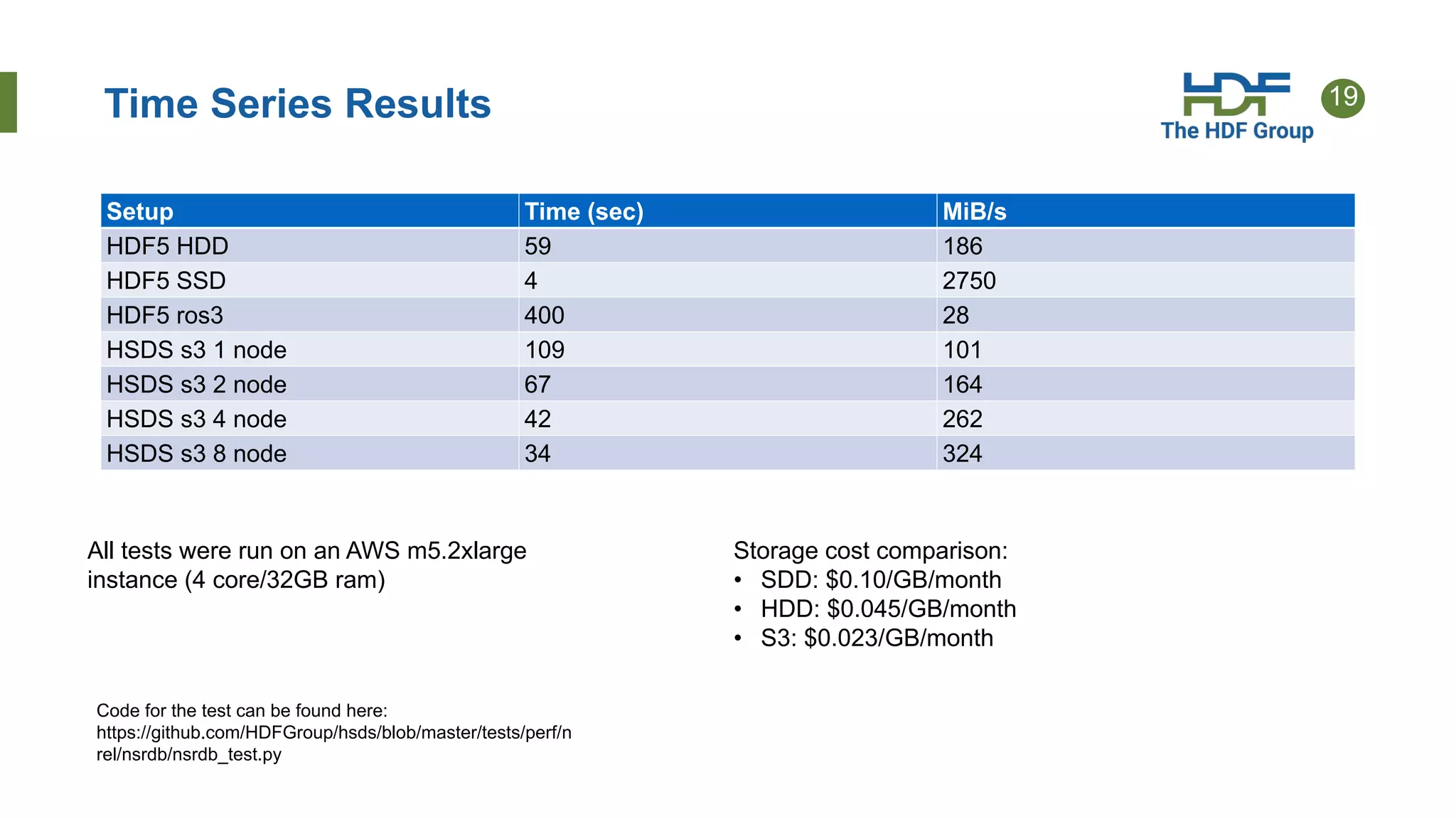
Time Series Results
Setup Time (sec) MiB/s
HDF5 HDD 59 186
HDF5 SSD 4 2750
HDF5 ros3 400 28
HSDS s3 1 node 109 101
HSDS s3 2 node 67 164
HSDS s3 4 node 42 262
HSDS s3 8 node 34 324
All tests were run on an AWS m5.2xlarge
instance (4 core/32GB ram)
Storage cost comparison:
• SDD: $0.10/GB/month
• HDD: $0.045/GB/month
• S3: $0.023/GB/month
Code for the test can be found here:
https://github.com/HDFGroup/hsds/blob/master/tests/perf/n
rel/nsrdb/nsrdb_test.py
20
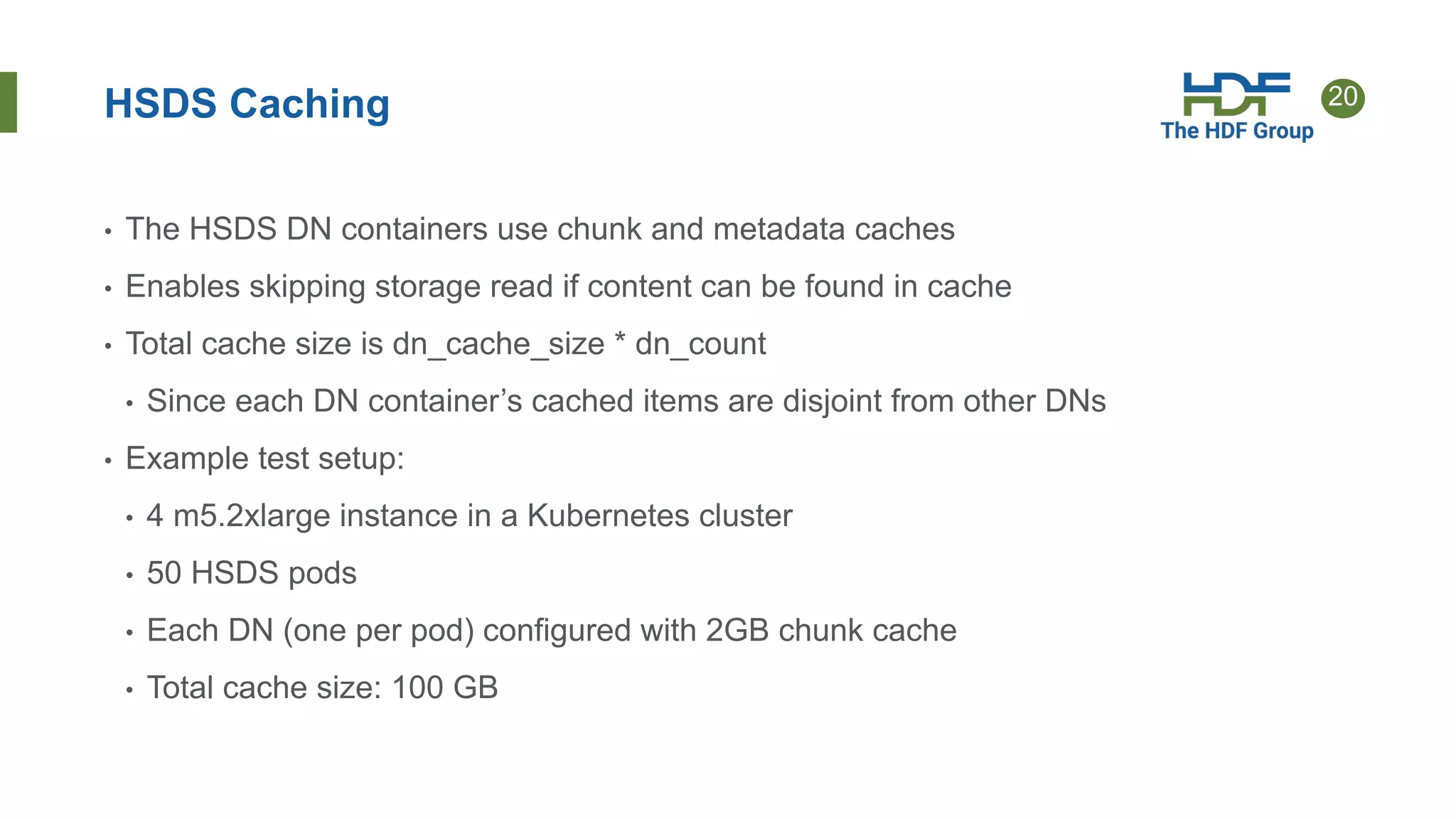
HSDS Caching
• The HSDS DN containers use chunk and metadata caches
• Enables skipping storage read if content can be found in cache
• Total cache size is dn_cache_size * dn_count
• Since each DN container’s cached items are disjoint from other DNs
• Example test setup:
• 4 m5.2xlarge instance in a Kubernetes cluster
• 50 HSDS pods
• Each DN (one per pod) configured with 2GB chunk cache
• Total cache size: 100 GB
21
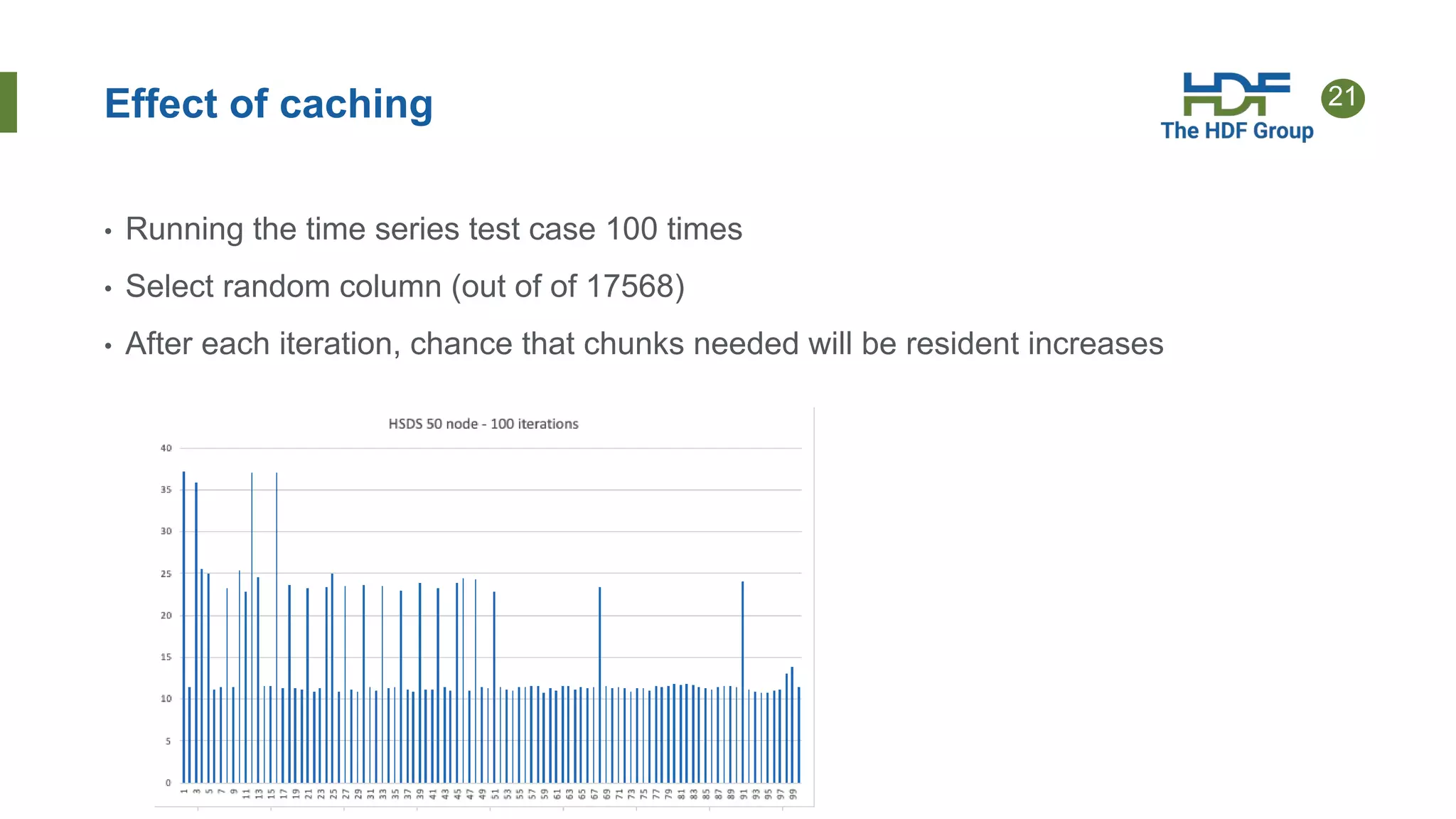
Effect of caching
• Running the time series test case 100 times
• Select random column (out of of 17568)
• After each iteration, chance that chunks needed will be resident increases
22
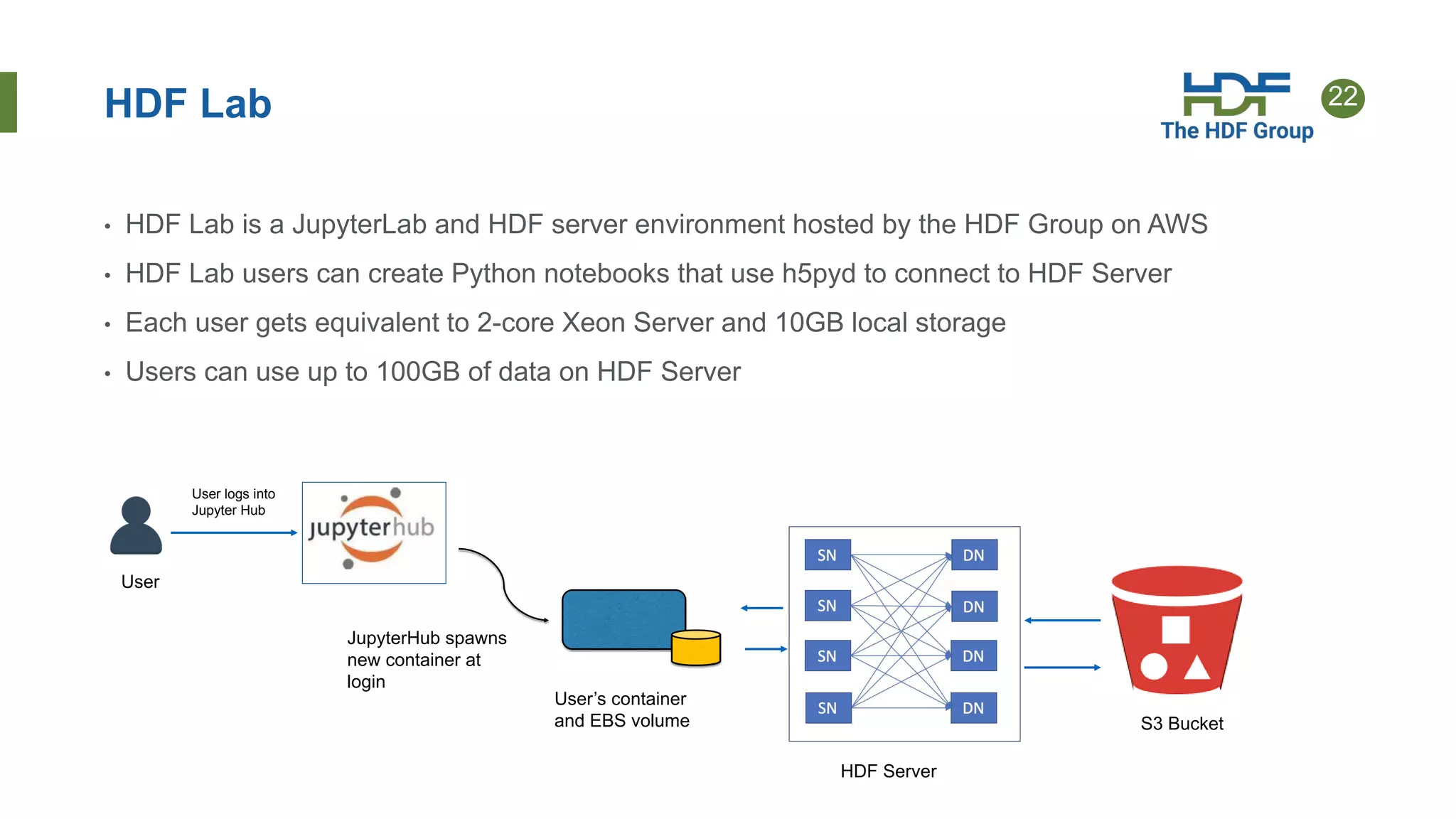
HDF Lab
• HDF Lab is a JupyterLab and HDF server environment hosted by the HDF Group on AWS
• HDF Lab users can create Python notebooks that use h5pyd to connect to HDF Server
• Each user gets equivalent to 2-core Xeon Server and 10GB local storage
• Users can use up to 100GB of data on HDF Server
User’s container
and EBS volume
User
User logs into
Jupyter Hub
JupyterHub spawns
new container at
login
HDF Server
S3 Bucket
23
Case Study - NREL
NREL (National Renewable Energy Laboratory) uses HDF
Cloud to make PB’s of environmental data accessible to the
public.
HSDS enables users to slice and dice just the data they need
(say given time range, or geo range)
Use of HSDS has expanded over the last 5 years
NREL has started to use the HSDS Lambda functions (request
load is highly variable driven mostly by external uses)
24
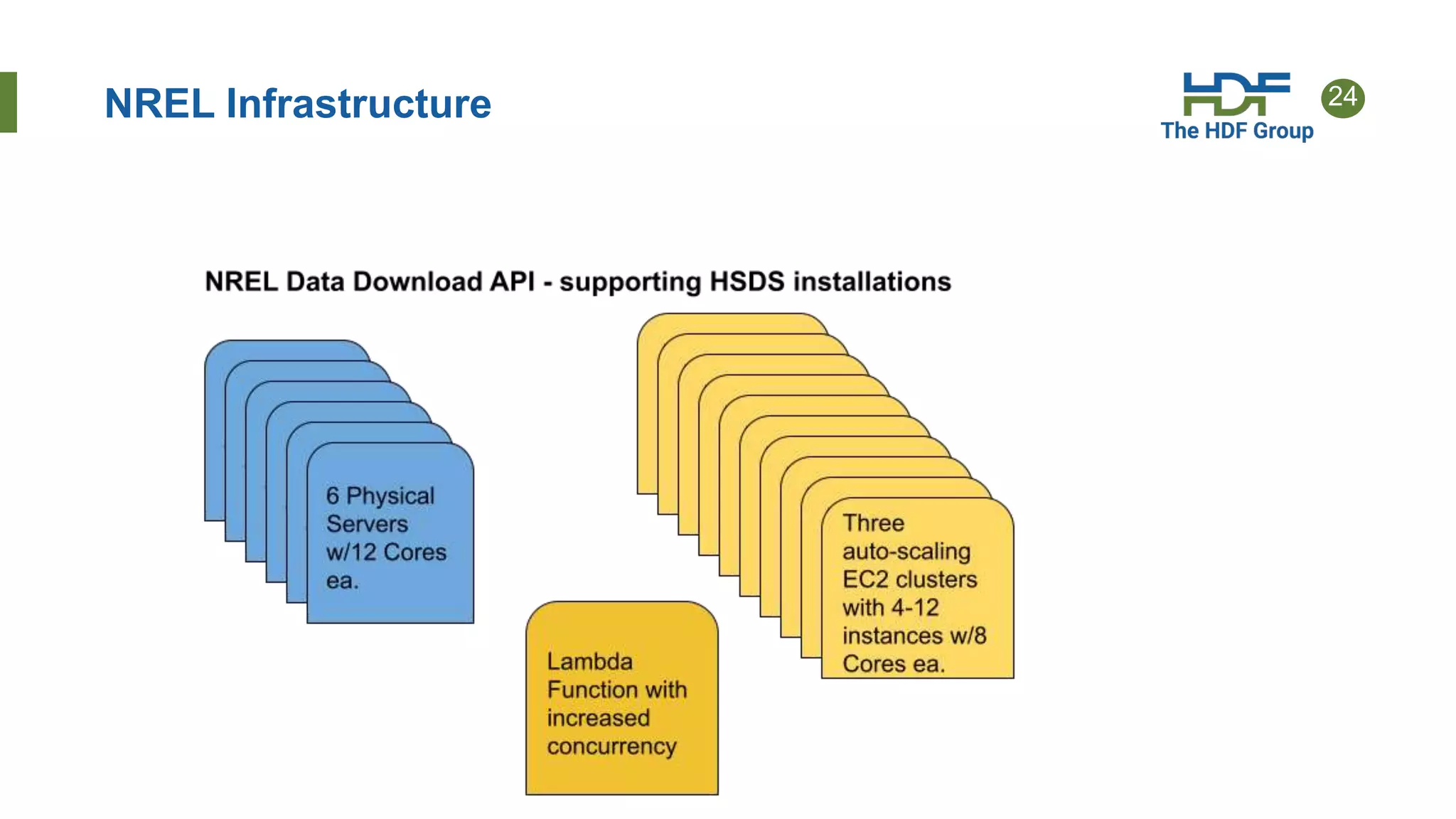
NREL Infrastructure
25
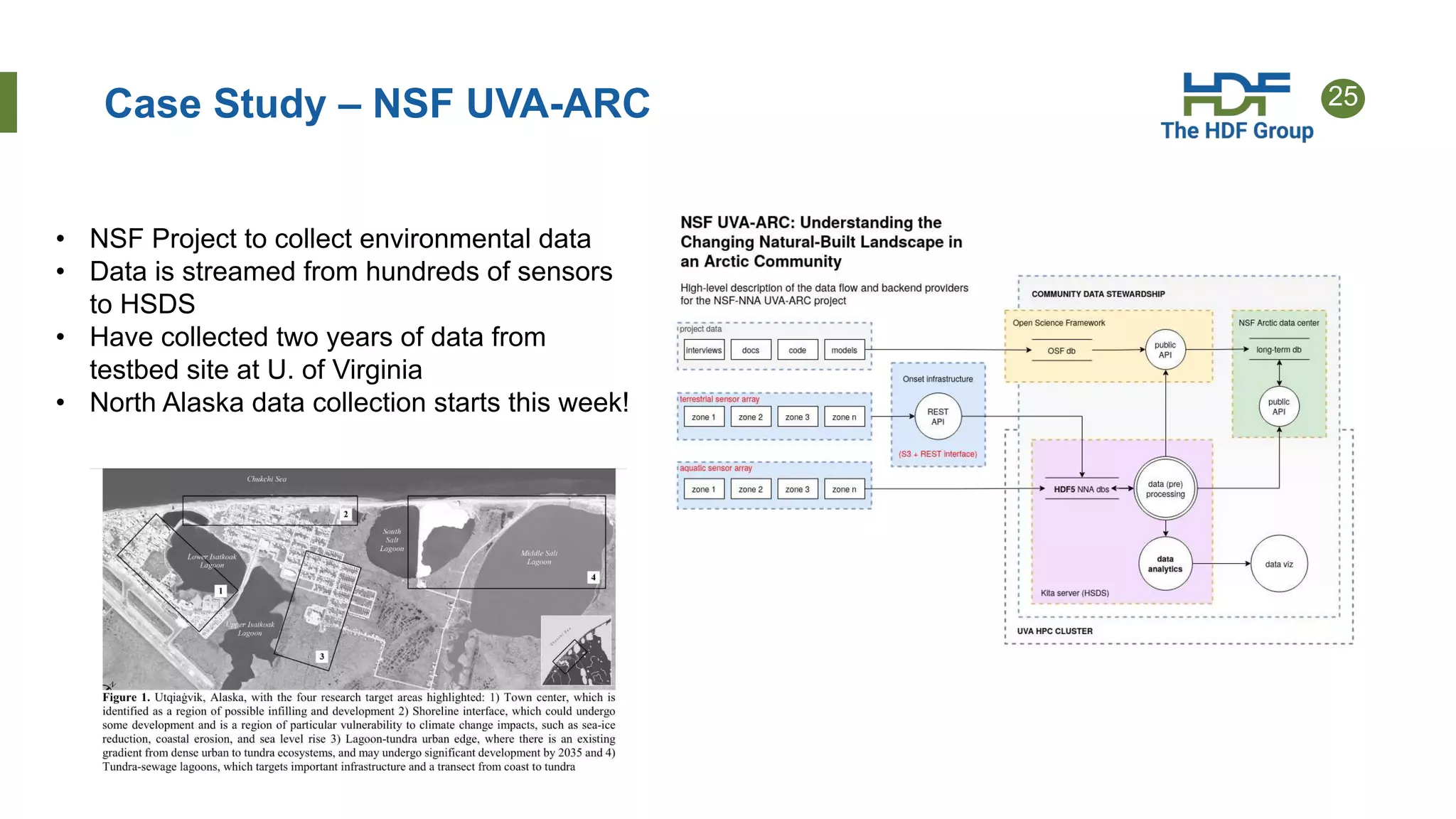
Case Study – NSF UVA-ARC
• NSF Project to collect environmental data
• Data is streamed from hundreds of sensors
to HSDS
• Have collected two years of data from
testbed site at U. of Virginia
• North Alaska data collection starts this week!
26
References 2
6
• HSDS Design Doc:
https://github.com/HDFGroup/hsds/blob/master/docs/design/hsds_arch/hsds
_arch.md
• HSDS Design Schema:
https://github.com/HDFGroup/hsds/blob/master/docs/design/obj_store_sche
ma/obj_store_schema_v2.md
• SciPy2017 talk:
https://s3.amazonaws.com/hdfgroup/docs/hdf_data_services_scipy2017.pdf
• AWS Big Data Blog article: https://aws.amazon.com/blogs/big-data/power-
from-wind-open-data-on-aws/

Highly Scalable Data Service (HSDS) Performance Features

  • 1.
    Proprietary and Confidential.Copyright 2018, The HDF Group. HDF Town Hall 2022: HSDS Performance Features John Readey – jreadey@hdfgroup.org
  • 2.
    2 • Brief Overviewof HSDS • Streaming support • Fancy indexing • Performance Comparison • Case Studies Outline
  • 3.
    3 What is HDF5? Dependson your point of view: • a C-API • a File Format • a data model The File format is just a container for The data. Dropping this view of HDF allows us to more flexibly create a cloud version of HDF.
  • 4.
    4 HDF for theCloud • Ideas • Web based - provide a RESTful API that is feature compatible with HDF5 Lib API • Utilize object storage – cost effective, scalable throughput, redundant • Elastic compute – scale throughput by autoscaling compute clusters • Compatibility - Provide client SDK so existing HDF applications can just work
  • 5.
    5 HDF Cloud Schema BigIdea: Map individual HDF5 objects (datasets, groups, chunks) as Object Storage Objects • Limit maximum storage object size • Support parallelism for read/write • Only data that is modified needs to be updated • Multiple clients can be reading/updating the same “file” Legend: • Dataset is partitioned into chunks • Each chunk stored as an S3 object • Dataset meta data (type, shape, attributes, etc.) stored in a separate object (as JSON text) How to store HDF5 content in S3? Each chunk (heavy outlines) get persisted as a separate object
  • 6.
    6 Architecture Legend: • Client: Anyuser of the service • Load balancer – distributes requests to Service nodes • Service Nodes – processes requests from clients (with help from Data Nodes) • Data Nodes – responsible for partition of Object Store • Object Store: Base storage service (e.g. AWS S3)
  • 7.
    7 Server Features • Simple+ familiar API • Clients can interact with service using REST API • SDKs provide language specific interface (e.g. h5pyd for Python) • Can read/write just the data they need (as opposed to transferring entire files) • Support for compression • Scalable performance: • Can cache recently accessed data in RAM • Can parallelize requests across multiple nodes • More nodes  better performance • Cluster based – any number of machines can be used to constitute the server • Multiple clients can read/write to same data source • No limit to the amount of data that can be stored by the service
  • 8.
    8 H5pyd – Pythonclient • H5py is a popular Python package that provide a Pythonic interface to the HDF5 library • H5pyd (for h5py distributed) provides a h5py compatible h5py for accessing the server • Pure Python – uses requests package to make http calls to server • Include several extensions to h5py: • List content in folders • Get/Set ACLs (access control list) • Pytables-like query interface • H5netcdf and xarray packages will use h5pyd when http:// is prepended to the file path • Installable from PyPI: $ pip install h5pyd
  • 9.
    9 HSDS Deployment Types •There’s quite a few ways to deploy HSDS: • Docker -- +simple to setup, - Limited to one machine • Kubernetes -- + dynamically scale, +run in cluster, +complicated to setup • AWS Lambda -- + no server, +super elastic, -slow startup • H5pyd direct – + no server, -no coordination between apps
  • 10.
    10 HSDS on Docker SN DN1 DN2 DN3 DN4 External Clients Internal Clients Localhost dns hostname EC2 Instance • Typically # of DN set to number of cores • Can’t change # of DNs after startup • Only 1 SN, so can be a bottleneck • Not easy to have other containers talk to SN node
  • 11.
    11 HSDS On Kubernetes •HSDS Pods – one SN, one DN container per pod • Number of HSDS Pods can be dynamically scaled • Kubernetes Job pods (user application) can be scaled to increase throughput • Ability to run more pods can be scaled by increasing number of servers in Kubernetes cluster • All pods agnostic as to which machine they are running on Ability to scale up and down is improved in v0.7!
  • 12.
    12 HSDS on KubernetesAlternative Deployment • Configure each pod with containers for app, SN, DNs • App just uses localhost endpoint to talk to SN • SN just talks to DNs in its pod • No worries about scaling HSDS • But DN’s in different pods won’t coordinate (may overwrite each other – need to have app pods write to different chunks) App SN DN1 DN1 DN1 DN4 Pod #1 App SN DN1 DN1 DN1 DN4 Pod #2 Etc…
  • 13.
    13 HSDS on Lambda External Clients h5pyd Clients HSDSLambda Function Storage • Lambda function provides completes HSDS API • Pay just for time function spends executing • Up to 1000 simultaneous invocations • H5pyd can invoke lambda directly • API Gateway can be used to provide REST endpoint The Good The Bad • Startup cost per invocation (up to 2 sec) • Limitations on size of req/response • Maximum run time • Only JSON supported (no binary req/response)
  • 14.
    14 H5pyd Direct H5pyd App SN DN1 DN1 DN1 DN4Storage App Subprocesses • In direct mode, h5pyd instantiates SN/DN nodes as sub-processes on File open • Number of DN nodes can be specified (will default to # of cores) • On file close, subprocesses or terminated • Some overhead setting up subprocesses, not a good choice if app will be doing lots of file opens
  • 15.
    15 When to useLambda? Use Lambda when handling quickly changing workloads or sporadic usage. (otherwise you’ll be better off with EC2 or Kubernetes)
  • 16.
    16 Streaming Support • PreviouslyHSDS had limits on the number of chunks that could be accessed in one request and the number of bytes that could be read or written (server would send a 413 – Payload too large response) • Problem was the HSDS would need to allocate memory buffer to store the response (or request) • Too large of request -> out of memory death! • In v0.7, HSDS now internally paginates larger request • So: • No limit on the size of a binary request (+1GB/req is fine) • Memory load on server is managed • Client will start getting bytes back when the server is still processing latter chunks
  • 17.
    17 Fancy Indexing • Fancyindexing enables dataset selections based on start+stop+stride or set of indexes • Example. N(0:100, (1,4,63,92)) • In v0.7 fancy indexes can be done in one request vs (a series of hyperslab selections) • Some selections see 8x speed increase vs getting on index per request • Example: retrieving 4000 random columns from a 17520 by 2018392 dataset demonstrating good scaling as the number of HSDS nodes was increased: • 4 nodes: 65.4s • 8 nodes: 35.7s • 16 nodes: 23.4 s
  • 18.
    18 Time Series PerformanceComparison • How does HSDS do compared to other methods? • Test case: read 1 column from 17568 x 2018392 dataset • 80GB file, 40k chunks, 10GB read to return 4mb • Compare: • HDF5Lib with file on spinning disk • HDF5Lib with file on SSD • HDF5Lib with ros3 VFD with file on S3 • HSDS with file on S3 • Test with 1,2,4,8 HSDS nodes
  • 19.
    19 Time Series Results SetupTime (sec) MiB/s HDF5 HDD 59 186 HDF5 SSD 4 2750 HDF5 ros3 400 28 HSDS s3 1 node 109 101 HSDS s3 2 node 67 164 HSDS s3 4 node 42 262 HSDS s3 8 node 34 324 All tests were run on an AWS m5.2xlarge instance (4 core/32GB ram) Storage cost comparison: • SDD: $0.10/GB/month • HDD: $0.045/GB/month • S3: $0.023/GB/month Code for the test can be found here: https://github.com/HDFGroup/hsds/blob/master/tests/perf/n rel/nsrdb/nsrdb_test.py
  • 20.
    20 HSDS Caching • TheHSDS DN containers use chunk and metadata caches • Enables skipping storage read if content can be found in cache • Total cache size is dn_cache_size * dn_count • Since each DN container’s cached items are disjoint from other DNs • Example test setup: • 4 m5.2xlarge instance in a Kubernetes cluster • 50 HSDS pods • Each DN (one per pod) configured with 2GB chunk cache • Total cache size: 100 GB
  • 21.
    21 Effect of caching •Running the time series test case 100 times • Select random column (out of of 17568) • After each iteration, chance that chunks needed will be resident increases
  • 22.
    22 HDF Lab • HDFLab is a JupyterLab and HDF server environment hosted by the HDF Group on AWS • HDF Lab users can create Python notebooks that use h5pyd to connect to HDF Server • Each user gets equivalent to 2-core Xeon Server and 10GB local storage • Users can use up to 100GB of data on HDF Server User’s container and EBS volume User User logs into Jupyter Hub JupyterHub spawns new container at login HDF Server S3 Bucket
  • 23.
    23 Case Study -NREL NREL (National Renewable Energy Laboratory) uses HDF Cloud to make PB’s of environmental data accessible to the public. HSDS enables users to slice and dice just the data they need (say given time range, or geo range) Use of HSDS has expanded over the last 5 years NREL has started to use the HSDS Lambda functions (request load is highly variable driven mostly by external uses)
  • 24.
  • 25.
    25 Case Study –NSF UVA-ARC • NSF Project to collect environmental data • Data is streamed from hundreds of sensors to HSDS • Have collected two years of data from testbed site at U. of Virginia • North Alaska data collection starts this week!
  • 26.
    26 References 2 6 • HSDSDesign Doc: https://github.com/HDFGroup/hsds/blob/master/docs/design/hsds_arch/hsds _arch.md • HSDS Design Schema: https://github.com/HDFGroup/hsds/blob/master/docs/design/obj_store_sche ma/obj_store_schema_v2.md • SciPy2017 talk: https://s3.amazonaws.com/hdfgroup/docs/hdf_data_services_scipy2017.pdf • AWS Big Data Blog article: https://aws.amazon.com/blogs/big-data/power- from-wind-open-data-on-aws/

Editor's Notes

  • #4 Mention Andrew’s talk
  • #7 Each node is implemented as a docker container