@AU_EarthObs
SPD and KEA:
HDF5 based file formats for Earth
Observation
Pete Bunting1, John Armston2, Sam Gillingham3, Neil Flood4
1. Aberystwyth University, UK (pfb@aber.ac.uk)
2. University of Maryland, USA (armston@umd.edu)
3. Landcare Research, NZ (gillingham.sam@gmail.com)
4. Science Division, Queensland Government, Australia (neil.flood@dsiti.qld.gov.au)
Contents
• Sorted Pulse Data (SPD) Format
– For storing laser scanning data
• KEA Image File Format
– Implementation of the GDAL raster data
model.
SPD: Little History…
• The first version of ‘SPDLib’ was written in 2008
– ‘Sorted Point Data’, simply stored a 2D grid based index
alongside the points file.
• 2009 I was using a ENVI image file to store the header
information (as a 2 band image). Having multiple files per
datasets wasn’t ideal also LAS missing fields (e.g., height)
I wanted for processing.
– Colleague suggested looking at HDF5
• 2011 John Armston visited Aberystwyth with a set of full
waveform acquisitions for use in his PhD.
– ‘Sorted Pulse Data’ was born.
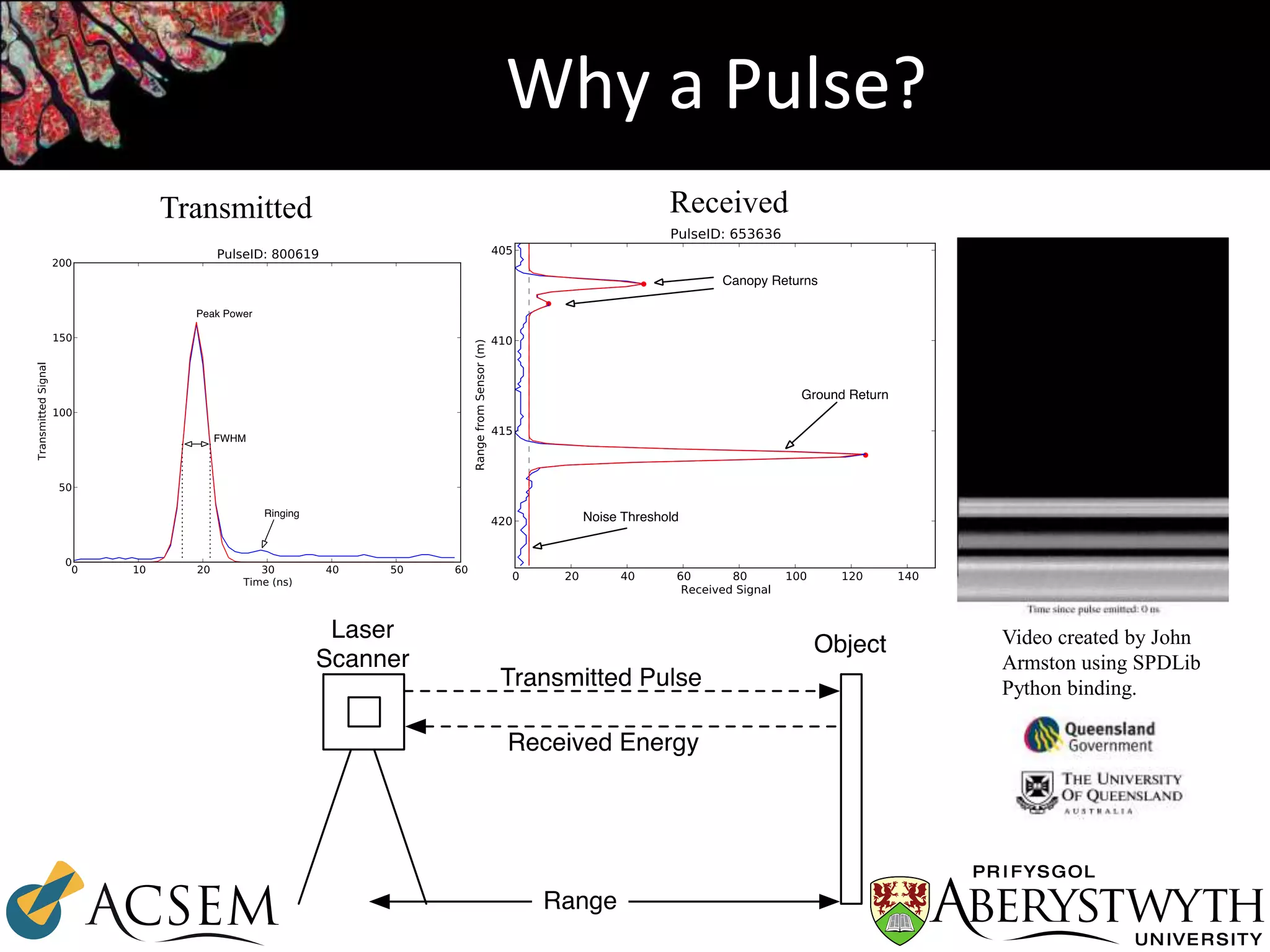
Why a Pulse?
Transmitted Received
Video created by John
Armston using SPDLib
Python binding.
SPD File Format
Pulse ID
GPSTime
Origin [X, Y, Z, H]
Index [X, Y]
Azimuth
Zenith
TransmitAmplitude
TransmitWidth
SourceID
Wavelength
NumberOfReturns
Returns
NumberOfTransmittedBins
TransmittedBins
NumberOfRecievedBins
RecievedBins
SPD Pulse
Point ID
GPSTime
Location [X, Y, Z, H]
Classification
Amplitude
Width
Range
Red
Green
Blue
WaveformOffset
SPD Point
Point ID
GPSTime
Location [X, Y, Z, H]
Classification
Amplitude
Width
Range
Red
Green
Blue
WaveformOffset
SPD Point
Point ID
GPSTime
Location [X, Y, Z, H]
Classification
Amplitude
Width
Range
Red
Green
Blue
WaveformOffset
SPD Point
Pulse ID
GPSTime
Origin [X, Y, Z, H]
Index [X, Y]
Azimuth
Zenith
TransmitAmplitude
TransmitWidth
SourceID
Wavelength
NumberOfReturns
Returns
NumberOfTransmittedBins
TransmittedBins
NumberOfRecievedBins
RecievedBins
SPD Pulse
Point ID
GPSTime
Location [X, Y, Z, H]
Classification
Amplitude
Width
Range
Red
Green
Blue
WaveformOffset
SPD Point
Point ID
GPSTime
Location [X, Y, Z, H]
Classification
Amplitude
Width
Range
Red
Green
Blue
WaveformOffset
SPD Point
Point ID
GPSTime
Location [X, Y, Z, H]
Classification
Amplitude
Width
Range
Red
Green
Blue
WaveformOffset
SPD Point
Pulse ID
GPSTime
Origin [X, Y, Z, H]
Index [X, Y]
Azimuth
Zenith
TransmitAmplitude
TransmitWidth
SourceID
Wavelength
NumberOfReturns
Returns
NumberOfTransmittedBins
TransmittedBins
NumberOfRecievedBins
RecievedBins
SPD Pulse
Point ID
GPSTime
Location [X, Y, Z, H]
Classification
Amplitude
Width
Range
Red
Green
Blue
WaveformOffset
SPD Point
Point ID
GPSTime
Location [X, Y, Z, H]
Classification
Amplitude
Width
Range
Red
Green
Blue
WaveformOffset
SPD Point
Point ID
GPSTime
Location [X, Y, Z, H]
Classification
Amplitude
Width
Range
Red
Green
Blue
WaveformOffset
SPD Point
Pulse ID
GPSTime
Origin [X, Y, Z, H]
Index [X, Y]
Azimuth
Zenith
TransmitAmplitude
TransmitWidth
SourceID
Wavelength
NumberOfReturns
Returns
NumberOfTransmittedBins
TransmittedBins
NumberOfRecievedBins
RecievedBins
SPD Pulse
Point ID
GPSTime
Location [X, Y, Z, H]
Classification
Amplitude
Width
Range
Red
Green
Blue
WaveformOffset
SPD Point
Point ID
GPSTime
Location [X, Y, Z, H]
Classification
Amplitude
Width
Range
Red
Green
Blue
WaveformOffset
SPD Point
Point ID
GPSTime
Location [X, Y, Z, H]
Classification
Amplitude
Width
Range
Red
Green
Blue
WaveformOffset
SPD Point
Pulse ID
GPSTime
Origin [X, Y, Z, H]
Index [X, Y]
Azimuth
Zenith
TransmitAmplitude
TransmitWidth
SourceID
Wavelength
NumberOfReturns
Returns
NumberOfTransmittedBins
TransmittedBins
NumberOfRecievedBins
RecievedBins
SPD Pulse
Point ID
GPSTime
Location [X, Y, Z, H]
Classification
Amplitude
Width
Range
Red
Green
Blue
WaveformOffset
SPD Point
Point ID
GPSTime
Location [X, Y, Z, H]
Classification
Amplitude
Width
Range
Red
Green
Blue
WaveformOffset
SPD Point
Point ID
GPSTime
Location [X, Y, Z, H]
Classification
Amplitude
Width
Range
Red
Green
Blue
WaveformOffset
SPD Point
Pulse ID
GPSTime
Origin [X, Y, Z, H]
Index [X, Y]
Azimuth
Zenith
TransmitAmplitude
TransmitWidth
SourceID
Wavelength
NumberOfReturns
Returns
NumberOfTransmittedBins
TransmittedBins
NumberOfRecievedBins
RecievedBins
SPD Pulse
Point ID
GPSTime
Location [X, Y, Z, H]
Classification
Amplitude
Width
Range
Red
Green
Blue
WaveformOffset
SPD Point
Point ID
GPSTime
Location [X, Y, Z, H]
Classification
Amplitude
Width
Range
Red
Green
Blue
WaveformOffset
SPD Point
Point ID
GPSTime
Location [X, Y, Z, H]
Classification
Amplitude
Width
Range
Red
Green
Blue
WaveformOffset
SPD Point
Pulse ID
GPSTime
Origin [X, Y, Z, H]
Index [X, Y]
Azimuth
Zenith
TransmitAmplitude
TransmitWidth
SourceID
Wavelength
NumberOfReturns
Returns
NumberOfTransmittedBins
TransmittedBins
NumberOfRecievedBins
RecievedBins
SPD Pulse
Point ID
GPSTime
Location [X, Y, Z, H]
Classification
Amplitude
Width
Range
Red
Green
Blue
WaveformOffset
SPD Point
Point ID
GPSTime
Location [X, Y, Z, H]
Classification
Amplitude
Width
Range
Red
Green
Blue
WaveformOffset
SPD Point
Point ID
GPSTime
Location [X, Y, Z, H]
Classification
Amplitude
Width
Range
Red
Green
Blue
WaveformOffset
SPD Point
Pulse ID
GPSTime
Origin [X, Y, Z, H]
Index [X, Y]
Azimuth
Zenith
TransmitAmplitude
TransmitWidth
SourceID
Wavelength
NumberOfReturns
Returns
NumberOfTransmittedBins
TransmittedBins
NumberOfRecievedBins
RecievedBins
SPD Pulse
Point ID
GPSTime
Location [X, Y, Z, H]
Classification
Amplitude
Width
Range
Red
Green
Blue
WaveformOffset
SPD Point
Point ID
GPSTime
Location [X, Y, Z, H]
Classification
Amplitude
Width
Range
Red
Green
Blue
WaveformOffset
SPD Point
Point ID
GPSTime
Location [X, Y, Z, H]
Classification
Amplitude
Width
Range
Red
Green
Blue
WaveformOffset
SPD Point
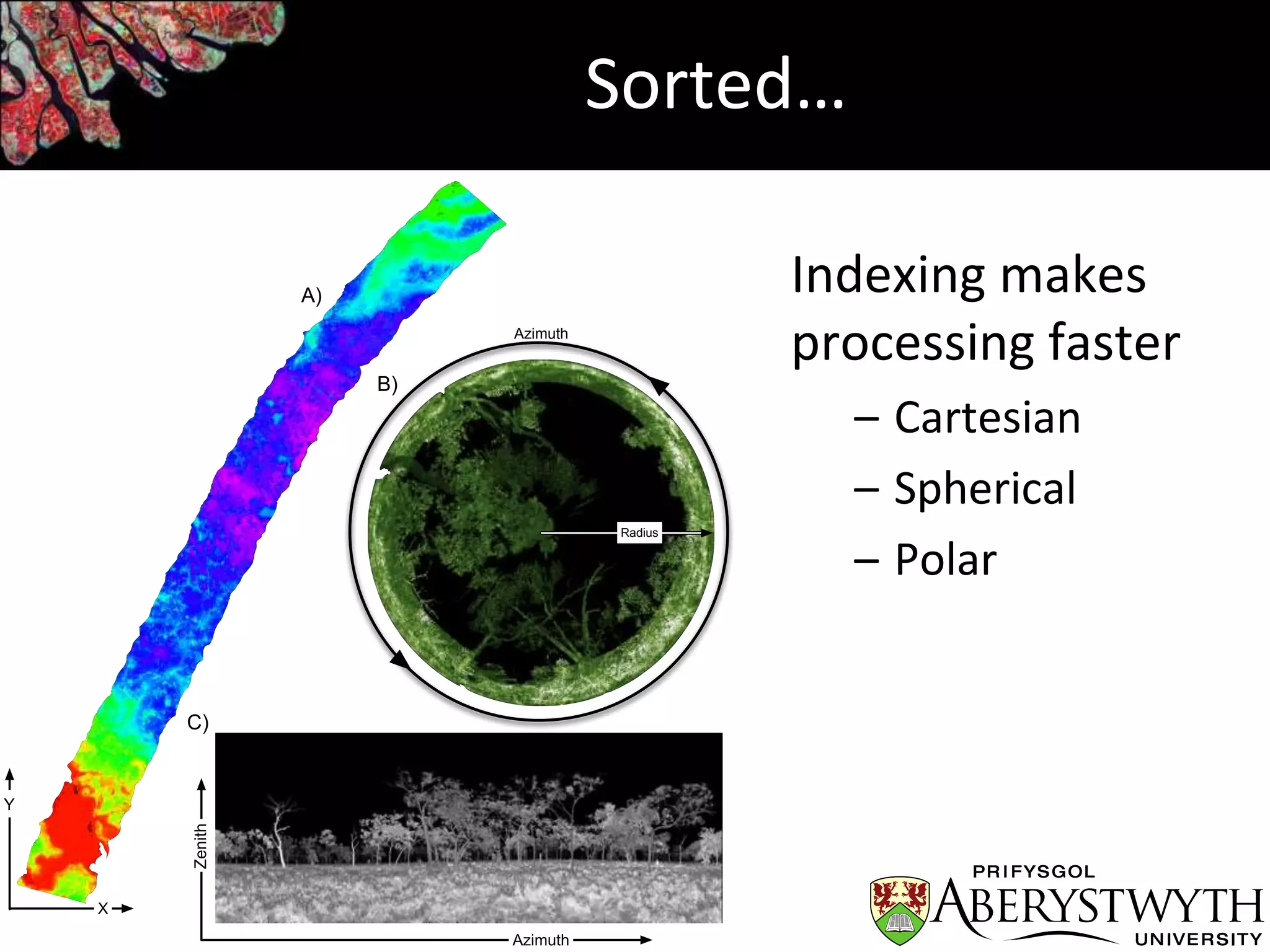
Sorted…
Indexing makes
processing faster
– Cartesian
– Spherical
– Polar
A)
B)
C)
X
Y
Azimuth
Zenith
Radius
Azimuth
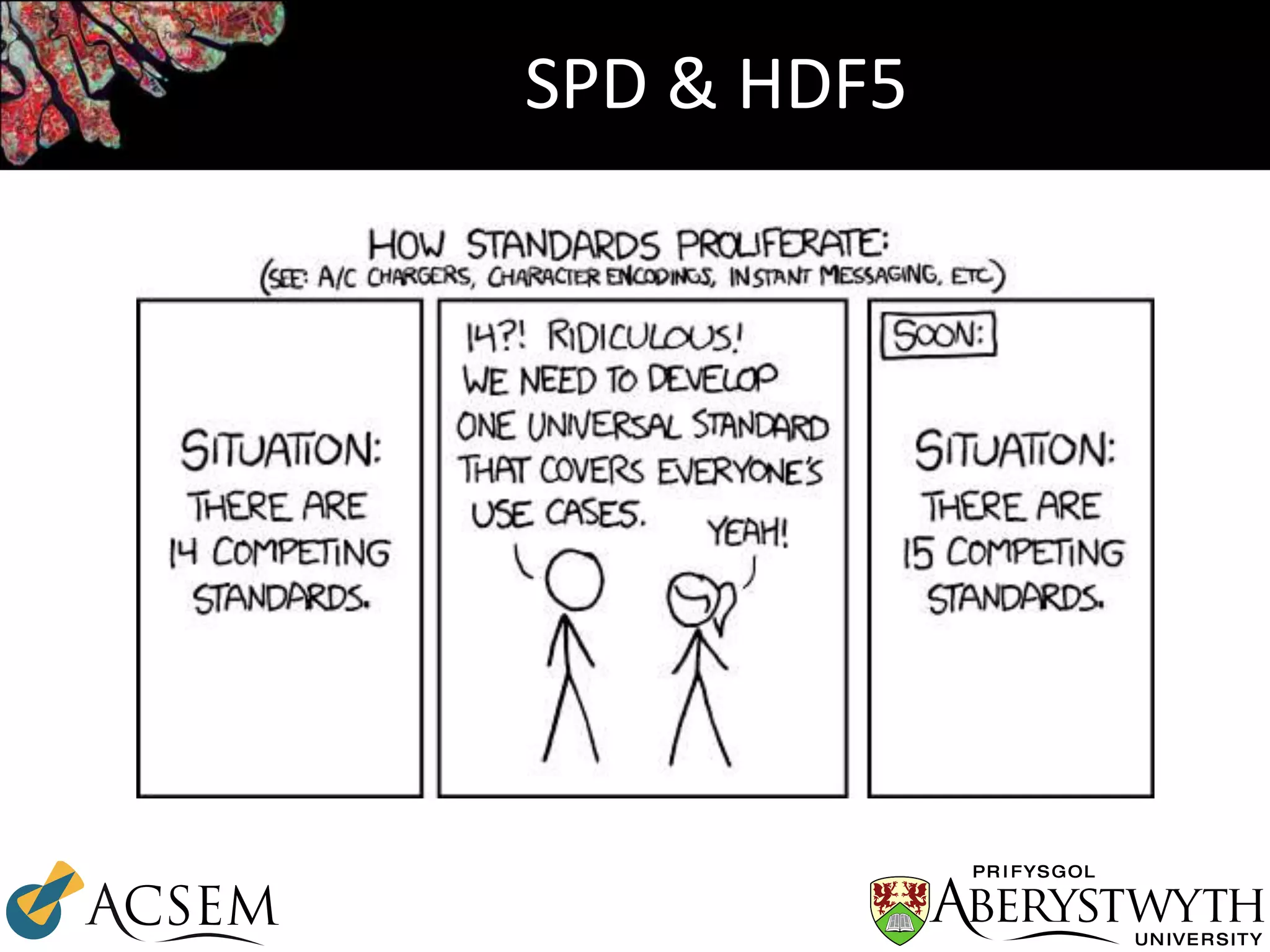
SPD & HDF5
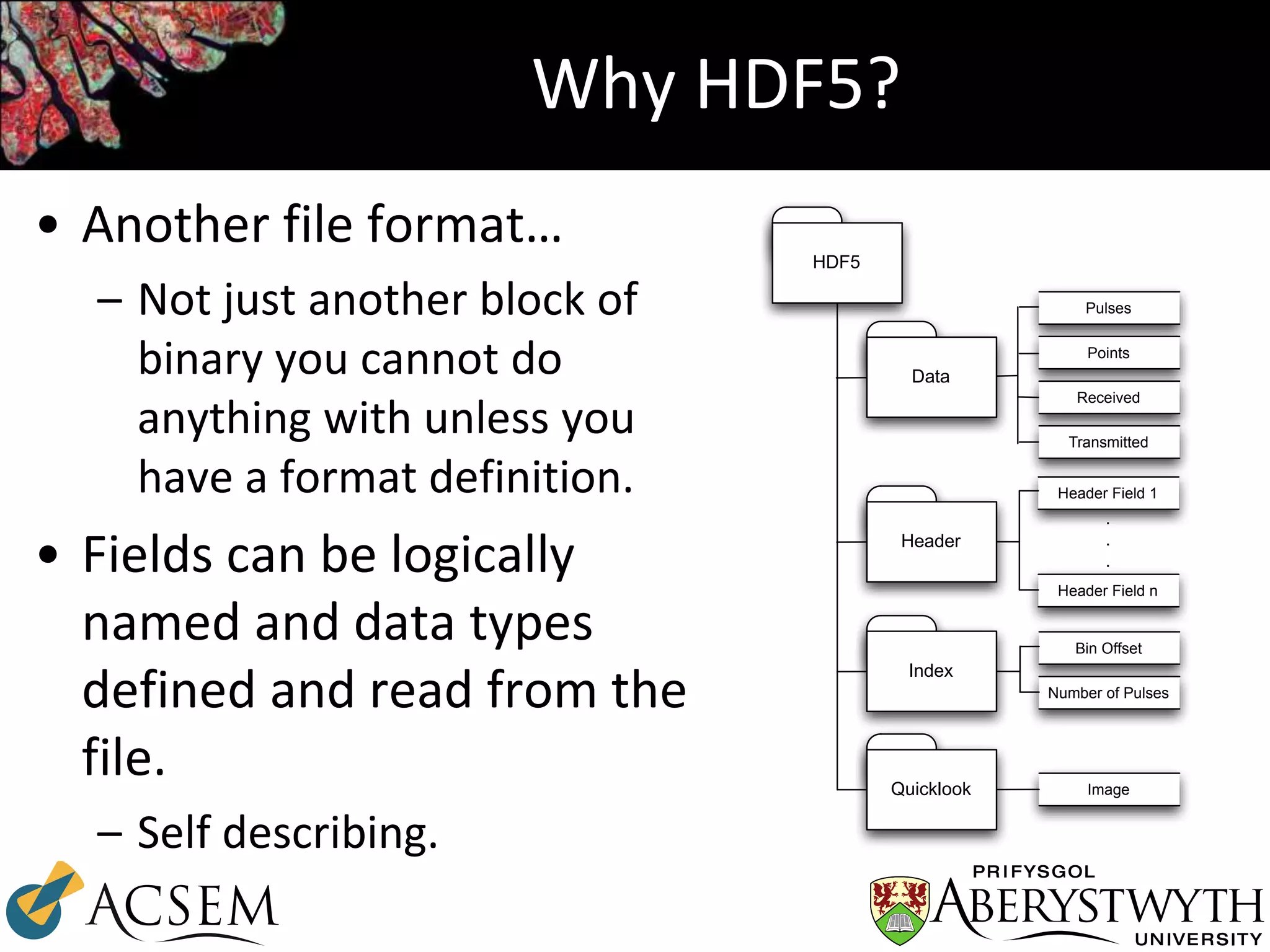
Why HDF5?
• Another file format…
– Not just another block of
binary you cannot do
anything with unless you
have a format definition.
• Fields can be logically
named and data types
defined and read from the
file.
– Self describing.
HDF5
Data
Header
Index
Quicklook Image
Pulses
Points
Received
Transmitted
Header Field 1
Header Field n
.
.
.
Bin Offset
Number of Pulses
Compression
• zlib compression is used by default
– Provided by HDF5 library
– Compression block size can be varied using SPD
header parameters
• File sizes are on average slight smaller than an
uncompressed LAS file but larger than LAZ.
– More complex data structures
– Two pieces of information pulse and point(s)
KEA: Little History…
• Created in 2012 and funded by Landcare Research, NZ.
• The problem:
“How to have large attribute tables of data alongside raster data?”
• Erdas Imagine format (HFA, *.img) supports attribute tables but compression is
only supported for 32bit file sizes (i.e., < 2Gb).
– Attribute tables are also uncompressed.
• BigTiff supports large raster imagery but not attribute tables.
• Initial implementation with a hdf5 file for attribute table with a separate image
file (e.g., tiff).
– This was untidy and having to keep track of multiple files is not desirable.
• “Why not just put the image in the HDF5 file with a gdal driver?”
– Result the KEA HDF5 schema.
Raster Storage: KEA file format
• HDF5 based image file format
• GDAL driver
– Therefore the format can be used in any GDAL
compatibly software (e.g., ArcMap)
• Support for large raster attribute tables
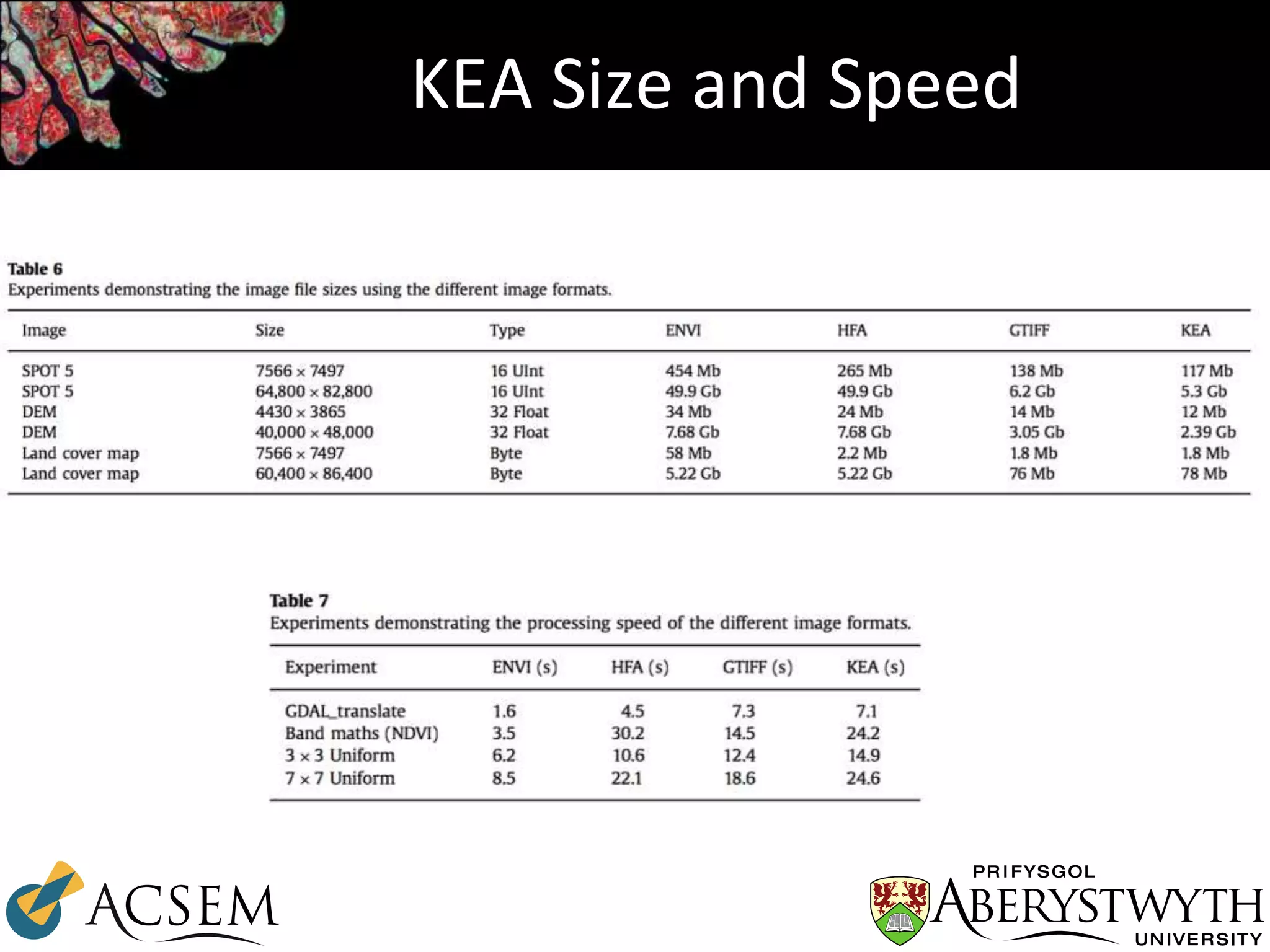
• zlib based compression
– Small file sizes
– 10 m SPOT mosaic of New Zealand ~5GB per
island (Each approx. 65000, 84000 pixels)
Bunting and Gillingham 2013
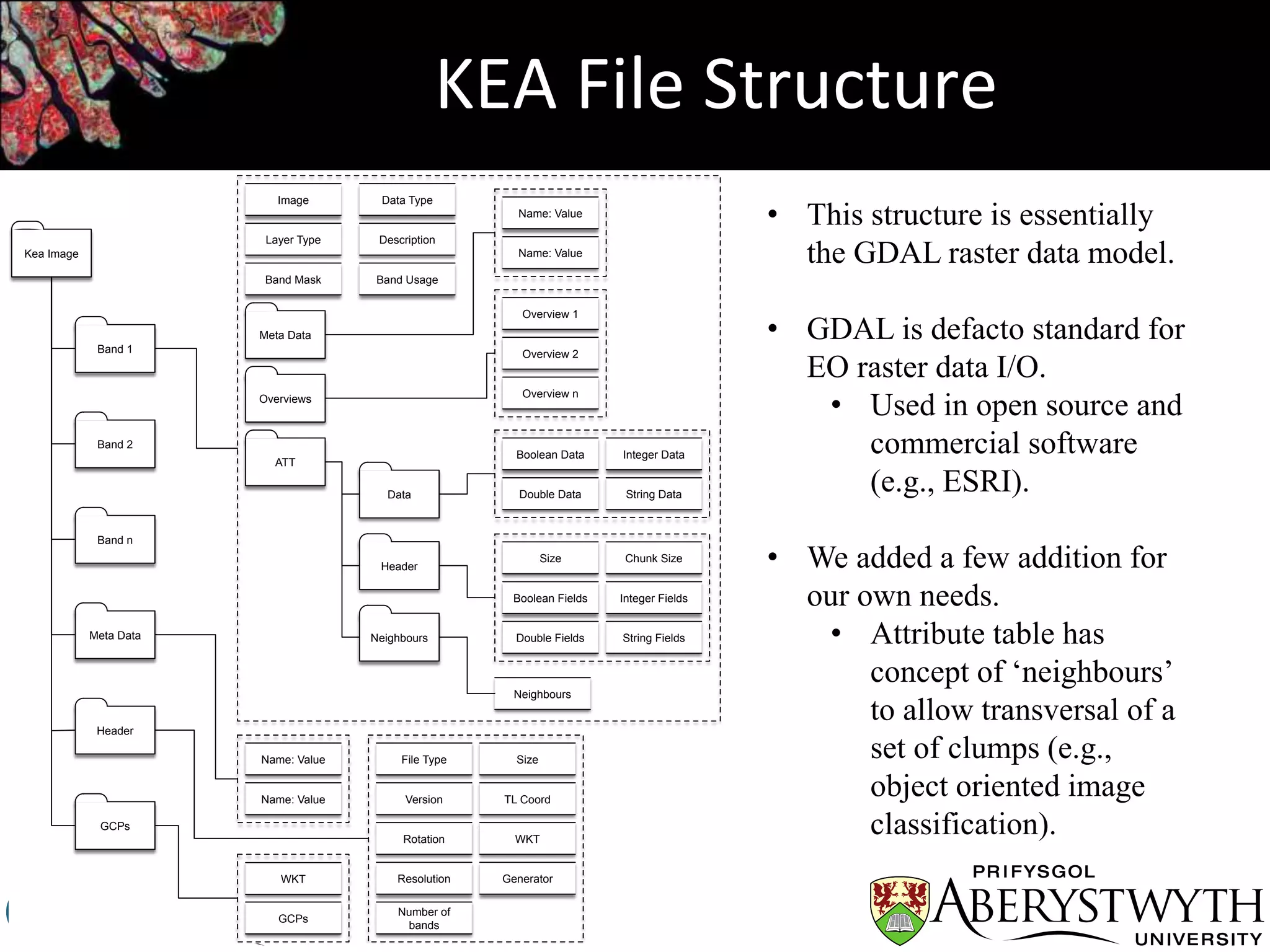
KEA File Structure
File Type
Number of
bands
GeneratorResolution
Rotation
Size
TL CoordVersion
WKT
Name: Value
Name: Value
Kea Image
Band 1
Band 2
Band n
Meta Data
Header
GCPs
GCPs
WKT
ATT
Image
Layer Type
Data Type
Description
Overviews
Meta Data
Name: Value
Name: Value
Overview 1
Overview 2
Overview n
Data
Header
Neighbours
Boolean Data Integer Data
String DataDouble Data
Size
Double Fields
Chunk Size
Integer FieldsBoolean Fields
String Fields
Neighbours
Band Mask Band Usage
• This structure is essentially
the GDAL raster data model.
• GDAL is defacto standard for
EO raster data I/O.
• Used in open source and
commercial software
(e.g., ESRI).
• We added a few addition for
our own needs.
• Attribute table has
concept of ‘neighbours’
to allow transversal of a
set of clumps (e.g.,
object oriented image
classification).
KEA Size and Speed
Is HDF5 a good base?
• Yes. - We’ve found it excellent.
– Coding is quick and relatively easy
– No worrying about Endian etc.
• Originally SPD was developed on PowerPC Mac.
– If used correctly compression is good, with little
overhead of the HDF5 structures
– Possible to make complex and flexible data
structures.
• However, it is the data structures in the file
rather the ‘file format’ that is important thing.
However,
• Compound data types can reduce flexibility
– Not possible to dynamically add new fields (c struct)
• Use tables instead (as implemented in KEA attribute tables)
– i.e., Single data type per table
• No boolean data type (C data types)
– Store as int8, wasted space?
• No compression on ‘ragged’ data structure
• HDF5 file can get defragmented
– Many changes (i.e., data added) happening within the file.
• Cannot remove data from the file
– Deleting does not reduce file size.
• Split data into suitable compression blocks and use / process
data in those blocks.
SPD v4
• Updated version of SPD (v3 has been the version widely used)
• Learning lessons from SPD and KEA
– Remove compound data types
– Uses tables of single data type rather than compound data types.
– Made as much optional as possible.
– Multiple waveforms per pulse.
• Implemented in pyLiDAR
– http://pylidar.org/en/latest/spdv4format.html
• Pulses are very useful
– But some times points are all you need
• Multiple methods of spatially indexing the data is useful
– 2D grid useful for many but not all applications.
Questions

SPD and KEA: HDF5 based file formats for Earth Observation

  • 1.
    @AU_EarthObs SPD and KEA: HDF5based file formats for Earth Observation Pete Bunting1, John Armston2, Sam Gillingham3, Neil Flood4 1. Aberystwyth University, UK (pfb@aber.ac.uk) 2. University of Maryland, USA (armston@umd.edu) 3. Landcare Research, NZ (gillingham.sam@gmail.com) 4. Science Division, Queensland Government, Australia (neil.flood@dsiti.qld.gov.au)
  • 2.
    Contents • Sorted PulseData (SPD) Format – For storing laser scanning data • KEA Image File Format – Implementation of the GDAL raster data model.
  • 3.
    SPD: Little History… •The first version of ‘SPDLib’ was written in 2008 – ‘Sorted Point Data’, simply stored a 2D grid based index alongside the points file. • 2009 I was using a ENVI image file to store the header information (as a 2 band image). Having multiple files per datasets wasn’t ideal also LAS missing fields (e.g., height) I wanted for processing. – Colleague suggested looking at HDF5 • 2011 John Armston visited Aberystwyth with a set of full waveform acquisitions for use in his PhD. – ‘Sorted Pulse Data’ was born.
  • 4.
    Why a Pulse? TransmittedReceived Video created by John Armston using SPDLib Python binding.
  • 5.
    SPD File Format PulseID GPSTime Origin [X, Y, Z, H] Index [X, Y] Azimuth Zenith TransmitAmplitude TransmitWidth SourceID Wavelength NumberOfReturns Returns NumberOfTransmittedBins TransmittedBins NumberOfRecievedBins RecievedBins SPD Pulse Point ID GPSTime Location [X, Y, Z, H] Classification Amplitude Width Range Red Green Blue WaveformOffset SPD Point Point ID GPSTime Location [X, Y, Z, H] Classification Amplitude Width Range Red Green Blue WaveformOffset SPD Point Point ID GPSTime Location [X, Y, Z, H] Classification Amplitude Width Range Red Green Blue WaveformOffset SPD Point Pulse ID GPSTime Origin [X, Y, Z, H] Index [X, Y] Azimuth Zenith TransmitAmplitude TransmitWidth SourceID Wavelength NumberOfReturns Returns NumberOfTransmittedBins TransmittedBins NumberOfRecievedBins RecievedBins SPD Pulse Point ID GPSTime Location [X, Y, Z, H] Classification Amplitude Width Range Red Green Blue WaveformOffset SPD Point Point ID GPSTime Location [X, Y, Z, H] Classification Amplitude Width Range Red Green Blue WaveformOffset SPD Point Point ID GPSTime Location [X, Y, Z, H] Classification Amplitude Width Range Red Green Blue WaveformOffset SPD Point Pulse ID GPSTime Origin [X, Y, Z, H] Index [X, Y] Azimuth Zenith TransmitAmplitude TransmitWidth SourceID Wavelength NumberOfReturns Returns NumberOfTransmittedBins TransmittedBins NumberOfRecievedBins RecievedBins SPD Pulse Point ID GPSTime Location [X, Y, Z, H] Classification Amplitude Width Range Red Green Blue WaveformOffset SPD Point Point ID GPSTime Location [X, Y, Z, H] Classification Amplitude Width Range Red Green Blue WaveformOffset SPD Point Point ID GPSTime Location [X, Y, Z, H] Classification Amplitude Width Range Red Green Blue WaveformOffset SPD Point Pulse ID GPSTime Origin [X, Y, Z, H] Index [X, Y] Azimuth Zenith TransmitAmplitude TransmitWidth SourceID Wavelength NumberOfReturns Returns NumberOfTransmittedBins TransmittedBins NumberOfRecievedBins RecievedBins SPD Pulse Point ID GPSTime Location [X, Y, Z, H] Classification Amplitude Width Range Red Green Blue WaveformOffset SPD Point Point ID GPSTime Location [X, Y, Z, H] Classification Amplitude Width Range Red Green Blue WaveformOffset SPD Point Point ID GPSTime Location [X, Y, Z, H] Classification Amplitude Width Range Red Green Blue WaveformOffset SPD Point Pulse ID GPSTime Origin [X, Y, Z, H] Index [X, Y] Azimuth Zenith TransmitAmplitude TransmitWidth SourceID Wavelength NumberOfReturns Returns NumberOfTransmittedBins TransmittedBins NumberOfRecievedBins RecievedBins SPD Pulse Point ID GPSTime Location [X, Y, Z, H] Classification Amplitude Width Range Red Green Blue WaveformOffset SPD Point Point ID GPSTime Location [X, Y, Z, H] Classification Amplitude Width Range Red Green Blue WaveformOffset SPD Point Point ID GPSTime Location [X, Y, Z, H] Classification Amplitude Width Range Red Green Blue WaveformOffset SPD Point Pulse ID GPSTime Origin [X, Y, Z, H] Index [X, Y] Azimuth Zenith TransmitAmplitude TransmitWidth SourceID Wavelength NumberOfReturns Returns NumberOfTransmittedBins TransmittedBins NumberOfRecievedBins RecievedBins SPD Pulse Point ID GPSTime Location [X, Y, Z, H] Classification Amplitude Width Range Red Green Blue WaveformOffset SPD Point Point ID GPSTime Location [X, Y, Z, H] Classification Amplitude Width Range Red Green Blue WaveformOffset SPD Point Point ID GPSTime Location [X, Y, Z, H] Classification Amplitude Width Range Red Green Blue WaveformOffset SPD Point Pulse ID GPSTime Origin [X, Y, Z, H] Index [X, Y] Azimuth Zenith TransmitAmplitude TransmitWidth SourceID Wavelength NumberOfReturns Returns NumberOfTransmittedBins TransmittedBins NumberOfRecievedBins RecievedBins SPD Pulse Point ID GPSTime Location [X, Y, Z, H] Classification Amplitude Width Range Red Green Blue WaveformOffset SPD Point Point ID GPSTime Location [X, Y, Z, H] Classification Amplitude Width Range Red Green Blue WaveformOffset SPD Point Point ID GPSTime Location [X, Y, Z, H] Classification Amplitude Width Range Red Green Blue WaveformOffset SPD Point Pulse ID GPSTime Origin [X, Y, Z, H] Index [X, Y] Azimuth Zenith TransmitAmplitude TransmitWidth SourceID Wavelength NumberOfReturns Returns NumberOfTransmittedBins TransmittedBins NumberOfRecievedBins RecievedBins SPD Pulse Point ID GPSTime Location [X, Y, Z, H] Classification Amplitude Width Range Red Green Blue WaveformOffset SPD Point Point ID GPSTime Location [X, Y, Z, H] Classification Amplitude Width Range Red Green Blue WaveformOffset SPD Point Point ID GPSTime Location [X, Y, Z, H] Classification Amplitude Width Range Red Green Blue WaveformOffset SPD Point
  • 6.
    Sorted… Indexing makes processing faster –Cartesian – Spherical – Polar A) B) C) X Y Azimuth Zenith Radius Azimuth
  • 7.
  • 8.
    Why HDF5? • Anotherfile format… – Not just another block of binary you cannot do anything with unless you have a format definition. • Fields can be logically named and data types defined and read from the file. – Self describing. HDF5 Data Header Index Quicklook Image Pulses Points Received Transmitted Header Field 1 Header Field n . . . Bin Offset Number of Pulses
  • 9.
    Compression • zlib compressionis used by default – Provided by HDF5 library – Compression block size can be varied using SPD header parameters • File sizes are on average slight smaller than an uncompressed LAS file but larger than LAZ. – More complex data structures – Two pieces of information pulse and point(s)
  • 10.
    KEA: Little History… •Created in 2012 and funded by Landcare Research, NZ. • The problem: “How to have large attribute tables of data alongside raster data?” • Erdas Imagine format (HFA, *.img) supports attribute tables but compression is only supported for 32bit file sizes (i.e., < 2Gb). – Attribute tables are also uncompressed. • BigTiff supports large raster imagery but not attribute tables. • Initial implementation with a hdf5 file for attribute table with a separate image file (e.g., tiff). – This was untidy and having to keep track of multiple files is not desirable. • “Why not just put the image in the HDF5 file with a gdal driver?” – Result the KEA HDF5 schema.
  • 11.
    Raster Storage: KEAfile format • HDF5 based image file format • GDAL driver – Therefore the format can be used in any GDAL compatibly software (e.g., ArcMap) • Support for large raster attribute tables • zlib based compression – Small file sizes – 10 m SPOT mosaic of New Zealand ~5GB per island (Each approx. 65000, 84000 pixels) Bunting and Gillingham 2013
  • 12.
    KEA File Structure FileType Number of bands GeneratorResolution Rotation Size TL CoordVersion WKT Name: Value Name: Value Kea Image Band 1 Band 2 Band n Meta Data Header GCPs GCPs WKT ATT Image Layer Type Data Type Description Overviews Meta Data Name: Value Name: Value Overview 1 Overview 2 Overview n Data Header Neighbours Boolean Data Integer Data String DataDouble Data Size Double Fields Chunk Size Integer FieldsBoolean Fields String Fields Neighbours Band Mask Band Usage • This structure is essentially the GDAL raster data model. • GDAL is defacto standard for EO raster data I/O. • Used in open source and commercial software (e.g., ESRI). • We added a few addition for our own needs. • Attribute table has concept of ‘neighbours’ to allow transversal of a set of clumps (e.g., object oriented image classification).
  • 13.
  • 14.
    Is HDF5 agood base? • Yes. - We’ve found it excellent. – Coding is quick and relatively easy – No worrying about Endian etc. • Originally SPD was developed on PowerPC Mac. – If used correctly compression is good, with little overhead of the HDF5 structures – Possible to make complex and flexible data structures. • However, it is the data structures in the file rather the ‘file format’ that is important thing.
  • 15.
    However, • Compound datatypes can reduce flexibility – Not possible to dynamically add new fields (c struct) • Use tables instead (as implemented in KEA attribute tables) – i.e., Single data type per table • No boolean data type (C data types) – Store as int8, wasted space? • No compression on ‘ragged’ data structure • HDF5 file can get defragmented – Many changes (i.e., data added) happening within the file. • Cannot remove data from the file – Deleting does not reduce file size. • Split data into suitable compression blocks and use / process data in those blocks.
  • 16.
    SPD v4 • Updatedversion of SPD (v3 has been the version widely used) • Learning lessons from SPD and KEA – Remove compound data types – Uses tables of single data type rather than compound data types. – Made as much optional as possible. – Multiple waveforms per pulse. • Implemented in pyLiDAR – http://pylidar.org/en/latest/spdv4format.html • Pulses are very useful – But some times points are all you need • Multiple methods of spatially indexing the data is useful – 2D grid useful for many but not all applications.
  • 17.