HDF Update
Elena Pourmal
The HDF Group
epourmal@hdfgroup.org
This work was supported by NASA/GSFC under
Raytheon Co. contract number NNG15HZ39C
2
Outline
• What’s new in HDF?
• HDF tools
– HDFView
– nagg
– ODBC
• Q & A: Tell us about your needs
3
HDF5
• HDF5 Compression
– Faster way to write compressed data to HDF5
– Community supported compression filters
– https://github.com/nexusformat/HDF5-
External-Filter-Plugins/tree/master/
• Single writer/multiple reader file access
• Virtual Data Set
• HDF5 JNI is part of the HDF5 source code
4
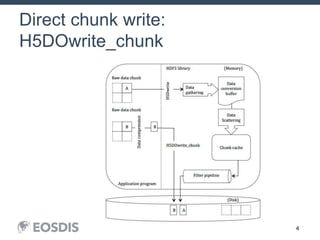
Direct chunk write:
H5DOwrite_chunk
5
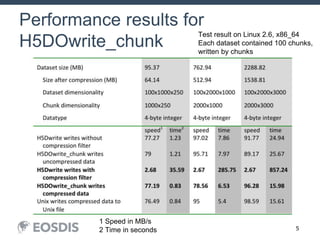
Performance results for
H5DOwrite_chunk
1 Speed in MB/s
2 Time in seconds
Test result on Linux 2.6, x86_64
Each dataset contained 100 chunks,
written by chunks
6
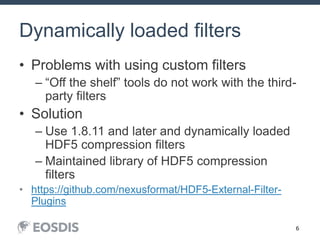
Dynamically loaded filters
• Problems with using custom filters
– “Off the shelf” tools do not work with the third-
party filters
• Solution
– Use 1.8.11 and later and dynamically loaded
HDF5 compression filters
– Maintained library of HDF5 compression
filters
• https://github.com/nexusformat/HDF5-External-Filter-
Plugins
7
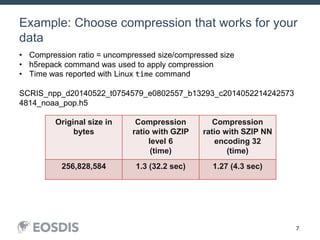
Example: Choose compression that works for your
data
July 15, 2014 JPSS DEWG Telecon 7
Original size in
bytes
Compression
ratio with GZIP
level 6
(time)
Compression
ratio with SZIP NN
encoding 32
(time)
256,828,584 1.3 (32.2 sec) 1.27 (4.3 sec)
• Compression ratio = uncompressed size/compressed size
• h5repack command was used to apply compression
• Time was reported with Linux time command
SCRIS_npp_d20140522_t0754579_e0802557_b13293_c2014052214242573
4814_noaa_pop.h5
8
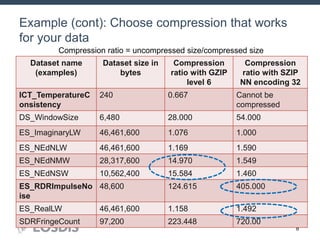
Example (cont): Choose compression that works
for your data
July 15, 2014 JPSS DEWG Telecon 8
Dataset name
(examples)
Dataset size in
bytes
Compression
ratio with GZIP
level 6
Compression
ratio with SZIP
NN encoding 32
ICT_TemperatureC
onsistency
240 0.667 Cannot be
compressed
DS_WindowSize 6,480 28.000 54.000
ES_ImaginaryLW 46,461,600 1.076 1.000
ES_NEdNLW 46,461,600 1.169 1.590
ES_NEdNMW 28,317,600 14.970 1.549
ES_NEdNSW 10,562,400 15.584 1.460
ES_RDRImpulseNo
ise
48,600 124.615 405.000
ES_RealLW 46,461,600 1.158 1.492
SDRFringeCount 97,200 223.448 720.00
Compression ratio = uncompressed size/compressed size
9
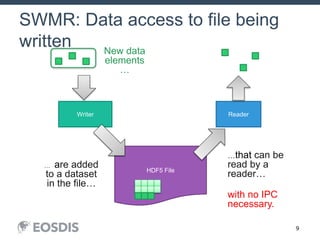
SWMR: Data access to file being
written
HDF5 File
Writer Reader
…that can be
read by a
reader…
with no IPC
necessary.
New data
elements
…
… are added
to a dataset
in the file…
10
SWMR
• Released in HDF5 1.10.0
• Restricted to append-data only scenario
• SWMR doesn’t work on NFS
• Files are not compatible with HDF5 1.8.*
libraries
• Use h5format_convert tool
– Converts HDF5 metadata in place
– No raw data is rewritten
11
VDS
• Data stored in multiple files and datasets
can be accessed via one dataset (VDS)
using standard HDF5 read/write
12
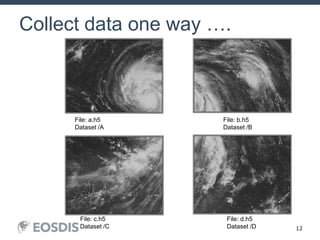
Collect data one way ….
File: a.h5
Dataset /A
File: b.h5
Dataset /B
File: c.h5
Dataset /C
File: d.h5
Dataset /D
13
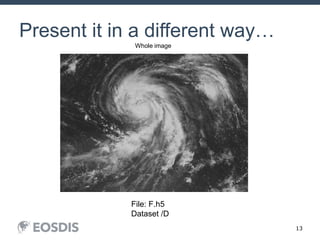
Present it in a different way…
Whole image
File: F.h5
Dataset /D
14
VDS
• VDS works with SWMR
• File with VDS cannot be accessed by
HDF5 1.8.* libraries
• Use h5repack tool to rewrite data (1.10.0-
patch1)
15
HDF5 Roadmap for 2016 -2017
• May 31 -HDF5 1.10.0-patch1
– h5repack, Windows builds, Fortran issues on
HPC systems
• Late summer HDF5 1.10.1 (?)
– Address issues found in 1.10.0
• December
– HPC features that didn’t make it into 1.10.0
release
• Maintenance releases of HDF5 1.8 and 1.10
versions (May and November)
16
HDF4
• HDF 4.2.12 (June 2016)
• Support for latest Intel, PGI and GNU
compilers
• HDF4 JNI included with the HDF4 source
code
18
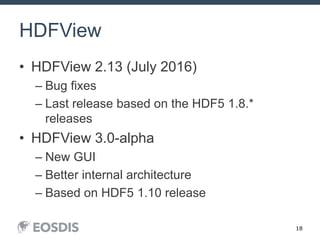
HDFView
• HDFView 2.13 (July 2016)
– Bug fixes
– Last release based on the HDF5 1.8.*
releases
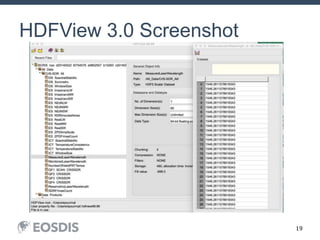
• HDFView 3.0-alpha
– New GUI
– Better internal architecture
– Based on HDF5 1.10 release
19
HDFView 3.0 Screenshot
20
Nagg tool
Nagg is a tool for rearranging NPP data
granules from existing files to create new
files with a different aggregation number or a
different packaging arrangement.
• Release 1.6.2 before July 21, 2016
HDF Workshop 20September 23, 2015
21
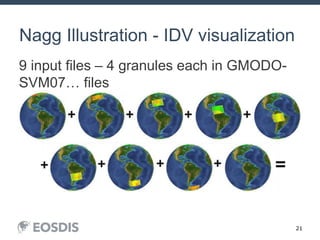
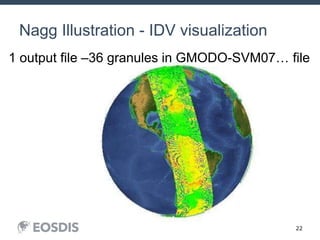
Nagg Illustration - IDV visualization
9 input files – 4 granules each in GMODO-
SVM07… files
HDF Workshop 21September 23, 2015
22
Nagg Illustration - IDV visualization
HDF Workshop 22September 23, 2015
1 output file –36 granules in GMODO-SVM07… file
23
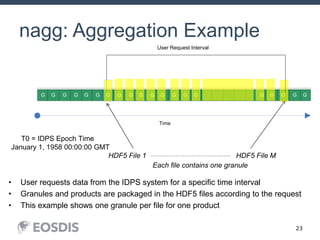
nagg: Aggregation Example
G GGGG
Aggregation Bucket
Time
T=0
First Ascending Node
After Launch
G GGGG
...Aggregation BucketAggregation Bucket
G GGGG
Aggregation Bucket
G GGGG
User Request Interval
HDF5 File 1 HDF5 File M………………………………………
Each file contains one granule
T0 = IDPS Epoch Time
January 1, 1958 00:00:00 GMT
• User requests data from the IDPS system for a specific time interval
• Granules and products are packaged in the HDF5 files according to the request
• This example shows one granule per file for one product
24
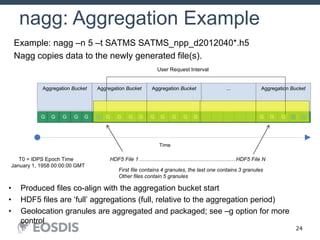
nagg: Aggregation Example
G GGGG
Aggregation Bucket
Time
T=0
First Ascending Node
After Launch
G GGGG
...Aggregation BucketAggregation Bucket
G GGGG
Aggregation Bucket
G GGGG
User Request Interval
HDF5 File 1 HDF5 File N………………………………………………
First file contains 4 granules, the last one contains 3 granules
Other files contain 5 granules
• Produced files co-align with the aggregation bucket start
• HDF5 files are ‘full’ aggregations (full, relative to the aggregation period)
• Geolocation granules are aggregated and packaged; see –g option for more
control
Example: nagg –n 5 –t SATMS SATMS_npp_d2012040*.h5
Nagg copies data to the newly generated file(s).
T0 = IDPS Epoch Time
January 1, 1958 00:00:00 GMT
25
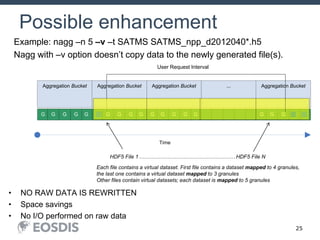
Possible enhancement
G GGGG
Aggregation Bucket
Time
T=0
First Ascending Node
After Launch
G GGGG
...Aggregation BucketAggregation Bucket
G GGGG
Aggregation Bucket
G GGGG
User Request Interval
HDF5 File 1 HDF5 File N………………………………………………
Each file contains a virtual dataset. First file contains a dataset mapped to 4 granules,
the last one contains a virtual dataset mapped to 3 granules
Other files contain virtual datasets; each dataset is mapped to 5 granules
• NO RAW DATA IS REWRITTEN
• Space savings
• No I/O performed on raw data
Example: nagg –n 5 –v –t SATMS SATMS_npp_d2012040*.h5
Nagg with –v option doesn’t copy data to the newly generated file(s).
26
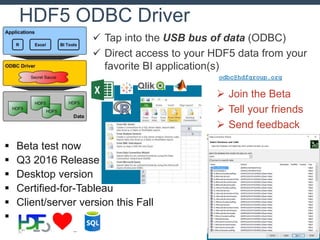
HDF5 ODBC Driver
 Tap into the USB bus of data (ODBC)
 Direct access to your HDF5 data from your
favorite BI application(s)
 Join the Beta
 Tell your friends
 Send feedback
odbc@hdfgroup.org
 Beta test now
 Q3 2016 Release
 Desktop version
 Certified-for-Tableau
 Client/server version this Fall

27
New requirements and features?
• Tell us your needs (here are some ideas):
– Multi-threaded compression filters
– H5DOread_chunk function
– Full SWMR implementation
– Performance
– Backward/forward compatibility
• Other requests?
28
This work was supported by
NASA/GSFC under Raytheon Co.
contract number NNG15HZ39C

HDF Update 2016

  • 1.
    HDF Update Elena Pourmal TheHDF Group epourmal@hdfgroup.org This work was supported by NASA/GSFC under Raytheon Co. contract number NNG15HZ39C
  • 2.
    2 Outline • What’s newin HDF? • HDF tools – HDFView – nagg – ODBC • Q & A: Tell us about your needs
  • 3.
    3 HDF5 • HDF5 Compression –Faster way to write compressed data to HDF5 – Community supported compression filters – https://github.com/nexusformat/HDF5- External-Filter-Plugins/tree/master/ • Single writer/multiple reader file access • Virtual Data Set • HDF5 JNI is part of the HDF5 source code
  • 4.
  • 5.
    5 Performance results for H5DOwrite_chunk 1Speed in MB/s 2 Time in seconds Test result on Linux 2.6, x86_64 Each dataset contained 100 chunks, written by chunks
  • 6.
    6 Dynamically loaded filters •Problems with using custom filters – “Off the shelf” tools do not work with the third- party filters • Solution – Use 1.8.11 and later and dynamically loaded HDF5 compression filters – Maintained library of HDF5 compression filters • https://github.com/nexusformat/HDF5-External-Filter- Plugins
  • 7.
    7 Example: Choose compressionthat works for your data July 15, 2014 JPSS DEWG Telecon 7 Original size in bytes Compression ratio with GZIP level 6 (time) Compression ratio with SZIP NN encoding 32 (time) 256,828,584 1.3 (32.2 sec) 1.27 (4.3 sec) • Compression ratio = uncompressed size/compressed size • h5repack command was used to apply compression • Time was reported with Linux time command SCRIS_npp_d20140522_t0754579_e0802557_b13293_c2014052214242573 4814_noaa_pop.h5
  • 8.
    8 Example (cont): Choosecompression that works for your data July 15, 2014 JPSS DEWG Telecon 8 Dataset name (examples) Dataset size in bytes Compression ratio with GZIP level 6 Compression ratio with SZIP NN encoding 32 ICT_TemperatureC onsistency 240 0.667 Cannot be compressed DS_WindowSize 6,480 28.000 54.000 ES_ImaginaryLW 46,461,600 1.076 1.000 ES_NEdNLW 46,461,600 1.169 1.590 ES_NEdNMW 28,317,600 14.970 1.549 ES_NEdNSW 10,562,400 15.584 1.460 ES_RDRImpulseNo ise 48,600 124.615 405.000 ES_RealLW 46,461,600 1.158 1.492 SDRFringeCount 97,200 223.448 720.00 Compression ratio = uncompressed size/compressed size
  • 9.
    9 SWMR: Data accessto file being written HDF5 File Writer Reader …that can be read by a reader… with no IPC necessary. New data elements … … are added to a dataset in the file…
  • 10.
    10 SWMR • Released inHDF5 1.10.0 • Restricted to append-data only scenario • SWMR doesn’t work on NFS • Files are not compatible with HDF5 1.8.* libraries • Use h5format_convert tool – Converts HDF5 metadata in place – No raw data is rewritten
  • 11.
    11 VDS • Data storedin multiple files and datasets can be accessed via one dataset (VDS) using standard HDF5 read/write
  • 12.
    12 Collect data oneway …. File: a.h5 Dataset /A File: b.h5 Dataset /B File: c.h5 Dataset /C File: d.h5 Dataset /D
  • 13.
    13 Present it ina different way… Whole image File: F.h5 Dataset /D
  • 14.
    14 VDS • VDS workswith SWMR • File with VDS cannot be accessed by HDF5 1.8.* libraries • Use h5repack tool to rewrite data (1.10.0- patch1)
  • 15.
    15 HDF5 Roadmap for2016 -2017 • May 31 -HDF5 1.10.0-patch1 – h5repack, Windows builds, Fortran issues on HPC systems • Late summer HDF5 1.10.1 (?) – Address issues found in 1.10.0 • December – HPC features that didn’t make it into 1.10.0 release • Maintenance releases of HDF5 1.8 and 1.10 versions (May and November)
  • 16.
    16 HDF4 • HDF 4.2.12(June 2016) • Support for latest Intel, PGI and GNU compilers • HDF4 JNI included with the HDF4 source code
  • 17.
    18 HDFView • HDFView 2.13(July 2016) – Bug fixes – Last release based on the HDF5 1.8.* releases • HDFView 3.0-alpha – New GUI – Better internal architecture – Based on HDF5 1.10 release
  • 18.
  • 19.
    20 Nagg tool Nagg isa tool for rearranging NPP data granules from existing files to create new files with a different aggregation number or a different packaging arrangement. • Release 1.6.2 before July 21, 2016 HDF Workshop 20September 23, 2015
  • 20.
    21 Nagg Illustration -IDV visualization 9 input files – 4 granules each in GMODO- SVM07… files HDF Workshop 21September 23, 2015
  • 21.
    22 Nagg Illustration -IDV visualization HDF Workshop 22September 23, 2015 1 output file –36 granules in GMODO-SVM07… file
  • 22.
    23 nagg: Aggregation Example GGGGG Aggregation Bucket Time T=0 First Ascending Node After Launch G GGGG ...Aggregation BucketAggregation Bucket G GGGG Aggregation Bucket G GGGG User Request Interval HDF5 File 1 HDF5 File M……………………………………… Each file contains one granule T0 = IDPS Epoch Time January 1, 1958 00:00:00 GMT • User requests data from the IDPS system for a specific time interval • Granules and products are packaged in the HDF5 files according to the request • This example shows one granule per file for one product
  • 23.
    24 nagg: Aggregation Example GGGGG Aggregation Bucket Time T=0 First Ascending Node After Launch G GGGG ...Aggregation BucketAggregation Bucket G GGGG Aggregation Bucket G GGGG User Request Interval HDF5 File 1 HDF5 File N……………………………………………… First file contains 4 granules, the last one contains 3 granules Other files contain 5 granules • Produced files co-align with the aggregation bucket start • HDF5 files are ‘full’ aggregations (full, relative to the aggregation period) • Geolocation granules are aggregated and packaged; see –g option for more control Example: nagg –n 5 –t SATMS SATMS_npp_d2012040*.h5 Nagg copies data to the newly generated file(s). T0 = IDPS Epoch Time January 1, 1958 00:00:00 GMT
  • 24.
    25 Possible enhancement G GGGG AggregationBucket Time T=0 First Ascending Node After Launch G GGGG ...Aggregation BucketAggregation Bucket G GGGG Aggregation Bucket G GGGG User Request Interval HDF5 File 1 HDF5 File N……………………………………………… Each file contains a virtual dataset. First file contains a dataset mapped to 4 granules, the last one contains a virtual dataset mapped to 3 granules Other files contain virtual datasets; each dataset is mapped to 5 granules • NO RAW DATA IS REWRITTEN • Space savings • No I/O performed on raw data Example: nagg –n 5 –v –t SATMS SATMS_npp_d2012040*.h5 Nagg with –v option doesn’t copy data to the newly generated file(s).
  • 25.
    26 HDF5 ODBC Driver Tap into the USB bus of data (ODBC)  Direct access to your HDF5 data from your favorite BI application(s)  Join the Beta  Tell your friends  Send feedback odbc@hdfgroup.org  Beta test now  Q3 2016 Release  Desktop version  Certified-for-Tableau  Client/server version this Fall 
  • 26.
    27 New requirements andfeatures? • Tell us your needs (here are some ideas): – Multi-threaded compression filters – H5DOread_chunk function – Full SWMR implementation – Performance – Backward/forward compatibility • Other requests?
  • 27.
    28 This work wassupported by NASA/GSFC under Raytheon Co. contract number NNG15HZ39C

Editor's Notes

  • #5 Complexity of data flow when chunk is written by H5Dwrite call vs. simplified patch with the optimized function
  • #8 H5repack tools was used to apply compression to every dataset in the file -rw-r--r-- 1 epourmal hdf 196611611 Jul 17 17:33 gzip.h5 -rw-r--r-- 1 epourmal hdf 256828584 Jul 17 11:35 orig.h5 -rw-r--r-- 1 epourmal hdf 201924661 Jul 17 17:33 szip.h5
  • #9 GZIP compression alone made the difference only for 2 datasets; modified with shuffle – 3 datasets showed great compression ratios.
  • #10 No communications between the processes and no file locking are required. The processes can run on the same or on different platforms, as long as they share a common file system that is POSIX compliant. The orderly operation of the metadata cache is crucial to SWMR functioning. A number of APIs have been developed to handle the requests from writer and reader processes and to give applications the control of the metadata cache they might need.
  • #13 Images are stored in four different datasets. They represent a part of the bigger image.
  • #14 Virtual dataset stores a mapping for each quadrant to data stored in the source HDF5 files and datasets a-d.h5. Application can read the whole image from dataset /D using regular H5Dread call. It doesn’t need to know the mapping in order to read data.
  • #19 Java API wrappers (JNI) API: HDF4, HDF5, version 1.10.1 JNI libraries packaged with appropriate HDF release (like C++, Fortran) HDFView – HDF4/HDF5 file display, creation, editing Better support for complex data types Limited “compound compound”, variable length Beta (alpha?) version with SWT GUI (Look and feel, better memory handling) Will support v1.10.0 To be done: Support for 1.10 features (creating VDS, etc.) Various bug fixes and minor new features Memory model redesign for large datasets / large # of objects
  • #24 This and the following slide address one of the simplest scenarios to explain nagg’s functionality. User requested a product data for a particular time interval with one granule per file. The user gets HDF5 files with product data with one granule per file and HDF5 files with the corresponding geolocation data. He/she would like to re-aggregate data to have 5 granules per file. (next slide)
  • #25 Here is a command that will do it. –n flag indicates number of granules per file, -t indicates the type or product to be re-aggregated. User has to specify the list of files with the granules to aggregate. For convenience one can use wild cards to specify files names. The result of nagg operation will be regarregated files as they would be received by the user from the IDPS system. New product files will co-align with the aggregation bucket start. Therefore sometime the first and the last files in aggregation will not have five granules. On this slide we show that the first HDF5 files will contain 4 granules and the last one only three granules. Geolocation product will be aggregated and packaged with the product data. the tool has –g option to control geolocation data packaging and aggregation.