Freebies, cheapies and good things to do  - tips for optimising digital content on a budget Changing platforms: creating effective content Royal College of Surgeons 15 March 2011 Martin Bazley, Martin Bazley & Associates
Martin Bazley Previously: Teaching (7 yrs) Science Museum, London,  Internet Projects (7yrs) E-Learning Officer, MLA South East (3yrs)
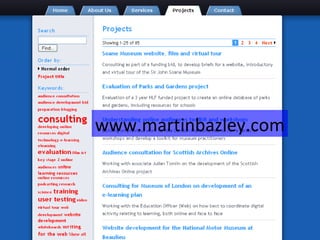
Martin Bazley Previously: Teaching (7 yrs) Science Museum, London,  Internet Projects (7yrs) E-Learning Officer, MLA South East (3yrs) Currently Vice Chair, DLNet (was E-Learning Group for Museums, Lib, Archives) Consultancy, websites, training, user testing, evaluation … Martin Bazley & Associates www.martinbazley.com   Slides and notes available afterwards
 
www.martinbazley.com
Key points About creating digital content – ‘writing for the web’ Plan, evaluate, do audience research, do user testing Make use of freebies and cheapies
Writing for the web
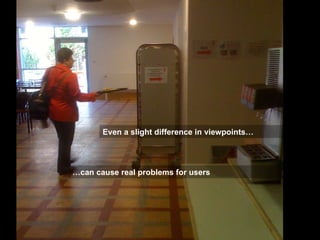
Users don’t always ‘get’ what we are offering: a real–world analogy
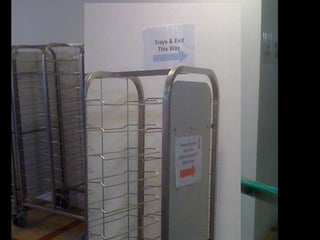
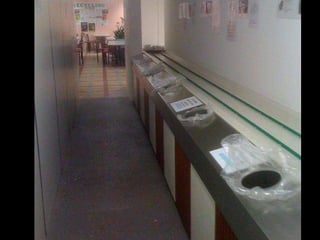
Even a slight difference in viewpoints… … can cause real problems for users
 
 
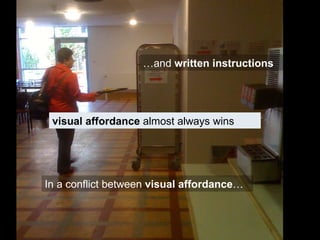
In a conflict between  visual affordance … … and  written instructions visual affordance  almost always wins
So what is the point of all this?
People use the web differently…
…  from the way they use books, object labels, magazines, newspapers, information screens, etc
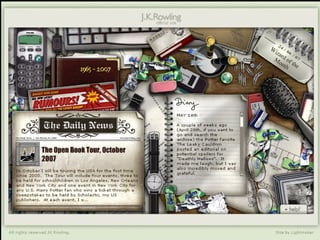
For most people the web is a predominantly  visual  medium
 
We are all different and some people like to read all the text on a web page before deciding what to do next, even though a lot of it might be pretty redundant but  most people  – or at least most regular users of the web – rather than reading through them in detail   just scan   the   web pages   they are using, or at least the ones where they are still trying to work out where to go next
 
Users won't read your text thoroughly  word-by-word.  Exhaustive reading is rare, especially when browsing.  Yes, some people will read more, but most won't.
The first two paragraphs must state the most important information .  There's some hope that users will actually read this material – though they'll probably read more of the first paragraph than the second.
Start subheadings, paragraphs, and bullet points with information-carrying words  that users will notice  when scanning down the left side of your content in the final stem of their F-behaviour.  They'll read the third word on a line much less often than the first two words.
If they have to work at it   for example if they cannot see what they are looking for, or if it doesn’t make sense to them at first glance then  most   people   – or at least many people who do a lot of searching or browsing on the web   just   decide that this particular site is not for them, and anyway they have a long list of other search results or ideas to try and so they  go elsewhere
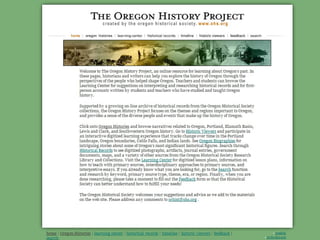
Exercise: Make this web page better 2 minutes -  discuss  with your neighbour [Scribble revised layout  on copy of page in your pack]
 
About website structure,  ways people use the web and implications for writing for the web
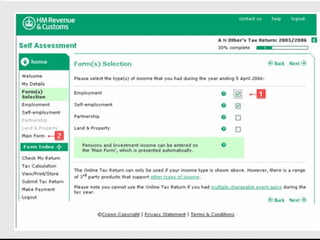
Certain types of websites impose  linear user journeys:  TheTrainline.com Cinema ticket bookings Self assessment tax return online
 
In most websites, although there are some linear elements …
 
…  people like to have other pathways available to them…
…  and most journeys are  very non-linear
Also, most people reach your website via Google Only 20% arrive at your website on the home page
Most may not have had your site in mind when searching
30% of them go to home page to ‘try and work out what this site is about’
So... each page on the site must quickly:  engage users  and   give sense of what site is about –  otherwise most will leave
‘ Writing for the web’ is not just about text…
…  but also choosing the right images …  layouts …  graphical look and feel … website structure etc etc
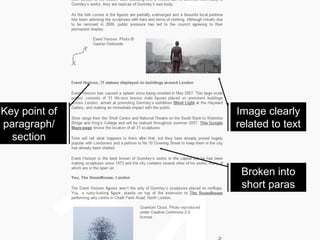
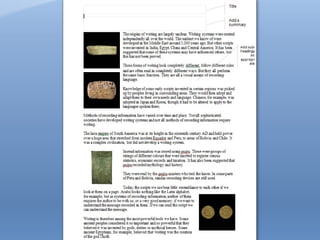
Key point of paragraph/ section Image clearly related to text Broken into short paras
Short video guides http://www.youtube.com/watch?v=AoU2yANNxRs&eurl=http://inside.123-reg.co.uk/archives/video-writing-your-web-copy   Writing web headlines  http://www.youtube.com/watch?v=zBg7dJIfHM0
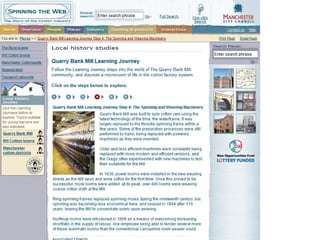
Home page: key functions Offer overview:  Show user what the site can do for them Show user what is in the site: The structure at a glance Content highlights or samples Engagement: make user want to continue browsing www.manchestergalleries.org/
Article page: key functions Engage the user – make them want to consume the article Signposting:  Show user what else is nearby in the site The structure at a glance Show user what else the site offers them www.mylearning.org/overview.asp?journeyid=73 www.manchestergalleries.org/
Short writing exercises
Key points About creating digital content – ‘writing for the web’ Plan, evaluate, do audience research, do user testing Make use of freebies and cheapies
Plan, evaluate, do audience research How to plan and conduct research into online audiences: http://sca.jiscinvolve.org/audience-publications/   Focus on  why  you are measuring what you plan to measure Web stats, online questionnaires, focus groups (concept testing), user testing – various ways of gathering data Build costs into the project for regular evaluation – avoid expensive remedial action later in project
Key points About creating digital content – ‘writing for the web’ Plan, evaluate, do audience research, do user testing Make use of freebies and cheapies
Freebies and cheapies WordPress and other ‘free’ CMSs for creating websites, blogging, or prototyping  YouTube, Vimeo, podcasting Social media: Facebook, Twitter Google maps, Google site search, Google Analytics TripAdvisor, etc
Making websites - CMSs http://wordpress.com   - free website creation service (pay extra for features like own domain name etc).  All hosting and upgrading etc is done for you
Making websites - CMSs http://wordpress.org   - free website creation service – like .com except you have to install it on your server and you are responsible for updating, hosting costs, etc
Making websites - CMSs www.contentcurator.net   - free open-source CMS specially developed for cultural and heritage sector.  Powerful and easy to use e.g. in-place editing
Making websites - CMSs www.cmsmadesimple.org  - free website creation service – you install it on your server and you are responsible for updating, hosting costs, etc  - very similar to wordpress.org
Prototyping with WordPress http://ruskinelementsofdrawing.wordpress.com
Video – maximise impact http://vimeo.com   http://ruskinelementsofdrawing.wordpress.com
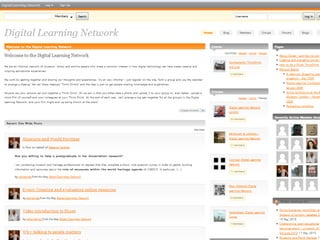
Social media – maximise impact? Has potential to increase engagement but be aware: long term commitment essential so financial implications in resourcing Can also work against you.  DLNet  vs.  Dulwich Picture Gallery blog
Online audiences - links Advice and links on online audience research,social media strategy, evaluation, etc http://onlineaudiences.wordpress.com/
More info / advice / ideas Martin Bazley 0780 3580 727 www.martinbazley.com

Martin bazley Creating effective content 15 Mar 11

  • 1.
    Freebies, cheapies andgood things to do - tips for optimising digital content on a budget Changing platforms: creating effective content Royal College of Surgeons 15 March 2011 Martin Bazley, Martin Bazley & Associates
  • 2.
    Martin Bazley Previously:Teaching (7 yrs) Science Museum, London, Internet Projects (7yrs) E-Learning Officer, MLA South East (3yrs)
  • 3.
    Martin Bazley Previously:Teaching (7 yrs) Science Museum, London, Internet Projects (7yrs) E-Learning Officer, MLA South East (3yrs) Currently Vice Chair, DLNet (was E-Learning Group for Museums, Lib, Archives) Consultancy, websites, training, user testing, evaluation … Martin Bazley & Associates www.martinbazley.com Slides and notes available afterwards
  • 4.
  • 5.
  • 6.
    Key points Aboutcreating digital content – ‘writing for the web’ Plan, evaluate, do audience research, do user testing Make use of freebies and cheapies
  • 7.
  • 8.
    Users don’t always‘get’ what we are offering: a real–world analogy
  • 9.
    Even a slightdifference in viewpoints… … can cause real problems for users
  • 10.
  • 11.
  • 12.
    In a conflictbetween visual affordance … … and written instructions visual affordance almost always wins
  • 13.
    So what isthe point of all this?
  • 14.
    People use theweb differently…
  • 15.
    … fromthe way they use books, object labels, magazines, newspapers, information screens, etc
  • 16.
    For most peoplethe web is a predominantly visual medium
  • 17.
  • 18.
    We are alldifferent and some people like to read all the text on a web page before deciding what to do next, even though a lot of it might be pretty redundant but most people – or at least most regular users of the web – rather than reading through them in detail just scan the web pages they are using, or at least the ones where they are still trying to work out where to go next
  • 19.
  • 20.
    Users won't readyour text thoroughly word-by-word. Exhaustive reading is rare, especially when browsing. Yes, some people will read more, but most won't.
  • 21.
    The first twoparagraphs must state the most important information . There's some hope that users will actually read this material – though they'll probably read more of the first paragraph than the second.
  • 22.
    Start subheadings, paragraphs,and bullet points with information-carrying words that users will notice when scanning down the left side of your content in the final stem of their F-behaviour. They'll read the third word on a line much less often than the first two words.
  • 23.
    If they haveto work at it for example if they cannot see what they are looking for, or if it doesn’t make sense to them at first glance then most people – or at least many people who do a lot of searching or browsing on the web just decide that this particular site is not for them, and anyway they have a long list of other search results or ideas to try and so they go elsewhere
  • 24.
    Exercise: Make thisweb page better 2 minutes - discuss with your neighbour [Scribble revised layout on copy of page in your pack]
  • 25.
  • 26.
    About website structure, ways people use the web and implications for writing for the web
  • 27.
    Certain types ofwebsites impose linear user journeys: TheTrainline.com Cinema ticket bookings Self assessment tax return online
  • 28.
  • 29.
    In most websites,although there are some linear elements …
  • 30.
  • 31.
    … peoplelike to have other pathways available to them…
  • 32.
    … andmost journeys are very non-linear
  • 33.
    Also, most peoplereach your website via Google Only 20% arrive at your website on the home page
  • 34.
    Most may nothave had your site in mind when searching
  • 35.
    30% of themgo to home page to ‘try and work out what this site is about’
  • 36.
    So... each pageon the site must quickly: engage users and give sense of what site is about – otherwise most will leave
  • 37.
    ‘ Writing forthe web’ is not just about text…
  • 38.
    … butalso choosing the right images … layouts … graphical look and feel … website structure etc etc
  • 39.
    Key point ofparagraph/ section Image clearly related to text Broken into short paras
  • 40.
    Short video guideshttp://www.youtube.com/watch?v=AoU2yANNxRs&eurl=http://inside.123-reg.co.uk/archives/video-writing-your-web-copy Writing web headlines http://www.youtube.com/watch?v=zBg7dJIfHM0
  • 41.
    Home page: keyfunctions Offer overview: Show user what the site can do for them Show user what is in the site: The structure at a glance Content highlights or samples Engagement: make user want to continue browsing www.manchestergalleries.org/
  • 42.
    Article page: keyfunctions Engage the user – make them want to consume the article Signposting: Show user what else is nearby in the site The structure at a glance Show user what else the site offers them www.mylearning.org/overview.asp?journeyid=73 www.manchestergalleries.org/
  • 43.
  • 44.
  • 45.
    Key points Aboutcreating digital content – ‘writing for the web’ Plan, evaluate, do audience research, do user testing Make use of freebies and cheapies
  • 46.
    Plan, evaluate, doaudience research How to plan and conduct research into online audiences: http://sca.jiscinvolve.org/audience-publications/ Focus on why you are measuring what you plan to measure Web stats, online questionnaires, focus groups (concept testing), user testing – various ways of gathering data Build costs into the project for regular evaluation – avoid expensive remedial action later in project
  • 47.
    Key points Aboutcreating digital content – ‘writing for the web’ Plan, evaluate, do audience research, do user testing Make use of freebies and cheapies
  • 48.
    Freebies and cheapiesWordPress and other ‘free’ CMSs for creating websites, blogging, or prototyping YouTube, Vimeo, podcasting Social media: Facebook, Twitter Google maps, Google site search, Google Analytics TripAdvisor, etc
  • 49.
    Making websites -CMSs http://wordpress.com - free website creation service (pay extra for features like own domain name etc). All hosting and upgrading etc is done for you
  • 50.
    Making websites -CMSs http://wordpress.org - free website creation service – like .com except you have to install it on your server and you are responsible for updating, hosting costs, etc
  • 51.
    Making websites -CMSs www.contentcurator.net - free open-source CMS specially developed for cultural and heritage sector. Powerful and easy to use e.g. in-place editing
  • 52.
    Making websites -CMSs www.cmsmadesimple.org - free website creation service – you install it on your server and you are responsible for updating, hosting costs, etc - very similar to wordpress.org
  • 53.
    Prototyping with WordPresshttp://ruskinelementsofdrawing.wordpress.com
  • 54.
    Video – maximiseimpact http://vimeo.com http://ruskinelementsofdrawing.wordpress.com
  • 55.
    Social media –maximise impact? Has potential to increase engagement but be aware: long term commitment essential so financial implications in resourcing Can also work against you. DLNet vs. Dulwich Picture Gallery blog
  • 56.
    Online audiences -links Advice and links on online audience research,social media strategy, evaluation, etc http://onlineaudiences.wordpress.com/
  • 57.
    More info /advice / ideas Martin Bazley 0780 3580 727 www.martinbazley.com