Progressive Web Apps
Kranthi Lakum
PWA
• Built with Progressive enhancement at the core
• Service Worker augmented Application Shell
architecture
• Apps that work offline or on low-quality networks
• Served via HTTPS
• PWA Example
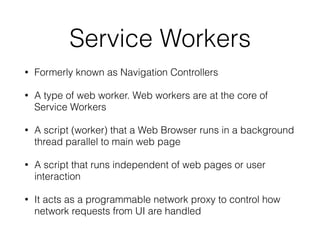
Service Workers
• Formerly known as Navigation Controllers
• A type of web worker. Web workers are at the core of
Service Workers
• A script (worker) that a Web Browser runs in a background
thread parallel to main web page
• A script that runs independent of web pages or user
interaction
• It acts as a programmable network proxy to control how
network requests from UI are handled
• Basic Example
• Detailed Registration
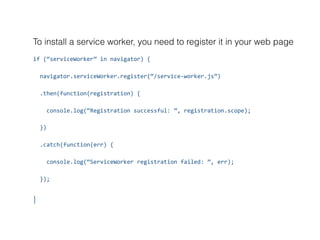
To install a service worker, you need to register it in your web page
if	(“serviceWorker”	in	navigator)	{	
		navigator.serviceWorker.register(“/service-worker.js”)	
		.then(function(registration)	{	
				console.log(“Registration	successful:	”,	registration.scope);	
		})	
		.catch(function(err)	{	
				console.log(“ServiceWorker	registration	failed:	”,	err);	
		});	
}
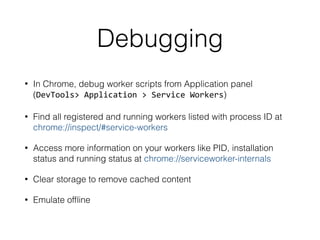
Debugging
• In Chrome, debug worker scripts from Application panel
(DevTools>	Application	>	Service	Workers)
• Find all registered and running workers listed with process ID at
chrome://inspect/#service-workers
• Access more information on your workers like PID, installation
status and running status at chrome://serviceworker-internals
• Clear storage to remove cached content
• Emulate offline
App Shell
• Service Worker augmented Application Shell Architecture
is a Web application architecture that leverages Service
Worker to offline cache your Application Shell
• App shell consists of minimal HTML, CSS, and JavaScript
to load a simple user interface (static web-app)
• App shell is loaded from Service Worker cache
• Cached App shell loads instantly on repeat visits
• Content gets populated in the App shell eventually when
connected to network
Manifest
• Text file written in JSON format with metadata
information about a web application
• Allows installation of apps to home screen of a
device
• Adds an auto-generated splash screen
• <link rel=“manifest” href=“manifest.webmanifest”>
• W3C Web App Manifest Specification
Compatibility
• Chrome for Desktop 40+
• Chrome for Android 40+
• Firefox for Desktop 33+
• Safari (WebKit) not supported,
but under consideration
• Opera for Desktop and
Android 27+
Resources
• Web Workers
• Service Worker Introduction
• Service Worker Explained
• Service Worker API, MDN
• Service Workers by Jack Archibald
• Progressive Enhancement
• Google Chrome sw-toolkit
• Google Chrome sw-precache
• PWA Examples
• Service Workers Explanation, MDN

Progressive Web Apps

  • 1.
  • 2.
    PWA • Built withProgressive enhancement at the core • Service Worker augmented Application Shell architecture • Apps that work offline or on low-quality networks • Served via HTTPS • PWA Example
  • 3.
    Service Workers • Formerlyknown as Navigation Controllers • A type of web worker. Web workers are at the core of Service Workers • A script (worker) that a Web Browser runs in a background thread parallel to main web page • A script that runs independent of web pages or user interaction • It acts as a programmable network proxy to control how network requests from UI are handled
  • 4.
    • Basic Example •Detailed Registration
  • 5.
    To install aservice worker, you need to register it in your web page if (“serviceWorker” in navigator) { navigator.serviceWorker.register(“/service-worker.js”) .then(function(registration) { console.log(“Registration successful: ”, registration.scope); }) .catch(function(err) { console.log(“ServiceWorker registration failed: ”, err); }); }
  • 6.
    Debugging • In Chrome,debug worker scripts from Application panel (DevTools> Application > Service Workers) • Find all registered and running workers listed with process ID at chrome://inspect/#service-workers • Access more information on your workers like PID, installation status and running status at chrome://serviceworker-internals • Clear storage to remove cached content • Emulate offline
  • 7.
    App Shell • ServiceWorker augmented Application Shell Architecture is a Web application architecture that leverages Service Worker to offline cache your Application Shell • App shell consists of minimal HTML, CSS, and JavaScript to load a simple user interface (static web-app) • App shell is loaded from Service Worker cache • Cached App shell loads instantly on repeat visits • Content gets populated in the App shell eventually when connected to network
  • 8.
    Manifest • Text filewritten in JSON format with metadata information about a web application • Allows installation of apps to home screen of a device • Adds an auto-generated splash screen • <link rel=“manifest” href=“manifest.webmanifest”> • W3C Web App Manifest Specification
  • 9.
    Compatibility • Chrome forDesktop 40+ • Chrome for Android 40+ • Firefox for Desktop 33+ • Safari (WebKit) not supported, but under consideration • Opera for Desktop and Android 27+
  • 10.
    Resources • Web Workers •Service Worker Introduction • Service Worker Explained • Service Worker API, MDN • Service Workers by Jack Archibald • Progressive Enhancement • Google Chrome sw-toolkit • Google Chrome sw-precache • PWA Examples • Service Workers Explanation, MDN