Manufacturing Application
Powered by Odoo ERP
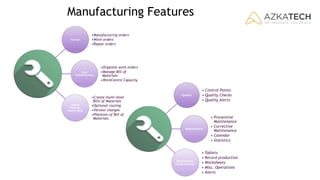
Manufacturing Features
Manage
•Manufacturing orders
•Work orders
•Repair orders
Plan
Manufacturing
•Organize work orders
•Manage Bill of
Materials
•WorkCentre Capacity
Define
Flexible
Master Data
•Create multi-level
Bills of Materials
•Optional routing
•Version changes
•Phantom of Bill of
Materials
Quality
• Control Points
• Quality Checks
• Quality Alerts
Maintenance
• Preventive
Maintenance
• Corrective
Maintenance
• Calendar
• Statistics
WorkCentre
Control Panel
• Tablets
• Record production
• Worksheets
• Misc. Operations
• Alerts
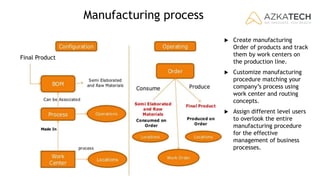
Manufacturing process
Final Product
 Create manufacturing
Order of products and track
them by work centers on
the production line.
 Customize manufacturing
procedure matching your
company’s process using
work center and routing
concepts.
 Assign different level users
to overlook the entire
manufacturing procedure
for the effective
management of business
processes.
All you need in a Single Software
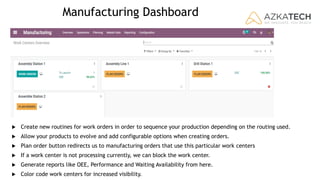
Manufacturing Dashboard
 Create new routines for work orders in order to sequence your production depending on the routing used.
 Allow your products to evolve and add configurable options when creating orders.
 Plan order button redirects us to manufacturing orders that use this particular work centers
 If a work center is not processing currently, we can block the work center.
 Generate reports like OEE, Performance and Waiting Availability from here.
 Color code work centers for increased visibility.
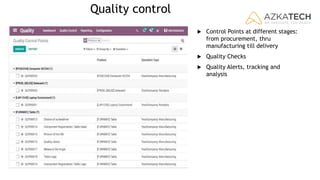
Quality control
 Control Points at different stages:
from procurement, thru
manufacturing till delivery
 Quality Checks
 Quality Alerts, tracking and
analysis
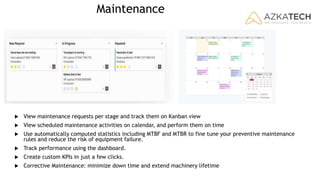
Maintenance
 View maintenance requests per stage and track them on Kanban view
 View scheduled maintenance activities on calendar, and perform them on time
 Use automatically computed statistics including MTBF and MTBR to fine tune your preventive maintenance
rules and reduce the risk of equipment failure.
 Track performance using the dashboard.
 Create custom KPIs in just a few clicks.
 Corrective Maintenance: minimize down time and extend machinery lifetime
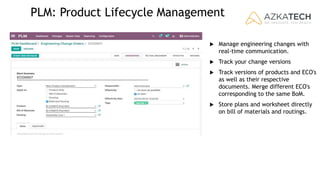
PLM: Product Lifecycle Management
 Manage engineering changes with
real-time communication.
 Track your change versions
 Track versions of products and ECO's
as well as their respective
documents. Merge different ECO's
corresponding to the same BoM.
 Store plans and worksheet directly
on bill of materials and routings.
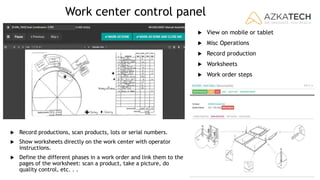
Work center control panel
 View on mobile or tablet
 Misc Operations
 Record production
 Worksheets
 Work order steps
 Record productions, scan products, lots or serial numbers.
 Show worksheets directly on the work center with operator
instructions.
 Define the different phases in a work order and link them to the
pages of the worksheet: scan a product, take a picture, do
quality control, etc. . .
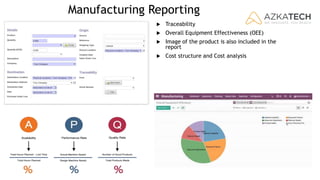
Manufacturing Reporting
 Traceability
 Overall Equipment Effectiveness (OEE)
 Image of the product is also included in the
report
 Cost structure and Cost analysis
Your Key to a successful ERP implementation
+961 1 38 98 77
info@azka.tech
azka.tech
Certified Odoo Partner
Powered by

Manufacturing management solution

  • 1.
  • 2.
    Manufacturing Features Manage •Manufacturing orders •Workorders •Repair orders Plan Manufacturing •Organize work orders •Manage Bill of Materials •WorkCentre Capacity Define Flexible Master Data •Create multi-level Bills of Materials •Optional routing •Version changes •Phantom of Bill of Materials Quality • Control Points • Quality Checks • Quality Alerts Maintenance • Preventive Maintenance • Corrective Maintenance • Calendar • Statistics WorkCentre Control Panel • Tablets • Record production • Worksheets • Misc. Operations • Alerts
  • 3.
    Manufacturing process Final Product Create manufacturing Order of products and track them by work centers on the production line.  Customize manufacturing procedure matching your company’s process using work center and routing concepts.  Assign different level users to overlook the entire manufacturing procedure for the effective management of business processes.
  • 4.
    All you needin a Single Software
  • 5.
    Manufacturing Dashboard  Createnew routines for work orders in order to sequence your production depending on the routing used.  Allow your products to evolve and add configurable options when creating orders.  Plan order button redirects us to manufacturing orders that use this particular work centers  If a work center is not processing currently, we can block the work center.  Generate reports like OEE, Performance and Waiting Availability from here.  Color code work centers for increased visibility.
  • 6.
    Quality control  ControlPoints at different stages: from procurement, thru manufacturing till delivery  Quality Checks  Quality Alerts, tracking and analysis
  • 7.
    Maintenance  View maintenancerequests per stage and track them on Kanban view  View scheduled maintenance activities on calendar, and perform them on time  Use automatically computed statistics including MTBF and MTBR to fine tune your preventive maintenance rules and reduce the risk of equipment failure.  Track performance using the dashboard.  Create custom KPIs in just a few clicks.  Corrective Maintenance: minimize down time and extend machinery lifetime
  • 8.
    PLM: Product LifecycleManagement  Manage engineering changes with real-time communication.  Track your change versions  Track versions of products and ECO's as well as their respective documents. Merge different ECO's corresponding to the same BoM.  Store plans and worksheet directly on bill of materials and routings.
  • 9.
    Work center controlpanel  View on mobile or tablet  Misc Operations  Record production  Worksheets  Work order steps  Record productions, scan products, lots or serial numbers.  Show worksheets directly on the work center with operator instructions.  Define the different phases in a work order and link them to the pages of the worksheet: scan a product, take a picture, do quality control, etc. . .
  • 10.
    Manufacturing Reporting  Traceability Overall Equipment Effectiveness (OEE)  Image of the product is also included in the report  Cost structure and Cost analysis
  • 11.
    Your Key toa successful ERP implementation +961 1 38 98 77 info@azka.tech azka.tech Certified Odoo Partner Powered by