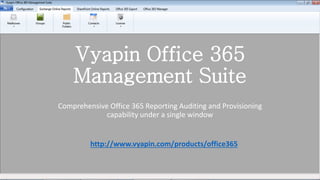
Vyapin Office 365
Management Suite
Comprehensive Office 365 Reporting Auditing and Provisioning
capability under a single window
http://www.vyapin.com/products/office365
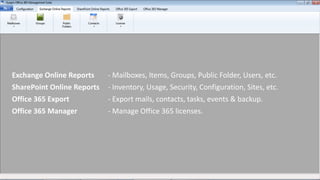
Exchange Online Reports - Mailboxes, Items, Groups, Public Folder, Users, etc.
SharePoint Online Reports - Inventory, Usage, Security, Configuration, Sites, etc.
Office 365 Export - Export mails, contacts, tasks, events & backup.
Office 365 Manager - Manage Office 365 licenses.
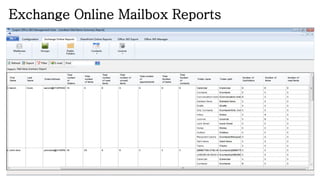
Exchange Online Mailbox Reports
• Gather reports like Exchange Online mailboxes, the mail items and
their statistics
• Email addresses, dates and Exchange settings details provided
• Reports about various restrictions and quotas
• Delivery options and mailbox permissions report also generated
• Hidden & disabled mailboxes, duplicate display names, default size
and folder security details also generated
• Folder properties, attachment summary help complete the list of
details required by Office 365 administrators
Exchange Online Mailbox Reports
Exchange Online Group Reports
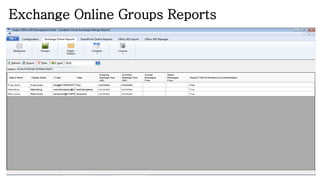
• Provides basic details like general information, e-mail addresses
• Created and modified date about Groups presented
• Groups Exchange Settings data also generated
• Membership details of Groups provided as necessary
• Size and delivery restrictions also listed through reports
• Also lists whether senders are authenticated or not
Exchange Online Groups Reports
Exchange Online Public Folder Reports
• Provides basic details like general settings and created / modified
dates
• Provides folder details like limits, size, empty Public Folders, etc.
• Provides details about delivery and size restrictions as well as
permissions applied
• Presents details of email addresses
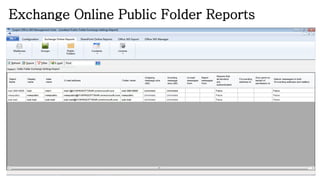
• Helps gather Exchange Online Public Folder settings
• Also displays list of Public Folders hidden from Address Book
Exchange Online Public Folder Reports
SharePoint Online Configuration Reports
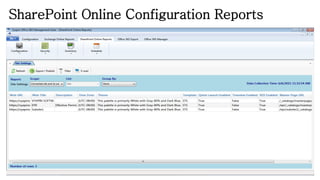
• Provides basic details like general settings, list templates, site
collection workflow templates, site templates, etc.
• Important configuration parameters like site columns, settings and
content types also generated
• Site workflows and web parts configuration details also generated
SharePoint Online Configuration Reports
SharePoint Online Security Reports
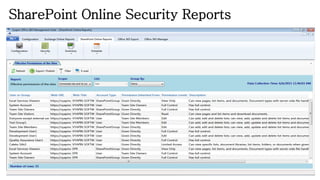
• Provides details of SharePoint Online effective permissions
• Provides a list of effective permissions on sites, lists, items
• Also lists effective permission on groups and users
• Group ownership details in SharePoint Online also provided
• Provides a list of lists and sites with no unique securable objects
• Lists unique securable objects with empty permissions
• Gives details of limited access permissions
SharePoint Online Security Reports
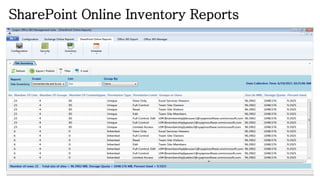
SharePoint Online Inventory Reports
• Provides extensive site inventory data like sub-webs, columns, lists,
groups, content types, permissions, groups, user, size, quota, etc.
• Displays list details like title, dates, template used, type, items
present, columns, permissions applied, users and groups associated
with the list and the size
• The items inventory provides details like author, editor, date, file
directory and type, version numbers, permission type and level,
groups and users associated with the items, and the size
• The inventory report provides details that help you gain an insight on
how the allocated resources are being used
SharePoint Online Inventory Reports
SharePoint Online Reports - Schedule
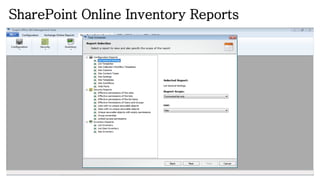
• All SharePoint Online reports can be scheduled using the Schedule
wizard
• It provides a wide range of options under titles – Configuration
Reports, Security Reports and Inventory Reports
• You can choose between select lists or the entire contents of a site for
generating reports about
• You can choose between exporting the report to a destination folder
on file share, emailing it to addresses or publishing the report to a
document library
SharePoint Online Inventory Reports
Office 365 Export
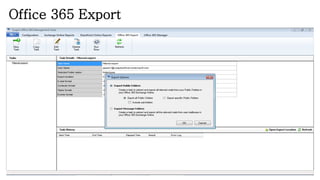
• Export selected or all Public Folders using respective wizards
• Can also extract and export all relevant mails from user mailboxes
under the Export Message Folders wizard
• Export inbox, drafts, sent & delete items, contacts, tasks, calendar,
journal and custom folders. Sub folders also included in export
• Use the search option to search for and create filter conditions
• File naming rules for exported files help give appropriate names to
exported files
• Specify export destination and time period during which to export
contents
Office 365 Export
Office 365 License Manager
• Generate reports about licenses, the users who are assigned these
licenses, the license types and counts
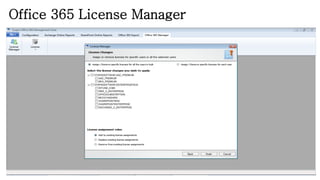
• Modify tenant licenses using the License Manager wizard
• You can add to existing license assignments
• You can replace existing license assignments
• You can remove from existing license assignments
• You can do bulk assignments to several users
• Can also modify licenses assigned to specific individuals
Office 365 License Manager

Office 365 Reporting and Licenses Management Tool

  • 1.
    Vyapin Office 365 ManagementSuite Comprehensive Office 365 Reporting Auditing and Provisioning capability under a single window http://www.vyapin.com/products/office365
  • 2.
    Exchange Online Reports- Mailboxes, Items, Groups, Public Folder, Users, etc. SharePoint Online Reports - Inventory, Usage, Security, Configuration, Sites, etc. Office 365 Export - Export mails, contacts, tasks, events & backup. Office 365 Manager - Manage Office 365 licenses.
  • 3.
    Exchange Online MailboxReports • Gather reports like Exchange Online mailboxes, the mail items and their statistics • Email addresses, dates and Exchange settings details provided • Reports about various restrictions and quotas • Delivery options and mailbox permissions report also generated • Hidden & disabled mailboxes, duplicate display names, default size and folder security details also generated • Folder properties, attachment summary help complete the list of details required by Office 365 administrators
  • 4.
  • 5.
    Exchange Online GroupReports • Provides basic details like general information, e-mail addresses • Created and modified date about Groups presented • Groups Exchange Settings data also generated • Membership details of Groups provided as necessary • Size and delivery restrictions also listed through reports • Also lists whether senders are authenticated or not
  • 6.
  • 7.
    Exchange Online PublicFolder Reports • Provides basic details like general settings and created / modified dates • Provides folder details like limits, size, empty Public Folders, etc. • Provides details about delivery and size restrictions as well as permissions applied • Presents details of email addresses • Helps gather Exchange Online Public Folder settings • Also displays list of Public Folders hidden from Address Book
  • 8.
    Exchange Online PublicFolder Reports
  • 9.
    SharePoint Online ConfigurationReports • Provides basic details like general settings, list templates, site collection workflow templates, site templates, etc. • Important configuration parameters like site columns, settings and content types also generated • Site workflows and web parts configuration details also generated
  • 10.
  • 11.
    SharePoint Online SecurityReports • Provides details of SharePoint Online effective permissions • Provides a list of effective permissions on sites, lists, items • Also lists effective permission on groups and users • Group ownership details in SharePoint Online also provided • Provides a list of lists and sites with no unique securable objects • Lists unique securable objects with empty permissions • Gives details of limited access permissions
  • 12.
  • 13.
    SharePoint Online InventoryReports • Provides extensive site inventory data like sub-webs, columns, lists, groups, content types, permissions, groups, user, size, quota, etc. • Displays list details like title, dates, template used, type, items present, columns, permissions applied, users and groups associated with the list and the size • The items inventory provides details like author, editor, date, file directory and type, version numbers, permission type and level, groups and users associated with the items, and the size • The inventory report provides details that help you gain an insight on how the allocated resources are being used
  • 14.
  • 15.
    SharePoint Online Reports- Schedule • All SharePoint Online reports can be scheduled using the Schedule wizard • It provides a wide range of options under titles – Configuration Reports, Security Reports and Inventory Reports • You can choose between select lists or the entire contents of a site for generating reports about • You can choose between exporting the report to a destination folder on file share, emailing it to addresses or publishing the report to a document library
  • 16.
  • 17.
    Office 365 Export •Export selected or all Public Folders using respective wizards • Can also extract and export all relevant mails from user mailboxes under the Export Message Folders wizard • Export inbox, drafts, sent & delete items, contacts, tasks, calendar, journal and custom folders. Sub folders also included in export • Use the search option to search for and create filter conditions • File naming rules for exported files help give appropriate names to exported files • Specify export destination and time period during which to export contents
  • 18.
  • 19.
    Office 365 LicenseManager • Generate reports about licenses, the users who are assigned these licenses, the license types and counts • Modify tenant licenses using the License Manager wizard • You can add to existing license assignments • You can replace existing license assignments • You can remove from existing license assignments • You can do bulk assignments to several users • Can also modify licenses assigned to specific individuals
  • 20.