



Managing GCP Projects
with Terraform
GDG DevFest Pisa 0.1
Giovanni Toraldo @gionn
cloudesire.com
About me
Giovanni Toraldo
Open Source Enthusiast, Java
coder, writer of the OpenNebula
book, lead developer &
co-founder at @Cloudesire,
shooting 2 euro coin at 36
meters with crossbow
2
Monetization & Brokering
Platform for immediate
SaaSification and automated
distribution of business
applications and services.
3
4
Infrastructure as code?
Design, implement, and deploy applications infrastructure with
known software best practices:
● Code versioning
● Code reuse (modularization/abstraction)
● Code sharing
In order to achieve:
● Repeatability
● Speed
● Reliability
5
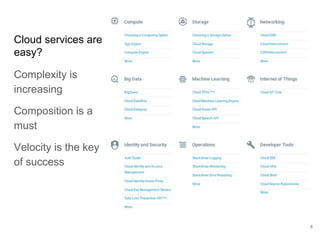
Cloud services are
easy?
Complexity is
increasing
Composition is a
must
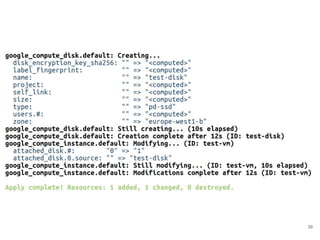
Velocity is the key
of success
6
7
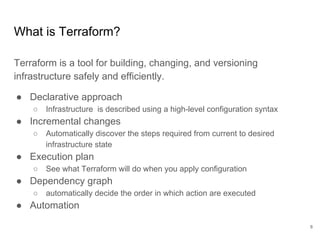
What is Terraform?
Terraform is a tool for building, changing, and versioning
infrastructure safely and efficiently.
● Declarative approach
○ Infrastructure is described using a high-level configuration syntax
● Incremental changes
○ Automatically discover the steps required from current to desired
infrastructure state
● Execution plan
○ See what Terraform will do when you apply configuration
● Dependency graph
○ automatically decide the order in which action are executed
● Automation
8
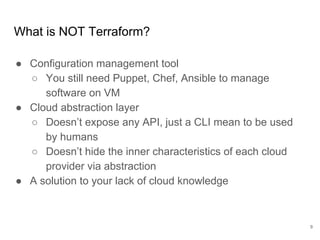
What is NOT Terraform?
● Configuration management tool
○ You still need Puppet, Chef, Ansible to manage
software on VM
● Cloud abstraction layer
○ Doesn’t expose any API, just a CLI mean to be used
by humans
○ Doesn’t hide the inner characteristics of each cloud
provider via abstraction
● A solution to your lack of cloud knowledge
9
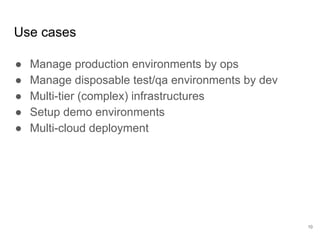
Use cases
● Manage production environments by ops
● Manage disposable test/qa environments by dev
● Multi-tier (complex) infrastructures
● Setup demo environments
● Multi-cloud deployment
10
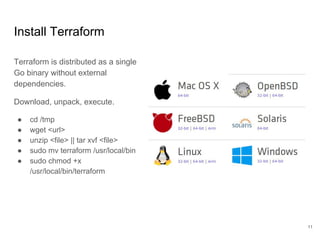
Install Terraform
Terraform is distributed as a single
Go binary without external
dependencies.
Download, unpack, execute.
● cd /tmp
● wget <url>
● unzip <file> || tar xvf <file>
● sudo mv terraform /usr/local/bin
● sudo chmod +x
/usr/local/bin/terraform
11
Create a Google Cloud Platform account
12
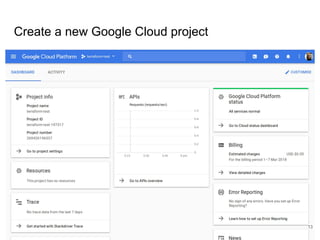
Create a new Google Cloud project
13
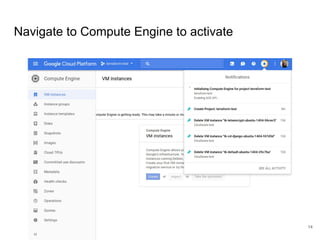
Navigate to Compute Engine to activate
14
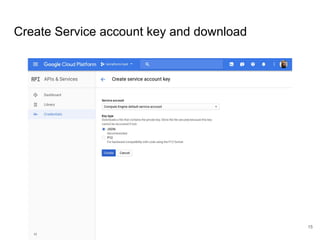
Create Service account key and download
15
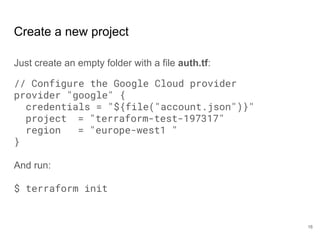
Create a new project
Just create an empty folder with a file auth.tf:
// Configure the Google Cloud provider
provider "google" {
credentials = "${file("account.json")}"
project = "terraform-test-197317"
region = "europe-west1 "
}
And run:
$ terraform init
16
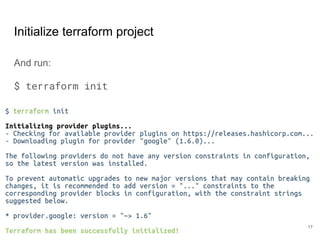
Initialize terraform project
And run:
$ terraform init
17
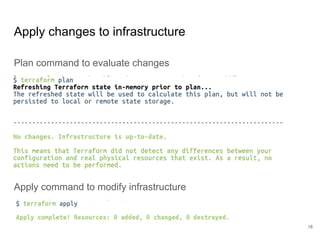
Apply changes to infrastructure
Plan command to evaluate changes
Apply command to modify infrastructure
18
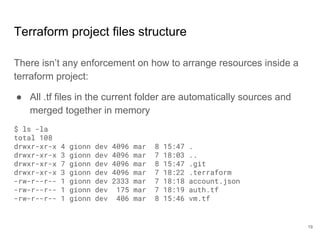
Terraform project files structure
There isn’t any enforcement on how to arrange resources inside a
terraform project:
● All .tf files in the current folder are automatically sources and
merged together in memory
$ ls -la
total 108
drwxr-xr-x 4 gionn dev 4096 mar 8 15:47 .
drwxr-xr-x 3 gionn dev 4096 mar 7 18:03 ..
drwxr-xr-x 7 gionn dev 4096 mar 8 15:47 .git
drwxr-xr-x 3 gionn dev 4096 mar 7 18:22 .terraform
-rw-r--r-- 1 gionn dev 2333 mar 7 18:18 account.json
-rw-r--r-- 1 gionn dev 175 mar 7 18:19 auth.tf
-rw-r--r-- 1 gionn dev 406 mar 8 15:46 vm.tf
19
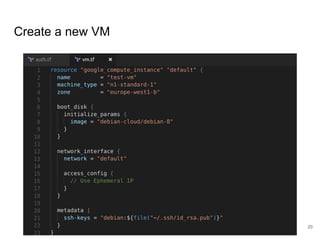
Create a new VM
20
Plan output
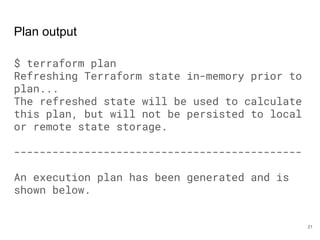
$ terraform plan
Refreshing Terraform state in-memory prior to
plan...
The refreshed state will be used to calculate
this plan, but will not be persisted to local
or remote state storage.
---------------------------------------------
An execution plan has been generated and is
shown below.
21
Plan output
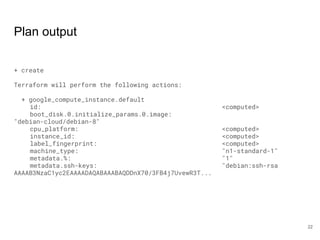
+ create
Terraform will perform the following actions:
+ google_compute_instance.default
id: <computed>
boot_disk.0.initialize_params.0.image:
"debian-cloud/debian-8"
cpu_platform: <computed>
instance_id: <computed>
label_fingerprint: <computed>
machine_type: "n1-standard-1"
metadata.%: "1"
metadata.ssh-keys: "debian:ssh-rsa
AAAAB3NzaC1yc2EAAAADAQABAAABAQDDnX70/3FB4j7UvewR3T...
22
Plan output
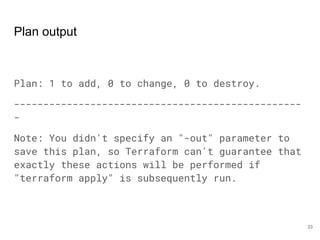
Plan: 1 to add, 0 to change, 0 to destroy.
-------------------------------------------------
-
Note: You didn't specify an "-out" parameter to
save this plan, so Terraform can't guarantee that
exactly these actions will be performed if
"terraform apply" is subsequently run.
23
Apply output
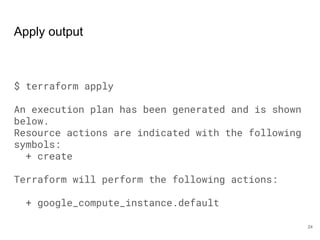
$ terraform apply
An execution plan has been generated and is shown
below.
Resource actions are indicated with the following
symbols:
+ create
Terraform will perform the following actions:
+ google_compute_instance.default
24
Apply output
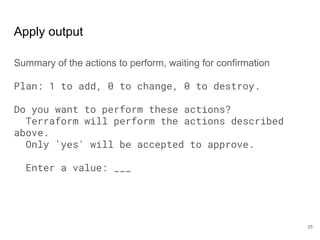
Summary of the actions to perform, waiting for confirmation
Plan: 1 to add, 0 to change, 0 to destroy.
Do you want to perform these actions?
Terraform will perform the actions described
above.
Only 'yes' will be accepted to approve.
Enter a value: ___
25
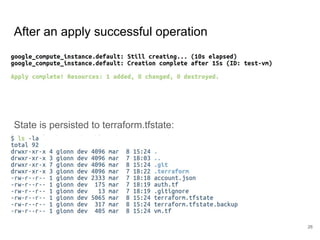
After an apply successful operation
State is persisted to terraform.tfstate:
26
27
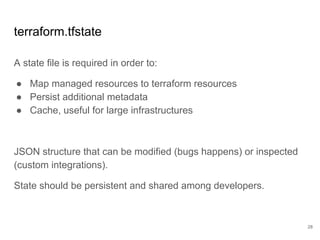
terraform.tfstate
A state file is required in order to:
● Map managed resources to terraform resources
● Persist additional metadata
● Cache, useful for large infrastructures
JSON structure that can be modified (bugs happens) or inspected
(custom integrations).
State should be persistent and shared among developers.
28
Terraform.tfstate sharing and locking
For solo developers or small teams: just commit to GIT.
For bigger teams, tfstate locking is required.
Multiple backends supported:
● Google cloud storage
● S3
● Consul
● Etcd
● Terraform enterprise
29
Terraform.tfstate sample output
{
"version": 3,
"terraform_version": "0.11.3",
"serial": 2,
"lineage": "d495f1c0-3c8b-45c2-bda2-f40d28382f30",
"modules": [
{
"path": [
"root"
],
"outputs": {},
"resources": {
"google_compute_instance.default": {
"type": "google_compute_instance",
"depends_on": [],
"primary": {
"id": "test-vm",
"attributes": {
"attached_disk.#": "0",
"boot_disk.#": "1",
"boot_disk.0.auto_delete": "true",
"boot_disk.0.device_name": "persistent-disk-0",
"boot_disk.0.disk_encryption_key_raw": "",
"boot_disk.0.disk_encryption_key_sha256": "",
30
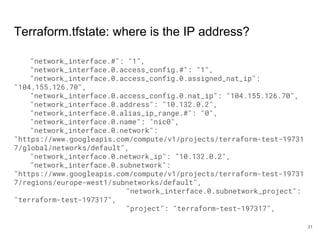
Terraform.tfstate: where is the IP address?
"network_interface.#": "1",
"network_interface.0.access_config.#": "1",
"network_interface.0.access_config.0.assigned_nat_ip":
"104.155.126.70",
"network_interface.0.access_config.0.nat_ip": "104.155.126.70",
"network_interface.0.address": "10.132.0.2",
"network_interface.0.alias_ip_range.#": "0",
"network_interface.0.name": "nic0",
"network_interface.0.network":
"https://www.googleapis.com/compute/v1/projects/terraform-test-19731
7/global/networks/default",
"network_interface.0.network_ip": "10.132.0.2",
"network_interface.0.subnetwork":
"https://www.googleapis.com/compute/v1/projects/terraform-test-19731
7/regions/europe-west1/subnetworks/default",
"network_interface.0.subnetwork_project":
"terraform-test-197317",
"project": "terraform-test-197317",
31
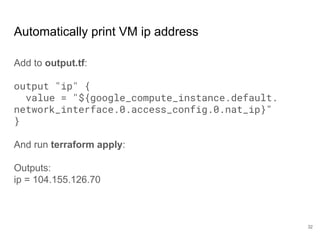
Automatically print VM ip address
Add to output.tf:
output "ip" {
value = "${google_compute_instance.default.
network_interface.0.access_config.0.nat_ip}"
}
And run terraform apply:
Outputs:
ip = 104.155.126.70
32
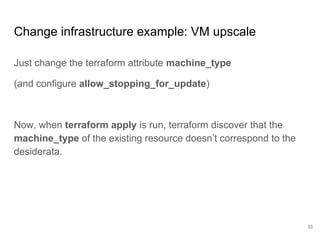
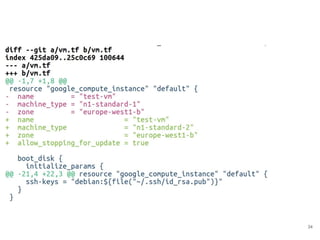
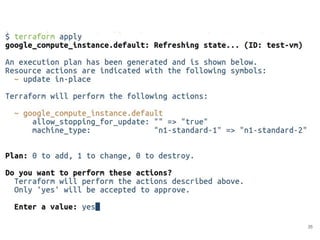
Change infrastructure example: VM upscale
Just change the terraform attribute machine_type
(and configure allow_stopping_for_update)
Now, when terraform apply is run, terraform discover that the
machine_type of the existing resource doesn’t correspond to the
desiderata.
33
34
35
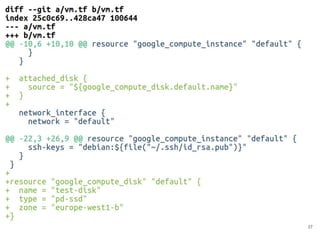
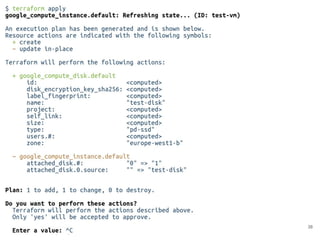
Attach a new data disk
We’ll create a new data disk resource, and reference it insiude the
instance resource.
36
37
38
39
40
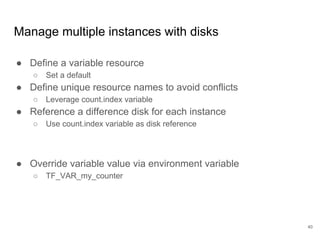
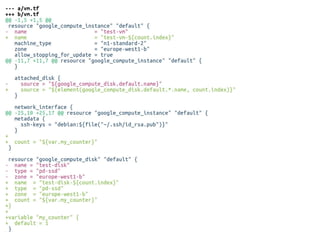
Manage multiple instances with disks
● Define a variable resource
○ Set a default
● Define unique resource names to avoid conflicts
○ Leverage count.index variable
● Reference a difference disk for each instance
○ Use count.index variable as disk reference
● Override variable value via environment variable
○ TF_VAR_my_counter
41
42
github.com/
gionn/terraform-example
Questions?
43

Managing GCP Projects with Terraform (devfest Pisa 2018)

  • 1.
    Managing GCP Projects withTerraform GDG DevFest Pisa 0.1 Giovanni Toraldo @gionn cloudesire.com
  • 2.
    About me Giovanni Toraldo OpenSource Enthusiast, Java coder, writer of the OpenNebula book, lead developer & co-founder at @Cloudesire, shooting 2 euro coin at 36 meters with crossbow 2
  • 3.
    Monetization & Brokering Platformfor immediate SaaSification and automated distribution of business applications and services. 3
  • 4.
  • 5.
    Infrastructure as code? Design,implement, and deploy applications infrastructure with known software best practices: ● Code versioning ● Code reuse (modularization/abstraction) ● Code sharing In order to achieve: ● Repeatability ● Speed ● Reliability 5
  • 6.
    Cloud services are easy? Complexityis increasing Composition is a must Velocity is the key of success 6
  • 7.
  • 8.
    What is Terraform? Terraformis a tool for building, changing, and versioning infrastructure safely and efficiently. ● Declarative approach ○ Infrastructure is described using a high-level configuration syntax ● Incremental changes ○ Automatically discover the steps required from current to desired infrastructure state ● Execution plan ○ See what Terraform will do when you apply configuration ● Dependency graph ○ automatically decide the order in which action are executed ● Automation 8
  • 9.
    What is NOTTerraform? ● Configuration management tool ○ You still need Puppet, Chef, Ansible to manage software on VM ● Cloud abstraction layer ○ Doesn’t expose any API, just a CLI mean to be used by humans ○ Doesn’t hide the inner characteristics of each cloud provider via abstraction ● A solution to your lack of cloud knowledge 9
  • 10.
    Use cases ● Manageproduction environments by ops ● Manage disposable test/qa environments by dev ● Multi-tier (complex) infrastructures ● Setup demo environments ● Multi-cloud deployment 10
  • 11.
    Install Terraform Terraform isdistributed as a single Go binary without external dependencies. Download, unpack, execute. ● cd /tmp ● wget <url> ● unzip <file> || tar xvf <file> ● sudo mv terraform /usr/local/bin ● sudo chmod +x /usr/local/bin/terraform 11
  • 12.
    Create a GoogleCloud Platform account 12
  • 13.
    Create a newGoogle Cloud project 13
  • 14.
    Navigate to ComputeEngine to activate 14
  • 15.
    Create Service accountkey and download 15
  • 16.
    Create a newproject Just create an empty folder with a file auth.tf: // Configure the Google Cloud provider provider "google" { credentials = "${file("account.json")}" project = "terraform-test-197317" region = "europe-west1 " } And run: $ terraform init 16
  • 17.
    Initialize terraform project Andrun: $ terraform init 17
  • 18.
    Apply changes toinfrastructure Plan command to evaluate changes Apply command to modify infrastructure 18
  • 19.
    Terraform project filesstructure There isn’t any enforcement on how to arrange resources inside a terraform project: ● All .tf files in the current folder are automatically sources and merged together in memory $ ls -la total 108 drwxr-xr-x 4 gionn dev 4096 mar 8 15:47 . drwxr-xr-x 3 gionn dev 4096 mar 7 18:03 .. drwxr-xr-x 7 gionn dev 4096 mar 8 15:47 .git drwxr-xr-x 3 gionn dev 4096 mar 7 18:22 .terraform -rw-r--r-- 1 gionn dev 2333 mar 7 18:18 account.json -rw-r--r-- 1 gionn dev 175 mar 7 18:19 auth.tf -rw-r--r-- 1 gionn dev 406 mar 8 15:46 vm.tf 19
  • 20.
  • 21.
    Plan output $ terraformplan Refreshing Terraform state in-memory prior to plan... The refreshed state will be used to calculate this plan, but will not be persisted to local or remote state storage. --------------------------------------------- An execution plan has been generated and is shown below. 21
  • 22.
    Plan output + create Terraformwill perform the following actions: + google_compute_instance.default id: <computed> boot_disk.0.initialize_params.0.image: "debian-cloud/debian-8" cpu_platform: <computed> instance_id: <computed> label_fingerprint: <computed> machine_type: "n1-standard-1" metadata.%: "1" metadata.ssh-keys: "debian:ssh-rsa AAAAB3NzaC1yc2EAAAADAQABAAABAQDDnX70/3FB4j7UvewR3T... 22
  • 23.
    Plan output Plan: 1to add, 0 to change, 0 to destroy. ------------------------------------------------- - Note: You didn't specify an "-out" parameter to save this plan, so Terraform can't guarantee that exactly these actions will be performed if "terraform apply" is subsequently run. 23
  • 24.
    Apply output $ terraformapply An execution plan has been generated and is shown below. Resource actions are indicated with the following symbols: + create Terraform will perform the following actions: + google_compute_instance.default 24
  • 25.
    Apply output Summary ofthe actions to perform, waiting for confirmation Plan: 1 to add, 0 to change, 0 to destroy. Do you want to perform these actions? Terraform will perform the actions described above. Only 'yes' will be accepted to approve. Enter a value: ___ 25
  • 26.
    After an applysuccessful operation State is persisted to terraform.tfstate: 26
  • 27.
  • 28.
    terraform.tfstate A state fileis required in order to: ● Map managed resources to terraform resources ● Persist additional metadata ● Cache, useful for large infrastructures JSON structure that can be modified (bugs happens) or inspected (custom integrations). State should be persistent and shared among developers. 28
  • 29.
    Terraform.tfstate sharing andlocking For solo developers or small teams: just commit to GIT. For bigger teams, tfstate locking is required. Multiple backends supported: ● Google cloud storage ● S3 ● Consul ● Etcd ● Terraform enterprise 29
  • 30.
    Terraform.tfstate sample output { "version":3, "terraform_version": "0.11.3", "serial": 2, "lineage": "d495f1c0-3c8b-45c2-bda2-f40d28382f30", "modules": [ { "path": [ "root" ], "outputs": {}, "resources": { "google_compute_instance.default": { "type": "google_compute_instance", "depends_on": [], "primary": { "id": "test-vm", "attributes": { "attached_disk.#": "0", "boot_disk.#": "1", "boot_disk.0.auto_delete": "true", "boot_disk.0.device_name": "persistent-disk-0", "boot_disk.0.disk_encryption_key_raw": "", "boot_disk.0.disk_encryption_key_sha256": "", 30
  • 31.
    Terraform.tfstate: where isthe IP address? "network_interface.#": "1", "network_interface.0.access_config.#": "1", "network_interface.0.access_config.0.assigned_nat_ip": "104.155.126.70", "network_interface.0.access_config.0.nat_ip": "104.155.126.70", "network_interface.0.address": "10.132.0.2", "network_interface.0.alias_ip_range.#": "0", "network_interface.0.name": "nic0", "network_interface.0.network": "https://www.googleapis.com/compute/v1/projects/terraform-test-19731 7/global/networks/default", "network_interface.0.network_ip": "10.132.0.2", "network_interface.0.subnetwork": "https://www.googleapis.com/compute/v1/projects/terraform-test-19731 7/regions/europe-west1/subnetworks/default", "network_interface.0.subnetwork_project": "terraform-test-197317", "project": "terraform-test-197317", 31
  • 32.
    Automatically print VMip address Add to output.tf: output "ip" { value = "${google_compute_instance.default. network_interface.0.access_config.0.nat_ip}" } And run terraform apply: Outputs: ip = 104.155.126.70 32
  • 33.
    Change infrastructure example:VM upscale Just change the terraform attribute machine_type (and configure allow_stopping_for_update) Now, when terraform apply is run, terraform discover that the machine_type of the existing resource doesn’t correspond to the desiderata. 33
  • 34.
  • 35.
  • 36.
    Attach a newdata disk We’ll create a new data disk resource, and reference it insiude the instance resource. 36
  • 37.
  • 38.
  • 39.
  • 40.
    40 Manage multiple instanceswith disks ● Define a variable resource ○ Set a default ● Define unique resource names to avoid conflicts ○ Leverage count.index variable ● Reference a difference disk for each instance ○ Use count.index variable as disk reference ● Override variable value via environment variable ○ TF_VAR_my_counter
  • 41.
  • 42.
  • 43.