white paper


Managed File Transfer
 Why Your Organization Needs It
white paper


Managed File Transfer
Why Your Organization Needs It


Introduction
This white paper describes the ways in which many companies currently transfer large and confidential files and the reasons
why these methods are not sufficient. It explains what Managed File Transfer is, how organizations can benefit from it, and
what you need to look for when selecting a Managed File Transfer solution.


Survey
In co-operation with OnDemandAdvisors, Red Earth Software conducted a survey among 60 IT Administrators about how
they transfer large and secure files within their organizations.


Enforcement of Confidential File Exchange
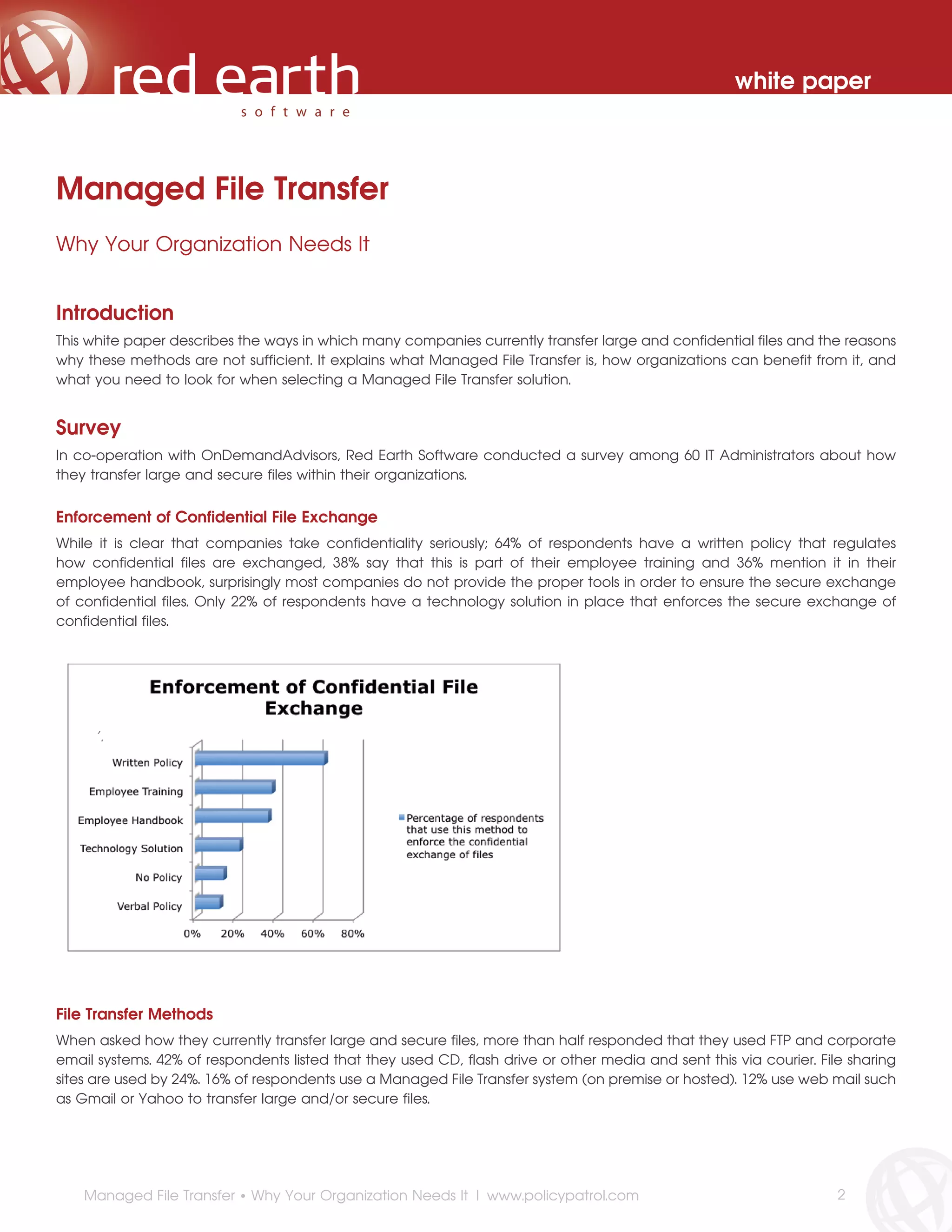
While it is clear that companies take confidentiality seriously; 64% of respondents have a written policy that regulates
how confidential files are exchanged, 38% say that this is part of their employee training and 36% mention it in their
employee handbook, surprisingly most companies do not provide the proper tools in order to ensure the secure exchange
of confidential files. Only 22% of respondents have a technology solution in place that enforces the secure exchange of
confidential files.


     ‘’.


File Transfer Methods
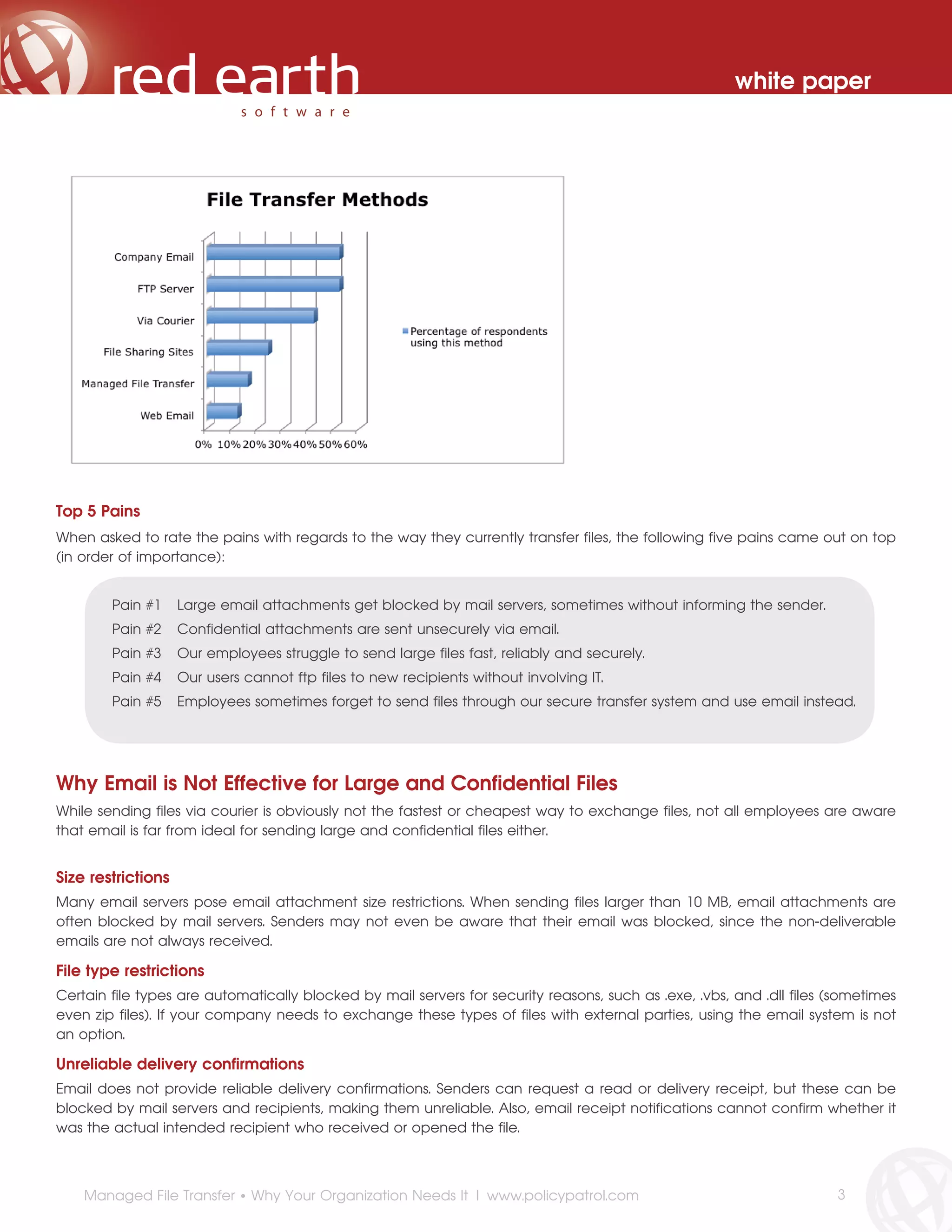
When asked how they currently transfer large and secure files, more than half responded that they used FTP and corporate
email systems. 42% of respondents listed that they used CD, flash drive or other media and sent this via courier. File sharing
sites are used by 24%. 16% of respondents use a Managed File Transfer system (on premise or hosted). 12% use web mail such
as Gmail or Yahoo to transfer large and/or secure files.


    Managed File Transfer • Why Your Organization Needs It | www.policypatrol.com                                    2
white paper


Top 5 Pains
When asked to rate the pains with regards to the way they currently transfer files, the following five pains came out on top
(in order of importance):


        Pain #1     Large email attachments get blocked by mail servers, sometimes without informing the sender.
        Pain #2     Confidential attachments are sent unsecurely via email.
        Pain #3     Our employees struggle to send large files fast, reliably and securely.
        Pain #4     Our users cannot ftp files to new recipients without involving IT.
        Pain #5     Employees sometimes forget to send files through our secure transfer system and use email instead.


Why Email is Not Effective for Large and Confidential Files
While sending files via courier is obviously not the fastest or cheapest way to exchange files, not all employees are aware
that email is far from ideal for sending large and confidential files either.


Size restrictions
Many email servers pose email attachment size restrictions. When sending files larger than 10 MB, email attachments are
often blocked by mail servers. Senders may not even be aware that their email was blocked, since the non-deliverable
emails are not always received.

File type restrictions
Certain file types are automatically blocked by mail servers for security reasons, such as .exe, .vbs, and .dll files (sometimes
even zip files). If your company needs to exchange these types of files with external parties, using the email system is not
an option.

Unreliable delivery confirmations
Email does not provide reliable delivery confirmations. Senders can request a read or delivery receipt, but these can be
blocked by mail servers and recipients, making them unreliable. Also, email receipt notifications cannot confirm whether it
was the actual intended recipient who received or opened the file.


    Managed File Transfer • Why Your Organization Needs It | www.policypatrol.com                                      3
white paper


Email is not secure
Email is not a good transfer method for confidential files since emails can easily be intercepted and if email attachments are
sent unencrypted the confidential information can be exposed. For this reason it is important that employees understand
that they must not send files containing personally identifiable information such as Social Security Numbers, credit card
details, customer information, and account numbers via email.

No remote deletion/expiry
Another drawback with sending files via email is that once a file is sent, there is no way to control it anymore. There is no
way to ‘expire’ the file or delete it.


Disadvantages of using FTP
When email cannot get the job done, many companies use FTP systems since they are low cost or free and do not pose any
file size restrictions. While FTP does allow users to send large files instantly, FTP is not secure and is cumbersome to manage.

Below are the five main disadvantages of FTP systems:

1.   FTP is not reliable: There is no way to know whether the recipient received the files and downloaded them.
2.   FTP is not secure: Files are sent and stored in unencrypted format, potentially exposing confidential data. FTP systems
     are vulnerable to backdoor hacking attempts.
3.   FTP lacks management tools: There is no way to automatically expire files or to limit the number of downloads.
4.   FTP is cumbersome: Users need to contact IT to set up new accounts, remove files and remove accounts. This results in
     users sharing accounts rather than bothering IT, files that are left on the system for too long and active accounts that
     should have been disabled long ago.
5.   FTP lacks auditing: There is no way to find out who sent which files and who downloaded them. For compliance
     reasons it is important that companies can track access to confidential files.


Since FTP is not secure and is cumbersome to manage, FTP data breaches are regularly the news. Your ‘free’ FTP system
could actually prove to be quite costly after all. Here are some examples:


      In September 2012, the Institute of Electrical and Electronics Engineers (IEEE) inadvertently exposed plain-text
      files with user credentials for nearly 100,000 members. The FTP server had been left open to the Net for at least
      one month before the problem was discovered.


      In August 2011, Yale announced that the names and Social Security numbers of 43,000 people affiliated with
      the university had been publicly viewable on their FTP server for 10 months, since Google started crawling and
      indexing FTP servers.


     In November 2010, an informant for the Sheriff’s Office of Mesa County, Colorado, noticed their name popping
     up on a Google search. The search engine’s crawler had found an unsecure FTP site on a server owned by
     the county that contained names, contact information, and Social Security numbers of drug informants to the
     agency. Somehow an IT staffer mistakenly put that data onto the FTP site from a very sensitive database file.


     Managed File Transfer • Why Your Organization Needs It | www.policypatrol.com                                        4
white paper


       “Although FTP is a widely used platform for file transfer, it fails to adequately support secure,
       automated, managed and audited file transfers.”
       - Thomas Skybakmoen - Gartner, Inc.


What happens if you do not provide the proper tools?
If employees are not provided with the proper tools for secure file transfer, they will find other ways to get the job done,
such as:

•   Using Gmail or Yahoo to send large files: Once files are sent via outside email platforms, the company no longer has
    any control over these files.
•   Setting individual passwords on files: Password management poses a challenge. If the employee leaves the company,
    it will be very difficult for the company to retrieve the passwords for the individual files.
•   Using file sharing sites: When systems are used outside of the company network or approved company systems, the
    company no longer has control. Even if these sites are approved by the company, many do not provide any central
    visibility, making it difficult for companies to track file transfers and make sure that any confidential information is
    removed if necessary.


          “Your users have a job they need to get done, and often don’t realize the ways in which their
          ad hoc file-sharing mechanisms might be less than secure. You need to provide a supported
          solution that lets your users get their jobs done while maintaining the security and integrity of your
          company’s data.”
          - Don Jones - IT Expert & Journalist


What Is Managed File Transfer?
As defined in Wikipedia: Managed File Transfer (MFT) refers to software solutions that facilitate the secure transfer of data,
in flight and at rest, from one computer to another through a network (e.g. the Internet).

Typically, MFT offers a higher level of security and control than FTP. Features include reporting (e.g. notification of successful
file transfers), non-repudiation (i.e. authentication), auditability, global visibility, automation of file transfer-related activities
and processes, end-to-end security, and performance metrics/monitoring.

While Secure FTP does offer secure file transfer, it lacks the management capabilities that are available in Managed File
Transfer, such as automatically expiring files, setting limits on the number of downloads, central visibility and auditing (i.e.
tracking who sent which files to whom and when).


                     For a comparison between FTP and Managed File Transfer, go to:
                     http://www.policypatrol.com/policy-patrol-mft-versus-ftp/


    Managed File Transfer • Why Your Organization Needs It | www.policypatrol.com                                            5
white paper


Why Do You Need Managed File Transfer?
Managed File Transfer offers all those features that are missing in FTP and Secure FTP: Managed File Transfer provides
companies with instant and secure file transfer with encryption protection, delivery confirmations, central control and
visibility.

Managed File Transfer offers the following benefits to companies:

•   Send large files without size restrictions
•   Enable customers & suppliers to send you (large) files securely
•   Aid compliancy with PCI, HIPAA, GLB, Data Protection Act and others
•   Maintain customer and employee privacy
•   Save on courier costs
•   Faster project turnaround
•   Reduce IT burden
•   Increase user productivity
•   Avoid damage to reputation
•   Prevent data breach
•   Offload mail server


      “   Managed file transfer is a proven technology that addresses file transfer in a secure and governed way.”
      - Thomas Skybakmoen - Gartner, Inc.


What to look for in a Managed File Transfer Solution
Once you decide that your company needs a Managed File Transfer Solution, how do you decide which one is best for your
organization? In our survey we asked respondents to rate the importance of managed file transfer features. The list below
shows the top 10 rated features (in order of importance):


    #1        The ability to set central email transfer policies without having to install client software.
    #2        The ability to send large files instantly.
    #3        The ability for customers and suppliers to send you large and/or confidential files.
    #4        The ability for users to send large and confidential files via email without changing the way they work.
    #5        The ability to prevent inadvertent unsecure confidential data exchange through email.
    #6        The ability for users to send files securely and without size limits from a browser.
    #7        The ability to encrypt files in transit to prevent confidentiality breaches.
    #8        The ability to control and search files that employees are exchanging with customers and suppliers.
    #9        The ability to get reliable delivery and download receipts
    #10       The ability to set central email policies that automatically direct email attachments over a certain
              size via managed file transfer.


    Managed File Transfer • Why Your Organization Needs It | www.policypatrol.com                                     6
white paper


We have compiled the following check list that you can use when selecting a Managed File Transfer solution. The check
list includes essential features that your Managed File Transfer solution should offer.


            Managed File Transfer Check List

        The Managed File Transfer solution should:

            Fit in the normal workflow
            Allow you to set central email attachment policies
            Not require client software
            Include auditing to track past file transfers
            Encrypt files in transit
            Encrypt stored files
            Be cross platform (can be used from any browser or email client)
            Offer centralized management and administration
            Allow you to receive files through your website
            Send delivery & download notifications
            Not require user training
            Authenticate recipients
            Allow users to expire files
            Allow users to limit the number of downloads


Why Policy Patrol MFT?
Policy Patrol MFT is not just another MFT solution: In addition to offering a secure portal for instantly transferring encrypted
files along with the necessary management tools, Policy Patrol MFT allows companies to set central email policies that
automatically direct email attachments via file transfer without requiring any software installation on the client:


1.   Policy Patrol allows companies to automatically direct certain email attachments via managed file transfer, which
     extends the following important benefits:


         Users do not need to change the way they work
         Companies decide how email attachments are transferred
         Users will not mistakenly transfer files through unsecured email
         Emails with large attachments will not get blocked


     Managed File Transfer • Why Your Organization Needs It | www.policypatrol.com                                      7
white paper


2.   Since Policy Patrol integrates directly with your Exchange Server, Policy Patrol MFT extends these additional benefits:


         You do not need to install any client software
         File transfer can be initiated from any client including mobile devices


Conclusion
Any company that transfers large and/or confidential files with external contacts requires a managed file transfer solution.
Whether your company needs to comply with certain industry regulations, or whether you need to ensure customer and
employee privacy, managed file transfer is a must for every company that takes security seriously. Not only will Managed
File Transfer aid compliancy and avoid data breaches, it will also provide companies with considerable cost savings and
productivity improvements.


About Red Earth Software
For email administrators in every industry, Red Earth Software is the email management software company that provides the
most complete suite of email policy enforcement tools as a result of a long-term focus on solving mission critical business
problems and anticipating evolving industry compliance and security issues. As compliance regulations increase globally,
Policy Patrol serves an ever-growing need that spans all vertical industries such as financial services, healthcare, legal and
government. Included among Red Earth Software clients are organizations such as Nissan, Targus, Nikon, Lotto, Volkswagen,
Bank of America, and Sony.


More information
For more information about Policy Patrol MFT or to download a 30-day evaluation version, please visit
http://www.policypatrol.com/policy-patrol-mft.


More articles and white papers by Red Earth Software can be downloaded from
http://www.policypatrol.com/white-papers.


References
•    http://www.technewsdaily.com/6456-informants-info-revealed-in-colorado-sheriffs-office-leak.html
•    http://www.darkreading.com/database-security/167901020/security/news/240008028/100-000-ieee-user-passwords-ids-
     exposed-on-internet.html
•    http://www.technewsdaily.com/7101-data-breach-hits-yale-university.html
•    http://en.wikipedia.org/wiki/Managed_file_transfer
•    http://www.wxyz.com/dpp/news/region/wayne_county/wayne-county-sends-out-email-blast-containing-some-1300-
     names-and-social-security-numbers
•    http://www.gartner.com/DisplayDocument?doc_cd=208765
•    http://redmondmag.com/articles/2010/06/01/managing-file-transfer.aspx


Policy Patrol® is a registered trademark of Red Earth Software®. Copyright © 2001- 2012 by Red Earth Software.


     Managed File Transfer • Why Your Organization Needs It | www.policypatrol.com                                       8

Managed File Transfer White Paper

  • 1.
    white paper Managed FileTransfer Why Your Organization Needs It
  • 2.
    white paper Managed FileTransfer Why Your Organization Needs It Introduction This white paper describes the ways in which many companies currently transfer large and confidential files and the reasons why these methods are not sufficient. It explains what Managed File Transfer is, how organizations can benefit from it, and what you need to look for when selecting a Managed File Transfer solution. Survey In co-operation with OnDemandAdvisors, Red Earth Software conducted a survey among 60 IT Administrators about how they transfer large and secure files within their organizations. Enforcement of Confidential File Exchange While it is clear that companies take confidentiality seriously; 64% of respondents have a written policy that regulates how confidential files are exchanged, 38% say that this is part of their employee training and 36% mention it in their employee handbook, surprisingly most companies do not provide the proper tools in order to ensure the secure exchange of confidential files. Only 22% of respondents have a technology solution in place that enforces the secure exchange of confidential files. ‘’. File Transfer Methods When asked how they currently transfer large and secure files, more than half responded that they used FTP and corporate email systems. 42% of respondents listed that they used CD, flash drive or other media and sent this via courier. File sharing sites are used by 24%. 16% of respondents use a Managed File Transfer system (on premise or hosted). 12% use web mail such as Gmail or Yahoo to transfer large and/or secure files. Managed File Transfer • Why Your Organization Needs It | www.policypatrol.com 2
  • 3.
    white paper Top 5Pains When asked to rate the pains with regards to the way they currently transfer files, the following five pains came out on top (in order of importance): Pain #1 Large email attachments get blocked by mail servers, sometimes without informing the sender. Pain #2 Confidential attachments are sent unsecurely via email. Pain #3 Our employees struggle to send large files fast, reliably and securely. Pain #4 Our users cannot ftp files to new recipients without involving IT. Pain #5 Employees sometimes forget to send files through our secure transfer system and use email instead. Why Email is Not Effective for Large and Confidential Files While sending files via courier is obviously not the fastest or cheapest way to exchange files, not all employees are aware that email is far from ideal for sending large and confidential files either. Size restrictions Many email servers pose email attachment size restrictions. When sending files larger than 10 MB, email attachments are often blocked by mail servers. Senders may not even be aware that their email was blocked, since the non-deliverable emails are not always received. File type restrictions Certain file types are automatically blocked by mail servers for security reasons, such as .exe, .vbs, and .dll files (sometimes even zip files). If your company needs to exchange these types of files with external parties, using the email system is not an option. Unreliable delivery confirmations Email does not provide reliable delivery confirmations. Senders can request a read or delivery receipt, but these can be blocked by mail servers and recipients, making them unreliable. Also, email receipt notifications cannot confirm whether it was the actual intended recipient who received or opened the file. Managed File Transfer • Why Your Organization Needs It | www.policypatrol.com 3
  • 4.
    white paper Email isnot secure Email is not a good transfer method for confidential files since emails can easily be intercepted and if email attachments are sent unencrypted the confidential information can be exposed. For this reason it is important that employees understand that they must not send files containing personally identifiable information such as Social Security Numbers, credit card details, customer information, and account numbers via email. No remote deletion/expiry Another drawback with sending files via email is that once a file is sent, there is no way to control it anymore. There is no way to ‘expire’ the file or delete it. Disadvantages of using FTP When email cannot get the job done, many companies use FTP systems since they are low cost or free and do not pose any file size restrictions. While FTP does allow users to send large files instantly, FTP is not secure and is cumbersome to manage. Below are the five main disadvantages of FTP systems: 1. FTP is not reliable: There is no way to know whether the recipient received the files and downloaded them. 2. FTP is not secure: Files are sent and stored in unencrypted format, potentially exposing confidential data. FTP systems are vulnerable to backdoor hacking attempts. 3. FTP lacks management tools: There is no way to automatically expire files or to limit the number of downloads. 4. FTP is cumbersome: Users need to contact IT to set up new accounts, remove files and remove accounts. This results in users sharing accounts rather than bothering IT, files that are left on the system for too long and active accounts that should have been disabled long ago. 5. FTP lacks auditing: There is no way to find out who sent which files and who downloaded them. For compliance reasons it is important that companies can track access to confidential files. Since FTP is not secure and is cumbersome to manage, FTP data breaches are regularly the news. Your ‘free’ FTP system could actually prove to be quite costly after all. Here are some examples: In September 2012, the Institute of Electrical and Electronics Engineers (IEEE) inadvertently exposed plain-text files with user credentials for nearly 100,000 members. The FTP server had been left open to the Net for at least one month before the problem was discovered. In August 2011, Yale announced that the names and Social Security numbers of 43,000 people affiliated with the university had been publicly viewable on their FTP server for 10 months, since Google started crawling and indexing FTP servers. In November 2010, an informant for the Sheriff’s Office of Mesa County, Colorado, noticed their name popping up on a Google search. The search engine’s crawler had found an unsecure FTP site on a server owned by the county that contained names, contact information, and Social Security numbers of drug informants to the agency. Somehow an IT staffer mistakenly put that data onto the FTP site from a very sensitive database file. Managed File Transfer • Why Your Organization Needs It | www.policypatrol.com 4
  • 5.
    white paper “Although FTP is a widely used platform for file transfer, it fails to adequately support secure, automated, managed and audited file transfers.” - Thomas Skybakmoen - Gartner, Inc. What happens if you do not provide the proper tools? If employees are not provided with the proper tools for secure file transfer, they will find other ways to get the job done, such as: • Using Gmail or Yahoo to send large files: Once files are sent via outside email platforms, the company no longer has any control over these files. • Setting individual passwords on files: Password management poses a challenge. If the employee leaves the company, it will be very difficult for the company to retrieve the passwords for the individual files. • Using file sharing sites: When systems are used outside of the company network or approved company systems, the company no longer has control. Even if these sites are approved by the company, many do not provide any central visibility, making it difficult for companies to track file transfers and make sure that any confidential information is removed if necessary. “Your users have a job they need to get done, and often don’t realize the ways in which their ad hoc file-sharing mechanisms might be less than secure. You need to provide a supported solution that lets your users get their jobs done while maintaining the security and integrity of your company’s data.” - Don Jones - IT Expert & Journalist What Is Managed File Transfer? As defined in Wikipedia: Managed File Transfer (MFT) refers to software solutions that facilitate the secure transfer of data, in flight and at rest, from one computer to another through a network (e.g. the Internet). Typically, MFT offers a higher level of security and control than FTP. Features include reporting (e.g. notification of successful file transfers), non-repudiation (i.e. authentication), auditability, global visibility, automation of file transfer-related activities and processes, end-to-end security, and performance metrics/monitoring. While Secure FTP does offer secure file transfer, it lacks the management capabilities that are available in Managed File Transfer, such as automatically expiring files, setting limits on the number of downloads, central visibility and auditing (i.e. tracking who sent which files to whom and when). For a comparison between FTP and Managed File Transfer, go to: http://www.policypatrol.com/policy-patrol-mft-versus-ftp/ Managed File Transfer • Why Your Organization Needs It | www.policypatrol.com 5
  • 6.
    white paper Why DoYou Need Managed File Transfer? Managed File Transfer offers all those features that are missing in FTP and Secure FTP: Managed File Transfer provides companies with instant and secure file transfer with encryption protection, delivery confirmations, central control and visibility. Managed File Transfer offers the following benefits to companies: • Send large files without size restrictions • Enable customers & suppliers to send you (large) files securely • Aid compliancy with PCI, HIPAA, GLB, Data Protection Act and others • Maintain customer and employee privacy • Save on courier costs • Faster project turnaround • Reduce IT burden • Increase user productivity • Avoid damage to reputation • Prevent data breach • Offload mail server “ Managed file transfer is a proven technology that addresses file transfer in a secure and governed way.” - Thomas Skybakmoen - Gartner, Inc. What to look for in a Managed File Transfer Solution Once you decide that your company needs a Managed File Transfer Solution, how do you decide which one is best for your organization? In our survey we asked respondents to rate the importance of managed file transfer features. The list below shows the top 10 rated features (in order of importance): #1 The ability to set central email transfer policies without having to install client software. #2 The ability to send large files instantly. #3 The ability for customers and suppliers to send you large and/or confidential files. #4 The ability for users to send large and confidential files via email without changing the way they work. #5 The ability to prevent inadvertent unsecure confidential data exchange through email. #6 The ability for users to send files securely and without size limits from a browser. #7 The ability to encrypt files in transit to prevent confidentiality breaches. #8 The ability to control and search files that employees are exchanging with customers and suppliers. #9 The ability to get reliable delivery and download receipts #10 The ability to set central email policies that automatically direct email attachments over a certain size via managed file transfer. Managed File Transfer • Why Your Organization Needs It | www.policypatrol.com 6
  • 7.
    white paper We havecompiled the following check list that you can use when selecting a Managed File Transfer solution. The check list includes essential features that your Managed File Transfer solution should offer. Managed File Transfer Check List The Managed File Transfer solution should: Fit in the normal workflow Allow you to set central email attachment policies Not require client software Include auditing to track past file transfers Encrypt files in transit Encrypt stored files Be cross platform (can be used from any browser or email client) Offer centralized management and administration Allow you to receive files through your website Send delivery & download notifications Not require user training Authenticate recipients Allow users to expire files Allow users to limit the number of downloads Why Policy Patrol MFT? Policy Patrol MFT is not just another MFT solution: In addition to offering a secure portal for instantly transferring encrypted files along with the necessary management tools, Policy Patrol MFT allows companies to set central email policies that automatically direct email attachments via file transfer without requiring any software installation on the client: 1. Policy Patrol allows companies to automatically direct certain email attachments via managed file transfer, which extends the following important benefits: Users do not need to change the way they work Companies decide how email attachments are transferred Users will not mistakenly transfer files through unsecured email Emails with large attachments will not get blocked Managed File Transfer • Why Your Organization Needs It | www.policypatrol.com 7
  • 8.
    white paper 2. Since Policy Patrol integrates directly with your Exchange Server, Policy Patrol MFT extends these additional benefits: You do not need to install any client software File transfer can be initiated from any client including mobile devices Conclusion Any company that transfers large and/or confidential files with external contacts requires a managed file transfer solution. Whether your company needs to comply with certain industry regulations, or whether you need to ensure customer and employee privacy, managed file transfer is a must for every company that takes security seriously. Not only will Managed File Transfer aid compliancy and avoid data breaches, it will also provide companies with considerable cost savings and productivity improvements. About Red Earth Software For email administrators in every industry, Red Earth Software is the email management software company that provides the most complete suite of email policy enforcement tools as a result of a long-term focus on solving mission critical business problems and anticipating evolving industry compliance and security issues. As compliance regulations increase globally, Policy Patrol serves an ever-growing need that spans all vertical industries such as financial services, healthcare, legal and government. Included among Red Earth Software clients are organizations such as Nissan, Targus, Nikon, Lotto, Volkswagen, Bank of America, and Sony. More information For more information about Policy Patrol MFT or to download a 30-day evaluation version, please visit http://www.policypatrol.com/policy-patrol-mft. More articles and white papers by Red Earth Software can be downloaded from http://www.policypatrol.com/white-papers. References • http://www.technewsdaily.com/6456-informants-info-revealed-in-colorado-sheriffs-office-leak.html • http://www.darkreading.com/database-security/167901020/security/news/240008028/100-000-ieee-user-passwords-ids- exposed-on-internet.html • http://www.technewsdaily.com/7101-data-breach-hits-yale-university.html • http://en.wikipedia.org/wiki/Managed_file_transfer • http://www.wxyz.com/dpp/news/region/wayne_county/wayne-county-sends-out-email-blast-containing-some-1300- names-and-social-security-numbers • http://www.gartner.com/DisplayDocument?doc_cd=208765 • http://redmondmag.com/articles/2010/06/01/managing-file-transfer.aspx Policy Patrol® is a registered trademark of Red Earth Software®. Copyright © 2001- 2012 by Red Earth Software. Managed File Transfer • Why Your Organization Needs It | www.policypatrol.com 8